Heads upThis site is currently under heavy development.
SubscribeGet it delivered — the daily firehose, filtered to the tools you run, plus the documentation changes vendors never announce.Compare plans →

Product Docs Weekly — issue 001, August 26, 2026

THE AI TOOLCHAINNO. 001
Diff
WHAT VENDORS CHANGED AND DIDN'T ANNOUNCE
PUBLISHED AUGUST 26, 2026 · WEDNESDAYS
EDITIONStailgrepheaddiffuniq

What changed in the docs of the products you run and evaluate.

// HOW THIS ISSUE IS MADE

We diff the product documentation and the API reference pages of the 193 tools on our watchlist, week over week.

Docs are where features land without an announcement — new settings, new integrations, new limits. The API reference is where a new endpoint, a renamed parameter or a retired field shows up before your integration breaks. We surface what the page says now that it didn't say before, and link back to the page itself. Changelogs and release notes are deliberately left to the daily issue, so nothing is reported twice.

$ tct list   # 16 tools matched
Build
◆  AI Coding Agents

Replit Agent

SourcesProduct docs →docs updateDOCS
+ New in the docsdocs.replit.com

Replit Agent gains enterprise model controls, SSO via Clerk/SAML, a Project Security Center, agent-driven security scans, and black-box pen testing.

Read on docs.replit.com →
└──▷ DETAILED CHANGES · 7FULL DIFF · what the page said before, and says now
New Enterprise model controls let admins choose which Agent model providers and models…
NEW IN THE DOCS

New Enterprise model controls let admins choose which Agent model providers and models are available in each Enterprise Workspace.

New SSO integration via the Clerk dashboard lets app users sign in with company…
NEW IN THE DOCS

New SSO integration via the Clerk dashboard lets app users sign in with company identity providers (Okta, Microsoft Entra ID) plus multi-factor authentication and session controls.

New SAML SSO setup for Replit Enterprise Organizations is now configurable directly…
NEW IN THE DOCS

New SAML SSO setup for Replit Enterprise Organizations is now configurable directly from workspace settings, including IdP configuration and email domain claims.

New Project Security Center lets developers choose a security scan, review findings…
NEW IN THE DOCS

New Project Security Center lets developers choose a security scan, review findings, and fix vulnerabilities before publishing a Replit App.

New agent security scans enable source-code security review, finding assessment…
NEW IN THE DOCS

New agent security scans enable source-code security review, finding assessment, Agent-assisted remediation, and fix verification in a single workflow.

New black-box pen tests (Level 3 security scan) combine source-code review with live…
NEW IN THE DOCS

New black-box pen tests (Level 3 security scan) combine source-code review with live browser and network interaction testing against the running app.

New Steer and Queue controls let users redirect or schedule follow-up messages to Agent…
NEW IN THE DOCS

New Steer and Queue controls let users redirect or schedule follow-up messages to Agent mid-task, with Conversation and Project-level preferences.

7 edits
WasNow
@@ -152,4 +152,5 @@
- [Workspace geography](https://docs.replit.com/features/collaboration/workspace-geography.md): Choose where development resources for a Workspace and its new Projects are hosted.
- [Workspace Settings](https://docs.replit.com/features/collaboration/workspace-settings.md): Set Enterprise policy for Agent models and choose how each Workspace applies that policy.
- [Enterprise model controls](https://docs.replit.com/features/collaboration/enterprise-model-controls.md): Choose which Agent model providers and models are available in each Enterprise Workspace.
- [Admin API](https://docs.replit.com/teams/admin-api.md): Use the Replit Enterprise Admin API to access account usage, workspaces, members, and projects programmatically.
- [Conversations](https://docs.replit.com/features/conversations-and-routines/conversations.md): Use Conversations to ask questions, explore information, run Routines, and describe useful outcomes.
@@ -188,9 +189,11 @@
- [Replit Auth](https://docs.replit.com/features/auth-and-identity/authentication.md): Learn how to add user authentication to your app with Replit Auth — users sign in with their Replit accounts, with zero setup required.
- [Clerk Auth](https://docs.replit.com/features/auth-and-identity/clerk-auth.md): Learn how Clerk Auth gives your Replit app its own dedicated authentication system with customizable branding, independent user accounts, and SSO providers.
- [Add SSO to your app (Clerk)](https://docs.replit.com/features/auth-and-identity/single-sign-on.md): Let your app's users sign in with their company identity provider, such as Okta or Microsoft Entra ID, through the Clerk dashboard, plus multi-factor authentication and session controls.
- [Migrate from Replit Auth to Clerk](https://docs.replit.com/features/auth-and-identity/migrate-auth-to-clerk.md): Use Agent to move an existing Replit Auth app to Clerk Auth while preserving your app's user data.
- [Single sign-on (SSO)](https://docs.replit.com/features/auth-and-identity/single-sign-on.md): Add enterprise single sign-on with Okta or Microsoft Entra ID to your Replit app through the Clerk dashboard, plus multi-factor authentication and session controls.
- [Sign-in providers](https://docs.replit.com/features/auth-and-identity/sign-in-providers.md): Set up custom OAuth credentials for Google, GitHub, Apple, and X sign-in on apps that use Clerk Auth.
- [Plan a custom auth migration](https://docs.replit.com/features/auth-and-identity/custom-auth-migration.md): Plan a safe migration from a custom authentication system to Clerk Auth while preserving your app's user data and access rules.
- [Project Security Center](https://docs.replit.com/features/security/project-security-center.md): Find dependency, code, and privacy vulnerabilities in your project with automatic scans and Agent-powered security reviews.
- [Project Security Center](https://docs.replit.com/features/security/project-security-center.md): Choose a security scan, review findings, and fix vulnerabilities before you publish your Replit App.
- [Agent security scans](https://docs.replit.com/features/security/agent-security-scans.md): Run a source-code security review, assess findings, fix vulnerabilities with Agent, and verify the fixes.
- [Black-box pen tests](https://docs.replit.com/features/security/black-box-pen-tests.md): Run a Level 3 security scan that reviews source code and tests the running app through browser and network interactions.
- [Workspace Security Center](https://docs.replit.com/features/security/workspace-security-center.md): Scan your workspace's projects for vulnerabilities, view CVE details by severity, fix issues with Agent, and export SBOMs for compliance.
- [Package Firewall](https://docs.replit.com/features/security/package-firewall.md): Package Firewall blocks malicious and compromised packages at install time, before any code reaches your app. On by default, powered by Socket.
@@ -227,5 +230,5 @@
- [Audio Generation](https://docs.replit.com/features/agent/audio-generation.md): Generate music, sound effects, and speech for your apps with Agent.
- [Voice Mode](https://docs.replit.com/features/agent/voice-mode.md): Speak your prompts to Agent instead of typing. Voice Mode transcribes what you say into the chat box so you can review and send it.
- [Message Queue](https://docs.replit.com/features/agent/message-queue.md): Learn how to queue follow-up messages for Agent so it handles them in order after finishing its current task.
- [Steer or queue follow-up messages](https://docs.replit.com/features/agent/steer-and-queue-messages.md): Learn how Steer and Queue handle Agent follow-up messages, set Conversation and Project preferences, and manage messages while Agent is working in Replit.
- [Web Search](https://docs.replit.com/features/agent/web-search.md): Learn how Agent searches the web to build apps with up-to-date information and the latest documentation.
- [Task lifecycle](https://docs.replit.com/features/agent/task-lifecycle.md): Understand task states, queued work, applying changes, archiving, and cancelling Agent tasks.
@@ -257,4 +260,5 @@
- [External Access Tokens](https://docs.replit.com/features/deployment-customization/external-access-tokens.md): Let CI pipelines, webhooks, and other automated services reach your private Replit app without signing in.
- [Fix a published app using a shared database](https://docs.replit.com/features/data-and-storage/shared-database-migration.md): Step-by-step instructions for updating a published app that still uses a database originally created for another app.
- [August 21, 2026](https://docs.replit.com/updates/2026/08/21/changelog.md): 3 min read
- [August 14, 2026](https://docs.replit.com/updates/2026/08/14/changelog.md): 2 min read
- [August 7, 2026](https://docs.replit.com/updates/2026/08/07/changelog.md): 1 min read
@@ -393,5 +397,5 @@
- [Account and Workspace Admins](https://docs.replit.com/teams/identity-and-access-management/account-and-workspace-admins.md): Account admins and workspace admins are distinct roles. Account admins manage billing and every workspace under your account, while workspace admins manage only the workspaces they belong to.
- [Access Management](https://docs.replit.com/teams/identity-and-access-management/repl-access-management.md): Learn how to control access and visibility settings for Replit Apps through the Project Editor interface, including group permissions and user roles.
- [SAML](https://docs.replit.com/teams/identity-and-access-management/saml.md): Set up SAML single sign-on for your Replit Enterprise Organization directly from your workspace settings, including IdP configuration and email domain claims.
- [Single sign-on (SAML SSO)](https://docs.replit.com/teams/identity-and-access-management/saml.md): Set up SAML single sign-on for your Replit Enterprise Organization directly from your workspace settings, including IdP configuration and email domain claims.
- [SCIM](https://docs.replit.com/teams/identity-and-access-management/scim.md): Set up SCIM to automate provisioning from your identity provider, then manage how synced groups map to your Replit workspaces, roles, and account admins.
- [Audit Logs](https://docs.replit.com/teams/identity-and-access-management/audit-logs.md): Track and monitor security-relevant actions in your Replit Enterprise organization with comprehensive audit logs and SIEM integration.

7 edits
The page said
nothing here — this text is new
It now says
- [Enterprise model controls](https://docs.replit.com/features/collaboration/enterprise-model-controls.md): Choose which Agent model providers and models are available in each Enterprise Workspace.
The page said
nothing here — this text is new
It now says
- [Add SSO to your app (Clerk)](https://docs.replit.com/features/auth-and-identity/single-sign-on.md): Let your app's users sign in with their company identity provider, such as Okta or Microsoft Entra ID, through the Clerk dashboard, plus multi-factor authentication and session controls.
The page said
- [Single sign-on (SSO)](https://docs.replit.com/features/auth-and-identity/single-sign-on.md): Add enterprise single sign-on with Okta or Microsoft Entra ID to your Replit app through the Clerk dashboard, plus multi-factor authentication and session controls.
It now says
nothing here — this text was removed
The page said
- [Project Security Center](https://docs.replit.com/features/security/project-security-center.md): Find dependency, code, and privacy vulnerabilities in your project with automatic scans and Agent-powered security reviews.
It now says
- [Project Security Center](https://docs.replit.com/features/security/project-security-center.md): Choose a security scan, review findings, and fix vulnerabilities before you publish your Replit App. - [Agent security scans](https://docs.replit.com/features/security/agent-security-scans.md): Run a source-code security review, assess findings, fix vulnerabilities with Agent, and verify the fixes. - [Black-box pen tests](https://docs.replit.com/features/security/black-box-pen-tests.md): Run a Level 3 security scan that reviews source code and tests the running app through browser and network interactions.
The page said
- [Message Queue](https://docs.replit.com/features/agent/message-queue.md): Learn how to queue follow-up messages for Agent so it handles them in order after finishing its current task.
It now says
- [Steer or queue follow-up messages](https://docs.replit.com/features/agent/steer-and-queue-messages.md): Learn how Steer and Queue handle Agent follow-up messages, set Conversation and Project preferences, and manage messages while Agent is working in Replit.
The page said
nothing here — this text is new
It now says
- [August 21, 2026](https://docs.replit.com/updates/2026/08/21/changelog.md): 3 min read
The page said
- [SAML](https://docs.replit.com/teams/identity-and-access-management/saml.md): Set up SAML single sign-on for your Replit Enterprise Organization directly from your workspace settings, including IdP configuration and email domain claims.
It now says
- [Single sign-on (SAML SSO)](https://docs.replit.com/teams/identity-and-access-management/saml.md): Set up SAML single sign-on for your Replit Enterprise Organization directly from your workspace settings, including IdP configuration and email domain claims.
Was this useful?

Warp

SourcesProduct docs →docs updateDOCS
+ New in the docsdocs.warp.dev

Warp Factories enters Early Access, adds /usage command to Agent CLI, and expands completions and vim keybindings.

Read on docs.warp.dev →
└──▷ DETAILED CHANGES · 3FULL DIFF · what the page said before, and says now
Extends vim keybindings to the rule editor when vim mode is enabled.
Adds new shell completions for mpv, ruff, deno, yay, paru, kubectl --user
NEW IN THE DOCS

Adds new shell completions for mpv, ruff, deno, yay, paru, kubectl --user value completions, ip (address, link, route, neighbour, netns, rule, tunnel, xfrm, monitor, and remaining subcommands), and git read-tree.

Agent run details panel now has a copy button on the Initial query field, matching the Error and Environment details fields.
1 edit
WasNow
@@ -9,4 +9,197 @@
Submit bugs and feature requests on our
GitHub board!
GitHub board!
2026.08.19 (v0.2026.08.19.08.15)
Section titled “2026.08.19 (v0.2026.08.19.08.15)”
New features
Warp Factories is now live in Early Access! Read the
Warp Factories launch announcement
for more details.
Added an inline
/usage
command to the Warp Agent CLI showing plan, credit usage, and billing links. (
#14968
)
Bug fixes
Fixed an unbounded memory leak in the terminal completions engine where large or unusual input (e.g. pasting a large blob of text) could permanently grow memory usage over a session. (
#15181
)
Fixed a font-fallback bug on web that made the ⇧ (Shift) key glyph in keyboard shortcut hints render heavier, larger, and misaligned compared to neighboring ⌘/⌥ glyphs. (
#15261
)
Removed a stray 1px border around the workspace on Warp Web that could get clipped by rounded browser corners. (
#15259
)
Oz updates
Fixed intermittent “MCP server not found” errors after a cloud agent sandbox is rebuilt mid-task.
2026.08.18 (v0.2026.08.18.02.52)
Section titled “2026.08.18 (v0.2026.08.18.02.52)”
New features
Warp Factories is now live in Early Access! Read the
Warp Factories announcement
.
Warp now includes a built-in Factory MCP server for logged-in users.
Improvements
Added completions for
mpv
and
ruff
, and refreshed
deno
completions. (
#15248
)
Teamless users in a native workspace now see an Admin Panel link and joinable teams on the Teams settings page instead of team creation. (
#15246
)
oz agent run-cloud
now accepts
--title
and
--parent-run-id
, so third-party harnesses can set a run’s title and orchestration lineage. (
#15187
)
The agent run details panel now has a copy button on the Initial query field, matching the Error and Environment details fields. (
#15156
)
Workspace admins can now manage team membership (promote/demote/remove) on their current team, and show a “Workspace admin”/“Workspace owner” badge in the team members list. (
#15123
)
Cloud agent sandboxes now default to a
Warp
git identity instead of
Oz
when the server doesn’t return a resolved GitHub identity. (
#15110
)
Added completions for
yay
and
paru
, and
kubectl --user
value completions. (
#15109
)
Added completions for
ip
— address, link, route, neighbour, netns, rule, tunnel, xfrm, monitor, and the remaining subcommands — plus
git read-tree
. (
#15101
)
Vim keybindings now work in several more multi-line editors (commit messages, suggested-rule content, env var commands, compact AI inputs, queued-prompt editing, workflow dynamic enums) when vim mode is enabled. (
#15054
)
Vim keybindings now work in the rule editor when vim mode is enabled. (
#15044
)
The File explorer chip can now be added to Warp Agent’s input toolbelt via Edit agent toolbelt. (
#15007
)
Bug fixes
Fixed a memory leak where repeatedly re-parsing and deep-cloning
.gitignore
matchers during file-tree watcher updates could allocate an unbounded number of regex caches in large repositories. (
#15240
)
Fixed billing copy that described add-on credit purchases as going to your personal balance instead of the team’s shared pool. (
#15207
)
Fixed the client failing to load a cloud agent task list that included an orchestration-sourced task. (
#15164
)
Fixed
paru
completions to match the real v2.1.0 CLI (options, operations, and argument types). (
#15159
)
Fixed excessive memory growth where a burst of repository-indexing updates could spawn many concurrent background tasks re-reading project rule files (WARP.md/AGENTS.md). (
#15147
)
Fixed a runaway loop of duplicate network requests that could fire while viewing a completed cloud agent conversation. (
#15138
)
Fixed the Teams settings page showing an invite-by-link option for Private and Hidden teams, which don’t support it. (
#15129
)
Fixed the Teams settings page showing another team’s pending email invites in a multi-team workspace. (
#15121
)
Fixed zsh sessions occasionally echoing Warp’s own shell-integration bootstrap script into the terminal when
cursor_mode
/prezto’s
init.zsh
was loaded. (
#15118
)
Fixed the Teams settings page’s “Open admin panel” link sending workspace admins to the team admin page instead of the workspace admin panel. (
#15113
)
Fixed
kubectl
completions ignoring a
--context
,
--cluster
, or
--user
flag on the command line;
kubecolor
/
oc
now complete those flags too, and
nx run
completions were fixed. (
#15109
)
Fixed
ip nexthop
filter completions suggesting protocol names that iproute2 rejects, and completed the
ip rule
/
ip mrule
flush selector sets. (
#15102
)
Fixed
ip
completions not appearing for iproute2’s bare keyword arguments, along with missing
ip addr
/
ip a
/
ip neighbor
aliases. (
#15101
)
Fixed missing product logos for MCP servers with decorated titles (e.g. “Sentry (OAuth)”) in MCP settings. (
#15037
)
Cancelling a conversation while an orchestration tool call was still streaming left the card stuck on “Configuring agents…”; it now shows a cancelled state. (
#14972
)
Fixed an issue where removing a team member from
Settings
>
Teams
would fail silently with no error shown if the removal was rejected by the server. (
#14964
)
[Windows] Stopped enumerating the full process table with per-process CPU sampling on every terminal session, which could cause DPC_WATCHDOG_VIOLATION / high CPU on machines with many cores. (
#13405
) —
@npapano42
Fixed excessive memory usage when opening code review in a repository with large untracked directories (e.g.
node_modules
). (
#13393
)
Fixed a performance issue where every file-tree change deep-cloned compiled
.gitignore
matchers in large repositories. (
#13290
)
2026.08.13 (v0.2026.08.12.21.54)
Section titled “2026.08.13 (v0.2026.08.12.21.54)”
1 edit
The page said
nothing here — this text is new
It now says
2026.08.19 (v0.2026.08.19.08.15) Section titled “2026.08.19 (v0.2026.08.19.08.15)” New features Warp Factories is now live in Early Access! Read the Warp Factories launch announcement for more details. Added an inline /usage command to the Warp Agent CLI showing plan, credit usage, and billing links. ( #14968 ) Bug fixes Fixed an unbounded memory leak in the terminal completions engine where large or unusual input (e.g. pasting a large blob of text) could permanently grow memory usage over a session. ( #15181 ) Fixed a font-fallback bug on web that made the ⇧ (Shift) key glyph in keyboard shortcut hints render heavier, larger, and misaligned compared to neighboring ⌘/⌥ glyphs. ( #15261 ) Removed a stray 1px border around the workspace on Warp Web that could get clipped by rounded browser corners. ( #15259 ) Oz updates Fixed intermittent “MCP server not found” errors after a cloud agent sandbox is rebuilt mid-task. 2026.08.18 (v0.2026.08.18.02.52) Section titled “2026.08.18 (v0.2026.08.18.02.52)” New features Warp Factories is now live in Early Access! Read the Warp Factories announcement . Warp now includes a built-in Factory MCP server for logged-in users. Improvements Added completions for mpv and ruff , and refreshed deno completions. ( #15248 ) Teamless users in a native workspace now see an Admin Panel link and joinable teams on the Teams settings page instead of team creation. ( #15246 ) oz agent run-cloud now accepts --title and --parent-run-id , so third-party harnesses can set a run’s title and orchestration lineage. ( #15187 ) The agent run details panel now has a copy button on the Initial query field, matching the Error and Environment details fields. ( #15156 ) Workspace admins can now manage team membership (promote/demote/remove) on their current team, and show a “Workspace admin”/“Workspace owner” badge in the team members list. ( #15123 ) Cloud agent sandboxes now default to a Warp git identity instead of Oz when the server doesn’t return a resolved GitHub identity. ( #15110 ) Added completions for yay and paru , and kubectl --user value completions. ( #15109 ) Added completions for ip — address, link, route, neighbour, netns, rule, tunnel, xfrm, monitor, and the remaining subcommands — plus git read-tree . ( #15101 ) Vim keybindings now work in several more multi-line editors (commit messages, suggested-rule content, env var commands, compact AI inputs, queued-prompt editing, workflow dynamic enums) when vim mode is enabled. ( #15054 ) Vim keybindings now work in the rule editor when vim mode is enabled. ( #15044 ) The File explorer chip can now be added to Warp Agent’s input toolbelt via Edit agent toolbelt. ( #15007 ) Bug fixes Fixed a memory leak where repeatedly re-parsing and deep-cloning .gitignore matchers during file-tree watcher updates could allocate an unbounded number of regex caches in large repositories. ( #15240 ) Fixed billing copy that described add-on credit purchases as going to your personal balance instead of the team’s shared pool. ( #15207 ) Fixed the client failing to load a cloud agent task list that included an orchestration-sourced task. ( #15164 ) Fixed paru completions to match the real v2.1.0 CLI (options, operations, and argument types). ( #15159 ) Fixed excessive memory growth where a burst of repository-indexing updates could spawn many concurrent background tasks re-reading project rule files (WARP.md/AGENTS.md). ( #15147 ) Fixed a runaway loop of duplicate network requests that could fire while viewing a completed cloud agent conversation. ( #15138 ) Fixed the Teams settings page showing an invite-by-link option for Private and Hidden teams, which don’t support it. ( #15129 ) Fixed the Teams settings page showing another team’s pending email invites in a multi-team workspace. ( #15121 ) Fixed zsh sessions occasionally echoing Warp’s own shell-integration bootstrap script into the terminal when cursor_mode /prezto’s init.zsh was loaded. ( #15118 ) Fixed the Teams settings page’s “Open admin panel” link sending workspace admins to the team admin page instead of the workspace admin panel. ( #15113 ) Fixed kubectl completions ignoring a --context , --cluster , or --user flag on the command line; kubecolor / oc now complete those flags too, and nx run completions were fixed. ( #15109 ) Fixed ip nexthop filter completions suggesting protocol names that iproute2 rejects, and completed the ip rule / ip mrule flush selector sets. ( #15102 ) Fixed ip completions not appearing for iproute2’s bare keyword arguments, along with missing ip addr / ip a / ip neighbor aliases. ( #15101 ) Fixed missing product logos for MCP servers with decorated titles (e.g. “Sentry (OAuth)”) in MCP settings. ( #15037 ) Cancelling a conversation while an orchestration tool call was still streaming left the card stuck on “Configuring agents…”; it now shows a cancelled state. ( #14972 ) Fixed an issue where removing a team member from Settings > Teams would fail silently with no error shown if the removal was rejected by the server. ( #14964 ) [Windows] Stopped enumerating the full process table with per-process CPU sampling on every terminal session, which could cause DPC_WATCHDOG_VIOLATION / high CPU on machines with many cores. ( #13405 ) — @npapano42 ✨ Fixed excessive memory usage when opening code review in a repository with large untracked directories (e.g. node_modules ). ( #13393 ) Fixed a performance issue where every file-tree change deep-cloned compiled .gitignore matchers in large repositories. ( #13290 )
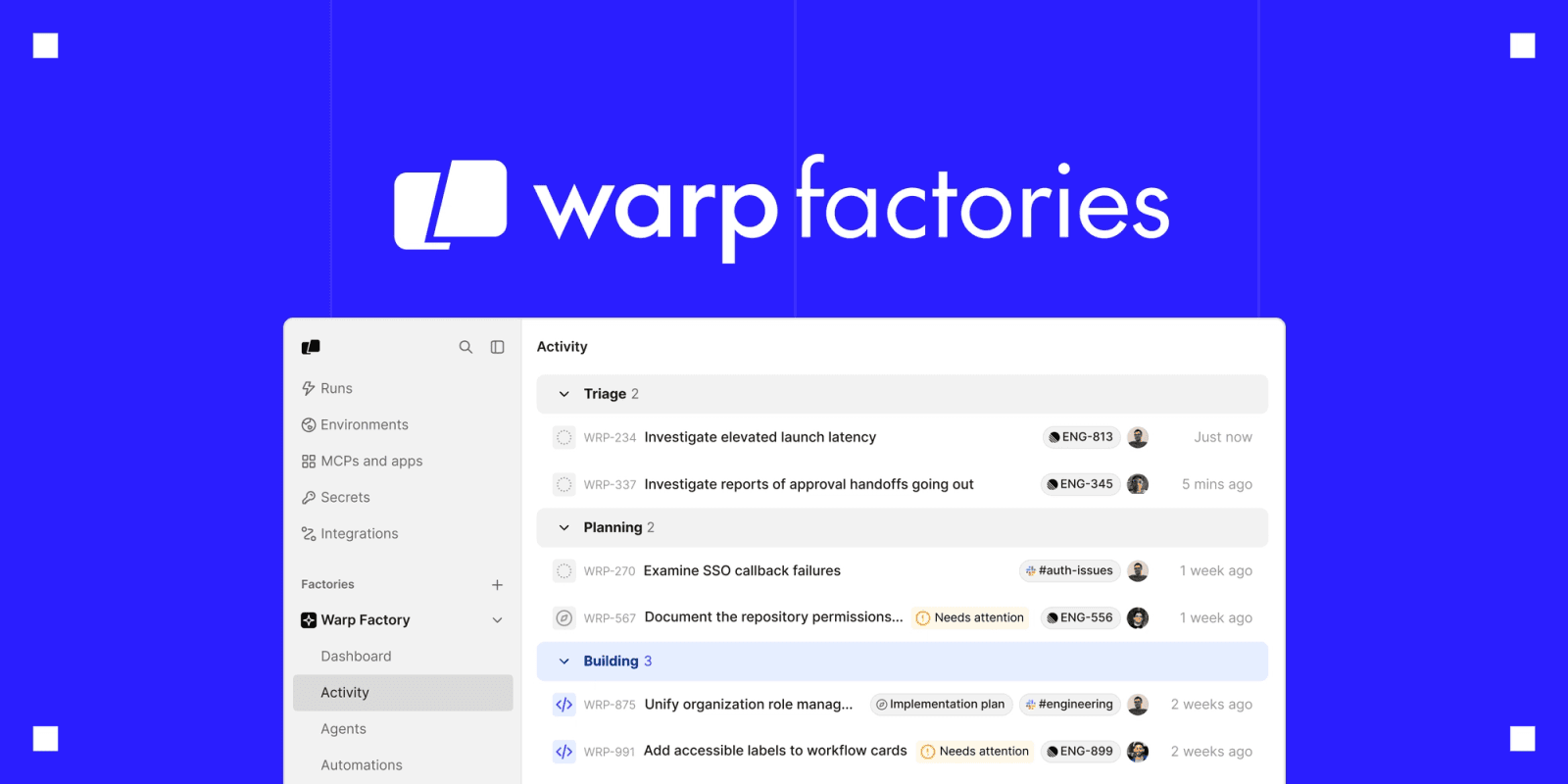
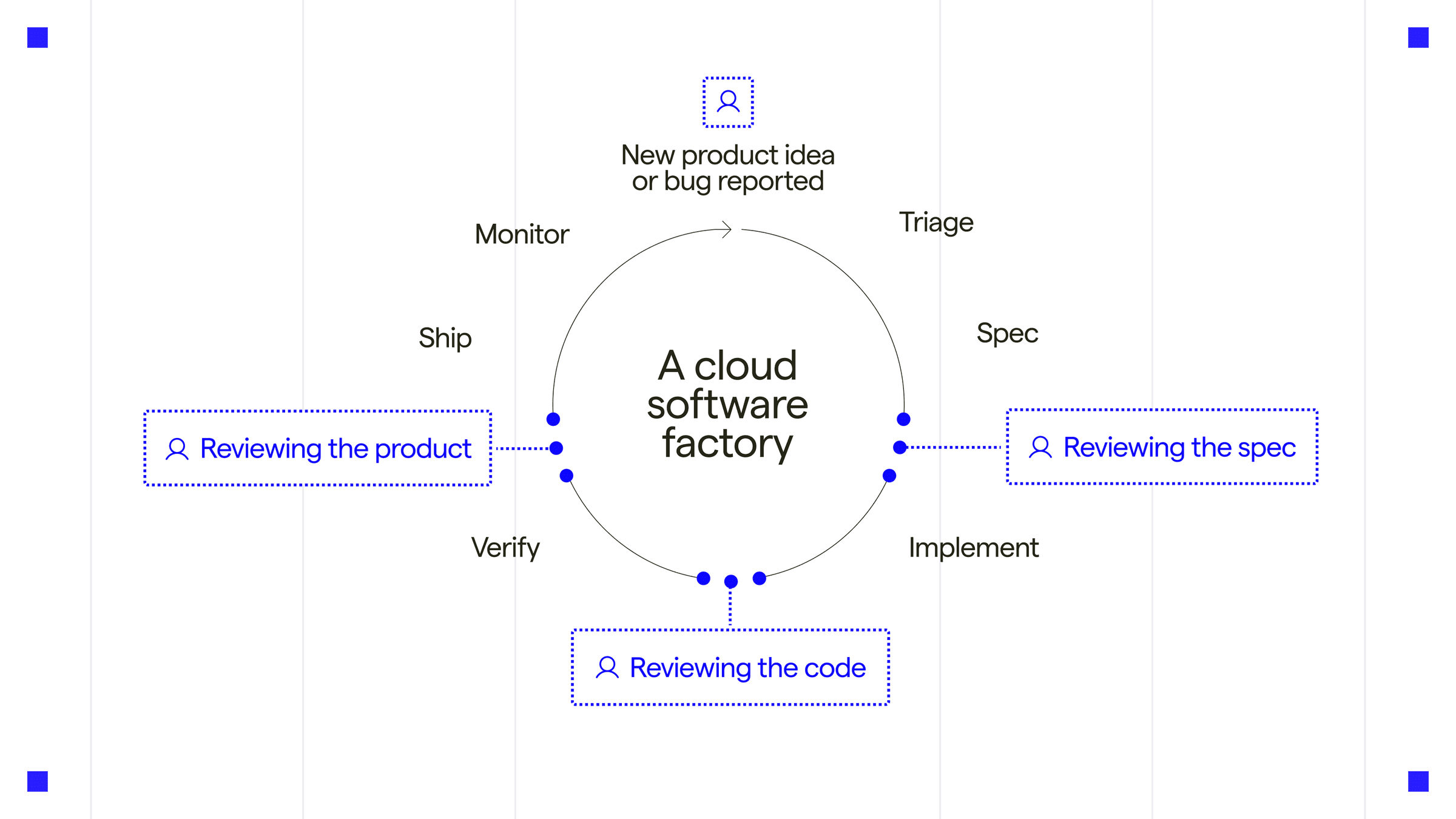
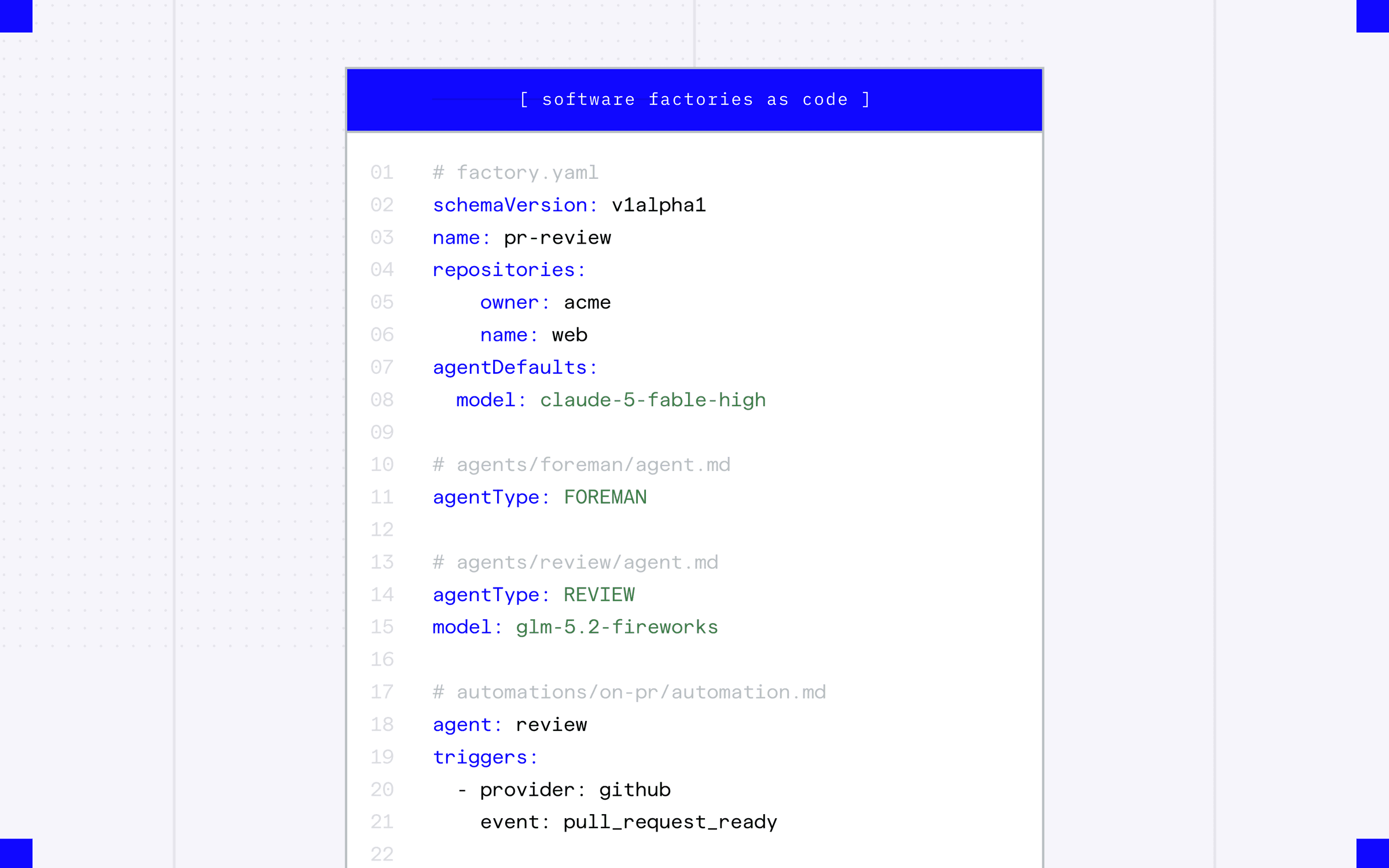
Warp Factory Activity view grouping tasks into Triage, Planning, and Building, with linked issues, implementation plans, channels, and “Needs attention” statuseImage from Introducing Warp Factories - open, flexible infrastructure for building your software factory“Software factories as code” YAML configuration defining repositories, agent models and roles, and a GitHub pull-request trigger.
Was this useful?

Graphify

SourcesProduct docs →docs update2026-08-24 → 2026-08-26DOCS
+ New in the docsgraphify.com

C# and TypeScript enum members now emit graph nodes with case_of edges, matching existing Java/Kotlin/Swift enum handling. Graphify v0.9.49 adds cross-repo type linking, C# property/constructor/interface-dispatch nodes, and safer --code-only --force extraction.

Read on graphify.com →
└──▷ DETAILED CHANGES · 9FULL DIFF · what the page said before, and says now
C# and TypeScript enum members now each emit a graph node with a case_of edge to their parent enum, covering explicit and implicit values, const enum, and quoted TypeScript member names
NEW IN THE DOCS

C# and TypeScript enum members now each emit a graph node with a case_of edge to their parent enum, covering explicit and implicit values, const enum, and quoted TypeScript member names — consistent with existing Java/Kotlin/Swift enum handling.

Installing graphifyy[postgres] now includes the tree-sitter-sql grammar required by…
NEW IN THE DOCS

Installing graphifyy[postgres] now includes the tree-sitter-sql grammar required by the SQL introspection path, and a missing or ABI-incompatible grammar raises an actionable error instead of silently returning zero nodes.

Multi-repo community detection now offsets each input's community ids so community 0 of…
NEW IN THE DOCS

Multi-repo community detection now offsets each input's community ids so community 0 of one repo no longer fuses with community 0 of another; the original id is preserved in the local_community field.

Performance: ignore-pattern evaluation in pattern-heavy monorepos is dramatically faster
NEW IN THE DOCS

Performance: ignore-pattern evaluation in pattern-heavy monorepos is dramatically faster — relative paths are now computed lexically, each pattern is parsed once into a bounded process cache, and per-entry work is memoized; ignore decisions are unchanged.

Running graphify extract --code-only --force over an existing graph now preserves the…
NEW IN THE DOCS

Running graphify extract --code-only --force over an existing graph now preserves the document/paper/image semantic layer instead of dropping it; files deleted from disk are still pruned.

graphify merge-graphs now links a type declaration shared across two repos
NEW IN THE DOCS

graphify merge-graphs now links a type declaration shared across two repos — matched by fully-qualified namespace and name — with a same_type_as edge, making shared contract types navigable across repo boundaries.

C# object-creation expressions (new Foo()) now emit an edge to the constructed type…
NEW IN THE DOCS

C# object-creation expressions (new Foo()) now emit an edge to the constructed type, making constructor usage visible in the graph; built-in and out-of-corpus types are not fabricated.

C# interfaces with exactly one implementing class now have their methods linked to that…
NEW IN THE DOCS

C# interfaces with exactly one implementing class now have their methods linked to that implementation with a dispatches_to edge, so calls through injected dependencies reach the concrete implementation.

C# properties now emit a member node per property, making properties visible as class members alongside fields and methods.
2 edits
WasNow
@@ -2,4 +2,64 @@
What's new
What's new
Every release, straight from GitHub, newest first.
v0.9.50
Aug 25, 2026
v0.9.50
Fix: Ruby methods whose names end in
!
,
?
, or
=
now keep distinct node ids, so
save
and
save!
(or
foo
and
foo=
) no longer collide into one node; the label keeps the raw spelling and member-call resolution still matches (#3077, thanks @hopstreax).
Fix: a Ruby call on a qualified constant receiver (
ActiveRecord::Base.transaction
) now matches the receiver's full constant path, so it no longer binds to an unrelated lone class named
Base
; an edge is emitted only on a single unambiguous match (#3078, thanks @rohit-jsfreaky).
Fix: a CommonJS member export wrapped in a higher-order function (
exports.x = wrap(fn)
,
module.exports.y = onCall({...}, handler)
) is now captured, reaching through the wrapper to the function it wraps without fabricating the wrapper as the export's identity (#3035, thanks @hopstreax).
Fix:
graphify merge-graphs
now offsets each input's community ids so community 0 of one repo no longer fuses with community 0 of another; within-input structure is preserved and the original id is kept in
local_community
(#3014, thanks @santhiprakash).
Fix: a
.graphify_root
marker written by Windows PowerShell (which prepends a UTF-8 BOM) no longer breaks hook rebuilds or silently mis-roots a scan; PowerShell now writes the marker BOM-less and every reader decodes BOM-tolerantly (#3028, thanks @rohit-jsfreaky).
Perf: ignore-pattern evaluation no longer builds a
Path
and calls
relative_to
per pattern per file — it computes the relative path lexically in string space, parses each pattern once into a bounded process cache, and memoizes per-entry work; ignore decisions are unchanged (differential-fuzz verified) and a pattern-heavy monorepo scans dramatically faster (#2226, thanks @Azeem1985). The
**
-aware matcher was also lifted out of a per-call cache closure that leaked a reference cycle each call.
Feature: C# and TypeScript enum members now each emit a graph node with a
case_of
edge to their enum (matching the existing Java/Kotlin/Swift enum handling), so an enum case is visible as a member; explicit and implicit values,
const enum
, and quoted TypeScript member names are all handled and no built-in types are fabricated (#3063, #3064, thanks @durmazoguzhan).
Fix:
graphify watch
no longer re-triggers on its own reads — read-only inotify events (
opened
,
closed_no_write
, emitted by the watcher's own AST rebuild) are dropped, while close-after-write and create/modify/move/delete still trigger; a no-op on the macOS/Windows backends that never emit them (thanks @Azeem1985).
Fix:
pip install graphifyy[postgres]
now carries the
tree-sitter-sql
grammar the introspection path needs, and a missing or ABI-incompatible grammar raises an actionable error instead of silently returning zero nodes (thanks @Azeem1985).
v0.9.49
v0.9.49
Aug 24, 2026
Aug 24, 2026
@@ -572,41 +632,4 @@
[_svc run]
[_svc run]
) now resolves through the property/ivar's declared type.
v0.9.38
Aug 9, 2026
v0.9.38
Correctness release: fixes a callback-scoping regression from 0.9.37, collects Kotlin property-initializer calls, resolves Swift attribute/factory receivers, stops SQL CTE names becoming table refs, and captures nested/module-scope dynamic imports.
Fix: the 0.9.37 callback-body fix (#2552) no longer lets a local declared in one callback suppress a call in a sibling callback (#2568, thanks @imagineers-tyler). Each callback body's local names are now scoped to that body instead of unioned under the shared declaration, so a real
indirect_call
in one sibling closure is no longer dropped because another sibling declared a same-named local. This can only restore dropped edges, never fabricate.
Fix: Kotlin calls in a property initializer are now collected (#2565, thanks @kskchaitanya1993). A class property (
val repo = createRepo()
), a
by lazy { ... }
delegate, a companion-object property, and a top-level property initializer now produce
calls
edges attributed to the enclosing class (or file), including fully-qualified calls. A plain literal initializer produces no edge.
Fix: Swift receiver-type inference now handles
@Environment(Store.self)
properties and factory-initialised bindings (#2561, thanks @fakewaffle). A member call on a receiver typed only through an
@Environment(Type.self)
attribute, or bound to an in-corpus factory whose return type is known (
let x = ServiceFactory.make()
), now resolves. Ambiguous or non-concrete returns (opaque
some P
, arrays, out-of-corpus) stay unresolved rather than guessing.
Fix: the SQL extractor no longer emits a
reads_from
edge to a CTE name (#2577, thanks @wilyan09007). A
WITH cte AS (...)
name is scoped to its query and is no longer treated as a table, so it no longer mints a bare stub that could bind to an unrelated same-named symbol; an outer real table sharing a subquery-CTE's name still resolves.
Fix: a dynamic
await import('…')
inside a nested function or at module scope now produces an edge (#2575, thanks @phudayyy), and
dynamic_import
edges are now included in
affected
. Calls inside a nested named function are also collected now. A dynamic import already captured as a deferred
imports_from
is not double-counted.
Full release history:
github.com/
github.com/
2 edits
The page said
nothing here — this text is new
It now says
v0.9.50 Aug 25, 2026 v0.9.50 Fix: Ruby methods whose names end in ! , ? , or = now keep distinct node ids, so save and save! (or foo and foo= ) no longer collide into one node; the label keeps the raw spelling and member-call resolution still matches (#3077, thanks @hopstreax). Fix: a Ruby call on a qualified constant receiver ( ActiveRecord::Base.transaction ) now matches the receiver's full constant path, so it no longer binds to an unrelated lone class named Base ; an edge is emitted only on a single unambiguous match (#3078, thanks @rohit-jsfreaky). Fix: a CommonJS member export wrapped in a higher-order function ( exports.x = wrap(fn) , module.exports.y = onCall({...}, handler) ) is now captured, reaching through the wrapper to the function it wraps without fabricating the wrapper as the export's identity (#3035, thanks @hopstreax). Fix: graphify merge-graphs now offsets each input's community ids so community 0 of one repo no longer fuses with community 0 of another; within-input structure is preserved and the original id is kept in local_community (#3014, thanks @santhiprakash). Fix: a .graphify_root marker written by Windows PowerShell (which prepends a UTF-8 BOM) no longer breaks hook rebuilds or silently mis-roots a scan; PowerShell now writes the marker BOM-less and every reader decodes BOM-tolerantly (#3028, thanks @rohit-jsfreaky). Perf: ignore-pattern evaluation no longer builds a Path and calls relative_to per pattern per file — it computes the relative path lexically in string space, parses each pattern once into a bounded process cache, and memoizes per-entry work; ignore decisions are unchanged (differential-fuzz verified) and a pattern-heavy monorepo scans dramatically faster (#2226, thanks @Azeem1985). The ** -aware matcher was also lifted out of a per-call cache closure that leaked a reference cycle each call. Feature: C# and TypeScript enum members now each emit a graph node with a case_of edge to their enum (matching the existing Java/Kotlin/Swift enum handling), so an enum case is visible as a member; explicit and implicit values, const enum , and quoted TypeScript member names are all handled and no built-in types are fabricated (#3063, #3064, thanks @durmazoguzhan). Fix: graphify watch no longer re-triggers on its own reads — read-only inotify events ( opened , closed_no_write , emitted by the watcher's own AST rebuild) are dropped, while close-after-write and create/modify/move/delete still trigger; a no-op on the macOS/Windows backends that never emit them (thanks @Azeem1985). Fix: pip install graphifyy[postgres] now carries the tree-sitter-sql grammar the introspection path needs, and a missing or ABI-incompatible grammar raises an actionable error instead of silently returning zero nodes (thanks @Azeem1985).
The page said
v0.9.38 Aug 9, 2026 v0.9.38 Correctness release: fixes a callback-scoping regression from 0.9.37, collects Kotlin property-initializer calls, resolves Swift attribute/factory receivers, stops SQL CTE names becoming table refs, and captures nested/module-scope dynamic imports. Fix: the 0.9.37 callback-body fix (#2552) no longer lets a local declared in one callback suppress a call in a sibling callback (#2568, thanks @imagineers-tyler). Each callback body's local names are now scoped to that body instead of unioned under the shared declaration, so a real indirect_call in one sibling closure is no longer dropped because another sibling declared a same-named local. This can only restore dropped edges, never fabricate. Fix: Kotlin calls in a property initializer are now collected (#2565, thanks @kskchaitanya1993). A class property ( val repo = createRepo() ), a by lazy { ... } delegate, a companion-object property, and a top-level property initializer now produce calls edges attributed to the enclosing class (or file), including fully-qualified calls. A plain literal initializer produces no edge. Fix: Swift receiver-type inference now handles @Environment(Store.self) properties and factory-initialised bindings (#2561, thanks @fakewaffle). A member call on a receiver typed only through an @Environment(Type.self) attribute, or bound to an in-corpus factory whose return type is known ( let x = ServiceFactory.make() ), now resolves. Ambiguous or non-concrete returns (opaque some P , arrays, out-of-corpus) stay unresolved rather than guessing. Fix: the SQL extractor no longer emits a reads_from edge to a CTE name (#2577, thanks @wilyan09007). A WITH cte AS (...) name is scoped to its query and is no longer treated as a table, so it no longer mints a bare stub that could bind to an unrelated same-named symbol; an outer real table sharing a subquery-CTE's name still resolves. Fix: a dynamic await import('…') inside a nested function or at module scope now produces an edge (#2575, thanks @phudayyy), and dynamic_import edges are now included in affected . Calls inside a nested named function are also collected now. A dynamic import already captured as a deferred imports_from is not double-counted.
It now says
nothing here — this text was removed
Was this useful?

Earendil Works Pi

SourcesProduct docs →docs update2026-08-24DOCS
+ New in the docspi.dev

Pi gains Windows/WSLWSLWindows Subsystem for Linux, a Microsoft-built compatibility layer that lets a Linux environment run directly on Windows without a virtual machine, giving cyber tools access to Linux binaries, filesystems, and syscalls on a Windows host. keybinding support with shortcuts for paste, search, model cycling, undo, and message queuing. Pi adds an optional powershell tool on Windows, running commands through pwsh.exe or Windows PowerShell. Pi 0.84.3 adds a native PowerShell tool for Windows, safer atomic managed updates, and a /thinking selector with persistent model defaults.

Read on pi.dev →
└──▷ DETAILED CHANGES · 12FULL DIFF · what the page said before, and says now
Adds Alt+V to paste an image or clipboard text on Windows/WSL.
Adds Ctrl+F to search the transcript in fullscreen mode on Windows/WSL.
Adds Ctrl+Up / Ctrl+Down to jump between marked messages on Windows/WSL.
Adds Alt+P to cycle to the previous model on Windows/WSL.
Adds Ctrl+Z for undo on native Windows; WSL uses Alt+Z so Ctrl+Z can suspend pi.
Adds Ctrl+Q to queue a follow-up message and Alt+Q to restore queued messages on Windows/WSL.
Supports binding app.message.followUp to alt+enter in pi config to use Alt+Enter…
NEW IN THE DOCS

Supports binding app.message.followUp to alt+enter in pi config to use Alt+Enter for follow-up queueing instead of Ctrl+Q.

Adds a powershell tool that runs commands through pwsh.exe (falling back to Windows…
NEW IN THE DOCS

Adds a powershell tool that runs commands through pwsh.exe (falling back to Windows PowerShell) with -NoProfile -NonInteractive -ExecutionPolicy Bypass; administrator-enforced execution policies still take precedence.

Supports configuring defaultTools to replace or supplement the default bash tool with powershell on Windows
NEW IN THE DOCS

Supports configuring defaultTools to replace or supplement the default bash tool with powershell on Windows — e.g. "defaultTools": ["read", "powershell", "edit", "write"] to replace, or "defaultTools": ["read", "bash", "powershell", "edit", "write"] to run both side by side.

Adds a powershell tool for optional native PowerShell command execution on Windows, configurable through the SDK.
Adds /thinking selector with searchable default choices to the model and thinking…
NEW IN THE DOCS

Adds /thinking selector with searchable default choices to the model and thinking selectors; Ctrl+S saves the selected model as the global default, persisting it session-wide.

Changes installer-managed updates to stage, verify, and atomically activate the selected release in place.
7 edits
WasNow
@@ -146,7 +146,30 @@
Windows Terminal
Windows Terminal
Copied
Copied
Pi uses Windows-style keybindings when running natively on Windows or in WSL:
Alt+V
pastes an image or clipboard text.
Ctrl+F
searches the transcript in fullscreen mode, and
Ctrl+Up
/
Ctrl+Down
jump between marked messages.
Alt+P
cycles to the previous model.
Ctrl+Z
undoes editing on native Windows; WSL uses
Alt+Z
so
Ctrl+Z
can suspend pi.
Ctrl+Q
queues a follow-up message and
Alt+Q
restores queued messages.
Add to
Add to
settings.json
settings.json
(Ctrl+Shift+, or Settings → Open JSON file) to forward the modified Enter keys pi uses:
(Ctrl+Shift+, or Settings → Open JSON file) to forward
Shift+Enter
for inserting a new line:
{
{
"actions": [
"actions": [
@@ -154,26 +177,19 @@
"command": { "action": "sendInput", "input": "\u001b[13;2u" },
"keys": "shift+enter"
},
{
"command": { "action": "sendInput", "input": "\u001b[13;3u" },
"keys": "alt+enter"
}
}
]
]
}
}
Shift+Enter
inserts a new line.
Windows Terminal binds
Alt+Enter
Alt+Enter
to fullscreen by default. That prevents pi from receiving
to fullscreen by default. To use it instead of pi's
Alt+Enter
Ctrl+Q
for follow-up queueing.
default for follow-up queueing, configure Windows Terminal to send the key and bind
Remapping
app.message.followUp
Alt+Enter
to
to
sendInput
alt+enter
forwards the real key chord to pi instead.
in pi.
If you already have an
actions
actions
array, add the objects to it. If the old fullscreen behavior persists, fully close and reopen Windows Terminal.
array, add the object to it. Fully close and reopen Windows Terminal after changing its settings.
xfce4-terminal, terminator
Copied
Copied
7 edits
The page said
nothing here — this text is new
It now says
Pi uses Windows-style keybindings when running natively on Windows or in WSL: Alt+V pastes an image or clipboard text. Ctrl+F searches the transcript in fullscreen mode, and Ctrl+Up / Ctrl+Down jump between marked messages. Alt+P cycles to the previous model. Ctrl+Z undoes editing on native Windows; WSL uses Alt+Z so Ctrl+Z can suspend pi. Ctrl+Q queues a follow-up message and Alt+Q restores queued messages.
The page said
(Ctrl+Shift+, or Settings → Open JSON file) to forward the modified Enter keys pi uses:
It now says
(Ctrl+Shift+, or Settings → Open JSON file) to forward Shift+Enter for inserting a new line:
The page said
}, { "command": { "action": "sendInput", "input": "\u001b[13;3u" }, "keys": "alt+enter"
It now says
nothing here — this text was removed
The page said
Shift+Enter inserts a new line.
It now says
nothing here — this text was removed
The page said
to fullscreen by default. That prevents pi from receiving Alt+Enter for follow-up queueing. Remapping Alt+Enter
It now says
to fullscreen by default. To use it instead of pi's Ctrl+Q default for follow-up queueing, configure Windows Terminal to send the key and bind app.message.followUp
The page said
sendInput forwards the real key chord to pi instead.
It now says
alt+enter in pi.
The page said
array, add the objects to it. If the old fullscreen behavior persists, fully close and reopen Windows Terminal.
It now says
array, add the object to it. Fully close and reopen Windows Terminal after changing its settings.
Was this useful?

SST OpenCode

SourcesProduct docs →docs updateDOCS
+ New in the docsopencode.ai

OpenCode GitHub Action gains variant, oidc_base_url, and custom token passthrough options for flexible CI deployments.

Read on opencode.ai →
└──▷ DETAILED CHANGES · 4FULL DIFF · what the page said before, and says now
Adds variant config key to set provider-specific reasoning effort (e.g. high
NEW IN THE DOCS

Adds variant config key to set provider-specific reasoning effort (e.g. high, max, or minimal) for the GitHub Action.

Adds oidc_base_url config key to point the OIDC token exchange at a custom GitHub App…
NEW IN THE DOCS

Adds oidc_base_url config key to point the OIDC token exchange at a custom GitHub App installation instead of the default https://api.opencode.ai.

Adds mentions config key accepting a comma-separated, case-insensitive list of…
NEW IN THE DOCS

Adds mentions config key accepting a comma-separated, case-insensitive list of trigger phrases (defaults to /opencode,/oc) to control which PR/issue comments activate the bot.

Supports caller-provided token mode that skips OIDC exchange entirely, allowing a PAT or third-party GitHub App token stored as a secret to be passed directly
NEW IN THE DOCS

Supports caller-provided token mode that skips OIDC exchange entirely, allowing a PAT or third-party GitHub App token stored as a secret to be passed directly — removing the requirement for id-token: write permission.

6 edits
WasNow
@@ -104,5 +104,4 @@
anthropic/claude-sonnet-4-20250514
# share: true
# share: true
# github_token: xxxx
Store the API keys in secrets
In your organization or project
@@ -132,15 +131,33 @@
prompt
prompt
: Optional custom prompt to override the default behavior. Use this to customize how OpenCode processes requests.
token
mentions
: Optional GitHub access token for performing operations such as creating comments, committing changes, and opening pull requests. By default, OpenCode uses the installation access token from the OpenCode GitHub App, so commits, comments, and pull requests appear as coming from the app.
: Comma-separated list of trigger phrases, case-insensitive. Defaults to
Alternatively, you can use the GitHub Action runner’s
/opencode,/oc
built-in
.
variant
: Model variant for provider-specific reasoning effort, for example
high
,
max
, or
minimal
.
oidc_base_url
: Base URL for the OIDC token exchange API. Only needed when running a custom GitHub App install. Defaults to
https://api.opencode.ai
.
use_github_token
: Set to
true
to use a caller-provided
GITHUB_TOKEN
GITHUB_TOKEN
without installing the OpenCode GitHub App. Just make sure to grant the required permissions in your workflow:
instead of exchanging an OIDC token for an OpenCode App installation token. Defaults to
false
.
Use this mode to run without installing the OpenCode GitHub App. Pass the token through
env
and grant the permissions required by your workflow:
permissions
permissions
:
:
id-token
:
write
contents
contents
:
:
@@ -152,7 +169,32 @@
:
:
write
write
You can also use a
steps
:
-
uses
:
anomalyco/opencode/github@latest
env
:
ANTHROPIC_API_KEY
:
${{ secrets.ANTHROPIC_API_KEY }}
GITHUB_TOKEN
:
${{ secrets.GITHUB_TOKEN }}
with
:
model
:
anthropic/claude-sonnet-4-20250514
use_github_token
:
true
id-token: write
is not required in this mode because OIDC exchange is skipped. To use a
personal access token
(PAT) if preferred.
or another GitHub App token, store it as a secret and pass that secret as
GITHUB_TOKEN
instead.
Supported Events
Supported Events
OpenCode can be triggered by the following GitHub events:
6 edits
The page said
# github_token: xxxx
It now says
nothing here — this text was removed
The page said
token : Optional GitHub access token for performing operations such as creating comments, committing changes, and opening pull requests. By default, OpenCode uses the installation access token from the OpenCode GitHub App, so commits, comments, and pull requests appear as coming from the app. Alternatively, you can use the GitHub Action runner’s built-in
It now says
mentions : Comma-separated list of trigger phrases, case-insensitive. Defaults to /opencode,/oc . variant : Model variant for provider-specific reasoning effort, for example high , max , or minimal . oidc_base_url : Base URL for the OIDC token exchange API. Only needed when running a custom GitHub App install. Defaults to https://api.opencode.ai . use_github_token : Set to true to use a caller-provided
The page said
without installing the OpenCode GitHub App. Just make sure to grant the required permissions in your workflow:
It now says
instead of exchanging an OIDC token for an OpenCode App installation token. Defaults to false . Use this mode to run without installing the OpenCode GitHub App. Pass the token through env and grant the permissions required by your workflow:
The page said
id-token : write
It now says
nothing here — this text was removed
The page said
You can also use a
It now says
steps : - uses : anomalyco/opencode/github@latest env : ANTHROPIC_API_KEY : ${{ secrets.ANTHROPIC_API_KEY }} GITHUB_TOKEN : ${{ secrets.GITHUB_TOKEN }} with : model : anthropic/claude-sonnet-4-20250514 use_github_token : true id-token: write is not required in this mode because OIDC exchange is skipped. To use a
The page said
(PAT) if preferred.
It now says
or another GitHub App token, store it as a secret and pass that secret as GITHUB_TOKEN instead.
Was this useful?

Google gemini-cli

SourcesProduct docs →docs updateDOCS
◆ New pagegeminicli.com

Gemini CLI gains Agent Skills — installable, on-demand expertise bundles with scoped discovery and session management commands

Read the new page on geminicli.com →
└──▷ DETAILED CHANGES · 10FULL DIFF · what the page said before, and says now
New gemini skills install <url|path> --consent CLI command installs a skill from a…
NEW IN THE DOCS

New gemini skills install <url|path> --consent CLI command installs a skill from a Git repository or local directory, with --scope user|workspace to control whether it is global or project-local.

New gemini skills list --all CLI command lists all discovered skills across every…
NEW IN THE DOCS

New gemini skills list --all CLI command lists all discovered skills across every tier, including built-in skills normally hidden from output.

New gemini skills uninstall <name> --scope workspace CLI command removes an installed skill.
New /skills list [all] [nodesc] interactive session command shows discovered skills…
NEW IN THE DOCS

New /skills list [all] [nodesc] interactive session command shows discovered skills, with all to surface built-in skills and nodesc to suppress descriptions.

New /skills link <path> [--scope user|workspace] interactive session command links…
NEW IN THE DOCS

New /skills link <path> [--scope user|workspace] interactive session command links skills from an arbitrary local directory into the active session.

New /skills disable <name> and /skills enable <name> interactive session commands…
NEW IN THE DOCS

New /skills disable <name> and /skills enable <name> interactive session commands toggle individual skills without uninstalling them.

New /skills reload (alias /skills refresh) interactive session command rescans all…
NEW IN THE DOCS

New /skills reload (alias /skills refresh) interactive session command rescans all discovery tiers and refreshes the skill list mid-session.

Agent Skills are discovered from four tiers in precedence order
NEW IN THE DOCS

Agent Skills are discovered from four tiers in precedence order: built-in, extension, user (~/.gemini/skills/ or ~/.agents/skills/), and workspace (.gemini/skills/ or .agents/skills/), with workspace skills version-controllable for team sharing.

Adds the activate_skill tool
NEW IN THE DOCS

Adds the activate_skill tool — called automatically by the model when a task matches a skill's description — which injects the skill's SKILL.md and grants the agent read access to the skill's bundled assets.

Skills support an interoperable .agents/skills/ path alias so skill directories…
NEW IN THE DOCS

Skills support an interoperable .agents/skills/ path alias so skill directories remain compatible across multiple AI tools beyond Gemini CLI.

1 edit
WasNow
@@ -0,0 +1,188 @@
Agent Skills
Agent Skills let you extend Gemini CLI with specialized expertise, procedural
workflows, and task-specific resources. Based on the
Agent Skills
open standard, a “skill” is a
self-contained directory that packages instructions and assets into a
discoverable capability.
Unlike general context files (
GEMINI.md
), which provide
persistent workspace-wide background, Skills represent
on-demand expertise
.
This lets Gemini CLI maintain a vast library of specialized capabilities—such as
security auditing, cloud deployments, or codebase migrations—without cluttering
the model’s immediate context window.
How it works
Section titled “How it works”
The lifecycle of an Agent Skill involves discovery, activation, and conditional
resource access.
Discovery
: At the start of a session, Gemini CLI scans the discovery
tiers and injects the name and description of all enabled skills into the
system prompt.
Activation
: When Gemini identifies a task matching a skill’s
description, it calls the
activate_skill
tool.
Consent
: You will see a confirmation prompt in the UI detailing the
skill’s name, purpose, and the directory path it will gain access to.
Injection
: Upon your approval:
The
SKILL.md
body and folder structure is added to the conversation
history.
The skill’s directory is added to the agent’s allowed file paths, granting
it permission to read any bundled assets.
Execution
: The model proceeds with the specialized expertise active. It
is instructed to prioritize the skill’s procedural guidance within reason.
Discovery tiers
Section titled “Discovery tiers”
Gemini CLI discovers skills from several locations, following a specific order
of precedence (lowest to highest):
Built-in skills
: Standard skills included with Gemini CLI that provide
foundational capabilities.
Extension skills
: Skills bundled within installed
extensions
.
User skills
: Located in
~/.gemini/skills/
or the
~/.agents/skills/
alias.
Workspace skills
: Located in
.gemini/skills/
or the
.agents/skills/
alias. Workspace skills are shared with your team via version control.
Precedence and aliases
Section titled “Precedence and aliases”
If multiple skills share the same name, the version from the higher-precedence
location is used. Within the same tier (user or workspace), the
.agents/skills/
alias takes precedence over the
.gemini/skills/
directory.
The
.agents/skills/
alias provides an interoperable path for managing
agent-specific expertise that remains compatible across different AI tools.
Key benefits
Section titled “Key benefits”
Agent Skills provide several advantages for managing specialized knowledge and
complex workflows.
Shared expertise
: Package complex workflows (like a specific team’s PR
review process) into a folder that anyone can use.
Repeatable workflows
: Ensure complex multi-step tasks are performed
consistently by providing a procedural framework.
Resource bundling
: Include scripts, templates, or example data alongside
instructions so the agent has everything it needs.
Progressive disclosure
: Only skill metadata (name and description) is
loaded initially. Detailed instructions and resources are only disclosed when
the model explicitly activates the skill, saving context tokens.
To see all available skills in your current session, use the
/skills list
command.
Managing skills
Section titled “Managing skills”
You can manage Agent Skills through interactive session commands or directly
from your terminal.
In an interactive session
Section titled “In an interactive session”
Use the
/skills
slash command to view and manage available expertise:
/skills list [all] [nodesc]
: Shows discovered skills. Use
all
to include
built-in skills and
nodesc
to hide descriptions.
/skills link <path> [--scope user|workspace]
: Links skills from a local
directory.
/skills disable <name>
: Prevents a specific skill from being used.
/skills enable <name>
: Re-enables a disabled skill.
/skills reload
(or
/skills refresh
): Refreshes the list of discovered
skills from all tiers.
From the terminal
Section titled “From the terminal”
The
gemini skills
command provides management utilities:
Terminal window
# List all discovered skills. Use --all to include built-in skills.
gemini
skills
list
--all
# Install a skill from a Git repository or local directory.
# Use --consent to skip the security confirmation prompt.
gemini
skills
install
https://github.com/user/repo.git
--consent
# Uninstall a skill.
gemini
skills
uninstall
my-skill
--scope
workspace
Command options
Section titled “Command options”
The skill management commands support several global and command-specific
options.
--scope
: Either
user
(global, default) or
workspace
(local to the
project).
--path
: The sub-directory within a Git repository containing the skill.
--consent
: Acknowledge security risks and skip the interactive confirmation
during installation.
For more details on CLI commands, see the
CLI reference
.
Next steps
Section titled “Next steps”
Explore these resources to refine your skills and understand the framework
better.
Get started with Agent Skills
: A
quick walkthrough of triggering and using skills.
Creating Agent Skills
: Create your first skill and
bundle custom logic.
Using Agent Skills
: Learn how to leverage built-in
and custom skills.
Best practices
: Learn strategies for building
effective skills.
Last updated:
Apr 30, 2026
1 edit
The page said
nothing here — this text is new
It now says
Agent Skills Agent Skills let you extend Gemini CLI with specialized expertise, procedural workflows, and task-specific resources. Based on the Agent Skills open standard, a “skill” is a self-contained directory that packages instructions and assets into a discoverable capability. Unlike general context files ( GEMINI.md ), which provide persistent workspace-wide background, Skills represent on-demand expertise . This lets Gemini CLI maintain a vast library of specialized capabilities—such as security auditing, cloud deployments, or codebase migrations—without cluttering the model’s immediate context window. How it works Section titled “How it works” The lifecycle of an Agent Skill involves discovery, activation, and conditional resource access. Discovery : At the start of a session, Gemini CLI scans the discovery tiers and injects the name and description of all enabled skills into the system prompt. Activation : When Gemini identifies a task matching a skill’s description, it calls the activate_skill tool. Consent : You will see a confirmation prompt in the UI detailing the skill’s name, purpose, and the directory path it will gain access to. Injection : Upon your approval: The SKILL.md body and folder structure is added to the conversation history. The skill’s directory is added to the agent’s allowed file paths, granting it permission to read any bundled assets. Execution : The model proceeds with the specialized expertise active. It is instructed to prioritize the skill’s procedural guidance within reason. Discovery tiers Section titled “Discovery tiers” Gemini CLI discovers skills from several locations, following a specific order of precedence (lowest to highest): Built-in skills : Standard skills included with Gemini CLI that provide foundational capabilities. Extension skills : Skills bundled within installed extensions . User skills : Located in ~/.gemini/skills/ or the ~/.agents/skills/ alias. Workspace skills : Located in .gemini/skills/ or the .agents/skills/ alias. Workspace skills are shared with your team via version control. Precedence and aliases Section titled “Precedence and aliases” If multiple skills share the same name, the version from the higher-precedence location is used. Within the same tier (user or workspace), the .agents/skills/ alias takes precedence over the .gemini/skills/ directory. The .agents/skills/ alias provides an interoperable path for managing agent-specific expertise that remains compatible across different AI tools. Key benefits Section titled “Key benefits” Agent Skills provide several advantages for managing specialized knowledge and complex workflows. Shared expertise : Package complex workflows (like a specific team’s PR review process) into a folder that anyone can use. Repeatable workflows : Ensure complex multi-step tasks are performed consistently by providing a procedural framework. Resource bundling : Include scripts, templates, or example data alongside instructions so the agent has everything it needs. Progressive disclosure : Only skill metadata (name and description) is loaded initially. Detailed instructions and resources are only disclosed when the model explicitly activates the skill, saving context tokens. To see all available skills in your current session, use the /skills list command. Managing skills Section titled “Managing skills” You can manage Agent Skills through interactive session commands or directly from your terminal. In an interactive session Section titled “In an interactive session” Use the /skills slash command to view and manage available expertise: /skills list [all] [nodesc] : Shows discovered skills. Use all to include built-in skills and nodesc to hide descriptions. /skills link <path> [--scope user|workspace] : Links skills from a local directory. /skills disable <name> : Prevents a specific skill from being used. /skills enable <name> : Re-enables a disabled skill. /skills reload (or /skills refresh ): Refreshes the list of discovered skills from all tiers. From the terminal Section titled “From the terminal” The gemini skills command provides management utilities: Terminal window # List all discovered skills. Use --all to include built-in skills. gemini skills list --all # Install a skill from a Git repository or local directory. # Use --consent to skip the security confirmation prompt. gemini skills install https://github.com/user/repo.git --consent # Uninstall a skill. gemini skills uninstall my-skill --scope workspace Command options Section titled “Command options” The skill management commands support several global and command-specific options. --scope : Either user (global, default) or workspace (local to the project). --path : The sub-directory within a Git repository containing the skill. --consent : Acknowledge security risks and skip the interactive confirmation during installation. For more details on CLI commands, see the CLI reference . Next steps Section titled “Next steps” Explore these resources to refine your skills and understand the framework better. Get started with Agent Skills : A quick walkthrough of triggering and using skills. Creating Agent Skills : Create your first skill and bundle custom logic. Using Agent Skills : Learn how to leverage built-in and custom skills. Best practices : Learn strategies for building effective skills. Last updated: Apr 30, 2026
Was this useful?
Agent
◆  MCP Servers & Tooling

gridctl

SourcesProduct docs →docs update2026-08-23DOCS
+ New in the docsgithub.com

gridctl: Adds LM Studio as a link client integration. gridctl 0.1.0-rc.3 adds LM Studio as a supported client and a post-link notes channel for client-specific guidance.

Read on github.com →
└──▷ DETAILED CHANGES · 2
Adds LM Studio as the 16th supported client, live-verified against LM Studio 0.4.x.
Introduces a post-link notes channel that surfaces client-specific guidance in the CLI…
NEW IN THE DOCS

Introduces a post-link notes channel that surfaces client-specific guidance in the CLI and the Connections detail pane after linking.

└──▷ GET THIS VERSION
$ git clone --branch docs-db1b2666eeba https://github.com/gridctl/gridctl.git
# already have the repo? check out this version:
$ git checkout docs-db1b2666eeba
Was this useful?
◆  AI Agent Frameworks

Agno (formerly Phidata)

SourcesProduct docs →docs update2026-08-24DOCS
+ New in the docsdocs.agno.com

Agno agents gain media_storage and delete_media options to offload and manage session media externally. Agno adds media storage backends for sessions: local filesystem, Amazon S3, and Google Cloud Storage.

Read on docs.agno.com →
└──▷ DETAILED CHANGES · 3FULL DIFF · what the page said before, and says now
Adds media_storage parameter (type…
NEW IN THE DOCS

Adds media_storage parameter (type Optional[Union[MediaStorage, AsyncMediaStorage]]) to Agent, enabling offloading of media to external storage while keeping only a reference in the database.

Adds delete_media parameter (bool, default False) to Agent, which when True also…
NEW IN THE DOCS

Adds delete_media parameter (bool, default False) to Agent, which when True also deletes a session's offloaded media from media_storage on session deletion.

New Media Storage subsystem for persisting session media, with backends for local…
NEW IN THE DOCS

New Media Storage subsystem for persisting session media, with backends for local filesystem, Amazon S3 (S3 Media Storage), and Google Cloud Storage (GCS Media Storage).

2 edits
WasNow
@@ -278,4 +278,8 @@
True
True
If True, store media in the database
media_storage
Optional[Union[MediaStorage, AsyncMediaStorage]]
None
Offload media to external storage and keep only a reference in the database
store_tool_messages
store_tool_messages
bool
bool
@@ -972,4 +976,8 @@
user_id
user_id
(Optional[str]): User ID to use
delete_media
(bool): If True, also delete the session’s offloaded media from
media_storage
. Defaults to False
save_session
save_session
2 edits
The page said
nothing here — this text is new
It now says
media_storage Optional[Union[MediaStorage, AsyncMediaStorage]] None Offload media to external storage and keep only a reference in the database
The page said
nothing here — this text is new
It now says
delete_media (bool): If True, also delete the session’s offloaded media from media_storage . Defaults to False
Was this useful?

Arcade

SourcesProduct docs →docs updateDOCS
+ New in the docsdocs.arcade.dev

Arcade now lets you register external MCP servers to govern their tools alongside Arcade's own.

Read on docs.arcade.dev →
└──▷ DETAILED CHANGES · 1FULL DIFF · what the page said before, and says now
Adds support for registering existing or vendor-supplied MCP servers with Arcade…
NEW IN THE DOCS

Adds support for registering existing or vendor-supplied MCP servers with Arcade, enabling unified governance of external MCP tools alongside native Arcade tools.

2 edits
WasNow
@@ -29,4 +29,7 @@
Pre-built integrations
Browse 7,500+ ready-to-use integrations for Gmail, Slack, GitHub, and more.
Learn more
Bring your own MCP server
Already run an MCP server, or use a vendor's? Register it with Arcade and govern its tools alongside Arcade's own.
Learn more
Learn more
Popular Integrations
@@ -86,4 +89,4 @@
Changelog
Changelog
Last updated on
Last updated on
July 27, 2026
August 24, 2026
About Arcade
About Arcade
2 edits
The page said
nothing here — this text is new
It now says
Learn more Bring your own MCP server Already run an MCP server, or use a vendor's? Register it with Arcade and govern its tools alongside Arcade's own.
The page said
July 27, 2026
It now says
August 24, 2026
Was this useful?
Deploy
◆  AI Model & Data Infrastructure

Groq

SourcesProduct docs →docs update2026-08-25 → 2026-08-26DOCS
+ New in the docsconsole.groq.com

Groq Remote MCP now supports the Qwen 3.8 27B model (qwen/qwen3.8-27b). Groq: Adds qwen/qwen3.8-27b (Qwen 3.8 27B) to the list of models supported for structured outputs on Groq. Groq vision now supports Qwen 3.8 27B (qwen/qwen3.8-27b), a multimodal model with thinking/instruct modes, tunable reasoning, tool use, and JSON mode.

Read on console.groq.com →
└──▷ DETAILED CHANGES · 4FULL DIFF · what the page said before, and says now
Adds qwen/qwen3.8-27b (Qwen 3.8 27B) as a supported model for Remote MCP tool-use on Groq.
Adds qwen/qwen3.8-27b (Qwen 3.8 27B) as a supported vision model
NEW IN THE DOCS

Adds qwen/qwen3.8-27b (Qwen 3.8 27B) as a supported vision model — a 27B multimodal model accepting up to 3 images per request, with thinking and instruct modes, tunable reasoning effort, tool use, and JSON mode; each image counts as 2048 input tokens.

Adds support for Qwen3 models, with qwen/qwen3.8-27b supporting low, medium, and…
NEW IN THE DOCS

Adds support for Qwen3 models, with qwen/qwen3.8-27b supporting low, medium, and high reasoning effort levels; high maps to the model's native xhigh mode.

Supports a default reasoning effort value to use the model's built-in default, and an option to disable reasoning entirely.
1 edit
WasNow
@@ -109,4 +109,6 @@
qwen/qwen3.6-27b
qwen/qwen3.6-27b
Qwen 3.6 27B
Qwen 3.6 27B
qwen/qwen3.8-27b
Qwen 3.8 27B
llama-3.3-70b-versatile
Llama 3.3 70B
Llama 3.3 70B
1 edit
The page said
nothing here — this text is new
It now says
qwen/qwen3.8-27b Qwen 3.8 27B
Was this useful?

RunPod

SourcesProduct docs →docs update2026-08-26DOCS
◆ New pagedocs.runpod.io

RunPod Serverless adds Batch Jobs API for async bulk inference with dedicated workers, isolated from standard /run traffic. RunPod Serverless adds batch jobs: submit large inference request collections as a single named batch, processed asynchronously.

Read the new page on docs.runpod.io →
└──▷ DETAILED CHANGES · 7FULL DIFF · what the page said before, and says now
New POST /v2/{endpoint_id}/batch endpoint creates a batch job (optionally with…
NEW IN THE DOCS

New POST /v2/{endpoint_id}/batch endpoint creates a batch job (optionally with initial requests) that runs asynchronously on dedicated workers, isolated from standard /run traffic.

New POST /v2/{endpoint_id}/batch/{id}/requests endpoint appends additional requests…
NEW IN THE DOCS

New POST /v2/{endpoint_id}/batch/{id}/requests endpoint appends additional requests to a DRAFT batch incrementally; each call accepts up to 10 MiB of request body.

New GET /v2/{endpoint_id}/batch/{id} endpoint returns batch summary with progress…
NEW IN THE DOCS

New GET /v2/{endpoint_id}/batch/{id} endpoint returns batch summary with progress fields requestTotal, requestInProgress, requestCompleted, and requestFailed.

New GET /v2/{endpoint_id}/batch/{id}/requests endpoint returns paginated child…
NEW IN THE DOCS

New GET /v2/{endpoint_id}/batch/{id}/requests endpoint returns paginated child request results; supports offset and limit query parameters with a hasMore field for pagination.

Batch lifecycle moves through states DRAFTFINALIZEDFAILED / CANCELLED
NEW IN THE DOCS

Batch lifecycle moves through states DRAFTFINALIZEDFAILED / CANCELLED; completion is inferred when requestCompleted + requestFailed equals requestTotal.

Console Inbox notifications are sent on terminal state transitions, including batch ID…
NEW IN THE DOCS

Console Inbox notifications are sent on terminal state transitions, including batch ID, endpoint name, status, and item counts.

New batch jobs capability for RunPod Serverless allows submitting large collections of…
NEW IN THE DOCS

New batch jobs capability for RunPod Serverless allows submitting large collections of inference requests as a single named batch for asynchronous processing.

1 edit
WasNow
@@ -0,0 +1,419 @@
Docs
Examples
Community
CLI
API v1
API v2
Models
Release notes
Use batch jobs to run large volumes of inference requests against a serverless endpoint without waiting for each result in real time. Batch jobs run asynchronously on dedicated workers that are separate from your endpoint’s standard
/run
traffic, so submitting a batch never delays your interactive requests.
Batch Jobs is currently in beta. Join our
Discord
to provide feedback and get support.
When to use batch vs /run
Batch
/run
Use case
Bulk, offline workloads
Interactive, real-time inference
Latency
Multi-hour
Seconds to minutes
Traffic isolation
Dedicated batch workers
Standard serverless workers
Result delivery
Poll or subscribe to notifications
Synchronous or async poll
Choose batch when your workload can tolerate multi-hour latency — for example, nightly dataset processing, pre-computing embeddings, or running evaluations.
Batch lifecycle
A batch moves through the following states:
DRAFT → FINALIZED → FAILED
→ CANCELLED
DRAFT
— The batch is a draft. You can add, update, or remove individual requests. Batch workers have not started any work.
FINALIZED
— The batch is locked; no further requests can be added or removed. Batch workers process the requests while the batch stays in this state, and there is no separate
RUNNING
or
COMPLETED
batch status. Track progress through the
requestTotal
,
requestInProgress
,
requestCompleted
, and
requestFailed
counts — all requests have finished when
requestCompleted + requestFailed
equals
requestTotal
.
FAILED
— The batch itself failed before or during execution (distinct from individual request failures in a batch whose other requests finished successfully).
CANCELLED
— You cancelled the batch. See
Cancellation
for details.
You must call
/finalize
before the batch begins processing. A DRAFT batch will not be executed.
API walkthrough
1. Create a batch
POST
/v2/{endpoint_id}/batch
Authorization:
Bearer
{api_key}
Content-Type:
application/json
The request body is a top-level JSON array. Send an empty array
[]
to create a batch and add requests later, or send a populated array to include an initial list of requests. Each element uses the same shape as a standard
/run
call — a JSON object with an
input
field.
[
{
"input"
: {
"text"
:
"The quick brown fox"
} },
{
"input"
: {
"text"
:
"Jumped over the lazy dog"
} }
]
Response:
{
"id"
:
"batch_01j9abc123"
,
"status"
:
"DRAFT"
}
2. Add more requests
While the batch is DRAFT, append additional requests:
POST
/v2/{endpoint_id}/batch/{batch_id}/requests
Authorization:
Bearer
{api_key}
Content-Type:
application/json
{
"requests"
: [
{
"input"
: {
"text"
:
"More text to embed"
} },
{
"input"
: {
"text"
:
"Another piece of text"
} },
{
"input"
: {
"text"
:
"And another one"
} }
]
}
Request body size is limited to 10 MiB per call. You can call this endpoint multiple times to build up large batches incrementally.
3. Finalize the batch
Once you’ve added all requests, finalize the batch to make it eligible for execution:
POST
/v2/{endpoint_id}/batch/{batch_id}/finalize
Authorization:
Bearer
{api_key}
After finalization, the batch status transitions to
FINALIZED
and requests are locked. You can no longer add or remove individual requests.
4. Poll batch status
Check overall progress by fetching the batch summary:
GET
/v2/{endpoint_id}/batch/{batch_id}
Authorization:
Bearer
{api_key}
Response:
{
"id"
:
"batch_01j9abc123"
,
"endpointId"
:
"abc123xyz"
,
"status"
:
"FINALIZED"
,
"requestTotal"
:
1000
,
"requestInProgress"
:
8
,
"requestCompleted"
:
244
,
"requestFailed"
:
6
,
"createdAt"
:
1783584000000
}
Poll this endpoint at whatever interval suits your workflow. A batch that is still processing reports
status: FINALIZED
; there is no
RUNNING
or
COMPLETED
status. All requests have finished when
requestCompleted + requestFailed
equals
requestTotal
. The batch reaches a terminal state only when
status
is
FAILED
or
CANCELLED
. The
createdAt
field is a Unix epoch timestamp in milliseconds.
5. Retrieve results
Fetch paginated results for all child requests in the batch:
GET
/v2/{endpoint_id}/batch/{batch_id}/requests
Authorization:
Bearer
{api_key}
Response:
{
"requests"
: [
{
"id"
:
"req_abc001"
,
"status"
:
"COMPLETED"
,
"output"
: {
"embedding"
: [
0.12
,
0.34
,
...
] },
"startedAt"
:
"2026-07-09T09:15:00Z"
,
"completedAt"
:
"2026-07-09T09:15:02Z"
},
{
"id"
:
"req_abc002"
,
"status"
:
"FAILED"
,
"error"
:
"Handler raised an exception: timeout exceeded"
,
"startedAt"
:
"2026-07-09T09:15:01Z"
,
"completedAt"
:
"2026-07-09T09:15:10Z"
}
],
"total"
:
1000
,
"offset"
:
0
,
"limit"
:
50
,
"hasMore"
:
true
}
The results are paginated. Pass the
offset
and
limit
query parameters to page through results. The
hasMore
field indicates whether more pages remain.
Full API reference
Method
Path
Description
POST
/v2/{endpoint_id}/batch
Create a new batch, optionally with initial requests
POST
/v2/{endpoint_id}/batch/{id}/requests
Append requests to a DRAFT batch
POST
/v2/{endpoint_id}/batch/{id}/finalize
Lock the batch and make it eligible for execution
PUT
/v2/{endpoint_id}/batch/{id}
Update batch attributes (e.g. display name)
DELETE
/v2/{endpoint_id}/batch/{id}/requests/{requestId}
Remove a single request from a DRAFT batch
GET
/v2/{endpoint_id}/batch
List all batches for an endpoint, newest first
GET
/v2/{endpoint_id}/batch/{id}
Batch summary with request counts
POST
/v2/{endpoint_id}/batch/{id}/cancel
Cancel a batch
GET
/v2/{endpoint_id}/batch/{id}/requests
Paginated child request list
For full request and response schemas, see the
API reference
.
Monitoring batches in the console
Open your endpoint in the Runpod console and select the
Batch
tab to see all batches. Each row shows the batch name, status, and progress counts.
Click a batch to open the detail view, which shows:
Top-level status and progress
Per-request rows with status, timestamps, and error messages for failed requests
Links to the full request detail view for each child request
The child request list is sorted by failures first, then in-progress, then queued, then completed.
Notifications
When a batch reaches a terminal state (
FAILED
or
CANCELLED
), Runpod sends:
Console Inbox notification
— includes batch ID, endpoint name, terminal status, and item counts (completed / failed / total)
Webhook event
— if your account has a webhook subscription configured for batch events
Notifications are sent once per terminal state transition and are not fired for intermediate progress.
Cancellation
To cancel a batch:
POST
/v2/{endpoint_id}/batch/{batch_id}/cancel
Authorization:
Bearer
{api_key}
Cancellation behavior:
Queued requests
are cancelled immediately and are not billed.
In-progress requests
are allowed to finish and are billed normally.
The batch status transitions to
CANCELLED
once all in-progress work has drained.
Limits
Limit
Value
Active batches per endpoint
10
Requests per batch
5,000
Queued requests per endpoint
50,000
The maximum queued requests per endpoint can go up to 1,000,000 daily jobs. Limits are configurable for enterprise accounts. Contact support for custom limits.
Billing
Batch jobs are billed at the same rate as standard serverless requests on your endpoint. For enterprise customers, flex worker discounts apply to batch jobs. Billing is based on the compute time used by each child request, regardless of whether the batch was later cancelled (in-progress requests that completed before cancellation are billed normally).
Error handling
Individual request failures
— A failed child request does not fail the entire batch. The batch stays
FINALIZED
and continues processing the remaining requests; overall completion is inferred from the request counts (all requests are done when
requestCompleted + requestFailed
equals
requestTotal
). Inspect failed requests via the console or the
GET .../requests
endpoint; each failed request includes an error message from the handler.
Batch-level failure
— If the batch itself fails (status
FAILED
), it indicates a systemic problem rather than individual handler errors. Contact support if you see this state and cannot explain it from request-level errors.
Redis durability
— Batch jobs use the same Redis-backed queue as standard serverless requests. In the event of a Redis failure, queued batch requests may be lost. This is an MVP limitation that applies equally to
/run
traffic.
Known limitations
Batch jobs inherit the GPU type configured on your endpoint. You cannot specify a different GPU per batch or per request.
There is no per-request scheduling or ordering. Requests within a batch are processed in an unspecified order.
Cost estimation before finalization is not available at launch.
Runpod schedules batch workers based on global queue urgency and off-peak capacity, so start times aren’t guaranteed.
Last modified on
August 25, 2026
I
1 edit
The page said
nothing here — this text is new
It now says
Docs Examples Community CLI API v1 API v2 Models Release notes Use batch jobs to run large volumes of inference requests against a serverless endpoint without waiting for each result in real time. Batch jobs run asynchronously on dedicated workers that are separate from your endpoint’s standard /run traffic, so submitting a batch never delays your interactive requests. Batch Jobs is currently in beta. Join our Discord to provide feedback and get support. ​ When to use batch vs /run Batch /run Use case Bulk, offline workloads Interactive, real-time inference Latency Multi-hour Seconds to minutes Traffic isolation Dedicated batch workers Standard serverless workers Result delivery Poll or subscribe to notifications Synchronous or async poll Choose batch when your workload can tolerate multi-hour latency — for example, nightly dataset processing, pre-computing embeddings, or running evaluations. ​ Batch lifecycle A batch moves through the following states: DRAFT → FINALIZED → FAILED → CANCELLED DRAFT — The batch is a draft. You can add, update, or remove individual requests. Batch workers have not started any work. FINALIZED — The batch is locked; no further requests can be added or removed. Batch workers process the requests while the batch stays in this state, and there is no separate RUNNING or COMPLETED batch status. Track progress through the requestTotal , requestInProgress , requestCompleted , and requestFailed counts — all requests have finished when requestCompleted + requestFailed equals requestTotal . FAILED — The batch itself failed before or during execution (distinct from individual request failures in a batch whose other requests finished successfully). CANCELLED — You cancelled the batch. See Cancellation for details. You must call /finalize before the batch begins processing. A DRAFT batch will not be executed. ​ API walkthrough ​ 1. Create a batch POST /v2/{endpoint_id}/batch Authorization: Bearer {api_key} Content-Type: application/json The request body is a top-level JSON array. Send an empty array [] to create a batch and add requests later, or send a populated array to include an initial list of requests. Each element uses the same shape as a standard /run call — a JSON object with an input field. [ { "input" : { "text" : "The quick brown fox" } }, { "input" : { "text" : "Jumped over the lazy dog" } } ] Response: { "id" : "batch_01j9abc123" , "status" : "DRAFT" } ​ 2. Add more requests While the batch is DRAFT, append additional requests: POST /v2/{endpoint_id}/batch/{batch_id}/requests Authorization: Bearer {api_key} Content-Type: application/json { "requests" : [ { "input" : { "text" : "More text to embed" } }, { "input" : { "text" : "Another piece of text" } }, { "input" : { "text" : "And another one" } } ] } Request body size is limited to 10 MiB per call. You can call this endpoint multiple times to build up large batches incrementally. ​ 3. Finalize the batch Once you’ve added all requests, finalize the batch to make it eligible for execution: POST /v2/{endpoint_id}/batch/{batch_id}/finalize Authorization: Bearer {api_key} After finalization, the batch status transitions to FINALIZED and requests are locked. You can no longer add or remove individual requests. ​ 4. Poll batch status Check overall progress by fetching the batch summary: GET /v2/{endpoint_id}/batch/{batch_id} Authorization: Bearer {api_key} Response: { "id" : "batch_01j9abc123" , "endpointId" : "abc123xyz" , "status" : "FINALIZED" , "requestTotal" : 1000 , "requestInProgress" : 8 , "requestCompleted" : 244 , "requestFailed" : 6 , "createdAt" : 1783584000000 } Poll this endpoint at whatever interval suits your workflow. A batch that is still processing reports status: FINALIZED ; there is no RUNNING or COMPLETED status. All requests have finished when requestCompleted + requestFailed equals requestTotal . The batch reaches a terminal state only when status is FAILED or CANCELLED . The createdAt field is a Unix epoch timestamp in milliseconds. ​ 5. Retrieve results Fetch paginated results for all child requests in the batch: GET /v2/{endpoint_id}/batch/{batch_id}/requests Authorization: Bearer {api_key} Response: { "requests" : [ { "id" : "req_abc001" , "status" : "COMPLETED" , "output" : { "embedding" : [ 0.12 , 0.34 , ... ] }, "startedAt" : "2026-07-09T09:15:00Z" , "completedAt" : "2026-07-09T09:15:02Z" }, { "id" : "req_abc002" , "status" : "FAILED" , "error" : "Handler raised an exception: timeout exceeded" , "startedAt" : "2026-07-09T09:15:01Z" , "completedAt" : "2026-07-09T09:15:10Z" } ], "total" : 1000 , "offset" : 0 , "limit" : 50 , "hasMore" : true } The results are paginated. Pass the offset and limit query parameters to page through results. The hasMore field indicates whether more pages remain. ​ Full API reference Method Path Description POST /v2/{endpoint_id}/batch Create a new batch, optionally with initial requests POST /v2/{endpoint_id}/batch/{id}/requests Append requests to a DRAFT batch POST /v2/{endpoint_id}/batch/{id}/finalize Lock the batch and make it eligible for execution PUT /v2/{endpoint_id}/batch/{id} Update batch attributes (e.g. display name) DELETE /v2/{endpoint_id}/batch/{id}/requests/{requestId} Remove a single request from a DRAFT batch GET /v2/{endpoint_id}/batch List all batches for an endpoint, newest first GET /v2/{endpoint_id}/batch/{id} Batch summary with request counts POST /v2/{endpoint_id}/batch/{id}/cancel Cancel a batch GET /v2/{endpoint_id}/batch/{id}/requests Paginated child request list For full request and response schemas, see the API reference . ​ Monitoring batches in the console Open your endpoint in the Runpod console and select the Batch tab to see all batches. Each row shows the batch name, status, and progress counts. Click a batch to open the detail view, which shows: Top-level status and progress Per-request rows with status, timestamps, and error messages for failed requests Links to the full request detail view for each child request The child request list is sorted by failures first, then in-progress, then queued, then completed. ​ Notifications When a batch reaches a terminal state ( FAILED or CANCELLED ), Runpod sends: Console Inbox notification — includes batch ID, endpoint name, terminal status, and item counts (completed / failed / total) Webhook event — if your account has a webhook subscription configured for batch events Notifications are sent once per terminal state transition and are not fired for intermediate progress. ​ Cancellation To cancel a batch: POST /v2/{endpoint_id}/batch/{batch_id}/cancel Authorization: Bearer {api_key} Cancellation behavior: Queued requests are cancelled immediately and are not billed. In-progress requests are allowed to finish and are billed normally. The batch status transitions to CANCELLED once all in-progress work has drained. ​ Limits Limit Value Active batches per endpoint 10 Requests per batch 5,000 Queued requests per endpoint 50,000 The maximum queued requests per endpoint can go up to 1,000,000 daily jobs. Limits are configurable for enterprise accounts. Contact support for custom limits. ​ Billing Batch jobs are billed at the same rate as standard serverless requests on your endpoint. For enterprise customers, flex worker discounts apply to batch jobs. Billing is based on the compute time used by each child request, regardless of whether the batch was later cancelled (in-progress requests that completed before cancellation are billed normally). ​ Error handling Individual request failures — A failed child request does not fail the entire batch. The batch stays FINALIZED and continues processing the remaining requests; overall completion is inferred from the request counts (all requests are done when requestCompleted + requestFailed equals requestTotal ). Inspect failed requests via the console or the GET .../requests endpoint; each failed request includes an error message from the handler. Batch-level failure — If the batch itself fails (status FAILED ), it indicates a systemic problem rather than individual handler errors. Contact support if you see this state and cannot explain it from request-level errors. Redis durability — Batch jobs use the same Redis-backed queue as standard serverless requests. In the event of a Redis failure, queued batch requests may be lost. This is an MVP limitation that applies equally to /run traffic. ​ Known limitations Batch jobs inherit the GPU type configured on your endpoint. You cannot specify a different GPU per batch or per request. There is no per-request scheduling or ordering. Requests within a batch are processed in an unspecified order. Cost estimation before finalization is not available at launch. Runpod schedules batch workers based on global queue urgency and off-peak capacity, so start times aren’t guaranteed. Last modified on August 25, 2026 ⌘ I
Was this useful?

Fireworks AI

SourcesProduct docs →docs updateDOCS
+ New in the docsdocs.fireworks.ai

Fireworks AI: Adds opt-in IdP-initiated SAML SSO support via --enable-idp-initiated-sso, extending Custom SSO beyond SP-initiated login flows.

Read on docs.fireworks.ai →
└──▷ FULL DIFF · what the page said before, and says now
@@ -1,2 +1,10 @@
+​
+​
+SSO documentation: IdP-initiated SAML
+Updated the
+Custom SSO
+guide. IdP-initiated SAML is supported as an opt-in (
+--enable-idp-initiated-sso
+); the previous troubleshooting copy that said Fireworks only supported SP-initiated login was incorrect.
└──▷ WHAT'S NEW IN THE DOCS
SSO documentation: IdP-initiated SAML
Updated the
Custom SSO
guide. IdP-initiated SAML is supported as an opt-in (
--enable-idp-initiated-sso
); the previous troubleshooting copy that said Fireworks only supported SP-initiated login was incorrect.
Was this useful?
Data
◆  Vector DBs & RAG

Pinecone

SourcesProduct docs →docs update2026-08-25 → 2026-08-26DOCS
+ New in the docsdocs.pinecone.io

Pinecone BYOC reaches GA on AWS, GCP, and Azure; Pinecone Nexus knowledge engine for agents also now generally available. Pinecone Assistant gains MCP server support, OpenAI-compatible chat, answer evaluation, context snippet retrieval, and a new upsert_file API in the 2026-04 API version. Pinecone adds Nexus (BYOC RAG with query tracing), S3/GCS/Azure Blob storage integrations, API versioning via X-Pinecone-Api-Version, and CLI target context via pc target.

Read on docs.pinecone.io →
└──▷ DETAILED CHANGES · 18FULL DIFF · what the page said before, and says now
Bring Your Own Cloud (BYOC) is now generally available on the Enterprise plan across AWS, GCP, and Azure
NEW IN THE DOCS

Bring Your Own Cloud (BYOC) is now generally available on the Enterprise plan across AWS, GCP, and Azure — runs the Pinecone data plane inside your own cloud account so vectors, metadata, and queries never leave your environment, with an in-cluster agent pulling operations from Pinecone without requiring inbound network access.

Pinecone Nexus, a knowledge engine for agents, is now generally available
NEW IN THE DOCS

Pinecone Nexus, a knowledge engine for agents, is now generally available — point it at your sources, curate them into a context, and query that context to receive grounded, cited answers.

New upsert_file API endpoint (2026-04)
NEW IN THE DOCS

New upsert_file API endpoint (2026-04): creates or replaces a file in an assistant by assistant_file_id, enabling idempotent file uploads.

New list_operations API endpoint (2026-04)
NEW IN THE DOCS

New list_operations API endpoint (2026-04): lists all in-progress, completed, and failed ingestion operations for an assistant, filterable by operation_type and status query parameters; operations are retained for 30 days.

New metrics_alignment API endpoint evaluates RAG answer correctness, completeness…
NEW IN THE DOCS

New metrics_alignment API endpoint evaluates RAG answer correctness, completeness, and alignment (harmonic mean of correctness and completeness) against a ground-truth answer.

Adds an OpenAI-compatible Chat Completion API interface for Pinecone Assistant…
NEW IN THE DOCS

Adds an OpenAI-compatible Chat Completion API interface for Pinecone Assistant, enabling inline citations, streaming responses, and drop-in integration with OpenAI-compatible clients.

Adds a Model Context Protocol (MCP) server for Pinecone Assistant, supporting both…
NEW IN THE DOCS

Adds a Model Context Protocol (MCP) server for Pinecone Assistant, supporting both remote and local MCP endpoints for connecting AI agents (including Cursor and Claude Desktop).

Adds context snippet retrieval from Pinecone Assistant to power external LLMs, RAG…
NEW IN THE DOCS

Adds context snippet retrieval from Pinecone Assistant to power external LLMs, RAG pipelines, or agentic workflows, returning citations with signed URLs.

Adds answer evaluation capability measuring correctness, completeness, and alignment scores to benchmark RAG system quality.
Adds an n8n workflow quickstart for Pinecone Assistant integrating with OpenAI to…
NEW IN THE DOCS

Adds an n8n workflow quickstart for Pinecone Assistant integrating with OpenAI to download files via HTTP, upload documents, and chat with them from an automation.

Supports spend alerts and per-dimension usage monitoring (chat tokens, context…
NEW IN THE DOCS

Supports spend alerts and per-dimension usage monitoring (chat tokens, context retrieval, evaluation) for Pinecone Assistant organizations.

Adds customer-managed encryption key (CMEK) option when creating a new Pinecone project via console or Admin API.
New pc target CLI subcommand sets the target organization and project context for all commands, including CI/CD pipelines.
New X-Pinecone-Api-Version header controls which stable API version your requests use, with documented support windows.
New storage integrations enable bulk import of vector data into indexes and export of…
NEW IN THE DOCS

New storage integrations enable bulk import of vector data into indexes and export of audit logs from Amazon S3 (via IAM role), Google Cloud Storage (via service account key), and Azure Blob Storage (via service principal).

New Pinecone Nexus product supports BYOC (Bring Your Own Compute) deployment, KnowQL…
NEW IN THE DOCS

New Pinecone Nexus product supports BYOC (Bring Your Own Compute) deployment, KnowQL queries that return grounded multi-document answers with citations, and per-query tracing showing reasoning steps, retrieval tool calls, token usage, latency, cost breakdown, and cache savings.

New Standard plan trial provides $300 in credits over 21 days, including bulk import…
NEW IN THE DOCS

New Standard plan trial provides $300 in credits over 21 days, including bulk import, backup and restore, RBAC, and higher scale limits.

New API errors reference documents all HTTP 2xx, 4xx, and 5xx status codes returned by the Pinecone API.
9 edits
WasNow
@@ -1,5 +1,13 @@
Filters
Filters
These release notes cover all Pinecone products. Use the filters to narrow the list.
August 2026
Database
General availability: Bring your own cloud (BYOC)
BYOC
is now
generally available
and recommended for production usage on the Enterprise plan, across AWS, GCP, and Azure.
BYOC runs the Pinecone data plane inside your own cloud account, so your vectors, metadata, and queries stay in your environment. An agent in your cluster pulls operations from Pinecone and runs them locally, so Pinecone needs no inbound network access to your infrastructure.
Database
Database
@@ -25,4 +33,13 @@
before you start, as the limit can often be raised for your project.
Nexus
General availability: Pinecone Nexus
Pinecone Nexus, the knowledge engine for agents, is now
generally available
. Point Nexus at your sources, curate them into a context, and query that context to get grounded, cited answers. Get started in the
Nexus quickstart
.
Database
Database
@@ -39,6 +56,4 @@
terraform import
terraform import
support for every resource.
July 2026
Database
Database
@@ -200,6 +215,4 @@
Reranking models
Reranking models
.
.
June 2026
Database
Database
@@ -257,6 +270,4 @@
.
.
May 2026
Marketplace
Marketplace
@@ -375,6 +386,4 @@
.
.
April 2026
Database
Database
@@ -429,6 +438,4 @@
.
.
March 2026
General
General
@@ -506,6 +513,4 @@
metadata indexing
metadata indexing
on serverless and BYOC indexes.
February 2026
Database
Database
@@ -531,6 +536,4 @@
Understanding cost — HIPAA compliance add-on
.
.
January 2026
Assistant
Assistant
9 edits
The page said
​ August 2026
It now says
These release notes cover all Pinecone products. Use the filters to narrow the list. ​ Database ​ General availability: Bring your own cloud (BYOC) BYOC is now generally available and recommended for production usage on the Enterprise plan, across AWS, GCP, and Azure. BYOC runs the Pinecone data plane inside your own cloud account, so your vectors, metadata, and queries stay in your environment. An agent in your cluster pulls operations from Pinecone and runs them locally, so Pinecone needs no inbound network access to your infrastructure.
The page said
nothing here — this text is new
It now says
Nexus ​ General availability: Pinecone Nexus Pinecone Nexus, the knowledge engine for agents, is now generally available . Point Nexus at your sources, curate them into a context, and query that context to get grounded, cited answers. Get started in the Nexus quickstart . ​
The page said
​ July 2026
It now says
nothing here — this text was removed
The page said
​ June 2026
It now says
nothing here — this text was removed
The page said
May 2026 ​
It now says
nothing here — this text was removed
The page said
April 2026 ​
It now says
nothing here — this text was removed
The page said
March 2026 ​
It now says
nothing here — this text was removed
The page said
​ February 2026
It now says
nothing here — this text was removed
The page said
​ January 2026
It now says
nothing here — this text was removed
Was this useful?
Evaluate
◆  AI Observability & Evals

Braintrust

SourcesProduct docs →docs update2026-08-25 → 2026-08-26DOCS
+ New in the docsbraintrust.dev

Braintrust v0.3.21 adds a full REST API client, richer LLM span nesting, and smarter Topics log filtering. Braintrust adds Topics auto-classification, dataset pipelines, remote eval sandboxes, and reasoning model evaluation support. Braintrust adds collapsible SQL query sidebar, per-member permission group editing, span-name log filtering, and searchable filter value picker.

Read on braintrust.dev →
└──▷ DETAILED CHANGES · 24FULL DIFF · what the page said before, and says now
Adds DefaultBraintrustApiClient.Api, a generated client covering every Braintrust…
NEW IN THE DOCS

Adds DefaultBraintrustApiClient.Api, a generated client covering every Braintrust REST endpoint, shipped inside the existing Braintrust.Sdk package with no separate install required.

Web search, file search, code interpreter, and MCP calls in the OpenAI Responses API…
NEW IN THE DOCS

Web search, file search, code interpreter, and MCP calls in the OpenAI Responses API now appear as child tool spans nested under the LLM span for cleaner trace visualization.

server_tool_use blocks in the Anthropic Messages API now appear as child tool spans…
NEW IN THE DOCS

server_tool_use blocks in the Anthropic Messages API now appear as child tool spans under the LLM span, and Anthropic spans capture new server_tool_use_* metrics.

Hovering a row in the List view of a Topics facet card now reveals a 'View logs' link…
NEW IN THE DOCS

Hovering a row in the List view of a Topics facet card now reveals a 'View logs' link that filters logs to that topic and all nested topics.

Custom preprocessors whose output is not a recognized message array now render in…
NEW IN THE DOCS

Custom preprocessors whose output is not a recognized message array now render in thread layout as labeled text instead of failing.

New Topics feature automatically classifies production logs by user intent, sentiment, and issues
NEW IN THE DOCS

New Topics feature automatically classifies production logs by user intent, sentiment, and issues — with built-in Task, Sentiment, and Issues facets — then surfaces patterns as topic distributions and time-series trends.

Custom facets let teams define domain-specific classification dimensions using custom…
NEW IN THE DOCS

Custom facets let teams define domain-specific classification dimensions using custom preprocessors and prompts beyond the built-in Topics facets.

Adds dataset pipelines to transform spans or traces from project logs into dataset rows…
NEW IN THE DOCS

Adds dataset pipelines to transform spans or traces from project logs into dataset rows in bulk using declarative, version-controlled pipelines.

Remote evals and sandboxes allow connecting custom agent code to a playground and…
NEW IN THE DOCS

Remote evals and sandboxes allow connecting custom agent code to a playground and running it in an isolated sandbox to test complex agents interactively without modifying deployed code.

Supports evaluating reasoning models (OpenAI o4, Claude, Gemini) with configurable…
NEW IN THE DOCS

Supports evaluating reasoning models (OpenAI o4, Claude, Gemini) with configurable thinking budgets, capture of intermediate reasoning traces, and scoring of final outputs.

New Loop agent enables natural-language interaction to analyze logs, optimize prompts…
NEW IN THE DOCS

New Loop agent enables natural-language interaction to analyze logs, optimize prompts, build datasets, and generate custom React view components.

Custom views let teams describe a trace/dataset interface in natural language; Loop…
NEW IN THE DOCS

Custom views let teams describe a trace/dataset interface in natural language; Loop generates an embeddable, customizable React component.

Advanced tracing patterns now cover distributed tracing across services, sensitive data…
NEW IN THE DOCS

Advanced tracing patterns now cover distributed tracing across services, sensitive data masking, custom span rendering, and high-throughput performance tuning.

Log attachments support images, audio, PDFs, and other binary files attached to traces…
NEW IN THE DOCS

Log attachments support images, audio, PDFs, and other binary files attached to traces and experiments for multimodal review in context.

Adds monitoring dashboards to track request counts, latency, costs, and scores across logs and experiments over time.
Adds alerts with webhook and Slack notification configuration.
Topics management includes on-demand pipeline runs, sampling adjustment, pause/resume…
NEW IN THE DOCS

Topics management includes on-demand pipeline runs, sampling adjustment, pause/resume, and history rewind after facet or filter changes.

Human review now supports multiple reviewers with configurable score-combination rules…
NEW IN THE DOCS

Human review now supports multiple reviewers with configurable score-combination rules and a base value for non-numeric scores.

Dataset performance tracking shows which experiments used a dataset and how each row…
NEW IN THE DOCS

Dataset performance tracking shows which experiments used a dataset and how each row performs over time, with chart and SQL filters.

Adds export of annotated traces and datasets for use in external evaluation frameworks…
NEW IN THE DOCS

Adds export of annotated traces and datasets for use in external evaluation frameworks, analysis pipelines, or training workflows.

The SQL sandbox now organizes queries in a collapsible sidebar with search by name…
NEW IN THE DOCS

The SQL sandbox now organizes queries in a collapsible sidebar with search by name, drag-to-reorder, command-bar navigation, and a per-query menu to rename, duplicate, or delete.

Manage a member's permission groups directly from the member dialog
NEW IN THE DOCS

Manage a member's permission groups directly from the member dialog — showing direct groups, inherited groups, and available groups to add — without opening each group individually.

Filter the logs list to a specific span name by clicking that span's name in the trace…
NEW IN THE DOCS

Filter the logs list to a specific span name by clicking that span's name in the trace panel header, instead of building the filter manually.

The filter tab's value picker is now searchable and accepts values not present in the list by typing them directly.
4 edits
WasNow
@@ -239,4 +239,22 @@
. Image, document, and tool block shapes align with Bedrock’s native wire format.
Java SDK releases
v0.3.21
- Web search, file search, code interpreter, and MCP calls in the OpenAI Responses API, and
server_tool_use
blocks in the Anthropic Messages API now appear as child
tool
spans nested under the LLM span. Anthropic spans also capture
server_tool_use_*
metrics (for example,
server_tool_use_web_search_requests
).
Breaking change
: The Google GenAI provider metadata field changed from
"gemini"
to
"google"
. Update trace queries that filter on the previous value.
Ruby SDK releases
Ruby SDK releases
v0.4.1
v0.4.1
@@ -264,4 +282,14 @@
braintrust.expected_json
is now also written to task spans in addition to eval spans. Update any SQL queries or span-attribute handling that relied on the old names or format.
C# SDK releases
v0.2.11
- Added
DefaultBraintrustApiClient.Api
, a generated client for the full Braintrust REST API. The client covers every REST endpoint and ships inside the existing
Braintrust.Sdk
package with no separate install. See
API client
for details.
Improvements
Improvements
@@ -375,4 +403,16 @@
filter tab’s value picker is now searchable, and you can apply a value that isn’t in the list by typing it directly. See
Apply a filter
Apply a filter
for details.
Hovering a row in the
List
view of a Topics facet card now reveals a
View logs
link that opens
Logs
filtered to that topic and every topic nested under it. See
Review insights
for details.
Custom preprocessors whose output isn’t a recognized message array now render in the thread layout as text labeled with the preprocessor’s name, instead of failing. See
Write a custom preprocessor
for details.
for details.
@@ -479,11 +519,4 @@
Data sources
Data sources
for the supported functions.
Topics digest
Get a daily digest of new Topics activity delivered to Slack, so your team stays ahead of emerging user intents, trending issues, and sentiment shifts as they develop in production. Each digest summarizes topic movement over the last 24 hours, calls out the biggest mover, highlights specific traces worth a closer look, and surfaces an actionable takeaway when one is clear. See
Send a daily Slack digest
for setup.
Beta
— This feature is subject to change.
Python SDK releases
Python SDK releases
4 edits
The page said
nothing here — this text is new
It now says
Java SDK releases v0.3.21 - Web search, file search, code interpreter, and MCP calls in the OpenAI Responses API, and server_tool_use blocks in the Anthropic Messages API now appear as child tool spans nested under the LLM span. Anthropic spans also capture server_tool_use_* metrics (for example, server_tool_use_web_search_requests ). Breaking change : The Google GenAI provider metadata field changed from "gemini" to "google" . Update trace queries that filter on the previous value. ​
The page said
nothing here — this text is new
It now says
​ C# SDK releases v0.2.11 - Added DefaultBraintrustApiClient.Api , a generated client for the full Braintrust REST API. The client covers every REST endpoint and ships inside the existing Braintrust.Sdk package with no separate install. See API client for details.
The page said
nothing here — this text is new
It now says
for details. Hovering a row in the List view of a Topics facet card now reveals a View logs link that opens Logs filtered to that topic and every topic nested under it. See Review insights for details. Custom preprocessors whose output isn’t a recognized message array now render in the thread layout as text labeled with the preprocessor’s name, instead of failing. See Write a custom preprocessor
The page said
​ Topics digest Get a daily digest of new Topics activity delivered to Slack, so your team stays ahead of emerging user intents, trending issues, and sentiment shifts as they develop in production. Each digest summarizes topic movement over the last 24 hours, calls out the biggest mover, highlights specific traces worth a closer look, and surfaces an actionable takeaway when one is clear. See Send a daily Slack digest for setup. Beta — This feature is subject to change.
It now says
nothing here — this text was removed
└──▷ BREAKING ON UPGRADE
  • !The Google GenAI provider metadata field name changed; trace queries that filter on the previous value must be updated to use the new field name.
Was this useful?

LangChain LangSmith

SourcesProduct docs →docs update2026-08-25 → 2026-08-26DOCS
+ New in the docsdocs.langchain.com

LangSmith SaaS (GCP-hosted) can now export to S3 via AWS IAM role assumption, eliminating static credential storage. LangSmith lets you add threads directly to a dataset from the UI. LangSmith adds a Chat interface on the Engine page to investigate detected issues and linked traces via natural language.

Read on docs.langchain.com →
└──▷ DETAILED CHANGES · 7FULL DIFF · what the page said before, and says now
Adds AWS IAM role assumption support for S3 bulk-export destinations on GCP-hosted…
NEW IN THE DOCS

Adds AWS IAM role assumption support for S3 bulk-export destinations on GCP-hosted LangSmith SaaS, allowing credential-free exports using a trusted AWS role ARN instead of static AWS credentials.

Supports switching an existing S3 export destination between static credentials and IAM…
NEW IN THE DOCS

Supports switching an existing S3 export destination between static credentials and IAM role assumption without recreating the destination.

Adds the ability to add threads to a dataset from the LangSmith UI.
New Chat interface on the Engine page lets practitioners ask natural-language questions…
NEW IN THE DOCS

New Chat interface on the Engine page lets practitioners ask natural-language questions about detected issues and their linked traces, such as 'What went wrong?', 'Why was this flagged?', 'Explain the proposed fix', 'What are my most pressing issues?', and 'How many new issues do I have?'

Adds aws_role_arn field to the PATCH body for S3 export destinations, enabling LangSmith to assume an AWS IAM role instead of storing static credentials
NEW IN THE DOCS

Adds aws_role_arn field to the PATCH body for S3 export destinations, enabling LangSmith to assume an AWS IAM role instead of storing static credentials — available on GCP SaaS deployments only.

Switching authentication modes (static credentials ↔ IAM role assumption) is now possible without recreating the destination
NEW IN THE DOCS

Switching authentication modes (static credentials ↔ IAM role assumption) is now possible without recreating the destination: supplying aws_role_arn clears stored credentials, and supplying static credentials clears the stored role ARN.

LangSmith validates any authentication-mode switch with a test write to the destination…
NEW IN THE DOCS

LangSmith validates any authentication-mode switch with a test write to the destination bucket before saving, returning an error if the new configuration lacks sufficient write permissions.

2 edits
WasNow
@@ -518,8 +518,289 @@
Revoke old credentials once no runs are using them.
Authenticate with an AWS IAM role
AWS IAM role assumption lets GCP-hosted LangSmith SaaS export to S3 without storing static AWS credentials. Configure an AWS role that trusts the LangSmith service accounts for your production region, then provide its ARN when you create or update a destination.
Pass
aws_role_arn
instead of
credentials
to use IAM role assumption.
IAM role assumption is available only on GCP-hosted LangSmith SaaS. It is not available on AWS-hosted SaaS or self-hosted deployments.
Create the AWS role
Create an AWS IAM role with a trust policy that permits web identity federation from the three subject IDs for your region. Grant the role access to your export bucket. Select your LangSmith region to use the corresponding subject IDs. Each Terraform example uses the minimum required
s3:PutObject
permission:
resource
"aws_iam_role"
"langsmith_bulk_export"
{
name
=
"langsmith-bulk-export"
max_session_duration
=
43200
assume_role_policy
=
jsonencode
({
Version
=
"2012-10-17"
Statement
=
[
{
Effect
=
"Allow"
Principal
=
{
Federated
=
"accounts.google.com"
}
Action
=
"sts:AssumeRoleWithWebIdentity"
Condition
=
{
StringEquals
=
{
"accounts.google.com:oaud"
=
"langsmith-bulk-export"
"accounts.google.com:sub"
=
[
"110136955440523778103"
,
"116331607438151298187"
,
"115251468294701876731"
,
]
}
}
}
]
})
inline_policy
{
name
=
"langsmith-bulk-export-s3"
policy
=
jsonencode
({
Version
=
"2012-10-17"
Statement
=
[
{
Effect
=
"Allow"
Action
=
"s3:PutObject"
Resource
=
"arn:aws:s3:::YOUR_BUCKET_NAME/*"
}
]
})
}
}
resource
"aws_iam_role"
"langsmith_bulk_export"
{
name
=
"langsmith-bulk-export"
max_session_duration
=
43200
assume_role_policy
=
jsonencode
({
Version
=
"2012-10-17"
Statement
=
[
{
Effect
=
"Allow"
Principal
=
{
Federated
=
"accounts.google.com"
}
Action
=
"sts:AssumeRoleWithWebIdentity"
Condition
=
{
StringEquals
=
{
"accounts.google.com:oaud"
=
"langsmith-bulk-export"
"accounts.google.com:sub"
=
[
"110207823358662523645"
,
"115689110758588220909"
,
"109691164801275818274"
,
]
}
}
}
]
})
inline_policy
{
name
=
"langsmith-bulk-export-s3"
policy
=
jsonencode
({
Version
=
"2012-10-17"
Statement
=
[
{
Effect
=
"Allow"
Action
=
"s3:PutObject"
Resource
=
"arn:aws:s3:::YOUR_BUCKET_NAME/*"
}
]
})
}
}
resource
"aws_iam_role"
"langsmith_bulk_export"
{
name
=
"langsmith-bulk-export"
max_session_duration
=
43200
assume_role_policy
=
jsonencode
({
Version
=
"2012-10-17"
Statement
=
[
{
Effect
=
"Allow"
Principal
=
{
Federated
=
"accounts.google.com"
}
Action
=
"sts:AssumeRoleWithWebIdentity"
Condition
=
{
StringEquals
=
{
"accounts.google.com:oaud"
=
"langsmith-bulk-export"
"accounts.google.com:sub"
=
[
"105923862603785245337"
,
"114288557158507552617"
,
"116622461022404604716"
,
]
}
}
}
]
})
inline_policy
{
name
=
"langsmith-bulk-export-s3"
policy
=
jsonencode
({
Version
=
"2012-10-17"
Statement
=
[
{
Effect
=
"Allow"
Action
=
"s3:PutObject"
Resource
=
"arn:aws:s3:::YOUR_BUCKET_NAME/*"
}
]
})
}
}
See
AWS S3 permissions
for optional permissions.
Switch authentication mode
aws_role_arn
Switch an existing destination between static credentials and
is available only on GCP SaaS deployments.
AWS IAM role assumption
Switch an existing destination between static credentials and AWS IAM role assumption without recreating it. Use
without recreating it. Use
PATCH /api/v1/bulk-exports/destinations/{destination_id}
.
.
2 edits
The page said
nothing here — this text is new
It now says
Authenticate with an AWS IAM role AWS IAM role assumption lets GCP-hosted LangSmith SaaS export to S3 without storing static AWS credentials. Configure an AWS role that trusts the LangSmith service accounts for your production region, then provide its ARN when you create or update a destination. Pass aws_role_arn instead of credentials to use IAM role assumption. IAM role assumption is available only on GCP-hosted LangSmith SaaS. It is not available on AWS-hosted SaaS or self-hosted deployments. ​ Create the AWS role Create an AWS IAM role with a trust policy that permits web identity federation from the three subject IDs for your region. Grant the role access to your export bucket. Select your LangSmith region to use the corresponding subject IDs. Each Terraform example uses the minimum required s3:PutObject permission: resource "aws_iam_role" "langsmith_bulk_export" { name = "langsmith-bulk-export" max_session_duration = 43200 assume_role_policy = jsonencode ({ Version = "2012-10-17" Statement = [ { Effect = "Allow" Principal = { Federated = "accounts.google.com" } Action = "sts:AssumeRoleWithWebIdentity" Condition = { StringEquals = { "accounts.google.com:oaud" = "langsmith-bulk-export" "accounts.google.com:sub" = [ "110136955440523778103" , "116331607438151298187" , "115251468294701876731" , ] } } } ] }) inline_policy { name = "langsmith-bulk-export-s3" policy = jsonencode ({ Version = "2012-10-17" Statement = [ { Effect = "Allow" Action = "s3:PutObject" Resource = "arn:aws:s3:::YOUR_BUCKET_NAME/*" } ] }) } } resource "aws_iam_role" "langsmith_bulk_export" { name = "langsmith-bulk-export" max_session_duration = 43200 assume_role_policy = jsonencode ({ Version = "2012-10-17" Statement = [ { Effect = "Allow" Principal = { Federated = "accounts.google.com" } Action = "sts:AssumeRoleWithWebIdentity" Condition = { StringEquals = { "accounts.google.com:oaud" = "langsmith-bulk-export" "accounts.google.com:sub" = [ "110207823358662523645" , "115689110758588220909" , "109691164801275818274" , ] } } } ] }) inline_policy { name = "langsmith-bulk-export-s3" policy = jsonencode ({ Version = "2012-10-17" Statement = [ { Effect = "Allow" Action = "s3:PutObject" Resource = "arn:aws:s3:::YOUR_BUCKET_NAME/*" } ] }) } } resource "aws_iam_role" "langsmith_bulk_export" { name = "langsmith-bulk-export" max_session_duration = 43200 assume_role_policy = jsonencode ({ Version = "2012-10-17" Statement = [ { Effect = "Allow" Principal = { Federated = "accounts.google.com" } Action = "sts:AssumeRoleWithWebIdentity" Condition = { StringEquals = { "accounts.google.com:oaud" = "langsmith-bulk-export" "accounts.google.com:sub" = [ "105923862603785245337" , "114288557158507552617" , "116622461022404604716" , ] } } } ] }) inline_policy { name = "langsmith-bulk-export-s3" policy = jsonencode ({ Version = "2012-10-17" Statement = [ { Effect = "Allow" Action = "s3:PutObject" Resource = "arn:aws:s3:::YOUR_BUCKET_NAME/*" } ] }) } } See AWS S3 permissions for optional permissions. ​
The page said
aws_role_arn is available only on GCP SaaS deployments. Switch an existing destination between static credentials and AWS IAM role assumption without recreating it. Use
It now says
Switch an existing destination between static credentials and AWS IAM role assumption without recreating it. Use
Was this useful?
Govern
◆  AI/LLM Security

Mend.io Mend AI

SourcesProduct docs →docs update2026-08-24DOCS
+ New in the docsdocs.mend.io

Mend AI adds an AI Bill of Materials (AI-BOM) report that inventories models, prompts, agents, and connected tools across organization, application, and project scopes. Mend AI 26.8.1 adds account-level global workflows with API support and a redesigned Administration sidebar. Mend Renovate 44.41.x adds cursor pagination for GitHub HTTP and a new overrideDescription config option.

Read on docs.mend.io →
└──▷ DETAILED CHANGES · 8FULL DIFF · what the page said before, and says now
Exports AI-BOM data in industry-standard CycloneDX 1.7 and SPDX 3.0.1 formats, with…
NEW IN THE DOCS

Exports AI-BOM data in industry-standard CycloneDX 1.7 and SPDX 3.0.1 formats, with metadata-only exports to preserve data privacy.

Introduces Account-Level (Global) Workflows, letting administrators define workflows…
NEW IN THE DOCS

Introduces Account-Level (Global) Workflows, letting administrators define workflows centrally and propagate them to selected organizations, with controls over whether org-level admins can enable or disable them locally.

Adds comprehensive API support for managing global workflows.
Updates the Administration page sidebar with a categorized, collapsible navigation…
NEW IN THE DOCS

Updates the Administration page sidebar with a categorized, collapsible navigation structure, adding a dedicated 'AI Usage' tab under a new AI category and sub-headers for AI, Code, and Dependencies in Engine Settings.

Adds overrideDescription option to Renovate config (v44.41.0).
Adds cursor pagination support for GitHub HTTP requests (v44.41.1).
Adds Chainguard as a supported vendor in Mend Container's hardened image detection…
NEW IN THE DOCS

Adds Chainguard as a supported vendor in Mend Container's hardened image detection, incorporating Chainguard-specific vulnerability data, VEX information, and detection of Chainguard image layers and base images.

Surfaces Chainguard VEX status and branding directly in the risk factors columns across…
NEW IN THE DOCS

Surfaces Chainguard VEX status and branding directly in the risk factors columns across the UI for Chainguard-based images and findings.

1 edit
WasNow
@@ -23,4 +23,10 @@
here
here
.
.
(24-August-2026)
New Features and Updates
Introduced the new
AI Bill of Materials (AI-BOM) report
, providing full visibility into an organization's AI footprint. Available through the Mend Platform's reporting interface and API, this report generates a comprehensive inventory of detected AI entities—including models, system prompts, agent configurations, tools, and agents—using industry-standard CycloneDX 1.7 and SPDX 3.0.1 formats. This allows security teams to maintain a clear record of AI usage across organization, application, and project scopes while ensuring data privacy through metadata-only exports.
AI-BOM data are available for scans performed after the feature release.
(09-August-2026)
(09-August-2026)
New Features and Updates
1 edit
The page said
nothing here — this text is new
It now says
(24-August-2026) New Features and Updates Introduced the new AI Bill of Materials (AI-BOM) report , providing full visibility into an organization's AI footprint. Available through the Mend Platform's reporting interface and API, this report generates a comprehensive inventory of detected AI entities—including models, system prompts, agent configurations, tools, and agents—using industry-standard CycloneDX 1.7 and SPDX 3.0.1 formats. This allows security teams to maintain a clear record of AI usage across organization, application, and project scopes while ensuring data privacy through metadata-only exports. AI-BOM data are available for scans performed after the feature release.
Was this useful?
my-toolchain — 0 tools
paste an install list to detect your tools

A brew list, a Brewfile, requirements.txt, aDockerfile — or just the product names, free-form. Nothing leaves your browser.

    browse all tools →