The daily firehose — everything the toolchain shipped today, already filtered.
// HOW THIS ISSUE IS MADE
We read every release from the 187 tools on our watchlist at the source — GitHub and GitLab release notes, vendor release pages and changelogs, project blogs and feeds, vendor press releases, and the source code behind the tag. Bug-fix-only releases and non-product newsroom noise are dropped; what's left is summarized down to the new capability, how to try it, and any screenshots or videos the release itself published. Every entry links to the sources it was built from.
VIEW
ISSUE VIEWfull issue
Do you prefer full issue?
▾
↕
filter by tool name…
$ tct list# 33 tools matched
Same issue, same prompt, two writers:
A read across the whole issue before you read any of it: what stands out in today's releases, grouped by what it lets you do. Every tool named links to its entry below.
Three unrelated things stand out. Arcade now clears every OAuth consent an agent job needs in one approval pass up front, so a run stops stalling mid-job on a fresh grant. Pinecone will run its whole data plane inside your own AWS, GCP or Azure account. Cursor moves cloud agents onto your own machines.
govern
Grant an agent's OAuth consents once, up front, instead of mid-run
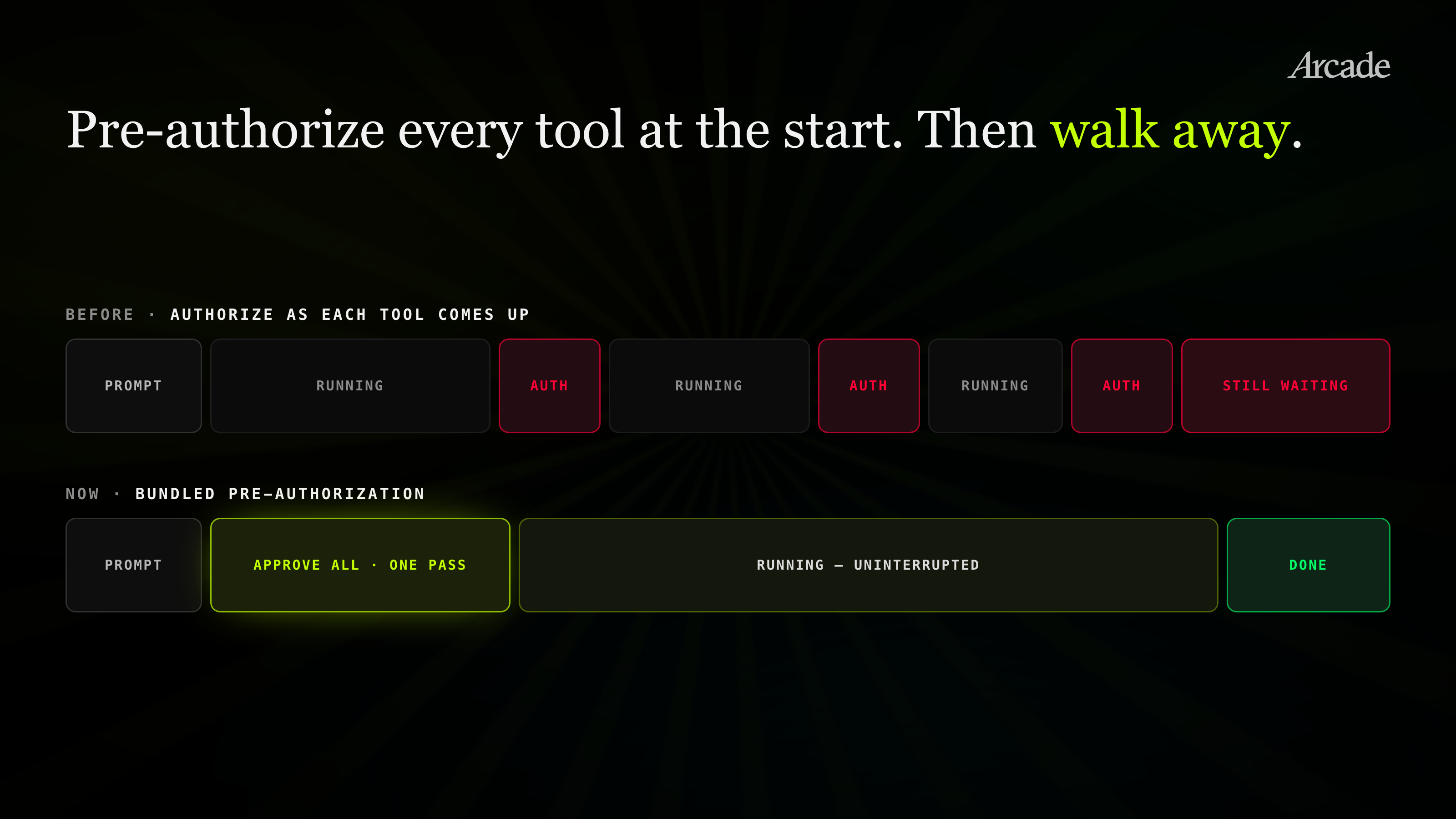
Arcade's bundled pre-authorization collects every consent a job will need in a single approval pass, then still enforces scope per action at runtime. Approvals become a reviewable decision made before work starts rather than a stream of interrupts a user clicks through while an agent is already running.
Keep the vector data plane and the agent runtime inside your own boundary
Pinecone BYOC runs the full data plane in the customer's own AWS, GCP or Azure account with private-networking and KMSKMSAWS Key Management Service, a managed service from Amazon that creates, stores, and controls cryptographic keys so tools can encrypt data without handling raw key material themselves. options; Cursor Self-Hosted Machines runs cloud agents on customer infrastructure via a CLI worker command and auto-scaling pools. Both remove the argument that embeddings or repo-touching agents must leave the account to get managed tooling.
Tighten what a coding agent can reach on the local machine
Codex CLI hardened its macOS sandbox and improved MCPMCPModel Context Protocol, an open standard from Anthropic that lets an AI model call external tools and data sources through a uniform interface, so builders avoid writing custom glue code for every integration. authentication error reporting, so a failing MCP connection reads as an auth problem instead of a silent dead end. Cline's desktop agent plugins now load from a dedicated local directory, giving one place to audit what extension code an agent is executing.
Ask an investigation question of your traces instead of writing the query
Loop investigates traces and logs from natural language in a Braintrust-managed runtime, persists threads across sessions, and adds scheduled Patterns analysis, Topics clustering and a single-trace Debugger. Recurring analysis runs without someone remembering to open the dashboard, and a half-finished investigation survives to the next day.
Three unrelated things stand out today: Pinecone can keep the vector data plane inside your cloud boundary, Arcade lets agents collect OAuthOAuthAn open authorization protocol that lets a user grant a third-party application access to their account on another service without sharing their password, using scoped, revocable tokens instead. approvals before a job blocks, and Browser-use gives teams a controlled terminal surface for browser automation.
govern
Keep managed vector data inside your own cloud account
Pinecone’s BYOCBYOC"Bring Your Own Cloud" — a model where a vendor's software runs inside the customer's own cloud account rather than the vendor's, so the customer's data never leaves their environment. runs the data plane in a customer AWS, GCP, or Azure account, with private networking and KMSKMSAWS Key Management Service, a managed service from Amazon that creates, stores, and controls cryptographic keys so tools can encrypt data without handling raw key material themselves. options. Teams that could not send sensitive embeddings to a vendor-hosted plane get an isolation model that is easier to align with cloud, key-management, and audit requirements.
Approve an agent’s OAuth access before the work starts
Arcade’s bundled pre-authorization clears required OAuthOAuthAn open authorization protocol that lets a user grant a third-party application access to their account on another service without sharing their password, using scoped, revocable tokens instead. consents in one approval pass while keeping per-action enforcement at runtime. That removes the mid-task consent stop-and-start that breaks long agent jobs, without turning the agent loose with blanket access.
Run cloud coding agents on infrastructure you control
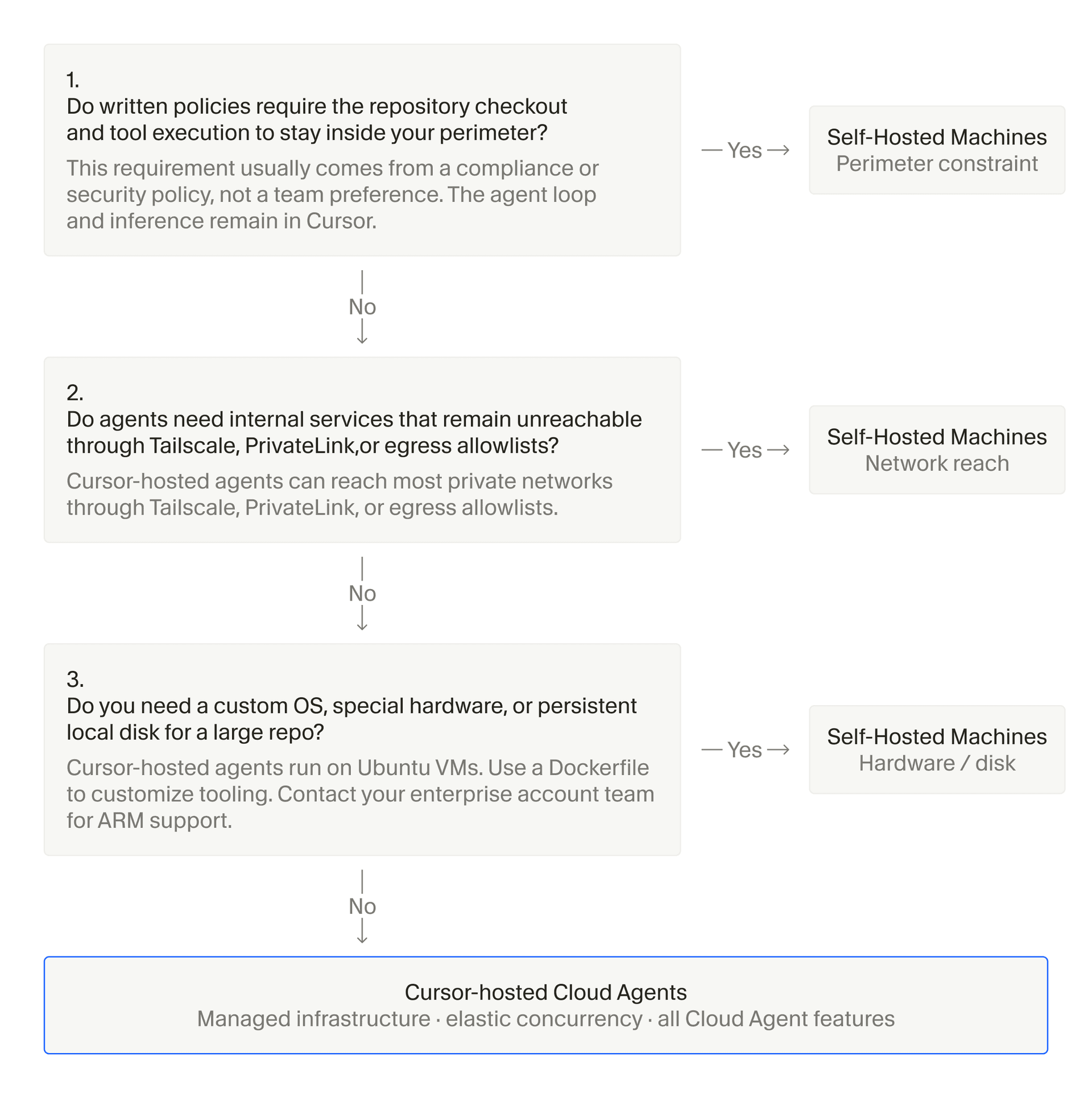
Cursor’s Self-Hosted Machines move cloud-agent execution onto team-managed infrastructure through a CLI worker and auto-scaling pools. For organizations with data residency, egress, or build-secret constraints, agent work can happen closer to the existing control plane instead of in a vendor-run worker.
Give browser agents secrets without pasting them into prompts
Browser-use Terminal adds AI-driven browser automation with secrets support, while Cloud adds 1Password and TOTPTOTPA one-time password algorithm (RFC 6238) that generates short-lived codes from a shared secret and the current time, giving cyber tools phishing-resistant second-factor authentication without a server round-trip. auto-fill. That gives teams a cleaner way to automate authenticated browser workflows without teaching users to copy credentials or one-time codes into an agent transcript.
xalgorix added native Z.AI (Zhipu GLM) provider support, a one-call SSTI verification function covering multiple template engines, and a new whitebox benchmark challenge for JavaScript RCE detection.
The xalgorix platform runs AI pentesting agents for reconnaissance, vulnerability detection, and exploitation workflows.
xalgorix added native Z.AI (Zhipu GLM) provider support, a one-call SSTI verification function covering multiple template engines, and a new whitebox benchmark challenge for JavaScript RCE detection.
└──▷ WHAT SHIPPED · 3 FEATURESmost completely described firstwhat's the number?
Each feature carries 0–100 for how completely the vendor documented it — not how big or important the work is. A major capability described in eight words scores low, and that is the finding.
depth0–40what it does and how it works or what changed
specificity0–30names real surfaces — APIs, flags, formats, limits, numbers
actionability0–30enough to go use it — a named endpoint, flag, or config key tops this; a UI path is a starting point
Code and config rank first by construction: a documented endpoint, flag or config key scores at the top of specificity and actionability, so it sorts above a feature described only in prose. Under60 the notes go thin — everything below the “thinner coverage” line is thinner documentation, not smaller work. Hover any meter for that feature's three sub-scores.
01
SSTI confirmation via verify_sstiNEW95how completely this was documenteddepth35/40specificity30/30actionability30/3095 / 100
Adds verify_ssti, accepting a hypothesis_id (or url) plus parameter, to confirm server-side template injection via randomized operands — {{a*b}} for Jinja2/Twig/Nunjucks and ${a*b} for Freemarker/JSP-EL/Velocity — proving evaluation when the computed product appears in the probe response but not the baseline. On confirmation it records exploit-proven evidence in the ledger and has the agent report High CWE-1336, mirroring the existing verify_sqli / verify_xss / verify_oob workflow; it respects scan session auth, rate policy, cancellation, scope-checking on internal host resolution, and is disabled in passive mode.
Confirm a suspected SSTI finding from the ledger and have the agent record it as High CWE-1336 evidence.
— Runnable function calls, exact operands, and severity/CWE mapping given.v4.6.35
02
Z.AI (Zhipu GLM) provider supportNEW80how completely this was documenteddepth30/40specificity30/30actionability20/3080 / 100
Adds the Z.AI (standard API) provider (https://api.z.ai/api/paas/v4) and Z.AI Coding Plan provider (https://api.z.ai/api/coding/paas/v4), both selectable in first-run setup and Settings → LLM provider list and authenticated by API key. glm-* model IDs are routed to Z.AI automatically, and any-case GLM IDs are normalised to lowercase before sending (e.g. GLM-5.3 → glm-5.3) so newly released model IDs aren't rejected as Z.AI's catalog evolves.
— Names endpoints and routing rule, but only a UI path to act on.v4.6.43
thinner coverage below
03
Node/Express RCE whitebox benchmarkNEW50how completely this was documenteddepth25/40specificity20/30actionability5/3050 / 100
Adds whitebox-node-rce benchmark challenge — a Node/Express app.js with an unlinked app.get('/internal/ping') route whose handler calls child_processexec('ping -c1 ' + host) — to validate that the source-to-runtime bridge can recognize JS command-exec sinks, correlate them to Express route declarations, probe unlinked routes, and confirm RCE via injected command output.
— Explains mechanism of the test case but gives no direct usage.v4.6.38
ⓘSourcesRelease page →1 RELEASE · seen 2026-09-04NOTES ↗alsoWhy this ranktop features scored 80/70/50, +10 product media, +6 runnable example — 82.67How ranking works →
Warp shipped file-overwrite support for its create_file agent tool, debug-agent access into failed cloud runs, and richer oz run transcript retrieval, alongside dual GitHub/GitLab credential handling and several agent-conversation UI refinements.
Warp is an AI terminal that runs commands and helps developers build software.
Warp shipped file-overwrite support for its create_file agent tool, debug-agent access into failed cloud runs, and richer oz run transcript retrieval, alongside dual GitHub/GitLab credential handling and several agent-conversation UI refinements.
└──▷ WHAT SHIPPED · 8 FEATURESmost completely described firstwhat's the number?
Each feature carries 0–100 for how completely the vendor documented it — not how big or important the work is. A major capability described in eight words scores low, and that is the finding.
depth0–40what it does and how it works or what changed
specificity0–30names real surfaces — APIs, flags, formats, limits, numbers
actionability0–30enough to go use it — a named endpoint, flag, or config key tops this; a UI path is a starting point
Code and config rank first by construction: a documented endpoint, flag or config key scores at the top of specificity and actionability, so it sorts above a feature described only in prose. Under60 the notes go thin — everything below the “thinner coverage” line is thinner documentation, not smaller work. Hover any meter for that feature's three sub-scores.
01
Transcript retrieval for third-party harness runsIMPROVED80how completely this was documenteddepth25/40specificity25/30actionability30/3080 / 100
oz run get --conversation and oz run conversation get now print the raw conversation transcript for third-party harness runs, instead of returning operation_not_supported as before.
Retrieve the raw conversation transcript from a third-party harness run that previously returned operation_not_supported.
$ oz run conversation get <run-id>
Retrieve the raw conversation transcript from a third-party harness run that previously returned an unsupported-operation error.
Overwrite support in create_file toolIMPROVED70how completely this was documenteddepth25/40specificity20/30actionability25/3070 / 100
The create_file tool now accepts allow_overwrite: true, letting an agent fully replace an existing file's contents in one step instead of failing and requiring a separate edit operation.
Debug agent for failed cloud runsNEW50how completely this was documenteddepth25/40specificity15/30actionability10/3050 / 100
Adds the ability to start a debug agent inside the retained session of a cloud run that failed during environment setup, preserving the original failure record for inspection.
Specific MCP connection failure reasonsIMPROVED45how completely this was documenteddepth20/40specificity15/30actionability10/3045 / 100
Cloud agents now report the specific reason an MCP server failed to connect — rejected credential or unavailable secret — instead of prompting desktop authentication.
Agent conversation UI polish for timestamps and thoughtsIMPROVED45how completely this was documenteddepth15/40specificity15/30actionability15/3045 / 100
Hovering over the profile icon on user messages in agent conversations now shows message timestamps with a 'Copy timestamp' option in the overflow menu, and text inside 'Thought' dropdowns in agent conversations can now be selected and copied.
Daytona provisions isolated development sandboxes for AI coding agents through an API and SDK.
Daytona shipped a CLI/SDK command for listing organization members alongside consistent daemon error handling, and added support for running Cursor Self-Hosted Machines inside Daytona sandboxes.
└──▷ WHAT SHIPPED · 3 FEATURESmost completely described firstwhat's the number?
Each feature carries 0–100 for how completely the vendor documented it — not how big or important the work is. A major capability described in eight words scores low, and that is the finding.
depth0–40what it does and how it works or what changed
specificity0–30names real surfaces — APIs, flags, formats, limits, numbers
actionability0–30enough to go use it — a named endpoint, flag, or config key tops this; a UI path is a starting point
Code and config rank first by construction: a documented endpoint, flag or config key scores at the top of specificity and actionability, so it sorts above a feature described only in prose. Under60 the notes go thin — everything below the “thinner coverage” line is thinner documentation, not smaller work. Hover any meter for that feature's three sub-scores.
01
Cursor Self-Hosted Machines integrationNEW90how completely this was documenteddepth35/40specificity30/30actionability25/3090 / 100
Daytona sandboxes now support Cursor Self-Hosted Machines, letting Cursor Cloud Agent workers run inside Daytona sandboxes instead of Cursor-hosted machines, using Linux containers, Linux VMs via the daytona-vm-medium snapshot, or Windows VMs via the windows-medium snapshot. Each agent request gets its own isolated sandbox created on demand from a defined snapshot, with the repository set as the workspace origin and a Cursor-minted short-lived GitHub token used for checkout so no long-lived credentials are stored in the snapshot. Three sandbox classes are supported per pool — Linux containers built from an included Dockerfile, Linux VMs from daytona-vm-medium, and Windows VMs from windows-medium — with pools defined per-snapshot. The controller ships in the lab channel of the Cursor CLI and requires a Cursor Enterprise team with a service-account API key.
The first AI coding agent that learns your coding taste. Powered by taste-1, a meta neuro-symbolic model.
Command Code expanded its model lineup with Gemini, Meta Muse Spark, and vision-capable Grok options, and taught read_file to convert Office, PDF, and e-book documents to Markdown, alongside browser-based sign-in and smaller UX polish.
└──▷ WHAT SHIPPED · 5 FEATURESmost completely described firstwhat's the number?
Each feature carries 0–100 for how completely the vendor documented it — not how big or important the work is. A major capability described in eight words scores low, and that is the finding.
depth0–40what it does and how it works or what changed
specificity0–30names real surfaces — APIs, flags, formats, limits, numbers
actionability0–30enough to go use it — a named endpoint, flag, or config key tops this; a UI path is a starting point
Code and config rank first by construction: a documented endpoint, flag or config key scores at the top of specificity and actionability, so it sorts above a feature described only in prose. Under60 the notes go thin — everything below the “thinner coverage” line is thinner documentation, not smaller work. Hover any meter for that feature's three sub-scores.
01
read_file converts Office and PDF documents to MarkdownNEW88how completely this was documenteddepth35/40specificity28/30actionability25/3088 / 100
The read_file command now reads Word, PowerPoint, Excel, OpenDocument, RTF, EPUB, and PDF documents, converting them to Markdown with windowed delivery for both single and multi-file reads. Scanned PDFs are handled by identifying image-only pages by name and emitting the pdftoppm command needed to render them, and the document converter installs on-demand into the user cache on first use rather than shipping bundled with the CLI.
Extract content from a mixed Office/PDF corpus into Markdown for analysis in a single pass.
Superset's latest releases add session tag folders and a unified Changes surface with an integrated ship flow, introduce environments as the starting point for cloud workspaces with an auto-launched built-in agent, and expand the model picker with GPT-6 Astra, Claude Fable 5.1 and Codex max/ultra reasoning tiers.
Superset is an agentic IDE to orchestrate 100+ coding agents in parallel. Run any agent with your own subscription.
Superset's latest releases add session tag folders and a unified Changes surface with an integrated ship flow, introduce environments as the starting point for cloud workspaces with an auto-launched built-in agent, and expand the model picker with GPT-6 Astra, Claude Fable 5.1 and Codex max/ultra reasoning tiers.
└──▷ WHAT SHIPPED · 14 FEATURESmost completely described firstwhat's the number?
Each feature carries 0–100 for how completely the vendor documented it — not how big or important the work is. A major capability described in eight words scores low, and that is the finding.
depth0–40what it does and how it works or what changed
specificity0–30names real surfaces — APIs, flags, formats, limits, numbers
actionability0–30enough to go use it — a named endpoint, flag, or config key tops this; a UI path is a starting point
Code and config rank first by construction: a documented endpoint, flag or config key scores at the top of specificity and actionability, so it sorts above a feature described only in prose. Under60 the notes go thin — everything below the “thinner coverage” line is thinner documentation, not smaller work. Hover any meter for that feature's three sub-scores.
01
Session tag folders in desktop sidebarNEW65how completely this was documenteddepth25/40specificity15/30actionability25/3065 / 100
Groups sessions into tag folders in the desktop sidebar, with tag groups supporting a name and colour. Folders can be renamed via right-click, entering a new name and picking a colour to distinguish them from other groups.
Organise long-running sessions by feature area so the sidebar stays scannable across projects.
📍In the desktop sidebar, right-click a Sessions tag folder → Rename, enter a name and pick a colour to distinguish it from other groups.
— Concrete UI mechanism with exact rename steps given.desktop-v1.26.0
02
New models and reasoning tiers in model pickerNEW65how completely this was documenteddepth20/40specificity25/30actionability20/3065 / 100
Adds GPT-6 Astra to the Codex model picker and pricing table, adds Claude Fable 5.1 to the model pickers and pricing table, and offers Codex max and ultra reasoning efforts in the agent model picker.
Switch to a higher reasoning tier for a complex refactor task without leaving the agent panel.
📍In the Codex agent panel, open the model picker → select 'max' or 'ultra' under Reasoning effort, then submit your prompt.
— Named models and reasoning tiers, with selection steps.desktop-v1.26.0
thinner coverage below
03
Environments as cloud workspace starting pointNEW50how completely this was documenteddepth25/40specificity15/30actionability10/3050 / 100
Introduces environments as the starting point for cloud workspaces, with a built-in agent launched automatically on cloud workspace creation.
— Mechanism described but no navigation path given.desktop-v1.26.0
04
Fork environment variable passthroughIMPROVED50how completely this was documenteddepth20/40specificity20/30actionability10/3050 / 100
Forks now carry their environment variables on the fork request via @blaxel/core 0.3.19.
— Named dependency version but no usage steps.cli-v1.26.0
05
Unified Changes surface with ship flowIMPROVED45how completely this was documenteddepth20/40specificity15/30actionability10/3045 / 100
Moves the changed-files list into the right sidebar with an integrated top-bar ship flow for a unified Changes surface.
— UI restructure described without exact navigation.desktop-v1.26.0
06
Leaderboard rank card in Usage settingsNEW40how completely this was documenteddepth10/40specificity10/30actionability20/3040 / 100
Adds a leaderboard rank card on Settings → Usage, showing team leaderboard standing.
Check your team leaderboard standing after a productive coding session.
📍In the desktop app, go to Settings → Usage and view the leaderboard rank card.
— Thin description but exact navigation path given.desktop-v1.26.0
07
Copy Workspace ID context menu actionNEW40how completely this was documenteddepth10/40specificity15/30actionability15/3040 / 100
Adds 'Copy Workspace ID' to the workspace sidebar context menu for quick access to workspace identifiers.
— Simple addition with exact UI location given.desktop-v1.26.0
08
Avatar and logo storage moved to R2IMPROVED40how completely this was documenteddepth20/40specificity15/30actionability5/3040 / 100
Serves avatars and logos from R2 with resizing at upload time, replacing Vercel Blob.
— Names infra change but no user-facing action.desktop-v1.26.0
09
MRR admin tile cache refreshNEW40how completely this was documenteddepth15/40specificity15/30actionability10/3040 / 100
Adds a refresh button to the MRR admin tile that breaks the cache.
— Internal admin feature with minimal detail.desktop-v1.26.0
10
SDK and CLI usage telemetryNEW35how completely this was documenteddepth15/40specificity15/30actionability5/3035 / 100
Adds SDK usage telemetry and client identity headers for the SDK and CLI.
— Names surfaces but gives no usage instructions.desktop-v1.26.0
11
Project sort and filter controlsNEW30how completely this was documenteddepth10/40specificity10/30actionability10/3030 / 100
Adds sort and filter controls for projects in the dashboard sidebar.
— Bare description without further location detail.desktop-v1.26.0
12
Downloads marketing page rebuildIMPROVED30how completely this was documenteddepth10/40specificity10/30actionability10/3030 / 100
Rebuilds the /download marketing page as a real downloads page.
— Names page path but gives no further detail.desktop-v1.26.0
13
Workspace board card UI refreshIMPROVED15how completely this was documenteddepth5/40specificity5/30actionability5/3015 / 100
Refreshes workspace board card UI for a cleaner layout.
— Vague description with no concrete specifics.cli-v1.26.0
14
App locale tracking in analyticsNEW15how completely this was documenteddepth10/40specificity5/30actionability0/3015 / 100
Tracks app locale in analytics events and records language changes.
— Analytics-only change with no actionable surface.desktop-v1.26.0
Codex CLI's latest alpha and patch releases roll out GPT-6-Astra model support across the API, bundled catalog, and Amazon Bedrock, alongside a new Guardian thread-context flag, a hardened macOS sandbox, and improved MCP status and authentication error reporting.
OpenAI Codex CLI runs an agent in the terminal that reads, changes, and tests code in local repositories.
Codex CLI's latest alpha and patch releases roll out GPT-6-Astra model support across the API, bundled catalog, and Amazon Bedrock, alongside a new Guardian thread-context flag, a hardened macOS sandbox, and improved MCP status and authentication error reporting.
└──▷ WHAT SHIPPED · 9 FEATURESmost completely described firstwhat's the number?
Each feature carries 0–100 for how completely the vendor documented it — not how big or important the work is. A major capability described in eight words scores low, and that is the finding.
depth0–40what it does and how it works or what changed
specificity0–30names real surfaces — APIs, flags, formats, limits, numbers
actionability0–30enough to go use it — a named endpoint, flag, or config key tops this; a UI path is a starting point
Code and config rank first by construction: a documented endpoint, flag or config key scores at the top of specificity and actionability, so it sorts above a feature described only in prose. Under60 the notes go thin — everything below the “thinner coverage” line is thinner documentation, not smaller work. Hover any meter for that feature's three sub-scores.
01
Guardian thread context flagNEW80how completely this was documenteddepth30/40specificity30/30actionability20/3080 / 100
Adds the guardian_thread_context feature flag (disabled by default) to the configuration schema, enabling thread-owned context for Guardian reviewers with persistent verified question-and-answer pairs that survive compaction, resume, and rollback.
GPT-6-Astra model supportNEW75how completely this was documenteddepth30/40specificity30/30actionability15/3075 / 100
GPT-6-Astra was added to the bundled model catalog and made accessible via the API with its own prompts, policies, and unified_exec shell type, without becoming the visible default model or appearing in the model picker. It was also added to the Amazon Bedrock model catalog as openai.gpt-6-astra, including global and US cross-region variants in the Bedrock Runtime catalog.
MCP server status and auth error reportingIMPROVED75how completely this was documenteddepth30/40specificity30/30actionability15/3075 / 100
MCP tool discovery errors are now surfaced directly in server status and the tool UI. MCP 401 Unauthorized responses carrying WWW-Authenticate headers are converted into tool errors with mcp/www_authenticate metadata, preserving authentication challenges for interactive login flows.
macOS Seatbelt sandbox TIOCSTI hardeningIMPROVED65how completely this was documenteddepth30/40specificity25/30actionability10/3065 / 100
Hardens the macOS Seatbelt sandbox against terminal input injection by denying the TIOCSTI ioctl, preventing a sandboxed child process from queuing input into the parent shell.
— Names exact ioctl and attack vector; automatic, no user action.rust-v0.154.0-alpha.2
thinner coverage below
05
Noise handshake bound to init timeoutIMPROVED55how completely this was documenteddepth25/40specificity20/30actionability10/3055 / 100
Bounds Noise protocol handshakes by the exec server initialization timeout, sharing the same configured duration across both the handshake and the JSON-RPC initialize request.
Independent executor–verifier orchestration for software changes.
Zeroshot v6.47.0 introduces run profiles and source issue delivery, expanding how executor-verifier runs can be configured and triggered.
└──▷ WHAT SHIPPED · 2 FEATURESmost completely described firstwhat's the number?
Each feature carries 0–100 for how completely the vendor documented it — not how big or important the work is. A major capability described in eight words scores low, and that is the finding.
depth0–40what it does and how it works or what changed
specificity0–30names real surfaces — APIs, flags, formats, limits, numbers
actionability0–30enough to go use it — a named endpoint, flag, or config key tops this; a UI path is a starting point
Code and config rank first by construction: a documented endpoint, flag or config key scores at the top of specificity and actionability, so it sorts above a feature described only in prose. Under60 the notes go thin — everything below the “thinner coverage” line is thinner documentation, not smaller work. Hover any meter for that feature's three sub-scores.
01
Run profiles for executionsNEW20how completely this was documenteddepth10/40specificity5/30actionability5/3020 / 100
Adds run profiles, a new way to configure Zeroshot runs, though the mechanism and configuration surface are not detailed in the release notes.
— Named but no mechanism, config keys, or usage shownv6.47.0
02
Source issue deliveryNEW20how completely this was documenteddepth10/40specificity5/30actionability5/3020 / 100
Adds source issue delivery capability, allowing issues to be delivered from source, but no further detail on format, trigger, or destination is given.
— Named but no mechanism or usage detail providedv6.47.0
Claude Code v2.1.260 introduces a live diff panel for fullscreen coding sessions and prompt-cache-miss diagnostics, extends /advisor and adds /reload-plugins to headless and SDK sessions, and adds new Claude apps gateway configuration keys, alongside a batch of timeout, sandbox, and Bedrock token-accounting refinements.
Claude Code is an agentic coding tool that lives in your terminal, understands your codebase, and helps you code faster by executing routine tasks, explaining complex code, and handling git workflows - all through natural language commands.
Claude Code v2.1.260 introduces a live diff panel for fullscreen coding sessions and prompt-cache-miss diagnostics, extends /advisor and adds /reload-plugins to headless and SDK sessions, and adds new Claude apps gateway configuration keys, alongside a batch of timeout, sandbox, and Bedrock token-accounting refinements.
└──▷ WHAT SHIPPED · 13 FEATURESmost completely described firstwhat's the number?
Each feature carries 0–100 for how completely the vendor documented it — not how big or important the work is. A major capability described in eight words scores low, and that is the finding.
depth0–40what it does and how it works or what changed
specificity0–30names real surfaces — APIs, flags, formats, limits, numbers
actionability0–30enough to go use it — a named endpoint, flag, or config key tops this; a UI path is a starting point
Code and config rank first by construction: a documented endpoint, flag or config key scores at the top of specificity and actionability, so it sorts above a feature described only in prose. Under60 the notes go thin — everything below the “thinner coverage” line is thinner documentation, not smaller work. Hover any meter for that feature's three sub-scores.
01
/advisor available in headless sessionsNEW85how completely this was documenteddepth25/40specificity30/30actionability30/3085 / 100
A text form of /advisor is now usable in the desktop app, Remote Control, and headless sessions (-p / Agent SDK): /advisor, /advisor <model>, and /advisor off.
Switch the advisor model mid-session in a headless Agent SDK run, or turn it off entirely to reduce token spend.
$ /advisor claude-fable-5-1
# or to disable:
/advisor off
— Exact command forms and surfaces are fully runnablev2.1.260
02
New Claude apps gateway config keysNEW80how completely this was documenteddepth25/40specificity30/30actionability25/3080 / 100
Adds oidc.scope_on_refresh to the Claude apps gateway config for IdPs that only return an id_token on refresh when openid is explicitly requested again, and adds userPluginMarketplacesEnabled and userPluginUploadsEnabled keys to desktop policy blocks in the same config.
— Names all three config keys and their exact purposev2.1.260
03
Bedrock aborted-request token countingIMPROVED80how completely this was documenteddepth30/40specificity30/30actionability20/3080 / 100
On Amazon Bedrock, input tokens for aborted requests are now counted with AWS's free CountTokens API (requires bedrock:CountTokens grant) instead of a one-token request.
— Names API, required grant, and prior behavior explicitlyv2.1.260
04
Prompt-cache-miss diagnostics in /costNEW75how completely this was documenteddepth30/40specificity25/30actionability20/3075 / 100
Adds likely-cause diagnostics for prompt-cache misses (e.g. tool definitions changed, system prompt changed, idle past TTL) to /cost output and the prompt_cache field in the status line.
— Names causes and exact field but no usage examplev2.1.260
05
Bash-mode commands bypass sandbox settingBREAKING70how completely this was documenteddepth25/40specificity25/30actionability20/3070 / 100
Commands typed at the ! bash-mode prompt now run outside the sandbox even when sandbox.allowUnsandboxedCommands: false is set.
— Exact config key named; overrides a prior safety guaranteev2.1.260
06
Self-hosted runner session timeout behaviorIMPROVED70how completely this was documenteddepth25/40specificity25/30actionability20/3070 / 100
The self-hosted runner's --kill-session-after-min flag now releases sessions waiting on user input (paused/resumable) rather than killing them and reporting failure.
— Exact flag and before/after behavior are givenv2.1.260
07
Longer wait for /ultrareview cloud reviewsIMPROVED70how completely this was documenteddepth20/40specificity25/30actionability25/3070 / 100
/ultrareview and claude ultrareview now wait up to 45 minutes (previously 30) for long-running cloud reviews.
— Exact commands and old/new timeout values givenv2.1.260
08
Auto-compact improvements for 1M-context modelsIMPROVED70how completely this was documenteddepth30/40specificity25/30actionability15/3070 / 100
For 1M-context models, Opus and Fable sessions now compact shortly before the 1M-token limit, and recovery compaction on very large contexts no longer times out at 10 minutes.
— Names models and limits but no direct user actionv2.1.260
09
Fullscreen transcript clear shortcutIMPROVED65how completely this was documenteddepth20/40specificity20/30actionability25/3065 / 100
ctrl+l / cmd+k in fullscreen mode now clears the transcript view like a terminal clear, with earlier messages still accessible by scrolling up.
— Exact shortcut and resulting behavior are namedv2.1.260
10
Live diff panel in fullscreen modeNEW60how completely this was documenteddepth20/40specificity15/30actionability25/3060 / 100
A live diff panel now shows uncommitted changes as Claude edits code in fullscreen mode, toggled with /diff.
Watch your uncommitted changes in real time alongside Claude's edits during a fullscreen coding session.
$ /diff
— Names the toggle command but little mechanism beyond thatv2.1.260
thinner coverage below
11
Managed CLAUDE.md skips approval dialogIMPROVED55how completely this was documenteddepth20/40specificity20/30actionability15/3055 / 100
Server-managed claudeMd settings mean a managed CLAUDE.md no longer triggers the security approval dialog.
— Names the setting but gives no further mechanismv2.1.260
12
/reload-plugins added to headless sessionsNEW50how completely this was documenteddepth15/40specificity15/30actionability20/3050 / 100
/reload-plugins is now available in headless sessions and is listed in the Claude Code Desktop and SDK command lists.
— Bare command addition with no further mechanism givenv2.1.260
13
VSCode extension footer and session filter updatesIMPROVED50how completely this was documenteddepth15/40specificity20/30actionability15/3050 / 100
The VSCode extension adds the selected effort level to the footer model pill and adds 'Open' and 'Closed' options to the session list status filter menu.
— Names UI elements but gives minimal mechanismv2.1.260
Goose v1.49.0 adds a --system flag for interactive sessions, new hook lifecycle events for extension developers, built-in web-search and browser-use skills, and eight new model providers, alongside desktop app packaging updates and chat UI refinements.
Goose is an open-source AI agent with a desktop app and CLI for coding and other automated tasks.
Goose v1.49.0 adds a --system flag for interactive sessions, new hook lifecycle events for extension developers, built-in web-search and browser-use skills, and eight new model providers, alongside desktop app packaging updates and chat UI refinements.
└──▷ WHAT SHIPPED · 13 FEATURESmost completely described firstwhat's the number?
Each feature carries 0–100 for how completely the vendor documented it — not how big or important the work is. A major capability described in eight words scores low, and that is the finding.
depth0–40what it does and how it works or what changed
specificity0–30names real surfaces — APIs, flags, formats, limits, numbers
actionability0–30enough to go use it — a named endpoint, flag, or config key tops this; a UI path is a starting point
Code and config rank first by construction: a documented endpoint, flag or config key scores at the top of specificity and actionability, so it sorts above a feature described only in prose. Under60 the notes go thin — everything below the “thinner coverage” line is thinner documentation, not smaller work. Hover any meter for that feature's three sub-scores.
01
--system flag for goose sessionNEW85how completely this was documenteddepth25/40specificity30/30actionability30/3085 / 100
Adds a --system flag to goose session that injects an additional system prompt, giving interactive sessions the same customization goose run already had.
Inject a custom system prompt into an interactive session to constrain the agent's behavior for a specific engagement.
$ goose session --system 'You are a penetration tester. Limit all responses to findings in scope for the current project.'
— Named flag with a runnable example command.v1.49.0
02
Hook lifecycle events for extension developersNEW65how completely this was documenteddepth25/40specificity25/30actionability15/3065 / 100
Adds an on_failure block for PreToolUse hooks enabling fallback behavior when a pre-tool check fails, a new PreToolUseResult event, and a stable tool_call_id propagated across the full tool lifecycle for hook authors and extension developers.
— Names specific hook fields but gives no usage example.v1.49.0
03
Model support updates: GLM-5.3, GPT-5.6, ACP thinking-effortIMPROVED60how completely this was documenteddepth20/40specificity30/30actionability10/3060 / 100
Adds Z.ai GLM-5.3, replacing GLM-5.2; adds OpenAI GPT-5.6 (sol/terra/luna) via Bedrock; adds GPT-5.6 follow-up support for Codex and the Responses API; and adds ACP thinking-effort derivation and forwarding to downstream providers.
— Names specific models and APIs but no setup steps.v1.49.0
04
Chat interface and session management improvementsIMPROVED60how completely this was documenteddepth20/40specificity25/30actionability15/3060 / 100
Adds an interactive git branch indicator in the chat bottom bar; sessions are now titled by subject rather than workflow step; scheduled job sessions are collapsed into an accordion in chat history; the chat footer model picker now shows recently used models; configured providers are sorted to the top of the provider list; and saved recipes can now be selected when creating a schedule.
— Lists concrete UI changes but no navigation paths given.v1.49.0
thinner coverage below
05
Observability and request attribution improvementsIMPROVED55how completely this was documenteddepth20/40specificity25/30actionability10/3055 / 100
Adds OTEL request params, response metadata, tool-call parity, and agent identification to observability output; also adds OpenRouter session_id forwarding and an app category header for improved request attribution.
— Lists named signals but no configuration instructions.v1.49.0
06
New model providers addedNEW55how completely this was documenteddepth15/40specificity30/30actionability10/3055 / 100
Adds new providers: Opper (declarative OpenAI-compatible), Databricks Unity Catalog model services discovery, TrustedRouter (declarative), OpenCode Zen gateway (declarative), Gondola (declarative OpenAI-compatible), SayGM (declarative OpenAI-compatible), Lynkr (declarative OpenAI-compatible), and PleumRouter (declarative).
— Names each provider but no configuration detail given.v1.49.0
07
Named inline extensions via --with-extensionNEW50how completely this was documenteddepth15/40specificity20/30actionability15/3050 / 100
Adds --with-extension name assignment so inline extensions can be referenced by name.
— Names the flag but gives no example invocation.v1.49.0
08
Pre-registered OAuth clients for streamable_http extensionsIMPROVED50how completely this was documenteddepth20/40specificity20/30actionability10/3050 / 100
Adds pre-registered OAuth clients for streamable_http extensions, removing the need for per-session client registration.
— Names the surface and behavior change, no setup steps.v1.49.0
09
Linux ARM64 packages and desktop auto-updaterNEW45how completely this was documenteddepth15/40specificity20/30actionability10/3045 / 100
Releases Linux ARM64 desktop packages and adds an auto-updater for the desktop application.
— Names the platform and feature, no rollout detail.v1.49.0
10
Web-search and browser-use built-in skillsNEW40how completely this was documenteddepth15/40specificity15/30actionability10/3040 / 100
Adds web-search and browser-use as built-in skills, available without needing an external extension.
— States the capability with no mechanism or setup detail.v1.49.0
11
Background extension loading on CLI startupIMPROVED40how completely this was documenteddepth20/40specificity10/30actionability10/3040 / 100
Loads extensions in the background so the CLI prompt is immediately usable on startup.
— Describes behavior change but gives no metrics.v1.49.0
12
Model-native audio transcription for voice inputNEW25how completely this was documenteddepth10/40specificity10/30actionability5/3025 / 100
Adds a model-native audio transcription provider enabling voice input.
— Bare description with no mechanism or usage detail.v1.49.0
13
Custom provider cost tracking fieldsNEW25how completely this was documenteddepth10/40specificity10/30actionability5/3025 / 100
Adds custom provider cost fields for cost tracking.
— Minimal detail, no field names or usage given.v1.49.0
Cline desktop v0.0.23 introduces an Agent Plugin system discovered from a dedicated local directory, alongside sign-in confirmation codes and smarter update dialogs.
Autonomous coding agent as an SDK, IDE extension, or CLI assistant.
Cline desktop v0.0.23 introduces an Agent Plugin system discovered from a dedicated local directory, alongside sign-in confirmation codes and smarter update dialogs.
└──▷ WHAT SHIPPED · 4 FEATURESmost completely described firstwhat's the number?
Each feature carries 0–100 for how completely the vendor documented it — not how big or important the work is. A major capability described in eight words scores low, and that is the finding.
depth0–40what it does and how it works or what changed
specificity0–30names real surfaces — APIs, flags, formats, limits, numbers
actionability0–30enough to go use it — a named endpoint, flag, or config key tops this; a UI path is a starting point
Code and config rank first by construction: a documented endpoint, flag or config key scores at the top of specificity and actionability, so it sorts above a feature described only in prose. Under60 the notes go thin — everything below the “thinner coverage” line is thinner documentation, not smaller work. Hover any meter for that feature's three sub-scores.
01
Agent Plugin discovery via ~/.agents/pluginsNEW90how completely this was documenteddepth35/40specificity30/30actionability25/3090 / 100
Cline discovers and runs Agent Plugins from ~/.agents/plugins, validating each plugin's plugin.json, exposing Agent Skills to the agent, and auto-starting stdio / Streamable HTTP / SSE MCP servers. Plugins are listed separately from Cline Plugins under Settings → Customize with descriptions, badges, contributed tools, and per-plugin enable/disable managed by the Hub; workspace-level .agents/plugins directories are intentionally ignored, so only the home-directory path is discovered.
— Names exact config path, file, and MCP transport typesdesktop-v0.0.23
02
Smarter Hub update and build-mismatch dialogsIMPROVED60how completely this was documenteddepth30/40specificity20/30actionability10/3060 / 100
Suppresses the 'Cline Hub was updated' dialog when the Hub is running the same core version, and the build-mismatch dialog now waits until an app update is actually staged. Dismissing with 'Later' now persists across session switches, reloads, and relaunches.
— Explains behavior change but no user action beyond dismissingdesktop-v0.0.23
thinner coverage below
03
Device confirmation code shown during sign-inNEW50how completely this was documenteddepth20/40specificity15/30actionability15/3050 / 100
Shows the device confirmation code inside the app during sign-in, in onboarding, Account settings, and the provider list, so users can match it against the browser prompt.
Voice input failures redirect to voice settingsIMPROVED50how completely this was documenteddepth20/40specificity15/30actionability15/3050 / 100
Redirects voice input failures caused by missing credentials or transcription config directly to voice settings instead of showing an unactionable toast.
— Clear behavior described, but thin on mechanismdesktop-v0.0.23
└──▷ BREAKING ON UPGRADE
!Workspace .agents/plugins directories are intentionally ignored by the Hub — only ~/.agents/plugins is discovered.
Bolt.new launched Visual Edits, a click-and-change editing layer that lets users tweak text and styling directly on the rendered app and batch all changes into a single model request.
Get help building with Bolt, an AI tool that turns your ideas into real websites and apps.
Bolt.new launched Visual Edits, a click-and-change editing layer that lets users tweak text and styling directly on the rendered app and batch all changes into a single model request.
└──▷ WHAT SHIPPED · 1 FEATUREmost completely described firstwhat's the number?
Each feature carries 0–100 for how completely the vendor documented it — not how big or important the work is. A major capability described in eight words scores low, and that is the finding.
depth0–40what it does and how it works or what changed
specificity0–30names real surfaces — APIs, flags, formats, limits, numbers
actionability0–30enough to go use it — a named endpoint, flag, or config key tops this; a UI path is a starting point
Code and config rank first by construction: a documented endpoint, flag or config key scores at the top of specificity and actionability, so it sorts above a feature described only in prose. Under60 the notes go thin — everything below the “thinner coverage” line is thinner documentation, not smaller work. Hover any meter for that feature's three sub-scores.
01
Visual Edits click-to-edit layerNEW85how completely this was documenteddepth35/40specificity25/30actionability25/3085 / 100
Visual Edits lets users click any element in the running app to open a per-element toolbar supporting font size (by pixel or size picker), text styling, lists, links, and in-place copy editing; the color picker only offers colors already in use in the app's rendered palette. All approved element changes across a session are batched into a single instruction set sent to the currently selected model in one round trip, rather than one prompt per change. Selected elements show plain-language names instead of raw HTML tags like div and h1, and first use (via the 'Select' button, marked 'new') triggers a one-time walkthrough dismissed per browser. Available to all users on free and paid plans as of September 3, 2026.
Make multiple visual tweaks during a live client review session — resize the headline, recolor the CTA, and rewrite the subhead — then send all changes to the model at once instead of prompting per change.
📍In Bolt.new, click the 'Select' button (marked 'new') › click the headline element › use the toolbar to set font size and color › click the CTA element › pick the brand color from the palette › click the subhead › edit copy in place › review the stacked changes list › click Save to send the full batch to the model.
ⓘSourcesBlog post →1 RELEASE · 2026-09-02BLOG ↗alsoWhy this ranktop features scored 93/65/55, +10 product media, +6 runnable example — 87How ranking works →
Cursor launched Self-Hosted Machines, letting teams run cloud agents on their own infrastructure via a new CLI worker command and auto-scaling worker pools, added native integrations with eight sandbox providers, and extended computer-use support to Linux workers.
Built to make you extraordinarily productive, agents turn ideas into code. Accelerate development by handing off tasks to Cursor.
Cursor launched Self-Hosted Machines, letting teams run cloud agents on their own infrastructure via a new CLI worker command and auto-scaling worker pools, added native integrations with eight sandbox providers, and extended computer-use support to Linux workers.
└──▷ WHAT SHIPPED · 3 FEATURESmost completely described firstwhat's the number?
Each feature carries 0–100 for how completely the vendor documented it — not how big or important the work is. A major capability described in eight words scores low, and that is the finding.
depth0–40what it does and how it works or what changed
specificity0–30names real surfaces — APIs, flags, formats, limits, numbers
actionability0–30enough to go use it — a named endpoint, flag, or config key tops this; a UI path is a starting point
Code and config rank first by construction: a documented endpoint, flag or config key scores at the top of specificity and actionability, so it sorts above a feature described only in prose. Under60 the notes go thin — everything below the “thinner coverage” line is thinner documentation, not smaller work. Hover any meter for that feature's three sub-scores.
01
Self-Hosted Machines with CLI worker registration and poolsNEW93how completely this was documenteddepth35/40specificity28/30actionability30/3093 / 100
Self-Hosted Machines let teams run Cursor cloud agents on their own infrastructure. A machine is registered as a worker with the new agent worker start CLI subcommand, which opens a long-lived outbound HTTPS connection to the Cursor cloud for agent tool execution. Two configurations are supported: 'My Machines' for single-device personal use, and 'Pools' — named queues of workers that auto-scale with demand and can serve any repository from a single pool. This lets cloud agents run on custom hardware such as GPUs, Apple silicon Macs (for iOS/macOS builds), Kubernetes, and other managed VM environments that are impractical to package as a Cursor-hosted Cloud Agent build.
Register a local machine or VM as a self-hosted worker so Cursor cloud agents execute tool calls inside your network instead of on Cursor-hosted infrastructure.
Sandbox provider integrations for Self-Hosted MachinesNEW65how completely this was documenteddepth20/40specificity30/30actionability15/3065 / 100
Adds native integrations with AWS Lambda, Cloudflare, Coder, Daytona, E2B, Modal, Namespace, and Vercel as supported sandbox providers, letting teams host workers on these platforms without building a custom sandbox layer.
Computer-use support extended to Linux workersIMPROVED55how completely this was documenteddepth25/40specificity20/30actionability10/3055 / 100
Computer-use support — browser control via Chrome or Chromium, including clicking, screenshots, and desktop observation — is now available on Linux workers, having previously only worked on Mac.
ⓘSourcesBlog post →1 RELEASE · 2026-09-02BLOG ↗leadWhy this ranktop features scored 80/80/65, +10 product media, +6 runnable example — 91How ranking works →
OpenHands is an open-source software-development agent that writes code, runs commands, and browses the web.
OpenHands' Agent Canvas update (v1.9.0–v1.16.0) introduces a beta app platform for custom pages and tools, adds shared Provider Connections and Git-synced automation definitions, and brings live run status, cost tracking, and a dedicated dashboard to automations, alongside child-conversation workflows and expanded desktop support.
└──▷ WHAT SHIPPED · 13 FEATURESmost completely described firstwhat's the number?
Each feature carries 0–100 for how completely the vendor documented it — not how big or important the work is. A major capability described in eight words scores low, and that is the finding.
depth0–40what it does and how it works or what changed
specificity0–30names real surfaces — APIs, flags, formats, limits, numbers
actionability0–30enough to go use it — a named endpoint, flag, or config key tops this; a UI path is a starting point
Code and config rank first by construction: a documented endpoint, flag or config key scores at the top of specificity and actionability, so it sorts above a feature described only in prose. Under60 the notes go thin — everything below the “thinner coverage” line is thinner documentation, not smaller work. Hover any meter for that feature's three sub-scores.
01
Canvas Apps Beta for custom pages and toolsNEW80how completely this was documenteddepth35/40specificity20/30actionability25/3080 / 100
Canvas Apps Beta (v1.16.0) lets teams add custom pages and browser-based tools to Agent Canvas that make authenticated HTTP requests to the active Agent Server. Apps are managed per backend and installed as disabled by default so the source can be inspected before enabling.
Install a Canvas App in beta to add a custom internal dashboard to Agent Canvas without modifying the core application.
📍In Agent Canvas, go to Apps, click Install App, paste the app source or manifest URL, inspect the resolved revision and contributed pages, then click Enable only after reviewing the trusted code.
Provider Connections for shared LLM credentialsNEW80how completely this was documenteddepth35/40specificity20/30actionability25/3080 / 100
Provider Connections store a provider key and optional base URL once, letting multiple LLM profiles share credentials; profiles show when a linked connection is missing.
Set up a Provider Connection so multiple LLM profiles share one API key, making key rotation a single operation.
📍In Agent Canvas, go to Settings › Provider Connections, click Add Connection, enter the provider key and optional base URL, then reference the connection in each LLM profile.
Live automation run phases and exportsIMPROVED65how completely this was documenteddepth30/40specificity25/30actionability10/3065 / 100
Automation cards, Home, and the Activity Log now display live PENDING, RUNNING, or FAILED phases; those phases are also included in CSV and JSON exports.
Automation discovery, import review, and dashboardNEW65how completely this was documenteddepth25/40specificity20/30actionability20/3065 / 100
A recommended rail on the new-conversation page surfaces automation templates before users need to search. Recommended automations can now define form fields (such as repository or workflow-specific configuration) so users configure them without a setup conversation. Imported automations now show their name, trigger, prompt, and plugins before they can be enabled. An automation dashboard brings run activity, failures, durations, details, and recent trends into one operational view.
Review an imported automation's trigger and prompt before enabling it, to enforce a trust-first workflow for new automations.
📍In Agent Canvas, go to Automations › Imported, select the automation, review its name, trigger, prompt, and plugins, then click Enable.
Automation Git SyncNEW55how completely this was documenteddepth30/40specificity15/30actionability10/3055 / 100
Automation Git Sync mirrors automation definitions to a private Git repository so workflows are portable across OpenHands installations and reviewable over time.
Markdown previews and clickable file links in chatIMPROVED50how completely this was documenteddepth20/40specificity15/30actionability15/3050 / 100
Markdown files now render as rich previews in the conversation with a one-click link to open in the Files drawer; all other files mentioned in chat are clickable and open in the Files panel.
Context meter and usage drawerNEW50how completely this was documenteddepth25/40specificity15/30actionability10/3050 / 100
Adds a context meter and usage drawer showing remaining context, token usage, and cost as a conversation grows, with a manual conversation compact option where supported.
Git state visibility panels in conversationsNEW45how completely this was documenteddepth20/40specificity15/30actionability10/3045 / 100
Adds an overview panel showing workspace, Git state, pull requests, and changes in a single card view, plus a unified Commits drawer for version control and commit inspection alongside the conversation.
LLM profile controls: model switching and validationNEW40how completely this was documenteddepth15/40specificity15/30actionability10/3040 / 100
Adds a Let the agent switch LLM profiles setting for explicit control over whether agents can change models mid-conversation, and LLM profiles now validate credentials and model availability before saving.
NVIDIA Object Oriented Agents: the Pythonic way to build AI Agents.
Object-Oriented Agents v0.0.10 adds durable coding sessions hosted over the Agent Client Protocol, clearer multi-agent traces, and routes the newest OpenAI reasoning model through its model-agnostic layer.
└──▷ WHAT SHIPPED · 4 FEATURESmost completely described firstwhat's the number?
Each feature carries 0–100 for how completely the vendor documented it — not how big or important the work is. A major capability described in eight words scores low, and that is the finding.
depth0–40what it does and how it works or what changed
specificity0–30names real surfaces — APIs, flags, formats, limits, numbers
actionability0–30enough to go use it — a named endpoint, flag, or config key tops this; a UI path is a starting point
Code and config rank first by construction: a documented endpoint, flag or config key scores at the top of specificity and actionability, so it sorts above a feature described only in prose. Under60 the notes go thin — everything below the “thinner coverage” line is thinner documentation, not smaller work. Hover any meter for that feature's three sub-scores.
01
ACP-hosted durable coding sessionsNEW80how completely this was documenteddepth25/40specificity25/30actionability30/3080 / 100
A new nooa-acp / nooa[acp] package serves durable coding sessions over the Agent Client Protocol (ACP), enabling use with ACP hosts such as Zed. Installed via uv add nooa-acp.
Add the ACP package to a project so a durable coding agent can be served to an ACP host like Zed.
$ uv add nooa-acp
— Named package and install command given, but session mechanics unexplainedv0.0.10
thinner coverage below
02
GPT-5.6 reasoning tool routing via LiteLLMNEW45how completely this was documenteddepth20/40specificity20/30actionability5/3045 / 100
GPT-5.6 reasoning tool calls are now routed through LiteLLM, extending the tool's model-agnostic routing to the latest OpenAI reasoning models.
— Names model and routing layer but no config or flag shownv0.0.10
03
Durable human-in-the-loop suspend-and-resume exampleNEW35how completely this was documenteddepth15/40specificity10/30actionability10/3035 / 100
A new example demonstrates how to pause and continue agent execution across sessions using durable human-in-the-loop suspend-and-resume.
— Describes example's purpose but not the code or API usedv0.0.10
04
Agent-class-qualified spans in trace viewerIMPROVED30how completely this was documenteddepth15/40specificity10/30actionability5/3030 / 100
Method spans in the trace viewer are now qualified with the owning agent class name, making multi-agent traces easier to read.
— Describes the change but no UI path or examplev0.0.10
PydanticAI v2.39.0 adds drop-in support for OpenAI's gpt-6-astra model.
PydanticAI is a framework that builds type-safe Python agents with dependency injection, model integrations, tools, and structured outputs.
PydanticAI v2.39.0 adds drop-in support for OpenAI's gpt-6-astra model.
└──▷ WHAT SHIPPED · 1 FEATUREmost completely described firstwhat's the number?
Each feature carries 0–100 for how completely the vendor documented it — not how big or important the work is. A major capability described in eight words scores low, and that is the finding.
depth0–40what it does and how it works or what changed
specificity0–30names real surfaces — APIs, flags, formats, limits, numbers
actionability0–30enough to go use it — a named endpoint, flag, or config key tops this; a UI path is a starting point
Code and config rank first by construction: a documented endpoint, flag or config key scores at the top of specificity and actionability, so it sorts above a feature described only in prose. Under60 the notes go thin — everything below the “thinner coverage” line is thinner documentation, not smaller work. Hover any meter for that feature's three sub-scores.
01
Support for OpenAI gpt-6-astra modelNEW60how completely this was documenteddepth15/40specificity20/30actionability25/3060 / 100
Adds support for the OpenAI gpt-6-astra model, making it available as a drop-in model string across agents, e.g. Agent('openai:gpt-6-astra') with no other code changes required.
Swap an existing agent to the newly supported gpt-6-astra model with no other code changes.
python
from pydantic_ai import Agent

agent = Agent('openai:gpt-6-astra')
result = agent.run_sync('Summarize the threat landscape for Q3.')
print(result.output)
— Names exact model string and shows runnable code, but no mechanism detail.v2.39.0
Make websites accessible for AI agents. Automate tasks online with ease.
Browser-use launched a new Terminal product — a TUI, CLI, and Python API for AI-driven browser automation with secrets, domain, and coding-assistant support — alongside Cloud additions for 1Password/TOTP auto-fill, an MCP Server, webhooks, x402 wallet payments, and Stripe Link checkout, plus core library updates adding an OrcaRouter provider and pre-filled-input visibility.
└──▷ WHAT SHIPPED · 20 FEATURESmost completely described firstwhat's the number?
Each feature carries 0–100 for how completely the vendor documented it — not how big or important the work is. A major capability described in eight words scores low, and that is the finding.
depth0–40what it does and how it works or what changed
specificity0–30names real surfaces — APIs, flags, formats, limits, numbers
actionability0–30enough to go use it — a named endpoint, flag, or config key tops this; a UI path is a starting point
Code and config rank first by construction: a documented endpoint, flag or config key scores at the top of specificity and actionability, so it sorts above a feature described only in prose. Under60 the notes go thin — everything below the “thinner coverage” line is thinner documentation, not smaller work. Hover any meter for that feature's three sub-scores.
01
browser_use.beta.Agent Python APINEW95how completely this was documenteddepth35/40specificity30/30actionability30/3095 / 100
New browser_use.beta.Agent class, backed by the Rust terminal runtime, accepts BrowserProfile and BrowserSession arguments for headless, headed, CDP-attached, or cloud browser sessions. BrowserProfile exposes cdp_url, user_agent, headless, user_data_dir, window_size, and allowed_domains; BrowserSession exposes use_cloud, cloud_profile_id, cloud_proxy_country_code, and keep_alive to drive Browser Use Cloud sessions from Python.
Run a Python agent against Browser Use Cloud with geo-targeted proxy and domain restriction, using the Rust terminal runtime.
python
import asyncio
from browser_use.beta import Agent, BrowserSession, ChatOpenAI

async def main():
    agent = Agent(
        task="Open Hacker News and summarize the top 5 stories.",
        llm=ChatOpenAI(model="gpt-5.5"),
        browser_session=BrowserSession(
            use_cloud=True,
            cloud_proxy_country_code="US",
            keep_alive=False,
        ),
    )
    history = await agent.run(max_steps=12)
    print(history.final_result())

asyncio.run(main())
— Runnable Python example plus full field list.product docs
02
Browser Use Terminal CLI and TUI launchNEW90how completely this was documenteddepth30/40specificity30/30actionability30/3090 / 100
New browser command launches an interactive TUI to watch, interrupt, steer, and resume AI-driven browser sessions; browser-use-terminal run-openai, run-anthropic, run-openrouter, and run-deepseek subcommands run one-shot scriptable browser tasks with --model selection; the --config flag accepts inline overrides such as browser.headless=true and browser.window_size={width=1440,height=900}. Installs via curl -fsSL https://browser-use.com/terminal/install.sh | sh, providing the browser and browser-use-terminal executables.
Run a one-shot browser task in CI against Hacker News using OpenAI, with headless chrome and a fixed viewport.
$ export OPENAI_API_KEY=...
browser-use-terminal \
  --config 'browser.headless=true' \
  --config 'browser.window_size={width=1440,height=900}' \
  run-openai --model gpt-5.5 \
  "Go to https://news.ycombinator.com and return the top stories with points"
— Full install and run command shown, no gaps.product docs
03
Secrets and TOTP management in TerminalNEW90how completely this was documenteddepth30/40specificity30/30actionability30/3090 / 100
browser-use-terminal secrets set --domain <domain> --name <name> --stdin with a --totp flag stores credentials and TOTP seeds so the agent can fill logins without exposing raw values to the model; secrets import pulls saved logins from 1Password via the op CLI, and secrets list displays credential metadata. In the TUI, the /secrets palette command (Ctrl-O shortcut) and /import-passwords command manage the same credentials and 2FA TOTP keys interactively.
Store a TOTP seed for a site so the agent can handle 2FA logins without the raw secret being visible to the model.
— Exact commands and flags for storing and importing secrets.product docs
04
Coding-assistant skills and scripted browser controlNEW85how completely this was documenteddepth30/40specificity30/30actionability25/3085 / 100
browser-use-terminal skill install writes a browser-automation skill into ~/.claude/skills/, ~/.codex/skills/, ~/.config/opencode/skills/, and ~/.agents/skills/ so assistants like Claude Code and Codex can drive the browser. The browser-use-terminal browser exec subcommand accepts a Python heredoc of page-interaction helpers (new_tab(), wait_for_load(), page_info(), capture_screenshot()), and a --session <name> flag isolates artifact directories, event logs, and managed browsers across parallel workstreams.
— Named paths and helper functions, no runnable example given.product docs
05
Pay with Link Stripe virtual card checkoutNEW85how completely this was documenteddepth35/40specificity30/30actionability20/3085 / 100
Adds Pay with Link: when an agent reaches checkout, it requests human approval via the Link app, which issues a one-time virtual card valid for a single purchase and limited time. Supports the Link Pay Token on Stripe checkouts that advertise agent payments, so the agent pays without ever handling a card number. Connect Stripe Link via the Integrations panel on cloud.browser-use.com, with a per-task Pay with Link toggle to enable the flow.
Domain allow/deny controls in TerminalNEW75how completely this was documenteddepth25/40specificity25/30actionability25/3075 / 100
New browser-use-terminal domains allow, domains deny, domains list, and domains clear subcommands enforce per-session site allow/block policy from the CLI, and the TUI /domains command lets you allow or block sites the agent can visit without leaving the session.
— Named commands given but no runnable example.product docs
07
@sandbox decorator for cloud browser sandboxesNEW75how completely this was documenteddepth25/40specificity25/30actionability25/3075 / 100
Adds @sandbox decorator (from browser_use) with a cloud_profile_id parameter to run agents in managed cloud sandboxes with persistent auth and cookies.
Run a browser automation agent in production with persistent cloud auth cookies using the @sandbox decorator.
python
from browser_use import Browser, sandbox, ChatBrowserUse
from browser_use.agent.service import Agent
import asyncio

@sandbox(cloud_profile_id='your-profile-id')
async def production_task(browser: Browser):
    agent = Agent(
        task="Log in and check alerts",
        browser=browser,
        llm=ChatBrowserUse(),
    )
    await agent.run()

asyncio.run(production_task())
— Parameter and runnable example provided, limited mechanism depth.product docs
08
ChatBrowserUse optimized LLM backendNEW70how completely this was documenteddepth20/40specificity25/30actionability25/3070 / 100
Adds ChatBrowserUse class, importable from browser_use, as a browser-automation-optimized LLM backend, configured via BROWSER_USE_API_KEY set in .env.
Configure the BROWSER_USE_API_KEY in .env to use the ChatBrowserUse optimized model backend.
ini
BROWSER_USE_API_KEY=<your-key>
Run a browser automation agent in production with persistent cloud auth cookies using the @sandbox decorator.
python
from browser_use import Browser, sandbox, ChatBrowserUse
from browser_use.agent.service import Agent
import asyncio

@sandbox(cloud_profile_id='your-profile-id')
async def production_task(browser: Browser):
    agent = Agent(
        task="Log in and check alerts",
        browser=browser,
        llm=ChatBrowserUse(),
    )
    await agent.run()

asyncio.run(production_task())
— Config key and usage example given, mechanism unspecified.product docs
09
Core Agent API and multi-provider importsNEW70how completely this was documenteddepth20/40specificity25/30actionability25/3070 / 100
Introduces Agent(task=..., llm=..., browser=...) as the core agent construction API, accepting any supported LLM class and an optional Browser instance. Adds ChatGoogle, ChatOpenAI, and ChatAnthropic classes importable directly from browser_use for multi-provider LLM support, and a uvx browser-use install subcommand to install the Chromium browser dependency after package installation.
Install browser-use and its Chromium dependency in an isolated Python 3.12 environment.
— Install command runnable; Agent API described only at signature level.product docs
10
BROWSER_USE_HEADLESS environment variableIMPROVED70how completely this was documenteddepth20/40specificity25/30actionability25/3070 / 100
Honors the BROWSER_USE_HEADLESS environment variable in BrowserProfile, letting library users control headless mode without code changes.
Run the agent headlessly via an environment variable without touching BrowserProfile code.
$ BROWSER_USE_HEADLESS=true python simple.py
— Runnable shell example demonstrates exact usage.0.13.9
11
Browser session lifecycle commands in TerminalNEW65how completely this was documenteddepth20/40specificity25/30actionability20/3065 / 100
New browser-use-terminal browser recover stop-owned-browser and stop-owned-remote commands shut down persistent managed and cloud browsers; events browser-cli-<session> streams the full event log for a named session; browser preference use local|cloud|managed-headless sets the remembered browser connection preference.
— Commands named but usage context thin, no example.product docs
12
TUI productivity commandsNEW60how completely this was documenteddepth20/40specificity25/30actionability15/3060 / 100
The TUI adds /context to inspect context-window attribution for the current task, /email to give the agent a disposable inbox for sign-ups and verification codes, /goal to set or view the goal for a long-running task, and /sync-cookies to sync local browser cookies into the agent session.
— Each command named but no examples or deeper mechanism.product docs
13
Multi-provider LLM classes in browser_use.betaNEW60how completely this was documenteddepth15/40specificity25/30actionability20/3060 / 100
New Python model classes ChatOpenAI, ChatAnthropic, ChatLiteLLM, ChatDeepSeek, and ChatOpenRouter in browser_use.beta configure the LLM provider passed to Agent.
— Named classes but no example of use.product docs
14
1Password and TOTP auto-fill for Cloud API tasksNEW60how completely this was documenteddepth20/40specificity25/30actionability15/3060 / 100
Adds 1Password and TOTP integration for Cloud API tasks: auto-fill passwords and TOTP codes using secret bindings for v4 runs or a vault ID for v2/v3 tasks.
— Names versions and binding mechanism, no example given.product docs
15
x402 agent wallet paymentsNEW60how completely this was documenteddepth20/40specificity25/30actionability15/3060 / 100
Adds x402 agent wallet support, enabling agent-native payments via AgentCash (local wallet, MCP) or Coinbase's Agentic Wallet (hosted wallet, CLI).
— Names two wallet options and their interfaces, no setup steps.product docs
thinner coverage below
16
Pre-filled form input values exposed to agentIMPROVED50how completely this was documenteddepth25/40specificity15/30actionability10/3050 / 100
Exposes the live value of pre-filled form inputs to the agent, enabling it to read and act on fields that are already populated before it starts.
— Explains behaviour change but no config surface.0.13.9
17
MCP Server for coding-assistant browser controlNEW45how completely this was documenteddepth15/40specificity20/30actionability10/3045 / 100
Adds an MCP Server to run browser automation tasks directly from AI coding assistants — supports Claude, Cursor, Windsurf, and any MCP client.
— Named clients but no setup steps or config given.product docs
18
Webhook notifications for async tasksNEW40how completely this was documenteddepth15/40specificity15/30actionability10/3040 / 100
Adds webhook support for async task monitoring: configure endpoint URLs to receive real-time notifications when Cloud tasks complete.
— No endpoint path or payload schema given.product docs
19
OrcaRouter LLM providerNEW40how completely this was documenteddepth15/40specificity15/30actionability10/3040 / 100
Adds OrcaRouter as a named LLM provider, giving agents a new routing backend alongside existing providers.
Personal AI assistant platform that connects messaging channels, tools, and model providers through a gateway.
OpenClaw's v2026.9.1 release adds personal skill libraries, a safer auto-rollback update flow, and Mermaid diagram rendering across the Control UI and native apps, alongside a broad set of new configuration keys, CLI flags, channel messaging upgrades, and model support additions.
└──▷ WHAT SHIPPED · 17 FEATURESmost completely described firstwhat's the number?
Each feature carries 0–100 for how completely the vendor documented it — not how big or important the work is. A major capability described in eight words scores low, and that is the finding.
depth0–40what it does and how it works or what changed
specificity0–30names real surfaces — APIs, flags, formats, limits, numbers
actionability0–30enough to go use it — a named endpoint, flag, or config key tops this; a UI path is a starting point
Code and config rank first by construction: a documented endpoint, flag or config key scores at the top of specificity and actionability, so it sorts above a feature described only in prose. Under60 the notes go thin — everything below the “thinner coverage” line is thinner documentation, not smaller work. Hover any meter for that feature's three sub-scores.
01
SSRF policy hostname blockingNEW80how completely this was documenteddepth25/40specificity25/30actionability30/3080 / 100
Adds blockedHostnames to the SSRF policy config to block configured hosts for browser automation, web fetch, and webhooks, hardening shared Gateway deployments against SSRF.
Block an internal hostname from being reached by browser automation, web fetch, or webhooks — useful for SSRF hardening in shared Gateway deployments.
— Named config key with a runnable example.v2026.9.1
02
Agent working directories and worktree managementNEW80how completely this was documenteddepth30/40specificity30/30actionability20/3080 / 100
Adds agents.defaults.cwd and per-agent cwd config keys to set agent working directories, plus a global worktreeRoot key; supports up to 100 managed worktree checkouts.
Safely preview a config change before applying it, catching conflicts with the current value in CI or automation pipelines.
$ openclaw config set agents.defaults.cwd /workspaces/myproject --dry-run--expect-current-absent
— Three keys and a numeric limit named, no dedicated example.v2026.9.1
03
Rollback-safe update flow with --no-restart flagBREAKING75how completely this was documenteddepth30/40specificity25/30actionability20/3075 / 100
Updates openclaw update to automatically roll back the npm candidate when the post-update Doctor fails, and adds a --no-restart flag for upgrades on systems without a service manager. Users on v2026.8.2 without a service manager must run openclaw update --no-restart once after upgrading, since the new flow otherwise refuses to proceed without one.
— Includes exact migration command for affected users.v2026.9.1
04
config set validation and dry-run flagsNEW75how completely this was documenteddepth20/40specificity25/30actionability30/3075 / 100
Adds --expect-current-json, --expect-current-absent, --dry-run, and --strict-json flags to config set, letting operators preview a change and catch conflicts with the current value before applying it.
Safely preview a config change before applying it, catching conflicts with the current value in CI or automation pipelines.
$ openclaw config set agents.defaults.cwd /workspaces/myproject --dry-run--expect-current-absent
— Four flags demonstrated with a runnable command.v2026.9.1
05
Per-channel enable flagNEW70how completely this was documenteddepth20/40specificity20/30actionability30/3070 / 100
Adds the channels.<id>.enabled: false config key to prevent a channel plugin from loading, without uninstalling it.
Disable a specific channel plugin without uninstalling it, so it stops loading on Gateway restart.
yaml
channels:
  my-slack-channel:
    enabled: false
— Config key shown with exact YAML syntax.v2026.9.1
06
Personal skill libraries commandNEW70how completely this was documenteddepth25/40specificity25/30actionability20/3070 / 100
Adds the openclaw skills library command for personal skill libraries on shared Gateways, with ZIP archive import and per-identity share/publish support.
— Command and capabilities named, no example invocation.v2026.9.1
07
Quick-start install lane for existing loginsNEW65how completely this was documenteddepth25/40specificity20/30actionability20/3065 / 100
Fresh installs, including via npx openclaw@latest, gain a quick-start lane that detects existing Claude Code or Codex logins and API keys, verifies them live, and automatically opens the web dashboard.
— Names install command and detection mechanism.v2026.9.1
08
Mermaid diagram renderingNEW60how completely this was documenteddepth25/40specificity20/30actionability15/3060 / 100
Mermaid blocks now render as interactive diagrams in the Control UI and the native macOS, iOS, and Android apps, with enlarge previews and a mobile retry option when rendering fails.
— Behavior described across platforms, no exact UI path.v2026.9.1
09
Channel action buttons and routingIMPROVED60how completely this was documenteddepth25/40specificity25/30actionability10/3060 / 100
Feishu and Matrix channels now deliver action buttons from agent replies; LINE reports which buttons it renders and supports group-mention routing.
— Three channels named but no setup steps shown.v2026.9.1
thinner coverage below
10
JSON error output for mcp commandNEW50how completely this was documenteddepth15/40specificity20/30actionability15/3050 / 100
Adds a --json flag to the mcp CLI command, emitting a JSON failure envelope on error.
— Flag and behavior named, no example output.v2026.9.1
11
New model support and usage visibilityNEW50how completely this was documenteddepth15/40specificity20/30actionability15/3050 / 100
Adds support for Anthropic Fable 5.1 and shows SuperGrok usage in openclaw models and the usage panel.
— Names model and command but no example.v2026.9.1
12
Android app UI parity with Control UIIMPROVED50how completely this was documenteddepth20/40specificity20/30actionability10/3050 / 100
Android appearance settings, chat screen, and sidebar navigation now match the Control UI, with a six-line composer and a recording fallback when dictation is unavailable.
— UI changes described without navigation steps.v2026.9.1
13
Memory index rebuild commandNEW45how completely this was documenteddepth15/40specificity15/30actionability15/3045 / 100
Adds the openclaw memory reset command to rebuild derived indexes without deleting sessions.
— Command named, minimal detail on mechanism.v2026.9.1
14
--agent flag on channel subcommandsNEW45how completely this was documenteddepth10/40specificity20/30actionability15/3045 / 100
Adds an --agent flag to the channels add, channels login, channels logout, channels remove, and channels resolve subcommands.
— Flag and subcommands named, no example usage.v2026.9.1
15
Uninstall preserves user data by defaultIMPROVED45how completely this was documenteddepth15/40specificity15/30actionability15/3045 / 100
openclaw uninstall now defaults to removing only the service while preserving user data.
— New default stated, no override flag given.v2026.9.1
16
sessions tail commandNEW40how completely this was documenteddepth10/40specificity15/30actionability15/3040 / 100
Adds the sessions tail CLI command, reporting recorded trajectory outcomes.
— Command named, output format not detailed.v2026.9.1
17
Model Setup access-type indicatorIMPROVED40how completely this was documenteddepth15/40specificity15/30actionability10/3040 / 100
Model Setup now shows whether access is via account or API key, including the runtime-reported email for Codex and Claude candidates.
— UI change described briefly, no navigation path.v2026.9.1
└──▷ BREAKING ON UPGRADE
!Users on v2026.8.2 without a service manager must run openclaw update --no-restart once after upgrading, as the new update flow would otherwise refuse to proceed without a service manager.
LangChain is an open-source framework that orchestrates applications powered by language models.
LangChain 1.4.0 adds native Model Context ProtocolModel Context ProtocolAn open protocol from Anthropic that standardises how applications supply context to large language models, letting cyber tools plug into any compliant LLM without writing custom integration code per model. support via a new langchain.mcp namespace, while langchain-anthropic 1.7.1 adds support for Anthropic's Claude Fable 5.1 model family.
└──▷ WHAT SHIPPED · 2 FEATURESmost completely described firstwhat's the number?
Each feature carries 0–100 for how completely the vendor documented it — not how big or important the work is. A major capability described in eight words scores low, and that is the finding.
depth0–40what it does and how it works or what changed
specificity0–30names real surfaces — APIs, flags, formats, limits, numbers
actionability0–30enough to go use it — a named endpoint, flag, or config key tops this; a UI path is a starting point
Code and config rank first by construction: a documented endpoint, flag or config key scores at the top of specificity and actionability, so it sorts above a feature described only in prose. Under60 the notes go thin — everything below the “thinner coverage” line is thinner documentation, not smaller work. Hover any meter for that feature's three sub-scores.
01
MCP support via langchain.mcp namespaceNEW70how completely this was documenteddepth20/40specificity25/30actionability25/3070 / 100
Adds the langchain.mcp namespace and MCPAdapter class, enabling Model Context Protocol (MCP) support directly in LangChain agents and chains. An MCP-compatible tool server can be connected to an agent via from langchain.mcp import MCPAdapter.
Connect an MCP-compatible tool server to a LangChain agent using the new MCPAdapter.
Arcade introduced bundled pre-authorization, letting agents clear all required OAuthOAuthAn open authorization protocol that lets a user grant a third-party application access to their account on another service without sharing their password, using scoped, revocable tokens instead. consents in a single approval pass before a job starts, while keeping per-action runtime enforcement intact.
Arcade provides an actions runtime that lets AI agents securely call external services with authorization and governance controls.
Arcade introduced bundled pre-authorization, letting agents clear all required OAuthOAuthAn open authorization protocol that lets a user grant a third-party application access to their account on another service without sharing their password, using scoped, revocable tokens instead. consents in a single approval pass before a job starts, while keeping per-action runtime enforcement intact.
└──▷ WHAT SHIPPED · 1 FEATUREmost completely described firstwhat's the number?
Each feature carries 0–100 for how completely the vendor documented it — not how big or important the work is. A major capability described in eight words scores low, and that is the finding.
depth0–40what it does and how it works or what changed
specificity0–30names real surfaces — APIs, flags, formats, limits, numbers
actionability0–30enough to go use it — a named endpoint, flag, or config key tops this; a UI path is a starting point
Code and config rank first by construction: a documented endpoint, flag or config key scores at the top of specificity and actionability, so it sorts above a feature described only in prose. Under60 the notes go thin — everything below the “thinner coverage” line is thinner documentation, not smaller work. Hover any meter for that feature's three sub-scores.
01
Bundled pre-authorization for agent tool setsNEW63how completely this was documenteddepth30/40specificity18/30actionability15/3063 / 100
An agent declares the full set of tools it plans to use and hands that set to Arcade, which returns one approval link per service so all OAuth consents are cleared in a single pass before the job begins. Each pre-authorization stays demand-scoped to the specific user, specific scopes, and specific tools the current job requires, and Arcade's per-action enforcement still evaluates every action at runtime.
Agno is a framework and runtime for building, running, and managing agent platforms.
Agno 3.0 is a major runtime release: durable background execution, tool-result and media offloading, a persistent CodeMode Python kernel, and a dedicated agno_runs run table with mandatory migration anchor a wave of new tool integrations, model providers, and a built-in MCP server — alongside a long list of breaking parameter, endpoint, and class renames.
└──▷ WHAT SHIPPED · 19 FEATURESmost completely described firstwhat's the number?
Each feature carries 0–100 for how completely the vendor documented it — not how big or important the work is. A major capability described in eight words scores low, and that is the finding.
depth0–40what it does and how it works or what changed
specificity0–30names real surfaces — APIs, flags, formats, limits, numbers
actionability0–30enough to go use it — a named endpoint, flag, or config key tops this; a UI path is a starting point
Code and config rank first by construction: a documented endpoint, flag or config key scores at the top of specificity and actionability, so it sorts above a feature described only in prose. Under60 the notes go thin — everything below the “thinner coverage” line is thinner documentation, not smaller work. Hover any meter for that feature's three sub-scores.
01
Dedicated run table with migration and direct run APIsBREAKING100how completely this was documenteddepth40/40specificity30/30actionability30/30100 / 100
Runs move out of the session JSON blob into a dedicated agno_runs table (columns session_id, run_type, agent_id, team_id, workflow_id, user_id, parent_run_id, status, run_index) alongside new agno_jobs and agno_tool_results tables, enabling direct run APIs: db.get_run(), db.get_runs(session_id=..., status=..., limit=..., page=...), db.upsert_run(), db.delete_run(), db.delete_runs() (sync + async), db.get_session(runs_limit=N), and db.get_sessions(include_runs=False). Migration is mandatory before v3.0 serves traffic: run MigrationManager(db).up() (or POST /databases/all/migrate) to non-destructively copy legacy runs, then reclaim old data with db.cleanup_legacy_runs_column() or db.cleanup_legacy_runs_field(); an unmigrated database raises MigrationRequiredError or SchemaMismatchError, surfaced by AgentOS as error_id: 'migration_required_error'.
Migrate a v2 database to the v3 schema before serving traffic, then clean up the legacy runs column after verifying.
python
from agno.storage.migrations import MigrationManager

# Run before starting v3.0 traffic
MigrationManager(db).up()

# After verifying data integrity, reclaim the legacy column
db.cleanup_legacy_runs_column()
Durable background execution and queue managementNEW95how completely this was documenteddepth35/40specificity30/30actionability30/3095 / 100
AgentOS(queue_config=QueueConfig(durable=True)) commits accepted runs to the database before they start so they survive crashes and deploys, supports cancellation while queued, bounds concurrency at 32 by default (configurable via the AGNO_BACKGROUND_MAX_CONCURRENCY env var), deduplicates via Idempotency-Key, and returns 429 when the queue is full. New queue REST endpoints: GET /queue/jobs, GET /queue/jobs/{job_id}, POST /queue/jobs/{job_id}/requeue, and GET /queue/stats; AgentOS can also bound concurrent batches and schedule endpoints.
Enable durable background execution so in-flight agent runs survive deploys and can be picked up by any replica, with the queue backed by the database instead of Redis.
python
from agno.agentos import AgentOS, QueueConfig

os = AgentOS(
    queue_config=QueueConfig(durable=True),
)
os.serve()
Keep a durable background job queue that survives pod restarts, with concurrency capped at 16 workers.
python
import os
os.environ["AGNO_BACKGROUND_MAX_CONCURRENCY"] = "16"

from agno.agent_os import AgentOS
from agno.agent_os.queue import QueueConfig

app = AgentOS(
    queue=QueueConfig(durable=True),
    db=db,
)
Tool-result offloading via ResultStoreNEW90how completely this was documenteddepth35/40specificity30/30actionability25/3090 / 100
offload_tool_results (a bool or ResultStore instance) on Agent/Team redirects tool outputs over 16,000 characters to AgentFS, leaving a short envelope (preview, size, result_id) in the message; agents retrieve the full result with read_result or search_result (plus async variants). ResultStore(threshold_chars=..., ttl_seconds=...) configures offload threshold and retention, and None/False control team inheritance of the setting.
HITL configuration consolidated into human_reviewBREAKING85how completely this was documenteddepth30/40specificity30/30actionability25/3085 / 100
Flat human-in-the-loop kwargs (requires_confirmation, confirmation_message, on_reject, requires_user_input, user_input_message, user_input_schema, requires_output_review, output_review_message, requires_iteration_review, iteration_review_message, on_error, hitl_max_retries, hitl_timeout, on_timeout) are removed from Step/Steps/Loop/Condition/Router in favor of human_review=HumanReview(...) from agno.workflow.types, with hitl_max_retries renamed max_retries and hitl_timeout renamed timeout. continue_run/acontinue_run drop updated_tools in favor of a requirements list of RunRequirement from the paused run output.
Tool method and module renames for consistencyBREAKING85how completely this was documenteddepth30/40specificity30/30actionability25/3085 / 100
DuckDuckGoTools.duckduckgo_search is renamed web_search and duckduckgo_news to search_news. Flat Google tool modules (agno.tools.gmail, agno.tools.googlesheets, agno.tools.googlecalendar, agno.tools.google_maps, agno.tools.google_drive, agno.tools.google_bigquery) are deleted in favor of agno.tools.google.*, with creds_path renamed credentials_path and auth_port renamed oauth_port; GDriveContextProvider is renamed GoogleDriveContextProvider. SQLTools's enable_list_tables, enable_describe_table, and enable_run_sql_query become bare method names, FileTools.check_escape moves to Toolkit._check_path, and the StudioTool alias is removed in favor of StudioTools.
— Every renamed method, module, and class listedv3.0.0
06
Agent, memory, and eval parameter renamesBREAKING85how completely this was documenteddepth30/40specificity30/30actionability25/3085 / 100
Agent parameters are renamed: enable_user_memories→update_memory_on_run, search_session_history→search_past_sessions, num_history_sessions→num_past_sessions_to_search, num_past_session_runs→num_past_session_runs_in_search. eval_id is renamed run_id across eval classes (the {eval_id} template placeholder becomes {run_id}, and POST /eval-runs now returns run_id). Learn aliases are removed: MemoriesConfig→UserMemoryConfig, MemoriesStore→UserMemoryStore, Decision→DecisionLog. Model.classify_error is removed in favor of ModelProviderError.classify(error), and the agno.models.metrics module/Metrics alias are removed — import RunMetrics from agno.metrics.
Media offloading to object storageNEW80how completely this was documenteddepth30/40specificity30/30actionability20/3080 / 100
media_storage on Agent, Team, and Workflow uploads images, audio, video, and files to local disk, S3, or GCS before persistence, storing a MediaReference (key, bucket, mime type, size, hash) in the session row instead of raw base64 — a 113 KB JPEG drops from ~151,000 chars to 2,897.
New tool integrations added to the toolkit libraryNEW80how completely this was documenteddepth30/40specificity30/30actionability20/3080 / 100
New toolkits: AdvisorTools (escalate to heavier models by name or broadcast to all advisors, mixing providers freely), OpenRouteServiceTools (routing distances, drive times, turn-by-turn directions via a free ORS_API_KEY), StudioRunnerTools (identity-aware dispatch that lists and runs Studio components by ID with no create/edit/delete access, executing as the calling user), FinanceTools (prices, fundamentals, and market data with swappable providers), AtomicMailTools (an inbox for registering, sending, and reading mail), WaveSpeedTools (image and video generation), SerplyTools (web, news, and scholar search), GandrTools (text-to-speech via the Gandr TTS API), and MiniMax video generation support. MCPTools gains a headers= argument for connect-time authentication against remote MCP servers, and every toolkit gains a stable id field so AgentOS tool references survive restarts and deploys regardless of load order.
CodeMode persistent Python kernel for tool callsNEW75how completely this was documenteddepth30/40specificity25/30actionability20/3075 / 100
CodeMode(tools=[...]) gives an agent a persistent IPython kernel that survives across a session, letting models write Python and call tools as awaitable handles with variables, loops, and helpers instead of round-tripping through the transcript. Requires pip install 'agno[code]' for ipykernel, jupyter_client, and dill.
Studio 3.0 draft-and-publish governanceNEW70how completely this was documenteddepth30/40specificity25/30actionability15/3070 / 100
Studio 3.0 makes create_* calls write a private DRAFT until publish_component is called; published versions are immutable with rollback, archive, restore, tombstoned deletes, and dependent-tracking. Compare-and-set guards return typed 409 responses on stale writes, and across all StudioTools calls (26–31 tools depending on release) responses come back as a machine-readable envelope with ok, status, data, error, and warnings.
Per-user isolation extended across platform dataIMPROVED70how completely this was documenteddepth30/40specificity25/30actionability15/3070 / 100
Per-user isolation now covers metrics, schedules, evals, knowledge, components, entity memory, and 17 vector databases, with metrics aggregated per user per day; unowned components and knowledge remain shared and readable by all (editable by admin). Entity memory under namespace='user' is now isolated per user, and EntityMemoryStore.delete/get require a keyword-only user_id in that namespace.
New model providers and default model updatesNEW70how completely this was documenteddepth25/40specificity30/30actionability15/3070 / 100
Adds Ramp Router as a model provider and xAI SuperGrok with device-code OAuth authentication, plus Synthorai as a model provider; Claude models now work with anthropic 1.0.0. Default models change: Cerebras moves to gpt-oss-120b, Gemini defaults to 3.7 Flash, and Groq migrates its deprecated llama-3.3-70b-versatile to openai/gpt-oss-120b. OpenAI integration now accepts the full value sets for reasoning_effort, reasoning_summary, service_tier, and verbosity.
Model listing endpoint replacedBREAKING70how completely this was documenteddepth20/40specificity25/30actionability25/3070 / 100
GET /models is removed; model data moves to GET /config under available_models, and GET /info becomes the single unauthenticated metadata endpoint.
— Exact endpoints named, no migration examplev3.0.0
14
MCP server exposing agents, teams, and toolsNEW65how completely this was documenteddepth25/40specificity20/30actionability20/3065 / 100
Agno adds a built-in MCP server at /mcp that exposes agents, teams, workflows, and custom tools to any MCP-compatible client, plus an AgentOS MCP Server that does the same through AgentOS. Configuration was consolidated from enable_mcp_server and mcp_config into a single mcp_server= parameter on AgentOS.
— Names endpoint and param but gives no usage examplev3.0.0
15
MultiMCPTools removed for per-server MCPToolsBREAKING65how completely this was documenteddepth20/40specificity25/30actionability20/3065 / 100
MultiMCPTools (and its allow_partial_failure option) is deleted; use one MCPTools per server instead. Separately, MCPToolbox drops auth_tokens/auth_headers in favor of auth_token_getters.
Culture feature removed in favor of KnowledgeDEPRECATED50how completely this was documenteddepth20/40specificity20/30actionability10/3050 / 100
The Culture feature is removed entirely: enable_agentic_culture, add_culture_to_context, CulturalKnowledge, culture tools, and the agno_culture table are gone, superseded by Knowledge.
Customer-facing single-agent product surfaceNEW30how completely this was documenteddepth15/40specificity10/30actionability5/3030 / 100
New customer-facing agents use case: serve a single agent inside your product, through Claude and ChatGPT, and in messaging interfaces.
— Described only in prose, no mechanism namedproduct docs
└──▷ BREAKING ON UPGRADE
!Runs move out of the sessions table into agno_runs; migration is mandatory before v3.0 serves traffic — an un-migrated database raises MigrationRequiredError.
!JWTMiddleware now takes verification_keys instead of secret_key.
!enable_mcp_server and mcp_config are replaced by a single mcp_server= parameter.
!reasoning=True is removed; set reasoning_model= explicitly instead.
!Workflow is now keyword-only.
!Flat HITL kwargs are replaced by human_review=HumanReview(...).
!MultiMCPTools is deleted; use one MCPTools per server.
!Culture is removed in favor of Knowledge.
!eval_id is renamed to run_id everywhere.
!Runs are no longer a JSON blob in the sessions table — they live in agno_runs. Run MigrationManager(db).up() (or POST /databases/all/migrate) before serving v3.0 traffic.
!Stale/unmigrated databases now raise MigrationRequiredError / SchemaMismatchError instead of silently misbehaving.
!page without a limit (or page < 1) now raises ValueError instead of returning unbounded/negative results.
!secret_key removed from JWTMiddleware and authorization_config — use verification_keys (a list) instead.
!GET /models removed — model data moved to GET /config under available_models; GET /info is now the single unauthenticated metadata endpoint.
!AgentOS(enable_mcp_server=..., mcp_config=...) removed — pass a single mcp_server= instead.
!Agent parameter enable_user_memories renamed to update_memory_on_run.
!Agent parameter search_session_history renamed to search_past_sessions.
!Agent parameter num_history_sessions renamed to num_past_sessions_to_search.
!Agent parameter num_past_session_runs renamed to num_past_session_runs_in_search.
!reasoning=True removed — set reasoning_model=<native reasoning model> explicitly.
!continue_run / acontinue_run: updated_tools parameter removed — pass requirements (a list of RunRequirement from the paused run output).
!Culture feature removed: enable_agentic_culture, add_culture_to_context, CulturalKnowledge, culture tools, and the agno_culture table are gone.
!The Workflow constructor is now keyword-only: Workflow(name=..., steps=[...]) is required.
!GDriveContextProvider renamed to GoogleDriveContextProvider.
!Searching a pre-v3 vector table with a user_id now raises ValueError instead of returning empty results.
!eval_id renamed to run_id across eval classes; {eval_id} placeholder in file_path_to_save_results templates no longer accepted — use {run_id}; POST /eval-runs now returns run_id.
!agno[mistral] now requires mistralai>=2.0.0; the v1 compatibility layer is removed.
!agno.models.metrics module and Metrics alias removed — import RunMetrics from agno.metrics.
!Model.classify_error removed — use ModelProviderError.classify(error).
!Entity memory under namespace='user' is now isolated per user; EntityMemoryStore.delete / get require a keyword-only user_id in that namespace.
!update_schedule is now allow-listed; any key outside the allowed set raises ValueError. The schedules unique key changes from name to (user_id, name) — duplicate schedule names across the same user will abort the migration.
!Cerebras / CerebrasOpenAI default model changed from llama-4-scout-17b-16e-instruct to gpt-oss-120b.
!Groq default model changed from llama-3.3-70b-versatile to openai/gpt-oss-120b.
!Background execution requires a db on the component — returns HTTP 400 without one.
ⓘSourcesBlog post →1 RELEASE · seen 2026-09-04BLOG ↗alsoWhy this ranktop features scored 80/72/66, +6 runnable example — 78.67How ranking works →
PyTorch 2.14 expands Inductor with a new opt-in locality-reordering config for training graphs and default-on distributed communication/compute overlap, adds new linear algebra ops including polar decomposition and matrix square root, brings native Apple Silicon linear algebra routines plus further MPS Metal kernel migrations, and adds Inductor codegen support for NVIDIA's Rubin architecture.
Tensors and Dynamic neural networks in Python with strong GPU acceleration
PyTorch 2.14 expands Inductor with a new opt-in locality-reordering config for training graphs and default-on distributed communication/compute overlap, adds new linear algebra ops including polar decomposition and matrix square root, brings native Apple Silicon linear algebra routines plus further MPS Metal kernel migrations, and adds Inductor codegen support for NVIDIA's Rubin architecture.
└──▷ WHAT SHIPPED · 6 FEATURESmost completely described firstwhat's the number?
Each feature carries 0–100 for how completely the vendor documented it — not how big or important the work is. A major capability described in eight words scores low, and that is the finding.
depth0–40what it does and how it works or what changed
specificity0–30names real surfaces — APIs, flags, formats, limits, numbers
actionability0–30enough to go use it — a named endpoint, flag, or config key tops this; a UI path is a starting point
Code and config rank first by construction: a documented endpoint, flag or config key scores at the top of specificity and actionability, so it sorts above a feature described only in prose. Under60 the notes go thin — everything below the “thinner coverage” line is thinner documentation, not smaller work. Hover any meter for that feature's three sub-scores.
01
New torch.linalg functions: polar and matrix_sqrthNEW80how completely this was documenteddepth30/40specificity28/30actionability22/3080 / 100
Adds torch.linalg.polar for polar decomposition, implemented via cuSOLVER QDWH with backward support on CPU, CUDA, and MPS, and torch.linalg.matrix_sqrth for computing the matrix square root of symmetric or Hermitian positive-definite matrices.
Opt-in locality reordering for training graphs in InductorNEW72how completely this was documenteddepth20/40specificity22/30actionability30/3072 / 100
Adds a new reorder_for_locality_in_training config key in torch._inductor.config to opt in to locality reordering on training graphs; it is off by default and can be enabled by setting inductor_config.reorder_for_locality_in_training = True before calling torch.compile.
Opt in to locality reordering on a training graph to improve cache behavior without changing default behavior.
python
import torch._inductor.config as inductor_config
inductor_config.reorder_for_locality_in_training = True

@torch.compile
def train_step(model, x, y):
    loss = model(x).sub(y).pow(2).mean()
    loss.backward()
    return loss
Native Apple Silicon linear algebra routines and MPS reduction rewriteNEW66how completely this was documenteddepth25/40specificity26/30actionability15/3066 / 100
Adds native Apple Silicon implementations for linear algebra: a Jacobi-kernel SVD, eigh, QR, and Cholesky, alongside a five-part rewrite of MPS reduction operations.
Default-on communication/compute overlap for distributed trainingIMPROVED46how completely this was documenteddepth20/40specificity18/30actionability8/3046 / 100
Enables Inductor's simple_overlap communication/compute reordering by default for distributed training, requiring no configuration change from users.
Perplexity API added the glm-5.3-flash model across the Router and Agent APIs, launched a new Agent API with reusable Profiles and on-demand Skills, and extended integrations to Google Antigravity (MCP), Cursor, and Stripe Projects.
Perplexity API Platform - build with the Router, Agent, Search, and Embeddings APIs. Real-time, web-wide research and Q&A capabilities for your products.
Perplexity API added the glm-5.3-flash model across the Router and Agent APIs, launched a new Agent API with reusable Profiles and on-demand Skills, and extended integrations to Google Antigravity (MCP), Cursor, and Stripe Projects.
└──▷ WHAT SHIPPED · 7 FEATURESmost completely described firstwhat's the number?
Each feature carries 0–100 for how completely the vendor documented it — not how big or important the work is. A major capability described in eight words scores low, and that is the finding.
depth0–40what it does and how it works or what changed
specificity0–30names real surfaces — APIs, flags, formats, limits, numbers
actionability0–30enough to go use it — a named endpoint, flag, or config key tops this; a UI path is a starting point
Code and config rank first by construction: a documented endpoint, flag or config key scores at the top of specificity and actionability, so it sorts above a feature described only in prose. Under60 the notes go thin — everything below the “thinner coverage” line is thinner documentation, not smaller work. Hover any meter for that feature's three sub-scores.
01
GLM-5.3 Flash model in Router and Agent APINEW85how completely this was documenteddepth30/40specificity30/30actionability25/3085 / 100
Perplexity's Router and Agent API now support perplexity/glm-5.3-flash (GLM-5.3 Flash) as a routable model. It supports cache reads but not cache writes, and is priced at $0.15 per million uncached-input tokens, $0.03 per million cached-input tokens, and $0.50 per million output tokens.
Call the new GLM-5.3 Flash model through the Perplexity router for low-cost inference with cache-read support.
— Names the model id, cache behavior, exact pricing, and a runnable curl example.snapshot-20260904
02
MCP server support for Google AntigravityNEW85how completely this was documenteddepth30/40specificity30/30actionability25/3085 / 100
The Perplexity MCP server now supports Google Antigravity as a client, configured via ~/.gemini/config/mcp_config.json with a serverUrl and bearer token (Bearer YOUR_PERPLEXITY_API_KEY) to connect to Perplexity's hosted remote MCP server over Streamable HTTP.
Agent API Skills systemNEW55how completely this was documenteddepth25/40specificity20/30actionability10/3055 / 100
The Agent API adds a Skills system for on-demand domain expertise, supporting built-in, inline, and custom skills — including a people_search skill for customer data enrichment.
— Names skill types and a concrete skill, but no usage example.product docs
04
Agent API Profiles for reusable configurationsNEW45how completely this was documenteddepth20/40specificity15/30actionability10/3045 / 100
The new Agent API introduces reusable, versioned Profiles that let developers save and manage configurations to run consistent agent requests without re-specifying parameters on each call.
— Explains the mechanism but gives no endpoint or example call.product docs
05
Stripe Projects integration for API provisioningNEW45how completely this was documenteddepth20/40specificity15/30actionability10/3045 / 100
A new Stripe Projects integration lets practitioners provision a Perplexity API project, API key, and credits from the terminal or a coding agent using the Stripe Projects CLI.
— Names the CLI and provisioning targets but no command shown.product docs
06
Cursor integration for Agent APINEW40how completely this was documenteddepth15/40specificity15/30actionability10/3040 / 100
Cursor now supports calling the Agent API from project code via the Perplexity or OpenAI SDK, or by adding a Perplexity MCP server.
— Names SDK and MCP options but no exact setup steps.product docs
07
Agent API model tier documentationNEW25how completely this was documenteddepth10/40specificity10/30actionability5/3025 / 100
New documentation covers Agent API model tiers, including token pricing, service tiers, and provider references for Agent API models.
— Thin documentation note with no specific numbers or examples.product docs
Groq added support for OpenAI's open-weight GPT-OSS models, giving developers a choice between a very fast small model and a larger, higher-accuracy one on the same API.
Groq is a high-speed inference engine that runs large language models significantly faster than traditional GPUs.
Groq added support for OpenAI's open-weight GPT-OSS models, giving developers a choice between a very fast small model and a larger, higher-accuracy one on the same API.
└──▷ WHAT SHIPPED · 1 FEATUREmost completely described firstwhat's the number?
Each feature carries 0–100 for how completely the vendor documented it — not how big or important the work is. A major capability described in eight words scores low, and that is the finding.
depth0–40what it does and how it works or what changed
specificity0–30names real surfaces — APIs, flags, formats, limits, numbers
actionability0–30enough to go use it — a named endpoint, flag, or config key tops this; a UI path is a starting point
Code and config rank first by construction: a documented endpoint, flag or config key scores at the top of specificity and actionability, so it sorts above a feature described only in prose. Under60 the notes go thin — everything below the “thinner coverage” line is thinner documentation, not smaller work. Hover any meter for that feature's three sub-scores.
01
OpenAI GPT-OSS 20B and 120B model supportNEW77how completely this was documenteddepth25/40specificity22/30actionability30/3077 / 100
Groq now serves openai/gpt-oss-20b, a mixture-of-experts model tuned for fast reasoning inference at roughly 1000 tokens per second with built-in tool-use capabilities, and openai/gpt-oss-120b, a larger variant aimed at higher-accuracy tasks such as coding, health, and multilingual queries where benchmark quality matters more than throughput. Both are accessed via POST https://api.groq.com/openai/v1/chat/completions by setting the model field to the respective model name.
Run a reasoning query against the 20B model to get fast (~1000 TPS) MoE inference with built-in tool capabilities.
$ curl https://api.groq.com/openai/v1/chat/completions \
  -H "Authorization: Bearer $GROQ_API_KEY" \
  -H "Content-Type: application/json" \
  -d '{"model": "openai/gpt-oss-20b", "messages": [{"role": "user", "content": "Explain why fast inference is critical for reasoning models"}]}'
Target the 120B model for higher-accuracy tasks (coding, health, multilingual) where benchmark quality outweighs throughput.
$ curl https://api.groq.com/openai/v1/chat/completions \
  -H "Authorization: Bearer $GROQ_API_KEY" \
  -H "Content-Type: application/json" \
  -d '{"model": "openai/gpt-oss-120b", "messages": [{"role": "user", "content": "Review this code for security vulnerabilities and suggest fixes"}]}'
— Names endpoint, model ids, TPS figure, but no summary or bullets givensnapshot-20260904
Darkbloom v0.8.16 ships a new system profiler for tracing requests, model-specific routing deadlines for the coordinator, upgraded routing-layer capacity planning, and auto-activating multi-token prediction for Qwen model weights.
Private Inference Network on Idle Macs
Darkbloom v0.8.16 ships a new system profiler for tracing requests, model-specific routing deadlines for the coordinator, upgraded routing-layer capacity planning, and auto-activating multi-token prediction for Qwen model weights.
└──▷ WHAT SHIPPED · 4 FEATURESmost completely described firstwhat's the number?
Each feature carries 0–100 for how completely the vendor documented it — not how big or important the work is. A major capability described in eight words scores low, and that is the finding.
depth0–40what it does and how it works or what changed
specificity0–30names real surfaces — APIs, flags, formats, limits, numbers
actionability0–30enough to go use it — a named endpoint, flag, or config key tops this; a UI path is a starting point
Code and config rank first by construction: a documented endpoint, flag or config key scores at the top of specificity and actionability, so it sorts above a feature described only in prose. Under60 the notes go thin — everything below the “thinner coverage” line is thinner documentation, not smaller work. Hover any meter for that feature's three sub-scores.
01
Model-specific first-content routing deadlinesNEW80how completely this was documenteddepth35/40specificity30/30actionability15/3080 / 100
Adds model-specific first-content deadlines via a new coordinator/modelpolicy package: qwen3-vl-30b-a3b-instruct gets a 5s upstream / 4s live-coordinator base (plus 1ms per estimated prompt token), versus the standard 10s / 9s posture.
— Concrete numbers and package name but no user-facing configv0.8.16
02
Auto-activating MTP for Qwen model weightsNEW75how completely this was documenteddepth30/40specificity25/30actionability20/3075 / 100
Introduces MTP (multi-token prediction) policy embedded in model weights — auto-activates for checkpoints that include mtplx_mtp in config.json and are Qwen-family, requiring no manual configuration.
— Names exact config key and activation conditionv0.8.16
03
System profiler with request waterfallsNEW65how completely this was documenteddepth25/40specificity20/30actionability20/3065 / 100
Adds a system profiler delivering per-attempt request waterfalls, provider/engine profiles, and fleet snapshots. Requests can pass metadata_details: true to surface X-Provider-Trust-Level and other attestation fields in the response JSON.
Request metadata details including provider trust level and GeoIP region alongside a completion, using metadata_details: true to surface X-Provider-Trust-Level and related attestation fields in the response JSON.
Ollama v0.33.3 adds visibility into prompt-cache hits across its APIs, makes it honor model-defined sampler defaults instead of silently overriding them, and brings image/audio input to gemma4 on the MLX engine.
Local large language model runner that downloads, serves, and chats with models through a CLI and REST API.
Ollama v0.33.3 adds visibility into prompt-cache hits across its APIs, makes it honor model-defined sampler defaults instead of silently overriding them, and brings image/audio input to gemma4 on the MLX engine.
└──▷ WHAT SHIPPED · 3 FEATURESmost completely described firstwhat's the number?
Each feature carries 0–100 for how completely the vendor documented it — not how big or important the work is. A major capability described in eight words scores low, and that is the finding.
depth0–40what it does and how it works or what changed
specificity0–30names real surfaces — APIs, flags, formats, limits, numbers
actionability0–30enough to go use it — a named endpoint, flag, or config key tops this; a UI path is a starting point
Code and config rank first by construction: a documented endpoint, flag or config key scores at the top of specificity and actionability, so it sorts above a feature described only in prose. Under60 the notes go thin — everything below the “thinner coverage” line is thinner documentation, not smaller work. Hover any meter for that feature's three sub-scores.
01
Cached prompt count reporting in API and CLINEW85how completely this was documenteddepth30/40specificity30/30actionability25/3085 / 100
Adds a CACHED_PROMPT_COUNT column to CSV benchmark output and reports prompt_eval_cached_count in native, OpenAI-compatible, and Anthropic-compatible API responses, so back-to-back prompt cache hits are now visible in verbose CLI output and benchmark results.
Check how many prompt tokens were served from cache on a second run to verify KV-cache reuse.
$ ollama run --verbose gemma4:12b 'why is the sky blue'
— Names exact fields and API surfaces, includes a runnable check commandv0.33.3
02
Model-defined sampler defaults from GGUF and MLX configsIMPROVED70how completely this was documenteddepth35/40specificity25/30actionability10/3070 / 100
Ollama now honors GGUF KV metadata and MLX generation_config.json sampler defaults, applying them below Modelfile/API parameters but above Ollama's built-in defaults, so model-intended parameters are no longer silently overridden.
— Explains precedence order and mechanism but no user-facing actionv0.33.3
thinner coverage below
03
Multimodal gemma4 support on MLX engineNEW35how completely this was documenteddepth15/40specificity15/30actionability5/3035 / 100
Enables image and audio input for gemma4 on the MLX engine.
— Bare capability statement with no usage detail or limitsv0.33.3
ⓘSourcesRelease notes →1 RELEASE · 2026-09-03NOTES ↗leadWhy this ranktop features scored 85/85/75, +10 product media, +6 runnable example — 97.67How ranking works →
The mlx-serve runtime provides Apple Silicon inference with OpenAI- and Anthropic-compatible APIs, chat, agent mode, and tool calling.
mlx-serve v26.9.1 adds a --config-overrides flag that unlocks 1M-token context for Qwen 3.8 Flash Next, merges terminal sessions into the chat sidebar, and delivers large sparse-attention throughput gains alongside a live video-generation preview and leaner chat image storage.
└──▷ WHAT SHIPPED · 9 FEATURESmost completely described firstwhat's the number?
Each feature carries 0–100 for how completely the vendor documented it — not how big or important the work is. A major capability described in eight words scores low, and that is the finding.
depth0–40what it does and how it works or what changed
specificity0–30names real surfaces — APIs, flags, formats, limits, numbers
actionability0–30enough to go use it — a named endpoint, flag, or config key tops this; a UI path is a starting point
Code and config rank first by construction: a documented endpoint, flag or config key scores at the top of specificity and actionability, so it sorts above a feature described only in prose. Under60 the notes go thin — everything below the “thinner coverage” line is thinner documentation, not smaller work. Hover any meter for that feature's three sub-scores.
01
YaRN rope scaling via --config-overridesNEW85how completely this was documenteddepth30/40specificity30/30actionability25/3085 / 100
Adds --config-overrides (equivalent to vLLM's --hf-overrides) to apply YaRN rope scaling without editing the model directory, enabling Qwen 3.8 Flash Next to run at a 1,048,576-token context.
— Exact flag and context size named, no runnable example givenv26.9.1
02
Terminal sessions in chat sidebarNEW85how completely this was documenteddepth35/40specificity30/30actionability20/3085 / 100
Terminals now live in the chat sidebar as rows in the Sessions list alongside chats, with drag-to-reorder, Cmd+1–9 shortcuts to jump across the panel, per-terminal theme, rename, and 'Move Tab to New Window'; closing a window no longer kills the SSH session behind it. New terminal sessions ask for a folder and hot-mount it at /projects/<name>, allowing multiple folders to coexist in the same session.
— Names shortcuts and mount path but no exact commandv26.9.1
03
Sparse attention speedups for Qwen 3.8 Flash NextIMPROVED75how completely this was documenteddepth35/40specificity30/30actionability10/3075 / 100
Sparse attention at decode for Qwen 3.8 Flash Next now reads only the selected ~2k KV rows instead of the full cache, raising 128k-prompt decode from 40 to 47 tok/s on an M4 Max. Long-prompt prefill now gathers sparse-attention blocks directly instead of masking the whole cache: 32k prefill improves 589 → 699 tok/s, 128k 395 → 654, 256k 267 → 551 tok/s on an M4 Max.
— Detailed before/after benchmarks, no reader action neededv26.9.1
04
--no-prevent-sleep flagNEW70how completely this was documenteddepth20/40specificity20/30actionability30/3070 / 100
Adds --no-prevent-sleep flag to disable the new default behavior of keeping the Mac awake during generation.
Run a generation server in a CI or shared environment where you do not want the host Mac's sleep policy overridden.
$ mlx-serve --no-prevent-sleep
— Flag plus runnable command, minimal further mechanismv26.9.1
05
Live preview for video generationNEW70how completely this was documenteddepth30/40specificity25/30actionability15/3070 / 100
Video Generation gains a 'Show live preview while generating' toggle that streams a still or filmstrip from the latent at each denoise step using the published colour projection for LTX and MiniMax H3; off by default with zero overhead when disabled.
Enable the live video generation preview so each denoise step streams a filmstrip frame back to the UI while LTX or MiniMax H3 renders.
📍In the mlx-serve UI, open Video Generation and toggle on 'Show live preview while generating'.
— UI toggle path given as clear starting pointv26.9.1
06
On-disk chat image storage and conversionIMPROVED65how completely this was documenteddepth30/40specificity25/30actionability10/3065 / 100
Chat images are now stored on disk instead of base64 in the history file, and HEIC/TIFF/raw attachments are automatically converted so the model receives them; a typical history file shrinks from 1.5 MB to 80 KB.
— Concrete size numbers but nothing for reader to dov26.9.1
07
MiniCPM5 V3 tool-call parsingNEW60how completely this was documenteddepth25/40specificity25/30actionability10/3060 / 100
Adds native parsing of MiniCPM5 V3 tool-call format (<function name=...><param name=...>), including truncated calls.
— Exact format tags named, little mechanism beyond thatv26.9.1
08
N-gram table warmed at bootIMPROVED60how completely this was documenteddepth30/40specificity25/30actionability5/3060 / 100
N-gram table is warmed at boot, eliminating the ~3× first-prompt penalty after a restart (38k prompt: 174 s → 55 s).
Settings > Interface panelNEW55how completely this was documenteddepth20/40specificity20/30actionability15/3055 / 100
Adds Settings > Interface panel with light/dark/system theme, accent colour, chat text size, compact mode, and a configurable global shortcut for the quick launcher; terminal themes and background are also configured here.
— UI navigation named, no config keys givenv26.9.1
Qdrant - High-performance, massive-scale Vector Database and Vector Search Engine for the next generation of AI. Also available in the cloud https://cloud.qdrant.io/
Qdrant introduced a full configuration surface for its embedded Edge API — EdgeConfig, vector/sparse vector params, optimizer tuning and WAL options, plus live shard reconfiguration — and shipped v1.19.1 with a new cpu_cores_used metric alongside broad quantized-search and storage performance gains, including 1.5x faster shard transfer.
└──▷ WHAT SHIPPED · 11 FEATURESmost completely described firstwhat's the number?
Each feature carries 0–100 for how completely the vendor documented it — not how big or important the work is. A major capability described in eight words scores low, and that is the finding.
depth0–40what it does and how it works or what changed
specificity0–30names real surfaces — APIs, flags, formats, limits, numbers
actionability0–30enough to go use it — a named endpoint, flag, or config key tops this; a UI path is a starting point
Code and config rank first by construction: a documented endpoint, flag or config key scores at the top of specificity and actionability, so it sorts above a feature described only in prose. Under60 the notes go thin — everything below the “thinner coverage” line is thinner documentation, not smaller work. Hover any meter for that feature's three sub-scores.
01
EdgeConfig struct for configuring Edge ShardsNEW90how completely this was documenteddepth35/40specificity30/30actionability25/3090 / 100
New EdgeConfig struct/class (Python and Rust) configures an Edge Shard at create/new or load time, with fields vectors, sparse_vectors, on_disk_payload, hnsw_config, quantization_config, optimizers, max_search_threads, search_pool_core, and (Rust-only) wal_options; unset fields resolve through provided → persisted in edge_config.json → derived from segments → default. The search_pool_core field pins every search-pool thread to a single CPU core, bounding search compute to one core while preserving I/O overlap (best-effort; defaults to OS scheduling if unset).
Pin a shard's search compute to a single CPU core and store payloads on disk to cap resource usage on an embedded or mobile device.
rust
let config = EdgeConfig::builder()
    .vector("text", EdgeVectorParams::builder(384, Distance::Cosine).build())
    .on_disk_payload(true)
    .search_pool_core(2)
    .build();
— Names every field and the config resolution order, with exampleproduct docs
02
EdgeOptimizersConfig and manual optimize() controlNEW90how completely this was documenteddepth35/40specificity30/30actionability25/3090 / 100
New EdgeOptimizersConfig class/struct exposes optimizer tuning via deleted_threshold (default 0.2), vacuum_min_vector_number (default 1000), default_segment_number, max_segment_size, indexing_threshold, and prevent_unoptimized fields. A new optimize() method (Python: def optimize(self) -> bool; Rust: pub fn optimize(&self) -> OperationResult<bool>) runs all optimizer passes synchronously — vacuuming deleted data, merging segments, and building HNSW indexes — returning True if any segment was optimized. Setting prevent_unoptimized defers point visibility until vectors have been indexed, preventing slow reads from large unoptimized segments.
Tune the optimizer to index segments sooner and prevent slow reads from unoptimized data, then run optimization after a batch upsert.
— Names fields, defaults, and a runnable optimize() exampleproduct docs
03
WalOptions for Edge Shard write-ahead log tuningNEW85how completely this was documenteddepth30/40specificity30/30actionability25/3085 / 100
New Rust-only WalOptions struct (set via EdgeConfig.wal_options) tunes the write-ahead log with segment_capacity (default 32 MiB), segment_queue_len (default 0), and retain_closed (default 1) — reducing segment_capacity is recommended for embedded/mobile deployments.
Shrink WAL segment size for an embedded deployment where the default 32 MiB pre-allocation is too large.
— Named fields with defaults and a runnable exampleproduct docs
04
Live shard reconfiguration methods (Rust)NEW80how completely this was documenteddepth25/40specificity30/30actionability25/3080 / 100
New Rust-only live-shard configuration methods persist changes to edge_config.json on an already-open shard: set_hnsw_config(hnsw_config) (global HNSW), set_vector_hnsw_config(vector_name, hnsw_config) (per named vector), and set_optimizers_config(optimizers).
Tune the optimizer to index segments sooner and prevent slow reads from unoptimized data, then run optimization after a batch upsert.
— Named endpoint and metric with a runnable curl examplev1.19.1
06
EdgeVectorParams for named dense vectorsNEW65how completely this was documenteddepth20/40specificity25/30actionability20/3065 / 100
New EdgeVectorParams class/struct configures a named dense vector with required size (dimension) and distance fields plus optional on_disk, multivector_config, datatype, quantization_config, and hnsw_config per-vector overrides; Rust exposes EdgeVectorParams::builder(size, distance).
Pin a shard's search compute to a single CPU core and store payloads on disk to cap resource usage on an embedded or mobile device.
rust
let config = EdgeConfig::builder()
    .vector("text", EdgeVectorParams::builder(384, Distance::Cosine).build())
    .on_disk_payload(true)
    .search_pool_core(2)
    .build();
— Lists required and optional fields but no deeper mechanismproduct docs
07
EdgeSparseVectorParams for named sparse vectorsNEW60how completely this was documenteddepth20/40specificity25/30actionability15/3060 / 100
New EdgeSparseVectorParams class/struct configures named sparse vectors with optional full_scan_threshold, on_disk, modifier (set to Modifier.Idf for BM25 scoring), and datatype fields; Rust exposes EdgeSparseVectorParamsBuilder.
— Names fields and BM25 use but no runnable exampleproduct docs
08
Query and storage performance optimizationsIMPROVED60how completely this was documenteddepth25/40specificity25/30actionability10/3060 / 100
Speeds up quantized scoring with memory-bandwidth-saturating prefetching; reworks and batches the 4-bit TurboQuant SIMD implementation; batches searches in HNSW; reduces query-plane allocations; improves L2 cosine preprocessing on AVX; batches deletion checks for faster full scans; skips bad items before pushing into the HNSW priority queue; skips point ID resolution in search post-processing; supports fast HNSW healing cancellation to avoid blocking consensus on shard drop; queries shard status without building full segment info; honors max_segment_size on filter-based updates; and uses cachestat on Linux for faster memory reporting, plus probes segment memory utilization outside of read locks to reduce contention.
— Names each technique but gives no config surfaces or numbersv1.19.1
thinner coverage below
09
Raw payload shard transferIMPROVED50how completely this was documenteddepth20/40specificity20/30actionability10/3050 / 100
Uses raw payloads in shard transfer, making payload-heavy shard transfers up to 1.5x faster.
— Gives a concrete speedup figure but no config surfacev1.19.1
10
Higher gRPC connection concurrencyIMPROVED40how completely this was documenteddepth15/40specificity15/30actionability10/3040 / 100
Raises HTTP/2 max pending resets on the gRPC API to support higher connection concurrency.
— Names the limit but no numbers or config keyv1.19.1
11
Broader container runtime detectionIMPROVED25how completely this was documenteddepth10/40specificity10/30actionability5/3025 / 100
Extends container runtime detection to include Kubernetes and other runtimes.
— Bare statement, no mechanism or config givenv1.19.1
ⓘSourcesRelease page →1 RELEASE · 2026-08-10NOTES ↗leadWhy this ranktop features scored 85/75/50, +15 breaking change, +6 runnable example — 91How ranking works →
LangSmith is a platform for debugging, testing, and monitoring LLM applications built with LangChain.
LangSmith's latest snapshot adds a validate endpoint for testing thread evaluators and OTELOTELOpenTelemetry, a CNCF standard for collecting traces, metrics, and logs from applications; cyber tools adopt it to emit observability data in a vendor-neutral format any compatible backend can ingest. resource attribute support for trace metadata, alongside three breaking changes: a zstdzstdA fast lossless compression algorithm and library maintained by Meta, offering compression ratios comparable to zlib but at much higher speeds, making it attractive for cyber tools that handle large volumes of data or logs. default for bulk export, removal of legacy dataset comparison APIs, and a reshaped run_verbs ingestion log.
└──▷ WHAT SHIPPED · 5 FEATURESmost completely described firstwhat's the number?
Each feature carries 0–100 for how completely the vendor documented it — not how big or important the work is. A major capability described in eight words scores low, and that is the finding.
depth0–40what it does and how it works or what changed
specificity0–30names real surfaces — APIs, flags, formats, limits, numbers
actionability0–30enough to go use it — a named endpoint, flag, or config key tops this; a UI path is a starting point
Code and config rank first by construction: a documented endpoint, flag or config key scores at the top of specificity and actionability, so it sorts above a feature described only in prose. Under60 the notes go thin — everything below the “thinner coverage” line is thinner documentation, not smaller work. Hover any meter for that feature's three sub-scores.
01
Thread evaluator testing endpointNEW85how completely this was documenteddepth30/40specificity25/30actionability30/3085 / 100
A new POST /runs/rules/validate endpoint lets you test a multi-turn thread evaluator against a real conversation, passing test_thread_id, session_id, and the evaluator definition, to verify it grades correctly on live data before saving it.
Test a multi-turn thread evaluator against a real conversation before saving it, to verify it grades correctly on live data.
— Runnable curl call with named endpoint and parameters.snapshot-20260904
02
Legacy dataset comparison helpers removedBREAKING75how completely this was documenteddepth25/40specificity25/30actionability25/3075 / 100
Legacy dataset comparison helpers are removed from the public OpenAPI spec and generated SDKs; callers should use POST /v2/datasets/{dataset_id}/experiment-runs instead. Existing HTTP routes continue to work, but only for LangSmith UI clients.
— Names removed surface and its replacement endpoint.snapshot-20260904
thinner coverage below
03
Bulk split management in experiment viewsNEW50how completely this was documenteddepth25/40specificity15/30actionability10/3050 / 100
Select multiple rows in an experiment view, or all rows matching the current filters, and add, replace, or remove dataset splits in one action, or copy the selected examples to another dataset.
— Describes the UI action but no exact navigation path.snapshot-20260904
04
Clearer duplicate run conflict errorsIMPROVED35how completely this was documenteddepth15/40specificity15/30actionability5/3035 / 100
LangSmith now returns clearer 409 Conflict messages when duplicate run create or update payloads are submitted, indicating whether the duplicate was a create or update request.
— Names status code but gives no endpoint or example.snapshot-20260904
05
Trace-root sharing for shared tracesIMPROVED35how completely this was documenteddepth20/40specificity10/30actionability5/3035 / 100
Sharing, viewing, or unsharing any run in a trace now operates on the trace root, making every run in a shared trace publicly viewable and opening public run links within the shared trace context.
— Explains new behavior but no UI path or API given.snapshot-20260904
└──▷ BREAKING ON UPGRADE
!Legacy dataset comparison helpers are removed from the public OpenAPI spec and generated SDKs; use POST /v2/datasets/{dataset_id}/experiment-runs instead. Existing HTTP routes continue to work for LangSmith UI clients only.
!Bulk export compression now defaults to zstd on cloud deployments; self-hosted environments that relied on the previous gzip default must set FF_BULK_EXPORT_DEFAULT_COMPRESSION to retain gzip.
!The batched-run ingestion log now emits run_verbs as a list of run_id and verbs objects instead of a map keyed by run UUID; log aggregators or parsers consuming the previous map format will need to be updated.
ⓘSourcesRelease notes →1 RELEASE · 2026-09-04NOTES ↗alsoWhy this ranktop features scored 88/57/43, +15 breaking change, +6 runnable example — 83.67How ranking works →
Arize Phoenix's client v3.4.0 release splits model provider listing into separate built-in and custom endpoints (a breaking change), adds per-project data retention configuration, extends prompt management, integrates Harbor job and reward tracking, and introduces a PXI tool that can file GitHub issues.
Arize Phoenix is an open-source AI observability platform for tracing and evaluating LLM applications.
Arize Phoenix's client v3.4.0 release splits model provider listing into separate built-in and custom endpoints (a breaking change), adds per-project data retention configuration, extends prompt management, integrates Harbor job and reward tracking, and introduces a PXI tool that can file GitHub issues.
└──▷ WHAT SHIPPED · 5 FEATURESmost completely described firstwhat's the number?
Each feature carries 0–100 for how completely the vendor documented it — not how big or important the work is. A major capability described in eight words scores low, and that is the finding.
depth0–40what it does and how it works or what changed
specificity0–30names real surfaces — APIs, flags, formats, limits, numbers
actionability0–30enough to go use it — a named endpoint, flag, or config key tops this; a UI path is a starting point
Code and config rank first by construction: a documented endpoint, flag or config key scores at the top of specificity and actionability, so it sorts above a feature described only in prose. Under60 the notes go thin — everything below the “thinner coverage” line is thinner documentation, not smaller work. Hover any meter for that feature's three sub-scores.
01
Model providers endpoints split into built-in and customBREAKING88how completely this was documenteddepth32/40specificity28/30actionability28/3088 / 100
Adds GET /v1/custom_model_providers REST endpoint for retrieving custom model providers, previously mixed into GET /v1/model_providers. GET /v1/model_providers now lists only built-in providers, exposes a provider field on each entry (replacing kind and provider_key), and no longer returns a next_cursor field.
List built-in model providers, now served by the dedicated endpoint with the new provider field.
!GET /v1/model_providers no longer returns custom providers or a next_cursor field; built-in entries now expose provider instead of kind and provider_key. Custom providers are now served by GET /v1/custom_model_providers.
Open source AI engineering platform: LLM evals, observability, metrics, prompt management, playground, datasets. Integrates with OpenTelemetry, LangChain, OpenAI SDK, LiteLLM, and more. YC W23
Langfuse's v4.28.1 release focuses on self-hosted operability and evaluation workflow refinements, adding custom ClickHouse cluster migration support, batch eval variable overrides, and clearer score visibility in experiments.
└──▷ WHAT SHIPPED · 4 FEATURESmost completely described firstwhat's the number?
Each feature carries 0–100 for how completely the vendor documented it — not how big or important the work is. A major capability described in eight words scores low, and that is the finding.
depth0–40what it does and how it works or what changed
specificity0–30names real surfaces — APIs, flags, formats, limits, numbers
actionability0–30enough to go use it — a named endpoint, flag, or config key tops this; a UI path is a starting point
Code and config rank first by construction: a documented endpoint, flag or config key scores at the top of specificity and actionability, so it sorts above a feature described only in prose. Under60 the notes go thin — everything below the “thinner coverage” line is thinner documentation, not smaller work. Hover any meter for that feature's three sub-scores.
01
Custom ClickHouse cluster migrationsNEW45how completely this was documenteddepth20/40specificity15/30actionability10/3045 / 100
Self-hosted Langfuse deployments can now manage schema changes on non-default ClickHouse cluster configurations via custom cluster migrations.
— Names ClickHouse clusters but no exact command or flag given.v4.28.1
02
Variable mapping override in batch evaluationsIMPROVED45how completely this was documenteddepth20/40specificity15/30actionability10/3045 / 100
Batch evaluations now support overriding variable mapping, giving more control over how inputs are mapped when running evals at scale.
— Describes the capability but no config key or UI path shown.v4.28.1
03
Score columns in Experiments viewIMPROVED40how completely this was documenteddepth15/40specificity10/30actionability15/3040 / 100
The Experiments view now shows score columns, making score values readable directly in the experiment table.
— Names the exact UI area to check, a clear starting point.v4.28.1
04
Timeline row label displayIMPROVED35how completely this was documenteddepth15/40specificity10/30actionability10/3035 / 100
Timeline rows now expand to display labels without shrinking the time axis, improving trace readability.
— Minor UI tweak described briefly with no further detail.v4.28.1
Braintrust's biggest addition this window is Loop, an AI agent for natural-language trace and log investigation that now runs in a Braintrust-managed runtime, persists threads, and gained scheduled Patterns analysis, trace clustering via Topics, a single-trace Debugger, and recurring automations. Alongside Loop, Braintrust shipped new SDK instrumentation for OpenAI Batch and Agno, a GLM-5.3 Flash model, a blind human reviews setting, and score/metric filters for the GitHub eval action.
Ship quality agents at scale. Braintrust is the AI observability platform for tracing production, running evals, and catching regressions before they reach users.
Braintrust's biggest addition this window is Loop, an AI agent for natural-language trace and log investigation that now runs in a Braintrust-managed runtime, persists threads, and gained scheduled Patterns analysis, trace clustering via Topics, a single-trace Debugger, and recurring automations. Alongside Loop, Braintrust shipped new SDK instrumentation for OpenAI Batch and Agno, a GLM-5.3 Flash model, a blind human reviews setting, and score/metric filters for the GitHub eval action.
└──▷ WHAT SHIPPED · 12 FEATURESmost completely described firstwhat's the number?
Each feature carries 0–100 for how completely the vendor documented it — not how big or important the work is. A major capability described in eight words scores low, and that is the finding.
depth0–40what it does and how it works or what changed
specificity0–30names real surfaces — APIs, flags, formats, limits, numbers
actionability0–30enough to go use it — a named endpoint, flag, or config key tops this; a UI path is a starting point
Code and config rank first by construction: a documented endpoint, flag or config key scores at the top of specificity and actionability, so it sorts above a feature described only in prose. Under60 the notes go thin — everything below the “thinner coverage” line is thinner documentation, not smaller work. Hover any meter for that feature's three sub-scores.
01
Score and metric filters for GitHub eval actionNEW85how completely this was documenteddepth25/40specificity30/30actionability30/3085 / 100
The GitHub eval action (v2.1.0) adds report_scores and report_metrics inputs, each accepting a comma- or newline-separated list of names, to filter which scores and metrics appear in the PR comment.
Filter a PR comment to only the scores and metrics you care about, keeping CI output concise for large eval suites.
— Exact input names with a runnable workflow examplesnapshot-20260904
02
OpenAI Batch API tracing in TypeScript SDKNEW85how completely this was documenteddepth25/40specificity30/30actionability30/3085 / 100
The TypeScript SDK (v3.30.0) adds OpenAI Batch API instrumentation via openaiFilesCreateTraced, openaiBatchesRetrieveTraced, and completeOpenAIBatchTrace for tracing asynchronous OpenAI Batch requests end-to-end.
Trace an asynchronous OpenAI Batch request end-to-end in Braintrust, from file upload through completion.
— Names exact functions with a runnable code examplesnapshot-20260904
03
Loop AI agent for trace and log investigationNEW80how completely this was documenteddepth35/40specificity25/30actionability20/3080 / 100
Loop is an AI agent that lets practitioners investigate logs and traces through natural language instead of writing queries, available from the left sidebar as a full-page thread, from a project's page or the logs page as an inline chat, on individual trace pages, and on a dedicated full page. It now runs in a Braintrust-managed runtime rather than the browser, persists threads, operates across logs, experiments, and datasets, and can create and edit prompts, scorers, datasets, facets, custom views, dashboards, and automations — with every write paused for approval unless auto-accept is enabled.
Start an in-depth AI-driven analysis of a project without leaving the Braintrust UI.
📍In the Braintrust console, go to the left sidebar and click 'Loop' to open a full-page thread, or navigate to a project's page and start a chat from there.
— Explains mechanism, runtime change, and write-approval scopesnapshot-20260904
04
Patterns scheduled trace analysisNEW70how completely this was documenteddepth35/40specificity20/30actionability15/3070 / 100
Patterns is a scheduled analysis mode that automatically runs Loop against a project's trace backlog, surfacing recurring failure modes, cost trends, and cohort-specific problems; each finding is recorded with the supporting traces and a suggested fix.
— Describes scheduling mechanism and output, no config keysnapshot-20260904
05
Loop automations for scheduled recurring runsNEW65how completely this was documenteddepth30/40specificity20/30actionability15/3065 / 100
Loop automations enable scheduled, recurring Loop runs with their own instruction, model, and write permissions; each run leaves a read-only thread and results can be sent to a Slack channel or webhook.
Auto-instrumentation for Agno eval suitesNEW65how completely this was documenteddepth15/40specificity25/30actionability25/3065 / 100
Braintrust can auto-instrument Agno eval suites via auto_instrument(), so eval runs like AccuracyEval and ReliabilityEval are automatically traced and open a Braintrust experiment.
Instrument Agno eval suites so every eval run is automatically traced and opens a Braintrust experiment.
python
from braintrust.integrations.agno import auto_instrument
from agno.evals import AccuracyEval, ReliabilityEval

auto_instrument()

AccuracyEval(agent=my_agent, inputs=test_inputs).run()
ReliabilityEval(agent=my_agent, inputs=test_inputs).run()
— Only known from a code example, no changelog descriptionsnapshot-20260904
07
Model selection for Loop runs (Enterprise)NEW60how completely this was documenteddepth25/40specificity20/30actionability15/3060 / 100
Enterprise organizations can choose which AI provider powers Loop runs — either Braintrust's built-in models or their own OpenAI-compatible AI providers — configured via the organization settings page and API.
— Names configuration surface but no exact API fieldproduct docs
08
Debugger for single-trace failure diagnosisNEW60how completely this was documenteddepth30/40specificity15/30actionability15/3060 / 100
Debugger is a Loop-powered mode for diagnosing why a single complex trace went wrong, reporting likely failure modes and citing the spans, tool calls, and model outputs involved; Analyze trace groups a run into Work sections explaining what it did.
— Names Analyze trace mechanism but no API or commandsnapshot-20260904
09
GLM-5.3 Flash model supportNEW60how completely this was documenteddepth20/40specificity25/30actionability15/3060 / 100
Adds glm-5.3-flash (GLM-5.3 Flash), a multimodal reasoning model, as a built-in Braintrust-served model available in playgrounds, prompts, and scorers under the Braintrust provider and via the Braintrust Gateway.
— Names model id and availability surfaces, no examplesnapshot-20260904
10
Blind human reviews project settingNEW60how completely this was documenteddepth25/40specificity20/30actionability15/3060 / 100
The Blind human reviews project setting hides peer scores, comments, and aggregates from reviewers until they submit their own scores; reviewers with the project Update permission are exempt.
— Names setting and permission exemption, no exact UI pathsnapshot-20260904
thinner coverage below
11
Invocation parameters in Pydantic AI span metadataIMPROVED55how completely this was documenteddepth20/40specificity25/30actionability10/3055 / 100
The Python SDK (v0.37.0) adds invocation parameters — temperature, max_tokens, and similar model settings — to Pydantic AI LLM span metadata whenever model settings are provided.
OpenAI shipped its most capable model, GPT-6 Astra, via the Responses API, and added API key as a filter and group-by dimension across the Usage and Costs dashboards and APIs.
Docs and resources to help you build with, for, and on OpenAI.
OpenAI shipped its most capable model, GPT-6 Astra, via the Responses API, and added API key as a filter and group-by dimension across the Usage and Costs dashboards and APIs.
└──▷ WHAT SHIPPED · 2 FEATURESmost completely described firstwhat's the number?
Each feature carries 0–100 for how completely the vendor documented it — not how big or important the work is. A major capability described in eight words scores low, and that is the finding.
depth0–40what it does and how it works or what changed
specificity0–30names real surfaces — APIs, flags, formats, limits, numbers
actionability0–30enough to go use it — a named endpoint, flag, or config key tops this; a UI path is a starting point
Code and config rank first by construction: a documented endpoint, flag or config key scores at the top of specificity and actionability, so it sorts above a feature described only in prose. Under60 the notes go thin — everything below the “thinner coverage” line is thinner documentation, not smaller work. Hover any meter for that feature's three sub-scores.
01
GPT-6 Astra model in Responses APINEW72how completely this was documenteddepth22/40specificity20/30actionability30/3072 / 100
Adds gpt-6-astra, described as OpenAI's most capable model built for the hardest end-to-end work, usable via client.responses.create(model="gpt-6-astra", ...) or by calling the Responses API endpoint directly with "model": "gpt-6-astra".
Call GPT-6 Astra for demanding end-to-end tasks via the Responses API.
$ curl https://api.openai.com/v1/responses \
  -H 'Authorization: Bearer $OPENAI_API_KEY' \
  -H 'Content-Type: application/json' \
  -d '{"model": "gpt-6-astra", "input": "Write a short bedtime story about a unicorn."}'
— Names the model and API but not benchmarks or limits.product docs
thinner coverage below
02
API key filtering in Usage and Costs dashboardsIMPROVED55how completely this was documenteddepth20/40specificity20/30actionability15/3055 / 100
Adds API key as a filter and group-by dimension in the Usage and Costs dashboards, and extends the Usage API and Costs API to support the API key dimension for programmatic reporting and analysis.
— Names the dashboards and APIs but no endpoint or param detail.snapshot-20260904
Gemini API's biggest addition this window is Lyria 3.5, two new music-generation models in public preview, alongside video-input and thinking-level controls for the Gemini 3.1 Flash Image models.
Build with Gemini 2.0 Flash, 2.5 Pro, and Gemma using the Gemini API and Google AI Studio.
Gemini API's biggest addition this window is Lyria 3.5, two new music-generation models in public preview, alongside video-input and thinking-level controls for the Gemini 3.1 Flash Image models.
└──▷ WHAT SHIPPED · 2 FEATURESmost completely described firstwhat's the number?
Each feature carries 0–100 for how completely the vendor documented it — not how big or important the work is. A major capability described in eight words scores low, and that is the finding.
depth0–40what it does and how it works or what changed
specificity0–30names real surfaces — APIs, flags, formats, limits, numbers
actionability0–30enough to go use it — a named endpoint, flag, or config key tops this; a UI path is a starting point
Code and config rank first by construction: a documented endpoint, flag or config key scores at the top of specificity and actionability, so it sorts above a feature described only in prose. Under60 the notes go thin — everything below the “thinner coverage” line is thinner documentation, not smaller work. Hover any meter for that feature's three sub-scores.
01
Lyria 3.5 music generation modelsNEW93how completely this was documenteddepth35/40specificity28/30actionability30/3093 / 100
Adds lyria-3.5-clip-preview, a model optimized for fixed-length 30-second music clips, loops, and rapid experimentation, accepting text and image inputs and generating 44.1 kHz stereo audio. Adds lyria-3.5-pro-preview for higher-quality, full-length song generation with improved musical coherence, natural vocals, and fine-grained duration and structural control, also accepting text and multimodal image inputs at 44.1 kHz stereo. Lyria 3.5 generates lyrics in the language of the prompt, enabling multilingual song generation by specifying the target language.
Generate a short music clip using the Lyria 3.5 Clip model via the Gemini API.
$ curl https://generativelanguage.googleapis.com/v1beta/models/lyria-3.5-clip-preview:generateContent \
  -H 'Content-Type: application/json' \
  -d '{"model": "lyria-3.5-clip-preview", "contents": [{"parts": [{"text": "An upbeat jazz melody with piano and trumpet"}]}]}'
Generate a full song with higher quality using the Lyria 3.5 Pro model.
$ curl https://generativelanguage.googleapis.com/v1beta/models/lyria-3.5-pro-preview:generateContent \
  -H 'Content-Type: application/json' \
  -d '{"model": "lyria-3.5-pro-preview", "contents": [{"parts": [{"text": "A cinematic orchestral theme with rising strings and dramatic brass"}]}]}'
— Named models, formats, and runnable curl examples given.September 3, 2026
thinner coverage below
02
Video inputs and thinking levels for Flash Image modelsIMPROVED46how completely this was documenteddepth20/40specificity18/30actionability8/3046 / 100
Gemini 3.1 Flash Image and Gemini 3.1 Flash Lite Image now support video inputs for image generation, and add configurable thinking levels to balance output quality against latency.
— No example, config syntax, or values given for thinking levels.product docs
 THE AI TOOLCHAIN