The daily firehose — everything the toolchain shipped today, already filtered.
// HOW THIS ISSUE IS MADE
We read every release from the 354 tools on our watchlist at the source — GitHub and GitLab release notes, vendor release pages and changelogs, project blogs and feeds, vendor press releases, and the source code behind the tag. Bug-fix-only releases and non-product newsroom noise are dropped; what's left is summarized down to the new capability, how to try it, and any screenshots or videos the release itself published. Every entry links to the sources it was built from.
VIEW
ISSUE VIEWfull issue
Do you prefer full issue?
▾
↕
filter by tool name…
$ tct list# 44 tools matched
Same issue, same prompt, two writers:
What stands out across today's releases, grouped by what it lets you do. Every tool named links to its entry below.
Three unrelated things stand out. Pinecone's Nexus adds a curated retrieval layer plus org-level admin APIs, so service accounts and role bindings stop being console clicks. Doberman-Core closes a fail-open gap in Claude Code hooks and moves approvals to your phone. Transformers v5.17.0 lands six new architectures, including a 780B-parameter MoE.
govern
Approve a risky agent action from your phone, and stop hook failures from silently allowing it
Doberman-Core sends Approve/Deny challenges over ntfy and hardens detection against command-wrapper bypasses, plus fixes a fail-open path in Claude Code hooks — the worst failure mode for a guardrail, where a crashing check reads as permission. safe2 CLI 0.2.0 generates and verifies Challenge evidence bundles offline, so the audit trail does not depend on a live service.
Provision Pinecone projects, service accounts and API keys from code instead of the console
Pinecone's organization-level admin APIs cover service accounts, role bindings, invites, projects and keys, with versioned 2026-07 OpenAPI specs — enough to put tenant setup and key rotation in Terraform or a CI job. Fireworks adds per-user spending limits and SSOSSOSingle Sign-On: an authentication scheme where one login session grants access to multiple independent systems, sparing tools from managing their own credential stores and letting them delegate identity to a central provider./SCIM in Nexus, so access and budget both come from the identity provider rather than manual grants.
Run a 780B MoE and new ASR and speech models from the same library you already use
Transformers v5.17.0 adds six architectures spanning a 780B-parameter MoE LLM, speech synthesis, multimodal encoders and multiple ASRASRAttack Surface Reduction — a set of Microsoft Defender policy rules built into Windows that block behaviors commonly abused by malware, giving cyber tools a host-based enforcement layer without custom kernel drivers. models, with quantization and kernel-registration work alongside — day-one loading code instead of a vendor fork. TRL v1.13.0 supports training on million-token contexts and vendors fused linear losses into trl.losses, cutting the activation memory that usually caps sequence length.
Three unrelated things stand out today: Braintrust can now run scheduled eval/automation loops in its own runtime; gridctl turns MCP server stacks into applied YAML with schema pinning and provenance; Doberman-Core closes a fail-open Claude Code hook path and adds phone approvals for risky actions.
evaluate
Run eval and debugging loops without maintaining the runner yourself
Loop now runs in a Braintrust-managed runtime with scheduled automations, and the new trace analysis surfaces repeated failure patterns instead of making a human sift through runs one by one. That makes recurring regression checks and post-failure triage easier to keep alive after the first prototype.
Ship an MCP gateway stack from a declarative file instead of wiring clients by hand
gridctl apply deploys a YAML stack, while client auto-linking, catalog search, token-reduction analysis, trust-on-first-use schema pinning, and SigstoreSigstoreAn open-source project maintained by the Linux Foundation that provides free signing, verification, and transparency infrastructure for software artifacts, letting cyber tools prove code provenance without managing private keys.-signed provenance move MCP setup toward repeatable infrastructure. Teams get a reviewable gateway definition instead of a collection of local server installs and ad hoc client configs.
Put a human approval step in front of dangerous agent actions
Phone-based Approve/Deny challenges over ntfyntfyAn open-source pub/sub notification service that lets any program push alerts to phones or desktops over HTTP, giving cyber tools a lightweight channel for real-time alerting without a messaging account. add an out-of-band checkpoint before elevation continues, and tighter hook handling closes a fail-open path in Claude Code. The practical win is that a wrapper bypass or broken hook is less likely to turn into unreviewed execution.
Merge and clean agent memory stores across machines and CI
engrim merge combines SQLite memory stores from separate runs or hosts, while engrim prune and tag filtering keep the retained history bounded. That replaces manual database copying and cleanup with commands that can sit inside review or CI workflows.
Letta Code's latest releases add CLI model management commands, smarter headless agent routing, proactive learning from feedback, safer message queue handling on interrupt, and live credential renewal for Desktop.︀︄︇︀︅︉︀︅︀︀︃︀︀︅︅︀︅︊︀︄︆︀︃︄
Letta Code is a terminal coding agent with persistent memory and identity across development sessions.
Letta Code's latest releases add CLI model management commands, smarter headless agent routing, proactive learning from feedback, safer message queue handling on interrupt, and live credential renewal for Desktop.︀︄︇︀︅︉︀︅︀︀︃︀︀︅︅︀︅︊︀︄︆︀︃︄
└──▷ WHAT SHIPPED ·
5 FEATURES3 OF 5 FEATURESmost completely described firstwhat's the number?
Each feature carries 0–100 for how completely the vendor documented
it — not how big or important the work is. A major capability
described in eight words scores low, and that is the finding.
depth0–40what it does and how it works or what changed
specificity0–30names real surfaces — APIs, flags, formats, limits, numbers
actionability0–30enough to go use it — a named endpoint, flag, or config key tops this; a UI path is a starting point
Code and config rank first by construction: a documented endpoint,
flag or config key scores at the top of specificity and actionability,
so it sorts above a feature described only in prose. Under
60 the notes go thin — everything below the “thinner
coverage” line is thinner documentation, not smaller work.
Hover any meter for that feature's three sub-scores.
0101
Model inspection and switching CLI commandsNEW67how completely this was documenteddepth20/40specificity22/30actionability25/3067 / 100
Adds model get, model list, and model set subcommands to the CLI for inspecting and switching models without entering the interactive session.︀︄︇︀︅︉︀︅︀︀︃︀︀︅︅︀︅︊︀︄︆︀︃︄
— Names exact subcommands but no example of usev0.32.1
0202
Resume queue for interrupted messagesNEW60how completely this was documenteddepth22/40specificity20/30actionability18/3060 / 100
Adds resume_queue to allow queued user messages parked on interrupt to be resumed without dropping them.
— Names the exact mechanism but no usage example givenv0.32.0
thinner coverage below
0300
Ambient agent inference for headless routingIMPROVED58how completely this was documenteddepth20/40specificity18/30actionability20/3058 / 100
Infers the ambient agent automatically when using --computer for headless routing, removing the need to specify --agent explicitly in common cases.
Send a headless message through a named remote computer without specifying an agent ID, letting Letta Code infer the ambient agent automatically.
$ letta -p--computer "work-laptop" "run the nightly audit"
— Concrete flag plus a runnable example commandv0.32.1
0403
Proactive learning from human feedbackNEW31how completely this was documenteddepth18/40specificity8/30actionability5/3031 / 100
Teaches agents proactive learning from human feedback, enabling prompt and memory updates driven by conversational corrections.
— Described only in prose, no mechanism or surface namedv0.32.1
0500
Live Desktop credential renewalIMPROVED28how completely this was documenteddepth15/40specificity8/30actionability5/3028 / 100
The server now accepts renewed Desktop credentials without requiring a restart.
— Behaviour stated but no config key or command shownv0.32.0
Cline desktop v0.0.25 focuses on account and provider ergonomics — a dedicated session-import page, clearer provider/model pickers, expanded local-CLI authentication, and a refreshed model catalog including a breaking change to ChatGPT Subscription (Codex) model limits.︀︄︇︀︅︉︀︅︀︀︃︀︀︅︅︀︅︊︀︄︆︀︃︄
Autonomous coding agent as an SDK, IDE extension, or CLI assistant.
Cline desktop v0.0.25 focuses on account and provider ergonomics — a dedicated session-import page, clearer provider/model pickers, expanded local-CLI authentication, and a refreshed model catalog including a breaking change to ChatGPT Subscription (Codex) model limits.︀︄︇︀︅︉︀︅︀︀︃︀︀︅︅︀︅︊︀︄︆︀︃︄
└──▷ WHAT SHIPPED ·
6 FEATURES3 OF 6 FEATURESmost completely described firstwhat's the number?
Each feature carries 0–100 for how completely the vendor documented
it — not how big or important the work is. A major capability
described in eight words scores low, and that is the finding.
depth0–40what it does and how it works or what changed
specificity0–30names real surfaces — APIs, flags, formats, limits, numbers
actionability0–30enough to go use it — a named endpoint, flag, or config key tops this; a UI path is a starting point
Code and config rank first by construction: a documented endpoint,
flag or config key scores at the top of specificity and actionability,
so it sorts above a feature described only in prose. Under
60 the notes go thin — everything below the “thinner
coverage” line is thinner documentation, not smaller work.
Hover any meter for that feature's three sub-scores.
0101
ChatGPT Subscription (Codex) model picker overhaulBREAKING85how completely this was documenteddepth35/40specificity30/30actionability20/3085 / 100
The Codex model picker now lists only models your plan can actually use, with gpt-5.6-terra as the new default.︀︄︇︀︅︉︀︅︀︀︃︀︀︅︅︀︅︊︀︄︆︀︃︄ Per-model context caps of 400K/272K/128K replace the previously inherited API limit of 1.05M, and the retired models gpt-5.4 and gpt-5.4-mini are removed, so accounts using either will have their default model changed.
— Names exact model IDs, caps and retirement, but no migration commanddesktop-v0.0.25
0202
Local CLI provider authentication expandedNEW70how completely this was documenteddepth30/40specificity25/30actionability15/3070 / 100
Providers that authenticate through a local CLI — Claude Code and Codex CLI — can now start sessions without an API key. OpenCode is now also treated as a local CLI provider, showing the local CLI notice instead of a non-functional browser sign-in button, and authenticates using credentials stored by the opencode CLI.
— Explains mechanism and names all three CLI providersdesktop-v0.0.25
0303
Model catalog additions and default refreshNEW65how completely this was documenteddepth20/40specificity30/30actionability15/3065 / 100
Adds NaN (nan.builders) to the model catalog and refreshes default models for 36 providers, including Bedrock, Vertex, OpenRouter, Kilo, GitHub Copilot, Gemini, Cerebras, Fireworks, Requesty, and Vercel AI Gateway.
— Names new provider and lists many affected providers, no per-provider detaildesktop-v0.0.25
thinner coverage below
0400
Session import moved to dedicated Settings pageIMPROVED55how completely this was documenteddepth25/40specificity15/30actionability15/3055 / 100
Session import from Claude Code, Codex, and opencode now has its own dedicated page in Settings instead of being a row buried in General.
— Clear before/after and named sources, but only a UI locationdesktop-v0.0.25
0500
Model picker distinguishes same-named modelsIMPROVED45how completely this was documenteddepth20/40specificity15/30actionability10/3045 / 100
The model picker now distinguishes models that share a name, and Cline Pass subscription models are listed separately from the free fallback tier.
— Describes the change but not the underlying mechanismdesktop-v0.0.25
0600
Provider picker shows configured providersIMPROVED35how completely this was documenteddepth15/40specificity10/30actionability10/3035 / 100
The composer's provider picker now marks which providers you have already configured.
— Bare description with no mechanism or exact locationdesktop-v0.0.25
└──▷ BREAKING ON UPGRADE
!ChatGPT Subscription (Codex) accounts using gpt-5.4 or gpt-5.4-mini as their model will find those models removed; the default moves to gpt-5.6-terra.
Diagram Design is a Claude Code skill that generates editorial HTML and SVG diagrams and imports draw.io or Mermaid sources.
Diagram Design gains ten new chart types, a headless-render linter, named client profiles, and native Droid plugin packaging.︀︄︇︀︅︉︀︅︀︀︃︀︀︅︅︀︅︊︀︄︆︀︃︄
└──▷ GET THIS VERSION
$ git clone --branch commits-2026-08-12 https://github.com/cathrynlavery/diagram-design.git
# already have the repo? check out this version:$ git checkout commits-2026-08-12
└──▷ TRY IT
Catch clipped or collapsed SVG diagrams in CI before they reach reviewers — runs headless Chromium and diffs overflow-released screenshots against the authored viewport.
$ python3 scripts/lint-render.py
Run the adversarial sankey verification suite to confirm the checker fires on real defects (ribbon narrowing, node volume loss, label mismatch) and stays quiet on clean files.
$ python3 scripts/test-verify-sankey.py
›Adds scripts/lint-render.py, a headless-Chromium linter that screenshots diagrams at authored viewport size and with overflow released, diffs the two to catch clipped SVG paint, collapsed SVGs, sideways page overflow, and runtime errors that source-level linting cannot detect.︀︄︇︀︅︉︀︅︀︀︃︀︀︅︅︀︅︊︀︄︆︀︃︄
›Adds verify-beeswarm.py with nine geometric invariants — shared value scale, no-overprint, and more — verifying that every drawn dot sits at its declared value on the linear axis and that crowding is resolved only by swarm offset, never by moving a dot along the value axis.
›Adds test-verify-sankey.py, an adversarial test suite for verify-sankey.py that covers both polarities (fires when it should, stays quiet when it should not) across ribbon narrowing, node volume loss, stage carry-loss, label/bar mismatch, and dark-variant drift.
›Adds a treemap type for part-of-whole by area (feat(types): add treemap).
›Adds a dumbbell as a Bar variant (feat(bar): add dumbbell).
+8 moreshow less
›Adds a slopegraph variant for change between two states (feat(line): add slopegraph).
›Adds a ridgeline as a Line variant (feat(line): add ridgeline).
›Adds a bubble variant to the scatter type for three-value comparisons (feat(scatter): add bubble).
›Adds named client profiles (Add named client profiles).
›Adds automatic plugin updates via native marketplaces and a version gate (feat(plugin): automatic updates via native marketplaces and a version gate).
›Adds animated HTML examples for Semantic Pattern #1 (Fan-in Queue / Bottleneck) as example-queue-animated.html and Semantic Pattern #5 (Secure Paved Road) as example-paved-road-animated.html.
›Adds semantic patterns and accessible motion ([verified] add semantic patterns and accessible motion).
›Deploys a live gallery to GitHub Pages, publishing skills/diagram-design/assets/ as a static site on push to main or via workflow_dispatch.
DeepSeek Harness's rc.1 release adds a new default model, DeepSeek-V41-Flash, with text and image input support, and adds a small guide UI enhancement for short entry lists.︀︄︇︀︅︉︀︅︀︀︃︀︀︅︅︀︅︊︀︄︆︀︃︄
DeepSeek Harness is an open-source agent harness for building coding agents with plugins.
DeepSeek Harness's rc.1 release adds a new default model, DeepSeek-V41-Flash, with text and image input support, and adds a small guide UI enhancement for short entry lists.︀︄︇︀︅︉︀︅︀︀︃︀︀︅︅︀︅︊︀︄︆︀︃︄
└──▷ WHAT SHIPPED ·
2 FEATURES2 OF 2 FEATURESmost completely described firstwhat's the number?
Each feature carries 0–100 for how completely the vendor documented
it — not how big or important the work is. A major capability
described in eight words scores low, and that is the finding.
depth0–40what it does and how it works or what changed
specificity0–30names real surfaces — APIs, flags, formats, limits, numbers
actionability0–30enough to go use it — a named endpoint, flag, or config key tops this; a UI path is a starting point
Code and config rank first by construction: a documented endpoint,
flag or config key scores at the top of specificity and actionability,
so it sorts above a feature described only in prose. Under
60 the notes go thin — everything below the “thinner
coverage” line is thinner documentation, not smaller work.
Hover any meter for that feature's three sub-scores.
0101
DeepSeek-V41-Flash as new default modelBREAKING73how completely this was documenteddepth25/40specificity28/30actionability20/3073 / 100
Adds a deepseek-flash model entry (DeepSeek-V41-Flash) to the default catalog with inputModalities: ['text', 'image'] and systemPromptUpdate: 'in-history', and sets it as the new default for Chat Completions, replacing the previous DeepSeek-V4-Flash default.︀︄︇︀︅︉︀︅︀︀︃︀︀︅︅︀︅︊︀︄︆︀︃︄ Any integration relying on the previous default without explicitly setting a model ID will now target the new model.
— Names exact model ID, config fields and breaking default changedsh-v0.1.5-rc.1
thinner coverage below
0202
Optional description field in sidebar guide entriesNEW57how completely this was documenteddepth20/40specificity22/30actionability15/3057 / 100
Adds an optional description field to SidebarRightGuideEntry for a one-line description shown beneath a capsule title in the guide, displayed when the entry list is short.
— Names the exact field and its display conditiondsh-v0.1.5-rc.1
└──▷ BREAKING ON UPGRADE
!The default Chat Completions model is now DeepSeek-V41-Flash (deepseek-flash); any integration that relied on the previous default (DeepSeek-V4-Flash) without explicitly setting a model ID will now target the new model.
Codex CLI v0.154.0 adds experimental worktree isolation for parallel sessions, inline question answering, a new GPT-6-Astra model, a /copy command, and shared background sessions on Windows, while removing the deprecated codex mcp-server entry point.︀︄︇︀︅︉︀︅︀︀︃︀︀︅︅︀︅︊︀︄︆︀︃︄
OpenAI Codex CLI runs an agent in the terminal that reads, changes, and tests code in local repositories.
Codex CLI v0.154.0 adds experimental worktree isolation for parallel sessions, inline question answering, a new GPT-6-Astra model, a /copy command, and shared background sessions on Windows, while removing the deprecated codex mcp-server entry point.︀︄︇︀︅︉︀︅︀︀︃︀︀︅︅︀︅︊︀︄︆︀︃︄
└──▷ WHAT SHIPPED ·
6 FEATURES5 OF 6 FEATURESmost completely described firstwhat's the number?
Each feature carries 0–100 for how completely the vendor documented
it — not how big or important the work is. A major capability
described in eight words scores low, and that is the finding.
depth0–40what it does and how it works or what changed
specificity0–30names real surfaces — APIs, flags, formats, limits, numbers
actionability0–30enough to go use it — a named endpoint, flag, or config key tops this; a UI path is a starting point
Code and config rank first by construction: a documented endpoint,
flag or config key scores at the top of specificity and actionability,
so it sorts above a feature described only in prose. Under
60 the notes go thin — everything below the “thinner
coverage” line is thinner documentation, not smaller work.
Hover any meter for that feature's three sub-scores.
0101
Experimental worktree isolation for sessionsNEW85how completely this was documenteddepth30/40specificity25/30actionability30/3085 / 100
Adds experimental worktree support via the --worktree flag or /worktree command to create isolated checkouts for new or forked sessions, with browse and resume capabilities so risky refactors or parallel experiments don't touch the main checkout.︀︄︇︀︅︉︀︅︀︀︃︀︀︅︅︀︅︊︀︄︆︀︃︄
Run a task in an isolated worktree so the main checkout is never touched — useful for risky refactors or parallel experiments.
$ codex --worktree 'Refactor the auth module to use the new token interface'
— Named flag/command with a runnable example and mechanism.rust-v0.154.0
thinner coverage below
0202
/copy command for status and session outputNEW55how completely this was documenteddepth20/40specificity20/30actionability15/3055 / 100
Adds the /copy command to copy status output or individual session fields, with rich-text formatting preserved when copying responses.
— Named command gives a clear starting point.rust-v0.154.0
0300
Windows background daemon sharingIMPROVED45how completely this was documenteddepth20/40specificity15/30actionability10/3045 / 100
Enables Windows sessions to share a background Codex server, with daemon lifecycle commands and managed updates.
— Names the mechanism but not specific commands.rust-v0.154.0
0403
Inline question answering during sessionsNEW40how completely this was documenteddepth20/40specificity10/30actionability10/3040 / 100
Enables inline question answering — you can answer questions with suggested choices or custom text while Codex continues working, without losing your main draft.
— Explains behavior but no command or UI path given.rust-v0.154.0
0504
GPT-6-Astra model addedNEW30how completely this was documenteddepth10/40specificity15/30actionability5/3030 / 100
Adds GPT-6-Astra to the model picker and Amazon Bedrock catalogs.
— Names the model and catalogs but no usage detail.rust-v0.154.0
0605
Removal of codex mcp-server entry pointBREAKING30how completely this was documenteddepth10/40specificity15/30actionability5/3030 / 100
The codex mcp-server entry point is no longer available, having been previously deprecated.
— Names the removed entry point but gives no migration path.rust-v0.154.0
└──▷ BREAKING ON UPGRADE
!The codex mcp-server entry point is no longer available (previously deprecated).
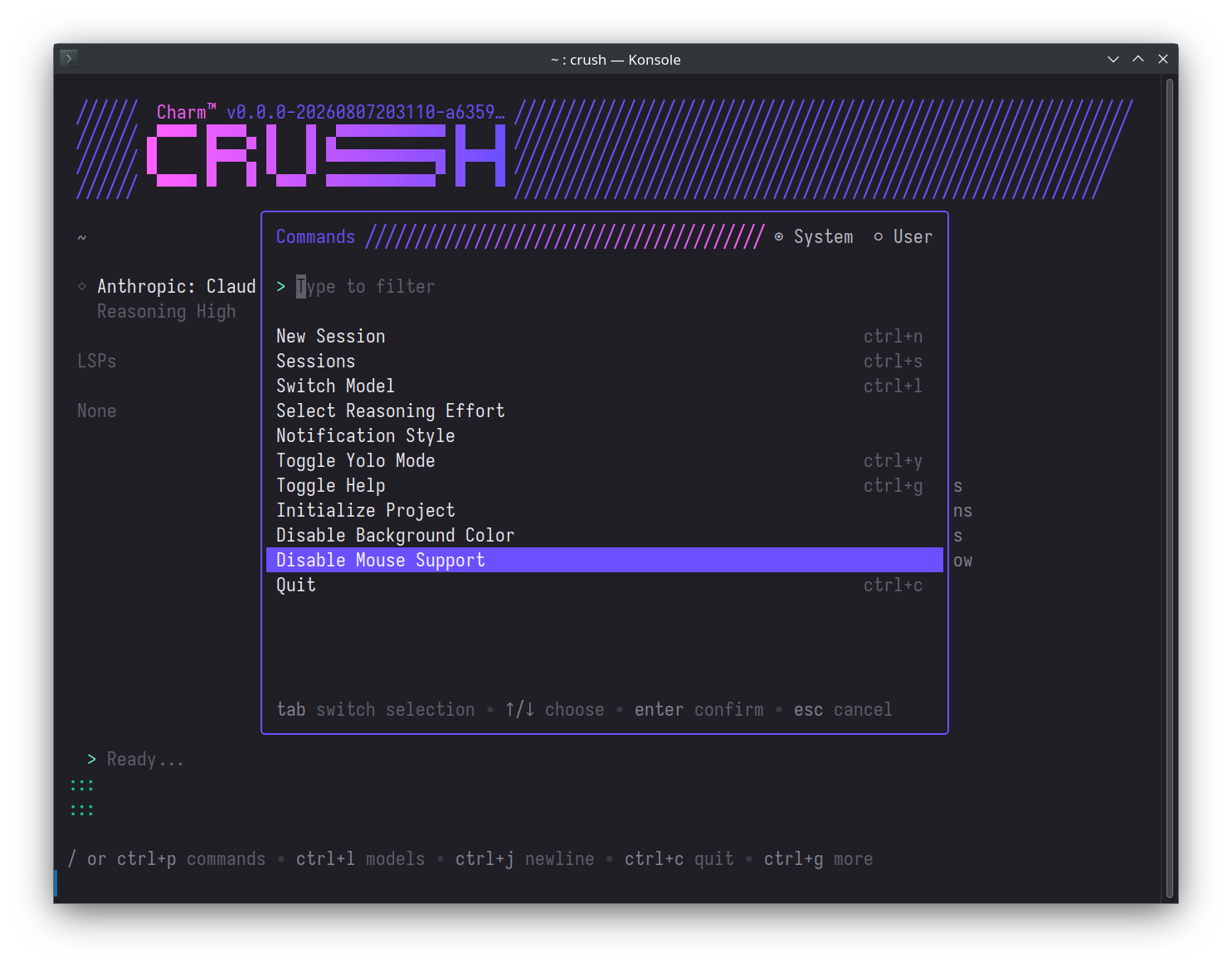
Crush v0.93.1 lets users disable mouse support in the TUI and shows which model served each conversation turn when using Hyper.︀︄︇︀︅︉︀︅︀︀︃︀︀︅︅︀︅︊︀︄︆︀︃︄
Terminal-based AI coding assistant that integrates LLMs, LSPs, and MCP servers into your development workflow.
Crush v0.93.1 lets users disable mouse support in the TUI and shows which model served each conversation turn when using Hyper.︀︄︇︀︅︉︀︅︀︀︃︀︀︅︅︀︅︊︀︄︆︀︃︄
└──▷ WHAT SHIPPED ·
2 FEATURES2 OF 2 FEATURESmost completely described firstwhat's the number?
Each feature carries 0–100 for how completely the vendor documented
it — not how big or important the work is. A major capability
described in eight words scores low, and that is the finding.
depth0–40what it does and how it works or what changed
specificity0–30names real surfaces — APIs, flags, formats, limits, numbers
actionability0–30enough to go use it — a named endpoint, flag, or config key tops this; a UI path is a starting point
Code and config rank first by construction: a documented endpoint,
flag or config key scores at the top of specificity and actionability,
so it sorts above a feature described only in prose. Under
60 the notes go thin — everything below the “thinner
coverage” line is thinner documentation, not smaller work.
Hover any meter for that feature's three sub-scores.
0101
Mouse support toggle in TUINEW80how completely this was documenteddepth25/40specificity25/30actionability30/3080 / 100
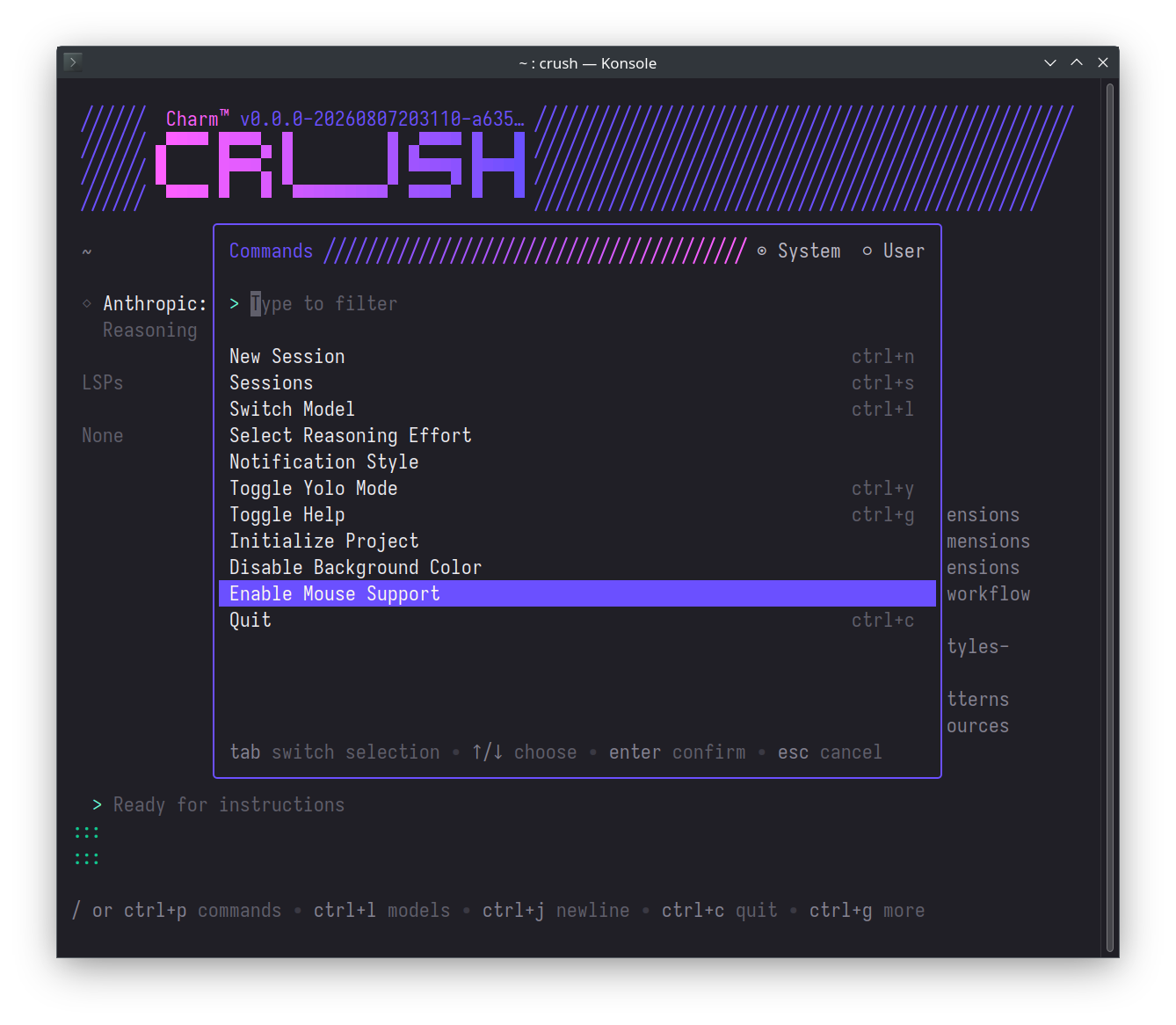
Adds option ui mouse false to crushrc and { "options": { "tui": { "mouse": false } } } to crush.json to disable mouse support in the TUI, so terminal text selection and right-click work natively.︀︄︇︀︅︉︀︅︀︀︃︀︀︅︅︀︅︊︀︄︆︀︃︄ Also toggleable via the command palette.
Disable mouse support so terminal text selection and right-click work natively during a Crush session.
ⓘSourcesCommits →1 RELEASE · 2026-09-09CODE ↗RankWhy this ranktop features scored 90/85/75, +6 runnable example — 89.33How ranking works →
mex 0.8.1 adds a visual Context graph to the Project Hub, an Inbox for proposing Wiki knowledge changes, open-team Relays with a new draft-save command, configurable agent logging modes, and code graph ignore globs.︀︄︇︀︅︉︀︅︀︀︃︀︀︅︅︀︅︊︀︄︆︀︃︄
Mex indexes codebases through a code graph and supplies a repo-local Markdown wiki to AI coding agents.
mex 0.8.1 adds a visual Context graph to the Project Hub, an Inbox for proposing Wiki knowledge changes, open-team Relays with a new draft-save command, configurable agent logging modes, and code graph ignore globs.︀︄︇︀︅︉︀︅︀︀︃︀︀︅︅︀︅︊︀︄︆︀︃︄
└──▷ WHAT SHIPPED ·
6 FEATURES6 OF 6 FEATURESmost completely described firstwhat's the number?
Each feature carries 0–100 for how completely the vendor documented
it — not how big or important the work is. A major capability
described in eight words scores low, and that is the finding.
depth0–40what it does and how it works or what changed
specificity0–30names real surfaces — APIs, flags, formats, limits, numbers
actionability0–30enough to go use it — a named endpoint, flag, or config key tops this; a UI path is a starting point
Code and config rank first by construction: a documented endpoint,
flag or config key scores at the top of specificity and actionability,
so it sorts above a feature described only in prose. Under
60 the notes go thin — everything below the “thinner
coverage” line is thinner documentation, not smaller work.
Hover any meter for that feature's three sub-scores.
0101
Configurable agent logging modesNEW90how completely this was documenteddepth30/40specificity30/30actionability30/3090 / 100
Adds mex logging command with significant (default), checkpoints, and manual modes for checkout-local agent logging preferences, also configurable in Hub Settings.︀︄︇︀︅︉︀︅︀︀︃︀︀︅︅︀︅︊︀︄︆︀︃︄ Adds AgentLoggingModeSchema (significant, checkpoints, manual), AgentLoggingPolicySchema, and AgentLoggingUpdateRequestSchema to the Hub contracts API.
Switch agent logging to checkpoint mode to capture more granular activity without full verbose output.
$ mex logging checkpoints
— Command, mode names, and API schemas all namedv0.8.1
0202
Open-team Relays and draft workflowNEW85how completely this was documenteddepth30/40specificity25/30actionability30/3085 / 100
Adds mex relay draft save --from <draft.json> to save open-team Relay local drafts through the existing signed workflow, with Hub and CLI showing audience, current eligibility, and the sharing boundary. Relays can now be open-to-team so eligible active Members can take them, including teammates who join later, and local drafts may leave recipients undecided.
Save an open-team Relay draft from a JSON file so any eligible active member can pick it up.
$ mex relay draft save --from handoff-draft.json
— Names exact command and describes eligibility mechanismv0.8.1
0303
Graph ignore globs for code indexingNEW75how completely this was documenteddepth20/40specificity25/30actionability30/3075 / 100
Adds additive Graph ignore globs under the graph.ignore key in .mex/config.json, with repository-relative validation that behaves consistently across platforms.
Exclude generated or vendored directories from the code graph to reduce noise in who-calls results.
— Exact config key and file path given with examplev0.8.1
0404
Inbox contributions to Wiki knowledgeNEW65how completely this was documenteddepth30/40specificity20/30actionability15/3065 / 100
Adds Inbox contributions for one addition or correction to existing architecture, component, convention, decision, pattern, or guide knowledge; local drafts publish as Git-shareable Markdown proposals and explicit approval writes the existing Wiki knowledge.
— Workflow explained but no command or UI path shownv0.8.1
0505
Context graph in Project HubNEW60how completely this was documenteddepth25/40specificity20/30actionability15/3060 / 100
Adds a Context graph in the Project Hub showing existing Wiki entities, relationships, and direct code groundings, with type filters, selection details, pan/zoom, and a list alternative.
— UI feature described but no exact navigation pathv0.8.1
thinner coverage below
0606
Member reactivation and bounded Timeline notesNEW35how completely this was documenteddepth20/40specificity10/30actionability5/3035 / 100
Adds member reactivation with the original identity; managed agent instructions now retrieve relevant bounded Timeline notes without automatically promoting those notes to accepted project knowledge.
— Thin description, no mechanism or interface detailv0.8.1
Claude Code v2.1.267 adds a flag for live system-prompt iteration and a cross-provider cap on model effort level.︀︄︇︀︅︉︀︅︀︀︃︀︀︅︅︀︅︊︀︄︆︀︃︄
Claude Code is Anthropic's terminal coding agent that plans, edits, and tests code in local repositories.
Claude Code v2.1.267 adds a flag for live system-prompt iteration and a cross-provider cap on model effort level.︀︄︇︀︅︉︀︅︀︀︃︀︀︅︅︀︅︊︀︄︆︀︃︄
└──▷ WHAT SHIPPED ·
2 FEATURES2 OF 2 FEATURESmost completely described firstwhat's the number?
Each feature carries 0–100 for how completely the vendor documented
it — not how big or important the work is. A major capability
described in eight words scores low, and that is the finding.
depth0–40what it does and how it works or what changed
specificity0–30names real surfaces — APIs, flags, formats, limits, numbers
actionability0–30enough to go use it — a named endpoint, flag, or config key tops this; a UI path is a starting point
Code and config rank first by construction: a documented endpoint,
flag or config key scores at the top of specificity and actionability,
so it sorts above a feature described only in prose. Under
60 the notes go thin — everything below the “thinner
coverage” line is thinner documentation, not smaller work.
Hover any meter for that feature's three sub-scores.
0101
Live system prompt iteration flagNEW85how completely this was documenteddepth30/40specificity25/30actionability30/3085 / 100
The --system-prompt-snapshot off flag makes Claude Code re-render the system prompt fresh on every request instead of replaying the recorded snapshot, enabling live iteration on prompt text without restarting the session.︀︄︇︀︅︉︀︅︀︀︃︀︀︅︅︀︅︊︀︄︆︀︃︄
Iterate on a system prompt without restarting the session — each request re-reads the prompt as written rather than replaying the snapshot recorded at session start.
$ claude --system-prompt-snapshot off -p 'Refactor the auth module'
— Names exact flag and runnable example command.v2.1.267
0202
maxEffortLevel cap across providersNEW65how completely this was documenteddepth25/40specificity25/30actionability15/3065 / 100
A new maxEffortLevel setting, configurable top-level or per model under modelSettings, caps the effort level across all providers including Bedrock, Vertex, and Foundry, while still letting users select a lower level.
— Names config key and scope, but no example usage.v2.1.267
OpenHands is an open-source software-development agent that writes code, runs commands, and browses the web.
OpenHands v1.17.0 tightens automation access control with split view/manage permissions, adds LLM provider connections for cloud deployments, and rounds out Agent Canvas with conversation tagging, custom manifests, and several automation-management UI refinements.︀︄︇︀︅︉︀︅︀︀︃︀︀︅︅︀︅︊︀︄︆︀︃︄
└──▷ WHAT SHIPPED ·
5 FEATURES4 OF 5 FEATURESmost completely described firstwhat's the number?
Each feature carries 0–100 for how completely the vendor documented
it — not how big or important the work is. A major capability
described in eight words scores low, and that is the finding.
depth0–40what it does and how it works or what changed
specificity0–30names real surfaces — APIs, flags, formats, limits, numbers
actionability0–30enough to go use it — a named endpoint, flag, or config key tops this; a UI path is a starting point
Code and config rank first by construction: a documented endpoint,
flag or config key scores at the top of specificity and actionability,
so it sorts above a feature described only in prose. Under
60 the notes go thin — everything below the “thinner
coverage” line is thinner documentation, not smaller work.
Hover any meter for that feature's three sub-scores.
0101
View/manage permission split for automationsNEW60how completely this was documenteddepth25/40specificity15/30actionability20/3060 / 100
Automation permissions are now split into separate 'view' and 'manage' roles, with a creator escape hatch that automatically grants automation creators full manage rights over automations they created regardless of their team-wide role.︀︄︇︀︅︉︀︅︀︀︃︀︀︅︅︀︅︊︀︄︆︀︃︄
Give automation creators full control over their own automations while restricting other team members to view-only access.
📍In the automations settings, assign 'view' permission to team members and 'manage' permission to automation owners; the creator escape hatch automatically grants creators full manage rights over automations they created regardless of team-wide role.
— Mechanism and roles named, with a worked examplev1.17.0
thinner coverage below
0200
Agent Canvas automation management enhancementsIMPROVED50how completely this was documenteddepth20/40specificity20/30actionability10/3050 / 100
Canvas gains support for generic custom automation manifests, lets users edit a custom cron expression directly from the edit-automation modal, shows manifest-declared value statements on dashboard cards and rows, makes the automation run UI task-outcome aware, and adds a unified cloud settings entrypoint for Agent Canvas.
— Five distinct UI/manifest additions named but only brieflyv1.17.0
0302
Conversation tags and filteringNEW30how completely this was documenteddepth10/40specificity10/30actionability10/3030 / 100
Adds conversation tags and filtering in the conversation panel.
— Names the panel but no detail on how tags workv1.17.0
0403
LLM provider connections on cloud deploymentsNEW25how completely this was documenteddepth10/40specificity10/30actionability5/3025 / 100
Enables LLM provider connections on cloud deployments.
— Only a one-line description, no mechanism givenv1.17.0
0504
Message timestamps on hoverNEW15how completely this was documenteddepth5/40specificity5/30actionability5/3015 / 100
Displays message timestamps on hover.
— Single-line description with no further detailv1.17.0
Superset is an agentic IDE to orchestrate 100+ coding agents in parallel. Run any agent with your own subscription.
Superset's desktop v1.28.0 release adds MCPMCPModel Context Protocol, an open standard from Anthropic that lets an AI model call external tools and data sources through a uniform interface, so cyber tools can expose capabilities directly to LLM-based agents. plugin integrations for agents, cloud workspace creation, iOS Live ActivitiesLive ActivitiesAn Apple iOS API that lets apps display real-time updating information on the Lock Screen and Dynamic Island, giving cyber tools a persistent, glanceable status surface without requiring the app to be open. showing agent status, and a round of polish across Pages, mobile terminals, and the paywall flow.︀︄︇︀︅︉︀︅︀︀︃︀︀︅︅︀︅︊︀︄︆︀︃︄
└──▷ WHAT SHIPPED ·
9 FEATURES5 OF 9 FEATURESmost completely described firstwhat's the number?
Each feature carries 0–100 for how completely the vendor documented
it — not how big or important the work is. A major capability
described in eight words scores low, and that is the finding.
depth0–40what it does and how it works or what changed
specificity0–30names real surfaces — APIs, flags, formats, limits, numbers
actionability0–30enough to go use it — a named endpoint, flag, or config key tops this; a UI path is a starting point
Code and config rank first by construction: a documented endpoint,
flag or config key scores at the top of specificity and actionability,
so it sorts above a feature described only in prose. Under
60 the notes go thin — everything below the “thinner
coverage” line is thinner documentation, not smaller work.
Hover any meter for that feature's three sub-scores.
0101
Host version display and remote updatesNEW50how completely this was documenteddepth20/40specificity15/30actionability15/3050 / 100
The desktop app now shows host versions and supports updating standalone hosts directly from the app.︀︄︇︀︅︉︀︅︀︀︃︀︀︅︅︀︅︊︀︄︆︀︃︄
ⓘSourcesRelease notes →1 RELEASE · 2026-09-09NOTES ↗RankWhy this ranktop features scored 85/85/75, +15 breaking change, +6 runnable example — 102.67How ranking works →
Zed is an open-source code editor that runs collaborative development workflows.
Zed v1.19.2 adds call hierarchy navigation, a tabular data preview for CSV/TSV/SSV/PSV files, and a batch of new panel and settings-UI options, while flipping project search on type to enabled by default.︀︄︇︀︅︉︀︅︀︀︃︀︀︅︅︀︅︊︀︄︆︀︃︄
└──▷ WHAT SHIPPED ·
10 FEATURES9 OF 10 FEATURESmost completely described firstwhat's the number?
Each feature carries 0–100 for how completely the vendor documented
it — not how big or important the work is. A major capability
described in eight words scores low, and that is the finding.
depth0–40what it does and how it works or what changed
specificity0–30names real surfaces — APIs, flags, formats, limits, numbers
actionability0–30enough to go use it — a named endpoint, flag, or config key tops this; a UI path is a starting point
Code and config rank first by construction: a documented endpoint,
flag or config key scores at the top of specificity and actionability,
so it sorts above a feature described only in prose. Under
60 the notes go thin — everything below the “thinner
coverage” line is thinner documentation, not smaller work.
Hover any meter for that feature's three sub-scores.
0101
Call hierarchy navigationNEW85how completely this was documenteddepth30/40specificity25/30actionability30/3085 / 100
Adds call hierarchy support via call hierarchy: show incoming calls and call hierarchy: show outgoing calls commands, with default keybindings cmd-k cmd-h on macOS and ctrl-k ctrl-h on Linux and Windows.︀︄︇︀︅︉︀︅︀︀︃︀︀︅︅︀︅︊︀︄︆︀︃︄
Navigate a codebase call graph to trace who calls a function and who it calls, without leaving the editor.
📍Open the command palette and run call hierarchy: show incoming calls (macOS: cmd-k cmd-h) to see all callers of the symbol under the cursor.
— Full commands, keybindings, and a runnable usage example.v1.19.2
0202
New panel and file-tab settingsNEW85how completely this was documenteddepth30/40specificity30/30actionability25/3085 / 100
Adds outline_panel.multi_buffer_hide_symbols setting and outline panel: toggle symbols action to show only files and directories in multi-buffer Outline Panel views; reveal_if_open setting to reveal buffers already open in another pane instead of opening them in the active pane; folder_indicator setting for showing disclosure chevrons and folder icons together in the Project Panel, Outline Panel, and Git Panel; close_panel_on_toggle setting added to the Settings UI; and Open File on Remote and Copy Remote File URL options added to file tabs and the Project Panel.
Hide symbols in the Outline Panel when working across a multi-buffer view to reduce noise and focus on file structure.
— Names every setting key and action, one has a runnable config example.v1.19.2
0303
Tabular data preview for delimited filesNEW75how completely this was documenteddepth25/40specificity25/30actionability25/3075 / 100
Adds cmd-shift-v and cmd-k v on macOS and ctrl-shift-v and ctrl-k v on Linux and Windows to open a tabular data preview for CSV, TSV, SSV, and PSV files.
— Exact keybindings and supported formats given, no deeper mechanism.v1.19.2
0404
Project search on type enabled by defaultBREAKING70how completely this was documenteddepth25/40specificity20/30actionability25/3070 / 100
Project search on type is now enabled by default, automatically triggering search as you type; set { "search": { "search_on_type": false } } in ~/.config/zed/settings.json to restore the previous manual-invocation behavior.
Suppress search triggering automatically as you type in a project-wide search, restoring manual invocation.
json
{ "search": { "search_on_type": false } }
— Exact config key and file path to revert the default behavior.v1.19.2
0505
Modal editing selection and text objectsNEW60how completely this was documenteddepth20/40specificity20/30actionability20/3060 / 100
Adds Visual Line selection with V in terminal vi mode, and Helix mode support for closest-pair text objects with m i m and m a m.
— Exact keys named but no further mechanism or scope described.v1.19.2
thinner coverage below
0600
Command palette recency-based orderingIMPROVED40how completely this was documenteddepth20/40specificity10/30actionability10/3040 / 100
Improves command palette ordering by sorting commands by recency of use, ranking previously used commands above unused ones while filtering.
— Describes the sorting mechanism but no configurable surface.v1.19.2
0706
LSP 3.18 Markdown diagnostics renderingNEW35how completely this was documenteddepth15/40specificity15/30actionability5/3035 / 100
Adds support for rendering LSP 3.18 Markdown diagnostic messages from language servers.
— Names the protocol version but is an automatic, non-actionable change.v1.19.2
0807
Renaming Terminal ThreadsNEW30how completely this was documenteddepth10/40specificity10/30actionability10/3030 / 100
Adds support for renaming Terminal Threads from the Threads Sidebar.
— Names the UI location but no further detail.v1.19.2
0908
Effort-based reasoning for OpenRouterNEW25how completely this was documenteddepth10/40specificity10/30actionability5/3025 / 100
Adds support for effort-based reasoning when using OpenRouter models.
— Names the provider but not the mechanism or configuration.v1.19.2
1009
Automatic language detection for untitled buffersNEW20how completely this was documenteddepth10/40specificity5/30actionability5/3020 / 100
Adds automatic language detection for untitled buffers.
— Bare description with no mechanism or scope given.v1.19.2
└──▷ BREAKING ON UPGRADE
!Project search on type is now enabled by default; set { "search": { "search_on_type": false } } to restore the previous behavior.
Gridctl is a command-line tool that manages and routes Model Context Protocol servers, skills, and tools.
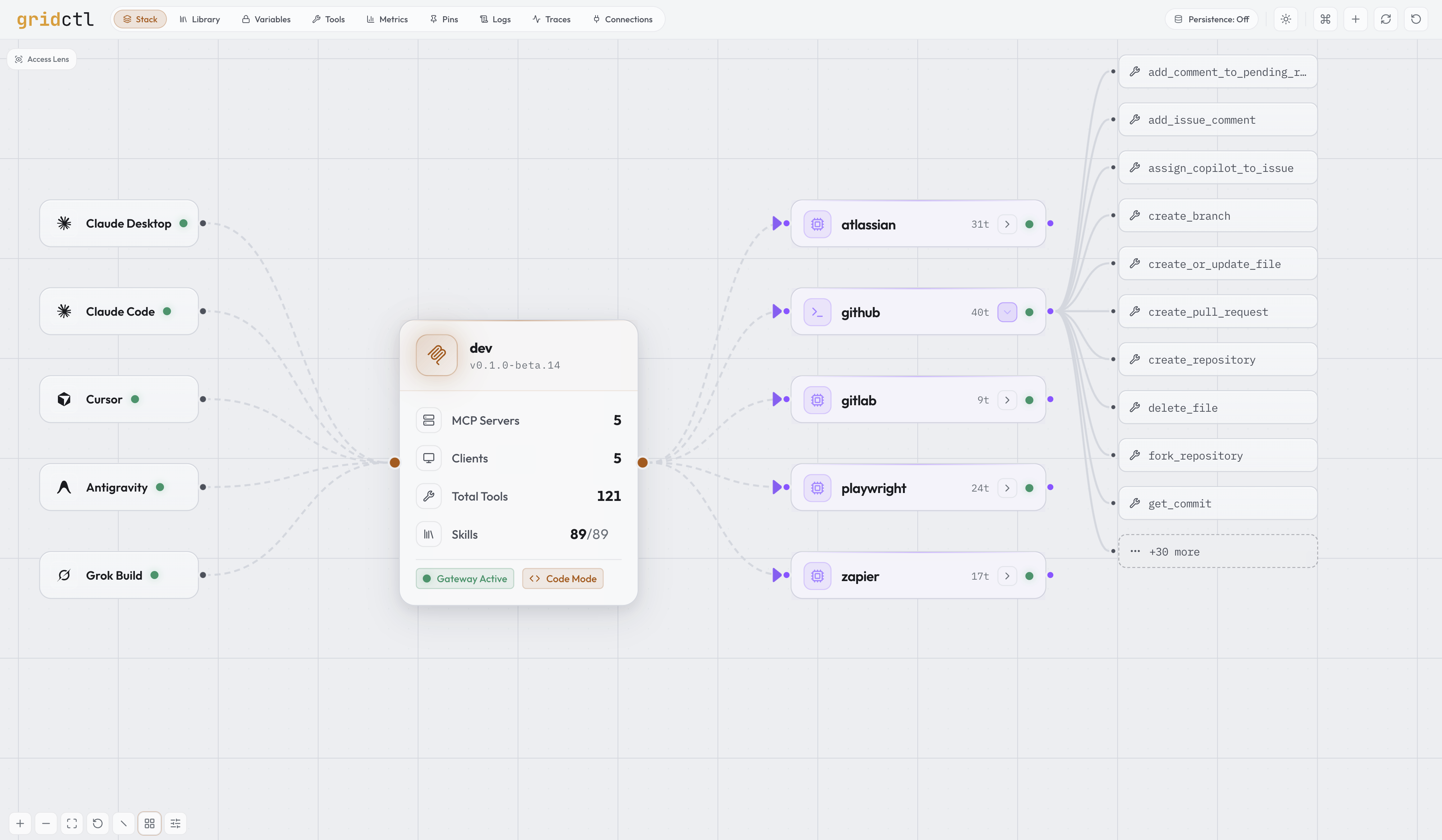
gridctl reached v1.0.0-rc.1, turning into a full stack-as-code MCPMCPModel Context Protocol, an open standard from Anthropic that lets an AI model call external tools and data sources through a uniform interface, so cyber tools can expose capabilities directly to LLM-based agents. gateway: gridctl apply deploys a YAML stack while new commands add client auto-linking, catalog search, token-reduction analysis, trust-on-first-use schema pinning, a SKILL.md skill library, containerized Python MCP servers from PyPIPyPIThe Python Package Index, maintained by the Python Software Foundation, is the official public repository for Python packages, letting cyber tools distribute and install dependencies with a single pip command. or Git, model routing, and SigstoreSigstoreAn open-source project maintained by the Linux Foundation that provides free signing, verification, and transparency infrastructure for software artifacts, letting cyber tools prove code provenance without managing private keys.-signed release provenance.︀︄︇︀︅︉︀︅︀︀︃︀︀︅︅︀︅︊︀︄︆︀︃︄
└──▷ WHAT SHIPPED ·
21 FEATURES21 OF 21 FEATURESmost completely described firstwhat's the number?
Each feature carries 0–100 for how completely the vendor documented
it — not how big or important the work is. A major capability
described in eight words scores low, and that is the finding.
depth0–40what it does and how it works or what changed
specificity0–30names real surfaces — APIs, flags, formats, limits, numbers
actionability0–30enough to go use it — a named endpoint, flag, or config key tops this; a UI path is a starting point
Code and config rank first by construction: a documented endpoint,
flag or config key scores at the top of specificity and actionability,
so it sorts above a feature described only in prose. Under
60 the notes go thin — everything below the “thinner
coverage” line is thinner documentation, not smaller work.
Hover any meter for that feature's three sub-scores.
0101
Client auto-linking with `gridctl link`NEW95how completely this was documenteddepth35/40specificity30/30actionability30/3095 / 100
gridctl link, gridctl link <client>, and gridctl link --all auto-detect installed LLM clients (Claude Desktop, Claude Code, Cursor, Antigravity, Grok) and inject gateway config pointing at the gateway's MCP endpoint, exposed at http://localhost:8180/mcp as streamable HTTP with an SSE endpoint, connectable by any MCP client.︀︄︇︀︅︉︀︅︀︀︃︀︀︅︅︀︅︊︀︄︆︀︃︄ A link: block in stack.yaml idempotently relinks the listed clients on every gridctl apply, and gridctl destroy --unlink tears down the stack while removing injected client config entries.
— Commands, config key, and endpoint all named with mechanism.product docs
0202
Encrypted variable store and scoped deliveryNEW93how completely this was documenteddepth35/40specificity30/30actionability28/3093 / 100
gridctl var explain <key> shows a variable's resolution, declaration, and consumers without exposing its value, and gridctl var scan --staged checks for exact secret values before commit. Variables are referenced as ${var:<KEY>} in a secrets.sets block in stack.yaml, delivered from an encrypted-at-rest store, with reserved-name enforcement for GRIDCTL_*, OP_CONNECT_TOKEN, and OP_SERVICE_ACCOUNT_TOKEN; scoped variable delivery now enables per-scope secrets and variables across stacks.
— Commands, config block, syntax, and reserved names all named.v1.0.0-rc.1
0303
Token-reduction findings via `gridctl optimize`NEW93how completely this was documenteddepth35/40specificity28/30actionability30/3093 / 100
gridctl optimize, with --format json and --severity warn,critical flags, surfaces actionable token-reduction findings — unused servers/tools, schema overhead, format-conversion shortfalls — with projected weekly token impact and paste-ready YAML remediations; --format json emits a machine-readable OptimizeReport.
Audit a running gateway for wasted tokens before a long agent run — narrow to only warn and critical findings and get machine-readable output for downstream processing.
— Exact flags, output format, and remediation mechanism all named.product docs
0404
Trust-on-first-use schema pinningNEW93how completely this was documenteddepth35/40specificity28/30actionability30/3093 / 100
gridctl pins verify (exit 1 on drift), gridctl pins diff <server> (per-tool before/after plus injection scan findings), and gridctl pins approve <server> implement trust-on-first-use pinning of tool definitions, flagging drift on apply and scanning for injection signals such as hidden instructions, sensitive-file references, hidden Unicode, and cross-server tool shadowing.
Verify that no upstream MCP server has silently changed a tool schema or injected hidden instructions since the last pin — fail CI if drift is detected.
$ gridctl pins verify
Detect prompt-injection drift in a GitHub MCP server's tool definitions before an agent ever sees the changed schema.
$ gridctl pins diff github
— Commands, exit codes, and specific injection signals all named.product docs
0505
Output format conversion for tool resultsNEW90how completely this was documenteddepth35/40specificity30/30actionability25/3090 / 100
The output_format config key, settable at the gateway: level and per-server under mcp-servers:, converts tool call results to toon, csv, json, or text before they reach the client, cutting token consumption by 25–61% for tabular and key-value data; payloads over 1 MB pass through unchanged.
Cut token consumption on a high-volume analytics server by converting its JSON responses to CSV at the gateway level, while leaving other servers on the default format.
— Config key, all four formats, and exact reduction numbers named.product docs
0606
SKILL.md skill library and projectionNEW88how completely this was documenteddepth32/40specificity28/30actionability28/3088 / 100
gridctl skill list, gridctl activate <skill>, and gridctl skill project sync manage a SKILL.md registry exposed to upstream MCP clients as prompts, with projection to Claude Code, OpenCode, Copilot, and Gemini CLI dialects tracked by a shared lockfile; gridctl skill pins adds per-file digest tracking of skill documents, holding drift for human approval with injection heuristics.
— Commands, file format, target dialects, and lockfile all named.product docs
0707
Containerized Python MCP servers from PyPI/GitNEW88how completely this was documenteddepth32/40specificity28/30actionability28/3088 / 100
source.type: pypi and source.type: git config keys in stack.yaml generate containerized Python MCP servers, run as non-root on Python/uv base images, built from a public PyPI package or a Git repository (with ref pinning and optional path/runtime fields) — no Dockerfile required.
Run a PyPI package as a containerised MCP server at a pinned version, without writing a Dockerfile.
— Config keys and runnable examples pin exact package/commit.v1.0.0-rc.1
0808
Stack-as-code deployment via `gridctl apply`NEW85how completely this was documenteddepth30/40specificity25/30actionability30/3085 / 100
gridctl apply stack.yaml deploys a full MCP gateway from a YAML stack spec in one command, linking downstream servers (OAuth remote, containerized stdio, or local command) to upstream LLM clients.
— Command, YAML spec, and three downstream server types named.product docs
0909
Tool surface control via groups and whitelistsNEW81how completely this was documenteddepth28/40specificity28/30actionability25/3081 / 100
gridctl groups lists tool groups, member counts, and their /groups/{name}/mcp endpoints. Per-server and per-group tools: whitelists, exclude: lists, groups: bundles, and clients: restrictions in stack.yaml control which tools each linked client may access.
— Command, endpoint pattern, and config keys named.product docs
1010
Import existing MCP client configsNEW73how completely this was documenteddepth28/40specificity20/30actionability25/3073 / 100
gridctl import scans existing client MCP configs, dedupes discovered servers, and appends selections to stack.yaml, offering any plaintext secrets it finds into the encrypted variable store.
— Command and dedupe/secrets mechanism named, single source.product docs
1111
OAuth authentication for remote MCP serversNEW73how completely this was documenteddepth28/40specificity25/30actionability20/3073 / 100
The per-server auth: type: oauth config key in stack.yaml handles OAuth-protected remote MCP servers, including encrypted-on-disk token storage, refresh, and a needs auth deployment state.
— Config key and states named, no CLI command given.product docs
1212
Stack export for safe sharingNEW67how completely this was documenteddepth25/40specificity22/30actionability20/3067 / 100
gridctl export re-reads the running deployment's stack file with ${var:<KEY>} variable references preserved and inline credentials blocked, for safe sharing; the web UI's Stack spec view offers the same output via an Export YAML action.
— Command and safeguard named, UI path noted but not detailed.product docs
1313
Per-server rate limitingNEW67how completely this was documenteddepth22/40specificity25/30actionability20/3067 / 100
gridctl limits displays every configured rate limit and its current state; a limits.rate_limits config block per server sets calls_per_minute and burst fields.
— Command and config fields named, no runtime behavior described.product docs
1414
Stack diff and validation commandsNEW65how completely this was documenteddepth20/40specificity20/30actionability25/3065 / 100
gridctl plan stack.yaml diffs a stack spec against the running deployment state before applying, and gridctl validate stack.yaml lints and schema-checks a stack spec, exiting with codes 0, 1, or 2.
— Named commands and exit codes but no deeper mechanism.product docs
1515
Catalog search and add commandsNEW63how completely this was documenteddepth18/40specificity20/30actionability25/3063 / 100
gridctl search <term> finds MCP servers in the built-in catalog and the MCP Registry, and gridctl add <server> appends a matched entry to stack.yaml by name.
— Commands named but minimal behavioral detail.product docs
1616
Code mode for tool-capped clientsNEW62how completely this was documenteddepth22/40specificity20/30actionability20/3062 / 100
The gateway.code_mode: on config key reduces the tool surface presented to clients that cap the number of MCP servers or tools they can see, such as Antigravity's 100-tool limit, letting large stacks work with those clients.
Gateway API authenticationNEW60how completely this was documenteddepth20/40specificity22/30actionability18/3060 / 100
The gateway.auth config key enables bearer token or API-key authentication on the /mcp endpoint and grouped /groups/{name}/mcp endpoints.
— Config key and endpoints named, minimal further detail.product docs
thinner coverage below
1818
Signed release provenance with SigstoreNEW59how completely this was documenteddepth22/40specificity22/30actionability15/3059 / 100
Binary releases are signed with a provenance.sigstore.json bundle, making v1.0.0-rc.1 the first provenance-covered production release, verifiable via the release verification procedure.
— Artifact name and version given, verification steps not detailed here.v1.0.0-rc.1
1919
Token-usage observability in Metrics workspaceNEW59how completely this was documenteddepth25/40specificity22/30actionability12/3059 / 100
A token-usage observability layer counts tokens per server, replica, client, and tool, and charts throughput and format-conversion savings in the Metrics workspace.
— Metrics dimensions named but no CLI or API access point.product docs
2020
Model routing policy via `gridctl models`NEW54how completely this was documenteddepth18/40specificity18/30actionability18/3054 / 100
The gridctl models subcommand projects model routing policy from a running gateway, and the web UI adds a model routing surface for viewing and managing that policy.
— Command named but routing mechanism itself not described.v1.0.0-rc.1
2121
Web UI with Tools, Metrics, and Library workspacesNEW48how completely this was documenteddepth15/40specificity18/30actionability15/3048 / 100
A web UI accessible via gridctl includes a Tools Workspace, Metrics Workspace, a Stack spec view, and a Library workspace for skill authoring.
— Workspace names given but no navigation or mechanism detail.product docs
Skyvern automates browser-based workflows with vision models and agents, completing form-driven tasks on sites it has not seen before.
Skyvern v1.0.53 adds ParquetParquetA columnar storage file format maintained by the Apache Software Foundation, designed for efficient compression and fast analytical queries, making it a common choice for storing and processing large structured datasets. workflow exports and extraction-block data export, expands Copilot with web search, in-chat credential requests, and reasoning visibility on Task V3 action rows, and exposes the Skyvern 3.0 engine in the workflow editor.︀︄︇︀︅︉︀︅︀︀︃︀︀︅︅︀︅︊︀︄︆︀︃︄
└──▷ WHAT SHIPPED ·
8 FEATURES7 OF 8 FEATURESmost completely described firstwhat's the number?
Each feature carries 0–100 for how completely the vendor documented
it — not how big or important the work is. A major capability
described in eight words scores low, and that is the finding.
depth0–40what it does and how it works or what changed
specificity0–30names real surfaces — APIs, flags, formats, limits, numbers
actionability0–30enough to go use it — a named endpoint, flag, or config key tops this; a UI path is a starting point
Code and config rank first by construction: a documented endpoint,
flag or config key scores at the top of specificity and actionability,
so it sorts above a feature described only in prose. Under
60 the notes go thin — everything below the “thinner
coverage” line is thinner documentation, not smaller work.
Hover any meter for that feature's three sub-scores.
0101
Copilot credential request and managementNEW60how completely this was documenteddepth25/40specificity20/30actionability15/3060 / 100
Lets Copilot ask for a login credential with a tool that opens an in-chat credential card, shows each saved credential's tested site and authenticator in Copilot account state, and lets Copilot use explicit access-link destinations.︀︄︇︀︅︉︀︅︀︀︃︀︀︅︅︀︅︊︀︄︆︀︃︄
— Groups three related Copilot credential increments with namesv1.0.53
thinner coverage below
0200
Skyvern 3.0 engine on validation blocks and editorIMPROVED50how completely this was documenteddepth15/40specificity20/30actionability15/3050 / 100
Exposes the Skyvern 3.0 engine on validation blocks and the default engine list in the workflow editor.
— Names surfaces but not selection mechanismv1.0.53
0302
Reasoning visibility on Task V3 action rowsNEW50how completely this was documenteddepth20/40specificity20/30actionability10/3050 / 100
Surfaces the provider's reasoning summary on Task V3 action rows where available, and persists the model's turn reasoning on Task V3 action rows.
Open-source Python framework for building multi-agent workflows using role-based AI agent Crews and event-driven Flows.
CrewAI's only shipment this window was internal telemetry to track checkpoint runtime and CLI usage.︀︄︇︀︅︉︀︅︀︀︃︀︀︅︅︀︅︊︀︄︆︀︃︄
└──▷ WHAT SHIPPED ·
1 FEATURE1 OF 1 FEATUREmost completely described firstwhat's the number?
Each feature carries 0–100 for how completely the vendor documented
it — not how big or important the work is. A major capability
described in eight words scores low, and that is the finding.
depth0–40what it does and how it works or what changed
specificity0–30names real surfaces — APIs, flags, formats, limits, numbers
actionability0–30enough to go use it — a named endpoint, flag, or config key tops this; a UI path is a starting point
Code and config rank first by construction: a documented endpoint,
flag or config key scores at the top of specificity and actionability,
so it sorts above a feature described only in prose. Under
60 the notes go thin — everything below the “thinner
coverage” line is thinner documentation, not smaller work.
Hover any meter for that feature's three sub-scores.
0101
Telemetry for checkpoint runtime and CLI usageNEW20how completely this was documenteddepth10/40specificity10/30actionability0/3020 / 100
CrewAI now adds telemetry to track checkpoint runtime and CLI usage.︀︄︇︀︅︉︀︅︀︀︃︀︀︅︅︀︅︊︀︄︆︀︃︄
— Only a bare description; no mechanism, data collected, or opt-out named1.15.21
Strands Agents is AWS's open-source SDK for production agents in Python and TypeScript, with a model-driven loop, tool integration, and deployment targets.
Strands Agents Python v1.55.1 adds background task scheduling to the Agent class, ports the notebook tool to Python, and simplifies bidirectional streaming model configuration for Google and OpenAI.︀︄︇︀︅︉︀︅︀︀︃︀︀︅︅︀︅︊︀︄︆︀︃︄
└──▷ WHAT SHIPPED ·
3 FEATURES2 OF 3 FEATURESmost completely described firstwhat's the number?
Each feature carries 0–100 for how completely the vendor documented
it — not how big or important the work is. A major capability
described in eight words scores low, and that is the finding.
depth0–40what it does and how it works or what changed
specificity0–30names real surfaces — APIs, flags, formats, limits, numbers
actionability0–30enough to go use it — a named endpoint, flag, or config key tops this; a UI path is a starting point
Code and config rank first by construction: a documented endpoint,
flag or config key scores at the top of specificity and actionability,
so it sorts above a feature described only in prose. Under
60 the notes go thin — everything below the “thinner
coverage” line is thinner documentation, not smaller work.
Hover any meter for that feature's three sub-scores.
0101
Background tasks on Agent classNEW45how completely this was documenteddepth15/40specificity15/30actionability15/3045 / 100
Adds backgroundTasks to the Agent class, enabling agents to schedule and run background tasks.︀︄︇︀︅︉︀︅︀︀︃︀︀︅︅︀︅︊︀︄︆︀︃︄
— Names the API surface but no usage detail or examplepython/v1.55.1
0202
Notebook vended tool in Python SDKNEW35how completely this was documenteddepth15/40specificity10/30actionability10/3035 / 100
Ports the notebook tool to Python as a vended tool, making it available in the Python SDK's tool library.
— States what changed but no mechanism or usagepython/v1.55.1
0300
Simplified bidi model configs for Google and OpenAIIMPROVED35how completely this was documenteddepth10/40specificity15/30actionability10/3035 / 100
Simplifies Google and OpenAI model configurations for bidirectional streaming (bidi) mode.
— Names the feature area but not the specific config changespython/v1.55.1
CopilotKit connects AI agents to application interfaces with shared state, tools, and generative UI components.
CopilotKit's v1.71.0 release adds provider-level agent configuration and unifies React Native's render-tool hooks with the shared react-core hook surface.︀︄︇︀︅︉︀︅︀︀︃︀︀︅︅︀︅︊︀︄︆︀︃︄
└──▷ WHAT SHIPPED ·
2 FEATURES1 OF 2 FEATURESmost completely described firstwhat's the number?
Each feature carries 0–100 for how completely the vendor documented
it — not how big or important the work is. A major capability
described in eight words scores low, and that is the finding.
depth0–40what it does and how it works or what changed
specificity0–30names real surfaces — APIs, flags, formats, limits, numbers
actionability0–30enough to go use it — a named endpoint, flag, or config key tops this; a UI path is a starting point
Code and config rank first by construction: a documented endpoint,
flag or config key scores at the top of specificity and actionability,
so it sorts above a feature described only in prose. Under
60 the notes go thin — everything below the “thinner
coverage” line is thinner documentation, not smaller work.
Hover any meter for that feature's three sub-scores.
0100
React Native render-tool hooks unified with react-coreIMPROVED45how completely this was documenteddepth20/40specificity15/30actionability10/3045 / 100
Converges React Native render-tool hooks onto react-core, unifying the hook surface across React and React Native.︀︄︇︀︅︉︀︅︀︀︃︀︀︅︅︀︅︊︀︄︆︀︃︄
— Names the module but no API or migration detailv1.71.0
0201
Provider-level agent configurationNEW20how completely this was documenteddepth10/40specificity5/30actionability5/3020 / 100
Adds the ability to configure agents at the provider level, per the v1.71.0 release summary; no further mechanism or config keys were specified.
— Only mentioned in summary, no mechanism or config namedv1.71.0
The Vercel AI SDK provides TypeScript APIs for model generation, structured output, tool use, and streaming application interfaces.
Vercel AI SDK 7.0.96 adds batch cancel and list APIs for managing asynchronous AI job batches.︀︄︇︀︅︉︀︅︀︀︃︀︀︅︅︀︅︊︀︄︆︀︃︄
└──▷ WHAT SHIPPED ·
1 FEATURE1 OF 1 FEATUREmost completely described firstwhat's the number?
Each feature carries 0–100 for how completely the vendor documented
it — not how big or important the work is. A major capability
described in eight words scores low, and that is the finding.
depth0–40what it does and how it works or what changed
specificity0–30names real surfaces — APIs, flags, formats, limits, numbers
actionability0–30enough to go use it — a named endpoint, flag, or config key tops this; a UI path is a starting point
Code and config rank first by construction: a documented endpoint,
flag or config key scores at the top of specificity and actionability,
so it sorts above a feature described only in prose. Under
60 the notes go thin — everything below the “thinner
coverage” line is thinner documentation, not smaller work.
Hover any meter for that feature's three sub-scores.
0101
Batch cancel and list APIsNEW30how completely this was documenteddepth10/40specificity10/30actionability10/3030 / 100
Adds batch cancel and list APIs for managing batches of AI requests.︀︄︇︀︅︉︀︅︀︀︃︀︀︅︅︀︅︊︀︄︆︀︃︄
Perplexity API shipped a hosted remote MCPMCPModel Context Protocol, an open standard from Anthropic that lets an AI model call external tools and data sources through a uniform interface, so cyber tools can expose capabilities directly to LLM-based agents. server with OAuth 2.1OAuth 2.1A consolidated draft of the OAuth authorization framework, maintained by the IETF, that folds in best-practice RFCs and deprecates unsafe flows like implicit grants, giving cyber tools a tighter baseline for delegated API access. and API-key authentication, a new gateway router endpoint exposing moderation and reasoning data, and added Google's Gemini 3.8 Flash model to the Agent API at promotional pricing.︀︄︇︀︅︉︀︅︀︀︃︀︀︅︅︀︅︊︀︄︆︀︃︄
Perplexity API Platform - build with the Router, Agent, Search, and Embeddings APIs. Real-time, web-wide research and Q&A capabilities for your products.
Perplexity API shipped a hosted remote MCPMCPModel Context Protocol, an open standard from Anthropic that lets an AI model call external tools and data sources through a uniform interface, so cyber tools can expose capabilities directly to LLM-based agents. server with OAuth 2.1OAuth 2.1A consolidated draft of the OAuth authorization framework, maintained by the IETF, that folds in best-practice RFCs and deprecates unsafe flows like implicit grants, giving cyber tools a tighter baseline for delegated API access. and API-key authentication, a new gateway router endpoint exposing moderation and reasoning data, and added Google's Gemini 3.8 Flash model to the Agent API at promotional pricing.︀︄︇︀︅︉︀︅︀︀︃︀︀︅︅︀︅︊︀︄︆︀︃︄
└──▷ WHAT SHIPPED ·
3 FEATURES3 OF 3 FEATURESmost completely described firstwhat's the number?
Each feature carries 0–100 for how completely the vendor documented
it — not how big or important the work is. A major capability
described in eight words scores low, and that is the finding.
depth0–40what it does and how it works or what changed
specificity0–30names real surfaces — APIs, flags, formats, limits, numbers
actionability0–30enough to go use it — a named endpoint, flag, or config key tops this; a UI path is a starting point
Code and config rank first by construction: a documented endpoint,
flag or config key scores at the top of specificity and actionability,
so it sorts above a feature described only in prose. Under
60 the notes go thin — everything below the “thinner
coverage” line is thinner documentation, not smaller work.
Hover any meter for that feature's three sub-scores.
0101
Hosted remote MCP server with OAuth and API-key authNEW91how completely this was documenteddepth35/40specificity28/30actionability28/3091 / 100
Adds a hosted remote MCP server over Streamable HTTP at https://api.perplexity.ai/mcp requiring no installation, working with any client that supports remote MCP servers (Claude Code, Cursor, VS Code, claude.ai).︀︄︇︀︅︉︀︅︀︀︃︀︀︅︅︀︅︊︀︄︆︀︃︄ Supports OAuth 2.1 with PKCE and dynamic client registration, opening a browser sign-in on first use with billing organization selectable at sign-in, or API-key authentication via --header "Authorization: Bearer YOUR_API_KEY" for clients without OAuth support or server-side setups such as the Anthropic API MCP connector. Run /mcp inside Claude Code to connect and follow the sign-in prompt, with optional API-key override via the bearer-token header.
Connect to the Perplexity MCP server from Claude Code using an API key instead of OAuth.
Connect Cursor to the Perplexity MCP server via OAuth by navigating to the Tools & MCP settings.
📍1. Open Cursor Settings › Tools & MCP
2. Add the Perplexity MCP server URL
3. Click Connect next to the server entry and complete browser sign-in
Use the Perplexity remote MCP server with OAuth in an MCP client without managing API keys — just point the client at the server URL and sign in.
📍Add the remote MCP server URL to your MCP client (e.g. Claude Code, Cursor, VS Code) and sign in with your Perplexity account when prompted to authenticate via OAuth.
Connect an OAuth-capable MCP client to the Perplexity MCP Server without managing API keys — billing is tied to the org you select at sign-in.
📍Add https://api.perplexity.ai/mcp as the MCP server URL in your client (claude.ai, Claude Code, Cursor, or VS Code), then follow the OAuth prompt to sign in with your Perplexity account and select a billing organization.
— Names protocol, server URL, auth flows and a runnable connect commandsnapshot-20260910
0202
Gateway router endpoint with moderation and reasoning fieldsNEW90how completely this was documenteddepth30/40specificity30/30actionability30/3090 / 100
Adds a POST /router/v1/chat/completions gateway endpoint for chat completions, whose responses include a moderation object with input and output moderation results — flagged, categories, category_scores, and category_applied_input_types — for both prompt and completion sides. Also adds a reasoning_content field on each choice's message object surfacing chain-of-thought/scratchpad reasoning, and a cache_write_tokens field under usage.prompt_tokens_details for tracking tokens written to the prompt cache.
Check whether the model flagged your prompt or its own output for policy violations using the new moderation fields in the gateway endpoint response.
— Endpoint path and every response field named with runnable curl+jq examplesproduct docs
0303
Gemini 3.8 Flash model in Agent APINEW65how completely this was documenteddepth20/40specificity25/30actionability20/3065 / 100
Adds google/gemini-3.8-flash to the Agent API, priced at $0.75/M uncached-input tokens, $0.075/M cached-input tokens, and $3.75/M output and reasoning tokens through December 31, 2026.
Call google/gemini-3.8-flash via the Perplexity API for fast, cost-efficient inference with promotional pricing through December 31, 2026.
ONNXONNXAn open-source format and runtime for machine learning models, maintained by the Linux Foundation, letting tools load models trained in any major framework without re-training or framework lock-in. Runtime v1.29.1 extends attention-related operators with bidirectional GroupQueryAttention, a new BNHS KV-cache layout, and CPU sliding-window attention_bias support, alongside a performance-test tooling update that removes redundant memory copies.︀︄︇︀︅︉︀︅︀︀︃︀︀︅︅︀︅︊︀︄︆︀︃︄
ONNX Runtime runs machine-learning models across hardware and operating systems with an open-source inference engine.
ONNXONNXAn open-source format and runtime for machine learning models, maintained by the Linux Foundation, letting tools load models trained in any major framework without re-training or framework lock-in. Runtime v1.29.1 extends attention-related operators with bidirectional GroupQueryAttention, a new BNHS KV-cache layout, and CPU sliding-window attention_bias support, alongside a performance-test tooling update that removes redundant memory copies.︀︄︇︀︅︉︀︅︀︀︃︀︀︅︅︀︅︊︀︄︆︀︃︄
└──▷ WHAT SHIPPED ·
4 FEATURES3 OF 4 FEATURESmost completely described firstwhat's the number?
Each feature carries 0–100 for how completely the vendor documented
it — not how big or important the work is. A major capability
described in eight words scores low, and that is the finding.
depth0–40what it does and how it works or what changed
specificity0–30names real surfaces — APIs, flags, formats, limits, numbers
actionability0–30enough to go use it — a named endpoint, flag, or config key tops this; a UI path is a starting point
Code and config rank first by construction: a documented endpoint,
flag or config key scores at the top of specificity and actionability,
so it sorts above a feature described only in prose. Under
60 the notes go thin — everything below the “thinner
coverage” line is thinner documentation, not smaller work.
Hover any meter for that feature's three sub-scores.
0100
Plugin EP allocators in perf test toolIMPROVED80how completely this was documenteddepth30/40specificity30/30actionability20/3080 / 100
Updates onnxruntime_perf_test to use plugin Execution Provider device allocators for generated inputs, loaded test data, and pre-allocated outputs, eliminating unnecessary per-run host/device copies.︀︄︇︀︅︉︀︅︀︀︃︀︀︅︅︀︅︊︀︄︆︀︃︄
— Names the tool and exact behavior change, directly usable in benchmarking.v1.29.1
0201
BNHS Value KV-cache layout supportNEW70how completely this was documenteddepth30/40specificity25/30actionability15/3070 / 100
Adds a session option and Execution Provider metadata contract for using the BNHS Value KV-cache layout, with graph transformations preserving compatibility with the existing BNSH operator schema.
— Mechanism and compatibility scope described, no exact config key given.v1.29.1
0302
CPU attention_bias with sliding-window cacheNEW70how completely this was documenteddepth30/40specificity25/30actionability15/3070 / 100
Adds CPU support for attention_bias with a sliding-window KV cache, including explicit position IDs and post-eviction bias indexing.
— Names the exact operator feature and mechanism but no runnable snippet.v1.29.1
0403
Bidirectional GroupQueryAttention supportNEW60how completely this was documenteddepth25/40specificity20/30actionability15/3060 / 100
Adds bidirectional GroupQueryAttention support on CPU and CUDA via a backward-compatible causal attribute.
— Names the attribute and providers but no usage example.v1.29.1
ⓘSourcesRelease notes →1 RELEASE · 2026-09-10NOTES ↗RankWhy this ranktop features scored 93/60/58, +15 breaking change, +6 runnable example — 91.33How ranking works →
TRL v1.13.0 adds support for training on million-token contexts and vendors fused linear losses into a new trl.losses module, while removing the legacy PPO trainer stack and raising several minimum dependency versions.︀︄︇︀︅︉︀︅︀︀︃︀︀︅︅︀︅︊︀︄︆︀︃︄
TRL trains transformer language models with reinforcement learning, covering supervised fine-tuning, reward modeling, PPO, DPO, and GRPO.
TRL v1.13.0 adds support for training on million-token contexts and vendors fused linear losses into a new trl.losses module, while removing the legacy PPO trainer stack and raising several minimum dependency versions.︀︄︇︀︅︉︀︅︀︀︃︀︀︅︅︀︅︊︀︄︆︀︃︄
└──▷ WHAT SHIPPED ·
5 FEATURES5 OF 5 FEATURESmost completely described firstwhat's the number?
Each feature carries 0–100 for how completely the vendor documented
it — not how big or important the work is. A major capability
described in eight words scores low, and that is the finding.
depth0–40what it does and how it works or what changed
specificity0–30names real surfaces — APIs, flags, formats, limits, numbers
actionability0–30enough to go use it — a named endpoint, flag, or config key tops this; a UI path is a starting point
Code and config rank first by construction: a documented endpoint,
flag or config key scores at the top of specificity and actionability,
so it sorts above a feature described only in prose. Under
60 the notes go thin — everything below the “thinner
coverage” line is thinner documentation, not smaller work.
Hover any meter for that feature's three sub-scores.
0101
1M-token long-context training for Qwen3-8BNEW93how completely this was documenteddepth35/40specificity28/30actionability30/3093 / 100
Adds a long-context training guide and runnable example demonstrating 1,048,576-token training of Qwen3-8B on a single 8×H100 node, using loss_type="chunked_nll", gradient-checkpointing offload, and YaRN RoPE levers; requires transformers >= 5.16.︀︄︇︀︅︉︀︅︀︀︃︀︀︅︅︀︅︊︀︄︆︀︃︄
Train a model on million-token sequences using chunked NLL loss and gradient-checkpointing offload to fit a single 8xH100 node.
— Names exact loss type, config levers, dependency and includes runnable command.v1.13.0
0202
PPO trainer stack removedBREAKING60how completely this was documenteddepth20/40specificity25/30actionability15/3060 / 100
PPOTrainer, PPOConfig, PreTrainedModelWrapper, AutoModelForCausalLMWithValueHead, and AutoModelForSeq2SeqLMWithValueHead are removed from TRL; from trl import PPOTrainer now fails at import time.
— Names removed classes exactly but gives no migration path.v1.13.0
thinner coverage below
0303
Minimum dependency versions raisedBREAKING58how completely this was documenteddepth18/40specificity25/30actionability15/3058 / 100
TRL now requires peft >= 0.13.0 (breaking installs on peft 0.12.x) and deepspeed >= 0.18.6 (breaking installs on deepspeed 0.16.4); vLLM 0.19.0 is no longer supported.
— Names exact version floors but no migration guidance.v1.13.0
0404
Fused linear losses vendored into trl.lossesNEW35how completely this was documenteddepth15/40specificity15/30actionability5/3035 / 100
TRL vendors fused linear losses into a new trl.losses module, with chunked cross-entropy reported to run 6× faster via bf16 tensor cores.
— Names module and speedup but no usage detail given.v1.13.0
0505
vLLM 0.28.0 supportNEW31how completely this was documenteddepth8/40specificity15/30actionability8/3031 / 100
Adds support for vLLM 0.28.0.
— One-line addition with no further detail.v1.13.0
└──▷ BREAKING ON UPGRADE
!PPOTrainer, PPOConfig, PreTrainedModelWrapper, AutoModelForCausalLMWithValueHead, and AutoModelForSeq2SeqLMWithValueHead are removed from TRL; from trl import PPOTrainer now fails at import time.
!peft >= 0.13.0 is now required; installations using peft 0.12.x will break.
!deepspeed >= 0.18.6 is now required; installations using deepspeed 0.16.4 will break.
Darkbloom's v0.9.1 release focuses on coordinator operability, adding an isolated migration mode and more accurate request-outcome accounting, alongside a mention of per-model cache outcome reporting.︀︄︇︀︅︉︀︅︀︀︃︀︀︅︅︀︅︊︀︄︆︀︃︄
└──▷ WHAT SHIPPED ·
3 FEATURES2 OF 3 FEATURESmost completely described firstwhat's the number?
Each feature carries 0–100 for how completely the vendor documented
it — not how big or important the work is. A major capability
described in eight words scores low, and that is the finding.
depth0–40what it does and how it works or what changed
specificity0–30names real surfaces — APIs, flags, formats, limits, numbers
actionability0–30enough to go use it — a named endpoint, flag, or config key tops this; a UI path is a starting point
Code and config rank first by construction: a documented endpoint,
flag or config key scores at the top of specificity and actionability,
so it sorts above a feature described only in prose. Under
60 the notes go thin — everything below the “thinner
coverage” line is thinner documentation, not smaller work.
Hover any meter for that feature's three sub-scores.
0101
Isolated migration mode for coordinatorNEW85how completely this was documenteddepth30/40specificity25/30actionability30/3085 / 100
The coordinator binary gains a --migrate-only flag that runs database migrations in isolation without starting listeners, workers, admin seeding, or MDM clients.︀︄︇︀︅︉︀︅︀︀︃︀︀︅︅︀︅︊︀︄︆︀︃︄ It requires EIGENINFERENCE_DATABASE_URL to be set, and can be used as a pre-deploy migration step in CI/CD pipelines, e.g. EIGENINFERENCE_DATABASE_URL=postgres://user:pass@host/db coordinator --migrate-only.
Run database migrations before a coordinator deployment without starting the full service — useful in a pre-deploy migration step in CI/CD pipelines.
— Names exact flag, env var and runnable command.v0.9.1
thinner coverage below
0200
Independent request-outcome recordingIMPROVED40how completely this was documenteddepth25/40specificity10/30actionability5/3040 / 100
Each incoming inference request outcome is now recorded independently of provider-attempt profiles, so a request that survives multiple provider refusals before completing is counted as one outcome rather than several failures.
— Explains the behavior change but no config surface or command.v0.9.1
0302
Per-model cache outcome reportingNEW15how completely this was documenteddepth10/40specificity5/30actionability0/3015 / 100
Darkbloom adds per-model cache outcome reporting, per the release summary, though no further mechanism or fields are described.
— Only named in summary; no detail on mechanism or fields.v0.9.1
NVIDIA Model Optimizer added opt-in support for the TensorRT-RTX ABI Execution Provider for ONNXONNXAn open-source format and runtime for machine learning models, maintained by the Linux Foundation, letting tools load models trained in any major framework without re-training or framework lock-in. calibration on Windows arm64.︀︄︇︀︅︉︀︅︀︀︃︀︀︅︅︀︅︊︀︄︆︀︃︄
NVIDIA Model Optimizer provides quantization, pruning, distillation, and other model-compression techniques for deployment.
NVIDIA Model Optimizer added opt-in support for the TensorRT-RTX ABI Execution Provider for ONNXONNXAn open-source format and runtime for machine learning models, maintained by the Linux Foundation, letting tools load models trained in any major framework without re-training or framework lock-in. calibration on Windows arm64.︀︄︇︀︅︉︀︅︀︀︃︀︀︅︅︀︅︊︀︄︆︀︃︄
└──▷ WHAT SHIPPED ·
1 FEATURE1 OF 1 FEATUREmost completely described firstwhat's the number?
Each feature carries 0–100 for how completely the vendor documented
it — not how big or important the work is. A major capability
described in eight words scores low, and that is the finding.
depth0–40what it does and how it works or what changed
specificity0–30names real surfaces — APIs, flags, formats, limits, numbers
actionability0–30enough to go use it — a named endpoint, flag, or config key tops this; a UI path is a starting point
Code and config rank first by construction: a documented endpoint,
flag or config key scores at the top of specificity and actionability,
so it sorts above a feature described only in prose. Under
60 the notes go thin — everything below the “thinner
coverage” line is thinner documentation, not smaller work.
Hover any meter for that feature's three sub-scores.
0101
TensorRT-RTX ABI Execution Provider for ONNX calibrationNEW75how completely this was documenteddepth20/40specificity25/30actionability30/3075 / 100
New --calibration_eps=NvTensorRtRtx and --trt_rtx_backend=abi flags enable the TensorRT-RTX ABI Execution Provider for ONNX calibration on Windows arm64; this is opt-in, with the legacy backend remaining the default.︀︄︇︀︅︉︀︅︀︀︃︀︀︅︅︀︅︊︀︄︆︀︃︄
— Names exact flags and platform but lacks broader behavioural detail.0.46.1
ⓘSourcesRelease notes →1 RELEASE · 2026-09-09NOTES ↗RankWhy this ranktop features scored 75/65/65, +15 breaking change, +10 product media — 93.33How ranking works →
Transformers: the model-definition framework for state-of-the-art machine learning models in text, vision, audio, and multimodal models, for both inference and training.
Transformers v5.17.0 ships six new model architectures spanning a 780B-parameter MoE LLM, speech synthesis, multimodal encoders and multiple ASRASRAttack Surface Reduction — a set of Microsoft Defender policy rules built into Windows that block behaviors commonly abused by malware, giving cyber tools a host-based enforcement layer without custom kernel drivers. models, alongside quantization, kernel-registration and generation-performance improvements, plus a breaking change to vision RoPERoPEA positional encoding scheme for transformer models that encodes token position by rotating query and key vectors, enabling attention to generalize to sequence lengths beyond those seen during training. handling.︀︄︇︀︅︉︀︅︀︀︃︀︀︅︅︀︅︊︀︄︆︀︃︄
└──▷ WHAT SHIPPED ·
13 FEATURES9 OF 13 FEATURESmost completely described firstwhat's the number?
Each feature carries 0–100 for how completely the vendor documented
it — not how big or important the work is. A major capability
described in eight words scores low, and that is the finding.
depth0–40what it does and how it works or what changed
specificity0–30names real surfaces — APIs, flags, formats, limits, numbers
actionability0–30enough to go use it — a named endpoint, flag, or config key tops this; a UI path is a starting point
Code and config rank first by construction: a documented endpoint,
flag or config key scores at the top of specificity and actionability,
so it sorts above a feature described only in prose. Under
60 the notes go thin — everything below the “thinner
coverage” line is thinner documentation, not smaller work.
Hover any meter for that feature's three sub-scores.
0101
HYV4 mixture-of-experts LLMNEW75how completely this was documenteddepth30/40specificity30/30actionability15/3075 / 100
Adds HYV4 (Hy4-Preview), a 780B-parameter mixture-of-experts LLM with Multi-head Latent Attention (kv_lora_rank, kv_b_proj), DeepSeek Sparse Attention (index_topk, indexer_types), and Independent Hyper-Connections (hc_mult), with a 1M-token context window.︀︄︇︀︅︉︀︅︀︀︃︀︀︅︅︀︅︊︀︄︆︀︃︄
— Names architecture internals but no runnable usage snippetv5.17.0
0202
Canary multilingual ASR modelNEW65how completely this was documenteddepth25/40specificity25/30actionability15/3065 / 100
Adds Canary, a multilingual ASR and speech-to-text translation model using ParakeetEncoder/ParakeetEncoderConfig and CanaryProcessor for task-selecting prompt prefixes.
— Names concrete classes a reader could import directlyv5.17.0
0303
Vision RoPE migration to centralized utilsBREAKING65how completely this was documenteddepth25/40specificity20/30actionability20/3065 / 100
Custom vision models relying on attention-layer-level or model-specific RoPE grid interleaving logic must migrate to the new centralized modeling_rope_utils.py implementation for vision (2D/3D) rotary embeddings.
— Names exact file and migration requirement for affected codev5.17.0
0404
NeoMME multimodal encodersNEW60how completely this was documenteddepth25/40specificity25/30actionability10/3060 / 100
Adds NeoMME and NeoMME-Retriever: 260M/800M multimodal-native multilingual encoders processing text and raw image patches in a single bidirectional Transformer, with NeoMME-Retriever supporting MeanMaxSim late-interaction and dense cosine-similarity retrieval.
— Concrete sizes and retrieval methods, no code examplev5.17.0
0505
Fun-ASR-Nano ASR modelNEW60how completely this was documenteddepth25/40specificity25/30actionability10/3060 / 100
Adds Fun-ASR-Nano, an 800M-parameter ASR model covering Chinese (including 7 dialects and 26 accents), English, and Japanese with hotword customization and native punctuation output.
— Rich detail on coverage but no invocation shownv5.17.0
0606
KimiLinear hybrid attention architectureNEW60how completely this was documenteddepth25/40specificity25/30actionability10/3060 / 100
Adds KimiLinear, a hybrid linear attention architecture featuring Kimi Delta Attention (KDA) with per-channel forget gates, interleaved MLA full-attention layers, and DeepSeek-V3-style MoE feed-forward blocks.
— Mechanism-heavy but no usage example providedv5.17.0
thinner coverage below
0707
Standalone function registration in KernelConfigNEW55how completely this was documenteddepth20/40specificity20/30actionability15/3055 / 100
Enables standalone functions (e.g., RoPE) to be registered in KernelConfig with optional non-inheritance of default mappings.
— Names config object and example function, no full snippetv5.17.0
0800
AutoRound low-bit quantizationIMPROVED50how completely this was documenteddepth15/40specificity20/30actionability15/3050 / 100
Supports 5-, 6-, and 7-bit quantization in AutoRound.
— Concrete bit-widths named but no config example givenv5.17.0
0908
VibeVoice speech synthesis modelNEW45how completely this was documenteddepth20/40specificity15/30actionability10/3045 / 100
Adds VibeVoice, a next-token diffusion speech synthesis model for high-fidelity long-form multi-speaker audio generation such as podcasts and audiobooks.
— Describes purpose but no API details givenv5.17.0
1009
Context parallelism support flagNEW40how completely this was documenteddepth10/40specificity15/30actionability15/3040 / 100
Adds supports_context_parallel property to PreTrainedModel for signalling context-parallelism compatibility.
— Named property but no usage detail beyond signallingv5.17.0
1100
Paged attention no-cache errorIMPROVED30how completely this was documenteddepth15/40specificity10/30actionability5/3030 / 100
Raises an error when a paged attention forward pass is called with no cache, surfacing silent failures instead of failing quietly.
— States behaviour change but no config or flag namedv5.17.0
1200
Hub-kernel fallback warningIMPROVED30how completely this was documenteddepth15/40specificity10/30actionability5/3030 / 100
Warns once when a hub-kernel function falls back to its reference PyTorch path instead of silently running slower code.
— Behaviour described but no configuration surface namedv5.17.0
1300
Reduced generation-step overheadIMPROVED30how completely this was documenteddepth15/40specificity10/30actionability5/3030 / 100
Reduces per-step generation overhead by avoiding unnecessary accelerator synchronization on every decode step.
— Mechanism named briefly, no measured benchmark givenv5.17.0
└──▷ ALSO FROM THESE RELEASES
└──▷ BREAKING ON UPGRADE
!Custom vision models relying on attention-layer-level or model-specific RoPE grid interleaving logic must migrate to the new centralized modeling_rope_utils.py implementation for vision (2D/3D) rotary embeddings.
The OpenAI Python SDK provides typed Python clients for OpenAI model APIs, streaming, and asynchronous requests.
OpenAI Python SDK v3.11.0 adds expiration controls for service account keys.︀︄︇︀︅︉︀︅︀︀︃︀︀︅︅︀︅︊︀︄︆︀︃︄
└──▷ WHAT SHIPPED ·
1 FEATURE1 OF 1 FEATUREmost completely described firstwhat's the number?
Each feature carries 0–100 for how completely the vendor documented
it — not how big or important the work is. A major capability
described in eight words scores low, and that is the finding.
depth0–40what it does and how it works or what changed
specificity0–30names real surfaces — APIs, flags, formats, limits, numbers
actionability0–30enough to go use it — a named endpoint, flag, or config key tops this; a UI path is a starting point
Code and config rank first by construction: a documented endpoint,
flag or config key scores at the top of specificity and actionability,
so it sorts above a feature described only in prose. Under
60 the notes go thin — everything below the “thinner
coverage” line is thinner documentation, not smaller work.
Hover any meter for that feature's three sub-scores.
0101
Expiration controls for service account keysNEW35how completely this was documenteddepth15/40specificity10/30actionability10/3035 / 100
The API client adds expiration controls for service account keys.︀︄︇︀︅︉︀︅︀︀︃︀︀︅︅︀︅︊︀︄︆︀︃︄
— Names the capability but no flag, field, or mechanism givenv3.11.0
The OpenAI TypeScript SDK provides typed JavaScript and TypeScript clients for OpenAI APIs and streaming responses.
OpenAI TypeScript SDK v7.13.0 adds API key expiration controls to the API surface.︀︄︇︀︅︉︀︅︀︀︃︀︀︅︅︀︅︊︀︄︆︀︃︄
└──▷ WHAT SHIPPED ·
1 FEATURE1 OF 1 FEATUREmost completely described firstwhat's the number?
Each feature carries 0–100 for how completely the vendor documented
it — not how big or important the work is. A major capability
described in eight words scores low, and that is the finding.
depth0–40what it does and how it works or what changed
specificity0–30names real surfaces — APIs, flags, formats, limits, numbers
actionability0–30enough to go use it — a named endpoint, flag, or config key tops this; a UI path is a starting point
Code and config rank first by construction: a documented endpoint,
flag or config key scores at the top of specificity and actionability,
so it sorts above a feature described only in prose. Under
60 the notes go thin — everything below the “thinner
coverage” line is thinner documentation, not smaller work.
Hover any meter for that feature's three sub-scores.
0101
API key expiration controlsNEW20how completely this was documenteddepth10/40specificity5/30actionability5/3020 / 100
Adds API key expiration controls to the OpenAI API surface, allowing keys to be configured with expiration.︀︄︇︀︅︉︀︅︀︀︃︀︀︅︅︀︅︊︀︄︆︀︃︄
— No named flag, endpoint, or parameter given, only a brief description.v7.13.0
Unsloth v0.1.808-beta ships native Docker images for running the full Studio stack, adds a VulkanVulkanA low-overhead GPU API maintained by the Khronos Group that gives programs direct control over graphics and compute hardware, letting cyber tools run massively parallel workloads like password cracking at near-native GPU speed. backend for AMD iGPUs, expands Apple Silicon MLXMLXA Python machine-learning array framework made by Apple, designed for Apple Silicon; it lets cyber tools run model inference efficiently on unified CPU/GPU memory without data copying. support, and speeds up diffusion inference while shrinking the Python package.︀︄︇︀︅︉︀︅︀︀︃︀︀︅︅︀︅︊︀︄︆︀︃︄
Unsloth runs and fine-tunes language and diffusion models locally through a Python library and interface.
Unsloth v0.1.808-beta ships native Docker images for running the full Studio stack, adds a VulkanVulkanA low-overhead GPU API maintained by the Khronos Group that gives programs direct control over graphics and compute hardware, letting cyber tools run massively parallel workloads like password cracking at near-native GPU speed. backend for AMD iGPUs, expands Apple Silicon MLXMLXA Python machine-learning array framework made by Apple, designed for Apple Silicon; it lets cyber tools run model inference efficiently on unified CPU/GPU memory without data copying. support, and speeds up diffusion inference while shrinking the Python package.︀︄︇︀︅︉︀︅︀︀︃︀︀︅︅︀︅︊︀︄︆︀︃︄
└──▷ WHAT SHIPPED ·
6 FEATURES2 OF 6 FEATURESmost completely described firstwhat's the number?
Each feature carries 0–100 for how completely the vendor documented
it — not how big or important the work is. A major capability
described in eight words scores low, and that is the finding.
depth0–40what it does and how it works or what changed
specificity0–30names real surfaces — APIs, flags, formats, limits, numbers
actionability0–30enough to go use it — a named endpoint, flag, or config key tops this; a UI path is a starting point
Code and config rank first by construction: a documented endpoint,
flag or config key scores at the top of specificity and actionability,
so it sorts above a feature described only in prose. Under
60 the notes go thin — everything below the “thinner
coverage” line is thinner documentation, not smaller work.
Hover any meter for that feature's three sub-scores.
0101
Docker images for Unsloth StudioNEW80how completely this was documenteddepth25/40specificity25/30actionability30/3080 / 100
Publishes native AMD64 and ARM64 unsloth/unsloth Docker images, enabling ARM-native deployments.︀︄︇︀︅︉︀︅︀︀︃︀︀︅︅︀︅︊︀︄︆︀︃︄ The full Studio stack can be run on an NVIDIA GPU host with docker run -d --gpus all --ipc=host -p 8000:8000 -p 8888:8888 -e UNSLOTH_STUDIO_PASSWORD="mypassword" -e JUPYTER_PASSWORD="mypassword" -v "$PWD":/workspace/host unsloth/unsloth, exposing Studio on port 8000 and JupyterLab on port 8888.
Run the full Unsloth Studio stack on an NVIDIA GPU host using the new Docker image, exposing Studio on port 8000 and JupyterLab on port 8888.
— Runnable command with exact ports and env vars given.v0.1.808-beta
thinner coverage below
0200
PyTorch 2.11 default with new install extrasIMPROVED55how completely this was documenteddepth15/40specificity25/30actionability15/3055 / 100
Updates default PyTorch to 2.11 across supported installers, with cu128, cu126, and cu130 extras (torch2110) and xformers 0.0.35.
— Names exact install extras and versions, no full command.v0.1.808-beta
0300
Expanded MLX support on Apple SiliconIMPROVED45how completely this was documenteddepth20/40specificity15/30actionability10/3045 / 100
Supports DoRA fine-tuning and additional DPO loss types on Apple Silicon via MLX, and batched MLX generation now streams and samples each chat session independently.
— Names DoRA and DPO but no command or config shown.v0.1.808-beta
0400
Faster diffusion inferenceIMPROVED35how completely this was documenteddepth15/40specificity15/30actionability5/3035 / 100
Accelerates diffusion inference 1.2x–1.7x for INT8/FP8 pathways across all models.
— Gives concrete speedup numbers but no usage detail.v0.1.808-beta
0502
Text-only fine-tuning for multimodal modelsNEW25how completely this was documenteddepth10/40specificity10/30actionability5/3025 / 100
Enables more multimodal models to be fine-tuned using text-only datasets.
— One-line description with no named models or steps.v0.1.808-beta
0600
Smaller Python package sizeIMPROVED25how completely this was documenteddepth10/40specificity10/30actionability5/3025 / 100
Reduces the Unsloth Python package size by more than 60%.
— States a number but no mechanism given.v0.1.808-beta
Fireworks AI shipped new training tooling — a pre-run cost estimator and a coding-agent training skill covering research, configuration and debugging — alongside a workflow to evaluate fine-tuned models before deployment, per-user spending limits and SSO/SCIM authentication in Fireworks Nexus, and additions for routing third-party requests through FireRouter and tagging dedicated deployments for cost attribution.︀︄︇︀︅︉︀︅︀︀︃︀︀︅︅︀︅︊︀︄︆︀︃︄
Fireworks AI provides hosted inference, model fine-tuning, and deployment APIs for open-weight models.
Fireworks AI shipped new training tooling — a pre-run cost estimator and a coding-agent training skill covering research, configuration and debugging — alongside a workflow to evaluate fine-tuned models before deployment, per-user spending limits and SSO/SCIM authentication in Fireworks Nexus, and additions for routing third-party requests through FireRouter and tagging dedicated deployments for cost attribution.︀︄︇︀︅︉︀︅︀︀︃︀︀︅︅︀︅︊︀︄︆︀︃︄
└──▷ WHAT SHIPPED ·
7 FEATURES7 OF 7 FEATURESmost completely described firstwhat's the number?
Each feature carries 0–100 for how completely the vendor documented
it — not how big or important the work is. A major capability
described in eight words scores low, and that is the finding.
depth0–40what it does and how it works or what changed
specificity0–30names real surfaces — APIs, flags, formats, limits, numbers
actionability0–30enough to go use it — a named endpoint, flag, or config key tops this; a UI path is a starting point
Code and config rank first by construction: a documented endpoint,
flag or config key scores at the top of specificity and actionability,
so it sorts above a feature described only in prose. Under
60 the notes go thin — everything below the “thinner
coverage” line is thinner documentation, not smaller work.
Hover any meter for that feature's three sub-scores.
0101
Training skill for coding agentsNEW65how completely this was documenteddepth30/40specificity25/30actionability10/3065 / 100
Adds Agent Skills — a Fireworks training skill for Claude Code, Cursor, Codex, and other compatible coding agents — to install research, configure, and debug workflows.︀︄︇︀︅︉︀︅︀︀︃︀︀︅︅︀︅︊︀︄︆︀︃︄ Users describe a training goal in plain language to plan a run, estimate cost, and wait for approval before spend.
Per-user spending limits in Fireworks NexusNEW60how completely this was documenteddepth25/40specificity20/30actionability15/3060 / 100
Adds Per-User Usage Limits to set per-user spending limits on serverless inference, with an account default spending limit, group limits, and per-user overrides configured under Fireworks Nexus > Usage Limits in the console.
Enforce a per-user spending cap so no single user can exhaust your serverless inference budget.
📍In the Fireworks console, go to Fireworks Nexus › Usage Limits, set an account default spending limit, then add per-user overrides or group limits as needed.
— Names the console path and limit types but no APIproduct docs
0303
FireRouter routing with your own provider keyNEW60how completely this was documenteddepth25/40specificity20/30actionability15/3060 / 100
FireRouter can route requests to a third-party provider using your own API key instead of Fireworks credentials, configured by adding a provider API key under Fireworks Nexus > Provider Keys.
Route requests through FireRouter to a third-party provider using your own API key instead of Fireworks credentials.
📍In the Fireworks console, go to Fireworks Nexus › Provider Keys and add your provider API key so FireRouter can call that provider on your behalf.
— Clear mechanism and console path, no API detailproduct docs
0404
Training cost estimatorNEW60how completely this was documenteddepth25/40specificity20/30actionability15/3060 / 100
Adds a training cost estimator that previews the cost of a training job before it runs, using published per-token rates for Managed and Serverless deployments and allocated GPU-hour rates for Dedicated deployments.
Before submitting a fine-tuning job, check the estimated cost to avoid surprises on large datasets or GPU-intensive runs.
📍In the Fireworks AI console, navigate to Training, configure your job parameters, then open the Training cost estimator to view the projected cost before submitting.
Ollama v0.34.0 adds ChatGPT Desktop integration on macOS, OpenAI-compatible tool search and response compaction endpoints, and faster structured output on Apple Silicon via speculative decoding.︀︄︇︀︅︉︀︅︀︀︃︀︀︅︅︀︅︊︀︄︆︀︃︄
Local large language model runner that downloads, serves, and chats with models through a CLI and REST API.
Ollama v0.34.0 adds ChatGPT Desktop integration on macOS, OpenAI-compatible tool search and response compaction endpoints, and faster structured output on Apple Silicon via speculative decoding.︀︄︇︀︅︉︀︅︀︀︃︀︀︅︅︀︅︊︀︄︆︀︃︄
└──▷ WHAT SHIPPED ·
4 FEATURES3 OF 4 FEATURESmost completely described firstwhat's the number?
Each feature carries 0–100 for how completely the vendor documented
it — not how big or important the work is. A major capability
described in eight words scores low, and that is the finding.
depth0–40what it does and how it works or what changed
specificity0–30names real surfaces — APIs, flags, formats, limits, numbers
actionability0–30enough to go use it — a named endpoint, flag, or config key tops this; a UI path is a starting point
Code and config rank first by construction: a documented endpoint,
flag or config key scores at the top of specificity and actionability,
so it sorts above a feature described only in prose. Under
60 the notes go thin — everything below the “thinner
coverage” line is thinner documentation, not smaller work.
Hover any meter for that feature's three sub-scores.
0101
ChatGPT Desktop model selection integrationNEW60how completely this was documenteddepth25/40specificity20/30actionability15/3060 / 100
Adds Ollama model selection to ChatGPT Desktop on macOS, accessible via the Ollama app, letting users run open models while keeping their existing chats, plugins, MCPs, and skills.︀︄︇︀︅︉︀︅︀︀︃︀︀︅︅︀︅︊︀︄︆︀︃︄
— UI path given but no config or API detailv0.34.0
0202
OpenAI-compatible tool search supportNEW60how completely this was documenteddepth25/40specificity20/30actionability15/3060 / 100
Adds OpenAI-compatible client tool search support, using the tsc_ prefix for tool search call IDs in both streaming and non-streaming responses.
— Names ID prefix but no endpoint or command shownv0.34.0
0303
Response compaction endpointNEW60how completely this was documenteddepth30/40specificity15/30actionability15/3060 / 100
Adds an OpenAI-compatible response compaction endpoint, with retry on context overflow and image preservation through compaction.
— Describes behavior but no exact route or flag namedv0.34.0
0400
Faster structured output on Apple SiliconIMPROVED60how completely this was documenteddepth30/40specificity20/30actionability10/3060 / 100
Improves structured output performance on Apple Silicon by enabling speculative decoding under structured output via xgrammar structural tags.
— Explains mechanism but no flag or benchmark givenv0.34.0
Hundreds of models & providers. One command to find what runs on your hardware.
llmfit v1.1.15 adds Ferrum as a supported benchmark provider and expands its community hardware benchmark database.︀︄︇︀︅︉︀︅︀︀︃︀︀︅︅︀︅︊︀︄︆︀︃︄
└──▷ WHAT SHIPPED ·
2 FEATURES2 OF 2 FEATURESmost completely described firstwhat's the number?
Each feature carries 0–100 for how completely the vendor documented
it — not how big or important the work is. A major capability
described in eight words scores low, and that is the finding.
depth0–40what it does and how it works or what changed
specificity0–30names real surfaces — APIs, flags, formats, limits, numbers
actionability0–30enough to go use it — a named endpoint, flag, or config key tops this; a UI path is a starting point
Code and config rank first by construction: a documented endpoint,
flag or config key scores at the top of specificity and actionability,
so it sorts above a feature described only in prose. Under
60 the notes go thin — everything below the “thinner
coverage” line is thinner documentation, not smaller work.
Hover any meter for that feature's three sub-scores.
0101
Ferrum provider support in benchmarkingNEW80how completely this was documenteddepth25/40specificity25/30actionability30/3080 / 100
Adds --provider ferrum to llmfit bench and the FERRUM_HOST environment variable, enabling benchmarking against Ferrum endpoints via the existing OpenAI-compatible transport.︀︄︇︀︅︉︀︅︀︀︃︀︀︅︅︀︅︊︀︄︆︀︃︄
Benchmark a model running on a Ferrum endpoint to capture real tok/s and TTFT measurements on your hardware.
$ llmfit bench --provider ferrum
— Names flag, env var and command; mechanism (OpenAI-compatible transport) given.v1.1.15
thinner coverage below
0202
New community benchmark resultsNEW35how completely this was documenteddepth10/40specificity20/30actionability5/3035 / 100
Adds community benchmark results for nvidia-gb10, nvidia-geforce-rtx-5070-ti, nvidia-geforce-rtx-3080, intel-raptor-lake-p-iris-xe-graphics-integrated, and intel-coffeelake-s-gt2-uhd-graphics-630-integrated hardware profiles.
— Names hardware profiles but no mechanism or usage path.v1.1.15
ComfyUI is a node-graph interface, API, and backend for running diffusion models, chaining generation steps into reusable visual workflows.
ComfyUI v0.35.0 introduces a new Comfy Compiler for graph execution optimization, adds 3D and video editing nodes, AVIFAVIFAn open image format based on the AV1 video codec, maintained by the Alliance for Open Media, offering smaller file sizes than JPEG or PNG at comparable quality — useful when a tool serves image assets over the web. image export, a sparse attention node, and a broad wave of new partner model integrations and LoRALoRAA fine-tuning technique for large language models that injects small trainable weight matrices into a frozen model, drastically reducing the compute and memory needed to adapt a pretrained model to a new task. support.︀︄︇︀︅︉︀︅︀︀︃︀︀︅︅︀︅︊︀︄︆︀︃︄
└──▷ WHAT SHIPPED ·
15 FEATURES10 OF 15 FEATURESmost completely described firstwhat's the number?
Each feature carries 0–100 for how completely the vendor documented
it — not how big or important the work is. A major capability
described in eight words scores low, and that is the finding.
depth0–40what it does and how it works or what changed
specificity0–30names real surfaces — APIs, flags, formats, limits, numbers
actionability0–30enough to go use it — a named endpoint, flag, or config key tops this; a UI path is a starting point
Code and config rank first by construction: a documented endpoint,
flag or config key scores at the top of specificity and actionability,
so it sorts above a feature described only in prose. Under
60 the notes go thin — everything below the “thinner
coverage” line is thinner documentation, not smaller work.
Hover any meter for that feature's three sub-scores.
0101
New partner model integrations across partner nodesNEW60how completely this was documenteddepth15/40specificity30/30actionability15/3060 / 100
Adds MiniMax-H3 Max and Max Turbo model options to the H3 text-to-video and first-last-frame partner nodes; Recraft V4 Styles and V4 Styles Pro to the Create Style partner node; WAN3-Prime via the WAN partner node; Google Omni 1.1 support; SenseNova U1.5 support (CORE-411); Pixal3D multiview support (CORE-421); Meta Muse Image partner nodes; Claude Fable 5.1 to the Anthropic Claude partner node; GPT Image 2.5 Flare and Sunburst models to the OpenAI partner node; the GPT-6 Astra model and a reasoning parameter to the OpenAI partner node; and Comfy-Cloud partner nodes to run curated workflows on Comfy Cloud GPUs.︀︄︇︀︅︉︀︅︀︀︃︀︀︅︅︀︅︊︀︄︆︀︃︄
— Names every partner node and model added, each thinly describedv0.35.0
thinner coverage below
0202
3D file import nodeNEW55how completely this was documenteddepth20/40specificity20/30actionability15/3055 / 100
Adds the File3DToMesh node to parse GLB, GLTF, OBJ, and STL files into a MESH type for use in 3D workflows.
— Names node and supported formats, no example givenv0.35.0
0303
In-graph video trim and crop nodesNEW55how completely this was documenteddepth20/40specificity20/30actionability15/3055 / 100
Adds VideoTrim and VideoCrop nodes with VIDEO_EDIT widget inputs for in-graph video editing.
— Names nodes and widget type, no usage examplev0.35.0
0404
LTXV video generation nodesNEW55how completely this was documenteddepth20/40specificity20/30actionability15/3055 / 100
Adds LTXV generated-keyframe nodes and a Freeze Latent node, plus LTXVAddLatentGuide for pinning a pre-encoded latent as a guide frame.
— Names three nodes with brief mechanism for onev0.35.0
0505
AMD GPU attention and FP8 supportNEW55how completely this was documenteddepth20/40specificity25/30actionability10/3055 / 100
Enables PyTorch SDPA attention and FP8 ops for AMD gfx1170 and gfx1171 GPUs.
— Names GPU archs and ops but no config to enablev0.35.0
0600
AVIF export in Save Image AdvancedIMPROVED50how completely this was documenteddepth15/40specificity20/30actionability15/3050 / 100
Supports the avif format in the Save Image Advanced node.
— Names node and format, no limits or defaults givenv0.35.0
0700
Live resolution preview in ResolutionSelectorIMPROVED45how completely this was documenteddepth15/40specificity15/30actionability15/3045 / 100
Adds a live resolution preview widget to the ResolutionSelector node.
Pinecone launched Nexus, a curated retrieval layer with BYOCBYOCBring Your Own Cloud — a deployment model where the end user supplies the cloud infrastructure instead of the vendor, letting cyber tools run inside an environment the customer already owns and controls. support and custom context manifests, and shipped a broad set of organization-level admin APIs covering service accounts, role bindings, invites, projects, organizations and API keys, alongside versioned 2026-07 OpenAPIOpenAPIA vendor-neutral specification for describing REST APIs in a machine-readable format, maintained by the OpenAPI Initiative. Cyber tools use it to auto-generate clients, documentation, and validation from a single source of truth. specs for Inference and Admin.︀︄︇︀︅︉︀︅︀︀︃︀︀︅︅︀︅︊︀︄︆︀︃︄
Pinecone is a managed vector database that stores and queries embeddings for AI applications.
Pinecone launched Nexus, a curated retrieval layer with BYOCBYOCBring Your Own Cloud — a deployment model where the end user supplies the cloud infrastructure instead of the vendor, letting cyber tools run inside an environment the customer already owns and controls. support and custom context manifests, and shipped a broad set of organization-level admin APIs covering service accounts, role bindings, invites, projects, organizations and API keys, alongside versioned 2026-07 OpenAPIOpenAPIA vendor-neutral specification for describing REST APIs in a machine-readable format, maintained by the OpenAPI Initiative. Cyber tools use it to auto-generate clients, documentation, and validation from a single source of truth. specs for Inference and Admin.︀︄︇︀︅︉︀︅︀︀︃︀︀︅︅︀︅︊︀︄︆︀︃︄
└──▷ WHAT SHIPPED ·
6 FEATURES6 OF 6 FEATURESmost completely described firstwhat's the number?
Each feature carries 0–100 for how completely the vendor documented
it — not how big or important the work is. A major capability
described in eight words scores low, and that is the finding.
depth0–40what it does and how it works or what changed
specificity0–30names real surfaces — APIs, flags, formats, limits, numbers
actionability0–30enough to go use it — a named endpoint, flag, or config key tops this; a UI path is a starting point
Code and config rank first by construction: a documented endpoint,
flag or config key scores at the top of specificity and actionability,
so it sorts above a feature described only in prose. Under
60 the notes go thin — everything below the “thinner
coverage” line is thinner documentation, not smaller work.
Hover any meter for that feature's three sub-scores.
0101
Service account management APIsNEW95how completely this was documenteddepth35/40specificity30/30actionability30/3095 / 100
Adds POST /service-accounts to create a service account with optional initial role bindings (the client secret is returned only once), GET /service-accounts to list all service accounts in the caller's organization, GET /service-accounts/{id} to retrieve a service account by ID, PATCH /service-accounts/{id} to update a service account's name, DELETE /service-accounts/{id} to delete a service account and revoke all tokens it minted within seconds, and a rotate-secret endpoint to rotate a service account's OAuth client secret, revoking the previous secret and its tokens within seconds and returning the new secret only once.︀︄︇︀︅︉︀︅︀︀︃︀︀︅︅︀︅︊︀︄︆︀︃︄
Rotate a compromised service account OAuth secret immediately to revoke all outstanding tokens within seconds.
$ curl -X POST https://api.pinecone.io/service-accounts/<service-account-id>/rotate-secret \
  -H 'Authorization: Bearer <your-token>'
— All endpoints named with exact behavior and a runnable curl examplesnapshot-20260910
0202
Nexus retrieval layer with BYOC and context manifestsNEW75how completely this was documenteddepth30/40specificity25/30actionability20/3075 / 100
Pinecone launches Nexus, a curated retrieval layer with BYOC (bring your own cloud) support. Nexus adds a context manifest system letting you define custom artifact and edge types in the console, turning sources into queryable knowledge; in the console you navigate to Nexus > Context Design, select 'Design your own manifest', define custom artifact and edge types, then trigger curation to index your sources.
Design a Nexus context manifest with custom artifact and edge types to make your sources queryable in Pinecone Nexus.
📍In the Pinecone console, navigate to Nexus › Context Design, select 'Design your own manifest', define custom artifact types and edge types, then trigger curation to index your sources.
— Names mechanism and console steps, but no API endpoint givenproduct docs
0303
Versioned 2026-07 API specs for Inference and AdminNEW65how completely this was documenteddepth15/40specificity25/30actionability25/3065 / 100
Adds inference_2026-07.oas and admin_2026-07.oas OpenAPI specs, versioned 2026-07, for the Inference and Admin APIs, retrievable directly from the pinecone-api GitHub repo to generate a client or validate requests against the new contract.
Fetch the latest 2026-07 Inference API spec to generate a client or validate requests against the new versioned contract.
— Exact filenames and fetch commands given, little behavioral detailproduct docs
thinner coverage below
0404
Role binding and invite listing APIsNEW50how completely this was documenteddepth15/40specificity20/30actionability15/3050 / 100
Adds POST /role-bindings to grant a role to a principal at organization or project scope, and GET /invites to list pending and expired invites in the caller's organization.
— Endpoints named but no example or scope mechanism detailsnapshot-20260910
0505
Documentation index at /llms.txtNEW40how completely this was documenteddepth10/40specificity15/30actionability15/3040 / 100
Serves a complete documentation index at /llms.txt for programmatic discovery of all available pages.
— Exact path named but no further mechanism or examplesnapshot-20260910
0606
Organization, project, and API key management APIsNEW38how completely this was documenteddepth15/40specificity15/30actionability8/3038 / 100
Adds organization management APIs to list organizations, get organization details, update an organization's name, and delete an organization; project management APIs to list projects, create a project, get project details, update a project's name, maximum Pod count, or CMEK, and delete a project; and API key management APIs to list all API keys in a project and delete an API key from a project.
— Described only as capabilities, no endpoint paths or examples givensnapshot-20260910
The Universal Cross-Model Episodic Memory Standard. Local-first, project-scoped SQLite memory engine for Google Antigravity, Claude Code, Cursor, Windsurf, and Codex.
engrim shipped a new engrim merge subcommand for combining SQLite memory stores across machines and CI, alongside engrim prune for log retention and disk reclamation, tag-based filtering, and a --strict exit-code gate for agent review hooks.︀︄︇︀︅︉︀︅︀︀︃︀︀︅︅︀︅︊︀︄︆︀︃︄
└──▷ WHAT SHIPPED ·
7 FEATURES5 OF 7 FEATURESmost completely described firstwhat's the number?
Each feature carries 0–100 for how completely the vendor documented
it — not how big or important the work is. A major capability
described in eight words scores low, and that is the finding.
depth0–40what it does and how it works or what changed
specificity0–30names real surfaces — APIs, flags, formats, limits, numbers
actionability0–30enough to go use it — a named endpoint, flag, or config key tops this; a UI path is a starting point
Code and config rank first by construction: a documented endpoint,
flag or config key scores at the top of specificity and actionability,
so it sorts above a feature described only in prose. Under
60 the notes go thin — everything below the “thinner
coverage” line is thinner documentation, not smaller work.
Hover any meter for that feature's three sub-scores.
0101
Prune command for log retention and vacuumNEW95how completely this was documenteddepth35/40specificity30/30actionability30/3095 / 100
New engrim prune command purges stale transcript logs and reclaims SQLite disk space via VACUUM.︀︄︇︀︅︉︀︅︀︀︃︀︀︅︅︀︅︊︀︄︆︀︃︄ It requires --keep-days <N> or $ENGRIM_PRUNE_KEEP_DAYS to delete anything, or --vacuum alone can reclaim fragmented space without deleting logs.
Reclaim disk space on a schedule without risking log deletion — vacuum only, no retention window needed.
$ engrim prune --vacuum
Purge transcript logs older than 30 days and vacuum the SQLite store, driven by an env var so CI or cron jobs need no flag changes.
$ ENGRIM_PRUNE_KEEP_DAYS=30 engrim prune
— Flags, env var and runnable examples all givenv1.3.1
0202
Merge SQLite memory storesNEW85how completely this was documenteddepth35/40specificity25/30actionability25/3085 / 100
New engrim merge OTHER.db subcommand folds another SQLite store's records and logs into the current store. It uses idempotent monotonic status resolution so superseded/done records carry over and are never reactivated, plus content-hash deduplication, enabling parallel CI and multi-machine agent workflows.
— Names subcommand and merge mechanism, no usage example givenv1.3.2
0303
Strict exit-code gating for reviewNEW85how completely this was documenteddepth30/40specificity25/30actionability30/3085 / 100
Adds --strict flag to engrim review (and $ENGRIM_STRICT=1 env var) that exits with code 2 when uncommitted architectural decisions are detected, enabling stop-hook gating for agents and orchestrators.
Gate an agent stop hook so it exits with code 2 — blocking the agent from clearing context — if any uncommitted architectural decisions are detected.
$ engrim review --strict
— Exact flag, env var and runnable example providedv1.3.1
0404
Tag filtering for recall and listNEW65how completely this was documenteddepth25/40specificity25/30actionability15/3065 / 100
Adds --tag / --tags flags to engrim recall and engrim list for filtering memories by tag, with full support across the CLI and the stdio MCP server tools for Claude Code and Cursor.
— Flags and surfaces named, no runnable examplev1.3.1
thinner coverage below
0500
Negation-aware decision captureIMPROVED35how completely this was documenteddepth20/40specificity10/30actionability5/3035 / 100
Capture checks now include explicit negation handling so reversed decisions (e.g. 'decided not to use X') no longer falsely match existing positive decisions.
— Describes behavior change but no command or flagv1.3.2
0600
Fixed review status on fresh environmentsIMPROVED30how completely this was documenteddepth15/40specificity10/30actionability5/3030 / 100
In a fresh, unlogged environment, review status is now reported as unknown rather than a false-positive 'safe to clear' when no session logs exist.
— Brief bug-fix description, no surface namedv1.3.2
0705
Version flag for CLINEW15how completely this was documenteddepth5/40specificity5/30actionability5/3015 / 100
Adds -v / --version flag to the engrim CLI parser.
PromptLayer is a platform for managing, evaluating, and observing prompts and LLM applications.
PromptLayer added multimodal input support for Gemini 3.8 Flash workflows and a fullscreen view for video playback in conversations.︀︄︇︀︅︉︀︅︀︀︃︀︀︅︅︀︅︊︀︄︆︀︃︄
└──▷ WHAT SHIPPED ·
2 FEATURES1 OF 2 FEATURESmost completely described firstwhat's the number?
Each feature carries 0–100 for how completely the vendor documented
it — not how big or important the work is. A major capability
described in eight words scores low, and that is the finding.
depth0–40what it does and how it works or what changed
specificity0–30names real surfaces — APIs, flags, formats, limits, numbers
actionability0–30enough to go use it — a named endpoint, flag, or config key tops this; a UI path is a starting point
Code and config rank first by construction: a documented endpoint,
flag or config key scores at the top of specificity and actionability,
so it sorts above a feature described only in prose. Under
60 the notes go thin — everything below the “thinner
coverage” line is thinner documentation, not smaller work.
Hover any meter for that feature's three sub-scores.
0101
Multimodal inputs for Gemini 3.8 FlashNEW40how completely this was documenteddepth15/40specificity15/30actionability10/3040 / 100
PromptLayer now supports multimodal inputs — text, images, video, audio, and PDF files — for Gemini 3.8 Flash model workflows.︀︄︇︀︅︉︀︅︀︀︃︀︀︅︅︀︅︊︀︄︆︀︃︄
ⓘSourcesRelease page →1 RELEASE · 2026-08-20NOTES ↗RankWhy this ranktop features scored 85/70/50, +15 breaking change, +6 runnable example — 89.33How ranking works →
LangSmith's biggest change this window is deprecating its legacy feedback-formula and dataset-comparison APIs in favor of a new paginated experiment-runs endpoint and composite evaluators, alongside new tooling for testing multi-turn evaluators and managing dataset splits in bulk.︀︄︇︀︅︉︀︅︀︀︃︀︀︅︅︀︅︊︀︄︆︀︃︄
LangSmith provides tracing, evaluation, and deployment tools for LLM applications.
LangSmith's biggest change this window is deprecating its legacy feedback-formula and dataset-comparison APIs in favor of a new paginated experiment-runs endpoint and composite evaluators, alongside new tooling for testing multi-turn evaluators and managing dataset splits in bulk.︀︄︇︀︅︉︀︅︀︀︃︀︀︅︅︀︅︊︀︄︆︀︃︄
└──▷ WHAT SHIPPED ·
5 FEATURES3 OF 5 FEATURESmost completely described firstwhat's the number?
Each feature carries 0–100 for how completely the vendor documented
it — not how big or important the work is. A major capability
described in eight words scores low, and that is the finding.
depth0–40what it does and how it works or what changed
specificity0–30names real surfaces — APIs, flags, formats, limits, numbers
actionability0–30enough to go use it — a named endpoint, flag, or config key tops this; a UI path is a starting point
Code and config rank first by construction: a documented endpoint,
flag or config key scores at the top of specificity and actionability,
so it sorts above a feature described only in prose. Under
60 the notes go thin — everything below the “thinner
coverage” line is thinner documentation, not smaller work.
Hover any meter for that feature's three sub-scores.
0101
Test multi-turn evaluators against real conversationsNEW85how completely this was documenteddepth30/40specificity25/30actionability30/3085 / 100
The POST /runs/rules/validate endpoint now accepts test_thread_id and session_id parameters, letting you validate a thread evaluator against a real conversation before saving the rule.︀︄︇︀︅︉︀︅︀︀︃︀︀︅︅︀︅︊︀︄︆︀︃︄ A matching Test action was added to multi-turn evaluators in the evaluator config UI, running the evaluator against a sample thread before it's saved.
Validate a multi-turn thread evaluator against a real conversation before saving the rule, to confirm it scores as expected.
— Names endpoint, params, and includes a runnable curl examplesnapshot-20260910
0202
Experiment comparison API replaced with paginated endpointBREAKING70how completely this was documenteddepth25/40specificity25/30actionability20/3070 / 100
POST /v2/datasets/<id>/experiment-runs is now the supported public API for paginated experiment comparison. Legacy dataset comparison helpers have been removed from the public OpenAPI spec and generated SDKs, though the underlying HTTP routes continue to work only for LangSmith UI clients.
Mixed thread and run items in annotation queuesNEW50how completely this was documenteddepth10/40specificity15/30actionability25/3050 / 100
The annotation queue items API supports adding a batch of conversation threads and runs to a queue in a single request, mixing item_type: THREAD (with thread_id/session_id) and item_type: RUN (with run_id) entries via POST /annotation-queues/<queue_id>/items.
Add a batch of conversation threads to an annotation queue for human review, mixing thread and run items in a single request.
— Only known via example, not described in release notessnapshot-20260910
0400
Dataset split chips in Examples tableIMPROVED38how completely this was documenteddepth20/40specificity8/30actionability10/3038 / 100
Each example's dataset splits now render as interactive chips in the dataset Examples table, with a clickable +N overflow menu when an example belongs to more splits than fit the column.
— UI-only description, no navigation path or config givensnapshot-20260910
0500
Deferred rendering for large experiment tablesIMPROVED30how completely this was documenteddepth20/40specificity5/30actionability5/3030 / 100
Experiment tables now defer full payload rendering and output diff preparation until those views are requested, improving responsiveness for runs with large agent trajectories.
— States the change but no metrics or trigger detailsnapshot-20260910
└──▷ BREAKING ON UPGRADE
!The legacy feedback formula endpoints (POST/GET /feedback/formulas and GET/PUT/DELETE /feedback/formulas/{feedback_formula_id}) are deprecated and scheduled for removal on 2026-08-20; migrate existing feedback formulas to composite evaluators.
!Legacy dataset comparison helpers are removed from the public OpenAPI spec and generated SDKs (existing HTTP routes continue to work only for LangSmith UI clients).
Arize Phoenix is an open-source platform that monitors LLM application traces and evaluates their outputs.
Phoenix Evals adds a new evaluator for checking whether conversational requests were fully completed.︀︄︇︀︅︉︀︅︀︀︃︀︀︅︅︀︅︊︀︄︆︀︃︄
└──▷ WHAT SHIPPED ·
1 FEATURE1 OF 1 FEATUREmost completely described firstwhat's the number?
Each feature carries 0–100 for how completely the vendor documented
it — not how big or important the work is. A major capability
described in eight words scores low, and that is the finding.
depth0–40what it does and how it works or what changed
specificity0–30names real surfaces — APIs, flags, formats, limits, numbers
actionability0–30enough to go use it — a named endpoint, flag, or config key tops this; a UI path is a starting point
Code and config rank first by construction: a documented endpoint,
flag or config key scores at the top of specificity and actionability,
so it sorts above a feature described only in prose. Under
60 the notes go thin — everything below the “thinner
coverage” line is thinner documentation, not smaller work.
Hover any meter for that feature's three sub-scores.
0101
Completeness evaluator for conversationsNEW53how completely this was documenteddepth15/40specificity18/30actionability20/3053 / 100
Adds createCompletenessEvaluator to judge whether every active user request in a conversation was actually completed.︀︄︇︀︅︉︀︅︀︀︃︀︀︅︅︀︅︊︀︄︆︀︃︄
Langfuse provides tracing, evaluation, and monitoring for LLM applications.
Langfuse's v4.33.0 release adds a time-scoped observation lookup to the public API, new filter operators for nullable fields, and a small playground UI improvement.︀︄︇︀︅︉︀︅︀︀︃︀︀︅︅︀︅︊︀︄︆︀︃︄
└──▷ WHAT SHIPPED ·
3 FEATURES2 OF 3 FEATURESmost completely described firstwhat's the number?
Each feature carries 0–100 for how completely the vendor documented
it — not how big or important the work is. A major capability
described in eight words scores low, and that is the finding.
depth0–40what it does and how it works or what changed
specificity0–30names real surfaces — APIs, flags, formats, limits, numbers
actionability0–30enough to go use it — a named endpoint, flag, or config key tops this; a UI path is a starting point
Code and config rank first by construction: a documented endpoint,
flag or config key scores at the top of specificity and actionability,
so it sorts above a feature described only in prose. Under
60 the notes go thin — everything below the “thinner
coverage” line is thinner documentation, not smaller work.
Hover any meter for that feature's three sub-scores.
0101
Optional startTime parameter on observation lookupNEW80how completely this was documenteddepth25/40specificity25/30actionability30/3080 / 100
The public API endpoint GET /observations/{id} now accepts an optional startTime query parameter, enabling time-scoped observation lookups so you can fetch a specific observation without scanning the full history when you know approximately when it occurred.︀︄︇︀︅︉︀︅︀︀︃︀︀︅︅︀︅︊︀︄︆︀︃︄
Fetch a specific observation scoped to a start time to avoid scanning the full history when you know approximately when the observation occurred.
$ curl -X GET 'https://cloud.langfuse.com/api/public/observations/{id}?startTime=2025-09-01T00:00:00Z' \
  -H 'Authorization: Basic <base64-encoded-credentials>'
— Named endpoint, param, and runnable curl example.v4.33.0
thinner coverage below
0202
has: and -has: filter operators for nullable fieldsNEW40how completely this was documenteddepth15/40specificity15/30actionability10/3040 / 100
The filter UI now surfaces has: and -has: filter operators while typing a nullable field name, allowing filtering on presence or absence of a value.
— Named operators but no exact UI path or example.v4.33.0
0300
Source prompt name in playgroundIMPROVED20how completely this was documenteddepth10/40specificity5/30actionability5/3020 / 100
The playground window content now displays the source prompt name.
— Very thin description, no mechanism or location detail.v4.33.0
ⓘSourcesRelease page →1 RELEASE · 2026-09-01NOTES ↗RankWhy this ranktop features scored 95/65/60, +15 breaking change, +6 runnable example — 94.33How ranking works →
Braintrust provides evaluation, tracing, and improvement workflows for AI applications.
Braintrust's biggest window changes centered on Loop, which now runs in a Braintrust-managed runtime with scheduled automations, alongside new AI-driven trace analysis (Patterns, Debugger) and Java SDK concurrency controls that require Task/Scorer/Classifier implementations to become thread-safe.︀︄︇︀︅︉︀︅︀︀︃︀︀︅︅︀︅︊︀︄︆︀︃︄ Smaller additions covered new built-in models, dashboard sections, blind human reviews, and SDK-level metadata across Python, Java, and TypeScript.
└──▷ WHAT SHIPPED ·
12 FEATURES9 OF 12 FEATURESmost completely described firstwhat's the number?
Each feature carries 0–100 for how completely the vendor documented
it — not how big or important the work is. A major capability
described in eight words scores low, and that is the finding.
depth0–40what it does and how it works or what changed
specificity0–30names real surfaces — APIs, flags, formats, limits, numbers
actionability0–30enough to go use it — a named endpoint, flag, or config key tops this; a UI path is a starting point
Code and config rank first by construction: a documented endpoint,
flag or config key scores at the top of specificity and actionability,
so it sorts above a feature described only in prose. Under
60 the notes go thin — everything below the “thinner
coverage” line is thinner documentation, not smaller work.
Hover any meter for that feature's three sub-scores.
0101
Java SDK concurrent eval execution and tuningBREAKING95how completely this was documenteddepth35/40specificity30/30actionability30/3095 / 100
The Java SDK now runs eval cases concurrently, so Task, Scorer, and Classifier implementations must be thread-safe.︀︄︇︀︅︉︀︅︀︀︃︀︀︅︅︀︅︊︀︄︆︀︃︄ Concurrency and OTel batching are controlled via the BRAINTRUST_DEFAULT_MAX_CONCURRENCY, BRAINTRUST_OTEL_MAX_QUEUE_SIZE, BRAINTRUST_OTEL_MAX_EXPORT_BATCH_SIZE, and BRAINTRUST_OTEL_EXPORT_INTERVAL_MILLIS environment variables, or programmatically via .maxConcurrency(int) on Eval.Builder and Devserver.Builder (default: 3 at a time) and .executor(Executor).
Tune Java eval concurrency and OTel export behavior without touching code, useful in high-throughput CI environments.
— Runnable env vars and builder methods with an explicit default and migration requirementsnapshot-20260910
0202
GLM-5.3 Flash built-in modelNEW65how completely this was documenteddepth20/40specificity25/30actionability20/3065 / 100
Adds GLM-5.3 Flash as a built-in multimodal reasoning model available under the Braintrust provider in playgrounds, prompts, and scorers, or via the Braintrust Gateway using the identifier glm-5.3-flash.
— Exact gateway identifier makes this directly usablesnapshot-20260910
0303
Eval.start() async eval execution in Java SDKNEW60how completely this was documenteddepth25/40specificity20/30actionability15/3060 / 100
Adds Eval.start() to the Java SDK (v0.3.23) to start an eval in the background and return an EvalResult as soon as the experiment exists, while Eval.run() still awaits full completion.
— Names the exact method and version but no runnable examplesnapshot-20260910
thinner coverage below
0404
Debugger and Analyze trace viewNEW55how completely this was documenteddepth25/40specificity15/30actionability15/3055 / 100
Adds the Debugger to the trace viewer, which reports likely failure modes for a single trace citing the spans, tool calls, and model outputs behind each one, alongside an 'Analyze trace' view that groups a run into labeled Work sections.
— Names the UI view and what it groups, giving a starting pointsnapshot-20260910
0505
Blind human reviews project settingNEW55how completely this was documenteddepth25/40specificity15/30actionability15/3055 / 100
Adds the 'Blind human reviews' project setting, which hides peer scores, comments, and aggregates until a reviewer submits their own scores; reviewers with the Update permission are always exempt.
— Names the exact setting and permission exemption clearlysnapshot-20260910
0606
org_name parameter for name-lookup toolsNEW55how completely this was documenteddepth20/40specificity20/30actionability15/3055 / 100
Adds org_name parameter to name-lookup tools to disambiguate patterns, prompts, and scorers across organizations.
— Names the parameter but not the tool or endpoint it modifiesproduct docs
0700
TypeScript SDK scorer score objects without nameIMPROVED55how completely this was documenteddepth20/40specificity20/30actionability15/3055 / 100
TypeScript SDK (v3.31.0) scorer functions in the test runner can now return a score object without a name field, using 'score' as the key when name is omitted.
— Exact field behavior and version named, easy to applysnapshot-20260910
0807
Dashboard sections for chartsNEW55how completely this was documenteddepth25/40specificity15/30actionability15/3055 / 100
Group a dashboard's charts into named sections that can be reordered, duplicated, and collapsed, with collapsed state persisted per browser; available on Pro and Enterprise plans.
— Describes behavior and plan availability, no exact UI pathsnapshot-20260910
0908
Patterns AI trace investigatorNEW50how completely this was documenteddepth25/40specificity15/30actionability10/3050 / 100
Patterns is an AI-driven scheduled investigation of traces that surfaces recurring problems, cost trends, and cohort-level failure modes; each finding is saved with supporting traces and a suggested fix.
— Explains mechanism but no config, endpoint, or navigation pathsnapshot-20260910
1000
Pydantic AI span metadata parametersIMPROVED50how completely this was documenteddepth20/40specificity20/30actionability10/3050 / 100
Adds temperature, max_tokens, and similar invocation parameters to Pydantic AI LLM span metadata in the Python SDK (v0.37.0) when model settings are provided.
AI-Infra-Guard is an AI red teaming platform that scans AI infrastructure for CVE vulnerabilities, MCP/Agent skill risks, jailbreak weaknesses, and API relay security issues.
AI-Infra-Guard's v4.6.1 release expands the API Checker's model fingerprinting coverage to include Gemini, Gemma, and GLM models.︀︄︇︀︅︉︀︅︀︀︃︀︀︅︅︀︅︊︀︄︆︀︃︄
└──▷ WHAT SHIPPED ·
1 FEATURE1 OF 1 FEATUREmost completely described firstwhat's the number?
Each feature carries 0–100 for how completely the vendor documented
it — not how big or important the work is. A major capability
described in eight words scores low, and that is the finding.
depth0–40what it does and how it works or what changed
specificity0–30names real surfaces — APIs, flags, formats, limits, numbers
actionability0–30enough to go use it — a named endpoint, flag, or config key tops this; a UI path is a starting point
Code and config rank first by construction: a documented endpoint,
flag or config key scores at the top of specificity and actionability,
so it sorts above a feature described only in prose. Under
60 the notes go thin — everything below the “thinner
coverage” line is thinner documentation, not smaller work.
Hover any meter for that feature's three sub-scores.
0101
Gemini, Gemma, and GLM fingerprints in API CheckerIMPROVED45how completely this was documenteddepth15/40specificity20/30actionability10/3045 / 100
The API Checker now identifies Gemini, Gemma, and GLM AI models via fingerprints, and the GLM-5.3-Flash fingerprint baseline was updated.︀︄︇︀︅︉︀︅︀︀︃︀︀︅︅︀︅︊︀︄︆︀︃︄
— Names models added but no mechanism or usage detailv4.6.1
Ai-Safe2-Framework provides governance, risk, and compliance controls for securing agentic AI systems and non-human identities.
safe2 CLI 0.2.0 adds offline Challenge evidence bundle generation and verification, a hardened Skill Trust Gate command that replaces a retired script, and stricter AISM ingestion validation, alongside a small adapter flag and expanded CI coverage.︀︄︇︀︅︉︀︅︀︀︃︀︀︅︅︀︅︊︀︄︆︀︃︄
└──▷ WHAT SHIPPED ·
6 FEATURES5 OF 6 FEATURESmost completely described firstwhat's the number?
Each feature carries 0–100 for how completely the vendor documented
it — not how big or important the work is. A major capability
described in eight words scores low, and that is the finding.
depth0–40what it does and how it works or what changed
specificity0–30names real surfaces — APIs, flags, formats, limits, numbers
actionability0–30enough to go use it — a named endpoint, flag, or config key tops this; a UI path is a starting point
Code and config rank first by construction: a documented endpoint,
flag or config key scores at the top of specificity and actionability,
so it sorts above a feature described only in prose. Under
60 the notes go thin — everything below the “thinner
coverage” line is thinner documentation, not smaller work.
Hover any meter for that feature's three sub-scores.
0101
Skill Trust Gate CLI command and detection rulesBREAKING95how completely this was documenteddepth35/40specificity30/30actionability30/3095 / 100
Adds safe2 gate skill PATH --strict to replace the retired standalone skill-gate script — the old script now exits with an error, so all uses must be replaced with safe2 gate skill PATH --strict.︀︄︇︀︅︉︀︅︀︀︃︀︀︅︅︀︅︊︀︄︆︀︃︄ The new command enforces expanded file-inspection scope across scripts, extensionless files, and unfamiliar extensions, and ships new Skill Trust Gate detection rules covering injection directives, credential paths, dynamic execution, and other suspicious patterns, with coverage counts reporting what was inspected.
Offline Challenge 001 evidence bundle generationNEW90how completely this was documenteddepth30/40specificity30/30actionability30/3090 / 100
Adds safe2 challenge quickstart 001 --output-dir <dir> to generate an offline Challenge 001 evidence bundle — including Decision Cards, inert scenario results, and optional Ed25519 signatures — without model credentials or paid APIs.
Challenge bundle verification commandNEW90how completely this was documenteddepth30/40specificity30/30actionability30/3090 / 100
Adds safe2 challenge verify-bundle <dir> to verify a Challenge bundle's internal consistency, checking file inventory, hashes, source binding, and artifact integrity; accepts --expected-sha256 to pin the manifest against a separately obtained trusted fingerprint.
Stricter AISM ingestion validationBREAKING60how completely this was documenteddepth20/40specificity20/30actionability20/3060 / 100
AISM ingestion now rejects ambiguous JSON, unsafe paths, invalid Challenge runs, and existing output files — use a new output filename when re-running.
!The retired standalone skill-gate script now exits with an error; replace all uses with safe2 gate skill PATH --strict.
!AISM ingestion now rejects ambiguous JSON, unsafe paths, invalid Challenge runs, and existing output files — use a new output filename when re-running.
ⓘSourcesRelease notes →1 RELEASE · 2026-09-09NOTES ↗RankWhy this ranktop features scored 90/90/70, +15 breaking change, +6 runnable example — 104.33How ranking works →
Doberman-Core is a runtime security tool that blocks unsafe or unintended AI agent inputs, outputs, and tool calls before execution.
Doberman-Core v0.18.7 adds phone-based Approve/Deny challenges over ntfy, tightens detection against command-wrapper bypasses, and closes a fail-open gap in Claude Code hooks, alongside more auditable decision logs and tighter elevation revocation.︀︄︇︀︅︉︀︅︀︀︃︀︀︅︅︀︅︊︀︄︆︀︃︄
└──▷ WHAT SHIPPED ·
6 FEATURES3 OF 6 FEATURESmost completely described firstwhat's the number?
Each feature carries 0–100 for how completely the vendor documented
it — not how big or important the work is. A major capability
described in eight words scores low, and that is the finding.
depth0–40what it does and how it works or what changed
specificity0–30names real surfaces — APIs, flags, formats, limits, numbers
actionability0–30enough to go use it — a named endpoint, flag, or config key tops this; a UI path is a starting point
Code and config rank first by construction: a documented endpoint,
flag or config key scores at the top of specificity and actionability,
so it sorts above a feature described only in prose. Under
60 the notes go thin — everything below the “thinner
coverage” line is thinner documentation, not smaller work.
Hover any meter for that feature's three sub-scores.
0101
Phone-based Approve/Deny challenges via ntfyNEW90how completely this was documenteddepth30/40specificity30/30actionability30/3090 / 100
doberman phone setup pushes 2FA and elevation challenges to a phone via ntfy with Approve and Deny buttons; on 2FA tiers the tap replaces the TOTP code.︀︄︇︀︅︉︀︅︀︀︃︀︀︅︅︀︅︊︀︄︆︀︃︄ --server points setup at a self-hosted ntfy instance instead of the public one.
Enroll phone approvals against a self-hosted ntfy server so challenge commands never reach the public ntfy instance.
— Names command, flag and mechanism with a runnable example.v0.18.7
0202
Timeout pin on Claude Code hook entriesBREAKING90how completely this was documenteddepth30/40specificity30/30actionability30/3090 / 100
Claude Code hook entries now pin a timeout that outlasts Doberman's challenge ceiling, preventing a timed-out hook from letting a call through before Doberman denies. Existing hook entries lack this pin and will continue to fail open on timeout until you re-run doberman install-hooks (add --host cursor for Cursor); doberman doctor flags un-pinned entries.
Refresh hook entries after upgrading to pick up the timeout pin that prevents fail-open on challenge timeout.
$ doberman install-hooks --host cursor
— Exact migration command and flag given, with mechanism and impact.v0.18.7
0300
Wrapper-bypass detection for destructive commandsIMPROVED70how completely this was documenteddepth30/40specificity30/30actionability10/3070 / 100
Destructive or egress commands wrapped in builtin, eval, strace, flock, unshare, or taskset now classify the same as their unwrapped form instead of passing the scanner unnoticed.
— Names all six wrappers and the before/after behaviour; no user action needed.v0.18.7
thinner coverage below
0403
JSONL decision log outputNEW55how completely this was documenteddepth20/40specificity20/30actionability15/3055 / 100
doberman log --jsonl output records which code path resolved an authentication and whether a person actually approved it in every decision-log row.
— Names the flag but gives no usage example.v0.18.7
0500
Re-verification of approved deletes before executionIMPROVED45how completely this was documenteddepth25/40specificity15/30actionability5/3045 / 100
Deletes approved through a host hook are re-verified before execution, showing the blast radius and denying if the file set changed since approval.
— Mechanism described but no named surface or user action.v0.18.7
0600
Elevation revocation on post-approval BLOCKIMPROVED45how completely this was documenteddepth25/40specificity15/30actionability5/3045 / 100
A post-approval BLOCK now revokes the elevation it just granted instead of leaving it live until its TTL expires.
— Behaviour change explained but no configurable surface or example.v0.18.7
└──▷ BREAKING ON UPGRADE
!Existing Claude Code hook entries lack the new timeout pin and will continue to fail open on timeout until you re-run doberman install-hooks (add --host cursor for Cursor); doberman doctor flags un-pinned entries.
Garak scans language models and applications for vulnerabilities including prompt injection and data leakage.
garak v0.17.0 adds EU AI Act risk-category mapping to probe results, extends the Ollama generator with authentication and custom client support, and drops Python 3.10 in favor of 3.13.︀︄︇︀︅︉︀︅︀︀︃︀︀︅︅︀︅︊︀︄︆︀︃︄
└──▷ WHAT SHIPPED ·
3 FEATURES2 OF 3 FEATURESmost completely described firstwhat's the number?
Each feature carries 0–100 for how completely the vendor documented
it — not how big or important the work is. A major capability
described in eight words scores low, and that is the finding.
depth0–40what it does and how it works or what changed
specificity0–30names real surfaces — APIs, flags, formats, limits, numbers
actionability0–30enough to go use it — a named endpoint, flag, or config key tops this; a UI path is a starting point
Code and config rank first by construction: a documented endpoint,
flag or config key scores at the top of specificity and actionability,
so it sorts above a feature described only in prose. Under
60 the notes go thin — everything below the “thinner
coverage” line is thinner documentation, not smaller work.
Hover any meter for that feature's three sub-scores.
0100
Ollama generator auth and parameter forwardingIMPROVED55how completely this was documenteddepth20/40specificity20/30actionability15/3055 / 100
The Ollama generator now supports authentication and custom client kwargs, and forwards generation parameters to Ollama via the options dict.︀︄︇︀︅︉︀︅︀︀︃︀︀︅︅︀︅︊︀︄︆︀︃︄
— Names the options dict but no exact flags or config keysv0.17.0
0201
EU AI Act risk-category tags for probesNEW45how completely this was documenteddepth20/40specificity15/30actionability10/3045 / 100
Adds EU AI Act risk-category reference tags so probe results can be surfaced and grouped by EU AI Act risk categories.
— Describes the capability but no concrete usage path givenv0.17.0
0302
Python version support updatedBREAKING35how completely this was documenteddepth10/40specificity15/30actionability10/3035 / 100
Python 3.10 is no longer supported; Python 3.13 is now supported.
— Clear version change but minimal explanation of impactv0.17.0
└──▷ BREAKING ON UPGRADE
!Python 3.10 is no longer supported; Python 3.13 is now supported.
Anthropic extended per-message effort changes (beta) to Google Cloud for Claude Fable 5.1, Claude Mythos 5.1, and Claude Opus 5.︀︄︇︀︅︉︀︅︀︀︃︀︀︅︅︀︅︊︀︄︆︀︃︄
Anthropic provides Claude AI models and APIs for building applications that generate, analyze, and automate work.
Anthropic extended per-message effort changes (beta) to Google Cloud for Claude Fable 5.1, Claude Mythos 5.1, and Claude Opus 5.︀︄︇︀︅︉︀︅︀︀︃︀︀︅︅︀︅︊︀︄︆︀︃︄
└──▷ WHAT SHIPPED ·
1 FEATURE1 OF 1 FEATUREmost completely described firstwhat's the number?
Each feature carries 0–100 for how completely the vendor documented
it — not how big or important the work is. A major capability
described in eight words scores low, and that is the finding.
depth0–40what it does and how it works or what changed
specificity0–30names real surfaces — APIs, flags, formats, limits, numbers
actionability0–30enough to go use it — a named endpoint, flag, or config key tops this; a UI path is a starting point
Code and config rank first by construction: a documented endpoint,
flag or config key scores at the top of specificity and actionability,
so it sorts above a feature described only in prose. Under
60 the notes go thin — everything below the “thinner
coverage” line is thinner documentation, not smaller work.
Hover any meter for that feature's three sub-scores.
0101
Per-message effort changes on Google CloudNEW70how completely this was documenteddepth20/40specificity25/30actionability25/3070 / 100
The per-message effort changes beta, accessed via the mid-conversation-output-config-2026-07-01 beta header, is now available on Google Cloud for Claude Fable 5.1, Claude Mythos 5.1, and Claude Opus 5.︀︄︇︀︅︉︀︅︀︀︃︀︀︅︅︀︅︊︀︄︆︀︃︄
— Names header and models but not mechanism of effort changes.snapshot-20260910
DeepSeek launched V4.1-Flash, a new smallest-in-family model with native multimodal visual understanding and lower pricing, while retiring older V4 Flash variants in favor of automatic routing to the new model.︀︄︇︀︅︉︀︅︀︀︃︀︀︅︅︀︅︊︀︄︆︀︃︄
The DeepSeek API uses an API format compatible with OpenAI/Anthropic. By modifying the configuration, you can use the OpenAI/Anthropic SDK or softwares compatible with the OpenAI/Anthropic API to access the DeepSeek API.
DeepSeek launched V4.1-Flash, a new smallest-in-family model with native multimodal visual understanding and lower pricing, while retiring older V4 Flash variants in favor of automatic routing to the new model.︀︄︇︀︅︉︀︅︀︀︃︀︀︅︅︀︅︊︀︄︆︀︃︄
└──▷ WHAT SHIPPED ·
2 FEATURES2 OF 2 FEATURESmost completely described firstwhat's the number?
Each feature carries 0–100 for how completely the vendor documented
it — not how big or important the work is. A major capability
described in eight words scores low, and that is the finding.
depth0–40what it does and how it works or what changed
specificity0–30names real surfaces — APIs, flags, formats, limits, numbers
actionability0–30enough to go use it — a named endpoint, flag, or config key tops this; a UI path is a starting point
Code and config rank first by construction: a documented endpoint,
flag or config key scores at the top of specificity and actionability,
so it sorts above a feature described only in prose. Under
60 the notes go thin — everything below the “thinner
coverage” line is thinner documentation, not smaller work.
Hover any meter for that feature's three sub-scores.
0101
Legacy V4 Flash model names rerouted to V4.1 FlashBREAKING70how completely this was documenteddepth25/40specificity25/30actionability20/3070 / 100
After 12:00 Beijing Time on September 14, 2026, all requests to deepseek-v4-pro will be routed to V4.1 Flash and billed at the V4.1 Flash price.︀︄︇︀︅︉︀︅︀︀︃︀︀︅︅︀︅︊︀︄︆︀︃︄ The model names deepseek-v4-flash and deepseek-v4-flash-vision-exp are now temporarily routed to V4.1 Flash, and the original V4 Flash and V4 Flash Vision Exp models have been retired.
— Exact model names and cutover date given, no migration stepsDate: 2026-09-10
0202
DeepSeek-V4.1-Flash model launchNEW67how completely this was documenteddepth25/40specificity22/30actionability20/3067 / 100
DeepSeek released DeepSeek-V4.1-Flash, callable via the model name deepseek-flash on the DeepSeek API. It is the smallest model in a new architecture family designed for a higher capability ceiling, faster inference, and higher throughput, and it includes native multimodal visual understanding built in. API pricing for DeepSeek-V4.1-Flash was also reduced relative to prior generation models.
— Names model, call name, and pricing change but no numbersDate: 2026-09-10
└──▷ BREAKING ON UPGRADE
!After 12:00 Beijing Time on September 14, 2026, all requests to deepseek-v4-pro will be routed to V4.1 Flash and billed at the V4.1 Flash price.
!The model names deepseek-v4-flash and deepseek-v4-flash-vision-exp are now temporarily routed to V4.1 Flash; the original V4 Flash and V4 Flash Vision Exp models have been retired.
Cohere launched North Small Translate, a dedicated machine-translation model available through the API, as open weights, and for private enterprise deployment.︀︄︇︀︅︉︀︅︀︀︃︀︀︅︅︀︅︊︀︄︆︀︃︄
Cohere develops Command, Aya, Embed, Rerank, transcription, and document-understanding models.
Cohere launched North Small Translate, a dedicated machine-translation model available through the API, as open weights, and for private enterprise deployment.︀︄︇︀︅︉︀︅︀︀︃︀︀︅︅︀︅︊︀︄︆︀︃︄
└──▷ WHAT SHIPPED ·
1 FEATURE1 OF 1 FEATUREmost completely described firstwhat's the number?
Each feature carries 0–100 for how completely the vendor documented
it — not how big or important the work is. A major capability
described in eight words scores low, and that is the finding.
depth0–40what it does and how it works or what changed
specificity0–30names real surfaces — APIs, flags, formats, limits, numbers
actionability0–30enough to go use it — a named endpoint, flag, or config key tops this; a UI path is a starting point
Code and config rank first by construction: a documented endpoint,
flag or config key scores at the top of specificity and actionability,
so it sorts above a feature described only in prose. Under
60 the notes go thin — everything below the “thinner
coverage” line is thinner documentation, not smaller work.
Hover any meter for that feature's three sub-scores.
0101
North Small Translate machine-translation modelNEW90how completely this was documenteddepth35/40specificity30/30actionability25/3090 / 100
north-small-translate-1-0 is a 218B-parameter (25B active) mixture-of-experts model purpose-built for machine translation across more than 50 languages and locale variants.︀︄︇︀︅︉︀︅︀︀︃︀︀︅︅︀︅︊︀︄︆︀︃︄ It is available via the Chat V2 API on the free tier with a 16K context length, as FP8 open weights on Hugging Face under CC BY-NC 4.0 for non-commercial use, and for private enterprise deployment through Model Vault under a commercial license with a suggested hardware configuration of two H100 GPUs or one B200 GPU.
 THE AI TOOLCHAIN