Augment Code
0.2.0 commercialAugment Code is an AI-powered code completion and generation tool that helps developers write code faster with intelligent suggestions.
auggie cloud trigger enable <trigger-id>
auggie cloud vfs get-url <file-path>
Summary
Augment Code is an AI-powered code completion and generation tool that helps developers write code faster with intelligent suggestions.
Release history
- 0.2.0
Augment Code now publishes an API — 10 endpoints across 3 areas: Analytics, Budgets, Content
- ›Analytics (7 endpoints) — Organization usage and activity analytics
- ›Budgets (2 endpoints) — Per-user budget override configuration
- ›Content (1 endpoint) — Public content from augmentcode.com
- changelog-20260828-0818f64f
Auggie CLI 0.35–0.36 adds a reasoning-effort flag, declarative daemon-pool config, and async environment rebuilds.
- ›Adds a
--reasoning-effortflag (or equivalent) to the Auggie CLI to control model reasoning effort directly from the command line. - ›Adds declarative configuration for daemon pools via Daemon Pool Bundles.
- ›Environment rebuild operations now run asynchronously, unblocking the CLI during long rebuilds.
- ›Plan-mode editor paths now expand
~to the home directory, enabling tilde-shorthand paths in editor configuration. - ›Private and shared MCP scope changes now work when organization-level access controls are disabled.
+1 moreshow less
- ›Auth session tokens are now written with restricted file permissions, hardening local credential storage.
└──▷ BREAKING ON UPGRADE- !The
secret get --revealflag has been removed from the CLI.
- ›Adds a
- snapshot-20260825
Auggie CLI 0.36.0 adds a flag to control model reasoning effort from the command line.
- ›Adds a flag to the Auggie CLI to control the model's reasoning effort level.
└──▷ BREAKING ON UPGRADE- !The
secret get --revealflag has been removed.
- snapshot-20260822
Auggie CLI 0.35.0 adds declarative daemon pool bundle configuration and async environment rebuilds.
- ›Adds declarative configuration for daemon pool bundles.
- ›Environment rebuild operations now run asynchronously, avoiding blocking the CLI during long rebuilds.
- ›Plan-mode editor paths now expand
~to the home directory. - ›Private and shared MCP scope changes now work when organization-level access controls are disabled.
- snapshot-20260820
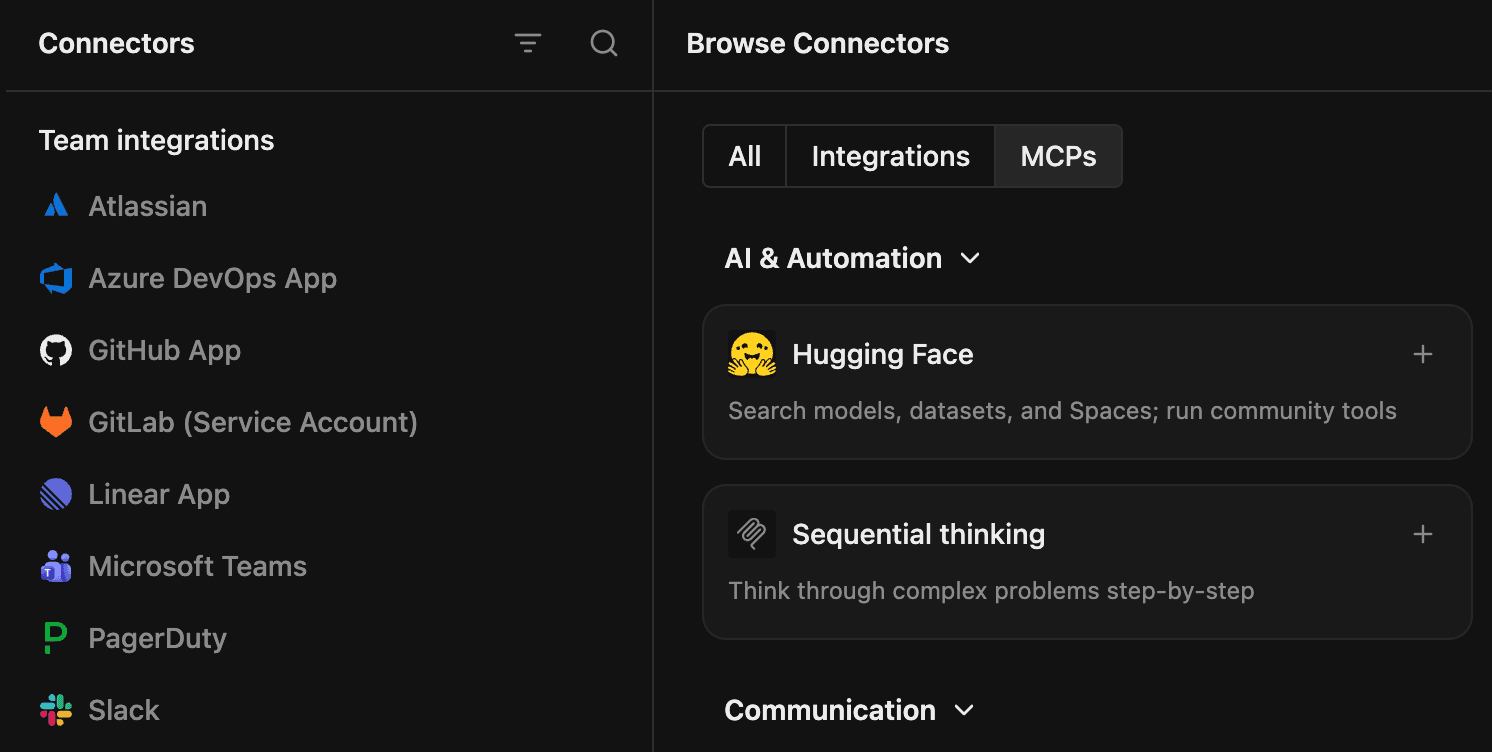
Augment Code adds Connectors hub, session tab customization, Cost Analytics CSV exports, ClickUp/Snowflake integrations, and new CLI commands for triggers and daemon environments.
└──▷ TRY ITEnable a persistent workflow trigger so your automation fires without manual intervention.$ auggie cloud trigger enable <trigger-id>Retrieve a shareable VFS URL for a file, relying on theAUGMENT_VFS_DIRfallback path when no explicit path is provided.$ auggie cloud vfs get-url <file-path>- ›New Settings > Connectors hub consolidates all integrations and MCP servers in one place, with a marketplace browser and an 'Add Connector' button for custom MCP servers not listed in the marketplace.
- ›Adds
auggie cloud trigger enable/disablecommands to manage persistent workflow triggers from the CLI. - ›Adds
auggie cloud environment getsupport for daemon targets. - ›Adds
auggie cloud vfs get-urlpath simplification and improved fallback handling for theAUGMENT_VFS_DIRenvironment variable. - ›Adds
auggie session getdisplay of a session's child worker sessions.
+23 moreshow less
- ›Cost Analytics now supports CSV exports, flexible filters, secondary breakdowns, and more accurate totals.
- ›Adds ClickUp and Snowflake integrations, expanding the connector catalog.
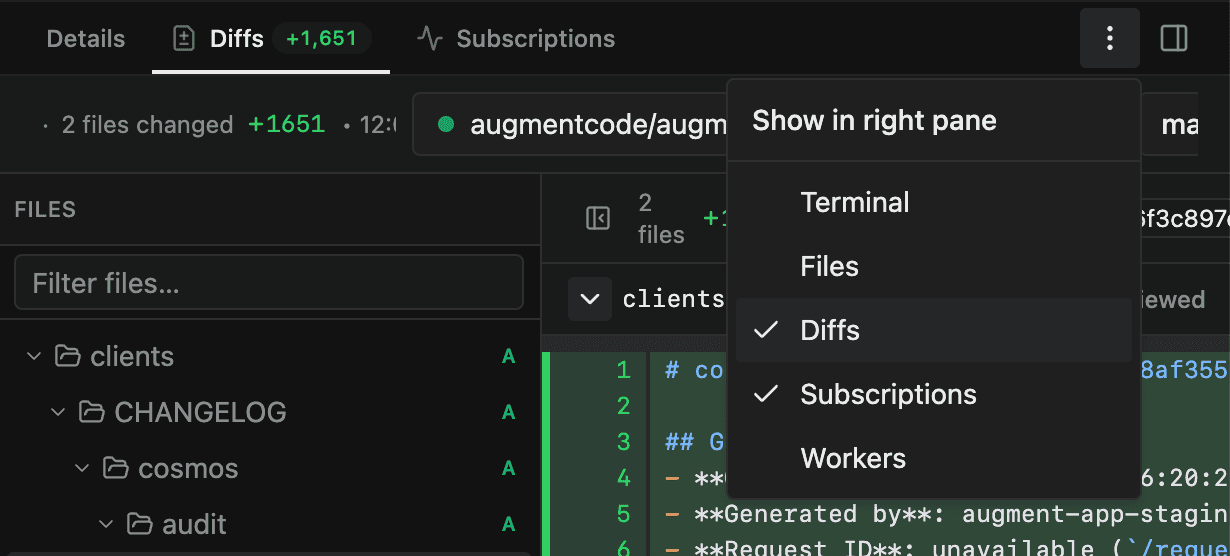
- ›Session tab layout is now configurable — drag Terminal, Files, Diffs, or Subscriptions between main and side panes; layout is saved and applied to new sessions.
- ›Session forking lets users branch a new session from a completed turn to explore a different direction without losing the original conversation.
- ›Cost Analytics for Enterprise organizations adds charts, detailed breakdowns, custom date ranges, filters, search, sorting, pagination, and direct session links.
- ›Session tags can now be viewed and edited in session details for use in analytics dashboards.
- ›MCP catalog expands to include Google Workspace services: Gmail, Drive, Calendar, Sheets, Docs, and Slides.
- ›Adds file comments: agents can now read, list, add, and reply to comments on Virtual File System files, with @mentions, emoji reactions, notifications, deep links, and click-to-open threads.
- ›Adds MCP
tools/list_changednotification support to dynamically refresh the agent's cached tool list. - ›MCP server TUI now displays the provenance (origin) of each MCP server to clarify which plugin or organization provided it.
- ›Adds automatic secret scrubbing for MCP server logs and improved stdio error visibility.
- ›Daemon pools and Expert sessions can now use isolated workspaces.
- ›Automations now have dedicated overview and history pages and support for initial instructions so launched sessions start with the right context.
- ›Adds pinned experts scoped per Space, always discoverable from a dedicated tab.
- ›Adds Jira and Confluence personal account connections under Linked Accounts.
- ›GitLab bulk-connect webhooks with progress tracking, per-group coverage, and paginated repository selection.
- ›Tunnel sessions can now be filtered on the Sessions page.
- ›Per-file size limit for the Virtual File System raised from 1 MB to 4 MiB.
- ›Billing information is now included in CLI JSON output.
- ›Sensitive Path Protection adds approval requirements for saving files to sensitive paths in the CLI.
- ›Cosmos Advisor is now available across eligible Spaces.
- ›Personal profiles and Experts can now use icons, emojis, or uploaded avatars.
- ›Adds
AUGMENT_VFS_DIRenvironment variable fallback handling improvements in the CLI.