Zed
v1.17.2 open-sourceZed is a high-performance code editor built for developers, emphasizing speed, collaboration, and AI-assisted coding features.
file_scan_exclusions:
  - "..."
  - "node_modules"
  - ".build"
  - "dist"
{
  "fullscreen_mode": "simple"
}
// In your Zed settings.json
{
  "terminal": {
    "starts_open": false
  }
}
// In your Zed settings.json
{
  "gutter": {
    "git_gutter_width": 8
  }
}
{
  "git": {
    "diff_base": "default_branch"
  }
}
{
  "gutter": {
    "git_gutter_width": 6
  }
}
[
  {
    "context": "multiple_selections",
    "bindings": {
      "ctrl-l": "editor::SelectNextMatch"
    }
  }
]
"git": {
  "diff_base": "default_branch"
}
"gutter": {
  "git_gutter_width": 6
}
{
  "agent": {
    "compaction_model": "claude-3-5-haiku"
  }
}
{
  "agent_ui_font_family": "Inter",
  "agent_buffer_font_family": "Zed Mono"
}
"agent": {
  "compaction_model": "claude-opus-4-5"
}
"agent_buffer_font_family": "JetBrains Mono",
"agent_ui_font_family": "Inter"
["file_finder::Toggle", { "include_ignored": true }]
["file_finder::Toggle", { "include_ignored": true }]
{
  "title_bar": {
    "show_worktree_name": false
  }
}
{
  "format_on_save": "modifications"
}
{
  "language_models": {
    "anthropic": {
      "custom_models": [
        {
          "name": "claude-custom",
          "model": "claude-opus-4-5",
          "mode": { "type": "adaptive" }
        }
      ]
    }
  }
}
{
  "lsp_results_location": "pane"
}
{
  "format_on_save": "modifications"
}
{
  "language_models": {
    "anthropic": {
      "custom_models": [
        {
          "name": "claude-custom",
          "mode": { "type": "adaptive" }
        }
      ]
    }
  }
}
{
  "lsp_results_location": "pane"
}
{
  "terminal.open_links_in_mouse_mode": false
}
{
  "git": {
    "inline_blame": {
      "location": "status_bar"
    }
  }
}
{
  "agent": {
    "commit_message_include_project_rules": false
  }
}
{
  "markdown_preview_font_size": 16
}
zed --completions zsh > ~/.zfunc/_zed
"markdown_preview": {
  "limit_content_width": true,
  "max_width": 800
}
"git_panel": {
  "entry_primary_click_action": "open_diff"
}
{
  "agent": {
    "terminal_init_command": "source .venv/bin/activate"
  }
}
{
  "dev_container_use_buildkit": false
}
/compact
git checkout $ZED_GIT_REF
{
  "agent": {
    "commit_message_instructions": "Use Conventional Commits format: type(scope): short summary. Include a body only when the change is non-trivial."
  }
}
{
  "scan_symlinks": "always"
}
{
  "language_models": {
    "openai": {
      "custom_headers": {
        "X-Org-Id": "<your-org-id>"
      }
    }
  }
}
{
  "lsp_document_links": false
}
{
  "git_commit_buffer_font_size": 16
}
{
  "git.show_stage_restore_buttons": false
}
{
  "markdown_preview_code_font_family": "JetBrains Mono"
}
{
  "subagent_model": "gpt-5.4-mini"
}
{
  "language_models": {
    "bedrock": {
      "guardrail_identifier": "my-guardrail-id",
      "guardrail_version": "1"
    }
  }
}
{
  "completion_menu_item_kind": "symbol"
}
// In settings.json
{
  "go_to_definition_scroll_strategy": "preserve"
}
{
  "code_lens": "on"
}
"mouse_wheel_zoom": true
"agent": {
  "limit_content_width": false
}
"cli_default_open_behavior": "open_in_existing_window"
zed --dev-container /path/to/project
{
  "project_panel": {
    "sort_order": "unicode"
  }
}
"agent": {
  "thinking_display": "always_expanded"
}
"minimum_split_diff_width": 120
{
  "customizations": {
    "zed": {
      "extensions": ["rust-analyzer", "toml"]
    }
  }
}
{
  "label": "Run tests",
  "command": "cargo test",
  "save": "all"
}
{
  "project_panel": {
    "git_status_indicator": true
  }
}
{
  "git_panel": {
    "starts_open": false
  }
}
[
  {
    "context": "Editor && edit_prediction",
    "unbind": {
      "tab": "editor::AcceptEditPrediction"
    }
  }
]
{
  "git_panel": {
    "show_count_badge": true,
    "file_icons": true,
    "folder_icons": true
  }
}
{
  "label": "Lint current file",
  "command": "lint-runner --lang $ZED_LANGUAGE ${ZED_FILE}"
}
"lm_studio": {
  "api_url": "http://localhost:1234/v1",
  "api_key": "<your-key>"
}
kernel_language_names:
  - python
  - python3
  - ipython
"vim": {
  "yank": {
    "background": "#f5c842"
  }
}
{
  "disable_ai": true
}
{
  "language_models": {
    "bedrock": {
      "allow_extended_context": true
    }
  }
}
{
  "languages": {
    "TypeScript": {
      "document_symbols": "on"
    }
  }
}
// In your language-specific settings block, e.g. for TypeScript:
{
  "languages": {
    "TypeScript": {
      "lsp_folding_ranges": "on"
    }
  }
}
{
  "global_lsp_settings": {
    "request_timeout": 30
  }
}
open 'zed://agent?prompt=Review%20the%20latest%20diff%20for%20secrets%20or%20hardcoded%20credentials'
"working_directory": "current_file_directory"
{
  "vim.gdefault": true
}
{
  "global_lsp_settings": {
    "notifications": {
      "dismiss_timeout_ms": 5000
    }
  }
}
ZED_VERSION=0.222.2 sh <(curl -fsSL https://zed.dev/install.sh)
{
  "mcpServers": {
    "my-server": {
      "command": "npx",
      "args": ["-y", "@modelcontextprotocol/server-filesystem", "/home/user/projects"],
      "remote": true
    }
  }
}
root = true

[*]
indent_style = space
indent_size = 2
{
  "agent.show_turn_stats": true
}
{
  "tab_bar": {
    "show_pinned_tabs_in_separate_row": true
  }
}
[
  {
    "context": "vim_mode",
    "bindings": {
      "%": ["vim::Matching", { "match_quotes": false }]
    }
  }
]
// In your Zed settings.json
{
  "which_key": {
    "enabled": true
  }
}
open 'zed://git/commit/a1b2c3d?repo=/path/to/repo'
zed --wait ~/my-project
{
  "languages": {
    "Python": {
      "language_servers": [
        "ty", "ruff", "!basedpyright", "!pyrefly", "!pyright", "!pylsp"
      ]
    }
  }
}
{
  "preview_tabs": {
    "enable_preview_from_project_panel": true,
    "enable_preview_from_file_finder": false,
    "enable_preview_from_multibuffer": true,
    "enable_preview_multibuffer_from_code_navigation": false,
    "enable_preview_file_from_code_navigation": true,
    "enable_keep_preview_on_code_navigation": false
  }
}
{
  "language_models": {
    "bedrock": {
      "allow_global": true
    }
  }
}
{
  "word_diff_enabled": false
}
{
  "load_direnv": "disabled"
}
{
  "lsp": {
    "eslint": {
      "settings": {
        "workingDirectories": ["./client", "./server"]
      }
    }
  }
}
{
  "languages": {
    "JSON": {
      "colorize_brackets": true
    }
  }
}
{
  "terminal": {
    "path_hyperlink_regexes": ["[a-zA-Z0-9_./-]+\\.[a-z]{1,5}(?::\\d+)?"],
    "path_hyperlink_timeout_ms": 200
  }
}
{
  "configurations": [
    {
      "name": "Attach to process",
      "type": "lldb",
      "request": "attach",
      "pid": "$ZED_PICK_PID"
    }
  ]
}
{
  "context_servers": {
    "my-remote-server": {
      "enabled": true,
      "url": "http://localhost:3000/mcp"
    }
  }
}
:'<,'>w snippet.py
{
  "sticky_scroll": {
    "enabled": true
  }
}
{
  "terminal": {
    "detect_venv": {
      "on": {
        "conda_manager": "mamba"
      }
    }
  }
}
// In Zed settings (settings.json)
{
  "hidden_files": ["**/.env", "**/node_modules", "**/dist"]
}
// In Zed settings (settings.json)
{
  "search": {
    "center_on_match": true
  }
}
// In Zed settings (settings.json)
{
  "editor": {
    "completion_menu_scrollbar": true
  }
}
"edit_predictions": {
  "codestral": {
    "api_url": "https://your-codestral-proxy.example.com",
    "model": "codestral-latest",
    "max_tokens": 150
  }
}
{
  "relative_line_numbers": "wrapped"
}
zed --reuse path/to/file.rs
{
  "status_bar": {
    "line_endings_button": true
  },
  "title_bar": {
    "window_controls_position": "left"
  }
}
{
  "open_file_on_paste": true
}
{
  "project_panel": {
    "hide_hidden": true
  }
}
"cmd-alt-a": ["action::Sequence", ["editor::SelectLargerSyntaxNode", "editor::Copy", "editor::UndoSelection"]]
{
  "title_bar": {
    "show_branch_icon": true
  }
}
{
  "terminal": {
    "keep_selection_on_copy": false
  }
}
{
  "git": {
    "blame": {
      "show_avatar": true
    }
  }
}
{
    "context": "Editor",
    "bindings": {"ctrl-k": ["editor::CutToEndOfLine", { "stop_at_newlines": true }]}
}
// In your Zed settings.json:
{ "use_system_window_tabs": true }
{ "excerpt_context_lines": 5 }
{ "project_panel": { "drag_and_drop": false } }
{
  "agent_servers": {
    "gemini": {
      "ignore_system_version": false
    }
  }
}
{
  "languages": {
    "Python": {
      "auto_indent": false
    }
  }
}
{
  "status_bar": {
    "cursor_position_button": false
  }
}
{
  "macos": {
    "buffer_font_size": 14
  },
  "windows": {
    "buffer_font_size": 13
  }
}
{
  "language_models": {
    "openai": {
      "available_models": [
        {
          "name": "o3",
          "display_name": "o3 (high reasoning)",
          "max_output_tokens": 128000,
          "max_tokens": 200000,
          "reasoning_effort": "high"
        }
      ],
      "version": "1"
    }
  }
}
{
  "project_panel": {
    "starts_open": false
  }
}
{
  "profiles": {
    "Streaming": {
      "agent_font_size": 20,
      "buffer_font_size": 20,
      "theme": "One Light",
      "ui_font_size": 20
    }
  }
}
{
  "expand_outlines_with_depth": 2
}
{ "disable_ai": true }
{ "use_modifier_to_send": true }
{ "snippet_sort_order": "none" }
{
  "show_menus": true
}
{
  "envFile": "${workspaceFolder}/.env"
}
// In your Zed settings.json:
{
  "terminal": {
    "keep_selection_on_copy": true
  }
}
// In your Zed settings.json:
{
  "agent": {
    "expand_terminal_card": false,
    "expand_edit_card": false
  }
}
// In your Zed settings.json:
{
  "sticky_scroll": false
}
{
  "adapter": "CodeLLDB",
  "sourceLanguages": ["rust"],
  "program": "./target/debug/my_binary"
}
{
  "helix_mode": true
}
{
  "dap": {
    "args": ["--log-level", "debug"]
  }
}
{
  "collapse_untracked_diff": true
}
{ "minimap": { "display_in": "active_editor" } }
zed --diff before.yaml after.yaml
{
  "project_panel": {
    "hide_root": true
  }
}
export GH_COPILOT_TOKEN=<your-oauth-token>
zed .
// In Zed settings (settings.json)
{
  "close_on_file_delete": true
}
// In .zed/tasks.json
[
  {
    "label": "Run tests in file directory",
    "command": "pytest",
    "args": ["$ZED_RELATIVE_DIR"],
    "cwd": "$ZED_WORKTREE_ROOT"
  }
]
{
  "agent": {
    "default_view": "text_thread"
  }
}
{
  "inline_code_actions": false
}
// In Zed's action palette, invoke pane::DeploySearch with excluded_files set
// Example keybinding in keymap.json:
{
  "context": "Workspace",
  "bindings": {
    "cmd-shift-f": ["pane::DeploySearch", { "excluded_files": "vendor/**,*.generated.rs" }]
  }
}
{
  "inline_code_actions": false
}
{
  "extend_comment_on_newline": false
}
{
  "minimap": {
    "show": "always"
  }
}
{
  "hover_popover_delay": 600
}
{
  "workspace": {
    "title_bar": {
      "show_onboarding_banner": false
    }
  }
}
{
  "skip_focus_for_active_in_search": false
}
{
  "git_panel": {
    "sort_by_path": true
  }
}
{
  "vim_mode": true,
  "vim": {
    "cursor_shape": {
      "normal": "hollow",
      "insert": "bar",
      "replace": "block",
      "visual": "underline"
    }
  }
}
{
  "bottom_dock_layout": "full"
}
{
  "bottom_dock_layout": "left_aligned"
}
zed --user-data-dir /tmp/zed-profile-test .
hide_mouse: on_typing
{
  "lsp": {
    "rust-analyzer": {
      "binary": {
        "path": "/usr/local/bin/rust-analyzer",
        "env": {
          "RA_PROFILE": "*>100"
        }
      }
    }
  }
}
{
  "go_to_definition_fallback": "none"
}
zed --system-specs
{
  "edit_predictions": {
    "mode": "subtle"
  }
}
{
  "use_system_prompts": false
}
:reg
"inlay_hints": {
  "toggle_on_modifiers_press": {
    "control": false,
    "shift": false,
    "alt": true,
    "platform": false,
    "function": false
  }
}
"edit_predictions": {
  "disabled_globs": [
    "/home/user/projects/**/*.test.ts"
  ]
}
{
  "languages": {
    "Markdown": {
      "allow_rewrap": false
    }
  }
}
// keybindings.json
[
  { "bindings": { "cmd-=": ["zed::IncreaseBufferFontSize", { "persist": true }] } },
  { "bindings": { "cmd--": ["zed::DecreaseBufferFontSize", { "persist": true }] } },
  { "bindings": { "cmd-0": ["zed::ResetBufferFontSize",    { "persist": true }] } }
]
[
  { "bindings": {
      "cmd-=": ["zed::IncreaseBufferFontSize", { "persist": true }],
      "cmd-+": ["zed::IncreaseBufferFontSize", { "persist": true }],
      "cmd--": ["zed::DecreaseBufferFontSize", { "persist": true }],
      "cmd-0": ["zed::ResetBufferFontSize",    { "persist": true }]
  } }
]
{
  "icon_theme": {
    "mode": "system",
    "light": "Zed (Default)",
    "dark": "Zed (Default)"
  }
}
{
  "tab_bar": {
    "show_tab_bar_buttons": false
  }
}
:'<,'>!sort
{
  "project_panel": {
    "entry_spacing": "standard"
  }
}
[
  {
    "context": "VimControl",
    "bindings": {
      "s": "vim::Sneak",
      "S": "vim::SneakBackward"
    }
  }
]
[
  {
    "context": "Diagnostics",
    "bindings": {
      "r": "diagnostics::Deploy"
    }
  }
]
{
  "context": "Workspace",
  "bindings": {
    "alt-z": ["app_menu::OpenApplicationMenu", "Zed"],
    "alt-f": ["app_menu::OpenApplicationMenu", "File"],
    "alt-e": ["app_menu::OpenApplicationMenu", "Edit"],
    "alt-s": ["app_menu::OpenApplicationMenu", "Selection"],
    "alt-v": ["app_menu::OpenApplicationMenu", "View"],
    "alt-g": ["app_menu::OpenApplicationMenu", "Go"],
    "alt-w": ["app_menu::OpenApplicationMenu", "Window"],
    "alt-h": ["app_menu::OpenApplicationMenu", "Help"]
  }
}
// In keymap.json
{
  "bindings": {
    "ctrl--": ["task::Spawn", { "task_name": "echo hello", "target": "center" }]
  }
}
{
  "hover_popover_delay": 600,
  "lsp_highlight_debounce": 200,
  "max_tabs": 10,
  "horizontal_scroll_margin": 4,
  "scrollbar": { "axis": "vertical" }
}
{
  "tabs": {
    "activate_on_close": "left_neighbour"
  }
}
{
  "languages": {
    "Markdown": {
      "show_completions_on_input": false,
      "show_completion_documentation": false
    }
  }
}
{
  "project_panel": {
    "show": "always"
  }
}
zed --uninstall
{
  "show_user_picture": false
}
{
  "vim": {
    "highlight_on_yank": true,
    "highlight_on_copy": false
  }
}
"file_scan_inclusions": ["vendor/**", "generated/**", ".env*"]
"show_summary": false,
"show_command": false
{
  "file_finder": {
    "modal_width": "medium"
  }
}
{
  "assistant": {
    "show_hints": false
  }
}
{"languages": {"Go": {"inline_completions_disabled_in": ["comment", "string"]}}}
{"lsp": {"tailwindcss-language-server": {"settings": {"rootFontSize": 20}}}}
{
  "context": "EmptyPane || SharedScreen || vim_mode == normal",
  "bindings": {
    ", r t": ["editor::SpawnNearestTask", { "reveal": "no_focus" }]
  }
}
{
  "context": "Editor",
  "bindings": {
    "ctrl-/": ["editor::ToggleComments", { "ignore_indent": true }]
  }
}
{
  "assistant": {
    "enable_experimental_live_diffs": true
  }
}
"terminal": {
  "option_as_meta": true
}
{
  "context": "VimControl && !menu",
  "bindings": {
    "/": ["vim::Search", { "regex": false }]
  }
}
{
  "context": "VimControl && !menu",
  "bindings": {
    "*": ["vim::MoveToNext", { "regex": false, "caseSensitive": false }],
    "#": ["vim::MoveToPrev", { "regex": false, "caseSensitive": false }]
  }
}
[
  {
    "label": "Run ${ZED_STEM}",
    "command": "gcc",
    "args": [
      "$ZED_FILE",
      "-o",
      "${ZED_DIRNAME}/${ZED_STEM}.out",
      "&&",
      "${ZED_DIRNAME}/${ZED_STEM}.out"
    ],
    "tags": ["c-main"]
  }
]
{
  "terminal": {
    "cursor_shape": "bar"
  }
}
{
  "assistant": {
    "inline_alternatives": ["gpt-4o", "claude-3-5-sonnet"]
  }
}
{
  "node": {
    "disable_path_lookup": true
  }
}
{
  "tabs": {
    "file_icons": true
  }
}
{
  "cursor_shape": "block",
  "inlay_hints": {
    "show_background": true
  }
}
{
  "search": {
    "case_sensitive": true,
    "whole_word": true
  }
}
{
  "context_servers": {
    "my-mcp-server": {
      "command": "my-mcp-server",
      "env": {
        "API_KEY": "<your-api-key>",
        "LOG_LEVEL": "info"
      }
    }
  }
}
[
  {
    "bindings": {
      "ctrl-backspace": ["DeleteToPreviousWordStart", {"ignore_newlines": true}]
    }
  }
]
{
  "unnecessary_code_fade": 0.3
}
// In your Zed settings.json
{
  "performance": {
    "show_in_status_bar": true
  }
}
// In your Zed keymap.json
[
  {
    "bindings": {
      ", ,": ["editor::HandleInput", ","]
    }
  }
]
// In your Zed keymap.json
[
  {
    "bindings": {
      "ctrl-l": "editor::ScrollCursorCenterTopBottom"
    }
  }
]
{
  "buffer_font_fallbacks": ["Noto Sans Mono", "Symbols Nerd Font"],
  "ui_font_fallbacks": ["Noto Sans"],
  "terminal": {
    "font_fallbacks": ["Noto Sans Mono"]
  }
}
"languages": {
  "Python": {
    "format_on_save": { "language_server": { "name": "ruff" } },
    "formatter": { "language_server": { "name": "ruff" } },
    "language_servers": ["pyright", "ruff"]
  }
}
[
  {
    "context": "Editor && mode == full",
    "bindings": {
      "ctrl-shift-enter": [
        "assistant::InlineAssist",
        { "prompt": "Build a snake game" }
      ]
    }
  }
]
{ "tabs": { "file_icons": true } }
{ "show_signature_help_after_completion": false }
{ "use_system_path_prompts": false }
{
  "lsp": {
    "tailwindcss-language-server": {
      "settings": {
        "classAttributes": ["class", "className", "ngClass", "styles"]
      }
    }
  }
}
"assistant": {
  "version": "1",
  "provider": {
    "default_model": "claude-3-5-sonnet",
    "name": "anthropic"
  }
}
{
  "JavaScript": {
    "language_servers": ["!vtsls", "typescript-language-server", "..."]
  }
}
{
  "toolbar": {
    "selections_menu": false
  }
}
{
  "assistant": {
    "version": "1",
    "provider": {
      "name": "ollama",
      "low_speed_timeout_in_seconds": 30
    }
  }
}
{
  "my snippet": {
    "prefix": "log",
    "body": ["console.log(\"$1\")"],
    "description": "Expand `log` to `console.log()`"
  }
}
{
  "lsp": {
    "rust-analyzer": {
      "binary": {
        "path_lookup": true
      }
    }
  }
}
"TypeScript": {
  "language_servers": ["!typescript-language-server", "vtsls", ".."]
}
{
  "label": "Lint current dir",
  "command": "eslint $ZED_RELATIVE_FILE",
  "cwd": "$ZED_DIRNAME"
}
{
  "expand_excerpt_lines": 10
}
{
  "syntax": {
    "keyword": {
      "color": "#569cd6",
      "background_color": "#1e1e2e"
    }
  }
}
{
  "languages": {
    "JSON": {
      "prettier": {
        "allowed": true,
        "parser": "json"
      }
    }
  }
}
{
  "file_types": {
    "Dockerfile": [
      "Dockerfile",
      "Dockerfile.*"
    ]
  }
}
{
  "assistant": {
    "version": "1",
    "provider": {
      "name": "anthropic"
    }
  }
}
{
  "tab_bar": {
    "show": false
  }
}
zed --foreground
{
  "stop_at_soft_wraps": true
}
{
  "context": "ProjectPanel",
  "bindings": {
    "backspace": "project_panel::Delete",
    "delete": "project_panel::Delete"
  }
}
{
  "lsp": {
    "eslint": {
      "settings": {
        "rulesCustomizations": [
          { "rule": "*", "severity": "warn" }
        ]
      }
    }
  }
}
// In your keybindings array (keymap.json)
{
  "context": "Editor && mode == full",
  "bindings": {
    "shift-enter": ["editor::ExpandExcerpts", { "lines": 5 }]
  }
}
{
  "git": {
    "inline_blame": {
      "min_column": 80
    }
  }
}
zed --stable /path/to/project
{"git": {"inline_blame": {"enabled": false}}}
{"lsp": {"clangd": {"binary": {"path": "/usr/bin/clangd", "arguments": ["--log=verbose"]}}}}
{"restore_on_startup": "none"}
{
  "line_indicator_format": "short"
}
{
  "tab_bar": {
    "show_nav_history_buttons": false
  }
}
// In Zed settings.json
{"languages": {"JavaScript": {"formatter": {"code_actions": {"source.fixAll.eslint": true}}}}}
// In Zed settings.json
{"lsp": {"eslint": {"settings": {"problems": {"shortenToSingleLine": true}}}}}
{
  "lsp": {
    "gopls": {
      "binary": {
        "path": "/home/user/go/bin/gopls",
        "arguments": ["-debug=0.0.0.0:8080"]
      }
    }
  }
}
{
  "lsp": {
    "elixir-ls": {
      "settings": {
        "mixEnv": "test"
      }
    }
  }
}
{
  "lsp": {
    "rust-analyzer": {
      "binary": {
        "path": "/my/abs/path/rust-analyzer",
        "arguments": ["--no-log-buffering"]
      }
    }
  }
}
{
  "label": "cargo build",
  "command": "cargo build",
  "reveal": "never"
}
zed --new src/main.rs src/lib.rs
{
  "double_click_in_multibuffer": "open"
}
{
  "code_actions_on_format": { "source.fixAll.eslint": true },
  "lsp": {
    "eslint": {
      "settings": {
        "codeActionOnSave": { "rules": ["import/order"] }
      }
    }
  }
}
{
  "vim": {
    "use_system_clipboard": "on_yank"
  }
}
{
  "gutter": {
    "line_numbers": true,
    "code_actions": false,
    "folds": false
  }
}
{
  "code_actions_on_format": {
    "source.organizeImports": true
  }
}
[
  {
    "context": "Editor && VimControl && !VimWaiting && !menu",
    "bindings": {
      "g z": ["workspace::SendKeystrokes", "j j j j l l l l"]
    }
  }
]
{
  "assistant": {
    "openai_api_url": "https://my-openai-proxy.internal/v1"
  }
}
"toolbar": {
  "breadcrumbs": true,
  "quick_actions": false
}
"share_on_join": false
{
  "private_files": ["**/.env", "**/secrets.json", "**/*.pem"],
  "redact_private_values": true
}
{
  "experimental.theme_overrides": {
    "editor.background": "#1a1a2e",
    "editor.foreground": "#e0e0ff"
  }
}
{
    "ui_font_family": "Zed Mono",
    "ui_font_size": 16
}
{
    "context": "Pane",
    "bindings": {
        "cmd-shift-f": "workspace::NewSearch"
    }
}
"assistant": {
    "default_open_ai_model": "gpt-4-0613"
}
{
  "seed_search_query_from_cursor": "selection"
}
{
  "terminal": {
    "detect_venv": {
      "on": {
        "activate_script": "nushell"
      }
    }
  }
}
{
  "elixir": {
    "lsp": "next_ls"
  }
}
{
  "diagnostics": {
    "include_warnings": false
  }
}
{
  "semantic_index": {
    "enabled": true
  }
}
{
  "default_open_ai_model": "gpt-4-0613"
}
"wrap_guides": [80, 120],
"show_wrap_guides": true
{ "bindings": { "cmd-k": null } }
{
  "project_panel": {
    "git_status": true
  }
}
zed src/main.rs:42:15
{
  "scrollbar": {
    "show": "always",
    "git_diff": true
  }
}
{
  "terminal": {
    "option_as_meta": true
  }
}
{
  "format_on_save": {
    "external": {
      "command": "prettier",
      "arguments": ["--stdin-filepath", "{buffer_path}"]
    }
  }
}
{
  "format_on_save": "off"
}
{
  "autosave": {
    "after_delay": {
      "milliseconds": 1000
    }
  }
}
{
    "Rust": {
        "enable_language_server": false
    }
}
[
    {
        "context": "Editor",
        "bindings": {
            "ctrl-w": "editor::DeleteToPreviousWordStart"
        }
    },
    {
        "context": "Workspace",
        "bindings": {
            "f1": "zed::OpenKeymap"
        }
    }
]
{
  "Editor": {
    "ctrl-w": "editor::DeleteToPreviousWordStart"
  }
}
~/.zed/settings.json
collaborators = ["nathansobo", "as-cii", "maxbrunsfeld"] Summary
Zed is an open-source editor that functions as a high-performance, multiplayer code editor for platform engineers, and its source code uses a GPL-3.0-or-later license. It is distributed as a desktop application available for macOS, Linux, and Windows. The project documentation does not name a comparable tool but describes itself in the category of editor/IDE. Development activity is ongoing, as indicated by detailed building guides for multiple operating systems.
Zed is a high-performance code editor built for developers, emphasizing speed, collaboration, and AI-assisted coding features.
What Zed answers
Does it support web usage?
only desktop applications for macOS, Linux, and Windows are available
How do I build it for different operating systems?
separate documentation guides exist for building on macOS, Linux, and Windows
Can I use my own contribution code?
contributors follow guidelines in the contributing documentation
Where does the code base handle license compliance?
the build process uses a tool to manage and enforce open source licenses
What licenses are used in the source code?
the source code is primarily under GPL-3.0-or-later, with some components under Apache-2.0
Are there limits on what I can build or contribute?
the process requires checking and specifying licenses for third-party dependencies
Examples
Command line
No option matches that search.
| option | found in | since | description |
|---|
No option matches that search.
Values are placeholders taken from each option’s declared default. Nothing is executed here — the output shown is a recording of a run that already happened.
Release history
- v1.17.2
Zed v1.17.2 adds tabular CSV/TSV previews, new Git blame/stash actions, an agent
ask_usertool, and asimplefullscreen mode.└──▷ GET THIS VERSION$ git clone --branch v1.17.2 https://github.com/zed-industries/zed.git # already have the repo? check out this version: $ git checkout v1.17.2
└──▷ USE ITExtend default file scan exclusions with custom paths instead of replacing the defaults entirely.file_scan_exclusions: - "..." - "node_modules" - ".build" - "dist"
Enable a fullscreen mode that covers the MacBook notch for a fully immersive display on macOS.{ "fullscreen_mode": "simple" }- ›Adds
"..."entry support infile_scan_exclusionsconfig, allowing custom exclusions to extend the defaults instead of replacing them entirely. - ›Adds
simpleoption to thefullscreen_modesetting for fullscreen windows that cover the MacBook display notch on macOS. - ›Adds
editor: blame revisionandeditor: blame previous revisionactions for viewing a file's blame at the selected revision or its parent. - ›Adds Stash Tracked and Stash Staged options to the Git Panel for stashing only tracked or only staged changes.
- ›Adds
multi workspace: move project upandmulti workspace: move project downactions for reordering projects in the Agent Sidebar.
+9 moreshow less
- ›Adds tabular data previews for CSV, TSV, PSV, and SSV files with sortable and independently resizable columns, value-based row filtering, a pinned row-number column, and right-click copying for cells and column headers.
- ›Adds an
ask_useragent tool that lets the AI Agent ask questions through forms with selectable options, free-text input, or both. - ›Adds a frame-time debug overlay, cycled with
ctrl-alt-shift-p; statistics reset withctrl-alt-shift-oon macOS/Linux orctrl-alt-shift-don Windows. - ›Adds Gemini 3.7 Flash to the available Google AI models.
- ›Adds low reasoning effort support for DeepSeek V4 Flash and V4 Pro.
- ›Adds Shell Script language detection for
.brushrcfiles. - ›Adds support for the
pathproperty on VS Code npm tasks. - ›Adds
handlkey support in Vim and Helix modes to collapse and expand Git Panel entries. - ›Reduces peak memory usage when opening large files by roughly the size of the file.
- ›Adds
- v1.16.1
Zed v1.16.1 adds Gemini 3.6 Flash, collapsible Git Panel sections,
terminal.starts_open, and Mermaid zoom/scroll.└──▷ GET THIS VERSION$ git clone --branch v1.16.1 https://github.com/zed-industries/zed.git # already have the repo? check out this version: $ git checkout v1.16.1
└──▷ USE ITPrevent the Terminal Panel from auto-opening every time you open a new workspace.// In your Zed settings.json { "terminal": { "starts_open": false } }Set a fixed pixel width for the git gutter instead of the default font-size-scaled width.// In your Zed settings.json { "gutter": { "git_gutter_width": 8 } }- ›Adds
terminal.starts_opensetting to control whether the Terminal Panel opens automatically in new workspaces. - ›Adds
gutter.git_gutter_widthsetting to the Settings UI with default (font-size-scaled) and custom (fixed pixel width) options. - ›Adds Copy Path and Copy Relative Path options to the Git Panel context menu.
- ›Adds Gemini 3.6 Flash to the Google AI models.
- ›Adds Claude Opus 5, Gemini 3.5 Flash Lite, Gemini 3.6 Flash, Gemini 3.7 Flash, Kimi K3, Grok 4.6, and Muse Spark 1.2 to OpenCode Zen.
+9 moreshow less
- ›Adds Kimi K3, Grok 4.5, Hy3, GPT 5.6 Luna, Qwen 3.8 Max, and GLM 5.3 to OpenCode Go.
- ›Makes grouped change sections in the Git Panel collapsible.
- ›Adds an optional message prompt when stashing changes in the Git Panel.
- ›Adds zooming and horizontal scrolling for Mermaid diagrams in the Markdown Preview and Agent Panel.
- ›Adds
tabandshift-tabnavigation for the code actions menu in Helix mode. - ›Adds highlighting for Python dunder variables via
attribute.specialin themes. - ›Adds horizontal scrollbars to wide Markdown tables for easier navigation.
- ›Highlights regex queries in the Text Finder when the regex filter is enabled.
- ›Adds frame-rendering performance data to telemetry diagnostics to help identify stutters and dropped frames.
└──▷ BREAKING ON UPGRADE- !The default model for OpenAI subscription users has changed to GPT-5.6 Sol.
- !OpenCode Free models have been removed from Zed's built-in OpenCode provider.
- !Claude Opus 4.1 has been removed from OpenCode Zen.
- ›Adds
- v1.15.0
Zed v1.15.0 adds
git.diff_basefor merge-base diffs,gutter.git_gutter_width, linked JSX/TSX editing, and Wayland drag-and-drop.└──▷ GET THIS VERSION$ git clone --branch v1.15.0 https://github.com/zed-industries/zed.git # already have the repo? check out this version: $ git checkout v1.15.0
└──▷ USE ITShow all current-branch changes against the default branch's merge base in gutters and file-status colors, rather than just uncommitted changes against HEAD.{ "git": { "diff_base": "default_branch" } }Widen the Git diff gutter indicators to make them easier to spot at a glance.{ "gutter": { "git_gutter_width": 6 } }Bind a key that only fires when multiple selections are active, leaving the same key free for normal editing.[ { "context": "multiple_selections", "bindings": { "ctrl-l": "editor::SelectNextMatch" } } ]- ›Adds
git.diff_basesetting to choose whether editor gutters, file-status colors, andgit: diffshow uncommitted changes againstHEAD(value"head", the default) or all current-branch changes against the merge base with the repository's default branch (value"default_branch"); also exposed as 'Diff Against Default Branch' in the editor controls menu. - ›Adds
gutter.git_gutter_widthsetting to configure the pixel width of Git diff indicators in the editor gutter. - ›Adds
multiple_selectionskey context, enabling distinct keybindings when multiple selections are active. - ›Adds support for self-hosted Sweep Next Edit models in OpenAI-compatible edit predictions, including the
sweepprompt format andinferdetection forsweep-next-editmodel names. - ›Adds linked editing for custom elements in JSX and TSX files.
+6 moreshow less
- ›Enables Emmet completions in return and arrow-function bodies for JSX and TSX.
- ›Adds a suggestion to install the
windows-batchextension when opening.batand.cmdfiles. - ›Supports dragging files from the Project Panel to external apps on macOS and Linux Wayland.
- ›Improves the project switcher to allow closing the currently selected project and automatically switching to a neighboring local or remote project.
- ›Improves installed development extensions to display their provided features and respect feature filters.
- ›Improves extension repository links to show provider-specific icons.
└──▷ BREAKING ON UPGRADE- !Copilot Chat authentication is now separated from edit-predictions authentication; existing users must reauthenticate with Copilot.
- ›Adds
- v1.15.0
Zed v1.15.0 adds
git.diff_basefor merge-base diffs,gutter.git_gutter_width, linked JSX/TSX editing, and Wayland file drag support.└──▷ GET THIS VERSION$ git clone --branch v1.15.0 https://github.com/zed-industries/zed.git # already have the repo? check out this version: $ git checkout v1.15.0
└──▷ USE ITShow all changes on the current branch relative to the default branch's merge base in gutters and file-status colors, rather than only uncommitted changes against HEAD."git": { "diff_base": "default_branch" }Widen the Git gutter indicators to make diff markers more visible in dense code."gutter": { "git_gutter_width": 6 }- ›Adds
git.diff_basesetting to choose whether editor gutters, file-status colors, andgit: diffshow uncommitted changes againstHEAD("head", the default) or all current-branch changes against the merge base with the repository's default branch ("default_branch"); also available as 'Diff Against Default Branch' in the editor controls menu. - ›Adds
gutter.git_gutter_widthsetting to configure the width of Git diff indicators in the editor gutter. - ›Adds
multiple_selectionskey context for assigning different keybindings when multiple selections are active. - ›Adds support for self-hosted Sweep Next Edit models in OpenAI-compatible edit predictions, including the
sweepprompt format andinferdetection forsweep-next-editmodel names. - ›Adds linked editing for custom elements in JSX and TSX files.
+5 moreshow less
- ›Enables Emmet completions in return and arrow-function bodies for JSX and TSX.
- ›Adds support for dragging files from the Project Panel to external apps on macOS and Linux Wayland.
- ›Adds a suggestion to install the
windows-batchextension when opening.batand.cmdfiles. - ›Improves the project switcher to allow closing the currently selected project and automatically switching to a neighboring local or remote project.
- ›Improves installed development extensions to display their provided features and respect feature filters.
└──▷ BREAKING ON UPGRADE- !Copilot Chat and edit-prediction authentication are now separated; existing Copilot users must reauthenticate with Copilot after upgrading.
- ›Adds
- v1.14.2
Zed v1.14.2 adds Agent sandboxing, undo/redo for file ops, skip-hooks commits, and configurable Agent Panel fonts.
└──▷ GET THIS VERSION$ git clone --branch v1.14.2 https://github.com/zed-industries/zed.git # already have the repo? check out this version: $ git checkout v1.14.2
└──▷ USE ITPin a cheaper or faster model for context compaction so your primary model is reserved for active generation.{ "agent": { "compaction_model": "claude-3-5-haiku" } }Set distinct fonts for the Agent Panel UI and its code buffers to improve readability.{ "agent_ui_font_family": "Inter", "agent_buffer_font_family": "Zed Mono" }- ›Adds
agent.compaction_modelsetting to specify the model used for context compaction. - ›Adds
agent_ui_font_familyandagent_buffer_font_familysettings for configuring the Agent Panel's UI and buffer fonts. - ›Adds a 'Skip Hooks' toggle (also available as
git: skip hooksaction) in the Git Panel Commit button menu and commit modal, bypassingpre-commitandcommit-msghooks for the next commit. - ›Adds the
_keybinding in Helix mode to trim whitespace from selections. - ›Adds sandboxing for the Agent's
terminalandfetchtools.
+7 moreshow less
- ›Adds a reasoning effort selector for Anthropic-compatible providers when the selected model supports adaptive thinking.
- ›Adds support for undoing and redoing file operations in the Project Panel.
- ›Improves OpenAI Responses API requests by sending system messages through the
instructionsfield. - ›Improves Markdown preview links so links to Markdown files open a preview scrolled to the linked heading or position, with
alt-clickopening the raw source instead. - ›Improves call diagnostics with per-participant audio health history and exportable reports.
- ›Improves proxy support by respecting
NO_PROXYand percent-encoded proxy credentials. - ›Improves support for language servers that dynamically register inlay hints, code lenses, or document symbols more than once.
- ›Adds
- v1.14.2
Zed v1.14.2 adds Agent sandboxing, undo/redo for Project Panel file ops, Skip Hooks for commits, and configurable Agent Panel fonts.
└──▷ GET THIS VERSION$ git clone --branch v1.14.2 https://github.com/zed-industries/zed.git # already have the repo? check out this version: $ git checkout v1.14.2
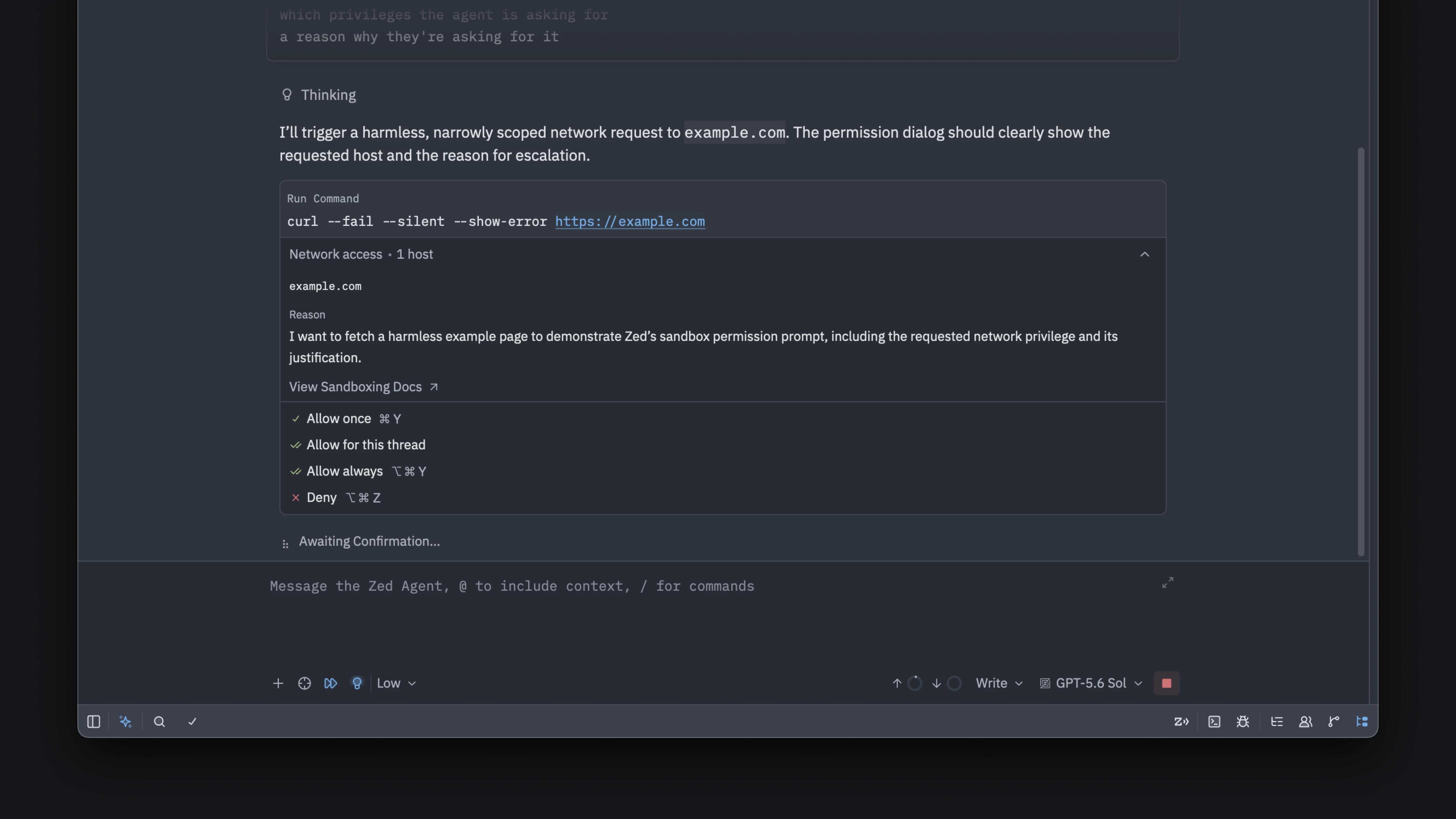 └──▷ USE ITPin a specific model for context compaction instead of letting the Agent choose the default.
"agent": { "compaction_model": "claude-opus-4-5" }Use a custom font in the Agent Panel's buffer area to match your editor font preferences."agent_buffer_font_family": "JetBrains Mono", "agent_ui_font_family": "Inter"
Skip pre-commit and commit-msg hooks for a single commit when hooks are broken or intentionally bypassed.📍In the Git Panel, click the arrow next to the Commit button, enable 'Skip Hooks', then commit — or rungit: skip hooksfrom the command palette before committing.- ›Adds
agent.compaction_modelsetting to specify the model used for context compaction. - ›Adds
agent_ui_font_familyandagent_buffer_font_familysettings for configuring the Agent Panel's UI and buffer fonts. - ›Adds sandboxing for the Agent's
terminalandfetchtools, isolating terminal commands and web fetches. - ›Adds a 'Skip Hooks' toggle (also available as
git: skip hooks) in the Commit button's menu and commit modal, skippingpre-commitandcommit-msghooks for the next commit. - ›Adds support for undoing and redoing file operations in the Project Panel.
+7 moreshow less
- ›Adds a reasoning effort selector for Anthropic-compatible providers when the selected model supports adaptive thinking.
- ›Adds the
_keybinding in Helix mode to trim whitespace from selections. - ›Improves OpenAI Responses API requests by sending system messages through the
instructionsfield. - ›Improves Markdown preview links so links to Markdown files open a preview scrolled to the linked heading or position, with
alt-clickopening the raw source. - ›Improves call diagnostics with per-participant audio health history and exportable reports.
- ›Improves proxy support by respecting
NO_PROXYand percent-encoded proxy credentials. - ›Improves support for language servers that dynamically register inlay hints, code lenses, or document symbols more than once.
- ›Adds
- v1.13.1
Zed v1.13.1 adds
include_ignoredfile-finder param,title_bar.show_worktree_namesetting, run-status gutter indicators, and editable image-viewer zoom.└──▷ GET THIS VERSION$ git clone --branch v1.13.1 https://github.com/zed-industries/zed.git # already have the repo? check out this version: $ git checkout v1.13.1
└──▷ USE ITOpen the File Finder with ignored files already included — useful when you need to quickly navigate to a build artifact or vendored file.["file_finder::Toggle", { "include_ignored": true }]- ›Adds
include_ignoredparameter tofile_finder::Toggle, enabling keybindings that open the File Finder with ignored files pre-included. - ›Adds
title_bar.show_worktree_namesetting (defaults totrue); set tofalseto hide the worktree-name picker in the title bar. - ›Adds run-status indicators to runnable gutter controls showing the last run result, plus a Clear Run Status context-menu action for completed runs.
- ›Adds 'Copy this Agent response', 'Scroll to User Message', and 'Scroll to top' buttons to every Agent Panel response.
- ›Adds support for editing image-viewer zoom levels directly from the toolbar.
+14 moreshow less
- ›Adds support for opening relative file links such as
src/main.rs#L42at the referenced line in Agent responses and Markdown previews. - ›Adds default keybindings for opening Text Finder from the editor and buffer search:
cmd-alt-fon macOS andctrl-alt-fon Linux and Windows. - ›Adds a preview pane to the buffer symbols picker.
- ›Adds support for the
variable.parametertheme color. - ›Adds support for loading Git commit template messages in remote and collaboration projects.
- ›Adds support for opening a specific line in a diff using the CLI.
- ›Improves the
create_worktreehook discoverability for setting up Git worktrees on creation. - ›Improves LSP Logs by showing request durations alongside RPC responses, making slow language server behavior easier to diagnose.
- ›Improves branch picker with better filtering, grouping, branch creation suggestions, and remote-provider icons.
- ›Improves Markdown previews by showing link destinations in the bottom-left corner when hovering over links.
- ›Adds support for surrounding selected text with backticks in Rust, C, and C++ comments.
- ›Improves Vim paste behavior by setting
[and]marks to the start and end of pasted text. - ›Improves Text Finder to seed its query from the focused item's selection, including the terminal.
- ›Updates Mistral Medium to version 3.5.
- ›Adds
- v1.13.1
Zed v1.13.1 adds
include_ignoredfile finder param,title_bar.show_worktree_namesetting, run-status gutter indicators, and editable image zoom.└──▷ GET THIS VERSION$ git clone --branch v1.13.1 https://github.com/zed-industries/zed.git # already have the repo? check out this version: $ git checkout v1.13.1
└──▷ USE ITOpen the File Finder with ignored files already visible — useful when you need to quickly navigate to a build artifact or gitignored config without changing project settings.["file_finder::Toggle", { "include_ignored": true }]Hide the worktree-name picker from the title bar to reduce visual clutter in single-project workspaces.{ "title_bar": { "show_worktree_name": false } }- ›Adds
include_ignoredparameter tofile_finder::Toggle, enabling keybindings that open the File Finder with ignored files pre-included. - ›Adds
title_bar.show_worktree_namesetting (defaulttrue); set tofalseto hide the worktree-name picker in the title bar. - ›Adds run-status indicators to runnable gutter controls, showing the last run result and a Clear Run Status context-menu action for completed runs.
- ›Adds support for editing image viewer zoom levels directly from the toolbar.
- ›Adds support for opening relative file links such as
src/main.rs#L42at the referenced line in Agent responses and Markdown previews.
+14 moreshow less
- ›Adds default keybindings for opening Text Finder from the editor and buffer search:
cmd-alt-fon macOS andctrl-alt-fon Linux and Windows. - ›Adds support for the
variable.parametertheme color. - ›Adds a preview pane to the buffer symbols picker.
- ›Adds 'Copy this Agent response', 'Scroll to User Message', and 'Scroll to top' buttons to every Agent Panel response.
- ›Adds support for opening a specific line in a diff using the CLI.
- ›Adds support for loading Git commit template messages in remote and collaboration projects.
- ›Improves the
create_worktreehook discoverability for setting up Git worktrees when they are created. - ›Improves branch picker filtering, grouping, branch creation suggestions, and remote-provider icons.
- ›Improves LSP Logs by showing request durations alongside RPC responses.
- ›Improves Vim paste behavior by setting the
[and]marks to the start and end of pasted text. - ›Improves Markdown previews by showing link destinations in the bottom-left corner when hovering over links.
- ›Improves Text Finder to seed its query from the focused item's selection, including the terminal.
- ›Adds support for surrounding selected text with backticks in Rust, C, and C++ comments.
- ›Updates Mistral Medium to version 3.5.
- ›Adds
- v1.12.1
Zed v1.12.1 adds Claude Opus 5 support for Anthropic and Amazon Bedrock BYOK providers.
└──▷ GET THIS VERSION$ git clone --branch v1.12.1 https://github.com/zed-industries/zed.git # already have the repo? check out this version: $ git checkout v1.12.1
- ›Adds Claude Opus 5 model support for Anthropic and Amazon Bedrock BYOK providers.
- v1.12.1
Zed v1.12.1 adds Claude Opus 5 support for Anthropic and Amazon Bedrock BYOK providers.
└──▷ GET THIS VERSION$ git clone --branch v1.12.1 https://github.com/zed-industries/zed.git # already have the repo? check out this version: $ git checkout v1.12.1
- ›Adds Claude Opus 5 model support for Anthropic and Amazon Bedrock BYOK providers.
- v1.12.0
Zed v1.12.0 adds Git staged/unstaged grouping, multi-select finders, adaptive Anthropic thinking, and format-on-save by changed lines.
└──▷ GET THIS VERSION$ git clone --branch v1.12.0 https://github.com/zed-industries/zed.git # already have the repo? check out this version: $ git checkout v1.12.0
└──▷ USE ITFormat only the lines you changed in a Git diff on save, avoiding noisy diffs in legacy codebases.{ "format_on_save": "modifications" }Enable adaptive thinking for a custom Anthropic model so the model allocates reasoning effort automatically.{ "language_models": { "anthropic": { "custom_models": [ { "name": "claude-custom", "model": "claude-opus-4-5", "mode": { "type": "adaptive" } } ] } } }Open LSP reference results in a filterable picker with preview instead of jumping directly, useful when a symbol has many references across files.{ "lsp_results_location": "pane" }- ›Adds
modificationsandmodifications_if_availableoptions toformat_on_saveto format only Git-changed lines instead of the entire file; also scopesremove_trailing_whitespace_on_saveandensure_final_newline_on_saveto changed lines in these modes. - ›Adds
lsp_results_locationglobal setting and per-actionopen_results_inoption to control filterable result pickers with previews foreditor: find all references,editor: go to definition, andeditor: go to implementation. - ›Adds support for adaptive thinking in custom Anthropic models via the
"mode": { "type": "adaptive" }configuration key. - ›Adds the
supports_fast_modesetting for enabling fast mode on custom Anthropic models. - ›Adds GPT-5.6 Sol, Terra, and Luna models to the Amazon Bedrock provider via the
bedrock-mantleendpoint.
+26 moreshow less
- ›Adds the
workspace: toggle editor zoomaction to maximize the active editor pane while keeping panels visible. - ›Adds the
editor: move to next comment paragraphandeditor: move to previous comment paragraphactions for caret navigation between comment paragraphs. - ›Adds
reduce_motionsetting with valueonto reduce UI animations. - ›Adds
/*glsl*/and/*wgsl*/comment-label syntax injection for JavaScript and TypeScript template literals. - ›Adds JSON language support for
deno.lockfiles. - ›Adds a Staging grouping to the Git Panel with separate Staged and Unstaged sections and controls for staging or unstaging changes.
- ›Adds GPG passphrase prompts in Zed for unlocking commit-signing keys.
- ›Adds Restore and Restore All buttons to the unstaged diff view for discarding unstaged changes.
- ›Adds the Git Graph context menu to the Git Panel's History tab.
- ›Adds tags to Git blame tooltips.
- ›Adds multi-select to the File Finder and Text Finder via
cmd-click(macOS) orctrl-click(Linux/Windows),tab, or the newcmd-shift-s/ctrl-shift-sshortcuts. - ›Enables ACP elicitations by default, allowing ACP agents to collect structured user input.
- ›Adds the ability to expand in-progress MCP tool calls.
- ›Adds improved skill deletion with a confirmation prompt and moves deleted skills to the system trash instead of permanently deleting them.
- ›Adds support for pasting clipboard images into Markdown files.
- ›Adds
cmd-shift-v(macOS) /ctrl-shift-v(Linux/Windows) shortcut in Markdown previews to toggle between preview and source file. - ›Adds support for opening gitignored subdirectories as separate workspaces.
- ›Adds support for regex subroutine calls in project search.
- ›Adds support for importing VS Code's
editor.formatOnSaveModesetting. - ›Adds GPT 5.6 Luna, GPT 5.6 Terra, GPT 5.6 Sol, and Grok 4.5 to OpenCode Zen.
- ›Adds GPT 5.6 Luna support for ChatGPT subscriptions.
- ›Improves MCP tool headers to show the primary argument when space allows.
- ›Improves Agent notifications by requesting OS-level attention for the corresponding Zed window.
- ›Improves copying selected text in the Agent Panel and Markdown Preview: partial selections of styled text copy as well-formed Markdown, and selections within a single inline code span copy as plain text.
- ›Adds branch filtering with all, local, and remote options in the branch picker.
- ›Improves semantic token highlighting to distinguish function parameters from local variables.
- ›Adds
- v1.12.0
Zed v1.12.0 adds Git staging groups, multi-select finders, format-on-save for changed lines, and adaptive thinking for custom Anthropic models.
└──▷ GET THIS VERSION$ git clone --branch v1.12.0 https://github.com/zed-industries/zed.git # already have the repo? check out this version: $ git checkout v1.12.0
└──▷ USE ITFormat only the lines you changed in Git, avoiding noise in pull request diffs on large legacy codebases.{ "format_on_save": "modifications" }Enable adaptive thinking for a custom Anthropic model to let it allocate reasoning effort dynamically.{ "language_models": { "anthropic": { "custom_models": [ { "name": "claude-custom", "mode": { "type": "adaptive" } } ] } } }Open all LSP 'find all references' results in a filterable picker with preview instead of jumping directly to the first match.{ "lsp_results_location": "pane" }- ›Adds
modificationsandmodifications_if_availableoptions toformat_on_saveto format only Git-changed lines instead of the entire file; also scopesremove_trailing_whitespace_on_saveandensure_final_newline_on_saveto changed lines when using a modifications mode. - ›Adds adaptive thinking support for custom Anthropic models via the
"mode": { "type": "adaptive" }configuration key. - ›Adds the
supports_fast_modesetting to enable fast mode on custom Anthropic models. - ›Adds
lsp_results_locationglobal setting and per-actionopen_results_inoption to control where filterable result pickers with previews open foreditor: find all references,editor: go to definition, andeditor: go to implementation. - ›Adds the
workspace: toggle editor zoomaction to maximize the active editor pane while keeping panels visible.
+26 moreshow less
- ›Adds
editor: move to next comment paragraphandeditor: move to previous comment paragraphactions for navigating between comment paragraphs. - ›Adds
reduce_motionsetting (set toon) to reduce UI animations. - ›Adds a Staging grouping option to the Git Panel with separate Staged and Unstaged sections and controls for staging or unstaging changes.
- ›Adds GPG passphrase prompts in Zed for unlocking commit-signing keys.
- ›Adds Restore and Restore All buttons to the unstaged diff view for discarding unstaged changes.
- ›Adds the Git Graph context menu to the Git Panel's History tab.
- ›Adds tags to Git blame tooltips.
- ›Adds branch filtering with all, local, and remote options in the branch picker.
- ›Adds multi-select to File Finder and Text Finder via
cmd-click(macOS) orctrl-click(Linux/Windows),tab, orcmd-shift-s/ctrl-shift-sshortcuts, with selection checkboxes and a multi-select button in the search bar. - ›Adds filterable result pickers with previews for LSP navigation actions (
editor: find all references,editor: go to definition,editor: go to implementation). - ›Adds support for pasting clipboard images into Markdown files.
- ›Adds
/*glsl*/and/*wgsl*/comment-label syntax injection for JavaScript and TypeScript template literals. - ›Adds JSON language support for
deno.lockfiles. - ›Enables ACP elicitations by default, allowing ACP agents to collect structured user input.
- ›Adds GPT 5.6 Luna, GPT 5.6 Terra, GPT 5.6 Sol, and Grok 4.5 to OpenCode Zen.
- ›Adds GPT-5.6 Sol, Terra, and Luna models to the Amazon Bedrock provider via the
bedrock-mantleendpoint. - ›Adds GPT 5.6 Luna support for ChatGPT subscriptions.
- ›Adds the ability to expand in-progress MCP tool calls.
- ›Improves MCP tool headers to show the primary argument when space allows.
- ›Improves skill deletion with a confirmation prompt and moves deleted skills to the system trash instead of permanently deleting them.
- ›Adds support for opening gitignored subdirectories as separate workspaces.
- ›Adds support for regex subroutine calls in project search.
- ›Adds support for importing VS Code's
editor.formatOnSaveModesetting. - ›Improves copying selected text in the Agent Panel and Markdown Preview: partial selections of styled text copy as well-formed Markdown, and selections within a single inline code span copy as plain text.
- ›Improves Markdown previews so
cmd-shift-v(macOS) andctrl-shift-v(Linux/Windows) toggles between the preview and its source file. - ›Improves Agent notifications by requesting OS-level attention for the corresponding Zed window.
- ›Adds
- v1.11.3
Zed v1.11.3 adds dedicated Staged/Unstaged Changes multibuffers, configurable Git Graph columns, Markdown commit messages, and a project symbols preview pane.
└──▷ GET THIS VERSION$ git clone --branch v1.11.3 https://github.com/zed-industries/zed.git # already have the repo? check out this version: $ git checkout v1.11.3
└──▷ HOW TO FIND ITReview only staged changes as a multibuffer to stage, unstage, or restore individual hunks before committing.📍git: view staged changesForward mouse clicks to vim or another mouse-reporting terminal app instead of opening links on Cmd/Ctrl-click.{ "terminal.open_links_in_mouse_mode": false }- ›Adds
git: view staged changesandgit: view unstaged changesactions that open dedicated Staged Changes and Unstaged Changes multibuffers for reviewing, staging, unstaging, or restoring individual hunks. - ›Adds
/helpfuland/not-helpfulslash commands (shown as 'Positive Feedback' and 'Negative Feedback') in the agent panel message editor for submitting thread feedback. - ›Adds
protocolvalidation for OpenCode settings, reasoning effort levels, and parallel tool calls enabled by default for OpenCode, along with new OpenCode Zen models (Fable 5, Sonnet 5, GLM 5.2, Kimi K2.7 Code, Minimax M3). - ›Adds
terminal.open_links_in_mouse_modesetting to control whether Cmd/Ctrl-click opens links or forwards clicks to the application when mouse reporting is enabled (e.g. vim, opencode, claude). - ›Adds boolean toggle support in ACP session configuration for agents that use them.
+15 moreshow less
- ›Adds 'Agent Panel' and 'Git Panel' items to the 'View' menu.
- ›Adds Claude Fable 5 and Sonnet 5 to the Amazon Bedrock provider.
- ›Adds native support for AWS Bedrock's Mantle endpoint, enabling GPT-5.5, GPT-5.4, and Grok 4.3 through the Amazon Bedrock provider.
- ›Adds a preview pane to the project symbols picker.
- ›Adds Git Graph column visibility toggle via right-clicking the table header to show or hide columns.
- ›Renders full commit messages as Markdown in the Git Graph details panel.
- ›Adds tag labels to the Git Panel commit history.
- ›Adds diff stat numbers to the uncommitted changes view.
- ›Adds support for searching inside agent terminal threads with
cmd-f(macOS) orctrl-f(Linux/Windows). - ›Adds a copy button in the agent panel to copy the last agent response, and moves 'Open Thread as Markdown' into the agent panel menu.
- ›Adds the ability to collapse per-file match groups in Text Finder by clicking the chevron on file headers.
- ›Adds support for middle-clicking a file in the project panel to open it in a permanent tab instead of a preview tab.
- ›Adds a
zed: get merchaction that opens the Zed merch store. - ›Adds a download progress indicator to the update button.
- ›Recognizes
ebuildfiles as bash.
- ›Adds
- v1.10.2
Zed v1.10.2 adds GPT 5.6 Sol & Terra models for ChatGPT subscription users.
└──▷ GET THIS VERSION$ git clone --branch v1.10.2 https://github.com/zed-industries/zed.git # already have the repo? check out this version: $ git checkout v1.10.2
- ›Adds GPT 5.6 Sol and GPT 5.6 Terra model options for ChatGPT subscription users in the agent panel (GPT 5.6 Luna is not yet available, pending OpenAI third-party access).
- v1.10.1
Zed v1.10.1 adds OpenAI GPT 5.6 Sol, Terra, and Luna model support.
└──▷ GET THIS VERSION$ git clone --branch v1.10.1 https://github.com/zed-industries/zed.git # already have the repo? check out this version: $ git checkout v1.10.1
- ›Adds support for GPT 5.6 Sol, Terra, and Luna models in the OpenAI integration.
- v1.10.0
Zed v1.10.0 adds llama.cpp as an LLM provider,
git.inline_blame.location, andagent.commit_message_include_project_rulesamong other new capabilities.└──▷ GET THIS VERSION$ git clone --branch v1.10.0 https://github.com/zed-industries/zed.git # already have the repo? check out this version: $ git checkout v1.10.0
└──▷ USE ITMove inline git blame to the status bar to reduce line clutter while still seeing blame information.{ "git": { "inline_blame": { "location": "status_bar" } } }Prevent project-level AI rules from leaking into generated commit messages.{ "agent": { "commit_message_include_project_rules": false } }Scale Markdown preview font size independently from the editor for more comfortable reading.{ "markdown_preview_font_size": 16 }- ›Adds
agent.commit_message_include_project_rulessetting to exclude project rules files from commit message generation prompts. - ›Adds
git.inline_blame.locationsetting to render current-line git blame either inline or in the status bar. - ›Adds
markdown_preview_font_sizesetting to scale Markdown preview font size independently from the editor. - ›Adds llama.cpp as a language model provider.
- ›Adds
maxreasoning level support for OpenAI-compatible and OpenCode providers.
+15 moreshow less
- ›Adds Expand All and Collapse All to the project panel right-click context menu, bound to
cmd-right/ctrl-right. - ›Adds
Workspace::ReopenLastPickeraction. - ›Adds Helix
z ckeymap in editor, project panel, and outline panel to scroll cursor to center. - ›Adds
alt-b/alt-ein Helix mode to move to the start/end of the larger syntax node. - ›Adds
*in Helix mode to set the current selection as the search term. - ›Supports dynamic registration of the
textDocument/semanticTokensLSP capability. - ›Adds an auto-watch button to the collab panel that automatically opens other participants' screen shares during a call.
- ›Adds 'Open Markdown Preview' context menu item to Project Panel markdown file entries.
- ›Improves Windows agent sandboxing to protect Git metadata unless access is explicitly approved.
- ›Adds Go syntax highlighting for builtin types and functions.
- ›Improves semantic highlighting for Python constants when using the
tylanguage server. - ›Batches file watcher rescan events to improve responsiveness under heavy filesystem usage.
- ›Ensures
zed <somefolder>always opens a new window even whencli_default_open_behavioris set tonew_windowand the project is already open. - ›Changes default behavior of queued agent messages to send at end of generation, with a toggle to steer mid-turn.
- ›Removes 'New from summary' menu item from agent panel dropdown; threads can still be @mentioned in a new one or compacted via
/compact.
└──▷ BREAKING ON UPGRADE- !Format-on-save is now disabled by default.
- ›Adds
- v1.9.0
Zed v1.9.0 adds Telescope-style resizable pickers with live preview,
text finder: togglesearch modal, Agent Panel search, and new Git Panel controls.└──▷ GET THIS VERSION$ git clone --branch v1.9.0 https://github.com/zed-industries/zed.git # already have the repo? check out this version: $ git checkout v1.9.0
└──▷ TRY ITGenerate shell completions for your shell so you can tab-completezedCLI arguments.$ zed --completions zsh > ~/.zfunc/_zed
Constrain and center Markdown preview content to a readable line width."markdown_preview": { "limit_content_width": true, "max_width": 800 }Control whether clicking a file in the Git Panel opens a diff or the file itself."git_panel": { "entry_primary_click_action": "open_diff" }- ›Adds
git_panel.entry_primary_click_actionsetting to control default click behavior for Git Panel files. - ›Adds
markdown_preview.limit_content_widthandmarkdown_preview.max_widthsettings for constraining and centering Markdown preview content. - ›Adds shell completion generation for the
zedCLI viazed --completions <SHELL>. - ›Adds
git_panel.sort_by(values:'path'or'name') andgit_panel.group_by(values:'none'or'status') settings to the Git Panel View Options menu. - ›Adds a text finder picker with live preview, opened via the
text finder: toggleaction in the command palette, as an alternative project search UI with shared searches.
+13 moreshow less
- ›Adds previews to the file finder, displayed to the right or below results depending on available space.
- ›Adds draggable resizing to picker modals.
- ›Adds in-thread search to the Agent Panel via Ctrl/Cmd+F.
- ›Adds an entry to the Agent Panel options menu to quickly add a remote MCP server.
- ›Adds ACP support for embedded resources in tool calls.
- ›Adds a Git Panel View Options menu for switching between list/tree view, sorting by path or name, and grouping by status; Project Diff now follows the same file ordering as the Git Panel.
- ›Adds a Git blame toggle to the gutter's context menu.
- ›Improves the Git Panel changes header with a split button keeping Stage All / Unstage All as the primary action and grouping related change actions in a dropdown.
- ›Adds Helix-mode debugger keybindings under
space shift-gfor starting, restarting, continuing, pausing, stepping, stopping, toggling breakpoints, and editing log breakpoints. - ›Adds paragraph navigation in terminal Vim mode with
shift-{andshift-}. - ›Adds GLM 5.2 and Kimi K2.7 Code to OpenCode Go, and makes DeepSeek V4 Pro available for OpenCode Zen.
- ›Improves Git Graph search to find commits by abbreviated or full hash.
- ›Includes the thread title in Agent Panel notifications when Zed is not focused.
└──▷ BREAKING ON UPGRADE- !The
git_panel.sort_by_pathsetting is replaced bygit_panel.sort_by('path'or'name') andgit_panel.group_by('none'or'status'); existing configs usinggit_panel.sort_by_pathwill break. - !MiniMax M3 Free is removed and deprecated OpenCode models GLM 5, Kimi K2.5, and MiniMax M2.5 are limited to Zen only.
- ›Adds
- v1.8.2
Zed v1.8.2 adds
agent.terminal_init_command, per-host network allowlisting, new delimiter selection actions, and more.└──▷ GET THIS VERSION$ git clone --branch v1.8.2 https://github.com/zed-industries/zed.git # already have the repo? check out this version: $ git checkout v1.8.2
└──▷ USE ITAutomatically activate a virtual environment every time the agent opens a new terminal thread in your Python project.{ "agent": { "terminal_init_command": "source .venv/bin/activate" } }Build a dev container using the classic Docker builder when working on Apple Container or another engine without integrated BuildKit.{ "dev_container_use_buildkit": false }Select the contents of the enclosing brackets at the cursor, then expand outward through nested pairs by repeating the action.📍editor: select inside delimiters- ›Adds the
agent.terminal_init_commandsetting to automatically run a command when opening a new agent terminal thread in the agent panel. - ›Adds a
dev_container_use_buildkitsetting to build dev containers with the classic Docker builder for engines without an integrated BuildKit (e.g. Apple Container). - ›Adds
editor: select inside delimitersandeditor: select around delimitersactions for selecting content within the nearest enclosing brackets, braces, parentheses, or quotes; repeating expands the selection to the next enclosing pair. - ›Adds a
workspace: reset pane sizescommand that equalizes the sizes of all panes in the center group. - ›Adds a
zed: rebuild dev extensionaction to rebuild an installed dev extension from the command palette.
+9 moreshow less
- ›Adds the ability to grant agent terminal commands network access to specific hosts (rather than all-or-nothing), enforced by an allowlisting proxy.
- ›Enables creating a new worktree directly from the sidebar's 'new thread' icon button.
- ›Adds Anthropic-compatible provider support in settings.
- ›Adds a 'View File' option to the Git Panel context menu to open a changed file in the editor without a diff view.
- ›Adds a Stop button to REPL notebook cells to interrupt the running kernel while a cell is executing.
- ›Prettier now reads the project's
.editorconfigfiles when formatting. - ›Improves the archive 'Search all threads' view to support filtering by project name, not just thread title.
- ›Adds the file icon to breadcrumbs when the tab bar is hidden, if file icons are enabled for tabs.
- ›Pressing up in an empty agent message editor now recalls the last queued message for editing.
- ›Adds the
- v1.7.2
Zed v1.7.2 adds agent context auto-compaction with
/compact, git graph custom commands via$ZED_GIT_REF, andAdd to .git/info/excludesupport.└──▷ GET THIS VERSION$ git clone --branch v1.7.2 https://github.com/zed-industries/zed.git # already have the repo? check out this version: $ git checkout v1.7.2
└──▷ TRY ITCompact the current agent context mid-thread to free up context window space without starting a new session.$ /compactRun a custom git command against a branch or tag directly from the git graph context menu — the clicked ref is available as$ZED_GIT_REF.$ git checkout $ZED_GIT_REF- ›Adds
/compactslash command to Zed Agent for manual context compaction, alongside automatic context compaction triggered by the agent itself. - ›Adds a git graph context menu for ref labels (branches, remote refs, tags) that runs custom git commands against the clicked ref, exposed as
$ZED_GIT_REF(e.g.git checkout $ZED_GIT_REF). - ›Adds
Add to .git/info/excludeoption under a new Git submenu in the project panel and git panel context menus, alongside the existingAdd to .gitignoreaction. - ›Adds
default_open_behaviorsetting to control whether selecting a project from the recent projects menu adds it to the sidebar or opens it in a new window. - ›Adds a
markdown: toggle block quoteaction.
+15 moreshow less
- ›Adds support for surrounding selected Markdown text with
~by typing~. - ›Adds ability to stylize built-in Python exceptions and warnings using the
type.class.builtinsyntax capture. - ›Adds context window usage and cost metrics display for external agents that support it.
- ›Adds the ability to delete sessions from history for external agents that support it.
- ›Adds a button to the git worktree picker to remove an open worktree from the current window.
- ›Detects
.envrcfiles as Shell Script. - ›Adds an optional tree view for commit details changed-file lists.
- ›Makes
zed://links clickable in the terminal. - ›Adds Chromium code review and SourceHut remote provider icons to the git panel.
- ›Adds scope picker (User vs. project) to the settings window breadcrumb for sub-pages such as Skills and per-language settings.
- ›Moves agent skills management into the settings UI.
- ›Allows loading skills whose descriptions exceed the 1024-byte limit by showing warnings instead of failing to load them.
- ›Adds OpenCode models: MiniMax M3, Qwen 3.7 Plus, DeepSeek V4 Flash, MiniMax M3 Free, and Nemotron 3 Ultra Free.
- ›Improves Markdown preview styles for legibility and readability.
- ›Improves outline symbol search with more consistent fuzzy matching and support for multi-term queries.
- ›Adds
- v1.6.3
Zed v1.6.3 adds agent 'Fast mode' for Anthropic/OpenAI, shareable skill links, Git split-diff history, and a new
agent.commit_message_instructionssetting.└──▷ GET THIS VERSION$ git clone --branch v1.6.3 https://github.com/zed-industries/zed.git # already have the repo? check out this version: $ git checkout v1.6.3
└──▷ USE ITCustomize AI-generated commit messages to follow a project's commit convention without editing the message manually every time.{ "agent": { "commit_message_instructions": "Use Conventional Commits format: type(scope): short summary. Include a body only when the change is non-trivial." } }Always index symlinked directories during project scanning so that code intelligence and search work inside linked monorepo packages.{ "scan_symlinks": "always" }Send a required authentication header to a self-hosted or enterprise language model provider without touching the request pipeline.{ "language_models": { "openai": { "custom_headers": { "X-Org-Id": "<your-org-id>" } } } }- ›Adds
agent.commit_message_instructionssetting to customize AI-generated git commit messages. - ›Adds
scan_symlinkssetting to control symlinked directory scanning; acceptsexpanded(default, scans only after expansion in project panel) oralways(follows all symlinks during indexing). - ›Adds
language_models.<provider>.custom_headersconfig key to set custom HTTP headers on language model providers. - ›Adds new
git: compare with branchaction to directly compare the current branch with an arbitrary branch. - ›Adds
editor: toggle breadcrumbaction to toggle the breadcrumb of the active item without persisting the change tosettings.json.
+24 moreshow less
- ›Adds
shell-scriptas a recognized modeline alias for the Shell Script language. - ›Adds support for the
ex:identifier in Vim modelines. - ›Adds 'Fast mode' support in the agent panel for Anthropic and OpenAI models, enabling faster responses (fast mode for Anthropic, priority service tier for OpenAI) at increased per-token cost.
- ›Adds a right-click context menu on thread items in the agent sidebar with options to regenerate title, rename, open as Markdown, or archive a thread.
- ›Adds shareable links for agent skills.
- ›Adds support for specifying reasoning effort for Grok 4.3 (xAI).
- ›Adds Claude Opus 4.8 BYOK support in the agent panel.
- ›Adds a manual trigger for the Rules-to-Skills migration in the agent.
- ›Adds terminal output controls for agents to inspect command output without hiding live terminal progress.
- ›Improves agent terminal sandboxing so commands can request write access to specific paths rather than all-or-nothing filesystem access, with the option to grant access for a single command or the rest of the conversation.
- ›Exposes actions to switch between classic and agentic workspace layout in the command palette.
- ›Adds support for symlinked global skill directories in the agent.
- ›Adds a download progress indicator while ACP servers are downloading.
- ›Adds support for opening SHA-256 object format git repositories.
- ›Adds support for anchored patterns in
.git/info/exclude. - ›Adds toggle for split diff mode in the commit history diff view.
- ›Shows total added and removed line counts in the Git panel.
- ›Adds progress feedback in the worktree picker while deleting a worktree.
- ›Adds the ability to open files from the file finder without dismissing it, using the right arrow key at the end of input or the 'Keep Open' footer button.
- ›Adds fuzzy search to the remote projects modal.
- ›Adds support for rendering Markdown frontmatter metadata blocks in Markdown Preview and the Agent Panel.
- ›Adds volume equalization for participants in collaboration calls.
- ›Improves Mermaid diagram rendering in Markdown previews.
- ›Improves display of related diagnostic entries in hover popovers to include diagnostic source and code.
- ›Adds
- v1.5.5
Zed v1.5.5 adds Claude Fable 5 to Anthropic bring-your-own-key model support.
└──▷ GET THIS VERSION$ git clone --branch v1.5.5 https://github.com/zed-industries/zed.git # already have the repo? check out this version: $ git checkout v1.5.5
- ›Adds Claude Fable 5 as an available model under Anthropic BYOK (bring-your-own-key) configuration.
- v1.5.3
Zed v1.5.3 adds clickable LSP document links, Fast Mode for OpenAI, a new
git_commit_buffer_font_sizesetting, and improved Mermaid rendering.└──▷ GET THIS VERSION$ git clone --branch v1.5.3 https://github.com/zed-industries/zed.git # already have the repo? check out this version: $ git checkout v1.5.3
└──▷ USE ITDisable LSP-provided clickable document links if they interfere with your workflow.{ "lsp_document_links": false }Set a larger font size for the Git commit message editor without affecting the rest of the UI.{ "git_commit_buffer_font_size": 16 }- ›Adds
"lsp_document_links": falsesetting to control clickable document links provided by language servers (enabled by default). - ›Adds
git_commit_buffer_font_sizesetting and makes the in-panel and modal commit message editors zoomable. - ›Adds the
zed: open status pageaction for opening the Zed status page from the command palette. - ›Adds Fast Mode (priority service tier) support to OpenAI models used through the ChatGPT subscription provider.
- ›Adds Fast Mode (priority service tier) support to the OpenAI API provider.
+20 moreshow less
- ›Adds support for renaming agent threads directly from the sidebar.
- ›Adds the ability to reorder projects in the sidebar via the ellipsis menu.
- ›Makes file paths in backticks clickable in the Agent Panel, opening the referenced file at the given line when present.
- ›Adds a logout flow for ACP agents that support it.
- ›Allows external ACP agents that support it to access all working directories in a project.
- ›Adds automatic refreshes for the list of Zed-hosted models without requiring a restart.
- ›Adds notification indicators to collapsed project headers in the sidebar when a thread completes.
- ›Adds a UI control for wrapping and unwrapping Markdown code block contents.
- ›Adds
shift+clicksupport in Markdown preview to extend text selection. - ›Adds icons for Bitbucket, Codeberg, Forgejo, Gitea, and GitLab remote providers.
- ›Adds recognition for HIP files in C++ language support.
- ›Adds support for local features in dev containers.
- ›OpenCode: Adds Gemini 3.5 Flash and Grok Build 0.1 models; removes MiniMax M2.5 Free.
- ›Improves Mermaid diagram rendering speed and accuracy.
- ›Swaps
qandQin Helix mode so they record and replay macros per Helix defaults. - ›Makes the Project Panel auto-reveal multi-buffer excerpts for the latest selection.
- ›Adds the setting scope (user or project) to Settings Editor breadcrumbs.
- ›Improves
read_filetool output rendering with a line-number gutter in the Agent Panel. - ›Improves Git worktree creation by fetching the latest
origin/mainbefore creating a worktree. - ›Rust: Uses the
rust-analyzerfrom a worktree's Rust toolchain when specified, improving toolchain compatibility.
- ›Adds
- v1.4.2
Zed v1.4.2 adds agent skills, global AGENTS.md, MCP image output, OAuth pre-registration, and new Git diff controls.
└──▷ GET THIS VERSION$ git clone --branch v1.4.2 https://github.com/zed-industries/zed.git # already have the repo? check out this version: $ git checkout v1.4.2
└──▷ USE ITHide the Stage/Restore buttons on diff hunks for a cleaner diff view.{ "git.show_stage_restore_buttons": false }Override the code font used in the Markdown preview independently of the editor font.{ "markdown_preview_code_font_family": "JetBrains Mono" }- ›Adds
git.show_stage_restore_buttonssetting to hide Stage/Restore buttons on diff hunks. - ›Adds
editor: toggle all diff hunksaction to expand or collapse all diff hunks at once. - ›Adds
agent: new terminal threadaction for defining custom shortcuts to launch an Agent Panel terminal thread. - ›Adds
markdown_preview_code_font_familysetting to override the code font in the markdown preview. - ›Adds
buffer_font_fallbackssupport on Linux.
+11 moreshow less
- ›Adds support for agent skills, replacing the previous rules library.
- ›Adds support for a global
AGENTS.mdfile alongsidesettings.jsonfor user-wide agent instructions included in every project's system prompt. - ›Adds commands to open global and project-specific
AGENTS.mdrules files. - ›Adds support for image output from MCP tools in the Agent Panel.
- ›Adds support for OAuth client pre-registration with a client ID and client secret in the built-in MCP client.
- ›Adds keyboard shortcuts
cmd-1/cmd-2(macOS) andctrl-1/ctrl-2(Linux/Windows) for switching between the Changes and History tabs in Git views. - ›Adds the ability to choose the base branch in the branch diff view.
- ›Adds runnables for C++.
- ›Improves CSV preview with column pinning to keep identifiers visible while scrolling.
- ›Improves restricted mode to make it more obvious and require immediate action when opening an untrusted project.
- ›Updates OpenCode with reasoning support, image support, and token count metadata.
└──▷ BREAKING ON UPGRADE- !The rules library has been removed and replaced with skills support;
@ruleautocomplete is replaced by@skillin the agent chat input.
- ›Adds
- v1.3.6
Zed v1.3.6 adds thinking levels for Google models and supports Gemini 2.5 Flash.
└──▷ GET THIS VERSION$ git clone --branch v1.3.6 https://github.com/zed-industries/zed.git # already have the repo? check out this version: $ git checkout v1.3.6
- ›Adds thinking level configuration for Google AI models.
- v1.3.5
Zed v1.3.5 adds Terminal Threads, Git branch history, inline Mermaid/image rendering in agent, and new
subagent_modelsetting.└──▷ GET THIS VERSION$ git clone --branch v1.3.5 https://github.com/zed-industries/zed.git # already have the repo? check out this version: $ git checkout v1.3.5
└──▷ USE ITPin a specific model for subagent tasks so long-running agentic workflows use a faster or cheaper model than your primary one.{ "subagent_model": "gpt-5.4-mini" }Enable AWS Bedrock guardrails so every model request satisfies IAM policies that require a guardrail.{ "language_models": { "bedrock": { "guardrail_identifier": "my-guardrail-id", "guardrail_version": "1" } } }Show symbol-style text icons next to completion menu items for quicker visual scanning of completion kinds.{ "completion_menu_item_kind": "symbol" }- ›Adds
subagent_modelsetting to specify which model is used when a subagent is spawned. - ›Adds
guardrail_identifierandguardrail_versionsettings for the AWS Bedrock provider, enabling use in environments where IAM policies require a guardrail on all model requests. - ›Adds
"completion_menu_item_kind": "symbol"config option to enable text/symbol icons for completion menu items (disabled by default). - ›Adds
vim.show_edit_predictions_in_normal_modesetting to control whether edit predictions are shown in normal mode. - ›Adds support for opening a file at a line range in the file finder using
path:start-endsyntax (e.g.file.rs:10-20).
+23 moreshow less
- ›Adds SCP-style SSH URL support:
zed ssh://user@host:~/code/proj. - ›Adds Terminal Threads creation from the Sidebar and Agent Panel.
- ›Adds a history view to the Git panel showing all commits for a given branch.
- ›Adds support for running global custom Git command tasks from the Git Graph commit context menu.
- ›Adds a Copy Tag action to the Git Graph context menu.
- ›Adds
alt+clickon the delete button to force-delete a branch immediately. - ›Adds confirmation prompt when deleting unmerged Git branches, with option to force delete.
- ›Adds support for force-deleting worktrees that contain modified or untracked files.
- ›Adds inline image rendering in the agent panel.
- ›Adds Mermaid diagram rendering inline in the agent panel, with theme-matched styling.
- ›Adds support for
grok-4.3andgrok-4.2models. - ›Adds Google Gemini 3.1 Flash Lite model.
- ›Adds
gpt-5.4-nanoandgpt-5.4-minimodels for the OpenAI provider. - ›Adds dynamic fetching of available models from the Anthropic API.
- ›Adds Vim-mode jump-to-word navigation on
g z. - ›Adds support for Helix buffer picker opened via
space b. - ›Adds user confirmation requirement before allowing tools to modify files inside
.agents/skills/(per-project) or~/.agents/skills/(global). - ›Adds theme keys for configuring editor diff hunk colors.
- ›Adds a Hide Button entry to the right-click context menu on status bar items and panel buttons.
- ›Adds
file:line:colnavigation fromctrl+clickhover links in the editor. - ›Adds built-in language server support for Bash.
- ›Adds the ability to input an 'expected patch' in the
edit prediction: rate completionsmodal. - ›Adds support for editing the thread title for external agent threads.
- ›Adds
- v1.2.6
Zed v1.2.6 adds effort-level control for OpenAI models used via ChatGPT subscription.
└──▷ GET THIS VERSION$ git clone --branch v1.2.6 https://github.com/zed-industries/zed.git # already have the repo? check out this version: $ git checkout v1.2.6
- ›Supports specifying effort level when using OpenAI models via a ChatGPT subscription.
- v1.2.4
Zed v1.2.4 adds ChatGPT Plus/Pro subscription support, gpt-5.4-nano/mini models, and effort-level control for OpenAI.
└──▷ GET THIS VERSION$ git clone --branch v1.2.4 https://github.com/zed-industries/zed.git # already have the repo? check out this version: $ git checkout v1.2.4
- ›Adds support for specifying effort level when using OpenAI models.
- ›Adds ChatGPT Plus/Pro subscription as a provider, letting users connect the Zed agent to their existing ChatGPT subscription.
- ›Adds support for
gpt-5.4-nanoandgpt-5.4-minimodels under the OpenAI provider.
└──▷ BREAKING ON UPGRADE- !Deprecated OpenAI models have been removed; configurations referencing them will need to be updated to a supported model.
- v1.2.3
Zed v1.2.3 adds Git Graph remote support, MCP 2025-11-25, new editor actions, and path pasting in the terminal.
└──▷ GET THIS VERSION$ git clone --branch v1.2.3 https://github.com/zed-industries/zed.git # already have the repo? check out this version: $ git checkout v1.2.3
└──▷ USE ITLock the cursor's vertical position in the viewport when jumping to definitions — useful in large files where spatial context matters.// In settings.json { "go_to_definition_scroll_strategy": "preserve" }Quickly base64-encode selected text (e.g. a secret or token) without leaving the editor.📍Open the command palette with Cmd+Shift+P (macOS) or Ctrl+Shift+P (Linux/Windows), then run: editor: convert to base64- ›Adds
git::ToggleFillCommitEditoraction to expand the commit editor to fill the git panel's available vertical space. - ›Adds a new
preserveoption togo_to_definition_scroll_strategythat keeps the cursor at the same vertical position within the viewport when navigating to a definition. - ›Adds
editor: convert to base64andeditor: convert from base64commands to the command palette. - ›Adds support for MCP version
2025-11-25. - ›Git Graph: Adds remote support, enabling visualization of remote branches in the graph.
+15 moreshow less
- ›Git Graph: Adds a context menu to graph rows.
- ›Adds View History to folder and project-root context menus in the project panel, opening Git history for the selected folder or the whole project.
- ›Adds running agent version display in the External Agent settings (ACP).
- ›Adds Mistral Ministral 3 models.
- ›Adds path pasting functionality in the terminal.
- ›Adds support for embedded bitmaps in fonts on Linux.
- ›Adds text rendering support for BGR subpixel layouts.
- ›Adds the ability to move a currently open project to a new window through the recent projects modal.
- ›Adds the line endings button setting to the settings UI.
- ›Adds a jump-to-project-file affordance from the commit view.
- ›AWS Bedrock provider now always uses 1M context windows for Anthropic models.
- ›Improved text rendering clarity on macOS, particularly in dark themes.
- ›Improved performance of 'Replace All' in buffer search.
- ›Improved settings window performance.
- ›Improved Vim navigation in the git graph with Ctrl-U and Ctrl-D half-page scrolling.
- ›Adds
- v1.1.5
Zed v1.1.5 adds LSP code lens, git graph view, split diff, panel layout switcher, Helix amp jump, and a
line_endingsetting with.editorconfigsupport.└──▷ GET THIS VERSION$ git clone --branch v1.1.5 https://github.com/zed-industries/zed.git # already have the repo? check out this version: $ git checkout v1.1.5
└──▷ USE ITEnable LSP code lens in Zed to see inline references and run/test actions directly in the editor.{ "code_lens": "on" }Force polling filesystem watching in WSL whereinotifyevents are unavailable, so Zed picks up file changes on network or FUSE mounts.📍ZED_FILE_WATCHER_MODE=pollzed .- ›Adds LSP code lens support (disabled by default); enable with
"code_lens": "on"in settings. - ›Adds
line_endingsetting to control how line endings are handled for new files and normalized on save. - ›Adds support for
.editorconfigend_of_lineproperty to enforce line endings per project. - ›Adds
allow_data_collectionkey underedit_predictionsinsettings.jsonto explicitly control Edit Predictions data collection. - ›Adds
go_to_definition_scroll_strategysetting to configure how go-to-definition scrolls the editor (default now centers the target).
+23 moreshow less
- ›Adds
helix.jump_label_accentsetting to control the color of amp jump labels in Helix mode. - ›Adds
markdown_preview_font_familyandmarkdown_preview_themesettings to customize markdown preview independently from the editor. - ›Adds
credentials_urlsetting for remote development, used as the key for storing credentials in Keychain Access, falling back toserver_url. - ›Adds
ZED_FILE_WATCHER_MODE=pollenvironment variable to force polling filesystem watching on Linux/WSL for filesystems withoutinotifysupport (e.g./mnt/c, network filesystems, FUSE mounts); polling is also chosen automatically when needed. - ›Adds audible BEL to the terminal; enable by setting
terminal.bellto"system". - ›Adds a Panel Layout switcher in the user menu with
classicandagenticpresets for quick layout swaps. - ›Adds Helix mode 'amp jump' navigation (
g w) for two-character label-based word jumping with forward/backward prioritization. - ›Replaces the file history view with a git graph view featuring lazy loading, search, resizable columns, and a commit information panel.
- ›Adds side-by-side split diff view in both the agent review diff and file diff panels.
- ›Adds 'Always allow' tool approval in the agent panel that propagates to other pending calls to the same tool.
- ›Adds a
git: copy branch nameaction. - ›Adds a dedicated empty state in the Git Panel for unsafe repositories with a 'Trust Directory' button that adds the repo to
safe.directory. - ›Adds a warning when a git commit message title exceeds a configurable character limit.
- ›Adds support for GFM alert callouts (
> [!NOTE],> [!TIP],> [!IMPORTANT],> [!WARNING],> [!CAUTION]) in markdown preview, rendered with colored left borders, icons, and bold labels. - ›Adds 'Add to .gitignore' option to the project panel context menu for files in git repositories.
- ›Adds OpenCode Go provider support, including configurable reasoning effort levels.
- ›Adds support for
interleaved_reasoningin OpenCode. - ›Adds new OpenCode models: GPT 5.5, DeepSeek V4, MiMo V2.5, Ling 2.6, and Hy3.
- ›Adds Copilot edit prediction support in temporary files.
- ›Adds a button to stop commit message generation in the git panel.
- ›Adds vim mode navigation to the git graph view.
- ›Makes table-cell markdown checkboxes clickable in markdown preview.
- ›Project directories now preserve the order they were added rather than sorting lexicographically.
└──▷ BREAKING ON UPGRADE- !Go-to-definition now opens its target centered in the editor by default; the previous scroll behavior must be restored via the new
go_to_definition_scroll_strategysetting.
- ›Adds LSP code lens support (disabled by default); enable with
- v1.0.0
Zed 1.0 adds bookmarks,
git: view commit, DeepSeek V4 models, GIF preview, and SSH ControlMaster reuse.└──▷ GET THIS VERSION$ git clone --branch v1.0.0 https://github.com/zed-industries/zed.git # already have the repo? check out this version: $ git checkout v1.0.0
└──▷ HOW TO FIND ITJump to any commit by ref without leaving the editor — useful for quickly reviewing a tagged release or a specific SHA during an investigation.📍git: view commit → type HEAD~5 (or any SHA, branch, or tag) in the promptNavigate a large file hands-free during a code review by toggling bookmarks on key lines and cycling through them.📍editor: toggle bookmark # mark the current line editor: go to next bookmark # jump forward editor: go to previous bookmark # jump back editor: view bookmarks # see all bookmarks in a panel- ›Adds
editor: toggle bookmark,editor: go to next bookmark,editor: go to previous bookmark,editor: view bookmarks, andworkspace: clear bookmarkscommand palette actions; bookmarks appear in the gutter and persist across sessions. - ›Adds
git: view commitcommand palette action to open any commit by git ref (HEAD, SHA, branch, or tag) in the commit view. - ›Adds
interleaved_reasoningoption to OpenAI-compatible model configurations. - ›Adds DeepSeek-V4-Pro and DeepSeek-V4-Flash models to the AI agent.
- ›Loads the commit message template from the file set in
git config commit.templatewhen starting a commit in the git panel.
+13 moreshow less
- ›Adds auto-completion of action names in the
command_aliasessetting. - ›Adds 'Copy Link' to the right-click context menu on links in Markdown views (agent panel and Markdown preview).
- ›Adds a 'New Center Terminal' button to the window context menu.
- ›Adds GIF animation support in the Markdown Preview.
- ›Adds 'Configure Provider' menu item to Copilot and Codestral providers.
- ›Adds select-all and deselect-all checkboxes to the git panel.
- ›Associates
.mlxfile extensions with OCaml. - ›Adds an action to copy the list of installed extensions to the clipboard.
- ›Enables diagnostic underlining in split editor views.
- ›Reuses existing SSH ControlMaster sessions for remote development instead of prompting for credentials again.
- ›Switches all OpenAI model requests to always use the Responses API.
- ›Improves fuzzy matching in the command palette, branch picker, tab switcher, and recent projects picker to support multi-word queries.
- ›Shows
editor: format selectionsin the command palette only when the active formatter supports range formatting (e.g. Prettier or LSPs likeclangdthat advertise the capability).
- ›Adds
- v0.233.5
Zed v0.233.5 ships parallel agents, Claude Opus 4.7 BYOK, block comment toggle, scroll-wheel font zoom, and new config settings.
└──▷ GET THIS VERSION$ git clone --branch v0.233.5 https://github.com/zed-industries/zed.git # already have the repo? check out this version: $ git checkout v0.233.5
└──▷ USE ITEnable scroll-wheel font size zooming in Zed so you can quickly adjust editor font size with Ctrl+scroll (Linux/Windows) or Cmd+scroll (macOS)."mouse_wheel_zoom": true
Disable the agent panel content max-width cap to use full panel width for wide-screen workflows."agent": { "limit_content_width": false }Set Zed CLI to always open files in the existing window, skipping the first-run prompt on subsequent launches."cli_default_open_behavior": "open_in_existing_window"
- ›Adds
mouse_wheel_zoomsetting to enable changing editor font size via scroll wheel (holdctrlon Linux/Windows,cmdon macOS); disabled by default. - ›Adds
limit_content_widthsetting in the agent panel to allow turning off the content max-width limit. - ›Adds
hover_popover_stickyandhover_popover_hiding_delaysettings to control hover popover responsiveness. - ›Adds
cli_default_open_behaviorsetting to control whetherzed <path>opens in an existing or new window; a first-run prompt saves the choice automatically. - ›Adds
editor: toggle block commentaction, bound tocmd-k cmd-/on macOS andctrl-k ctrl-/on Linux/Windows.
+8 moreshow less
- ›Adds
workspace: format and saveaction that always formats regardless of format-on-save settings. - ›Adds Claude Opus 4.7 as an available language model for BYOK (bring-your-own-key) configurations.
- ›Introduces parallel agents in Zed, enabling multiple concurrent agent threads.
- ›Adds anchor links for headings and footnote support in Markdown Preview.
- ›Adds syntax highlighting for
TopoJSONfiles. - ›Adds support for PNM image previews (
.pbm,.ppm,.pgmfiles). - ›Adds ability to toggle tree collapse in the Git panel.
- ›Reduces energy consumption for background windows by throttling their update speed.
- ›Adds
- v0.232.2
Zed v0.232.2 adds order-independent file search, Focus Follows Mouse, markdown preview search, and new AI/config settings.
└──▷ GET THIS VERSION$ git clone --branch v0.232.2 https://github.com/zed-industries/zed.git # already have the repo? check out this version: $ git checkout v0.232.2
└──▷ TRY ITOpen a project directly in its dev container from the CLI without manually selecting the container option.$ zed --dev-container /path/to/project
Control file sort order in the project panel to get case-sensitive, locale-aware sorting.{ "project_panel": { "sort_order": "unicode" } }- ›Adds
--dev-containerCLI flag to automatically open a project in a dev container when.devcontainer/configuration is present. - ›Adds
sort_ordersetting toproject_panelfor case-sensitive sorting; options aredefault,upper,lower, andunicode. - ›Adds
reasoning_effortsetting for custom OpenAI-compatible models. - ›Adds options to
pane::DeploySearchfor keymap-driven search initiation. - ›Adds
diff.plusanddiff.minustheme selectors in the diff syntax grammar.
+14 moreshow less
- ›Adds
tag.component.jsxtheme selector for custom JSX element syntax highlighting in TSX and JavaScript. - ›Adds editor setting for changing regex mode default in Vim searches.
- ›File Finder now matches search terms in any order (e.g., searching Cargotoml ui matches
crates/ui/Cargo.toml). - ›Adds 'Focus Follows Mouse' support for editor and terminal panes.
- ›Adds search support (Ctrl+F / Cmd+F) to the markdown preview.
- ›Adds Ctrl+R keybinding on macOS and Linux for opening recent projects, matching VS Code's default behavior.
- ›Bedrock: Adds 9 new models across 3 new providers (NVIDIA, Z.AI) and expanded coverage for Mistral and MiniMax.
- ›Adds new agent notification sound options.
- ›Adds a setting to control whether the button to resolve merge conflicts with the agent is displayed.
- ›Adds git checkpoint operations support in remote/Dev Container sessions, restoring the 'Restore from checkpoint' button in Agent threads.
- ›Adds persistence to the Show Occupied Channels collab toggle.
- ›Adds controls to the settings UI for whether the terminal and agent panels use flexible width.
- ›Adds highlight fallback chains for language captures, resolving highlights by trying captures in order.
- ›Improves settings profiles to allow profiles to lay atop Zed defaults, skipping user settings altogether.
- ›Adds
- v0.231.1
Zed v0.231.1 adds top-down agent streaming, Git Graph, native devcontainer support with Zed extensions, and configurable diff width switching.
└──▷ GET THIS VERSION$ git clone --branch v0.231.1 https://github.com/zed-industries/zed.git # already have the repo? check out this version: $ git checkout v0.231.1
└──▷ USE ITKeep the agent thinking block always visible while it streams, useful when you want to audit reasoning steps in real time."agent": { "thinking_display": "always_expanded" }Auto-collapse the git diff to unified view on narrow panes, handy when working with split editor layouts."minimum_split_diff_width": 120
Install a Zed extension automatically inside a devcontainer so every team member gets the same editor tooling on container start.{ "customizations": { "zed": { "extensions": ["rust-analyzer", "toml"] } } }- ›Adds
agent.thinking_displaysetting to control thinking block display in agent threads, accepting values'automatic','always_expanded', or'always_collapsed'. - ›Adds
minimum_split_diff_widthsetting to configure the column threshold at which the git diff view automatically switches from split mode to unified mode. - ›Adds
wrap_aroundoption topane::ActivatePreviousItemandpane::ActivateNextItemactions to optionally disable tab-cycling wrap-around behavior. - ›Adds
customizations.zed.extensionsfield indevcontainer.jsonto declare Zed extensions in devcontainers, backed by a new native devcontainer implementation replacing the previous Node-based CLI. - ›Adds Git Graph view, accessible via the button at the bottom of the git panel or the
git graph: Openaction.
+6 moreshow less
- ›Adds ability to restart agent servers directly from the Agent Settings panel (ACP).
- ›Adds controls for whether the Terminal and Agent panels use flexible or fixed width, configurable in the settings view.
- ›Adds ability to favorite channels in the collab panel.
- ›Agent thread generation now streams top-down with auto-scroll, replacing the previous bottom-up rendering.
- ›Adds pinching gesture support on all devices.
- ›Marks
.json.distfiles asjsonand.jshintrcfiles asjsoncfor language association.
- ›Adds
- v0.230.1
Zed v0.230.1 adds flexible/fixed panel width controls and configurable pre-task save behavior via tasks.json.
└──▷ GET THIS VERSION$ git clone --branch v0.230.1 https://github.com/zed-industries/zed.git # already have the repo? check out this version: $ git checkout v0.230.1
└──▷ USE ITRe-enable automatic buffer saving before a specific task runs, preserving the old default behavior.{ "label": "Run tests", "command": "cargo test", "save": "all" }- ›Adds
savefield intasks.jsonto configure whether edited buffers are saved before running a task (previously always saved; now off by default). - ›Adds controls for flexible or fixed width on Terminal and Agent panels, accessible from both the settings window and the status bar button right-click menu.
└──▷ BREAKING ON UPGRADE- !Edited buffers are no longer saved automatically before running a task by default; existing workflows that relied on pre-task auto-save must now set the
savefield intasks.jsonexplicitly.
- ›Adds
- v0.230.0
Zed v0.230.0 adds Wayland screen-sharing, multi-line search/replace, git status indicators, vim/emacs modeline support, and OAuth for MCP servers.
└──▷ GET THIS VERSION$ git clone --branch v0.230.0 https://github.com/zed-industries/zed.git # already have the repo? check out this version: $ git checkout v0.230.0
└──▷ USE ITEnable git status indicators in the Project Panel so file-level git state is visible at a glance while navigating a repo.{ "project_panel": { "git_status_indicator": true } }Keep the git panel closed by default in new workspaces so it does not open automatically on project load.{ "git_panel": { "starts_open": false } }- ›Adds
git_status_indicatorsetting (set totrueinproject_panelsettings) to show git status indicators in the Project Panel. - ›Adds
git_panel.starts_opensetting to control whether the git panel opens automatically in new workspaces (default:false). - ›Adds support for vim and emacs modeline comments (e.g.,
# vim: set ft=python :or-*- mode: ruby -*-) for per-file language detection and editor settings. - ›Adds OAuth authentication support for remote MCP servers, surfacing an 'Authenticate' button and browser-based authorization flow when a server requires login.
- ›Adds multi-line search and replace input in Buffer Search and Project Search.
+19 moreshow less
- ›Adds support for pasting files and folders into the Agent Panel.
- ›Adds support for pasting files from Finder (and other file managers) into the project panel via the system clipboard (macOS only); copying or cutting files in the project panel now also writes their paths to the system clipboard.
- ›Adds screen-sharing support on Wayland/Linux.
- ›Adds Anthropic reasoning effort selection for Anthropic models.
- ›Adds Native Thinking toggle as an alternative to model variants.
- ›Enables parallel tool calling support for OpenAI models that support it.
- ›Adds Opencode Zen as a new AI provider.
- ›Adds automatic volume control during calls.
- ›Adds call diagnostics when collaborating with other Zed users.
- ›Adds JSON syntax highlighting for
.babelrc,.eslintrc,.stylelintrc, and.swcrcconfiguration files. - ›Adds semantic token rule for Go format string interpolations via gopls.
- ›Adds support for Helix's
:reflowcommand. - ›Adds support for GNOME's window buttons configuration on Linux.
- ›Adds a toggle to control password visibility when connecting to a remote project.
- ›Adds 'Reveal in Finder' to the tab context menu.
- ›Improves
terminal: New Terminal(cmd-n) to open in the center pane when a terminal tab there is focused, instead of always opening in the terminal panel. - ›Improves 'Diff Clipboard with Selection' to support side-by-side diff view style.
- ›Changes the terminal permissions UI to allow selecting individual subcommands independently.
- ›Allows the keymap and settings UI to be opened without an active window.
- ›Adds
- v0.229.0
Zed v0.229.0 adds BYOK 1M-context Claude support,
editor::AlignSelections, configurable git panel badges, and keymap unbinding viakeymap.json.└──▷ GET THIS VERSION$ git clone --branch v0.229.0 https://github.com/zed-industries/zed.git # already have the repo? check out this version: $ git checkout v0.229.0
└──▷ USE ITRemove an unwanted default key binding without affecting other bindings that share the same key.[ { "context": "Editor && edit_prediction", "unbind": { "tab": "editor::AcceptEditPrediction" } } ]Show uncommitted change counts as a badge on the git panel icon and enable file type icons in the git panel.{ "git_panel": { "show_count_badge": true, "file_icons": true, "folder_icons": true } }Use the current buffer's language in a task command, e.g., to run a language-specific linter.{ "label": "Lint current file", "command": "lint-runner --lang $ZED_LANGUAGE ${ZED_FILE}" }- ›Adds
git_panel.show_count_badgeconfig key (off by default) to display a numeric badge on the git panel sidebar icon showing the count of uncommitted changes. - ›Adds
git_panel.file_iconsconfig key (off by default) to enable file type icons from icon theme extensions in the git panel, andgit_panel.folder_iconsto toggle folder icons (on by default). - ›Adds
unbindkey support inkeymap.jsonto remove default key bindings without re-declaring other bindings on the same key. - ›Adds
"formatter": "none"setting to explicitly disable the formatter. - ›Adds
project_panel.scrollbar.horizontal_scrollconfig key to toggle horizontal scrolling in the project panel.
+18 moreshow less
- ›Adds
$ZED_LANGUAGEtask variable exposing the current buffer's language name. - ›Adds
editor::AlignSelectionsaction to align multiple cursors vertically. - ›Adds
editor::GoToPreviousSymbolandeditor::GoToNextSymbolactions to navigate outline symbols via tree-sitter or LSP. - ›Adds
workspace::FocusCenterPaneaction to move focus to the most recent center pane from any dock. - ›Adds hotkey actions for toggling light and dark themes:
cmd-k cmd-shift-ton macOS,ctrl-k ctrl-shift-ton Linux/Windows. - ›Adds scroll-to-top and scroll-to-bottom keybindings for markdown preview (
gg/Gin Vim mode,cmd-up/cmd-downon macOS,ctrl-home/ctrl-endon Linux/Windows). - ›Updates BYOK integration to support the new 1M context window for Claude Opus and Sonnet.
- ›Terminal tool permissions regexes can now match environment variables; bare interpolations like
$FOOare disallowed when permissions regexes are active. - ›Adds usage tracking when streaming responses from OpenAI providers.
- ›Adds an error indicator in the edit prediction menu when the free tier limit is exceeded.
- ›Pinch-to-zoom now works in the image viewer on macOS and Linux.
- ›Project panel now colors folders containing deleted files.
- ›Adds
editor::CopyFileLocationimprovement: includes the full selected line range (e.g.,src/main.rs:12-18) when multiple lines are selected. - ›Adds
_and newline characters as subword boundaries. - ›Adds C/C++ clangd
readonlytoken modifier to semantic token rules to highlight constant variables as constants. - ›Recognizes C++ module interface files as C++ files.
- ›Remote hostname is now shown in the title bar project picker tooltip.
- ›Recent projects on external drives or network mounts are now preserved for 7 days when temporarily disconnected.
- ›Adds
- v0.228.0
Zed v0.228.0 adds agent-assisted merge conflict resolution, branch diff @
-mentions, new git actions, and LM Studio provider settings.└──▷ GET THIS VERSION$ git clone --branch v0.228.0 https://github.com/zed-industries/zed.git # already have the repo? check out this version: $ git checkout v0.228.0
└──▷ USE ITConfigure a local LM Studio instance as an agent provider with a custom endpoint and key."lm_studio": { "api_url": "http://localhost:1234/v1", "api_key": "<your-key>" }Declare Jupyter kernel language aliases in an extension language config so Zed maps kernels to the right language.kernel_language_names: - python - python3 - ipython
- ›Adds
api_urlandapi_keysettings for the LM Studio provider in the agent configuration. - ›Adds
kernel_language_namesfield to extension language configs for declaring Jupyter kernel language aliases. - ›Adds a
git: restore and nextaction that restores the diff hunk at the cursor and conditionally moves to the next hunk; in the git diff view,cmd-alt-z(macOS) /ctrl-k ctrl-r(Linux/Windows) now triggers this action instead ofgit: restore. - ›Adds Paste as Plain Text to the agent panel message editor right-click menu.
- ›Enables ability to @
-mentionyour branch diff in the agent panel to include all changes since main as context.
+5 moreshow less
- ›Enables one-click merge conflict resolution via the agent directly from conflict markers.
- ›Enables thinking mode when using Anthropic models with Copilot.
- ›Adds support for removing and renaming worktrees when connected via SSH.
- ›Adds ability to delete a git worktree from the worktree picker using
cmd-shift-backspace(macOS) orctrl-shift-backspace(Linux/Windows). - ›Adds an API for extensions to provide settings schemas, enabling autocompletion for language server settings.
└──▷ BREAKING ON UPGRADE- !The deprecated Gemini 3 Pro Preview model is removed; existing configurations automatically migrate to Gemini 3.1 Pro.
- !The
auto_indentsetting now supports three explicit modes —syntax_aware,preserve_indent, andnone— replacing its previous behavior.
- ›Adds
- v0.227.1
Zed v0.227.1 adds parallel subagents, Vercel AI Gateway, GPT-5.3-Codex support, and git diff stats in the git panel.
└──▷ GET THIS VERSION$ git clone --branch v0.227.1 https://github.com/zed-industries/zed.git # already have the repo? check out this version: $ git checkout v0.227.1
└──▷ USE ITSet a custom highlight color for vim yank operations to make yanked regions visually distinct in your theme."vim": { "yank": { "background": "#f5c842" } }- ›Adds
spawn_agenttool enabling the Zed Agent to spin up subagents for parallel task execution and better context management. - ›Adds
cmd-ykeybinding for accepting changes in the agent diff review, matching the git diff review shortcut. - ›Adds
ctrl-enterkeybinding (macOS) to type a newline in search bars. - ›Adds configurable
vim.yank.backgroundtheme color for vim yank highlight. - ›Adds
editor: Open excerptsaction (option-enter) to jump to a file from a diff inside an agent conversation.
+19 moreshow less
- ›Adds Vercel AI Gateway as a new LLM provider in Zed.
- ›Adds support for GPT-5.3-Codex as a bring-your-own-key model in the OpenAI provider.
- ›Adds support for providing an API key to OpenAI-compatible edit prediction providers.
- ›Adds support for specifying settings for the Go LSP adapter.
- ›Registers
.prettierrcas a JSON file type. - ›Migrates all built-in agents to the ACP Registry, making them individually removable and manageable.
- ›Adds git diff stats to git panel entries.
- ›Adds trusted workspace support for Zed's git integration.
- ›Adds support for listing tree-sitter tokens in the highlights tree view, including their resolved theme keys; semantic token entries also show resolved theme keys.
- ›Adds support for compound emojis.
- ›Adds file icons for YAML, Helm, and GitLab files; uses the Docker icon for Containerfile.
- ›Adds persistence for draft prompts across Zed restarts.
- ›Adds persistence for the thinking mode toggle and thinking effort when selecting a thread from history.
- ›Adds restoration of token counts and scroll position when loading a previous agent thread.
- ›Makes file mention chips in the chat input clickable to open referenced files in the editor.
- ›Changes the language selector to auto-select the current buffer's language when opened.
- ›Changes miniprofiler file extension to
.miniprof.json. - ›Adds truncation for long file names in tab titles.
- ›Improves redaction of sensitive environment variables from debugger error logs.
- ›Adds
- v0.226.5
Zed v0.226.5 adds GPT-5.4 and GPT-5.4-pro model support for OpenAI API key users.
└──▷ GET THIS VERSION$ git clone --branch v0.226.5 https://github.com/zed-industries/zed.git # already have the repo? check out this version: $ git checkout v0.226.5
- ›Adds
gpt-5.4andgpt-5.4-proas selectable models when using a personal OpenAI API key.
- ›Adds
- v0.226.4
Zed v0.226.4 adds self-hosted OpenAI-compatible edit predictions, branch diff agent review, and diagnostic badges in the project panel.
└──▷ GET THIS VERSION$ git clone --branch v0.226.4 https://github.com/zed-industries/zed.git # already have the repo? check out this version: $ git checkout v0.226.4
└──▷ HOW TO FIND ITSend the entire branch diff to an AI agent for a one-click code review without leaving the editor.📍Open the Command Palette and rungit: branch diff, then click the Review Diff button that appears in the branch diff view header to send the full diff to the agent panel.- ›Adds
diagnostic_badgesproject panel setting (disabled by default) to display error and warning counts next to file names. - ›Adds
debug_panel::Toggleaction to show/hide the debug panel, mirroringterminal_panel::Toggle. - ›Adds
workspace::ActivateLastPaneaction for keybindings that focus the last active pane. - ›Adds
zed: record etw profileaction on Windows to collect performance profiles. - ›Adds
agent::addSelectionToThread(cmd->) behavior change: uses the current cursor line when there is no selection.
+14 moreshow less
- ›Supports self-hosted OpenAI-compatible servers as a backend for edit predictions.
- ›Adds a Review Diff button in the
git: branch diffview to send the full diff to an agent for review. - ›Adds the ability to undo the
reject allaction when reviewing agent-made changes. - ›Adds Claude Sonnet 4.6 support for Amazon Bedrock in the agent.
- ›Adds diff stat numbers to the
git: branch diffview. - ›Adds WSL and SSH remote kernel support for the REPL, including spawn/kill kernel protocol messages.
- ›Adds the ability to clear REPL outputs via action.
- ›Adds basic HTML rendering in REPL outputs.
- ›Adds syntax highlighting for HTML character references (
·,',{, etc.) in TSX, JavaScript, and HTML files. - ›Adds Go definition highlights for functions, methods, and types.
- ›Adds
.mdcas a recognized Markdown file extension. - ›Adds a copy button for project diagnostics messages.
- ›Improves
zed: open performance profileraction to display profiling data from the remote server. - ›Improves multi-cursor paste to distribute each clipboard line to its corresponding cursor when line count matches.
- ›Adds
- v0.225.10
Zed v0.225.10 adds support for self-hosted OpenAI-compatible servers for edit predictions.
└──▷ GET THIS VERSION$ git clone --branch v0.225.10 https://github.com/zed-industries/zed.git # already have the repo? check out this version: $ git checkout v0.225.10
- ›Supports self-hosted OpenAI-compatible servers as a backend for edit predictions.
- v0.225.9
Zed v0.225.9 adds agent panel persistence, thinking effort controls,
allow_extended_contextfor Bedrock 1M windows, mermaid preview, anddocument_symbolsin breadcrumbs.└──▷ GET THIS VERSION$ git clone --branch v0.225.9 https://github.com/zed-industries/zed.git # already have the repo? check out this version: $ git checkout v0.225.9
└──▷ USE ITDisable AI features for a sensitive project so no code is sent to an LLM provider.{ "disable_ai": true }Enable 1M context windows on supported Amazon Bedrock models for large-codebase sessions.{ "language_models": { "bedrock": { "allow_extended_context": true } } }Surface LSP document symbols in the breadcrumb bar and outline panel for richer navigation.{ "languages": { "TypeScript": { "document_symbols": "on" } } }- ›Adds
allow_extended_contextto Bedrock settings to enable 1M context windows on supported models. - ›Adds
disable_aiproject setting in.zed/settings.jsonto disable AI for a specific project. - ›Adds
"document_symbols": "on"language setting to include LSP document symbols in breadcrumbs and outline UI. - ›Adds
workspace::CloseItemInAllPanesaction to close a file across all open panes. - ›Adds
{a,b}glob syntax support in project search include/exclude filters.
+23 moreshow less
- ›Adds thinking effort level controls for supported models using the Zed provider.
- ›Adds agent panel restoration so threads survive editor restarts.
- ›Exposes session history for external ACP agents: Auggie, Claude Agent, Codex, Factory Droid, Junie, Kimi CLI, Mistral Vibe, and OpenCode.
- ›Supports installing ACP agents via ACP registry in remote projects.
- ›Adds
toggleactions to all panels to toggle visibility. - ›Adds image input support for Amazon Bedrock models with vision capabilities.
- ›Adds prompt caching for Mistral AI.
- ›Adds subcommand-specific 'Always allow' suggestions for terminal commands (e.g. 'Always allow for
cargo buildcommands'). - ›Adds permission prompt when the agent tries to access files whose symlinks resolve outside the current workspace.
- ›Streamlines the Bedrock model list to 39 curated models.
- ›Adds cost multiplier display for GitHub Copilot models in the model selector.
- ›Adds mermaid diagram rendering support to the markdown preview panel.
- ›Adds a
git initbutton to the Git panel to initialize a new Git repository. - ›Replaces the Linux graphics backend with
wgpu. - ›Adds Python Environments to REPL kernel selection, with the active toolchain/environment recommended by default.
- ›Adds STDIN support (
input/raw_input) to REPL. - ›Adds Bash runnable support, shebang highlighting, and improved function parameter and case statement highlighting.
- ›Adds automatic syntax highlighting for GeoJSON files.
- ›Adds Vim
:bd/:bdeletecommand to close a file in all panes. - ›Adds ability to select and test audio input/output devices on the Collaboration settings page.
- ›Adds ability to quickly add a recent project to the current workspace.
- ›Improves
zed --addcommand to prefer the window it was run from. - ›Changes Ollama context window configuration to be set at the provider level instead of per model.
- ›Adds
- v0.224.4
Zed v0.224.4 adds split diffs, LSP semantic tokens, per-tool Agent permissions, and folding range support.
└──▷ GET THIS VERSION$ git clone --branch v0.224.4 https://github.com/zed-industries/zed.git # already have the repo? check out this version: $ git checkout v0.224.4
└──▷ USE ITEnable LSP-provided folding ranges so code folds match the language server's understanding of structure rather than indentation heuristics.// In your language-specific settings block, e.g. for TypeScript: { "languages": { "TypeScript": { "lsp_folding_ranges": "on" } } }Set a global LSP request timeout to avoid hangs with slow language servers in large monorepos.{ "global_lsp_settings": { "request_timeout": 30 } }- ›Adds per-tool permission settings for the Agent, including regex-based rules for auto-allow, auto-deny, or always-require-confirmation on individual tools.
- ›Adds
textDocument/foldingRangeLSP support; set"lsp_folding_ranges": "on"in language settings to fetch and prefer LSP folds. - ›Adds
global_lsp_settings.request_timeoutsetting to configure the maximum timeout duration for LSP-related operations. - ›Adds
tab_switcher::OpenInActivePaneaction for a more vim-like tab switching experience. - ›Adds
alt-las an alternate keybinding foragent::CycleFavoriteModelson Linux and Windows.
+16 moreshow less
- ›Adds support for viewing diffs in split (side-by-side) mode.
- ›Adds LSP semantic tokens highlighting support.
- ›Adds autocomplete support for the
settingsfield in LSP configuration, complementing existinginitialization_optionsautocomplete. - ›Adds support for
.devcontainer.jsonin the project root. - ›Adds forwarding of
ZED_*environment variables when using the Flatpak on Linux. - ›Adds
project panel: collapse selected entry and childrenaction to collapse a selected directory and all its subdirectories. - ›Adds Collapse All option to the Project Panel context menu for all directories, not just project roots.
- ›Allows individual DAP settings fields (such as
binary) to be overridden independently. - ›Improves Agent terminal command safety by auto-blocking a wider range of dangerous commands, detecting commands hidden in I/O redirects, here-documents, and compound constructs, and detecting path traversal attacks.
- ›Requires Agent file and directory tool operations to confirm before modifying sensitive settings paths.
- ›Adds Claude Opus 4.6 and 4.6 Thinking with Cross region inference for US, EU, and Global endpoints.
- ›Adds a Latest indicator in the Agent Panel to highlight the latest models available through the Zed provider.
- ›Adds C++ attribute highlighting.
- ›Adds a dedicated
@preproccapture group for C/C++ preprocessor directive highlighting, allowing themes to style them independently from language keywords. - ›Adds a Show Active Channels button to the collab panel to filter to only channels with active participants.
- ›Reduces resource usage when the system is under high thermal stress.
- v0.223.5
Zed v0.223.5 adds BYOK support for Claude Sonnet 4.6 and Kanayago as a Ruby language server.
└──▷ GET THIS VERSION$ git clone --branch v0.223.5 https://github.com/zed-industries/zed.git # already have the repo? check out this version: $ git checkout v0.223.5
- ›Adds Kanayago as an available language server for Ruby.
- ›Adds BYOK (Bring Your Own Key) support for Claude Sonnet 4.6.
- v0.223.3
Zed v0.223.3 adds Agent URL-based prompting, terminal-to-Agent selections, dangerous command blocking, Azure Git, and remote file downloads.
└──▷ GET THIS VERSION$ git clone --branch v0.223.3 https://github.com/zed-industries/zed.git # already have the repo? check out this version: $ git checkout v0.223.3
└──▷ TRY ITPre-populate the Agent Panel with a task prompt from an external script or CI link, so teammates land directly in a scoped AI thread.$ open 'zed://agent?prompt=Review%20the%20latest%20diff%20for%20secrets%20or%20hardcoded%20credentials'Open every new terminal in the directory of whichever file you are currently editing, keeping context local to your working file."working_directory": "current_file_directory"
- ›Opens the Agent Panel with a pre-filled prompt via
zed://agent?prompt=<url_encoded_text>URL, enabling deep-links into AI-assisted workflows. - ›Adds
current_file_directoryas a valid value for the terminalworking_directorysetting ("working_directory": "current_file_directory") to open new terminals in the active file's directory. - ›Adds a settings page in the settings editor for customizing tool-call permissions per Agent tool.
- ›Adds support for ACP Session Config options for agents that provide them.
- ›Adds automatic blocking of known-dangerous Agent terminal commands such as
rm -rf /andrm -rf ~.
+15 moreshow less
- ›Adds the ability to send terminal selections directly into an Agent thread.
- ›Adds multiple edit-prediction providers — GitHub Copilot Next Edit Suggestions, Ollama, Codestral, Sweep, and Mercury Coder — configurable via the Edit Prediction menu under Configure Providers.
- ›Adds Azure as a supported Git provider.
- ›Adds GitLab merge request links in the git blame hover popover.
- ›Adds a
MultiDiffViewshowing all changed files in a single scrollable view. - ›Extends
zed --diffto recurse into directories when given folders instead of files. - ›Adds right-click download option for files and folders stored on remote development servers.
- ›Adds detection of devcontainers located in subfolders.
- ›Adds configurable max height and width limits for REPL output, with large outputs scrolling and images scaling to the viewport.
- ›Adds JSON output support to the REPL.
- ›Adds memory-usage display per language server in the language servers menu.
- ›Improves autocomplete for
.zed/settings.jsonto surface only project-level-valid settings. - ›Changes the built-in file picker to show all hidden files by default.
- ›Adds double-click support on files in the Git Panel status list to open them in the editor.
- ›Adds a copy button to error message popups.
- ›Opens the Agent Panel with a pre-filled prompt via
- v0.222.3
Zed v0.222.3 adds Claude Opus 4.6 and 1M-token context window variants for Opus 4.6 and Sonnet 4.5 BYOK models.
└──▷ GET THIS VERSION$ git clone --branch v0.222.3 https://github.com/zed-industries/zed.git # already have the repo? check out this version: $ git checkout v0.222.3
- ›Adds Claude Opus 4.6 as a supported model.
- ›Claude Opus 4.6 and Sonnet 4.5 BYOK models now support variants with 1 million token context windows at distinct pricing.
- v0.222.2
Zed v0.222.2 adds multi-provider edit predictions, Windows SSH remoting, image viewer zoom/pan, and new vim/config settings.
└──▷ GET THIS VERSION$ git clone --branch v0.222.2 https://github.com/zed-industries/zed.git # already have the repo? check out this version: $ git checkout v0.222.2
└──▷ USE ITPinvim.gdefaultso all substitute commands replace every match on a line without needing/geach time.{ "vim.gdefault": true }Auto-dismiss noisy LSP server notifications after 5 seconds instead of leaving them on screen indefinitely.{ "global_lsp_settings": { "notifications": { "dismiss_timeout_ms": 5000 } } }Install a specific Zed version in CI or on a new machine instead of always pulling latest.$ ZED_VERSION=0.222.2 sh <(curl -fsSL https://zed.dev/install.sh)
- ›Adds
vim.gdefaultsetting (plus:set gdefault,:set nogdefault, short formsgd/nogd) to make/greplace-all the default for substitutions. - ›Adds
project_panel.bold_folder_labelssetting (defaultfalse) to render folder names in bold in the project panel. - ›Adds
global_lsp_settings.notifications.dismiss_timeout_mssetting to auto-dismiss server notifications after a configurable timeout (e.g.5000ms). - ›Adds
ZED_VERSIONenvironment variable to the install script to pin a specific Zed version (defaults tolatest). - ›Adds support for multiple edit prediction providers — GitHub Copilot Next Edit Suggestions, Ollama, Codestral, Sweep, and Mercury Coder — configurable via the Edit Prediction menu.
+19 moreshow less
- ›Adds Windows as a supported target platform for SSH remoting.
- ›Adds zooming and panning to the image viewer with zoom in/out, reset, fit-to-view, zoom-to-actual actions, scroll-wheel zoom with modifier, click-and-drag panning, zoom percentage overlay, and toolbar controls.
- ›Adds
editor: select to start of larger syntax nodeandeditor: select to end of larger syntax nodecommands for extending selections to syntax node boundaries. - ›Adds ability to rename terminal tabs via right-click context menu and double-click.
- ›Adds configurable remote server cache retention (default 5).
- ›Adds support for importing VS Code Insiders and VSCodium Insiders user settings (
settings.json). - ›Adds 'Reopen with Encoding' feature for local files, allowing buffers to be re-read with a different encoding.
- ›Adds a menu item to open Markdown and SVG files in the preview tab from the buffer and tab right-click menu.
- ›Adds 'Reveal in File Manager' to the project panel context menu on WSL.
- ›Adds a menu item to close the current project and return to a clean window state.
- ›Adds a setting on the terminal tool call card stop button to control whether it cancels the running command only, or the entire thread.
- ›Adds relative line jump support to the go-to-line action via
+/-/f/b/F/Bin Vim/Helix mode. - ›Adds first-line language detection for extensionless libc++ headers in C++.
- ›Adds syntax highlights for
#elifdefand#elifndefpreprocessor directives and document comments in C/C++. - ›Adds a context menu in the agent panel for inserting context items with the mouse.
- ›Makes the message queue feature available for external agents.
- ›Adds support for specifying multiple snippet paths in extensions.
- ›Significantly reduces resource usage when watching filesystem changes on macOS.
- ›Git panel project picker now displays Git status icons to indicate which repos have uncommitted changes.
- ›Adds
- v0.221.4
Zed v0.221.4 adds ACP Registry agent installs, MCP-over-SSH, Vim tag stack nav, EditorConfig inheritance, and Podman dev container support.
└──▷ GET THIS VERSION$ git clone --branch v0.221.4 https://github.com/zed-industries/zed.git # already have the repo? check out this version: $ git checkout v0.221.4
└──▷ USE ITRun an MCP server on the remote host rather than locally when doing SSH remote development.{ "mcpServers": { "my-server": { "command": "npx", "args": ["-y", "@modelcontextprotocol/server-filesystem", "/home/user/projects"], "remote": true } } }Stop Zed from inheriting EditorConfig rules from directories above the project root.root = true [*] indent_style = space indent_size = 2
- ›Adds
"remote": trueproperty in the MCP server settings entry to run MCP servers on the remote server when using remote development. - ›Adds
use_podmansetting to enable Podman support for dev container actions. - ›Adds
root = truesupport in.editorconfigfiles to stop inheriting EditorConfig settings from parent directories; Zed now traverses parent directories to find and apply EditorConfig settings. - ›Adds
pane: go to older tagandpane: go to newer tagcommands for Vim-style tag stack navigation, tracking 'Go to Definition' jumps in a dedicated stack. - ›Adds
projects: initialize dev containermodal to initialize a dev container definition in the current project.
+13 moreshow less
- ›Adds
@diagnosticscontext to 'New Thread' conversations, letting you feed current language-server diagnostics directly into the Agent Panel. - ›Adds ability to install new Agents via the ACP Registry from the Agent panel.
- ›Adds ability to edit queued agent messages and interrupt the agent while messages are queued.
- ›Makes prompt queuing the default behavior when sending messages during an ongoing agent generation.
- ›Adds reasoning content support for the OpenAI provider in the Agent panel.
- ›Adds a right-click menu item in the agent panel to copy a given agent's response.
- ›Adds support for viewing and updating project settings files in remote projects via the Settings UI.
- ›Adds the list of recent projects to the multi-project title bar menu.
- ›Adds the language server's path to a tooltip shown when hovering on its status in the language server menu.
- ›Improves
pane::CloseActiveItemto close center pane items even when focus is on a dock panel such as the project panel or outline panel. - ›Adds support for using a venv-installed
tybinary for Python/Ty. - ›Opens bundled files, keymap, local release notes, and the log file view within remote windows instead of opening a new local Zed window.
- ›Opens settings files, keymap files, task files, and debug files within WSL windows instead of opening a new local Zed window.
- ›Adds
- v0.220.2
Zed v0.220.2 adds a unified Git picker, Markdown outline, local terminals in remote projects, and Agent turn stats.
└──▷ GET THIS VERSION$ git clone --branch v0.220.2 https://github.com/zed-industries/zed.git # already have the repo? check out this version: $ git checkout v0.220.2
└──▷ USE ITShow token usage and turn timing in the Agent panel to monitor AI session cost and pacing.{ "agent.show_turn_stats": true }Keep pinned tabs visually separated so unpinned tabs have full horizontal space in the tab bar.{ "tab_bar": { "show_pinned_tabs_in_separate_row": true } }Control whether%in Vim mode also matches quote characters, e.g. to disable quote matching.[ { "context": "vim_mode", "bindings": { "%": ["vim::Matching", { "match_quotes": false }] } } ]- ›Adds
agent.show_turn_statssetting (defaultfalse) to display a timer, token count, and active turn indicator in the Agent panel. - ›Adds
tab_bar.show_pinned_tabs_in_separate_rowsetting to display pinned and unpinned tabs in separate rows, giving unpinned tabs full horizontal space. - ›Adds
localparameter to terminal commands to open local terminals inside remote projects. - ›Adds
match_quotesparameter to thevim::Matchingaction to control whether%matches quote characters. - ›Adds
vim::SearchUnderCursorandvim::SearchUnderCursorPreviousactions (bound to*/#) to search under the cursor without immediately jumping to the next or previous match.
+20 moreshow less
- ›Adds
{'ignore_newlines': true}opt-in parameter toeditor: delete to previous subword startandeditor: delete to next subword endaction bindings to restore previous newline behavior. - ›Unifies the branch, worktree, and stash pickers into a single Git picker for easier navigation between them.
- ›Adds structured outline support for Markdown files.
- ›Adds total and per-file line-added/removed counts for Agent threads.
- ›Adds
editor: move to {start,end} of larger syntax nodeactions to move the cursor to the start or end of the parent tree-sitter node. - ›Adds a project dropdown to the workspace for clearer display of the active project and easier switching between multiple projects.
- ›Enables the Inline Assistant to display messages and reduces non-code text insertion.
- ›Adds Copilot support for jumping to unresolved diagnostics in edit predictions.
- ›Adds keyboard navigation between views in the debugger's new session picker.
- ›Adds line numbers to the project symbols picker to distinguish between symbols with the same name.
- ›Adds scrollbar to the outline view picker.
- ›Adds the ability to right-click a breadcrumb file-path button to copy the path.
- ›Pressing
escwhen the Agent panel is focused now interrupts the running thread even if the text input box is not specifically focused. - ›Stopping a terminal tool call in the Agent panel now also cancels the thread generation and captures output up to that point so the model can see what was running.
- ›Improves the Ollama settings page to persist the current URL value when clicking 'Connect'.
- ›Improves performance of project search in remote projects.
- ›Adds
'#'as part of a word when double-clicking text in.jsonand.cssfiles. - ›Improves the
%motion to always fall back to text-based bracket matching when language-aware matching fails. - ›Adds ability to customize Vim mode foreground color.
- ›Improves Windows credential write failures to display the underlying Credential Manager error message instead of a generic error.
- ›Adds
- v0.219.5
Zed v0.219.5 adds support for GPT-5.2-Codex via OpenAI API Key.
└──▷ GET THIS VERSION$ git clone --branch v0.219.5 https://github.com/zed-industries/zed.git # already have the repo? check out this version: $ git checkout v0.219.5
- ›Adds support for GPT-5.2-Codex via OpenAI API Key.
- v0.219.4
Zed v0.219.4 adds which-key modal, subpixel text rendering, git PR command, per-server LLM timeouts, and MCP prompt support.
└──▷ GET THIS VERSION$ git clone --branch v0.219.4 https://github.com/zed-industries/zed.git # already have the repo? check out this version: $ git checkout v0.219.4
└──▷ USE ITEnable the which-key keybinding hint modal so you can discover available key sequences without memorising them.// In your Zed settings.json { "which_key": { "enabled": true } }Open a specific git commit directly from a script or browser link, without navigating Zed manually.$ open 'zed://git/commit/a1b2c3d?repo=/path/to/repo'- ›Adds
which_keysetting — enable with{"which_key": {"enabled": true}}in settings — to display a which-key-like keybinding modal anchored to the bottom-right. - ›Adds
context_server_timeoutglobal setting (default: 60s, max: 10 min) to configure MCP tool call timeouts, plus per-servertimeoutfield within entries in the"context_servers"setting. - ›Adds
text_rendering_modesetting to control subpixel (ClearType-style) text rendering, enabled by default on Windows and Linux for improved legibility on standard DPI displays. - ›Adds
extend_list_on_newlinesetting (default: true) to control automatic list continuation on Enter in Markdown (unordered, ordered, and task lists). - ›Adds
indent_list_on_tabsetting (default: true) to control Tab-based list nesting in Markdown.
+31 moreshow less
- ›Adds
zed://git/clone?repo=<git-url>URI scheme for git clone open listeners. - ›Adds
zed://git/commit/<sha>?repo=<path>URI scheme to open the git commit view directly. - ›Adds
git: create pull requestcommand to open a pull request for the current branch. - ›Adds Restore File action in the project panel context menu to discard uncommitted file changes.
- ›Adds
debugger.buttonsetting to conditionally show or hide the debugger panel icon. - ›Adds ability to favorite/pin agent language models and cycle through them with
alt-tab. - ›Adds message queuing in the agent panel.
- ›Adds MCP prompt support to agent threads — prompts from MCP servers now appear in the
/slash command menu. - ›Adds support for OpenAI's
/responsesendpoint for models that don't support the/chat/completionsAPI, along with thegpt-5-codexmodel. - ›Adds Amazon Bedrock authentication via API keys (bearer tokens), configurable via environment variable or the UI.
- ›Adds UI controls to restart or stop individual language servers (previously only all-or-nothing).
- ›Adds language server version display in a tooltip on language server hover.
- ›Adds global Git settings to enable/disable
git statusandgit diff. - ›Adds support for Git repository excludes file
.git/info/exclude. - ›Adds inline REPL execution results display and gutter execution display for simple REPL cells.
- ›Adds Vim
:r[ead] [name]command. - ›Adds Helix match surround operations.
- ›Adds Tailwind CSS Mode support for Tailwind-specific rules like
@apply,@layer, and@theme. - ›Adds status bar item showing the active file's character encoding (e.g.
UTF-8) and BOM status. - ›Adds support for remote connections over IPv6.
- ›MCP tools now automatically reload when a context server sends a
tools/list_changednotification. - ›Adds right-click context menu for the agent thread view.
- ›Adds 'Regenerate Thread Title' button in the agent panel ellipsis menu to re-trigger auto-summarized thread titles.
- ›Displays all branches and remotes by default in the branch picker.
- ›Adds copy-SHA action in the commit view.
- ›Adds keyboard support for collapsing/expanding entries in the git panel tree view.
- ›Adds Copilot Next Edit Suggestions support.
- ›C++: Includes namespace symbols in the outline view.
- ›C/C++: Adds
uniondeclarations as text objects. - ›Python: Adds support for
uv runin the shebang line to interpret files as Python scripts. - ›Python: Allows using a locally installed
tytype checker.
- ›Adds
- v0.218.5
Zed v0.218.5 adds Dev Container support, worktree trust, Git tree view, and new agent tools.
└──▷ GET THIS VERSION$ git clone --branch v0.218.5 https://github.com/zed-industries/zed.git # already have the repo? check out this version: $ git checkout v0.218.5
└──▷ TRY ITOpen a directory in Zed from a script and block until the editor window is closed, useful for git commit message editors.$ zed --wait ~/my-project
- ›Adds
save_fileandrestore_file_from_diskagent tools to handle dirty buffers when editing files in the agent thread. - ›Adds optional
timeout_msparameter to the agent terminal tool, letting the agent bound command runtime and prevent indefinite hangs. - ›Adds
auto_discoversetting for Ollama to optionally limit visible models to only those manually configured inavailable_models. - ›Introduces worktree trust mechanism, configurable via
{ "session": { "trust_all_worktrees": true } }in settings. - ›Adds ability to open a project in a Dev Container when a
.devcontainer/devcontainer.jsonfile is present.
+20 moreshow less
- ›Adds
connection_timeoutsetting to specify the SSH connection timeout. - ›Adds
show_user_menusetting (defaulting totrue) to show or hide the user avatar menu in the title bar. - ›Adds
launchpadas a new value for therestore_on_startupsetting, displaying a startup screen with up to 5 recent projects. - ›Adds
workspace::ZoomInandworkspace::ZoomOutactions to complement the existingworkspace::ToggleZoomaction. - ›Implements
zed --waitflag support when opening a directory — the command blocks until the window is closed. - ›Adds Markdown Preview scroll actions:
markdown::ScrollUp,markdown::ScrollDown,markdown::ScrollUpByItem, andmarkdown::ScrollDownByItem. - ›Adds Helix mode git/diff keybindings in goto mode:
g o(toggle diff hunks),g O(toggle staged),g R(restore change),g u(stage and goto next hunk),g U(unstage and goto next hunk). - ›Adds Helix's
space /keybinding to open a global search menu in Zed's Helix mode. - ›Adds a Settings UI section for configuring edit prediction providers (Codestral, GitHub Copilot) under AI > Edit Predictions, accessible via
zed://settings/edit_predictions.providers. - ›Adds an 'Open Keymap Editor' item under the Keymap section in the Settings UI.
- ›Adds a tree view for the Git panel, allowing users to switch between Flat and Tree view.
- ›AI-generated commit messages now respect rules files (e.g.,
AGENTS.md) if present. - ›Adds SQL syntax highlighting support inside Python files.
- ›Adds rainbow bracket coloring for C++ angle brackets (
</>). - ›Adds language injections for string and tagged template literals in JS/TS(X).
- ›Adds support for on-type formatting with newlines.
- ›Adds macOS Force Touch support for go-to-definition.
- ›Allows
shift-tabto cycle through profiles for the built-in Zed agent. - ›Adds the ability to delete a profile through the 'Manage Profiles' modal.
- ›Self-hosted Zeta edit prediction backends no longer require logging into Zed.
- ›Adds
- v0.217.3
Zed v0.217.3 adds unformatted paste support in the Agent panel via Ctrl/Cmd+Shift+V.
└──▷ GET THIS VERSION$ git clone --branch v0.217.3 https://github.com/zed-industries/zed.git # already have the repo? check out this version: $ git checkout v0.217.3
- ›Adds
ctrl/cmd+shift+vin the Agent panel to paste code without formatting.
- ›Adds
- v0.217.2
Zed v0.217.2 adds Gemini 3 Flash support and beta
tylanguage server downloads for Python.└──▷ GET THIS VERSION$ git clone --branch v0.217.2 https://github.com/zed-industries/zed.git # already have the repo? check out this version: $ git checkout v0.217.2
└──▷ USE ITEnable thetylanguage server (including beta builds) for Python while disabling competing servers.{ "languages": { "Python": { "language_servers": [ "ty", "ruff", "!basedpyright", "!pyrefly", "!pyright", "!pylsp" ] } } }- ›Supports downloading beta versions of
tywhen listed inlanguage_serversunderlanguages.Pythonin Zed settings. - ›Adds support for the Gemini 3 Flash model.
- ›Supports downloading beta versions of
- v0.217.1
Zed v0.217.1 adds command palette history, git remotes, Grok 4.1 Fast with 2M-token context, and new multi-cursor rotation actions.
└──▷ GET THIS VERSION$ git clone --branch v0.217.1 https://github.com/zed-industries/zed.git # already have the repo? check out this version: $ git checkout v0.217.1
└──▷ HOW TO FIND ITRotate swapped variable values across multiple cursors without manual copy-paste.📍Open the command palette and runRotateSelectionsForward(orRotateSelectionsBackward) after placing multiple cursors on the values to rotate.Fine-tune which interactions open preview (ephemeral) tabs vs. persistent tabs in your workspace.{ "preview_tabs": { "enable_preview_from_project_panel": true, "enable_preview_from_file_finder": false, "enable_preview_from_multibuffer": true, "enable_preview_multibuffer_from_code_navigation": false, "enable_preview_file_from_code_navigation": true, "enable_keep_preview_on_code_navigation": false } }Enable AWS Bedrock global endpoints for broader model availability in your region.{ "language_models": { "bedrock": { "allow_global": true } } }- ›Adds
RotateSelectionsForwardandRotateSelectionsBackwardactions to rotate content in a circular fashion across multiple cursors. - ›Adds
editor::InsertSnippetaction for programmatic snippet insertion. - ›Adds
preview_tabs.enable_preview_from_project_panel(defaulttrue),preview_tabs.enable_preview_from_multibuffer(defaulttrue),preview_tabs.enable_preview_multibuffer_from_code_navigation(defaultfalse), andpreview_tabs.enable_preview_file_from_code_navigation(defaulttrue) settings as part of an overhauled preview tabs configuration. - ›Adds opt-in
allow_globalconfig key for the Bedrock provider to enable global endpoints. - ›Adds command palette history — pressing
upnow cycles through recently executed commands, useful for re-running near-miss vim-mode commands.
+10 moreshow less
- ›Adds support for git remotes in the editor.
- ›Adds Grok 4.1 Fast (reasoning and non-reasoning) models in the xAI provider with 2M token context windows and full vision capabilities.
- ›Extends existing Grok 4 Fast variants from 128K to 2M token context windows and enables image/vision support for all Grok 4 family models.
- ›Adds automatic file context detection when pasting code into the agent panel — pasted code displays as collapsible badges showing file path and line numbers (e.g., 'app/layout.tsx (18-25)').
- ›Displays human-readable names of extension-provided agents in the agent menu.
- ›Git conflict buttons now show branch names instead of HEAD and ORIGIN.
- ›Project diff now focuses on merge conflicts for files that have them.
- ›Improves self-hosted git provider support and Bitbucket integration.
- ›Recent Projects picker now displays SSH hostname with remotes.
- ›Improves Go comment-directed language injections quality.
└──▷ BREAKING ON UPGRADE- !The
preview_tabs.enable_preview_from_code_navigationsetting is renamed topreview_tabs.enable_keep_preview_on_code_navigation(defaultfalse); any existing config using the old key will no longer be recognized.
- ›Adds
- v0.216.1
Zed v0.216.1 adds GPT-5.2 support and shows extension-defined agent display names in the menu.
└──▷ GET THIS VERSION$ git clone --branch v0.216.1 https://github.com/zed-industries/zed.git # already have the repo? check out this version: $ git checkout v0.216.1
- ›Adds support for OpenAI's GPT-5.2 as an available model.
- ›Renders agent display names defined by extensions in the agent selection menu.
- v0.216.0
Zed v0.216.0 adds File History view, word-based diff highlighting, Git branch deletion UI, and direnv disable support.
└──▷ GET THIS VERSION$ git clone --branch v0.216.0 https://github.com/zed-industries/zed.git # already have the repo? check out this version: $ git checkout v0.216.0
└──▷ USE ITDisable word-level diff highlighting inside expanded hunks when you prefer line-granularity only.{ "word_diff_enabled": false }Prevent Zed from loading direnv entirely in environments where direnv interferes with your toolchain.{ "load_direnv": "disabled" }Configure ESLint to resolve imports and rules from separate client/server package roots in a monorepo.{ "lsp": { "eslint": { "settings": { "workingDirectories": ["./client", "./server"] } } } }- ›Adds
word_diff_enabledlanguage setting (defaults totrue) to enable word-level diff highlighting inside expanded diff hunks of fewer than 5 lines. - ›Adds the ability to disable direnv integration entirely via
"load_direnv": "disabled"in settings. - ›Adds ESLint working directory configuration via
{"lsp":{"eslint":{"settings":{"workingDirectories":["./client","./server"]}}}}in settings. - ›Adds File History view accessible via right-click context menu on files in the editor, project panel, or git panel, showing commit history with author, timestamp, and commit message; clicking a commit opens a file-filtered diff view.
- ›Adds UI for deleting Git branches.
+14 moreshow less
- ›Adds
ctrl-w xkeybinding in Vim mode to swap the active window with the next adjacent one. - ›Adds a keybinding (
cmd-,on macOS /ctrl-,on Windows/Linux) to opensettings.jsonwhen the Settings UI is in focus. - ›Adds Show Tab Bar Buttons setting to the Settings UI to control visibility of New, Split Pane, and Zoom buttons in the tab bar.
- ›Adds support for deleting entire agent thread history in the agent panel.
- ›Adds support for @mentions after typing a slash command in ACP.
- ›Git now checks
pushRemoteandpushDefaultconfigurations before falling back to branch remote. - ›Increases the Git askpass timeout from 17 to 300 seconds.
- ›Adds Doxygen grammar support for C/C++ files.
- ›Adds Tailwind suggestions and validations for the Gleam programming language.
- ›Adds JavaScript highlighting via YAML
injections.scmfor script blocks ofactions/github-script. - ›Improves sorting order of pyright/basedpyright code completions for Python.
- ›Adds file icon for the Odin programming language.
- ›Improves performance for large multibuffer editors, large project searches, and project diffs.
- ›Git blame now runs separately from the git job queue, unblocking staging, unstaging, and committing in repositories with large git histories.
- ›Adds
- v0.215.3
Zed v0.215.3 adds rainbow brackets, GPT-5.1 BYOK, uv workspace detection,
$ZED_PICK_PIDdebugger variable, and new terminal path hyperlink settings.└──▷ GET THIS VERSION$ git clone --branch v0.215.3 https://github.com/zed-industries/zed.git # already have the repo? check out this version: $ git checkout v0.215.3
└──▷ USE ITEnable rainbow brackets for a specific language (e.g. JSON) to visually distinguish nesting depth.{ "languages": { "JSON": { "colorize_brackets": true } } }Restrict terminal path hyperlink detection to specific patterns and reduce timeout for faster response in dense output.{ "terminal": { "path_hyperlink_regexes": ["[a-zA-Z0-9_./-]+\\.[a-z]{1,5}(?::\\d+)?"], "path_hyperlink_timeout_ms": 200 } }Attach the debugger to a running process chosen interactively at session start, without hardcoding a PID.{ "configurations": [ { "name": "Attach to process", "type": "lldb", "request": "attach", "pid": "$ZED_PICK_PID" } ] }- ›Adds
terminal.path_hyperlink_regexesandterminal.path_hyperlink_timeout_mssettings to customize path hyperlink detection behavior in the terminal. - ›Adds
$ZED_PICK_PIDvariable for debug configurations, enabling interactive process selection when attaching the debugger at runtime. - ›Adds
colorize_bracketslanguage setting to enable rainbow bracket colorization. - ›Adds
project_panel::CollapseAllEntrieskeybinding (cmd-lefton macOS,ctrl-lefton Linux/Windows) to collapse all project panel entries at once. - ›Adds
default_modeanddefault_modelsettings for ACP extensions in agent configuration.
+13 moreshow less
- ›Supports OpenAI GPT-5.1 model for BYOK users.
- ›Adds ability to set a default model per built-in external agent (Claude Code, Codex CLI, Gemini CLI).
- ›Python: Automatically detects uv workspaces in the toolchain selector.
- ›C++: Treats
.h++files as C++ by default. - ›Markdown: Adds LaTeX syntax highlighting for inline and display equations.
- ›Identifies
.clangdand.clang-formatfiles as YAML by default. - ›Makes agent thread markdown editable.
- ›Enables opening a non-existing path via the
zedCLI. - ›Reuses the
GITHUB_TOKENenvironment variable when querying GitHub. - ›Enables environment passthrough for npm subcommands.
- ›Compresses large diffs for AI commit message generation.
- ›Improves project search performance when combining 'Also search files ignored by configuration' with file inclusion/exclusion queries.
- ›Improves language server startup by launching the existing server if an update is taking too long on slow connections.
- ›Adds
- v0.214.5
Zed v0.214.5 adds SSH-remoted agent server extensions, HTTP MCP servers, Vim range writes, and new
project_panel.sort_modeandterminal.scrollbar.scroll_multipliersettings.└──▷ GET THIS VERSION$ git clone --branch v0.214.5 https://github.com/zed-industries/zed.git # already have the repo? check out this version: $ git checkout v0.214.5
└──▷ USE ITConfigure an HTTP-based MCP server so the agent can connect to a remote context server without a local process.{ "context_servers": { "my-remote-server": { "enabled": true, "url": "http://localhost:3000/mcp" } } }Write only the visually selected lines to a new file without touching the original, useful for extracting a code snippet.$ :'<,'>w snippet.py- ›Adds
context_serversconfig support insettings.jsonfor MCP servers connecting over HTTP, withurlandenabledfields per server entry. - ›Adds
project_panel.sort_modesetting to control file explorer sort order (directories first, mixed, or files first). - ›Adds
terminal.scrollbar.scroll_multiplieroption to tune terminal scrollbar scroll speed. - ›Adds
diffs_expandedkey context to the Editor key context when diff changes are visible, enabling keybinding rules that target diff state. - ›Makes Agent Server Extensions available over SSH remoting, including per-target environment variable support.
+14 moreshow less
- ›Adds automatic retries for OpenAI-compatible LLM providers in the agent.
- ›Adds tilde expansion support for LSP binary paths in
settings.json. - ›Adds TypeScript pretty errors rendered with language-aware Markdown.
- ›Adds Vim
:[range]wcommand to replace the current file with the selected lines. - ›Adds Vim
:[range]w {file}command to write a line range to a specified file. - ›Adds Markdown Preview support for
HTMLhref elements. - ›Improves project search performance in local projects.
- ›When
@mention-inglarge files with no outline in the agent, their first 1KB is now added to context. - ›Agent file edits now error if the file has changed since last read, preventing the agent from overwriting external changes.
- ›Clicking a multi-buffer header file name or 'Open file' button now jumps to the most recent selection in that buffer.
- ›Opening a file via 'Open File' in the git panel context menu now automatically expands diff hunks.
- ›Changes the Keymap Editor to use exact match mode as the default keystroke search mode.
- ›Changes the Project Settings action to open the settings UI instead of a raw file.
- ›Improves the agent's modal for adding LLM providers to be responsive and keyboard navigable.
- ›Adds
- v0.213.7
Zed v0.213.7 adds Claude Opus 4.5 model support.
└──▷ GET THIS VERSION$ git clone --branch v0.213.7 https://github.com/zed-industries/zed.git # already have the repo? check out this version: $ git checkout v0.213.7
- ›Adds support for Claude Opus 4.5 as an available AI model.
- ›Adds workspace panels as soon as they are ready, reducing startup latency before panels are usable.
- v0.213.3
Zed v0.213.3 adds Gemini 3 Pro, sticky scroll, multi-word snippet prefixes,
default_modelfor agent profiles, and conda venv detection.└──▷ GET THIS VERSION$ git clone --branch v0.213.3 https://github.com/zed-industries/zed.git # already have the repo? check out this version: $ git checkout v0.213.3
└──▷ USE ITKeep the current scope (function, class, block) pinned at the top of the editor as you scroll through a large file.{ "sticky_scroll": { "enabled": true } }Use mamba instead of conda for virtual-environment detection in the integrated terminal.{ "terminal": { "detect_venv": { "on": { "conda_manager": "mamba" } } } }- ›Adds
"sticky_scroll": {"enabled": true}setting to pin scope context to the top of the editor. - ›Adds
default_modelkey to custom agent profile settings to configure a per-profile default model. - ›Adds
project_panel.auto_open.on_create,project_panel.auto_open.on_paste, andproject_panel.auto_open.on_dropsettings for granular control over when files auto-open in the project panel. - ›Adds
terminal.detect_venv.on.conda_managersetting to configure the conda manager, with optionsauto(default),conda,mamba, ormicromamba. - ›Adds
gdb_pathandgdb_argsoptions to gdb debug adapter configuration.
+19 moreshow less
- ›Adds
editor: next snippet tabstopandeditor: previous snippet tabstopactions for snippet navigation. - ›Adds
workspace: clear navigation historycommand. - ›Adds support for the Gemini 3 Pro model in the agent panel.
- ›Adds support for multi-word snippet prefixes.
- ›Adds support for relative paths in LSP and DAP binaries.
- ›Adds support for Forgejo and Gitea avatars in git blame.
- ›Adds automatic git-commit signing support via an askpass modal prompt.
- ›Adds an icon button in the agent panel to trigger the @
-mentioncontext menu with the mouse. - ›Adds a notification when cloning a repository.
- ›Adds support for uninstalling agent servers from the agent panel's settings view.
- ›Adds support for HTML styling elements in Markdown preview.
- ›Adds support for HTML table captions in Markdown preview.
- ›Adds support for image preview in remote sessions.
- ›Adds support for closing system window tabs with middle mouse click.
- ›Adds line numbers to deleted git hunks when relative line numbering is enabled.
- ›Adds support for comment language injections for remaining built-in languages, with multi-line support for Rust.
- ›Adds support for opening agent threads as Markdown in remote projects.
- ›Python code completion menu now shows packages that will be imported when a completion entry is accepted.
- ›Recommended AI models now appear both in the 'Recommended' category and their normal category in model selection.
- ›Adds
- v0.212.7
Zed v0.212.7 adds thought signatures for Gemini tool calls.
└──▷ GET THIS VERSION$ git clone --branch v0.212.7 https://github.com/zed-industries/zed.git # already have the repo? check out this version: $ git checkout v0.212.7
- ›Adds thought signatures for Gemini tool calls, surfacing model reasoning inline during AI-assisted workflows.
- v0.212.3
Zed v0.212.3 adds git worktree management,
git: pull rebase, GitLab/Gitee blame avatars, ACP agent installs via extensions, and newhidden_filesandsearch.center_on_matchsettings.└──▷ GET THIS VERSION$ git clone --branch v0.212.3 https://github.com/zed-industries/zed.git # already have the repo? check out this version: $ git checkout v0.212.3
└──▷ USE ITHide dot-files and build artifacts from the project panel while keeping them accessible via toggle.// In Zed settings (settings.json) { "hidden_files": ["**/.env", "**/node_modules", "**/dist"] }Keep the current match centered in the viewport when jumping through project-wide search results.// In Zed settings (settings.json) { "search": { "center_on_match": true } }Always show a scrollbar in the autocomplete completion menu for long suggestion lists.// In Zed settings (settings.json) { "editor": { "completion_menu_scrollbar": true } }- ›Adds
git: worktreecreation action and git worktree picker to open a git worktree in a new window or replace the current one. - ›Adds
git: pull rebaseaction for runninggit pull --rebase. - ›Adds
collab_panel::OpenSelectedChannelNotesaction (bound toalt-enterby default) for opening channel notes from the collaboration panel. - ›Adds
hidden_filessetting to configure glob patterns for files treated as hidden in the project panel. - ›Adds
project panel: toggle hidden filesaction to quickly show or hide hidden files in the project panel.
+24 moreshow less
- ›Adds
editor.completion_menu_scrollbarsetting to show a scrollbar in the completion menu. - ›Adds
search.center_on_matchoption for centering the cursor on buffer/project search matches. - ›Adds
workspace: toggle helix modeaction to the command palette. - ›Adds ability to install ACP agents via extensions.
- ›Adds experimental terminal-based authentication to ACP support.
- ›Adds ability to copy a deep-link to a specific setting, opening the settings window directly at that location.
- ›Adds ability to remove OpenAI-compatible LLM providers directly from the UI.
- ›Adds ability to switch between configured edit prediction providers through the status bar menu.
- ›Adds ability to configure conditions, logs, and hit conditions on breakpoints when there is no active debug session.
- ›Adds horizontal scroll bars to the debugger variable list, memory view, and breakpoint list.
- ›Adds a button for refreshing available Ollama models.
- ›Adds Bedrock support for Claude Haiku 4.5.
- ›Adds a button to expand or collapse all project search excerpts at once.
- ›Adds VS Code-style terminal split keybindings (
cmd-don macOS,ctrl-shift-5on Windows and Linux). - ›Adds modal hover for one-off tasks.
- ›Adds support for showing GitLab and self-hosted GitLab avatars in git blame.
- ›Adds support for showing Gitee avatars in git blame.
- ›Adds syntax highlighting for the new
ignoredirective ingo.modfiles (Go 1.25). - ›Improves diagnostics pane to live-update when editing within its editor.
- ›Shows inlay label parts' tooltips on hover.
- ›Improves SVG preview to re-render on every keystroke instead of only on save.
- ›Improved git blame performance by reducing concurrent git processes spawned.
- ›Improved keyboard input handling for international keyboard layouts and IMEs on Windows.
- ›Improved startup time on systems with slow process spawning.
- ›Adds
- v0.211.5
Zed v0.211.5 adds live SVG preview on every keypress and relative-path terminal login support for ACP extensions.
└──▷ GET THIS VERSION$ git clone --branch v0.211.5 https://github.com/zed-industries/zed.git # already have the repo? check out this version: $ git checkout v0.211.5
- ›SVG preview now rerenders on every keypress instead of only on file saves, enabling live feedback while editing SVG files.
- ›ACP extensions can now run terminal login commands using relative paths.
- v0.211.4
Zed v0.211.4 adds Windows Arm64 builds,
git: branch diff, ACP agent installs via extensions, and inline debug variables for JS/TS/TSX.└──▷ GET THIS VERSION$ git clone --branch v0.211.4 https://github.com/zed-industries/zed.git # already have the repo? check out this version: $ git checkout v0.211.4
└──▷ USE ITPoint Edit Prediction at a self-hosted or alternative Codestral endpoint instead of the default Mistral cloud URL."edit_predictions": { "codestral": { "api_url": "https://your-codestral-proxy.example.com", "model": "codestral-latest", "max_tokens": 150 } }Show line numbers on every wrapped segment and use wrapped-line-aware relative numbering.{ "relative_line_numbers": "wrapped" }- ›Adds
edit_predictions.codestral.api_urlconfig key (plusmodelandmax_tokens) to point Edit Prediction at a custom Codestral endpoint. - ›Changes
relative_line_numbersfrom a boolean to an enum (enabled,disabled, orwrapped) to support counting wrapped lines as relative lines and displaying line numbers for wrapped segments. - ›Adds
prevent_sharing_in_public_channelsproject setting to prevent projects from being shared in public Zed channels. - ›Adds
git: branch diffcommand palette action to diff the current branch againstmain. - ›Adds
editor: go to next referenceandeditor: go to previous referenceeditor actions.
+22 moreshow less
- ›Adds Toggle All Docks editor action and updates default keymaps to use it.
- ›Adds
ResetAllZoomandResetAgentZoomactions to return zoom level app-wide or just in the agent panel to its default. - ›Adds
buffer_search_deployedidentifier to the Pane key context, enabling keybindings that are conditional on the buffer search bar being open. - ›Adds Copy Channel Notes Link action to the right-click menu of Zed channels.
- ›Adds a footer to the command palette with buttons to add or change the selected action's keybinding, opening the keymap editor directly.
- ›Adds ability to install ACP agents via extensions.
- ›Adds experimental terminal-based authentication to ACP support.
- ›Adds support for the GitHub Copilot
/responsesendpoint. - ›Adds inline variable value display during debugging for JavaScript, TypeScript, and TSX, matching existing support for Rust, Python, and Go.
- ›Adds Windows Arm64 native builds.
- ›Adds file names and line numbers to agent symbol completions.
- ›Adds Vim motions to the settings navigation menu.
- ›Adds Helix keybindings
alt-oandalt-imapped toeditor: select larger/smaller syntax node. - ›Adds Helix keybindings
alt-pandalt-nmapped toeditor: select next/previous syntax node. - ›Adds a horizontal scrollbar for the debugger frame item panel and tooltips for variables.
- ›Adds a warning banner in the Settings UI when the viewed settings file is out of date and needs migration.
- ›Enables editing project settings for worktrees that have no existing project settings file.
- ›Adds Markdown Preview support for HTML lists, table
alignattribute, andcolspan/rowspanon HTML tables. - ›Adds comment injections for
go.modandgo.workfiles. - ›Surfaces Jupyter client errors directly in the UI.
- ›Increases remote dev initial connection timeout to 60 seconds.
- ›Improves
--waitCLI flag to always open the provided file in the currently focused window.
└──▷ BREAKING ON UPGRADE- !
relative_line_numbersis changed from a boolean to an enum; existingtrue/falsevalues must be updated toenabled/disabledin your settings file.
- ›Adds
- v0.210.4
Zed v0.210.4 adds Claude Haiku 4.5, git stash diff view,
--reuseCLI flag, and newkeyword.controlsyntax theming.└──▷ GET THIS VERSION$ git clone --branch v0.210.4 https://github.com/zed-industries/zed.git # already have the repo? check out this version: $ git checkout v0.210.4
└──▷ TRY ITReuse an already-open Zed window to open a file, avoiding a new window each time.$ zed --reuse path/to/file.rs
Enable the line ending indicator in the status bar and position window controls on the left (macOS style) on Linux.{ "status_bar": { "line_endings_button": true }, "title_bar": { "window_controls_position": "left" } }Auto-open a file when pasting its path into the project panel.{ "open_file_on_paste": true }- ›Adds
--reuse(-r) CLI flag to replace the workspace in an existing window instead of opening a new one. - ›Adds
status_bar.line_endings_buttonsetting (set totrueto enable) to display a line ending indicator in the status bar. - ›Adds
open_file_on_pastesetting to configure auto-opening of a file on paste in the project panel. - ›Adds
title_bar.window_controls_positionsetting on Linux to customize window control button placement ('left'for macOS style or'right'for Windows style). - ›Adds
editor::CollapseAllDiffHunksaction, mirroring the existingeditor::ExpandAllDiffHunks.
+20 moreshow less
- ›Adds
workspace::NewFileSplitaction to programmatically split the editor in a specified direction. - ›Adds
vim::HelixSubstituteandvim::HelixSubstituteNoYankactions for better Helix substitution behavior. - ›Adds
keyword.controlsyntax property for separately highlighting control flow keywords (if,else,return, etc.) in JS/TS/TSX, Rust, C, and C++. - ›Adds
zed: reveal log in file manageraction to the command palette. - ›Adds Claude Haiku 4.5 to the agent panel.
- ›Adds git diff view, toolbar, and destructive-action prompt for stash entries.
- ›Adds Vim filename autocomplete for commands:
write,edit,split,vsplit,tabedit,tabnew. - ›Adds Markdown Preview default Vim keybindings
gt(next tab) andgT(previous tab). - ›Adds Vue language server version 3 support.
- ›Adds comment language injections for built-in languages, enabling
TODOand similar note highlighting when the comment extension is installed. - ›Registers
.rules,.cursorrules,.windsurfrules, and.clinerulesas Markdown files. - ›Adds basic ICO image format support.
- ›Adds searchable theme and icon theme dropdowns in the Settings UI.
- ›Adds a validation warning banner in the Settings UI when the active settings file is broken or invalid.
- ›Adds window controls to the settings window on Linux.
- ›Adds more bindings for the Emacs keymap.
- ›Adds the ability to hide the git blame popover by pressing Escape.
- ›Adds the ability to run search actions while a modal is active.
- ›Improves startup time on systems with slow process spawning.
- ›Improves editor font rendering on LoDPI displays.
- ›Adds
- v0.209.4
Zed v0.209.4 adds Codestral edit predictions,
hide_hiddenproject panel setting, browser debugging over SSH/WSL, and more test runner detection.└──▷ GET THIS VERSION$ git clone --branch v0.209.4 https://github.com/zed-industries/zed.git # already have the repo? check out this version: $ git checkout v0.209.4
└──▷ USE ITHide dotfiles and other hidden files from the project panel to reduce noise in a workspace.{ "project_panel": { "hide_hidden": true } }- ›Adds
hide_hiddensetting to project panel settings to hide hidden files from the project panel. - ›Adds Codestral as an edit predictions provider.
- ›Adds 'Copy All Messages' button to ACP logs view.
- ›Adds Fold At Level 1-9 actions to the command palette.
- ›Enables browser debugging in SSH and WSL projects via the Debugger.
+11 moreshow less
- ›Adds ability to add files to
.gitignoredirectly from the git panel. - ›Adds a search bar to the repository selector.
- ›JS/TS: Adds detection support for
node:testandbun:testtest runners. - ›Go: Adds ability to run Go Testable Examples.
- ›Rust: Adds rust-analyzer support for musl remotes.
- ›Kotlin: Makes the official Kotlin Language Server the default language server for Kotlin.
- ›Markdown Preview: Adds support for HTML
imgtags inside paragraphs. - ›Provides auth method descriptions in the UI when available.
- ›Improved Zed startup speed when using themes provided by extensions.
- ›Reduced micro-stutters in project search with large multi-buffer contents.
- ›Collab: Disallows rename/delete/copy on unshared files.
└──▷ BREAKING ON UPGRADE- !The
feedback: give feedbackcommand palette action has been removed; its sub-actions are now in the Help menu directly. - !The
zed: request featurecommand palette action is renamed tofeedback: request feature. - !The
zed: email zedcommand palette action is renamed tofeedback: email zed.
- ›Adds
- v0.208.4
Zed v0.208.4 adds Windows support, Codex via ACP, a new settings UI, action sequences in keymaps, and granular agent font size controls.
└──▷ GET THIS VERSION$ git clone --branch v0.208.4 https://github.com/zed-industries/zed.git # already have the repo? check out this version: $ git checkout v0.208.4
└──▷ USE ITChain multiple editor actions to a single keybinding — useful for building custom selection-and-copy workflows without an extension."cmd-alt-a": ["action::Sequence", ["editor::SelectLargerSyntaxNode", "editor::Copy", "editor::UndoSelection"]]
Show a git status icon in the title bar to see repo state at a glance without opening the git panel.{ "title_bar": { "show_branch_icon": true } }- ›Introduces
agent_buffer_font_sizesetting for granular buffer font size control in the agent panel, separate from regular editors. - ›
agent_font_sizeis renamed toagent_ui_font_sizefor agent UI font size control. - ›Adds
"title_bar": {"show_branch_icon": true}setting to display a git status indicator icon in the title bar. - ›Adds
"terminal": {"keep_selection_on_copy": false}setting to opt out of the new default behavior of retaining terminal selection after copying. - ›Adds experimental
"status_bar": {"experimental.show": false}setting to hide the status bar.
+14 moreshow less
- ›Adds
granted_extension_capabilitiessetting to control the capabilities granted to extensions. - ›Supports action sequences in keymap bindings via
"action::Sequence", enabling chaining of multiple actions — e.g.,"cmd-alt-a": ["action::Sequence", ["editor::SelectLargerSyntaxNode", "editor::Copy", "editor::UndoSelection"]]. - ›Adds support for OpenAI Codex as an ACP agent.
- ›Adds support for pasting TIFF and BMP images in the agent panel.
- ›Adds support for HTML tables and HTML block quotes in Markdown Preview.
- ›Adds comment injections for Rust.
- ›Enables the outline modal in channel notes.
- ›Revamps project panel entry refresh for significantly smoother performance in large projects.
- ›Adds
SelectPreviousandSelectAllMatchesitems to the Selection app menu. - ›Adds Close Multibuffers pane context menu entry.
- ›Improves Collab panel by showing display names and GitHub handles.
- ›Adds support for file extension icons for patterns such as
stories.tsxandstories.svelte. - ›Adds graceful autohiding to scrollbars outside of the editor.
- ›Terminals now keep the selection after copying text by default, matching Terminal.app, Ghostty, and VS Code terminal behavior.
└──▷ BREAKING ON UPGRADE- !
agent_font_sizeis renamed toagent_ui_font_size; existing configs usingagent_font_sizemust be updated. - !
format_on_saveis now restricted to the values"on"and"off"only — format steps previously placed informat_on_savemust be moved to theformatterarray. Having format steps in bothformat_on_saveandformatteris no longer supported.
- ›Introduces
- v0.207.4
Zed terminal now retains selection after copy, with a new
keep_selection_on_copyconfig key to control the behavior.└──▷ GET THIS VERSION$ git clone --branch v0.207.4 https://github.com/zed-industries/zed.git # already have the repo? check out this version: $ git checkout v0.207.4
└──▷ USE ITOpt back into the old behavior where the terminal selection is cleared after copying.{ "terminal": { "keep_selection_on_copy": false } }- ›Adds
keep_selection_on_copyto theterminalconfig block to control whether the terminal selection is preserved after copying; defaults totrueto match Terminal.app, Ghostty, and VS Code terminal behavior.
- ›Adds
- v0.207.3
Zed v0.207.3 adds Vim project-panel navigation, GitHub avatars in blame gutter, agent profile search, and Linux font improvements.
└──▷ GET THIS VERSION$ git clone --branch v0.207.3 https://github.com/zed-industries/zed.git # already have the repo? check out this version: $ git checkout v0.207.3
└──▷ USE ITShow GitHub avatars next to blame annotations to identify authors at a glance without leaving the editor.{ "git": { "blame": { "show_avatar": true } } }- ›Adds
"git": { "blame": { "show_avatar": true } }setting to render GitHub avatars in the Git blame gutter. - ›Adds Vim commands to the project panel:
ctrl-u/ctrl-dscroll half-page,z z/z t/z bcenter/top/bottom, and{num} j/{num} kcount-based movement. - ›Adds support for
:set ignorecaseand:set noignorecasein Vim mode. - ›Adds
vim: yank end of lineaction (equivalent toy$). - ›Adds xAI custom model configuration support for tool and image capabilities.
+10 moreshow less
- ›Adds
qwen3-coderto the list of supported Ollama models. - ›Adds ability to search profiles in the agent panel's profile picker.
- ›Helix: Implements
select_regex. - ›Enables splitting the git commit view pane.
- ›Enables Vim mode in the rules editor.
- ›Markdown Preview now supports HTML
headingelements. - ›Linux: Implements perceptual gamma/contrast correction for font rendering.
- ›Improves project search relevance by ranking results using match score instead of insertion order.
- ›Collaboration: Uses a distinct sound effect when a guest joins a call.
- ›Improves rules library UI to distinguish default rules from regular rules.
└──▷ BREAKING ON UPGRADE- !Helix mode names in the UI no longer carry the
HELIX_prefix:HELIX_NORMALbecomesNORMAL,HELIX_SELECTbecomesSELECT.
- ›Adds
- v0.206.7
Zed v0.206.7 adds Grok 4 Fast models and xAI custom model tool/image configuration.
└──▷ GET THIS VERSION$ git clone --branch v0.206.7 https://github.com/zed-industries/zed.git # already have the repo? check out this version: $ git checkout v0.206.7
- ›Adds support for configuring tool and image support for xAI custom model configurations.
- ›Adds support for Grok 4 Fast models.
- v0.205.8
Zed v0.205.8 adds Claude Sonnet 4.5 BYOK support and makes Sonnet 4.5 the recommended Anthropic model.
└──▷ GET THIS VERSION$ git clone --branch v0.205.8 https://github.com/zed-industries/zed.git # already have the repo? check out this version: $ git checkout v0.205.8
- ›Adds Claude Sonnet 4.5 as a supported model for Bring-Your-Own-Key (BYOK) Anthropic configurations.
- ›Promotes Claude Sonnet 4.5 and Claude Sonnet 4.5 Thinking to the recommended Anthropic models.
- v0.205.4
Zed v0.205.4 adds git stash picker, built-in
tyand Ruff for Python, new split actions, and agent/AI improvements.└──▷ GET THIS VERSION$ git clone --branch v0.205.4 https://github.com/zed-industries/zed.git # already have the repo? check out this version: $ git checkout v0.205.4
└──▷ USE ITPreventctrl-kfrom eating the newline at end of line — useful when you want to clear only the line content, not join lines.{ "context": "Editor", "bindings": {"ctrl-k": ["editor::CutToEndOfLine", { "stop_at_newlines": true }]} }- ›Adds
whitespace_mapsetting to control which visible characters render whitespace whenshow_whitespaceis enabled. - ›Adds
repl.max_columnsandrepl.max_linessettings to cap REPL output dimensions. - ›Adds
agent.message_editor_min_linessetting to customize the agent panel message editor minimum height. - ›Adds
stop_at_newlinesoption toeditor::CutToEndOfLine(ctrl-k) to prevent gobbling newlines. - ›Adds
pane::SplitAndMoveUp,pane::SplitAndMoveDown,pane::SplitAndMoveLeft, andpane::SplitAndMoveRightactions to create a split without cloning the current buffer.
+18 moreshow less
- ›Adds a stash picker to pop or drop a specific git stash entry, plus new git stash
applyanddropcommands. - ›Adds built-in support for the
tyPython language server (disabled by default) — no extension install required. - ›Ships the Ruff native language server built-in for Python (enabled by default) — no extension install required.
- ›Adds out-of-the-box Tailwind completions in
.tsfiles via TypeScript support. - ›Adds API key and API URL configuration for connecting to a remote Ollama provider from agent panel settings.
- ›Adds Provider Routing control for OpenRouter models via settings.
- ›Adds dedicated 'helix select' mode in Helix emulation that can be targeted by keybindings.
- ›Enables commit message amendments in the Git UI without requiring any staged changes in the working copy.
- ›Adds tooltips to Git branch picker items to distinguish long branch names.
- ›Agent panel now sends a file outline instead of full file contents when
@mentioning large files, reducing token consumption. - ›Adds an error message when a Gemini response contains a
block_reason. - ›Adds scrollbars to the markdown preview and syntax tree view.
- ›Adds support for icon themes to change folder icons based on directory name.
- ›ACP now passes proxy settings through to all ACP agents.
- ›Installing a dev extension now automatically removes the corresponding release extension if installed.
- ›Allows
0as a valid value for theexcerpt_context_linessetting. - ›Improved drag-and-drop in the project panel: files and external paths can be dropped into empty space, and folded directories can be dragged onto other items.
- ›Python toolchain prioritization improved to prefer local virtual environments.
- ›Adds
- v0.204.1
Zed v0.204.1 adds basedpyright support, external agents over SSH, Claude Code plan mode, git uncommit, and new editor navigation actions.
└──▷ GET THIS VERSION$ git clone --branch v0.204.1 https://github.com/zed-industries/zed.git # already have the repo? check out this version: $ git checkout v0.204.1
└──▷ HOW TO FIND ITNavigate to each usage of a symbol under the cursor without leaving the keyboard, useful during code review or refactoring.📍editor::GoToNextDocumentHighlightToggle the terminal open and closed from the keyboard using the new VSCode/JetBrains-compatible binding.📍ctrl-Undo the most recent commit while keeping your changes staged, directly from the command palette.📍git: uncommit- ›Adds
terminal::Toggleaction, bound toctrl-\by default, matching VSCode and JetBrains terminal open/close behavior (rebind toterminal::ToggleFocus to restore old behavior). - ›Adds
project_panel::OpenSplitVerticalandproject_panel::OpenSplitHorizontalactions for opening files in splits from the project panel. - ›Adds
editor::GoToNextDocumentHighlightandeditor::GoToPreviousDocumentHighlightactions to navigate between LSP document highlights (symbol usages). - ›Adds
editor: select next syntax nodeandeditor: select previous syntax nodeactions for tree-sitter-based syntax tree navigation. - ›Adds
diagnostics: display current filecommand to view diagnostics scoped to the currently open file.
+28 moreshow less
- ›Adds
git: uncommitaction to undo the most recent commit. - ›Adds keybindings for agent tool-call authorization:
agent: Allow once,agent: Allow always, andagent: Reject oncein the agent panel. - ›Adds LSP binary config option to fetch nightly
rust-analyzerandclangdreleases. - ›Adds support for Gemini CLI, Claude Code, and custom external agents in SSH projects.
- ›Adds plan mode and all other permission modes for Claude Code integration.
- ›Adds support for
mistral-nemomodel via Ollama. - ›Adds OpenRouter user preferences support for filtering available models.
- ›Adds blame view and inline blame support for multi-buffer editors.
- ›Adds toggle in the git panel ellipsis menu to sort entries by path or by status.
- ›Adds line ending selector to the editor.
- ›Adds ability to specify a human-readable project name per worktree.
- ›Adds ability to create sub-directories when renaming a file in the file finder.
- ›Adds
UseActiveEditoraction to the syntax tree view to switch it to the last focused editor. - ›Enables the debugger panel to be opened via the app's View menu.
- ›Adds package origin display in completions from
pyrightandbasedpyright. - ›Adds ability to specify a custom virtual environment path for Python projects from within the picker.
- ›Adds Isograph language support injected into
isofunction calls. - ›Adds support for inline HTML
imgtags inside Markdown paragraphs. - ›Adds wrapping selected text in
*by typing*while text is selected in Markdown files. - ›Adds author name display option in branch picker commit information.
- ›Adds shorthand field highlighting for Rust.
- ›Adds label highlighting for Go.
- ›Adds Helix operators for selecting text objects.
- ›Improves terminal URL detection to correctly strip trailing punctuation (periods, unbalanced parentheses) from detected URLs.
- ›Improves terminal path hyperlink navigation by factoring in the terminal's working directory.
- ›Enhances model vendor compatibility to automatically support future AI providers and improves token counting accuracy using vendor-specific tokenizers from GitHub Copilot.
- ›Updates Gemini ACP server to respect proxy settings from Zed configuration.
- ›Updates branch picker to list the current branch first.
└──▷ BREAKING ON UPGRADE- !The
ctrl-\keybinding is now bound to the newterminal::Toggleaction instead of the previous behavior; users who want the old behavior must explicitly rebindctrl-\toterminal::ToggleFocus. - !The
goplsdefault foruseplaceholdersis changed to match the upstream Go specification, which may alter completion behavior for Go users.
- ›Adds
- v0.203.4
Zed v0.203.4 adds native macOS window tabbing, perceptual font rendering, MCP timeout config, and new editor settings.
└──▷ GET THIS VERSION$ git clone --branch v0.203.4 https://github.com/zed-industries/zed.git # already have the repo? check out this version: $ git checkout v0.203.4
└──▷ USE ITEnable native macOS window tabbing so Zed merges windows like other macOS apps when full-screened.// In your Zed settings.json: { "use_system_window_tabs": true }Control how many surrounding context lines appear when viewing search results or references in a multibuffer.{ "excerpt_context_lines": 5 }- ›Adds
use_system_window_tabssetting to enable native macOS window tabbing, merging windows the same way macOS does (by default when full-screened). - ›Adds
excerpt_context_linessetting to configure the number of context lines shown in a multibuffer. - ›Adds
rounded_selectionsetting to disable rounded corners for text selection. - ›Adds configurable timeout for MCP tool calls.
- ›Adds custom API URL support for the DeepSeek provider.
+18 moreshow less
- ›Adds
\cand\Cquery pattern items in Vim/Helix mode to control case-sensitivity in buffer search. - ›Adds scrolling of the documentation panel alongside the completion menu via
ctrl-d,ctrl-u,ctrl-e, andctrl-y. - ›Adds a 'Wrap Selections in Tag' action for HTML, JSX, and similar languages.
- ›Adds support for editing folders in WSL on Windows Alpha.
- ›Improved font rendering via perceptual gamma/contrast correction, and improved text contrast when text is selected or highlighted.
- ›OpenRouter provider now automatically retries on rate-limit or server errors.
- ›Ollama provider now only sends the tools object to models that support it, preventing 400 errors.
- ›Improved tool compatibility with OpenAI API-compatible providers.
- ›Added LSP log tracing in remote collaboration and remote SSH environments.
- ›Debugger now offers an option to show only stack frames from the user's project.
- ›Extensions installation and update progress now shown in the activity indicator.
- ›Markdown Preview now supports HTML
<img src="...">tags including SVG images. - ›Adds rewrap support in block comments.
- ›Helix:
xnow respects count modifiers (e.g.5 x) and pressingxon an empty line selects the current and next line. - ›Adds support for the Insert key from a character key location for keyboard layouts like neo2.
- ›Adds
ctrl-insertkeybinding for copying in Markdown preview on Linux/Windows. - ›Python: virtual environment search now looks in intermediate directories between the worktree root and the
pyproject.tomllocation. - ›Swapped default bindings for
editor::NewlineBelowandeditor::NewlineAboveon Linux and Windows to align with other editors.
└──▷ BREAKING ON UPGRADE- !Editing an old message in a native agent thread no longer automatically restores the checkpoint — it now only rejects unaccepted agent edits. Use the 'restore checkpoint' button to get the previous behavior.
- ›Adds
- v0.202.8
Zed v0.202.8 passes the project shell environment to external agent processes.
└──▷ GET THIS VERSION$ git clone --branch v0.202.8 https://github.com/zed-industries/zed.git # already have the repo? check out this version: $ git checkout v0.202.8
- ›Agent processes now receive the project shell environment, enabling external agents to inherit the same env vars as the editor session.
- v0.202.6
Zed v0.202.6 adds an Agent Panel callout when a new version of an external agent is available.
└──▷ GET THIS VERSION$ git clone --branch v0.202.6 https://github.com/zed-industries/zed.git # already have the repo? check out this version: $ git checkout v0.202.6
- ›Agent Panel now displays a callout when a new version of an external agent is available.
- v0.202.5
Zed v0.202.5 adds Claude Code via ACP, tab switcher diagnostics/preview, and new config keys for panels and completions.
└──▷ GET THIS VERSION$ git clone --branch v0.202.5 https://github.com/zed-industries/zed.git # already have the repo? check out this version: $ git checkout v0.202.5
└──▷ USE ITPrevent accidental file moves by disabling drag and drop in the project panel.{ "project_panel": { "drag_and_drop": false } }- ›Adds
{ "project_panel": {"drag_and_drop": false } }setting to disable drag and drop in the project panel. - ›Introduces
min_words_query_lenthreshold config for automatic word completion display, defaulting to 3 to reduce noise. - ›Adds
zoomed_paddingsetting to disable padding around zoomed panels. - ›Supports
.editorconfig'smax_line_lengthproperty. - ›Adds
grok-code-fast-1model to xAI's list of available models in the Agent panel.
+12 moreshow less
- ›Launches beta support for Claude Code in Zed via the Agent Client Protocol (ACP) adapter.
- ›Adds diagnostics indicators to the tab switcher.
- ›Tab switcher now shows a preview of the selected tab.
- ›Adds file icons to the multi-buffer view.
- ›File finder now shows matching file paths when a
:row:columnsuffix is added to the query. - ›Enables running
rust-analyzer's flycheck actions from anywhere in the project (not just the current file). - ›Makes
kotlin-language-serverthe default language server for Kotlin. - ›Adds CSS language injection support for styled-components and emotion in JavaScript, TypeScript, and TSX files.
- ›Adds new highlight groups for modules and shorthand initializers in Rust syntax highlighting.
- ›Helix mode: Shift+R now pastes instead of entering ReplaceMode.
- ›Helix mode:
g .navigates to the last modification location. - ›Improves Python virtual environment detection for terminals and tasks in remote projects.
└──▷ BREAKING ON UPGRADE- !The
diagnostics.cargo.fetch_cargo_diagnosticssetting has been removed.
- ›Adds
- v0.201.7
ACP external agent updates now install silently in the background.
└──▷ GET THIS VERSION$ git clone --branch v0.201.7 https://github.com/zed-industries/zed.git # already have the repo? check out this version: $ git checkout v0.201.7
- ›ACP external agent releases now install in the background without interrupting the current session.
- v0.201.6
Zed now bundles its own Gemini CLI binary and ACP agents respect
always_allow_tool_actions.└──▷ GET THIS VERSION$ git clone --branch v0.201.6 https://github.com/zed-industries/zed.git # already have the repo? check out this version: $ git checkout v0.201.6
└──▷ USE ITOpt out of the bundled Gemini CLI and use your system-installed version from$PATHinstead.{ "agent_servers": { "gemini": { "ignore_system_version": false } } }- ›Adds
agent_servers.gemini.ignore_system_versionconfig key: set tofalseto make Zed search$PATHfor Gemini CLI before falling back to its bundled private copy. - ›ACP agents now respect the
always_allow_tool_actionssetting, allowing tool actions to be auto-approved without per-action prompts. - ›Zed now downloads and uses a private copy of the Gemini CLI binary by default, removing the dependency on a system-installed Gemini CLI.
- ›Adds
- v0.201.4
Zed v0.201.4 launches Agent Client Protocol (ACP) with Gemini CLI integration, adds
grok-code-fast-1, configurableauto_indent, and more.└──▷ GET THIS VERSION$ git clone --branch v0.201.4 https://github.com/zed-industries/zed.git # already have the repo? check out this version: $ git checkout v0.201.4
└──▷ USE ITDisable auto-indentation for Python only, while keeping it enabled globally.{ "languages": { "Python": { "auto_indent": false } } }Hide the cursor position button from the status bar to reduce visual clutter.{ "status_bar": { "cursor_position_button": false } }- ›Adds
"auto_indent": falseto settings (globally or per language) to control automatic indentation per language. - ›Adds
status_bar.cursor_position_buttonsetting (boolean, defaulttrue) to show or hide the cursor position button in the status bar. - ›Adds
ZED_BUILD_REMOTE_SERVER=nomuslenvironment variable to opt out of musl builds when building the remote server. - ›Adds
[f/]fVim keybindings to navigate to the next collaborator. - ›Helix: binds
alt-stoeditor: split selection into lines.
+14 moreshow less
- ›Launches Agent Client Protocol (ACP), an open standard for integrating external agents with Zed, with Google's Gemini CLI as the first integration.
- ›Adds
grok-code-fast-1model to xAI's list of available models in the Agent. - ›Adds file status indicators in multibuffer headers.
- ›Adds a context menu for buffer titles.
- ›Adds a button in the Keymap Editor to open the keymap JSON file, with right-click shortcuts to open default Zed and Vim keymaps.
- ›Improves Python virtual environment propagation into LSP configuration for more reliable Go to Definition and Find All References.
- ›Improves project panel empty state to include git clone action and quick local folder opening.
- ›Text entered in a new untitled buffer is now used as the default filename suggestion when saving.
- ›Adds multiple selection support to the
editor: unwrap syntax nodeaction in Vim mode. - ›Helix: adds support for yanking a single character under cursor with
ywhen no active selection exists. - ›Agent fetch tool now requires user confirmation before executing.
- ›Agent font size now inherits UI font size by default when not explicitly set in settings.
- ›Agent automatically selects a language model provider when no user-set provider is configured.
- ›Adds drop-target highlighting when dragging a tab between two other tabs.
└──▷ BREAKING ON UPGRADE- !The
/docsslash command has been removed. - !The Zed Plex Sans and Zed Plex Mono font names are replaced by IBM Plex Sans and Lilex respectively; old names remain as aliases for backward compatibility.
- !
.ZedSansand.ZedMonoare introduced as new aliases for the default fonts, currently resolving to IBM Plex Sans and Lilex. - !The Services menu has been removed on non-macOS systems.
- ›Adds
- v0.200.4
Zed v0.200.4 adds OS-specific settings, Git clone, OpenAI reasoning effort control, Mistral thinking, and file diff from the project panel.
└──▷ GET THIS VERSION$ git clone --branch v0.200.4 https://github.com/zed-industries/zed.git # already have the repo? check out this version: $ git checkout v0.200.4
└──▷ USE ITSet macOS-specific font size without affecting your Windows or Linux Zed config.{ "macos": { "buffer_font_size": 14 }, "windows": { "buffer_font_size": 13 } }Tune reasoning effort for a custom OpenAI model entry to get more thorough (or faster) responses.{ "language_models": { "openai": { "available_models": [ { "name": "o3", "display_name": "o3 (high reasoning)", "max_output_tokens": 128000, "max_tokens": 200000, "reasoning_effort": "high" } ], "version": "1" } } }Keep the project panel closed by default when opening new projects, reducing visual noise.{ "project_panel": { "starts_open": false } }- ›Adds top-level
"macos","windows", and"linux"fields in user settings to configure OS-specific overrides, with lower precedence than release-channel settings. - ›Adds
reasoning_effortfield (values:minimal,low,medium(default),high) to OpenAI model entries underlanguage_models.openai.available_modelsfor controlling reasoning effort per model. - ›Adds
project_panel.starts_opensetting to control whether the project panel opens automatically in new projects. - ›Adds
status_bar.show_active_language_buttonsetting to show or hide the language button in the status bar. - ›Adds
git.inline_blame.paddingsetting for configurable padding on inline blame annotations.
+15 moreshow less
- ›Adds
theme_overridessetting for theme-specific setting overrides. - ›Adds
git: Cloneaction to clone remote Git repositories from within Zed. - ›Adds
compare marked filescontext menu item in the project panel to diff any two files against each other. - ›Adds Subtle and Eager edit prediction modes for Copilot and Supermaven.
- ›Adds thinking support for the Mistral provider in the Agent.
- ›Adds support for Ollama
gpt-ossmodel in the Agent. - ›Adds
editor: unwrap syntax nodeaction for the editor. - ›Adds keymap contexts for pickers:
CommandPalette,GitBranchSelector,GitRepositorySelector,RecentProjects,LanguageSelector,IconThemeSelector,ThemeSelector. - ›Agent now creates checkpoints before every edit, not just periodically.
- ›OpenAI-compatible models now have configurable capabilities.
- ›Adds Run to Cursor back to the editor context menu in the Debugger.
- ›Go: Adds support for running Go table-test subtests.
- ›Vue: Adds Emmet support in Vue.js files.
- ›Vim: Adds filename support in
:tabnewand:tabeditcommands. - ›Vim: Adds
ctrl-y/ctrl-ein insert mode to copy the next character from the line above or below.
└──▷ BREAKING ON UPGRADE- !FreeBSD support has been removed temporarily.
- !The default split directions for
pane: split horizontalandpane: split verticalhave changed; restore the old behavior viapane_split_direction_horizontalandpane_split_direction_verticalin settings. - !
always_allow_tool_actionsis removed from project-local settings and is now a global-only setting. - !Settings overrides (e.g. local project settings) can now only override
disable_aitotrue; they can no longer re-enable AI that has been disabled at a higher level.
- ›Adds top-level
- v0.199.8
Zed v0.199.8 adds a
reasoning_effortsetting for OpenAI models.└──▷ GET THIS VERSION$ git clone --branch v0.199.8 https://github.com/zed-industries/zed.git # already have the repo? check out this version: $ git checkout v0.199.8
- ›Adds
reasoning_effortsetting to control reasoning effort level for OpenAI models.
- ›Adds
- v0.199.5
Zed v0.199.5 adds OpenAI vision support, settings profiles, edit-prediction toggle, and GitLab PR links.
└──▷ GET THIS VERSION$ git clone --branch v0.199.5 https://github.com/zed-industries/zed.git # already have the repo? check out this version: $ git checkout v0.199.5
└──▷ USE ITDefine a 'Streaming' settings profile with larger fonts and a light theme, then switch into it on demand.{ "profiles": { "Streaming": { "agent_font_size": 20, "buffer_font_size": 20, "theme": "One Light", "ui_font_size": 20 } } }- ›Adds
workspace::ToggleEditPredictionaction to toggleshow_edit_predictionsfor all files via Edit Predictions menu -> All Files. - ›Introduces experimental
profileskey in settings to configure named settings profiles; activate one withsettings profile selector: toggle. - ›Adds vision support for OpenAI models in the agent.
- ›Adds option to create a branch from the default branch in the git branch picker.
- ›Adds 'View Pull Request' action when pushing to GitLab remotes.
+7 moreshow less
- ›Improves project search speed.
- ›Improves prompt caching for OpenAI models.
- ›Improves YAML outline to include a key's value when it is a simple string.
- ›Linux: Adds
zed://URL support improvements. - ›Linux: Dims background behind prompt dialogs for improved visibility.
- ›Rust: Adds GitHub artifact digest verification for
rust-analyzerandclangdbinary downloads, skipping re-download when cached digest is current. - ›Rust: Adds verification that cached
rust-analyzerandclangdbinaries are executable, re-downloading if not.
└──▷ BREAKING ON UPGRADE- !FreeBSD support has been removed temporarily.
- ›Adds
- v0.198.4
Zed v0.198.4 makes collaboration server connection opt-in instead of automatic on sign-in.
└──▷ GET THIS VERSION$ git clone --branch v0.198.4 https://github.com/zed-industries/zed.git # already have the repo? check out this version: $ git checkout v0.198.4
- ›Collaboration server connection is now manual opt-in — Zed no longer automatically connects to the collaboration server on sign-in.
- v0.198.3
Zed v0.198.3 adds GPT-5, GPT-5 mini, and GPT-5 nano as available AI models via OpenAI.
└──▷ GET THIS VERSION$ git clone --branch v0.198.3 https://github.com/zed-industries/zed.git # already have the repo? check out this version: $ git checkout v0.198.3
- ›Adds GPT-5, GPT-5 mini, and GPT-5 nano as selectable AI models, configured via the
OPENAI_API_KEYenvironment variable.
- ›Adds GPT-5, GPT-5 mini, and GPT-5 nano as selectable AI models, configured via the
- v0.198.2
Zed v0.198.2 adds Git stash/pop in the panel, Vim
:normsupport, outline collapse, and a newexpand_outlines_with_depthsetting.└──▷ GET THIS VERSION$ git clone --branch v0.198.2 https://github.com/zed-industries/zed.git # already have the repo? check out this version: $ git checkout v0.198.2
└──▷ USE ITSet the default outline expansion depth when opening a file to two levels deep.{ "expand_outlines_with_depth": 2 }- ›Adds
expand_outlines_with_depthsetting to control how deep the outline tree is expanded by default when a file is opened. - ›Adds
editor: convert to sentence casecommand. - ›Adds collapse/expand functionality to outline view entries.
- ›Adds Git stash and pop-stash actions accessible via a menu entry in the Git panel.
- ›Adds Vim
:normcommand support, accepting both Vim-style (<C-w>) and Zed-style (<ctrl-w>) modifier key syntax; multi-line execution uses multi-cursor (combinational) rather than sequential.
+7 moreshow less
- ›Adds
shift-escapebinding in Jetbrains keymaps to close docks (sidebars). - ›Adds support for running Go benchmarks named 'Benchmark'.
- ›Keymap editor now supports a short timeout so keybindings ending with bare
escapecan be entered, then recording stopped withescape escape escape. - ›Windows path search now accepts forward slashes.
- ›Improved regex error highlighting in search dialogs.
- ›Improved display of environment variables in the LSP Logs: Server Info view.
- ›Performance improvement for projects with large numbers of repositories.
└──▷ BREAKING ON UPGRADE- !The Agent panel action previously named 'open configuration' is renamed to 'open settings'.
- ›Adds
- v0.197.6
Zed v0.197.6 adds support for Claude Opus 4.1 as an AI model option.
└──▷ GET THIS VERSION$ git clone --branch v0.197.6 https://github.com/zed-industries/zed.git # already have the repo? check out this version: $ git checkout v0.197.6
- ›Adds Claude Opus 4.1 as a supported model.
- v0.197.3
Zed v0.197.3 adds Magistral/Devstral model support, a
disable_aisetting, data breakpoint access types, and a clipboard-diff action.└──▷ GET THIS VERSION$ git clone --branch v0.197.3 https://github.com/zed-industries/zed.git # already have the repo? check out this version: $ git checkout v0.197.3
└──▷ USE ITDisable all AI features organisation-wide or on a shared machine where AI access is not permitted.{ "disable_ai": true }Require an explicit modifier key when sending Agent messages to avoid accidental submissions.{ "use_modifier_to_send": true }Disable snippet completions entirely to reduce noise in completion lists.{ "snippet_sort_order": "none" }- ›Adds
"disable_ai": truesetting to completely disable all AI features in Zed. - ›Adds
use_modifier_to_sendsetting to require holdingcmd/ctrltogether withenterto send a message in the Agent panel. - ›Adds
panel.sticky_entry.backgroundtheme selector for styling project panel entries that become sticky when scrolling. - ›Adds
noneas a valid value forsnippet_sort_orderto completely disable snippet completion. - ›Adds
editor::BlameHoveraction for showing the git blame popover under the cursor; bound by default toctrl-k ctrl-bandg hin Vim mode.
+18 moreshow less
- ›Adds
editor: diff clipboard with selectionaction to diff the current selection against clipboard contents. - ›Adds git
--signoffsupport in the git panel. - ›Adds support for multiple OpenAI API-compatible providers in the Agent panel.
- ›Adds support for Mistral
magistral-smallandmagistral-mediummodels in the Agent panel. - ›Adds support for Mistral Devstral Medium in the Agent panel.
- ›Adds Magistral support for Ollama in the Agent panel.
- ›Adds screen selector dropdown to the screen share button for picking which screen to share during collaboration.
- ›Adds support for specifying a data breakpoint's access type (Read, Write, Read & Write) in the debugger.
- ›Adds support for Go subtest runner with raw string names in the debugger.
- ›Adds
;key binding in Helix mode to collapse the current text selection. - ›Adds 25+ keybinds to the macOS and Linux/Windows JetBrains compatibility keymaps.
- ›Agent panel now automatically retries failed requests under more circumstances.
- ›Agent context servers are now spawned in the currently active project root.
- ›Agent edit tool can now access files outside the current project when the user grants permission.
- ›Improves Bedrock streaming by eliminating response buffering delays.
- ›Keymap editor keystroke search now matches based on ordered (not necessarily contiguous) runs across multi-stroke sequences.
- ›Git panel now persists width, amend, and signoff settings on a per-workspace basis.
- ›Improves git
--amendexperience in the git panel.
└──▷ BREAKING ON UPGRADE- !Context predicates in the keymap file now handle
!and>differently:!now means 'none of these nodes match' (previously 'this node does not match'), and>now means 'descendant of' (previously 'child of'). Complex context queries may behave differently. - !The
CloseInactiveItemsaction is renamed toCloseOtherItems; any keymap bindings referencingCloseInactiveItemswill need to be updated.
- ›Adds
- v0.196.7
Keymap Editor gains smarter keystroke search with ordered-run matching and repeat-modifier support.
└──▷ GET THIS VERSION$ git clone --branch v0.196.7 https://github.com/zed-industries/zed.git # already have the repo? check out this version: $ git checkout v0.196.7
- ›Keymap Editor now supports searching for repeat modifiers, such as bindings containing
cmd-shift cmd. - ›Keymap Editor keystroke search now matches based on ordered (not necessarily contiguous) runs — e.g., searching
cmd-shift-jmatchescmd-k cmd-shift-j alt-qandcmd-i g shift-j, but notalt-k shift-jorcmd-k alt-j.
- ›Keymap Editor now supports searching for repeat modifiers, such as bindings containing
- v0.196.6
Agent panel now automatically retries failed requests under more circumstances.
└──▷ GET THIS VERSION$ git clone --branch v0.196.6 https://github.com/zed-industries/zed.git # already have the repo? check out this version: $ git checkout v0.196.6
- ›Agent panel automatically retries failed requests under more circumstances.
- v0.196.5
Zed v0.196.5 adds a keymap editor, debugger memory view, data breakpoints, and new workspace command palette actions.
└──▷ GET THIS VERSION$ git clone --branch v0.196.5 https://github.com/zed-industries/zed.git # already have the repo? check out this version: $ git checkout v0.196.5
└──▷ HOW TO FIND ITNavigate only to errors (not warnings) using the severity-filtered diagnostic action.📍editor::GoToDiagnostic { "severity": "error" }Always show the menu bar on Linux so toolbar menus are visible without pressing Alt.{ "show_menus": true }Load a .env file into a Go debug session using the envFile setting.{ "envFile": "${workspaceFolder}/.env" }- ›Adds
project panel: rename,project panel: delete, andproject panel: duplicateactions to the workspace command palette, enabling file operations when focused on the workspace. - ›Adds
editor: toggle focusaction to jump to the last active editor pane item. - ›Adds
severityargument toeditor::GoToDiagnostic,editor::GoToPreviousDiagnostic,project_panel::SelectNextDiagnostic, andproject_panel::SelectPrevDiagnosticactions for filtering navigation by diagnostic severity. - ›Adds
show_menussetting (Linux/Windows) to always show the menu bar. - ›Adds
panel.sticky_entry.backgroundtheme selector for styling sticky project panel entries.
+15 moreshow less
- ›Adds
envFilesetting to the Go debugger for loading environment variable files. - ›Adds
editor::ToggleFoldAllaction andalt-clicksupport on multibuffer excerpts to fold all code regions at once. - ›Introduces a new keymap editor view with keystroke-based search for existing actions and keystroke-based keybinding assignment.
- ›Adds a memory view to the debugger.
- ›Adds support for data breakpoints in the debugger.
- ›Adds support for shutting down debug sessions while they are still booting up.
- ›Adds streaming LSP workspace diagnostics support to prevent editor freezes on large diagnostic responses.
- ›Adds
pyenvPython activation script support in the terminal, withactivate_scriptnow automatically inferred based on the active shell. - ›Agent now receives diffs of user edits during collaborative editing sessions.
- ›Agent auto-retry now limited to when Burn Mode is enabled, and triggers sound/notification when the Zed window is in the background.
- ›Adds
shift-clicksupport in the git panel to stage a range of entries. - ›Adds GPG passphrase prompts for commit signing keys directly within Zed.
- ›Adds 'Open Pull Request' support for additional Git hosting platforms.
- ›Adds default terminal keybindings for
alt-delete(delete word to right) andcmd-delete(delete to end of line) on macOS. - ›Adds Google Repo
.repofolders to defaultfile_scan_exclusions.
└──▷ BREAKING ON UPGRADE- !Linux: Keybindings using
keysymnames (e.g.ctrl-cyrillic_yeru) in the keyboard shortcut file must now be replaced with QWERTY-equivalent characters, as non-ASCII keys are now matched against the QWERTY-equivalent layout. - !The semantics of the
dap.$ADAPTER.binarysetting changed forJavaScriptand Debugpy adapters: forJavaScriptit must now point todapDebugServer.js; for Debugpy it must now point to thesrc/debugpy/adapterdirectory.
- ›Adds
- v0.195.4
Zed v0.195.4 adds auto-retry in Burn Mode and background-completion notifications for the Agent.
└──▷ GET THIS VERSION$ git clone --branch v0.195.4 https://github.com/zed-industries/zed.git # already have the repo? check out this version: $ git checkout v0.195.4
- ›Auto-retries Agent requests automatically when Burn Mode is enabled.
- v0.195.2
Zed v0.195.2 adds xAI support, sticky project panel scroll, new agent/debugger settings, and terminal contrast adjustment.
└──▷ GET THIS VERSION$ git clone --branch v0.195.2 https://github.com/zed-industries/zed.git # already have the repo? check out this version: $ git checkout v0.195.2
└──▷ USE ITPreserve text selection in the terminal after copying so you can immediately act on the highlighted region.// In your Zed settings.json: { "terminal": { "keep_selection_on_copy": true } }Control how much agent panel detail is shown by default — collapse terminal and edit cards to keep the panel compact.// In your Zed settings.json: { "agent": { "expand_terminal_card": false, "expand_edit_card": false } }Disable sticky scroll in the project panel if you prefer the panel to scroll freely without pinning parent directories.// In your Zed settings.json: { "sticky_scroll": false }- ›Adds
"sticky_scroll": falsesetting to disable sticky scroll in the project panel, which keeps parent directories visible while scrolling. - ›Adds
agent.expand_terminal_cardsetting to control whether terminal cards in the agent panel show or hide full command output. - ›Adds
agent.expand_edit_cardsetting to control whether edit cards in the agent panel show or hide the full diff of a file's changes. - ›Adds
drag_and_drop_selection.delay_mssetting to configure text drag-and-drop behavior in the editor. - ›Adds
keep_selection_on_copyterminal setting (default:false); set totrueto preserve text selection after copying.
+26 moreshow less
- ›Adds Terminal && selection as a keybind context available when text is selected in the terminal.
- ›Adds support for the xAI language model provider in the agent panel.
- ›Adds
project_notificationstool for the agent. - ›Adds
editor::SortLinesByLengthaction to sort lines by their length. - ›Adds
zed://extension/{id}links to open the extensions UI focused on a specific extension. - ›Adds support for loading environment variables from Plan 9
rcshell. - ›Adds
/nand/cflags to vim:s//substitution command. - ›Adds
:sp[lit] <filename>and:vs[plit] <filename>vim commands to open splits with a named file. - ›Adds
Uvim keybind to return to the last changed line and undo. - ›Adds
z shift-landz shift-hvim keybinds to scroll half a page width right or left. - ›Adds
g wrewrap keybind for vim visual mode. - ›Adds automatic dynamic contrast adjustment for terminal foreground and background colors.
- ›Adds query history to the debugger console.
- ›Adds ability to edit automatically generated debug tasks.
- ›Adds improved autocompletion in the debugger console and menus.
- ›Persists exception breakpoint state across debugging sessions.
- ›Enables remote loading for DAP-only extensions.
- ›Adds signature help for overloaded items and renders signature help documentation.
- ›Adds warnings for unknown fields when editing
tasks.json/snippets.json. - ›Improves Go to Definition / Declaration / Type Definition / Implementation and Find All References to include results from all language servers.
- ›Disabled word-completions by default in Plain Text and Markdown buffers.
- ›Tasks from
package.jsonnow include the parent directory as a label to disambiguate multiple projects. - ›Adds ability to click a whole file row in the agent edits bar to trigger the review multibuffer.
- ›Shows disabled context servers in the agent panel settings.
- ›Opens multiple Zed windows concurrently on app restoration instead of sequentially.
- ›Improves Fish/Nushell support for Zed-generated tasks and debug sessions.
└──▷ BREAKING ON UPGRADE- !The PHP debug adapter has been renamed from
PHPto Xdebug; user-defined debug scenarios referencingPHPwill break and must be updated. - !The FreeBSD remote server build is missing in this release due to build issues.
- ›Adds
- v0.194.3
Zed v0.194.3 adds SVG previews, regex error reporting, dock-size actions,
NO_PROXYsupport, and debugger improvements.└──▷ GET THIS VERSION$ git clone --branch v0.194.3 https://github.com/zed-industries/zed.git # already have the repo? check out this version: $ git checkout v0.194.3
└──▷ USE ITEnable Rust pretty-printing in a CodeLLDB debug scenario now that it is opt-in.{ "adapter": "CodeLLDB", "sourceLanguages": ["rust"], "program": "./target/debug/my_binary" }- ›Adds
workspace::DecreaseOpenDockSize,workspace::IncreaseOpenDockSize,workspace::ResetOpenDockSize,workspace::DecreaseActiveDockSize,workspace::IncreaseActiveDockSize, andworkspace::ResetActiveDockSizeactions for programmatic dock size control. - ›Adds
GEMINI.mdas a supported agent rules file name alongside existing rules files. - ›Adds
attachSimplePortto the JavaScript DAP schema for JavaScript debugger configurations. - ›Respects the
NO_PROXYenvironment variable when any HTTP proxy is configured. - ›Adds SVG file preview accessible via the quick action bar or keyboard shortcuts (
ctrl/cmd+k vandctrl/cmd+shift+v) when editing SVG files.
+12 moreshow less
- ›Adds warnings for unknown fields when editing
settings.json. - ›Go debugger now respects the
envFilesetting in debug configurations. - ›Shows regex parsing errors inline under the search bar for buffer and project search.
- ›Pasted newlines in search inputs now render as
\nwith an underline instead of line-wrapping, clarifying multi-line search patterns. - ›Agent Panel now automatically retries on upstream AI API overload or 500 errors instead of surfacing an error to the user.
- ›Shows a notification when an Agent thread errors out while Zed is not the active window.
- ›Adds provider icon to the model selector to distinguish between AI providers at a glance.
- ›Improved support for explicitly disabling individual tools when
enable_all_context_serversis true. - ›Breakpoint properties (log condition, hit condition, condition) can now be set directly from the breakpoint list in the debugger panel.
- ›Restarting a debug session now reruns build tasks associated with that session.
- ›Moves parent directories of source breakpoints into a tooltip in the debugger panel.
- ›Allows multiple Markdown preview tabs to be open simultaneously.
└──▷ BREAKING ON UPGRADE- !The
versionfield is removed from settings foragent,language_models > anthropic, andlanguage_models > openai; settings will be auto-migrated, but v0.193.x and earlier requireversionwhile v0.194.x and later will complain ifversionis present. - !CodeLLDB no longer enables Rust pretty-printers by default; user-defined debug scenarios in
debug.jsonthat relied on Rust pretty-printing must now explicitly add"sourceLanguages": ["rust"]to their CodeLLDB debug configuration. - !The Ruby debug adapter has moved to the Ruby extension; existing saved debug scenarios must change
"adapter": "Ruby"to"adapter": "rdbg".
- ›Adds
- v0.193.3
Zed v0.193.3 adds Helix mode, Vercel AI provider, debugger variable watchers, and MCP server management improvements.
└──▷ GET THIS VERSION$ git clone --branch v0.193.3 https://github.com/zed-industries/zed.git # already have the repo? check out this version: $ git checkout v0.193.3
└──▷ USE ITEnable Helix key bindings in Zed — useful for users transitioning from the Helix editor who want familiar modal navigation.{ "helix_mode": true }Pass custom startup arguments to a debug adapter binary, such as enabling verbose logging in the adapter process.{ "dap": { "args": ["--log-level", "debug"] } }Auto-collapse untracked file diffs in the Git panel to reduce noise when reviewing changes in large repos.{ "collapse_untracked_diff": true }- ›Adds
helix_modesetting to enable/disable Helix key bindings (enablinghelix_modealso enablesvim_mode). - ›Adds
collapse_untracked_diffsetting to auto-collapse untracked diffs in the Git panel. - ›Implements
dap.argssetting to pass custom arguments to a debug adapter binary. - ›Adds
editor::ConvertIndentationToSpacesandeditor::ConvertIndentationToTabsactions to change editor indentation style. - ›Adds optional
clone: boolparameter (default:false) toworkspace::MoveItemToPaneandworkspace::MoveItemToPaneInDirectionto clone items into destination panes instead of moving them.
+13 moreshow less
- ›Adds support for Vercel as a language model provider in the Agent panel.
- ›Adds ability to delete and configure MCP servers from the Agent panel's settings view, including visibility into whether a server comes from an extension or was custom-added.
- ›Adds prompt caching support for Bedrock in the Agent panel.
- ›Adds cross-region usage of Sonnet 4 in EU/APAC AWS regions under Bedrock.
- ›Adds thinking support to the OpenRouter provider.
- ›Adds ability to permanently enable/disable context servers in the Agent configuration view.
- ›Redacts sensitive environment variables from MCP logs.
- ›Adds completion trigger support in the debug console.
- ›Adds variable watcher support in the debugger.
- ›Generates inline values based on a language's
debugger.scmfile. - ›Replaces the
use_multiline_findVim setting with per-actionmultilineargument onvim::PushFindForwardandvim::PushFindBackwardbindings. - ›Makes Helix mode
f/t/shift-f/shift-t/h/l/left/rightmultiline by default. - ›Makes horizontal outputs in REPL scrollable.
└──▷ BREAKING ON UPGRADE- !The
use_multiline_findVim setting is removed; multiline find/till behavior must now be configured by bindingvim::PushFindForwardandvim::PushFindBackwardwith{ "multiline": true }in the keymap.
- ›Adds
- v0.192.8
Zed v0.192.8 reworks color indicator visuals in the editor.
└──▷ GET THIS VERSION$ git clone --branch v0.192.8 https://github.com/zed-industries/zed.git # already have the repo? check out this version: $ git checkout v0.192.8
- ›Reworks the visual representation of color indicators in the editor.
- v0.192.5
Zed v0.192.5 adds inline color previews, Vercel AI provider, GitHub Copilot enterprise support, and Gemini 2.5 models.
└──▷ GET THIS VERSION$ git clone --branch v0.192.5 https://github.com/zed-industries/zed.git # already have the repo? check out this version: $ git checkout v0.192.5
└──▷ USE ITShow the minimap only on the active editor to reduce visual noise in split-pane workflows.{ "minimap": { "display_in": "active_editor" } }- ›Adds
{ "minimap": { "display_in": "active_editor" } }tosettings.jsonto show the minimap only on the currently active editor. - ›Implements
dap.argssetting to pass custom arguments to a debug adapter binary, configurable in.zed/settings.json. - ›Adds
project panel: collapse all entriesaction to collapse all Project Panel entries without requiring panel focus. - ›Adds
git: open modified filescommand to open all git-modified files at once. - ›Adds Vercel as a language model provider in the AI Agent.
+15 moreshow less
- ›Adds enterprise support for GitHub Copilot.
- ›Adds streaming support for OpenAI's o1 model in the AI Agent.
- ›Adds image support to the LMStudio provider in the AI Agent.
- ›Adds Gemini thought signatures support in the AI Agent.
- ›Updates to the latest Gemini 2.5 models.
- ›Adds
z landz hvim mode commands for horizontal scrolling. - ›Adds
[ eand] evim mode key bindings to move lines up and down. - ›Adds
cmd + shiftshortcut to start columnar selection from the mouse position. - ›Starts showing inline color previews for LSP document colors.
- ›Enables accepting and rejecting individual file changes from the Agent message editor.
- ›Adds a suggestion to enable burn mode when approaching the context window limit in the AI Agent.
- ›Automatically removes context server settings when an MCP extension is uninstalled.
- ›Adds caps lock detection with a warning when entering SSH passwords with Caps Lock enabled.
- ›Adds more settings file locations to check during VS Code / Cursor settings import.
- ›Gemini models now use diff format when making edits in the AI Agent.
└──▷ BREAKING ON UPGRADE- !Support for OpenAI's deprecated
o1-previewando1-minimodels has been removed. - !The notifications panel is now hidden by default.
- ›Adds
- v0.191.8
Zed v0.191.8 enables saving changes directly from the
zed --diffview.└──▷ GET THIS VERSION$ git clone --branch v0.191.8 https://github.com/zed-industries/zed.git # already have the repo? check out this version: $ git checkout v0.191.8
- ›Enables saving changes directly within the
zed --diffview.
- ›Enables saving changes directly within the
- v0.191.6
Zed v0.191.6 lets you change the OpenAI API base URL directly from the Agent UI.
└──▷ GET THIS VERSION$ git clone --branch v0.191.6 https://github.com/zed-industries/zed.git # already have the repo? check out this version: $ git checkout v0.191.6
- ›Adds UI control to override the OpenAI API base URL in the Agent panel, enabling use of compatible third-party or self-hosted endpoints.
- v0.191.5
Zed v0.191.5 adds a debugger onboarding modal and surfaces package.json tasks as debuggable scenarios.
└──▷ GET THIS VERSION$ git clone --branch v0.191.5 https://github.com/zed-industries/zed.git # already have the repo? check out this version: $ git checkout v0.191.5
- ›Debugger: New session modal now surfaces tasks from
package.jsonas ready-to-launch debuggable scenarios. - ›Debugger: Adds an onboarding modal to guide users through initial debugger setup.
- ›Debugger: New session modal now surfaces tasks from
- v0.191.4
Zed v0.191.4 ships a native debugger,
zed --diff A B, per-thread agent profiles, and image/thinking support for more AI providers.└──▷ GET THIS VERSION$ git clone --branch v0.191.4 https://github.com/zed-industries/zed.git # already have the repo? check out this version: $ git checkout v0.191.4
└──▷ TRY ITQuickly diff two arbitrary files without opening a project — useful for spot-checking config changes or reviewing a saved patch.$ zed --diff before.yaml after.yaml
Hide the redundant top-level root folder entry in the Project Panel when you have only one folder open.{ "project_panel": { "hide_root": true } }Authenticate Copilot Chat in a CI or headless environment without going through the browser OAuth flow.$ export GH_COPILOT_TOKEN=<your-oauth-token> zed .- ›Adds
zed --diff A BCLI flag to open a native diff view between any two files. - ›Adds
git::PushToaction to select which remote to push to. - ›Adds
git::FetchFromaction to fetch from a single remote. - ›Adds
hide_rootconfig key underproject_panelto hide the root entry when only one folder is open. - ›Adds
drag_and_drop_selectionconfig key (set tofalseto disable drag-and-drop text selection).
+24 moreshow less
- ›Adds
resize_all_panels_in_docksetting to resize every panel in a dock together. - ›Adds
multi_cursor_modifiersetting support for columnar mouse-drag selections. - ›Adds support for manually supplying a GitHub Copilot Chat OAuth token via the
GH_COPILOT_TOKENenvironment variable. - ›Adds Copilot Chat endpoint URL configuration via
settings.jsonor the Configuration View. - ›Adds
pane: unpin all tabsaction. - ›Adds
Ctrl-w ]andCtrl-w Ctrl-]Vim bindings to jump to a definition in a new split. - ›Launches native debugger support in Zed, now available to all users.
- ›Adds per-thread agent profile saving in the agent panel.
- ›Adds image support to OpenRouter and Mistral models in the agent panel.
- ›Adds thinking support to LM Studio and DeepSeek providers in the agent panel.
- ›Adds support for attaching images as context from clipboard in the inline assistant.
- ›Enables cross-region inference for Claude 4 family models on the Amazon Bedrock provider.
- ›Adds the latest Gemini 2.5 Pro and Flash Preview model versions to the agent panel.
- ›Adds support for the LSP
textDocument/diagnosticpull-diagnostics command. - ›Adds initial
package.jsonscripts task autodetection for JavaScript/TypeScript projects. - ›Adds channel reordering for administrators via
cmd-up/cmd-down(macOS) orctrl-up/ctrl-down(Linux). - ›Adds configurable minimum line number width in the gutter.
- ›Adds trailing whitespace rendering.
- ›Adds dynamic tab titles for unsaved files based on buffer content.
- ›Adds JSDoc scope support.
- ›Adds multi-key binding pending-keystroke display in Vim insert mode (e.g. pressing
jwithjk→escape mapped now showsjimmediately). - ›Improves
AddSelectionAboveandAddSelectionBelowto extend multiple cursors/selections. - ›Enables Vim window commands (
ctrl-w X) when the agent panel is focused. - ›Shows a warning on the context pill when the selected model does not support images as context.
- ›Adds
- v0.190.4
Zed v0.190.4 adds Vim mode in the agent panel, OpenRouter support, Python venv auto-config, a Cursor keymap, and FreeBSD SSH remotes.
└──▷ GET THIS VERSION$ git clone --branch v0.190.4 https://github.com/zed-industries/zed.git # already have the repo? check out this version: $ git checkout v0.190.4
└──▷ USE ITClose an open editor tab automatically when its file is deleted from disk, useful for keeping the workspace clean during refactors.// In Zed settings (settings.json) { "close_on_file_delete": true }Reference the current file's directory (relative to worktree root) in a custom task — handy for running tools scoped to the file's folder.// In .zed/tasks.json [ { "label": "Run tests in file directory", "command": "pytest", "args": ["$ZED_RELATIVE_DIR"], "cwd": "$ZED_WORKTREE_ROOT" } ]- ›Adds
close_on_file_deletesetting (off by default) to automatically close open editor tabs when the underlying file is deleted from disk. - ›Adds
ZED_RELATIVE_DIRtask variable providing the path to the current file's directory relative to the worktree root. - ›Adds
AGENT.mdandAGENTS.mdas recognized rules file names for the agent panel. - ›Adds
thinkingmode for custom Google models in the agent panel, with configurable token budget. - ›Adds
disabled_globssetting path expansion to handle~in Edit Prediction glob patterns.
+30 moreshow less
- ›Adds
:e[dit] {file}Vim command to open files within the current project. - ›Adds
:delm[arks] {marks}Vim command to delete named marks. - ›Adds
ArgumentRequiredVim action for commands that require arguments. - ›Adds
vim::PushFindForwardandvim::PushFindBackwardtext selection support in Helix mode. - ›Adds Cursor compatibility keymap for users migrating from Cursor.
- ›Adds Vim mode support in the agent panel's editor.
- ›Adds ability to accept or reject all agent-proposed changes at once from the agent panel.
- ›Adds OpenRouter as a language model provider for the agent.
- ›Adds image support for Ollama vision models in the agent.
- ›Adds thinking support when using Ollama models in the agent.
- ›Adds a keybinding to toggle Burn Mode on and off in the agent.
- ›Adds toast and/or sound notifications when the consecutive tool call limit is reached.
- ›Adds full terminal output display and collapsible terminal output in the agent panel.
- ›Adds AWS Bedrock support for Meta Llama 4 Scout and Maverick models.
- ›Adds AWS Bedrock ability to pick between Thinking and Non-Thinking model variants.
- ›Adds
sorbetandsteepto the list of available Ruby language servers. - ›Adds default
latexindentformatter settings for LaTeX without requiringtexlab, and allowsprettieras a LaTeX formatter. - ›Adds subword navigation and selection to the Sublime keymap.
- ›Adds option to create a new file directly from the project search panel.
- ›Adds initial SSH remote support for FreeBSD x86_64 hosts.
- ›Migrates agent thread storage to SQLite with compression, improving persistence and efficiency.
- ›Extends custom git hosting provider configuration to cover project-level settings in addition to global settings.
- ›Python toolchain selector now uses the closest
pyproject.tomlas the basis for virtual environment selection, enabling multiple disjoint virtual environments within a single project. - ›Improves automatic Python virtual environment configuration.
- ›Adds support for filtering language server completions in-place instead of re-querying.
- ›Adds macOS titlebar double-click action.
- ›Adds 'View Release Notes' entry to the Help menu.
- ›Snippet insertions now preserve leading whitespace instead of applying language-specific auto-indentation.
- ›Adds visual highlighting to project panel entries being dragged, and highlights the target drop folder.
- ›Adds copy-drag cursor when pressing
altorshiftto copy a file in the Project Panel.
- ›Adds
- v0.189.5
Zed v0.189.5 adds Cursor settings import, an element inspector, inline code action indicators, and major agent/AI improvements.
└──▷ GET THIS VERSION$ git clone --branch v0.189.5 https://github.com/zed-industries/zed.git # already have the repo? check out this version: $ git checkout v0.189.5
└──▷ HOW TO FIND ITMigrate your Cursor configuration into Zed in one step, without manually copying settings.📍zed: import cursor settingsSet the agent panel to open in text thread view by default instead of the standard thread panel.{ "agent": { "default_view": "text_thread" } }Disable the inline code action indicator that appears at the start of each row if it clutters your editor.{ "inline_code_actions": false }- ›Adds
dev::ToggleInspectorcommand (debug builds only) to open a pane for inspecting element info and live-modifying styles. - ›Adds
zed: import cursor settingscommand palette action to import settings from Cursor. - ›Adds
inline_code_actionssetting (set tofalseto disable) to control the new inline code action indicator shown at the start of each row. - ›Adds
minimap.thumb.backgroundandminimap.thumb.bordertheme keys to customize minimap thumb color and border. - ›Adds
agent.default_viewconfig key (values:threadortext_thread) to choose whether the agent or text thread panel opens by default.
+13 moreshow less
- ›Adds
agent: chat with followaction triggered viacmd-enter(macOS) /ctrl-enter(Linux) in the agent panel. - ›Agent: adds sound notification when the agent finishes generating or needs user input.
- ›Agent: adds support for tool calls to the LM Studio provider.
- ›Agent: agents now auto-format edits after saving when
format_on_saveis enabled. - ›Adds max mode support for text threads in the AI assistant.
- ›Adds ability to prefer LSP tasks over Zed tasks.
- ›Adds support for 'compound' file extensions in language extensions (e.g.
blade.php,component.html). - ›Adds support for configuring all ESLint server settings instead of only a predefined subset.
- ›Adds faster editor scrolling while holding
opt/alt. - ›Runnable markdown cells are now detected from active Jupyter kernels rather than being hardcoded to Python and TypeScript.
- ›File finder now includes indexed gitignored files in search results.
- ›
workspace::MoveItemToPaneInDirectionandworkspace::MoveItemToPanenow create non-existing panes. - ›Branch picker converts spaces to hyphens automatically when creating new branch names.
- ›Adds
- v0.188.3
Zed v0.188.3 adds SSH config import, inline code action indicators, IME support in terminal, and new keybinds.
└──▷ GET THIS VERSION$ git clone --branch v0.188.3 https://github.com/zed-industries/zed.git # already have the repo? check out this version: $ git checkout v0.188.3
└──▷ USE ITExclude generated or vendored files from a project-wide search to reduce noise in results.// In Zed's action palette, invoke pane::DeploySearch with excluded_files set // Example keybinding in keymap.json: { "context": "Workspace", "bindings": { "cmd-shift-f": ["pane::DeploySearch", { "excluded_files": "vendor/**,*.generated.rs" }] } }Disable the inline code action indicator if you prefer a cleaner editor gutter.{ "inline_code_actions": false }Disable automatic asterisk continuation in multiline comments across Go, Rust, C, C++, and JSDoc.{ "extend_comment_on_newline": false }- ›Adds
excluded_filestopane::DeploySearchto filter files from project search. - ›Adds
from_existing_connectionflag to theOpenRemoteaction to open the path picker for the current connection directly, bypassing the Remote Projects modal. - ›Adds
inline_code_actionssetting (set tofalseto disable) that shows a code action indicator inline at the start of each row. - ›Adds
extend_comment_on_newlinesetting (set tofalseto disable) controlling automatic asterisk insertion for new lines in multiline comments for Go, Rust, C, C++, and JSDoc. - ›Adds dedicated keybinds
cmd-alt-shift-f/ctrl-alt-shift-ffor 'Find in Folder...' from the project panel.
+8 moreshow less
- ›Adds ability to import SSH host names from the SSH config into remote project setup.
- ›Adds icons to the file finder.
- ›Adds tool call support for existing Mistral models in the Agent.
- ›Adds Emacs keymap bindings for Ctrl/Alt-V in selection mode to extend the selection one page up/down.
- ›Adds Vim
gMmotion to go to the middle of a line. - ›Terminal: Adds basic support for Japanese Input Method Editors (IMEs) on macOS, with pre-edit (marked) text display and Enter-key confirmation.
- ›Git: Project diff now autosaves the targeted buffer after resolving a merge conflict.
- ›Rust: Run ignored tests when the user targets one specific test.
- ›Adds
- v0.187.7
Zed v0.187.7 adds Claude 4 support on AWS Bedrock and handles Claude 4 refusal stop reasons.
└──▷ GET THIS VERSION$ git clone --branch v0.187.7 https://github.com/zed-industries/zed.git # already have the repo? check out this version: $ git checkout v0.187.7
- ›Changes the default value of
diagnostics_max_severityfromwarningtohint. - ›Adds support for Claude 4 models via AWS Bedrock.
- ›Adds handling for
"stop_reason": "refusal"responses from Claude 4 models.
└──▷ BREAKING ON UPGRADE- !
diagnostics_max_severitynow defaults tohintinstead ofwarning, which may surface more diagnostics in projects that previously relied on thewarningdefault.
- ›Changes the default value of
- v0.187.4
Zed v0.187.4 adds a minimap, image support in hover docs, new UI settings, and agent image support for Gemini and OpenAI.
└──▷ GET THIS VERSION$ git clone --branch v0.187.4 https://github.com/zed-industries/zed.git # already have the repo? check out this version: $ git checkout v0.187.4
└──▷ USE ITEnable the minimap for a persistent high-level view of large files — useful when reviewing long config or source files.{ "minimap": { "show": "always" } }Reduce hover tooltip noise by increasing the delay before the hover popover appears while reading code.{ "hover_popover_delay": 600 }- ›Adds minimap for high-level overview and quick navigation; enable with
"minimap": {"show": "always"}in settings. - ›Adds
hover_popover_delaysetting to control the delay in milliseconds before the informational hover box appears. - ›Adds
"search": {"button": false},"diagnostics": {"button": false},"title_bar": {"show_project_items": false}, and"title_bar": {"show_branch_name": false}settings to hide UI buttons. - ›Adds
included_filesfield to theDeploySearchaction to pre-fill file inclusion filters, enabling keybindings scoped to specific folders or file sets. - ›Adds
terminal::RerunTaskaction to re-run the last terminal task.
+13 moreshow less
- ›Adds
OpenDocsaction to open Zed's docs in a browser, aliased to:h[elp]in Vim mode. - ›Adds
scrollbar.thumb.active_backgroundtheme color property for customizing scrollbar thumb color while hovered or dragged. - ›Adds
workspace: close active dockaction to close the currently focused dock. - ›Adds ability to temporarily toggle diagnostics in the editor and set the maximum allowed diagnostics level in settings.
- ›Adds
default_widthsetting influencing initial panel width for project, outline, and collab panels in new windows. - ›Supports rendering images with data URLs in markdown, enabling image display in language server hover documentation.
- ›Supports tool result image input for Gemini models in the agent panel.
- ›Supports input image for OpenAI models in the agent panel.
- ›Linux: Adds initial support for
font_featuressetting. - ›Vim: Adds support for
:w[rite] <filename>to write a buffer to a named file. - ›Adds syntax highlighting for TypeScript and JavaScript shebang lines.
- ›Enables scrollbar marker rendering for small files.
- ›Unrecognized keys in Zed settings now show inline warnings while editing.
└──▷ BREAKING ON UPGRADE- !Removed the code actions indicator from the editor gutter; code actions remain accessible via right-click menu or keyboard shortcut.
- !Internal dev actions renamed from
debug:prefix todev:prefix:debug::OpenDebugAdapterLogs→dev::OpenDebugAdapterLogs,debug::OpenSyntaxTreeView→dev::OpenSyntaxTreeView,debug::OpenThemePreview→dev::OpenThemePreview,debug::OpenLanguageServerLogs→dev::OpenLanguageServerLogs,debug::OpenKeyContextView→dev::OpenKeyContextView.
- ›Adds minimap for high-level overview and quick navigation; enable with
- v0.186.10
Zed v0.186.10 adds image input support for OpenAI models in the Agent.
└──▷ GET THIS VERSION$ git clone --branch v0.186.10 https://github.com/zed-industries/zed.git # already have the repo? check out this version: $ git checkout v0.186.10
- ›Adds input image support for OpenAI models in the Agent panel.
- ›Improves inline assistant behavior to focus existing assistants when the cursor is placed on their line, matching selection behavior.
- v0.186.7
Zed v0.186.7 adds debugger beta, SOCKS proxy auth, new config keys, and
editor::GoToParentModulefor Rust.└──▷ GET THIS VERSION$ git clone --branch v0.186.7 https://github.com/zed-industries/zed.git # already have the repo? check out this version: $ git checkout v0.186.7
└──▷ USE ITSuppress the onboarding banner in a shared or team Zed setup where it is not relevant.{ "workspace": { "title_bar": { "show_onboarding_banner": false } } }Keep the file finder focused on the active file instead of skipping it during search.{ "skip_focus_for_active_in_search": false }- ›Adds
workspace.title_bar.show_onboarding_bannerpreference to hide onboarding banners. - ›Adds
skip_focus_for_active_in_searchsetting for the file finder, allowing users to turn off the default behavior of skipping focus on the active file during searches. - ›Relocates
workspace.show_user_picturepreference toworkspace.title_bar.show_user_picture. - ›Adds
ctrl-rkeybinding to refresh diagnostics in the project diagnostics editor context. - ›Adds
editor::GoToParentModuleaction for rust-analyzer-backed Rust projects.
+8 moreshow less
- ›Adds support for SOCKS proxy identification and authorization.
- ›Launches beta for a new integrated debugger (waitlist at zed.dev/debugger).
- ›Allows Rust diagnostics from Cargo and rust-analyzer to run without mutually locking each other.
- ›Adds hover state to editor scrollbars.
- ›Adds icon for the branch switcher in the title bar.
- ›Adds the ability to dismiss workspace notifications and clear the activity indicator.
- ›Vim:
r enternow maintains indentation, matching Vim behavior. - ›Vim: Bash word-based delimiters (
do <-> done,then <-> fi, etc.) can now be toggled with%.
└──▷ BREAKING ON UPGRADE- !The
workspace.show_user_picturepreference is relocated toworkspace.title_bar.show_user_picture; configs using the old key must be updated.
- ›Adds
- v0.185.16
Zed v0.185.16 adds image support for Copilot Chat, new AI models, and agent panel zoom controls.
└──▷ GET THIS VERSION$ git clone --branch v0.185.16 https://github.com/zed-industries/zed.git # already have the repo? check out this version: $ git checkout v0.185.16
- ›Supports zooming the agent panel via
workspace::ToggleZoomaction, also accessible from the panel's menu. - ›Adds image support for Copilot Chat models in the Agent panel.
- ›Dynamically detects available Copilot Chat models, including all models with tool support.
- ›Adds support for Amazon Nova Premier model.
- ›Adds support for Amazon Pixtral Large 25.02 v1 model.
+4 moreshow less
- ›Adds support for Writer Palmyra X4 and X5 models.
- ›Adds Cross-Region inference support for US Claude 3.5 Haiku.
- ›Makes terminal commands in the agent tool card selectable and copyable.
- ›Makes each provider block collapsible by default in the Agent settings view for improved scannability.
- ›Supports zooming the agent panel via
- v0.185.14
Zed v0.185.14 adds fuzzy search to Agent model selection and renders edit tool errors as Markdown.
└──▷ GET THIS VERSION$ git clone --branch v0.185.14 https://github.com/zed-industries/zed.git # already have the repo? check out this version: $ git checkout v0.185.14
- ›Agent model selection now supports fuzzy search for faster model switching.
- ›Agent edit tool errors now render as Markdown and are selectable.
- v0.185.13
Zed v0.185.13 adds
mistral-mediumsupport and per-thread Agent profile selection.└──▷ GET THIS VERSION$ git clone --branch v0.185.13 https://github.com/zed-industries/zed.git # already have the repo? check out this version: $ git checkout v0.185.13
- ›Adds
mistral-mediumto the Mistral provider in the Agent configuration. - ›Saves profile selection per Agent thread, so each thread remembers its own profile independently.
- ›Adds
- v0.185.12
Zed v0.185.12 lets you open the root directory
/as an SSH project folder and improves the SSH project picker.└──▷ GET THIS VERSION$ git clone --branch v0.185.12 https://github.com/zed-industries/zed.git # already have the repo? check out this version: $ git checkout v0.185.12
- ›Supports opening
/as a project folder over SSH, enabling direct root-level remote project access. - ›SSH project picker now shows the full path to the remote home directory instead of
~as its initial state.
- ›Supports opening
- v0.185.10
Zed v0.185.10 introduces the Agent Panel for AI-powered code editing.
└──▷ GET THIS VERSION$ git clone --branch v0.185.10 https://github.com/zed-industries/zed.git # already have the repo? check out this version: $ git checkout v0.185.10
- ›Introduces the Agent Panel, a new UI surface for AI-powered editing within the editor.
- v0.185.9
Zed v0.185.9 adds an Agent Panel for AI editing, merge conflict resolution, VS Code settings import, and new Git/tab controls.
└──▷ GET THIS VERSION$ git clone --branch v0.185.9 https://github.com/zed-industries/zed.git # already have the repo? check out this version: $ git checkout v0.185.9
└──▷ HOW TO FIND ITImport your existing VS Code settings into Zed without manual re-configuration.📍zed::ImportVsCodeSettingsMix untracked and tracked files together in the Git panel diff list, sorted by path.{ "git_panel": { "sort_by_path": true } }Search across tabs open in all panes and jump to the one you need.📍tab_switcher::ToggleAll- ›Adds
zed::ImportVsCodeSettingsaction to import settings from VS Code. - ›Adds
tab_switcher::ToggleAllaction to search open tabs across all panes and focus the selected one. - ›Adds
git_panel.sort_by_pathsetting to mix untracked and tracked files together in the diff list. - ›Increases the default value of
expand_excerpt_linesfrom 3 to 5 in the git diff view for more context. - ›Introduces the Agent Panel for agentic AI-powered editing.
+7 moreshow less
- ›Implements initial support for resolving merge conflicts in the editor.
- ›Adds support for SOCKS4a proxies.
- ›Linux (X11): Adds support for pasting images from the clipboard.
- ›Linux: Adds support for
F10toggling of menus. - ›Diagnostics now show the diagnostic code when available, display Rust code snippets in monospace font, and no longer merge diagnostics on the same line.
- ›Vim mode gains AnyQuotes, AnyBrackets, MiniQuotes, and MiniBrackets text objects.
- ›Allows creating new project panel entries when nothing is selected.
└──▷ BREAKING ON UPGRADE- !Vim: 'Replace with register' is remapped from
grtogR.
- ›Adds
- v0.184.8
Zed v0.184.8 adds remote file drag-and-drop, remote branch picking, multi-venv Python support, and per-mode Vim cursor shapes.
└──▷ GET THIS VERSION$ git clone --branch v0.184.8 https://github.com/zed-industries/zed.git # already have the repo? check out this version: $ git checkout v0.184.8
└──▷ USE ITSet distinct cursor shapes for each Vim mode so you can instantly tell which mode you are in.{ "vim_mode": true, "vim": { "cursor_shape": { "normal": "hollow", "insert": "bar", "replace": "block", "visual": "underline" } } }- ›Adds
vim.cursor_shapeconfig block supporting per-mode cursor shapes (normal,insert,replace,visual) with valueshollow,bar,block, andunderline. - ›Adds
editor::GoToPreviousChangeandeditor::GoToNextChangeactions to navigate between changes in the editor. - ›Supports drag-and-drop of external files directly onto the project panel to copy them into remote projects.
- ›Adds remote branch support to the branch picker, enabling checkout of remote branches without leaving the editor.
- ›Adds head commit SHA display to the Git branch picker in the title bar and Git panel.
+2 moreshow less
- ›Adds Qwen3 model support for Ollama, defaulting to a 16K token context window.
- ›Improves terminal right-click to automatically select the word under the cursor when no selection is present.
└──▷ BREAKING ON UPGRADE- !Default key bindings for splitting terminals changed from
ctrl-k {up,down,left,right}toctrl-alt-{up,down,left,right}. - !
outline_panel::Openis renamed tooutline_panel::OpenSelectedEntry; any keybindings or config referencing the old name must be updated.
- ›Adds
- v0.183.12
Zed v0.183.12 adds Ollama support for Qwen3 models with 16K token context.
└──▷ GET THIS VERSION$ git clone --branch v0.183.12 https://github.com/zed-industries/zed.git # already have the repo? check out this version: $ git checkout v0.183.12
- ›Adds Ollama support for Qwen3 models, defaulting to a 16K token context window (configurable via Assistant Configuration).
- v0.183.10
Zed v0.183.10 adds Git amend, customizable bottom dock layouts, OpenAI o3/o4-mini support, and new editor actions.
└──▷ GET THIS VERSION$ git clone --branch v0.183.10 https://github.com/zed-industries/zed.git # already have the repo? check out this version: $ git checkout v0.183.10
└──▷ USE ITKeep the bottom dock full-width regardless of which side docks are open, useful for a wide terminal or AI panel.{ "bottom_dock_layout": "full" }Use left-aligned bottom dock layout so the bottom panel only spans the area not occupied by the left dock.{ "bottom_dock_layout": "left_aligned" }- ›Adds
bottom_dock_layoutsetting with optionscontained(default),full,left_aligned, andright_alignedto control how the bottom dock is laid out when multiple docks are open simultaneously. - ›Adds new actions
editor::FindNextMatchandeditor::FindPreviousMatchthat jump to the first or last selection when multiple selections exist, similar toeditor::SelectNext/editor::SelectPreviouswith'replace_newest': true. - ›Adds Git amend support in the Git panel.
- ›Adds support for OpenAI
o3ando4-minimodels via the OpenAI API and Copilot Chat providers. - ›Tasks are now loaded from local
.vscode/tasks.jsonfiles even when they are.gitignored.
+10 moreshow less
- ›Improves block diagnostics rendering in the diagnostics view and when using
f8/shift-f8, which now always navigate to the next or previous diagnostic regardless of editor state. - ›Adds code actions to the right-click context menu for improved visibility.
- ›Python: Adds auto-closing support for
f,b,u,r,rb, andtstring prefixes. - ›Vim: The
:s//command now defaults to replacing the first match per line (matching Vim behavior); use/gto replace all matches. - ›Vim: Adds forced motion support for delete and yank, and a delete mapping in normal mode.
- ›Adds file icon support for Vyper (
.vy,.vyi) files. - ›Sublime Keymap: Adds
git::Restorecompatibility bind (revert_hunk) —cmd-k cmd-zon Mac andctrl-k ctrl-zon Linux. - ›Markdown preview now uses the buffer font size instead of the UI font size.
- ›Enables required Cargo features automatically when executing a Rust example or binary through a task.
- ›Cursor position is now reset to where it was after the last edit when undoing a format operation.
└──▷ BREAKING ON UPGRADE- !The Vim
:s//command now replaces only the first match per line by default (matching Vim behavior), rather than all matches; append/gto restore the previous all-matches behavior.
- ›Adds
- v0.182.11
Zed v0.182.11 adds support for OpenAI o3 and o4-mini models via OpenAI API and Copilot Chat providers.
└──▷ GET THIS VERSION$ git clone --branch v0.182.11 https://github.com/zed-industries/zed.git # already have the repo? check out this version: $ git checkout v0.182.11
- ›Adds support for OpenAI
o3ando4-minimodels via the OpenAI API and Copilot Chat providers.
- ›Adds support for OpenAI
- v0.182.9
Zed v0.182.9 adds screensharing on X11,
--user-data-dirCLI flag, task tags, LSP stop control, and newcompletions.lsp_insert_modesetting.└──▷ GET THIS VERSION$ git clone --branch v0.182.9 https://github.com/zed-industries/zed.git # already have the repo? check out this version: $ git checkout v0.182.9
└──▷ TRY ITLaunch Zed with an isolated user data directory — useful for testing profiles or CI environments.$ zed --user-data-dir /tmp/zed-profile-test .
- ›Adds
--user-data-dirCLI flag to specify a custom user data directory. - ›Adds
completions.lsp_insert_modesetting to control what is replaced when an LSP completion is accepted. - ›Adds
ConfirmCompletionInsertandConfirmCompletionReplaceactions for fine-grained LSP completion insertion control;shift-entertriggersConfirmCompletionReplaceby default, overridingcompletions.lsp_insert_mode. - ›Adds support for the
insert_text_modefield of completions from the Language Server Protocol. - ›Adds an
editor: toggle casecommand, bound tocmd-shift-u(macOS) andctrl-shift-u(Linux) in theJetBrainskeymap.
+10 moreshow less
- ›Adds ability to spawn tasks by tag with key bindings, and surfaces tags in the tasks selector.
- ›Adds a way to temporarily stop LSP servers from within the editor.
- ›Adds tasks surfaced from rust-analyzer.
- ›Adds screensharing support on X11 (Linux).
- ›Adds a project search button to the status bar.
- ›Adds a git activity indicator for long-running git commands.
- ›Adds vim motions from the indent-wise plugin:
[-,]-,[+,]+,[=,]=. - ›Adds warning for leading or trailing whitespace when renaming or creating files/directories in the Project Panel.
- ›Changes the default hosted LLM model to Claude 3.7 Sonnet.
- ›Expands default helix-style keybindings in experimental HelixNormal mode.
└──▷ BREAKING ON UPGRADE- !When using a system Node runtime, Zed now requires Node >= v20. Previously Node >= v18 was accepted. The Zed bundled Node runtime (v23) is unaffected.
- ›Adds
- v0.181.7
Zed v0.181.7 adds Gemini 2.5 Pro and GPT-4.1 family models to Copilot Chat and the Agent panel.
└──▷ GET THIS VERSION$ git clone --branch v0.181.7 https://github.com/zed-industries/zed.git # already have the repo? check out this version: $ git checkout v0.181.7
- ›Adds
Gemini 2.5 Proto Copilot Chat, available in both the stable Assistant panel and the new Agent panel (beta). - ›Adds OpenAI
GPT-4.1,GPT-4.1 mini, andGPT-4.1 nanovia Copilot Chat and the OpenAI API, available in both the stable Assistant panel and the new Agent panel (beta).
- ›Adds
- v0.181.6
Zed v0.181.6 restores screen sharing support on X11.
└──▷ GET THIS VERSION$ git clone --branch v0.181.6 https://github.com/zed-industries/zed.git # already have the repo? check out this version: $ git checkout v0.181.6
- ›Re-adds screen sharing support on X11.
- v0.181.5
Zed v0.181.5 adds GPU selection on Linux, git commit viewer, Vim
:ls/:options/g?, DeepSeek R1 on Bedrock, and project panel gitignore hiding.└──▷ GET THIS VERSION$ git clone --branch v0.181.5 https://github.com/zed-industries/zed.git # already have the repo? check out this version: $ git checkout v0.181.5
└──▷ USE ITControl when the mouse cursor hides — for example, hide it only while typing, not on movement.hide_mouse: on_typing
- ›Adds
ZED_DEVICE_IDenvironment variable on Linux to force Zed to use a specific GPU (hex value, e.g.ZED_DEVICE_ID=0x2484); obtain the ID vialspci -nn | grep VGA. - ›Adds
ProjectPanel::ToggleHideGitIgnoreaction andproject_panel.hide_gitignoresetting to hide gitignored files in the project panel. - ›Adds
hide_mousesetting accepting valueson_typing_and_movement,on_typing, orneverto control mouse cursor auto-hiding behavior. - ›Adds support for
Terminal && vi_modeas a keybinding context to detect when the terminal is in vi mode. - ›Vim: adds
:lsand:bufferscommands.
+17 moreshow less
- ›Vim: adds
:optionsand:mapcommands. - ›Vim: adds
g?operator to convert text to Rot13/Rot47. - ›Adds the ability to view past git commits in Zed — click a commit message in the commit panel or a SHA in git blame to inspect the full commit.
- ›Adds support for DeepSeek R1 hosted on AWS Bedrock as an AI provider.
- ›Adds persistent history of command palette usages.
- ›Respects an existing
GIT_ASKPASSenvironment variable instead of overriding it, enablinggit pushworkflows in tools like Coder. - ›Auto-inserts a newline when pressing Enter between opening and closing tags in JSX/TSX.
- ›Improves restoration of editor state (folds, selections, scroll position) when files are reopened.
- ›Improves handling of upper-case characters in keybinds: special keys (
F8,CTRL,SHIFT, etc.) are now parsed case-insensitively. - ›Dims keybinds in context menus when the corresponding action is currently disabled.
- ›Adds ability to double-click on an empty pane to open a new file.
- ›Adds correct syntax highlighting for use bounds and async closures in Rust.
- ›Deduplicates git UI to show only one repository when two subdirectories of a common repository root are open.
- ›Git panel now prompts for confirmation before restoring a file.
- ›Python: improves detection of virtualenvwrapper environments in work trees.
- ›Python: improves highlighting of function parameters.
- ›Python: improves display of environments in the toolchain selector.
└──▷ BREAKING ON UPGRADE- !The
hide_mouse_while_typingsetting is renamed tohide_mouse; existing configs using the old name will need to be updated. - !Upper-case ASCII characters in keymaps are now explicitly converted to
shift+ the lowercase version of the character; keybindings relying on the previous behavior may need to be updated.
- ›Adds
- v0.180.2
Zed v0.180.2 adds fold persistence, LSP env vars,
go_to_definition_fallback,--system-specs, and Gemini 2.5 Pro support.└──▷ GET THIS VERSION$ git clone --branch v0.180.2 https://github.com/zed-industries/zed.git # already have the repo? check out this version: $ git checkout v0.180.2
└──▷ USE ITSet environment variables for rust-analyzer without modifying your shell profile, useful for profiling or feature flags.{ "lsp": { "rust-analyzer": { "binary": { "path": "/usr/local/bin/rust-analyzer", "env": { "RA_PROFILE": "*>100" } } } } }Suppress the go-to-definition fallback so Zed does nothing instead of opening a references panel when no definition is found.{ "go_to_definition_fallback": "none" }Retrieve system specs for a GitHub bug report without launching the Zed GUI.$ zed --system-specs
- ›Adds
editor::CopyAndTrimaction to trim whitespace from selections when copying. - ›Adds
go_to_definition_fallbacksetting, acceptingfind_all_references(default) ornone, to control fallback behavior when go-to-definition finds no results. - ›Adds
envkey underlsp.<server>.binaryin settings to set environment variables for any language server (e.g.{"lsp": {"rust-analyzer": {"binary": {"env": {"RA_PROFILE": "*>100"}}}}}). - ›Adds
--system-specsflag to the Zed binary to retrieve system specs for GitHub issue reports without opening the GUI. - ›Adds persistence for editor folds so they are preserved across restarts.
+17 moreshow less
- ›Adds
:markscommand in Vim mode to display a list of current marks. - ›Adds
'and'marks in Vim mode tracking last jump location in the current buffer and last exit location. - ›Adds support for Gemini 2.5 Pro Experimental model in the AI assistant.
- ›Adds support for Claude Sonnet 3.7 Thought in the assistant panel and GitHub Copilot Chat.
- ›Updates Copilot to use the official
@github/copilot-language-serverlanguage server. - ›Adds a notification when
tasks.jsonis saved in an invalid state. - ›Adds a scrollbar to the extensions page.
- ›Adds option to copy an extension author's name and email from the extension context menu.
- ›Python: Adds detection for runnable Python modules and a task to run a Python file as a module from the project's scope.
- ›Python: Makes file/line references in the format
File "file.py", line 8clickable in the terminal. - ›Python: Shows tasks from the Python plugin for standalone files.
- ›Adds recognition for
APKBUILDfiles as 'Shell Script'. - ›Updates
bun.lockfiles to be recognized as JSONC. - ›Inline assistant now expands empty selections to the block under the cursor.
- ›Reduces memory usage for installed monospace fonts (e.g. ~800MB to ~300MB on Arch Linux with
nerd-fonts). - ›Improves autocomplete suggestions in
settings.jsonto query the whole string rather than just the last word. - ›Improves Regex syntax highlighting.
└──▷ BREAKING ON UPGRADE- !Files 6GB or larger will no longer open; this is a temporary workaround for extreme memory usage with large files.
- !Markdown default
soft_wrapbehavior changed frompreferred_line_lengthto window width.
- ›Adds
- v0.179.2
Zed v0.179.2 adds subtle Edit Prediction mode, word completions, custom Git hosting, Vim global marks, and more.
└──▷ GET THIS VERSION$ git clone --branch v0.179.2 https://github.com/zed-industries/zed.git # already have the repo? check out this version: $ git checkout v0.179.2
└──▷ USE ITEnable the subtle Edit Prediction mode so AI completions stay out of the way until you need them.{ "edit_predictions": { "mode": "subtle" } }Use Zed's own in-window dialogs instead of macOS system prompts for confirmations.{ "use_system_prompts": false }- ›Adds
"edit_predictions": { "mode": "subtle" }tosettings.jsonto hide predicted text by default, revealing it only while holding a modifier key; also togglable via the Edit Prediction status bar menu. - ›Adds
editor: show word completionsaction for word-based completion suggestions. - ›Adds
git_hosting_providerssetting for configuring custom Git hosting providers. - ›Adds
use_system_promptssetting (macOS); set tofalseto use Zed's in-window confirmation dialogs instead of system dialogs. - ›Adds
SelectRepoGit action that opens the repository selector in a modal.
+9 moreshow less
- ›Enables toggling Edit Prediction display modes (
eagerorsubtle) directly from the status bar menu UI. - ›Adds Vim global marks
'[A-Z]with persistence across workspace sessions. - ›Adds Vim sentence marks
'(and')'. - ›Allows signing into Copilot from assistant settings independently of the
edit_prediction_providersetting, enabling Copilot chat with a different prediction provider. - ›Supports reading from anonymous file descriptors (e.g., process substitution) on macOS and Linux.
- ›Improves SSH connection string handling for multiple
@characters, better supporting JumpServer jump hosts (e.g.,ssh jim.lv@[email protected]@11.239.1.231). - ›Adds filtering of the extensions list by category.
- ›Adds fallback colors for
version_control.<variant>theme properties. - ›Adds support for extended keyboard keys on Mac (F20–F35).
└──▷ BREAKING ON UPGRADE- !The
copilotkey underfeaturesin settings is removed; useedit_prediction_providerinstead.
- ›Adds
- v0.178.4
Zed v0.178.4 adds
git.hunk_stylestaged-hunk visibility, new language servers, JSX auto-close, and Vim:regsupport.└──▷ GET THIS VERSION$ git clone --branch v0.178.4 https://github.com/zed-industries/zed.git # already have the repo? check out this version: $ git checkout v0.178.4
└──▷ TRY ITInspect all current Vim register contents mid-session without leaving the editor.$ :reg- ›Adds
git.hunk_stylesetting to control whether staged or unstaged hunks are rendered as hollow in the gutter. - ›Gutter diff hunks now visually indicate whether a hunk is staged or unstaged.
- ›Adds
alt-shift-enterkeybinding mapped totoast::RunActionto interact with buttons on status toasts. - ›Adds a 'secondary' meta key to the keystroke parser, mapping to
cmdon macOS andctrlon all other platforms — enabling cross-platform keybinding definitions. - ›Adds
vtslsandtypescript-language-serverto the list of available language servers.
+12 moreshow less
- ›Adds support for clangd's
inactiveRegionsextension for C/C++ files. - ›Adds
Open Remote...entry to the File menu. - ›Adds a Copilot sign-out button in Assistant settings.
- ›Adds support for the
workspace/executeCommandLSP request for actions' data. - ›Adds support for auto-closing of JSX tags.
- ›Adds Vim
:reg[isters]command to display current register values. - ›Adds Vim
<count>%motion. - ›Adds Vim
ctrl-a/ctrl-xsupport for toggling boolean values. - ›Supports opening folders in Zed from third-party macOS file managers (e.g. Path Finder, Super Charge) via their 'Open With' menu.
- ›User and global
.npmrcconfiguration is now respected when running user-provided NPM binaries (also applied automatically whennpmfrom PATH is newer than 18.0.0). - ›Enables soft-wrap by default in Markdown files.
- ›Linux:
ctrl-o(nano save) now works by default in the terminal.
└──▷ BREAKING ON UPGRADE- !The
vim::Backspaceandvim::Spaceactions are renamed tovim::WrappingLeftandvim::WrappingRightrespectively. The old names remain available but are deprecated.
- ›Adds
- v0.177.9
Zed v0.177.9 adds multibuffer navigation actions and a new
multibufferkey context for keybindings.└──▷ GET THIS VERSION$ git clone --branch v0.177.9 https://github.com/zed-industries/zed.git # already have the repo? check out this version: $ git checkout v0.177.9
- ›Adds
multibufferkey context, enabling keybindings scoped specifically to multibuffer editors. - ›Adds
editor::MoveToStartOfNextExcerptandeditor::MoveToEndOfPreviousExcerptactions for navigating between excerpts in multibuffers. - ›On macOS,
cmd-downandcmd-shift-downnow move to the start of the next excerpt in multibuffers (and to the end of the last line in singleton buffers). - ›Git on macOS now uses the system Git binary to create commits, enabling compatibility with pre-commit hooks.
└──▷ BREAKING ON UPGRADE- !On macOS, committing from Zed now requires Git to be installed on the system; the previously bundled Git binary is no longer used for commits.
- ›Adds
- v0.177.7
Zed v0.177.7 adds built-in Git support,
editor::OrganizeImports, inlay-hint modifier toggles, and SSH config-file connections.└──▷ GET THIS VERSION$ git clone --branch v0.177.7 https://github.com/zed-industries/zed.git # already have the repo? check out this version: $ git checkout v0.177.7
└──▷ USE ITToggle inlay hints by holding Alt while editing, without permanently enabling them."inlay_hints": { "toggle_on_modifiers_press": { "control": false, "shift": false, "alt": true, "platform": false, "function": false } }Suppress edit predictions in all TypeScript test files using an absolute glob."edit_predictions": { "disabled_globs": [ "/home/user/projects/**/*.test.ts" ] }- ›Adds
toggle_on_modifiers_presskeys (control,shift,alt,platform,function) inside theinlay_hintsconfig block to show/hide inlay hints by holding modifier keys. - ›Adds
enabled_in_assistantsetting under Edit Predictions to control whether edit predictions are active inside the AI assistant. - ›Adds support for absolute globs in
edit_predictions.disabled_globsfor finer-grained prediction suppression. - ›SSH: Adds support for specifying
ssh_configfiles viassh -F ssh_configin the remote connection string. - ›Changes the
always_show_close_buttonconfig key toshow_close_buttonand introduces a newhiddenvalue to permanently suppress the tab close button.
+10 moreshow less
- ›Adds
stop_at_indentsupport toEditor::DeleteToBeginningOfLinefor indent-aware line deletion. - ›Adds the
editor::OrganizeImportsaction (default bindingalt-shift-o) to sort imports and remove unused ones via the active LSP. - ›Adds Vim git keyboard shortcuts:
d u/d Uto stage/unstage in the project diff view,d o/d Oto show/toggle staged in the editor, andd pto restore a hunk. - ›Adds ability to set the default Vim mode via configuration.
- ›Adds
copy permalinkaction for self-hosted GitHub Enterprise instances. - ›Adds support for unfolding multibuffer excerpts when editing their contents.
- ›Adds clickable file paths in the Odin language diagnostic format.
- ›SSH: Adds support for downloading
zed-remote-servervia busybox wget (Alpine Linux and similar). - ›Built-in Git support: view diffs, stage changes, commit, and push without leaving the editor.
- ›Improves performance of rendering multibuffers with very large numbers of buffers.
└──▷ BREAKING ON UPGRADE- !The
always_show_close_buttonconfig key is renamed toshow_close_button; existing configs using the old key must be updated. - !Several keymap actions are renamed for consistency (e.g.,
GoToPrevHunk→GoToPreviousHunk,TabPrev→ Backtab); use 'Backup and Update' in the keymap file to migrate.
- ›Adds
- v0.176.1
Zed v0.176.1 adds AWS Bedrock AI support, inline diagnostics,
allow_rewrap/on_last_window_closedsettings, and enhanced Git integrations beta.└──▷ GET THIS VERSION$ git clone --branch v0.176.1 https://github.com/zed-industries/zed.git # already have the repo? check out this version: $ git checkout v0.176.1
└──▷ USE ITPreventeditor::Rewrapfrom reflowing text in Markdown files where manual line breaks are intentional.{ "languages": { "Markdown": { "allow_rewrap": false } } }- ›Adds
allow_rewrapsetting to controleditor::Rewrapbehavior on a per-language basis. - ›Adds
on_last_window_closedsetting to quit the app when the last window is closed. - ›Adds
stop_at_indentoption forMoveToBeginningOfLineandSelectToBeginningOfLineactions. - ›Adds
--target-dirsupport for Rust tasks via the task runner. - ›Supports
edit_prediction_providerset tononeto immediately disable Edit Predictions.
+20 moreshow less
- ›Adds AWS Bedrock as a provider for the Zed Assistant.
- ›Adds initial inline diagnostics support in the editor.
- ›Adds support for
package-version-serverdiscovery on$PATHfor version-aware completions. - ›Adds support for repositories hosted on
chromium.googlesource.comfor Git blames and permalinks. - ›Adds ability to specify an HTTP/HTTPS proxy for Copilot.
- ›Adds support for tcsh/csh shells as login shell when loading environment variables.
- ›Adds support for doc tests in tasks for Rust.
- ›Adds syntax scopes to themes, enabling finer-grained token theming.
- ›Adds
vim-exchangeimplementation for Vim mode, enabling text region swapping. - ›Adds default key binding
grrforVim::CurrentLinein replace-with-register mode. - ›Adds Emacs keybinding for
alt-m(back-to-indentation). - ›Adds Emacs keybindings
alt-{andalt-}for paragraph navigation. - ›Adds support for the 'menu' key on Windows.
- ›Supports selecting the commit message text in the git commit UI.
- ›Launches private beta for enhanced Git integrations (invite-only via waitlist).
- ›Improves language server fallback handling: when the first configured server cannot handle Rename, Document Highlights, Find All References, Go to Definition, Go to Declaration, Go to Implementation, or Go to Type Definition, Zed now tries the next capable server.
- ›Edit Predictions no longer require a modifier key when indentation matches the surrounding block.
- ›Edit Predictions disable the 'This Buffer' option when predictions are turned off for that language.
- ›Improves project panel performance in large Git repositories.
- ›On Mac,
cmd-upnow navigates to the previous multibuffer excerpt start andcmd-downto the next multibuffer excerpt end in the default keymap.
└──▷ BREAKING ON UPGRADE- !
editor::RevertSelectedHunksis renamed togit::Restore; update any custom keybindings or action references. - !
editor::RevertFileis renamed togit::RestoreFile; update any custom keybindings or action references. - !
editor::ExpandAllHunkDiffsis renamed toeditor::ExpandAllDiffHunks; update any custom keybindings or action references.
- ›Adds
- v0.175.5
Zed v0.175.5 adds Gemini 2.0 Flash and Mistral to the Assistant, port forwarding for remote connections, and columnar selection support.
└──▷ GET THIS VERSION$ git clone --branch v0.175.5 https://github.com/zed-industries/zed.git # already have the repo? check out this version: $ git checkout v0.175.5
└──▷ USE ITPersist font size increases across sessions by opting into thepersistflag in your keybindings — useful when you wantcmd-=to actually save the new size to settings.// keybindings.json [ { "bindings": { "cmd-=": ["zed::IncreaseBufferFontSize", { "persist": true }] } }, { "bindings": { "cmd--": ["zed::DecreaseBufferFontSize", { "persist": true }] } }, { "bindings": { "cmd-0": ["zed::ResetBufferFontSize", { "persist": true }] } } ]- ›Adds
zed::IncreaseBufferFontSize,zed::DecreaseBufferFontSize, andzed::ResetBufferFontSizeactions with a{ "persist": true }parameter inkeybindings.jsonto toggle font size without writing to user settings by default. - ›Adds support for specifying port forwarding settings for remote connections.
- ›Adds support for Gemini 2.0 Flash via Copilot Chat in Zed Assistant.
- ›Adds support for Mistral as a provider in the Assistant.
- ›Adds columnar selection by pressing
alt-shiftwhile the mouse button is held down.
+13 moreshow less
- ›Adds
shift-clickto extend selections in the terminal. - ›Adds highlighting of all matching occurrences of text within the current editor selection.
- ›Adds regex syntax highlighting in the search query input.
- ›Adds recognition of
.batsfiles as Shell Script. - ›Adds the ability for icon themes to define their own file associations.
- ›Adds file icon associations for
.rdataand.RDatafiles to icon themes. - ›Adds icon theme support for Visual Studio project files:
.sln,.suo,.csproj,.fsproj, and.vbproj. - ›Adds icon theme support for Crystal source files (
.cr,.ecr). - ›Improves gutter color highlights with separate colors for removed and deleted portions of git modification hunks.
- ›Improves workspace serialization by persisting the latest editor selections across sessions.
- ›Improves LSP documentation file links to open inside Zed instead of the system file opener.
- ›Improves Vim
aq,iq,ab, andibmotions to behave more like the mini.ai plugin. - ›Excludes Cloudflare Workers
.dev.varsfiles from edit prediction.
└──▷ BREAKING ON UPGRADE- !The themes Andromeda, Atelier, Rosé Pine, Sandcastle, Solarized, and Summercamp are no longer installed by default; users must install the
zed-legacy-themesextension viazed: extensionsand re-select their theme. - !The split menu in the file finder no longer opens when the Command key is pressed.
- ›Adds
- v0.174.8
Zed v0.174.8 adds Claude Sonnet 3.7 to both Zed AI and GitHub Copilot Chat.
└──▷ GET THIS VERSION$ git clone --branch v0.174.8 https://github.com/zed-industries/zed.git # already have the repo? check out this version: $ git checkout v0.174.8
- ›Adds Claude Sonnet 3.7 as an available model in Zed AI.
- ›Adds Claude Sonnet 3.7 as an available model in GitHub Copilot Chat.
- v0.174.6
Font size commands no longer mutate settings.json by default; opt-in persistence available via keybindings.
└──▷ GET THIS VERSION$ git clone --branch v0.174.6 https://github.com/zed-industries/zed.git # already have the repo? check out this version: $ git checkout v0.174.6
└──▷ USE ITOpt in to saving font size changes to settings.json when using keyboard shortcuts, so your preferred size persists across sessions.[ { "bindings": { "cmd-=": ["zed::IncreaseBufferFontSize", { "persist": true }], "cmd-+": ["zed::IncreaseBufferFontSize", { "persist": true }], "cmd--": ["zed::DecreaseBufferFontSize", { "persist": true }], "cmd-0": ["zed::ResetBufferFontSize", { "persist": true }] } } ]- ›Adds a
persistargument tozed::IncreaseBufferFontSize,zed::DecreaseBufferFontSize, andzed::ResetBufferFontSizekeybinding actions, allowing opt-in writing of font size changes tosettings.jsonwhen set totrue; without it, font size adjustments are now session-only and leavesettings.jsonuntouched.
└──▷ BREAKING ON UPGRADE- !The
zed: increase buffer font sizeandzed: decrease buffer font sizecommands no longer persist changes tosettings.jsonby default; any workflow relying on these commands to save font size must add{ "persist": true }to the relevant keybindings inkeybindings.json.
- ›Adds a
- v0.173.8
Zed v0.173.8 introduces Edit Prediction powered by Zeta, light/dark icon themes, ToggleStagedSelectedDiffHunks, and Vim :set support.
└──▷ GET THIS VERSION$ git clone --branch v0.173.8 https://github.com/zed-industries/zed.git # already have the repo? check out this version: $ git checkout v0.173.8
└──▷ USE ITAutomatically switch between light and dark icon themes based on system appearance preference.{ "icon_theme": { "mode": "system", "light": "Zed (Default)", "dark": "Zed (Default)" } }- ›Adds
icon_themeconfig block withmode,light, anddarkkeys to support automatic light/dark icon theme switching based on system preference. - ›Adds
ToggleStagedSelectedDiffHunksaction for staging and unstaging individual diff hunks. - ›Adds
editor: copy file nameandeditor: copy file name without extensionscommands. - ›Passes the
NODE_EXTRA_CA_CERTSenvironment variable through to NPM when installing language servers. - ›Introduces first version of Vim
:setwith support for[no]wrap,[no]number, and[no]relativenumber.
+18 moreshow less
- ›Adds Vim
etext object for entire file (e.g.yaeto copy entire file). - ›Adds Vim
ctrl-w ato close all items in the current pane. - ›Adds Vim
grfor replace-with-register functionality. - ›Adds
project_panel::NewSearchInDirectoryimprovement: triggers on parent directory when invoked on a file. - ›Adds
debug::OpenSyntaxTreeViewaction improvement: automatically opens in a split to the right. - ›Introduces Edit Prediction powered by Zeta, an open-source, open-dataset language model.
- ›Enables searching within the results of a project search.
- ›Adds OpenAI o3-mini model support for the Assistant.
- ›Adds Copilot Chat support for o3-mini.
- ›Adds icon theme selector access from the user menu.
- ›Adds extension support for file icons for Bicep (
.bicep), C# (.cs), Cue (.cue), GitLab YAML (gitlab-ci.yml), Luau (.luau), Markdown (.md,.markdown), React (.mjsx,.cjsx,.mtsx,.ctsx), Solidity (.sol), Svelte (.svelte), and Stylehint config files. - ›Adds icon support for additional Prettier config file types.
- ›Adds file type associations for ESLint flat config files.
- ›Adds autoindent support for bash/shell files.
- ›Adds support for Go fuzz tests.
- ›Adds image dimension and file size information display.
- ›Adds extension store access from the theme selector.
- ›Adds a single-click migration notification for deprecated settings and keymaps, with automatic backup to the home directory.
- ›Adds
- v0.172.10
Zed v0.172.10 adds support for Google Gemini 2.0 models in the AI assistant.
└──▷ GET THIS VERSION$ git clone --branch v0.172.10 https://github.com/zed-industries/zed.git # already have the repo? check out this version: $ git checkout v0.172.10
- ›Adds support for Google's Gemini 2.0 models.
- v0.172.8
Zed v0.172.8 adds icon themes, new editor actions,
show_tab_bar_buttonssetting, and Copiloto3-minisupport.└──▷ GET THIS VERSION$ git clone --branch v0.172.8 https://github.com/zed-industries/zed.git # already have the repo? check out this version: $ git checkout v0.172.8
└──▷ USE ITHide the pane tab bar buttons to reclaim vertical space in a focused editing layout.{ "tab_bar": { "show_tab_bar_buttons": false } }Switch between installed icon themes without leaving the keyboard.📍Open the command palette and run: icon theme selector: toggle- ›Adds
show_tab_bar_buttonssetting undertab_barto enable hiding the pane tab bar buttons. - ›Adds
icon theme selector: toggleaction to switch between installed icon themes; extensions can now provide icon themes. - ›Adds
editor: open selections in multibuffercommand (bound toalt-enter) to open current selections in a multibuffer. - ›Adds Copilot Chat support for the
o3-minimodel (removeso1-mini). - ›Adds Vim
ab/ib'AnyBrackets' text objects, selecting the smallest ofa(/a[/a{ori(/i[/i{.
+10 moreshow less
- ›Adds Vim
ctrl-gand{count} ctrl-gto display the filename in the status bar. - ›Adds Open File action in the file menu on Linux and Windows.
- ›Adds auto-completion support for snippet files.
- ›Adds precise drag-and-drop for files onto folded directories in the Project Panel.
- ›Adds
alt+clickto expand or collapse a directory and all its contents in the Project Panel. - ›Adds Python syntax highlighting for class- and module-level docstrings and improves function-level docstring recognition.
- ›Improves diff rendering to allow cursor navigation inside deleted text in diff hunks.
- ›Improves project search performance in worktrees containing binary files.
- ›Reports errors in the settings file in the UI on startup.
- ›Accepting an inline completion mid-suggestion now applies a smaller, more precise edit.
└──▷ BREAKING ON UPGRADE- !The
editor: open excerpts splitkey binding is changed tocmd-alt-enteron macOS andctrl-alt-enteron Linux.
- ›Adds
- v0.171.6
Zed v0.171.6 adds Copilot Chat support for the
o3-minimodel.└──▷ GET THIS VERSION$ git clone --branch v0.171.6 https://github.com/zed-industries/zed.git # already have the repo? check out this version: $ git checkout v0.171.6
- ›Adds Copilot Chat support for OpenAI
o3-minimodel.
└──▷ BREAKING ON UPGRADE- !Copilot Chat support for
o1-minihas been removed.
- ›Adds Copilot Chat support for OpenAI
- v0.171.5
Zed v0.171.5 adds OpenAI o3-mini support and improves inline completion glob defaults.
└──▷ GET THIS VERSION$ git clone --branch v0.171.5 https://github.com/zed-industries/zed.git # already have the repo? check out this version: $ git checkout v0.171.5
- ›Improves default
inline_completions.disabled_globsconfiguration for more accurate inline completion filtering. - ›Adds support for the OpenAI o3-mini model in AI assistant features.
- ›Improves default
- v0.171.3
Zed v0.171.3 adds Emacs mark mode, Vim shell commands, new workspace actions, and a terminal scrollbar.
└──▷ GET THIS VERSION$ git clone --branch v0.171.3 https://github.com/zed-industries/zed.git # already have the repo? check out this version: $ git checkout v0.171.3
└──▷ HOW TO FIND ITCycle between open Zed windows without reaching for the mouse — useful when working across a project window and a scratch buffer.📍workspace: activate next windowRun a shell command on a visual selection in-place (Vim-style filter), e.g. sort selected lines.$ :'<,'>!sort- ›Adds
editor: swap selection endsaction to move the cursor between the beginning and end of the current selection. - ›Adds
workspace: activate next windowandworkspace: activate previous windowactions for cycling between open windows. - ›Adds
workspace: move focused panel to next positioncommand to relocate the focused panel across dock positions. - ›Adds Emacs mark mode:
ctrl-space/ctrl-@sets the mark;ctrl-x ctrl-xswaps mark and cursor. - ›Adds Vim
:!,:<range>!, and:r!shell command support, plus the!operator in normal and visual mode.
+10 moreshow less
- ›Adds a scrollbar to the integrated terminal.
- ›Adds
deepseek-r1to Ollama context size defaults for the AI provider. - ›Switches the OpenAI provider from
o1-previewtoo1as the default model. - ›Adds new Python syntax highlight capture groups:
@function.arguments,@function.kwargs,@type.class.inheritance,@keyword.definition,@attribute.builtin, and@type.builtin. - ›Persists font size changes made via editor actions to user settings automatically.
- ›Linux: Adds audio support in collaboration rooms.
- ›Linux: Adds Cut, Copy, Paste, Undo, Redo, New, Open, Save, and Find keys to the default keymap.
- ›Auto-expands directories on hover during drag-and-drop operations in the project panel.
- ›Keybinding display now gives precedence to later entries within
bindings, with default keymaps updated accordingly. - ›Keymap file parse errors in context, keystrokes, or actions no longer block loading of valid bindings.
└──▷ BREAKING ON UPGRADE- !The
selectionkeyboard context key is replaced byselection_mode; any custom keybindings that referenceselectionmust be updated toselection_mode.
- ›Adds
- v0.170.1
Zed v0.170.1 adds LM Studio AI support, vim-sneak, SubWord TextObject, and a new
project_panel.entry_spacingsetting.└──▷ GET THIS VERSION$ git clone --branch v0.170.1 https://github.com/zed-industries/zed.git # already have the repo? check out this version: $ git checkout v0.170.1
└──▷ USE ITSet a compact spacing between project panel entries to fit more files on screen.{ "project_panel": { "entry_spacing": "standard" } }Enable vim-sneak-style motion by binding keys to Sneak andSneakBackwardin your keymap.[ { "context": "VimControl", "bindings": { "s": "vim::Sneak", "S": "vim::SneakBackward" } } ]Bind a key to a custom action that fires only when the Diagnostics pane is focused.[ { "context": "Diagnostics", "bindings": { "r": "diagnostics::Deploy" } } ]- ›Adds
project_panel.entry_spacingsetting to configure project panel entry spacing; accepted values arecomfortable(default) orstandard. - ›Adds Diagnostics key context to enable Diagnostics pane-specific keybindings in keymap config.
- ›Adds LM Studio as a supported AI provider in the Assistant.
- ›Adds vim-sneak plugin emulation via the Sneak and
SneakBackwardoperators (disabled by default; must be enabled by binding a key). - ›Adds SubWord TextObject in Vim mode.
+12 moreshow less
- ›Adds support for detecting
yaml-language-serveron the$PATH. - ›Changes the default formatter for C/C++ to the primary language server (e.g.
clangd) instead of Prettier when using theeditor: formatcommand. - ›Adds the process ID (PID) to terminal tab tooltips.
- ›Adds error toast notification when a dev extension fails to install.
- ›Adds initialization configuration to the Server Info section of language server logs.
- ›Adds
fn-fkeyboard shortcut for fullscreen toggle on macOS. - ›Adds
ctrl-ttransposing characters support for Emacs mode on Linux. - ›Improves LSP debug logs with soft wrap, long-line folding, and
tail-styleautoscroll. - ›Improves keymap settings JSON schema for better
json-language-servercompletions and tooltips. - ›Improves diagnostic excerpts by using syntactic info to determine context lines.
- ›Reports language server errors in the UI when the user invokes an LSP action.
- ›Supports formatting selections across multiple cursors.
- ›Adds
- v0.169.2
Zed v0.169.2 adds
workspace::OpenFiles, fine-grained scrollbar diagnostics, Gemini 2.0 Flash, Claude 3.5 Haiku, and new Vim/Emacs keybinds.└──▷ GET THIS VERSION$ git clone --branch v0.169.2 https://github.com/zed-industries/zed.git # already have the repo? check out this version: $ git checkout v0.169.2
└──▷ HOW TO FIND ITOpen individual files from the command palette on Linux or Windows without going through the project panel.📍workspace::OpenFilesBind keyboard shortcuts to open application menus on Linux for full keyboard-driven navigation.{ "context": "Workspace", "bindings": { "alt-z": ["app_menu::OpenApplicationMenu", "Zed"], "alt-f": ["app_menu::OpenApplicationMenu", "File"], "alt-e": ["app_menu::OpenApplicationMenu", "Edit"], "alt-s": ["app_menu::OpenApplicationMenu", "Selection"], "alt-v": ["app_menu::OpenApplicationMenu", "View"], "alt-g": ["app_menu::OpenApplicationMenu", "Go"], "alt-w": ["app_menu::OpenApplicationMenu", "Window"], "alt-h": ["app_menu::OpenApplicationMenu", "Help"] } }- ›Adds
workspace::OpenFilesaction to enable opening individual files on Linux and Windows. - ›Adds
app_menu::OpenApplicationMenuaction with keyboard navigation for menus on Linux, bindable via the user keymap. - ›Adds fine-grained control of scrollbar diagnostic indicators.
- ›Adds support for Google's Gemini 2.0 Flash experimental model.
- ›Adds support for the Claude 3.5 Haiku model.
+14 moreshow less
- ›Adds the ability to specify additional beta headers for custom Anthropic models.
- ›Adds Vim
aq/iq'any quote' text objects (smallest ofa",a', ora\). - ›Adds Vim
g JJoinLinesandJoinLinesNoWhitespacecommands. - ›Adds Emacs keybindings including
alt-;Toggle Comments,alt-^Join Lines,ctrl-/Undo,alt-.GotoDefinition,alt-,GoBack,alt-</alt->Goto End/Beginning of Buffer,alt-g g/alt-g alt-gGoto Line Number,ctrl-x hSelectAll,ctrl-x bSwitch Tabs,ctrl-gMenu::cancel,ctrl-x 5 0CloseWindow, andctrl-x 5 2workspace::NewWindow. - ›Sets
TERMtoxterm-256colorin Zed's built-in terminal. - ›Improves
debug: open language server logsto display more language server data. - ›Improves
ExpandExcerptsaction (shift+enter) to expand all excerpts that have selected text, not just those containing the end of a selection. - ›Supports diagnostic navigation in multibuffers.
- ›Improves support for
file://URLs with line numbers in the Zed terminal. - ›Improves
RemoveFromProjectaction to remove all selected items. - ›Adds auto-focus for the docked terminal on load when no other item is focused.
- ›Adds Python detection for pixi-environments.
- ›Improves Tree-sitter support with added compatibility for standard injections captures.
- ›Improves support for Phi4 with Ollama.
└──▷ BREAKING ON UPGRADE- !The
OpenFileaction is renamed toOpenSelectedFilename; any keybindings or automation referencingOpenFilewill break. - !
<tab>at the start of a line when an inline completion (Copilot, Supermaven, …) is visible now indents the line instead of accepting the completion when the cursor is before the suggested indentation.
- ›Adds
- v0.168.3
Zed v0.168.3 adds auto-focus for the docked terminal on load when no other item is focused.
└──▷ GET THIS VERSION$ git clone --branch v0.168.3 https://github.com/zed-industries/zed.git # already have the repo? check out this version: $ git checkout v0.168.3
- ›Adds auto-focus for the docked terminal on load when no other item is focused.
- v0.168.2
Zed v0.168.2 adds Linux menus, sticky multibuffer headers, OpenAI o1 Copilot support, and new vim/terminal capabilities.
└──▷ GET THIS VERSION$ git clone --branch v0.168.2 https://github.com/zed-industries/zed.git # already have the repo? check out this version: $ git checkout v0.168.2
- ›Adds
workspace::ToggleRightDockbehavior change: now opens the assistant panel when no right-dock panel has previously been activated. - ›Adds
terminal::ToggleViModeaction (bound by default toctrl-shift-space) to enable Alacritty vi-mode arrow key movement across more keyboard layouts in the Zed terminal. - ›Adds keybinds
cmd-k e/cmd-k t(macOS) andctrl-k e/ctrl-k t(Linux) for 'Close Left' / 'Close Right' tab actions. - ›Adds support for
OpenAI o1model (non-preview) in GitHub Copilot Chat. - ›Adds block comment syntax
<!--and-->for Markdown files.
+8 moreshow less
- ›Adds menus on Linux.
- ›Multibuffer headers now stick to the top of the viewport while scrolling.
- ›Multibuffer diagnostic excerpts can now be expanded.
- ›Clicking line numbers in multibuffers jumps the cursor to that location in the file; keybinds for 'jump to file/location' and 'expand excerpt' are now shown.
- ›Terminal:
cmd-nnow opens a new terminal instead of a new file. - ›Adds support for searching the command palette using keymap-style action names.
- ›Adds syntax highlighting for the JavaScript
usingkeyword. - ›Adds support for find and replace in diagnostics, enabling vim search bindings such as
*and#to work in diagnostics.
- ›Adds
- v0.167.1
Zed v0.167.1 adds multibuffer folding, task center-pane targeting, new settings for scroll/tabs/hover, and simultaneous inline+menu completions.
└──▷ GET THIS VERSION$ git clone --branch v0.167.1 https://github.com/zed-industries/zed.git # already have the repo? check out this version: $ git checkout v0.167.1
└──▷ USE ITLaunch a specific named task into the editor's center pane via a custom keybinding instead of the terminal panel.// In keymap.json { "bindings": { "ctrl--": ["task::Spawn", { "task_name": "echo hello", "target": "center" }] } }Reduce UI jitter on large files by tuning hover and LSP highlight delays, and cap open tabs to keep the tab bar manageable.{ "hover_popover_delay": 600, "lsp_highlight_debounce": 200, "max_tabs": 10, "horizontal_scroll_margin": 4, "scrollbar": { "axis": "vertical" } }- ›Adds
target: 'center'parameter totask::Spawnkeybinding action, allowing tasks launched via custom keybindings to open in the center pane. - ›Adds
hover_popover_delaysetting to control the delay before hover boxes appear. - ›Adds
lsp_highlight_debouncesetting to configure the delay for querying highlights from a language server. - ›Adds
horizontal_scroll_marginandscrollbar.axissettings for scroll behavior control. - ›Adds
max_tabssetting to limit the maximum number of open tabs.
+12 moreshow less
- ›Adds
MoveItemToPaneandMoveItemToPaneInDirectionactions for moving editor items between panes. - ›Adds
Editor::DuplicateSelectionaction, bound tocmd-d/ctrl-din JetBrains and SublimeText keymaps. - ›Adds Editor && selection context for keybindings that activate only when text is selected.
- ›Adds
ToggleRegexaction (macOS:cmd-alt-x, Linux:ctrl-alt-x) for buffer search. - ›Vim mode now supports
:g/<pattern>/<cmd>and:v/<pattern>/<cmd>global commands. - ›Vim mode adds
<count>support for[x/]xmotions. - ›Emacs mode adds
ctrl-s/ctrl-r/ctrl-gkeybindings for navigating buffer search results. - ›Multibuffers now support folding (hiding) results from a given file or buffer.
- ›Inline completions (Copilot, Supermaven, etc.) are now shown simultaneously with the completion menu; accept inline completion with
<shift-tab>and menu entry with<tab>. - ›Adds
.prettierignoresupport to the Prettier integration. - ›Adds a Restart button to the Inline Assistant when the prompt is unchanged.
- ›Suggests the Cython extension for syntax highlighting of
.pyx,.pxd, and.pxifiles.
- ›Adds
- v0.166.1
Zed v0.166.1 adds image viewing, UUID insertion actions, per-language completion settings, and expanded Vim navigation.
└──▷ GET THIS VERSION$ git clone --branch v0.166.1 https://github.com/zed-industries/zed.git # already have the repo? check out this version: $ git checkout v0.166.1
└──▷ USE ITActivate the left adjacent tab instead of the right one when closing a tab — useful when working through files left-to-right.{ "tabs": { "activate_on_close": "left_neighbour" } }Disable completion popups while typing in prose-heavy languages like Markdown, without affecting code languages.{ "languages": { "Markdown": { "show_completions_on_input": false, "show_completion_documentation": false } } }Always show error and warning indicators on file tabs so you can spot problems at a glance without opening the diagnostics panel.{ "project_panel": { "show": "always" } }- ›Adds
left_neighbouroption to thetabs.activate_on_closesetting to activate the left adjacent tab when a tab is closed. - ›Adds
show_completions_on_inputandshow_completion_documentationas per-language configurable settings (previously only global). - ›Adds
"project_panel": {"show": "always"}setting to display error and warning indicators in tabs. - ›Adds
editor: insert uuid v4andeditor: insert uuid v7actions for inserting generated UUIDs at the cursor. - ›Adds
editor::OpenContextMenuaction to open the context menu at the current cursor position.
+11 moreshow less
- ›Adds Vim
[ c/] cbindings to select the previous/next git-modified file in the project panel. - ›Adds Vim
[ d/] dbindings to select the previous/next file with LSP diagnostics in the project panel. - ›Adds Vim
{/}bindings to select the previous/next directory in the project panel. - ›Adds support for opening images by dropping them onto a pane or opening them via the command line.
- ›Adds language server action execution on file rename.
- ›Adds YAML and TOML frontmatter syntax highlighting for Markdown files.
- ›Adds JavaScript runnable detection for
contextandsuitemethods in the Mocha.js framework. - ›Recognizes
*.Cand*.H(uppercase) file extensions as C++. - ›Adds delete action to Helix Normal mode.
- ›Linux: Adds preliminary support for voice chat and viewing screenshares.
- ›Makes the include-warnings toggle in the diagnostics tab global for the entire Zed session.
└──▷ BREAKING ON UPGRADE- !
editor::ShowInlineCompletionkeybinding changed tooption-tabon macOS (wasoption-/);editor::NextCompletionandeditor::PreviousCompletionare nowoption-tabandoption-shift-tab(wereoption-[andoption-]). - !In
keymap.json,"use_layout_keys": trueis now the default; to restore the previous behaviour, explicitly set"use_key_equivalents": true. - !The
completion_documentation_secondary_query_debouncesetting is deprecated and no longer has effect.
- ›Adds
- v0.165.4
Zed v0.165.4 adds terminal panel splitting,
zed --uninstall, new Vim motions/text objects, and ashow_user_picturesetting.└──▷ GET THIS VERSION$ git clone --branch v0.165.4 https://github.com/zed-industries/zed.git # already have the repo? check out this version: $ git checkout v0.165.4
└──▷ TRY ITUninstall Zed cleanly from the command line without hunting for files manually.$ zed --uninstall
Hide your profile picture from the Zed titlebar in a shared or screen-recorded session.{ "show_user_picture": false }Control whether yanked text is highlighted in Vim mode.{ "vim": { "highlight_on_yank": true, "highlight_on_copy": false } }- ›Adds
zed --uninstallCLI flag to cleanly uninstall Zed. - ›Adds
autoscroll_on_clickssetting to configure whether the editor scrolls when clicking near the edges of the visible text area. - ›Adds
show_user_picturesetting (default:true) to hide the user profile picture in the titlebar. - ›Adds
editor::FoldFunctionBodiesaction to fold all function bodies in textobject-supported languages. - ›Adds Vim settings
highlight_on_yankandhighlight_on_copyto control highlight behavior on yank/copy.
+14 moreshow less
- ›Adds terminal panel splitting support.
- ›Adds Vim section-navigation motions
[[,[],]],][, method-navigation motions[m,]m,[M,]M, and comment-navigation motions[*,]*,[/,]/(tree-sitter–powered, built-in languages only). - ›Adds Vim text objects
ic/ac(inside/around class),if/af(inside/around function/method), andg c(comment) (tree-sitter–powered, built-in languages only). - ›Adds textobject support for Erlang, Haskell, Lua, PHP, Prisma, Proto, TOML, and Zig.
- ›Publishes updated JSON Schema for themes at
zed.dev/schema/themes/v0.2.0.json. - ›Adds 'Copy Extension ID' option to the extension details context menu.
- ›Adds Vim
==indent-line operator. - ›GIF images now animate when opened in the editor.
- ›Enables clangd's dot-to-arrow automatic correction feature for C/C++.
- ›Adds support for running Rust examples as tasks.
- ›Recognizes
.pcssfiles as CSS. - ›Enables toolchain virtual environment activation in newly opened terminals.
- ›Improves runnable detection for JavaScript/TypeScript files.
- ›Adds Python syntax highlighting for forward references.
└──▷ BREAKING ON UPGRADE- !Linux users with an existing installation must re-run
install.shor manually edit theirzed.desktopfile to fix the issue where files would not open from the file explorer (the fix only applies automatically to new installs).
- ›Adds
- v0.164.2
Zed v0.164.2 adds
file_scan_inclusions, task output controls, image rendering in Markdown preview, and expanded Vim motions.└──▷ GET THIS VERSION$ git clone --branch v0.164.2 https://github.com/zed-industries/zed.git # already have the repo? check out this version: $ git checkout v0.164.2
└──▷ USE ITForce Zed to index gitignored files (e.g., vendored or generated directories) so they appear in search and the file finder."file_scan_inclusions": ["vendor/**", "generated/**", ".env*"]
Keep task output clean by hiding the summary header and the command line that was run."show_summary": false, "show_command": false
- ›Adds
file_scan_inclusionssetting to force Zed to index files matching provided globs even when they are gitignored. - ›Adds
show_summaryandshow_commandtask settings to suppress the summary and command line from task output. - ›Adds image rendering to the Markdown preview.
- ›Adds support for extension languages on the remote server (SSH Remoting).
- ›Adds support for
ctrl-k/ctrl-yalternate cut/yank buffer on macOS.
+8 moreshow less
- ›Adds the
=operator for auto-indent in Vim mode. - ›Adds support for
ctrl-w _andctrl-w =in Vim mode. - ›Adds
ctrl-w {+,-,>,<}for resizing the current pane in Vim mode. - ›Adds Vim 'unmatched' motions:
]},]),[{, and[(for jumping to surrounding brackets. - ›Adds
vii,vai, andvaIfor selecting the indent text object in Vim mode. - ›Adds JSON language server configuration via settings for json-language-server.
- ›Python:
pylspnow uses the version installed in the user's venv when one is available. - ›Python: Adds
string.docsyntax highlighting for class and module-level docstrings.
└──▷ BREAKING ON UPGRADE- !Zed no longer provides universal binaries for macOS releases.
- ›Adds
- v0.163.2
Zed v0.163.2 adds vim git permalinks, pytest discovery, file-finder width control, and assistant inline hints.
└──▷ GET THIS VERSION$ git clone --branch v0.163.2 https://github.com/zed-industries/zed.git # already have the repo? check out this version: $ git checkout v0.163.2
└──▷ USE ITSet the file finder modal to a specific width so it takes up less screen real estate during file search.{ "file_finder": { "modal_width": "medium" } }Disable the new inline assistant hints if you already know the keybindings and want a cleaner editor surface.{ "assistant": { "show_hints": false } }- ›Adds
file_finder.modal_widthsetting (values: e.g.'medium') to control the width of the file finder modal. - ›Adds
assistant.show_hintssetting (set tofalseto disable) to toggle inline hints that guide users on invoking the inline assistant and opening the assistant panel. - ›Adds vim command
:<range>cpplinkto copy a permanent git permalink for the highlighted range to the clipboard. - ›Adds Python pytest-based test discovery and runnables, with a configurable
TASK_RUNNERtask setting (values:'pytest'(default) or'unittest') to switch between pytest and unittest. - ›Adds
editor: open docsaction to open documentation links via rust-analyzer.
+12 moreshow less
- ›Adds Python
function.callandfunction.decoratorsyntax highlight tags, plus improved differentiation of function/method calls, class calls, and class definitions. - ›Adds support for
%in Vim mode to jump between pairs of matching tags. - ›Adds support for
ctrl-oin Vim insert mode to enter temporary normal mode. - ›Adds Sublime Keymap
editor::SelectAllMatchesbind (find_all_under):ctrl-cmd-gon Mac,alt-f3on Linux. - ›Enables snippet parsing with choices, showing a completion menu when tabbing to a snippet variable with multiple choices.
- ›Adds visual strikethrough on tab titles for files deleted outside of Zed, with improved handling (auto-save disabled, save-conflict detection for multibuffers, restore confirmation for single buffers).
- ›Adds HTML injections for Markdown syntax highlighting.
- ›Linux: Adds support for Back/Forward multimedia keys.
- ›Tab bar height now respects the
ui-densitysetting. - ›Improves
.env.*file detection as Shell Scripts by default. - ›Updates Copilot underlying version to Copilot.vim 1.41.0.
- ›Python tasks now use the active toolchain to run, with improved Conda and Poetry environment detection.
└──▷ BREAKING ON UPGRADE- !The
low_speed_timeoutsetting has been removed from LLM provider settings; any config referencing it will silently ignore it or may cause an error on upgrade.
- ›Adds
- v0.162.3
Zed v0.162.3 adds REPL kernel picker, inline-completion scope controls, FreeBSD support, and a new
project_panel::RemoveFromProjectaction.└──▷ GET THIS VERSION$ git clone --branch v0.162.3 https://github.com/zed-industries/zed.git # already have the repo? check out this version: $ git checkout v0.162.3
└──▷ USE ITDisable inline completions inside comments and strings in Go files to prevent noisy suggestions while writing docs.{"languages": {"Go": {"inline_completions_disabled_in": ["comment", "string"]}}}Set a custom root font size for Tailwind CSS IntelliSense when your project uses a non-16px base.{"lsp": {"tailwindcss-language-server": {"settings": {"rootFontSize": 20}}}}- ›Adds
inline_completions_disabled_into per-language settings to suppress inline completions inside named scopes (e.g.comment,string) — example:{"languages": {"Go": {"inline_completions_disabled_in": ["comment", "string"]}}}. - ›Adds
rootFontSizeconfiguration key fortailwindcss-language-servervialspsettings — example:{"lsp": {"tailwindcss-language-server": {"settings": {"rootFontSize": 50}}}}. - ›Adds
project_panel::RemoveFromProjectaction, enabling users to bind a custom key to remove a folder from the project. - ›REPL: Adds a kernel picker UI for selecting Jupyter kernels directly from the editor.
- ›Adds support for kernelspecs based on Python virtual environments in the REPL.
+9 moreshow less
- ›Adds a setting to display error and warning diagnostic indicators on project panel file/folder items.
- ›Adds initial support for FreeBSD.
- ›Adds support for look-around (lookahead/lookbehind) in project search.
- ›Python: Adds
python-lsp-serveras a secondary built-in language server. - ›Adds an initial set of default Emacs keybindings.
- ›Adds
open settingsandrevert selected hunksshortcuts to the JetBrains keymap. - ›Adds macOS key equivalents to
cmd-shift-pdebug: Open Key Context View. - ›Zig: Switches tree-sitter grammar to the official Zig grammar.
- ›SSH Remoting: Improves Zed remote server compilation support for riscv64.
└──▷ BREAKING ON UPGRADE- !All builtin shortcuts bound to
alt-[a-z]have been rebound:alt-b→alt-right,alt-d→alt-delete,alt-f→alt-left,alt-shift-f→ctrl-shift-f,alt-h→alt-backspace,alt-m→ctrl-shift-m,alt-q→cmd-k q/ctrl-k q,alt-t→cmd-shift-r/ctrl-shift-r,alt-shift-t→alt-cmd-r/ctrl-alt-r,alt-v→ctrl-shift-v,alt-z→cmd-k z/ctrl-k z. Restore old bindings manually in your keymap file if needed. - !macOS: Keyboard shortcuts are now automatically localized for non-US keyboard layouts (e.g. on QWERTZ,
cmd-[becomescmd-öandcmd-]becomescmd-ä), which may change existing shortcut behavior. - !macOS: All keyboard shortcuts now trigger based on the command layout for non-Latin keyboards, affecting Cyrillic, Japanese IME, and similar input methods.
- !macOS: Key repeat is now always enabled in the Terminal, permanently disabling the macOS character picker when holding a key.
- !Linux:
editor::AcceptPartialInlineCompletiondefault binding changed fromcmd-righttoctrl-right.
- ›Adds
- v0.161.1
Zed v0.161.1 adds new task-spawning actions,
auto_indent_on_pastesetting, git worktree support, and expanded Vim mode capabilities.└──▷ GET THIS VERSION$ git clone --branch v0.161.1 https://github.com/zed-industries/zed.git # already have the repo? check out this version: $ git checkout v0.161.1
└──▷ USE ITSpawn the nearest runnable task from the cursor without stealing focus — useful in a split-pane workflow where you want to keep editing while watching test output.{ "context": "EmptyPane || SharedScreen || vim_mode == normal", "bindings": { ", r t": ["editor::SpawnNearestTask", { "reveal": "no_focus" }] } }Force comment characters to the left margin (column 0) instead of matching the line's indentation — handy for C preprocessor directives or assembly-style comments.{ "context": "Editor", "bindings": { "ctrl-/": ["editor::ToggleComments", { "ignore_indent": true }] } }- ›Adds
auto_indent_on_pastesetting (configurable per-language) to control whether indentation is adjusted on paste; enabled by default for all languages except YAML and Markdown. - ›Adds
"no_focus"as a newrevealoption for tasks: opens the terminal panel without stealing focus. - ›Adds
editor::SpawnNearestTaskaction to spawn the task nearest to the cursor, supporting arevealstrategy parameter. - ›Adds
ignore_indentparameter toeditor::ToggleCommentsto place comment characters at the left margin instead of matching indentation. - ›Adds
debug: Open Key Context Viewaction to the command palette to help debug custom key bindings.
+24 moreshow less
- ›Adds
debug: open theme previewaction to the command palette to preview the current theme's styles. - ›Moves text selection context into a
/selectionslash command in the assistant panel. - ›Changes
/taband/fileslash commands in the Assistant Panel so diagnostics are no longer automatically attached; use/diagnosticsexplicitly to include them. - ›Adds support for git worktrees, including correct git status handling.
- ›Adds
ctrl-v/ctrl-qVim keybinds to insert any Unicode code point by value (e.g.ctrl-v u 1 0 E 2inserts ტ). - ›Adds
ctrl-shift-vas a paste alias in Vim mode on Linux. - ›Adds Vim
:noh[lsearch]command to clear search highlighting. - ›Adds
randaas Vim surround aliases for[and<text objects (mirroring vim-surround). - ›Extends Vim
ctrl-wto work in non-editor contexts such as Markdown Preview and screen shares. - ›Adds Go
go generaterunnables and tasks. - ›Adds autoclosing of
{}braces and''single quotes in Shell Scripts. - ›Adds
\u2028and\u2029as distinct invisible characters (previously treated as\n). - ›Adds scrollbar to outline panel.
- ›Adds scrollbar to info popovers in the editor.
- ›Adds auto-scrolling to the project panel when dragging an entry to a vertical edge.
- ›Adds option to dim inactive panes.
- ›Adds option to highlight the active pane with a border.
- ›Adds file path to breadcrumbs toolbar in the Image Viewer.
- ›Adds copy-code-block button to Markdown Preview.
- ›Adds external-change detection to Markdown Preview so it updates when the file is modified outside the editor.
- ›Updates settings schema to accept
nullas a valid value for optional settings without emitting a warning. - ›Improves
workspace::SendKeystrokesto support re-binding keys (e.g. bindingxin Vim normal mode to discard to the black-hole register). - ›Improves Go
go test ./...andgo generate ./...to run in the Go module directory rather than the current package directory. - ›Disables REPL buttons and actions for remote projects and collaboration sessions.
└──▷ BREAKING ON UPGRADE- !Diagnostics are no longer automatically attached as context to
/taband/fileslash commands in the Assistant Panel; you must now use/diagnosticsexplicitly to include them.
- ›Adds
- v0.160.7
Zed v0.160.7 adds SSH URL support, new Copilot models, invisible characters display, and a 'Suggest Edit' AI button.
└──▷ GET THIS VERSION$ git clone --branch v0.160.7 https://github.com/zed-industries/zed.git # already have the repo? check out this version: $ git checkout v0.160.7
└──▷ USE ITEnable the experimental 'Suggest Edit' AI button in the assistant panel.{ "assistant": { "enable_experimental_live_diffs": true } }- ›Adds
zed://ssh/<connection>/<path>URL scheme for opening remote files directly via SSH. - ›Adds
"enable_experimental_live_diffs": truein the"assistant"section ofsettings.jsonto surface a new 'Suggest Edit' button in the assistant panel, replacing the previous/workflowcommand. - ›The
/diagnosticsslash command now provides explicit control over including diagnostics as context in the Assistant Panel (diagnostics are no longer auto-attached to/taband/filecommands). - ›Adds support for OpenAI o1-mini, o1-preview, and Anthropic Claude 3.5 Sonnet models in GitHub Copilot Chat.
- ›Adds support for showing invisible characters in the editor.
+4 moreshow less
- ›Adds support for self-hosted GitLab instances when generating Git permalinks (host must include 'gitlab' in the URL).
- ›Adds commit summary display as part of inline Git blame.
- ›Adds support for Doxygen-style doc comments starting with
///or//!in C++. - ›Improves syntax highlighting for type hints in Python.
└──▷ BREAKING ON UPGRADE- !Diagnostics are no longer automatically attached as context to
/taband/fileslash commands in the Assistant Panel; use/diagnosticsexplicitly to include them.
- ›Adds
- v0.159.5
Zed SSH Remoting exits alpha with broad Linux/macOS host support, plus toolchain selector, code folding by level, and .editorconfig.
└──▷ GET THIS VERSION$ git clone --branch v0.159.5 https://github.com/zed-industries/zed.git # already have the repo? check out this version: $ git checkout v0.159.5
└──▷ USE ITRestore Option-as-Meta behavior in the terminal (required for Emacs users after the default change)."terminal": { "option_as_meta": true }Fold all code blocks to nesting level 2 to get a high-level overview of a large file.📍cmd-k, cmd-2- ›Adds
terminal.option_as_metaconfig key (default nowfalse) controlling whether the Option key acts as Meta in the terminal — Terminal Emacs users should set this totrue. - ›Adds fold-all-blocks-at-level command:
cmd-k, cmd-<number>(macOS) /ctrl-k, ctrl-<number>(Linux) to collapse code to a target nesting depth. - ›Adds keybinding
cmd-shift-y/ctrl-shift-yfor applying hunks in Proposed Changes. - ›Adds
.editorconfigsupport for per-directory editor settings. - ›Launches SSH Remoting in Beta, supporting macOS (x86_64 and aarch64) and Linux (x86_64/ARM) remote hosts including Ubuntu 20/22/24, Debian 11/12, Fedora 40/41/42, NixOS, ArchLinux, Alpine, SUSE/OpenSUSE, RedHat 8.x/9.x, Rocky Linux, CentOS Stream, AlmaLinux, Amazon Linux, and Oracle Linux.
+9 moreshow less
- ›Adds toolchain selector to the status bar with initial support for Rust and Python.
- ›Adds indent guides to the project panel and outline panel.
- ›Adds ability to cancel language server work in remote development sessions.
- ›Adds macOS Services menu integration.
- ›Registers
.postcssfiles as CSS. - ›Adds autoclosing of Rust multiline strings.
- ›Adds support for incrementing/decrementing numbers with leading zeros in Vim mode.
- ›Adds file icons for Gleam, Zig, Julia, SCSS, HCL, Nix, and Roc files.
- ›Adds support for detecting images with non-lowercase file extensions.
└──▷ BREAKING ON UPGRADE- !The
terminal.option_as_metadefault changed fromtruetofalse; Terminal Emacs users must explicitly setterminal.option_as_meta: truein their config to restore the previous behavior. - !The original remote development mode that routed traffic via Zed's servers is no longer available as of v0.157; SSH Remoting is now the only supported mode.
- ›Adds
- v0.158.2
Zed v0.158.2 switches Anthropic model references to
-latestaliases by default.└──▷ GET THIS VERSION$ git clone --branch v0.158.2 https://github.com/zed-industries/zed.git # already have the repo? check out this version: $ git checkout v0.158.2
- ›Switches default Anthropic model names to
-latestvariants, keeping integrations automatically current without manual version pinning.
- ›Switches default Anthropic model names to
- v0.158.1
Zed v0.158.1 adds format-selections, vi terminal mode, vim regex option, and shebang-based language detection.
└──▷ GET THIS VERSION$ git clone --branch v0.158.1 https://github.com/zed-industries/zed.git # already have the repo? check out this version: $ git checkout v0.158.1
└──▷ USE ITDisable regex search by default for/in vim normal mode, matching plain-text only unless toggled on.{ "context": "VimControl && !menu", "bindings": { "/": ["vim::Search", { "regex": false }] } }- ›Adds
editor: format selectionsaction to format only the currently selected text via the primary language server. - ›Adds
editor: reload filecommand to reload the current file from disk. - ›Adds a
regexoption to thevim::Searchcommand, allowing regex search to be disabled by default in the keymap. - ›Adds Alacritty vi mode support to the built-in terminal, activated with
ctrl-shift-space, enabling motions to navigate the scrollback buffer. - ›Adds
:e[dit]and:e[dit]!vim ex commands, mapped toeditor: reload file.
+5 moreshow less
- ›Adds
zkeybindings for scrolling in vim mode. - ›Adds support for using the Insert key to activate vim mode.
- ›Extends language auto-detection with shebang detection for
ts-node,tsx,bun, Deno JS, Deno TS,dash, andash. - ›Switches the built-in terminal to use the system locale instead of forcing
en_US.UTF-8. - ›Adds the ability to click intermediate auto-folded project panel entries.
└──▷ BREAKING ON UPGRADE- !The
cursor_shapevalueunderscoreis renamed tounderlinein configuration.
- ›Adds
- v0.157.4
Zed v0.157.4 adds color swatches in LSP completions, C runnables, and regex/case args for Vim search commands.
└──▷ GET THIS VERSION$ git clone --branch v0.157.4 https://github.com/zed-industries/zed.git # already have the repo? check out this version: $ git checkout v0.157.4
└──▷ USE ITBind*and#to word search without regex or case sensitivity, overriding Vim defaults for plain-text matching.{ "context": "VimControl && !menu", "bindings": { "*": ["vim::MoveToNext", { "regex": false, "caseSensitive": false }], "#": ["vim::MoveToPrev", { "regex": false, "caseSensitive": false }] } }Run a C main function directly from Zed using a task taggedc-main, compiling and executing the current file.[ { "label": "Run ${ZED_STEM}", "command": "gcc", "args": [ "$ZED_FILE", "-o", "${ZED_DIRNAME}/${ZED_STEM}.out", "&&", "${ZED_DIRNAME}/${ZED_STEM}.out" ], "tags": ["c-main"] } ]- ›Adds
regexandcaseSensitivearguments tovim::MoveToNextandvim::MoveToPrevcommands, enabling per-binding control over regex and case-sensitive search behavior. - ›Adds runnables for
mainfunctions in C, with ac-maintag for use in task configurations. - ›Adds color swatch previews in the language server completions list.
- ›Streamlines new branch creation from the branch selector.
- ›Adds a notice in the activity indicator when an error occurs while loading the shell environment.
└──▷ BREAKING ON UPGRADE- !Built-in support for Protocol Buffers has been removed;
.protofiles will now prompt download of the Protocol Buffers extension instead.
- ›Adds
- v0.156.0
Zed v0.156.0 adds snippet management commands, terminal cursor shape setting, SSH assistant panel, llama3.2 support, and expanded Vim fold operations.
└──▷ GET THIS VERSION$ git clone --branch v0.156.0 https://github.com/zed-industries/zed.git # already have the repo? check out this version: $ git checkout v0.156.0
└──▷ USE ITSet the terminal cursor to a bar shape by default instead of the standard block.{ "terminal": { "cursor_shape": "bar" } }Open your personal snippets folder to add or edit custom snippets for any language.📍snippets: open folder- ›Adds
snippets: configure snippetscommand to create and modify user snippets stored in~/.config/zed/snippets. - ›Adds
snippets: open foldercommand to open the~/.config/zed/snippetsdirectory directly. - ›Adds
terminal.cursor_shapesetting supporting valuesblock,bar,hollow, andunderlineto control the terminal's default cursor shape. - ›Adds
editor.document_highlight.bracket_backgroundtheme field to set the background color of highlighted brackets, falling back toeditor.document_highlight.read_backgroundwhen unset. - ›Adds new fold actions:
cmd-k cmd-l(toggle folds),cmd-k cmd-0(fold all),cmd-k cmd-j(unfold all),cmd-k cmd-[(fold recursively), andcmd-k cmd-](unfold recursively).
+12 moreshow less
- ›Adds Vim fold commands
:fo[ld],:foldo[pen], and:foldc[lose], plus motionsza(toggle fold),zO/zC/zA(open/close/toggle recursively), andzR/zM(open/close all folds). - ›Enables assistant panel and inline assists when working over SSH remoting (running on client).
- ›Adds support for running LSP adapters on the SSH remote host.
- ›Adds llama3.2 model support in the AI assistant.
- ›Adds ability to paste images into the Assistant Panel as context on Linux Wayland.
- ›Adds support for using a locally installed
pyrightif available, rather than requiring the bundled version. - ›Adds file watching support for symlinks.
- ›Adds keyboard shortcuts displayed inside tooltips in project search and buffer search panels.
- ›Improves direnv integration to use
direnv export jsondirect mode by default instead of relying on a shell hook. - ›Associates
uv.lockfiles with the TOML language. - ›Adds PHP heredoc string syntax highlighting.
- ›Improves C++ syntax highlighting.
└──▷ BREAKING ON UPGRADE- !Protocol Buffers language identifier renamed from
prototo Proto; users must updatefile_typesandlanguagessettings fromprototo Proto. - !To disable finding LSP adapters in your PATH, you must now specify
{"lsp":{"<lsp-name>":{"binary":{"ignore_system_version": true}}}}— the previous keypath_lookup: falseno longer works.
- ›Adds
- v0.155.2
Zed v0.155.2 adds parallel inline AI assists, a 'Fix with Assistant' action, and new Vim motions
└──▷ GET THIS VERSION$ git clone --branch v0.155.2 https://github.com/zed-industries/zed.git # already have the repo? check out this version: $ git checkout v0.155.2
└──▷ USE ITRun two models in parallel for every inline AI assist to compare outputs or increase confidence in suggestions.{ "assistant": { "inline_alternatives": ["gpt-4o", "claude-3-5-sonnet"] } }Keep Zed from downloading its own Node binary and instead use your project's managed Node version (e.g. via nvm or volta).{ "node": { "disable_path_lookup": true } }- ›Adds
assistant.inline_alternativessetting to configure additional models that run inline assists in parallel alongside the primary model. - ›Adds a Fix with Assistant action on code with errors or warnings, letting the AI address diagnostics inline.
- ›Adds
node.disable_path_lookupconfig key (true/false) to control whether Zed uses the Node.js binary on$PATH(now the default when Node ≥ v18 is found) instead of downloading its own. - ›Adds icons to the file finder for faster visual identification of file types.
- ›Adds a notification when user settings or project-local settings fail to deserialize.
+5 moreshow less
- ›Adds
g-Aandg-IVim motions in visual select mode to spawn multiple cursors. - ›Adds
gqandgwVim commands for rewrapping lines. - ›Adds escape string highlights to JSON and JSONC files.
- ›Improves performance in repositories using the Git
fsmonitor--daemonfeature. - ›Preview tabs are now permanently promoted when saved, reducing accidental tab replacement.
└──▷ BREAKING ON UPGRADE- !Zed now uses the Node.js binary on
$PATH(if v18 or newer) instead of downloading its own; set{"node": {"disable_path_lookup": true}}in your settings to restore the previous download behavior.
- ›Adds
- v0.154.1
Zed v0.154.1 adds file icons in tab switcher, assistant code-block actions, OpenAI o1 models, Ollama keep_alive, and more.
└──▷ GET THIS VERSION$ git clone --branch v0.154.1 https://github.com/zed-industries/zed.git # already have the repo? check out this version: $ git checkout v0.154.1
└──▷ USE ITEnable file icons in the tab switcher to visually distinguish open files by type at a glance.{ "tabs": { "file_icons": true } }Set a block cursor and show inlay-hint backgrounds to improve readability of type annotations.{ "cursor_shape": "block", "inlay_hints": { "show_background": true } }- ›Adds
"tabs": {"file_icons": true}setting to enable file icons in the tab switcher. - ›Adds
inlay_hints.show_backgroundsetting (defaultfalse) to display backgrounds for inlay hints using the theme'shint.backgroundcolor. - ›Adds
cursor_shapesetting acceptingbar,block,underline, orhollow(default:bar). - ›Adds
assistant::CopyCodeaction (cmd-k c/ctrl-k c) to copy assistant-panel code blocks to the clipboard without manual selection. - ›Adds
assistant::InsertIntoEditoraction (cmd-</ctrl-<) to insert assistant-panel code blocks directly into the editor.
+18 moreshow less
- ›Adds
/deltaslash command to re-insert changed files previously included in an AI context. - ›Adds support for OpenAI
o1-miniando1-previewmodels. - ›Adds
keep_alivesetting for Ollama AI models via settings. - ›Adds
editor: rewrapcommand for rewrapping text to the maximum line width. - ›Adds
pane::JoinAllaction to collapse all panes into one. - ›Adds keyboard shortcuts
ctrl-shift-pageup/ctrl-shift-pagedownto rearrange tabs left/right. - ›Adds support for fill-in-the-middle style inline completions.
- ›Adds clickable filepaths in
git diffoutput inside the built-in terminal. - ›Adds theme styling option to separate terminal background view from terminal background color, enabling transparent terminal backgrounds.
- ›SSH Remoting: adds support for booting language servers in limited circumstances.
- ›SSH Remoting: shows LSP status in the status bar.
- ›SSH Remoting: looks up language server binaries in the environment on the SSH host.
- ›Changes default
low_speed_timeout_in_secondsfor the OpenAI provider to600to accommodate o1 model response times. - ›Changes built-in language support (Rust, Go, C, YAML, …) to look up language-server-specific settings in the local project directory before falling back to global values.
- ›Changes
rust-analyzerto look up its binary in$PATHby default. - ›Adds local shell environment access for task context providers, enabling locally installed tools (e.g. Rust toolchains) to function.
- ›Improves Vim-mode
OpenFile(gf) to fall back and check<word>.<language-specific-suffix>when the word under the cursor is not an existing file path, similar to Vim'ssuffixesadd. - ›Persists tab pin state across Zed sessions.
└──▷ BREAKING ON UPGRADE- !Linux x86 binaries now require glibc >= 2.35 (previously >= 2.29).
- !
ui_font_sizeandbuffer_font_sizenow require values between 6px and 100px inclusive; values outside this range are no longer accepted. - !
tab_sizesetting now requires values between 1 and 16 inclusive.
- ›Adds
- v0.153.6
Zed v0.153.6 adds tab pinning, vim diff/yank commands, multi-file
/filecontext, and configurable search defaults.└──▷ GET THIS VERSION$ git clone --branch v0.153.6 https://github.com/zed-industries/zed.git # already have the repo? check out this version: $ git checkout v0.153.6
└──▷ USE ITSet default search options so case-sensitive and whole-word matching are always enabled when opening buffer or project search.{ "search": { "case_sensitive": true, "whole_word": true } }Configure environment variables for a context server so it receives credentials at launch without hardcoding them in the command.{ "context_servers": { "my-mcp-server": { "command": "my-mcp-server", "env": { "API_KEY": "<your-api-key>", "LOG_LEVEL": "info" } } } }Restore the old word-deletion behavior across newlines for a specific keybind by opting in viaignore_newlines.[ { "bindings": { "ctrl-backspace": ["DeleteToPreviousWordStart", {"ignore_newlines": true}] } } ]- ›Adds
searchsettings section to configure default options enabled in buffer and project searches. - ›Adds
display_namefield for custom models in OpenAI and Google Gemini AI provider configuration. - ›Adds environment variable configuration for context servers through settings, passed to the server process on launch.
- ›Adds
ignore_newlinesoption toDeleteToPreviousWordStartandDeleteToNextWordEndaction bindings in keymap to opt into previous newline behavior. - ›Adds yaml-language-server configuration via Zed settings (see zed.dev/docs/languages/yaml).
+14 moreshow less
- ›Adds 'Pin/Unpin Tab' action to workspace, assistant, and terminal panes.
- ›Adds ability to select and act upon intermediate auto-folded project entries (remove, rename, cut, paste).
- ›Adds support for adding multiple files in a single
/filecommand when pressing Tab in the assistant panel. - ›Adds support for copying and pasting slash commands in the assistant panel.
- ›Adds vim
:y[ank]command. - ›Adds vim
:diffand:revertcommands (compatible with'<,'>) to open and revert selected diffs. - ›Adds vim
d oto open a diff andd pto revert it. - ›Adds vim
ctrl-pandctrl-nto summon the autocomplete menu in insert mode. - ›Adds vim
(and)sentence motion. - ›Adds vim-style smart case option for search patterns.
- ›Adds vim Project Panel
skeybind to open a file with the default app. - ›Increases the default memory limit for vtsls from 3 GiB to 8 GiB.
- ›Adds Drag and Drop support on Linux (X11).
- ›Adds
context_sizefor theyi-codermodel in Ollama.
└──▷ BREAKING ON UPGRADE- !Linux x86 binaries now require glibc >= 2.35 (previously >= 2.29).
- ›Adds
- v0.152.3
Zed v0.152.3 adds CLI environment passthrough, REPL large-output buffers, 100-user machine support, and AI context-server argument completions.
└──▷ GET THIS VERSION$ git clone --branch v0.152.3 https://github.com/zed-industries/zed.git # already have the repo? check out this version: $ git checkout v0.152.3
- ›Adds
RA_LOG=info zed .-styleCLI environment passthrough: terminals opened withworkspace: new terminal, tasks, and language servers (includinggopls,zls,rust-analyzer) now inherit the environment variables present whenzedwas invoked. - ›Adds a readonly buffer for viewing large REPL outputs, plus a button to open full text output in a separate buffer.
- ›Adds argument completions for context server prompts, surfaced as regular slash-command completions in the Assistant.
- ›Adds optional descriptions in
prompts/getresponses from context servers, displayed as slash command labels. - ›Adds ability to accept terminal inline assist suggestions without executing them.
+4 moreshow less
- ›Adds
@variable.parameterand@attributehighlight scopes for Rust syntax highlighting. - ›Adds a Linux editor setting to toggle middle-click pasting (enabled by default).
- ›Adds project search scoped to only currently opened files.
- ›Adds multiuser support for up to 100 users on the same machine.
└──▷ BREAKING ON UPGRADE- !
go test ./...tasks now run in the package directory rather than the Zed project root; to run from the root, a manual task must be created explicitly.
- ›Adds
- v0.151.1
Zed v0.151.1 adds inline completion toggle, project search over SSH, SOCKS proxy, 10x faster project search, and new editor/Vim actions.
└──▷ GET THIS VERSION$ git clone --branch v0.151.1 https://github.com/zed-industries/zed.git # already have the repo? check out this version: $ git checkout v0.151.1
└──▷ HOW TO FIND ITTemporarily disable inline completions (Copilot/Supermaven) for the current buffer without changing your global settings.📍Open the command palette and run: editor: toggle inline completionsControl how aggressively unused code is faded in the editor to reduce visual noise.{ "unnecessary_code_fade": 0.3 }- ›Adds
editor: toggle inline completionsaction to toggle Copilot/Supermaven inline completions on/off per buffer, overriding any settings. - ›Adds
unnecessary_code_fadesetting to control how strongly unused code is visually faded. - ›Adds
soft_wrapvalueboundedalong with EditorWidth and PreferredLineLength minimum values. - ›Adds new settings to control split direction for horizontal and vertical splits (right/left or top/bottom), similar to Vim's
splitrightoption. - ›Adds
pane: join into nextaction to merge panes.
+22 moreshow less
- ›Adds
editor: copy file locationcommand to copy the current file location asFILE:LINEto the clipboard. - ›Adds level filtering to language server logs.
- ›Adds
gfVim command to open files under the cursor. - ›Adds Linux CLI pipe support.
- ›Adds Format Buffer action to the right-click context menu within a buffer.
- ›Adds SOCKS proxy support for client WebSocket connections.
- ›Adds switch source/header action for the clangd language server.
- ›Adds absolute line numbering in Vim for all modes except
insert. - ›Adds support for Ollama models with context length greater than 2048 tokens.
- ›Adds a REPL button to copy output and a restart kernel action.
- ›Adds
graphqltagged template literal and function call syntax highlighting in JavaScript, TypeScript, and TSX. - ›Adds support for
propertytests in runnables for Elixir. - ›Adds auto-closing for single quotes in YAML files.
- ›Adds buffer/project search entries to the outline panel.
- ›Adds clickable URLs with query parameters in the terminal.
- ›Adds a default package and overlay to Zed's Nix flake for NixOS nightly builds.
- ›Adds support for file paths ending in a language-specific extension at the start of Markdown code blocks.
- ›Improves Copy Path and Copy Relative Path in the project panel to copy all selected files' paths, separated by newlines.
- ›Improves project-wide search performance by up to 10x, reducing latency for first results.
- ›Improves Assistant Panel rendering performance with long conversations and large amounts of text.
- ›Linux: Improves text rendering with subpixel positioning support.
- ›Makes filenames
cmd/ctrl-clickableto open them directly.
- ›Adds
- v0.149.3
Zed AI launches with image paste, Prompt Caching, GPT-4o Copilot Chat, and 8192-token Claude Sonnet 3.5 output
└──▷ GET THIS VERSION$ git clone --branch v0.149.3 https://github.com/zed-industries/zed.git # already have the repo? check out this version: $ git checkout v0.149.3
└──▷ USE ITShow render performance metrics in the status bar to spot frame-rate regressions while developing themes or extensions.// In your Zed settings.json { "performance": { "show_in_status_bar": true } }Bind a key to type a literal comma without triggering a multi-key chord that starts with comma.// In your Zed keymap.json [ { "bindings": { ", ,": ["editor::HandleInput", ","] } } ]Cycle the cursor between center, top, and bottom of the viewport with a single key, similar to Emacsrecenter-top-bottom.// In your Zed keymap.json [ { "bindings": { "ctrl-l": "editor::ScrollCursorCenterTopBottom" } } ]- ›Adds
performance.show_in_status_bar: truesetting (macOS-only) to display time-to-first-window-draw and FPS in the status bar. - ›Adds
editor::ScrollCursorCenterTopBottomaction for toggling scroll position with a single key binding. - ›Adds
editor::HandleInputaction to allow typing symbols that conflict with keymaps (e.g.'", ,": ["editor::HandleInput", ","]'to type a literal comma without timeout). - ›Adds support for pasting images into the Assistant Panel as context (currently macOS and Anthropic models only).
- ›Adds Prompt Caching support for Anthropic models, dramatically lowering cost and improving performance for supported models.
+13 moreshow less
- ›Adds support for 8192 output tokens from Claude Sonnet 3.5.
- ›Adds GPT-4o support for Copilot Chat.
- ›Adds UI indicators in the assistant panel showing which messages have been cached.
- ›Adds syntax highlighting for tagged template literals in
javascript,typescript, andtsxforcss,html,js,json,sql,ts,yaml, andymltags. - ›Adds support for recognizing CUDA files as C++.
- ›Assistant workflow steps can now be applied and reverted directly from within the assistant panel.
- ›AI Workflows can now create new files in folders that did not previously exist.
- ›Adds a context token count display when hovering over token counts in the inline assist.
- ›Adds more context when using
assistant: Quote selectionto insert text into the assistant panel. - ›Allows the model to control indentation during inline transformations, improving experience in Python and other indentation-sensitive languages.
- ›Vim: Adds support for range syntax in commands and prefills the command line with
:'<,'>from visual mode. - ›Adds a popup displayed when the keymap is invalid.
- ›REPL: Reduces default stdout/stderr line count to 32 for improved visuals.
- ›Adds
- v0.148.0
Zed v0.148.0 adds tool calling for OpenAI/Ollama, REPL markdown rendering, and a new 'go to declaration' editor action.
└──▷ GET THIS VERSION$ git clone --branch v0.148.0 https://github.com/zed-industries/zed.git # already have the repo? check out this version: $ git checkout v0.148.0
- ›Adds
editor: go to declarationeditor action for LSP-based declaration navigation. - ›Prompt templates for inline transformation (editor and terminal) can now be overridden by placing files in
~/.config/zed/prompts/templates. - ›The ordering of
language_serversin settings now controls which server is treated as primary. - ›Adds
ctrl-alt-enter(ctrl-option-enteron macOS) keybinding forrepl::RunInPlace, keeping screen position and cursor in place. - ›Adds
update_display_datasupport for REPL, enabling live-updating outputs.
+7 moreshow less
- ›Adds markdown rendering for Jupyter/REPL outputs, supporting
Deno.jupyter.md(Deno/TypeScript) andIPython.display.Markdown(IPython). - ›Adds tool calling capabilities to OpenAI and Ollama models in the assistant.
- ›Adds menu items to quickly switch between Supermaven and Copilot inline completions when a provider is not yet configured.
- ›VTSLS now uses the local instance if one is available on PATH.
- ›Adds logging of raw kernel output from REPL in debug mode.
- ›Adds a popup displayed when settings are invalid.
- ›Improved Rust test detection to match attributes containing the
testsubstring.
└──▷ BREAKING ON UPGRADE- !Vim keybindings for go-to actions have changed:
g dis now 'Go to definition',g Dis 'Go to declaration',g yis 'Go to type definition', andg Iis 'Go to implementation' — any custom bindings relying on the previous mapping forg Dwill behave differently.
- ›Adds
- v0.147.2
Zed v0.147.2 adds GitHub Copilot Chat, inline terminal assistant, font fallback settings, and SSH remoting terminal support.
└──▷ GET THIS VERSION$ git clone --branch v0.147.2 https://github.com/zed-industries/zed.git # already have the repo? check out this version: $ git checkout v0.147.2
└──▷ USE ITConfigure font fallbacks for the editor buffer and UI so characters missing from your primary font render correctly.{ "buffer_font_fallbacks": ["Noto Sans Mono", "Symbols Nerd Font"], "ui_font_fallbacks": ["Noto Sans"], "terminal": { "font_fallbacks": ["Noto Sans Mono"] } }Generate a shell command from a plain-English description without leaving the terminal.📍# Inside the Zed integrated terminal, press ctrl-enter, # type your description (e.g. 'list all listening TCP ports'), # and accept the generated command.- ›Adds
ui_font_fallbacks,buffer_font_fallbacks, andterminal.font_fallbackssettings for font fallback configuration. - ›Adds GitHub Copilot Chat as an AI assistant option, available in the model dropdown after signing into GitHub Copilot within Zed.
- ›Adds
ctrl-enterkeybind to invoke the inline assistant in the terminal, enabling natural-language generation of terminal commands. - ›Adds support for language server tracing to the LSP log view.
- ›Adds terminal and task support to the experimental SSH remoting alpha.
+13 moreshow less
- ›Adds
comment.docscope to enable styled doc comments in Rust. - ›Adds support for Vim digraphs.
- ›Adds support for binding motions in Vim insert mode.
- ›Adds
{count}support for>/<indent operators in Vim visual mode. - ›Adds a Markdown preview button to the toolbar;
Option|Alt+Clickopens the preview in a side pane. - ›Adds double-click on blank space in the project panel to create a new file.
- ›Adds tab switcher support in the Assistant panel.
- ›Adds ability to select and copy text from diagnostic popovers.
- ›Adds 'copy absolute path' option to the tab context menu.
- ›Improves environment-variable detection for tasks so that
direnv,asdf,mise, and similar tools are automatically picked up. - ›Improves the Rust outline panel to include static items.
- ›Linux/X11: Adds support for keyboard layout hot-plugging.
- ›Changes the project panel to auto-fold directories by default.
└──▷ BREAKING ON UPGRADE- !SSH remoting alpha removes the ability to specify
gh cs sshorgcloud compute sshas connection commands; see https://zed.dev/docs/remote-development for alternatives.
- ›Adds
- v0.146.3
Zed v0.146.3 adds a built-in REPL, multi-formatter support, custom inline assist bindings, and a Ruff extension.
└──▷ GET THIS VERSION$ git clone --branch v0.146.3 https://github.com/zed-industries/zed.git # already have the repo? check out this version: $ git checkout v0.146.3
└──▷ USE ITConfigure multiple formatters for Python so Ruff handles both linting and formatting on save alongside Pyright."languages": { "Python": { "format_on_save": { "language_server": { "name": "ruff" } }, "formatter": { "language_server": { "name": "ruff" } }, "language_servers": ["pyright", "ruff"] } }Bind a key to trigger inline assist pre-filled with a specific prompt, so you can scaffold boilerplate instantly without typing the prompt each time.[ { "context": "Editor && mode == full", "bindings": { "ctrl-shift-enter": [ "assistant::InlineAssist", { "prompt": "Build a snake game" } ] } } ]- ›Adds
{"restore_on_startup": "last_workspace"}setting to revert to the previous single-workspace restore behavior; new default restores all windows open at quit. - ›Adds
{"session": {"restore_unsaved_buffers": false}}setting to control automatic restoration of unsaved buffers across sessions (requires a project to be open). - ›Adds
"command_aliases"setting to define abbreviated command names. - ›Extends task templates with
shellandhidefields for specifying custom shells and close behavior. - ›Allows
formatandformat_on_saveto accept an array of formatting actions;language_serverformatter option now accepts a named language server (e.g.{"language_server": {"name": "ruff"}}).
+11 moreshow less
- ›Adds custom inline assist keybindings that pre-fill a prompt via the
assistant::InlineAssistaction with apromptparameter inkeymap.json. - ›Built-in REPL now available, supporting line-by-line, block-by-block (
# %%), and arbitrary-selection code execution. - ›Adds Ruff extension for fast Python linting and formatting via a language server integration, configurable under
"languages": {"Python": {"language_servers": ["pyright", "ruff"]}}. - ›Adds support for quickly switching between multiple language model providers in the assistant panel.
- ›Adds support for
gpt-4o-minias a language model option. - ›Adds ability to automatically generate or manually edit summaries for assistant conversations.
- ›Adds Copy, Paste, Select All, and New Terminal to the terminal context menu.
- ›Adds a button to copy the SHA from a Git blame entry.
- ›Adds ability to sign out of a Supermaven account.
- ›Vim:
Ynow yanks to end of line (matching Neovim behavior). - ›Vim: adds support for count and object motion in the toggle comments action.
- ›Adds
- v0.145.1
Zed v0.145.1 ships Remote Development over SSH, a
/symbolsassistant command, gpt-4o-mini support, and file-icon tabs.└──▷ GET THIS VERSION$ git clone --branch v0.145.1 https://github.com/zed-industries/zed.git # already have the repo? check out this version: $ git checkout v0.145.1
└──▷ USE ITShow file icons on editor tabs to quickly distinguish file types at a glance.{ "tabs": { "file_icons": true } }Disable function signature popovers if they clutter your editing flow.{ "show_signature_help_after_completion": false }Use Zed's built-in keyboard-driven file picker on Linux instead of the system XDG dialog.{ "use_system_path_prompts": false }- ›Adds
"show_signature_help_after_completion": falsetosettings.jsonto disable the new function signature popovers. - ›Adds
"tabs": { "file_icons": true }tosettings.jsonto show file icons on buffer tabs. - ›Adds
use_system_path_promptssetting (defaulttrue) tosettings.json; set tofalseto use Zed's built-in keyboard-driven file prompts instead of XDG/system pickers. - ›Adds
/symbolsslash command in the assistant panel, which automatically inserts the active file's symbols into the assistant context. - ›Launches Remote Development (alpha) for all users — edit files or run commands on a remote server over SSH, with collaboration support.
+17 moreshow less
- ›Adds support for gpt-4o-mini as an assistant model.
- ›CLI: Adds ability to open URIs (including
zed://channel URIs) directly from the command line. - ›Linux: Adds
zed.dev/channel(zed://) URI support on Linux. - ›Adds
:bd,:bn, and:bpbuffer navigation commands in Vim mode. - ›Adds
-and+Vim motions to jump to the beginning of the line above/below. - ›Maps
ctrl-mtoenterin the editor in Vim mode. - ›Adds support for following the cursor into the assistant panel during collaboration.
- ›Adds runnable tasks for Flutter (including Flutter tasks in the Dart extension).
- ›Adds support for pyright workspace configuration.
- ›Sets
TERM_PROGRAMandTERM_PROGRAM_VERSIONenvironment variables in the integrated terminal. - ›Adds toggle hunk diff and expand-all hunk diffs key bindings.
- ›Adds default content for the user's
keymap.jsonfile. - ›Remote Development: Allows adding and removing folders from remote projects.
- ›Adds ability to select and copy text from information popovers.
- ›Adds banners for built-in Zed features when matching keywords are used in the extension search.
- ›Linux: Adds a fallback Open file picker when XDG is not working.
- ›Linux: Adds a representation of the current focus state to Zed's window style.
└──▷ BREAKING ON UPGRADE- !Vim: The built-in binding of
-to open the project panel has been removed. Re-add it manually to your keymap file with:{"context":"VimControl", "bindings":{ "-": "pane::RevealInProjectPanel"}}. - !Vim: Keymap contexts have been restructured — bindings that rely on
VimWaitingorVimOperatorbeing true may break and must be updated per the docs at https://zed.dev/docs/vim#custom-key-bindings.
- ›Adds
- v0.144.3
Zed v0.144.3 adds native snippet support for all buffers, outline panel filtering, and tailwindcss-language-server classAttributes config.
└──▷ GET THIS VERSION$ git clone --branch v0.144.3 https://github.com/zed-industries/zed.git # already have the repo? check out this version: $ git checkout v0.144.3
└──▷ USE ITConfigure Tailwind to recognize custom class attributes (e.g. in Angular or CSS Modules projects) so the language server provides completions in those attributes.{ "lsp": { "tailwindcss-language-server": { "settings": { "classAttributes": ["class", "className", "ngClass", "styles"] } } } }- ›Adds
classAttributeskey underlsp.tailwindcss-language-server.settingsin Zed config, letting you declare which attributes Tailwind scans (e.g.class,className,ngClass,styles). - ›Extensions can now ship snippets by including a
snippets.jsonfile alongside the extension manifest. - ›Moves snippet support into the core editor so snippets work in any buffer, including plain text — deprecates the separate snippet extension.
- ›Adds filtering support in the outline panel.
- ›Adds dynamic registration and unregistration of LSP formatting capabilities.
- ›Adds
- v0.143.6
Zed lands on Linux with macro support, new AI action, IBM Plex fonts, and updated keybindings
└──▷ GET THIS VERSION$ git clone --branch v0.143.6 https://github.com/zed-industries/zed.git # already have the repo? check out this version: $ git checkout v0.143.6
- ›Adds
assistant: insert into editoraction (keybinding:cmd-<on macOS,ctrl-<on Linux) to insert AI output directly into the editor. - ›Adds keyboard shortcuts for scrolling in the terminal.
- ›Changes default key binding for page-down to move the cursor via
editor::MovePageDown; previous scroll-only behavior (editor::PageDown) is now bound tocmd-pagedownon macOS andalt-pagedownon Linux. - ›Adds
shift shiftas a default binding to open the command palette in the JetBrains keymap. - ›Adds duplicate-line shortcut to the Sublime Text keymap.
+10 moreshow less
- ›Adds vim bindings for the outline panel.
- ›Adds vim macro support: record with
qand replay with@. - ›Changes default fonts to IBM Plex Sans and IBM Plex Mono (previous Zed Sans/Zed Mono fonts require manual download and install).
- ›Defaults to a light theme during the day.
- ›Adds recognition of
*.markdownfiles as Markdown. - ›Adds updated window controls on Linux.
- ›First official stable release of Zed on Linux.
- ›Improves power consumption on Intel Macs by preferring integrated GPUs over discrete GPUs.
- ›Improves editor performance with large undo histories.
- ›Improves performance of 'replace all' in buffer search and project search.
└──▷ BREAKING ON UPGRADE- !
editor::RevealInFinderis renamed toeditor::RevealInFileManager; any keybindings or config referencing the old name will stop working.
- ›Adds
- v0.142.4
Zed v0.142.4 adds Claude 3.5 Sonnet support, customizable OpenAI-compatible models, and new editor settings including
scroll_beyond_last_lineandgutter.runnables.└──▷ GET THIS VERSION$ git clone --branch v0.142.4 https://github.com/zed-industries/zed.git # already have the repo? check out this version: $ git checkout v0.142.4
└──▷ USE ITConfigure Zed's assistant to use Claude 3.5 Sonnet via Anthropic for AI-assisted coding."assistant": { "version": "1", "provider": { "default_model": "claude-3-5-sonnet", "name": "anthropic" } }- ›Adds Claude 3.5 Sonnet (
claude-3-5-sonnet) as a supported model via theassistantconfig block with"name": "anthropic"and"default_model": "claude-3-5-sonnet". - ›Adds
scroll_beyond_last_linesetting to control whether the editor scrolls past the final line. - ›Adds
gutter.runnablessetting to control whether runnable indicators are displayed in the gutter. - ›Adds
active_line_widthsetting to configure the line width of the active indent guide. - ›Adds ability to customize available models for OpenAI-compatible services.
+10 moreshow less
- ›Adds
editor: select enclosing symbolcommand (tree-sitter-based), useful with inline assist to rewrite a function. - ›Adds
workspace: clear all notificationscommand to dismiss all notifications. - ›Adds mouse context action to copy a permalink to a specific line.
- ›Adds package version tooltips when hovering over
package.jsondependency entries. - ›Adds vertical scrollbar to the project panel.
- ›Adds ability to remove multi-cursors by clicking on them again.
- ›Adds ability to bind
shiftor other modifier keys in keybindings. - ›Adds Vim
auto_surroundsupport. - ›Adds action to surround text in Vim visual mode (no default binding).
- ›Adds Markdown Preview shortcut for the Atom keymap.
- ›Adds Claude 3.5 Sonnet (
- v0.141.2
Zed v0.141.2 adds an outline panel, VTSLS as default TS server, Vim register/multicursor support, and a selections toolbar.
└──▷ GET THIS VERSION$ git clone --branch v0.141.2 https://github.com/zed-industries/zed.git # already have the repo? check out this version: $ git checkout v0.141.2
└──▷ USE ITKeep using typescript-language-server instead of the new VTSLS default for JavaScript/TypeScript projects.{ "JavaScript": { "language_servers": ["!vtsls", "typescript-language-server", "..."] } }Hide the new 'selection and movement' toolbar to keep the editor UI minimal.{ "toolbar": { "selections_menu": false } }- ›Adds
"toolbar": {"selections_menu": true/false}tosettings.jsonto show or hide the new 'selection and movement' tool in the Editor toolbar. - ›Switches VTSLS to the default language server for TypeScript, TSX, and JavaScript; opt back to
typescript-language-servervia"language_servers": ["!vtsls", "typescript-language-server", "..."]under the"JavaScript"key insettings.json. - ›New outline panel gives a structural 'map' of the active editor; toggle via the
outline panel: toggle focusaction. - ›New
cancel language server workaction cancels long-running language server tasks. - ›Adds Vim support for named registers
"a–"z,"0–"9,"-,"_,"%, and"/.
+7 moreshow less
- ›Adds Vim
gvcommand to restore the previous visual selection. - ›Adds Vim
ctrl-r Xto paste from a register in insert mode. - ›Adds Vim multicursor register support.
- ›Adds pending key display to the Vim mode indicator.
- ›Supports dropping files from the macOS Finder onto the project panel.
- ›Adds the ability to cancel a cargo check by clicking the status bar item.
- ›Inline assist no longer closes when an editor loses and regains focus; it closes only when the cursor moves outside it.
└──▷ BREAKING ON UPGRADE- !The
language_overrideskey insettings.jsonis no longer supported as an alias and must be renamed tolanguages. - !The
copilotkey insettings.jsonis no longer supported as an alias and must be renamed toinline_completions. - !The
show_copilot_suggestionskey insettings.jsonis no longer supported as an alias and must be renamed toshow_inline_completions. - !VTSLS is now the default language server for TypeScript, TSX, and JavaScript, replacing
typescript-language-server; existing setups relying ontypescript-language-servermust explicitly configure"language_servers": ["!vtsls", "typescript-language-server", "..."].
- ›Adds
- v0.140.5
Zed v0.140.5 adds local Ollama LLM provider, snippet support, search-in-selection, and new Vim motions.
└──▷ GET THIS VERSION$ git clone --branch v0.140.5 https://github.com/zed-industries/zed.git # already have the repo? check out this version: $ git checkout v0.140.5
└──▷ USE ITUse a locally-running Ollama model as the assistant provider instead of a cloud API, with a longer timeout to allow model startup.{ "assistant": { "version": "1", "provider": { "name": "ollama", "low_speed_timeout_in_seconds": 30 } } }Define a reusable code snippet so that typing 'log' and expanding it inserts a console.log() call.{ "my snippet": { "prefix": "log", "body": ["console.log(\"$1\")"], "description": "Expand `log` to `console.log()`" } }Allow Zed to resolve therust-analyzerbinary from$PATHso that per-project Rust toolchains managed byasdfor Nix are used automatically.{ "lsp": { "rust-analyzer": { "binary": { "path_lookup": true } } } }- ›Adds Ollama as a local LLM provider for the assistant, configured via
assistant.provider.name="ollama"andlow_speed_timeout_in_secondsin settings; supports any model from the Ollama Library. - ›Adds snippet support via the
simple-completion-language-serverextension; snippets are stored as JSON files in~/.config/zed/snippets/(e.g.~/.config/zed/snippets/snippets.json) withprefix,body, anddescriptionfields. - ›Adds
path_lookupkey underlsp.rust-analyzer.binaryin settings to let Zed find therust-analyzerbinary via$PATH, enabling per-folder toolchains withasdfor Nix. - ›Adds the
editor: toggle tab baraction. - ›Adds ability to search inside of selections.
+10 moreshow less
- ›Adds
/nowslash command to the Assistant for retrieving the current date and time. - ›Adds search for saved assistant history.
- ›Adds
g/for project search in Vim mode. - ›Adds
gu,gU, andg~for case-changing in Vim mode. - ›Adds scrolling of the currently-open information overlay in Vim mode via
ctrl-u,ctrl-d,ctrl-e,ctrl-y. - ›Adds support for linked editing ranges LSP request — editing opening tags in HTML/TSX files (with vtsls) syncs the closing tag, and vice versa.
- ›Adds auto-completion support for
package.jsonfiles. - ›Adds runnable tests for TSX files, customizable via the
tsx-testtag. - ›Adds
inlextension support to C++ config. - ›Improves handling of JSON response bodies in the
/fetchcommand in the Assistant.
└──▷ BREAKING ON UPGRADE- !The
workspace::Restartaction is renamed toworkspace::Reload; any keybindings or automation referencingworkspace::Restartwill break and must be updated.
- ›Adds Ollama as a local LLM provider for the assistant, configured via
- v0.139.3
Zed v0.139.3 adds vtsls support, boundary whitespace rendering, Python/JS/TS/Elixir runnable tasks, and Vim indent motions.
└──▷ GET THIS VERSION$ git clone --branch v0.139.3 https://github.com/zed-industries/zed.git # already have the repo? check out this version: $ git checkout v0.139.3
└──▷ USE ITEnable the vtsls language server for TypeScript/JavaScript instead of the default typescript-language-server."TypeScript": { "language_servers": ["!typescript-language-server", "vtsls", ".."] }- ›Adds
boundarywhitespace rendering option, displaying whitespace only at line boundaries. - ›Adds support for
vtslslanguage server for TypeScript/JavaScript, enabled by settinglanguage_serversinsettings.json(e.g.["!typescript-language-server", "vtsls", ".."]under theTypeScriptkey). - ›Adds
alt-mkeyboard shortcut to switch AI assistant models directly from the keyboard in the assistant panel. - ›Supports
shift-enterin the inline assistant to insert newlines, and adds automatic wrapping when text gets too long. - ›Adds runnable tasks for Python
unittest.
+7 moreshow less
- ›Adds runnable tests and a task to run selected code for JavaScript and TypeScript files.
- ›Adds completions for
tsconfig.json. - ›Adds runnable tasks for Elixir tests at the module,
describe, andtestblock levels. - ›Implements
>and<indent/dedent operators with motions and text objects in Vim mode. - ›Adds ability to restart remote language servers while collaborating.
- ›Adds support for copying permalinks inside multi-buffers.
- ›Adds ability to format unsaved buffers using external formatters.
└──▷ BREAKING ON UPGRADE- !
picker::UseSelectedQueryis rebound fromopt-EtoF2.
- ›Adds
- v0.138.4
Zed v0.138.4 adds indent guides, new task variables, Go/Rust runnables, Vim diagnostics nav, and multi-select in the project panel.
└──▷ GET THIS VERSION$ git clone --branch v0.138.4 https://github.com/zed-industries/zed.git # already have the repo? check out this version: $ git checkout v0.138.4
└──▷ USE ITUse task variables to run a script scoped to the current file's directory, useful in per-directory build or lint tasks.{ "label": "Lint current dir", "command": "eslint $ZED_RELATIVE_FILE", "cwd": "$ZED_DIRNAME" }Control how many lines are revealed when expanding excerpts up or down in a multi-buffer, so diffs show more context by default.{ "expand_excerpt_lines": 10 }Apply a background color to a custom syntax token in a theme to visually distinguish it in the editor.{ "syntax": { "keyword": { "color": "#569cd6", "background_color": "#1e1e2e" } } }- ›Adds
editor::ExpandExcerptsUpandeditor::ExpandExcerptsDownactions (each accepting alinesparameter) and theexpand_excerpt_linessetting to control default expansion line count in multi-buffers. - ›Adds
ZED_RELATIVE_FILE(path to current file relative to worktree root) andZED_DIRNAME(path to the directory containing current file) task variables. - ›Adds
background_colorsupport in thesyntaxmap withintheme.json. - ›Changes the default value of
calls.share_on_jointofalse. - ›Adds indent guides to the editor.
+14 moreshow less
- ›Adds support for configuring UI font weight in standard CSS weight units (0–900).
- ›Adds multi-entry selection in the project panel via
cmd-clickandshift-click/shift-up/shift-down, with Cut, Copy, Trash, and Delete actions supporting multiple selections. - ›Adds the ability to copy a project panel entry by holding the
optmodifier while dragging and dropping. - ›Adds icon and hover description for symlinks in the project panel.
- ›Enables reordering worktrees in the project panel by dragging and dropping.
- ›Adds a send button to the assistant panel.
- ›Adds re-run task button to the terminal title bar.
- ›Adds runnables for
package.jsonandcomposer.jsonscripts. - ›Adds
.mdwnas a recognized Markdown file extension. - ›Adds runnable icon for Rust
#[cfg(test)] mod testsblocks. - ›Adds Go Runnables/Tasks for test functions starting with 'Test', subtests, benchmark tests, and the main function.
- ›Adds Vim
]d/[dkeybindings for go to next/prev diagnostic. - ›Adds Vim
]c/[ckeybindings for go to next/prev git change, with:diffand:revertto show the diff and revert it. - ›Adds Vim
g cmd-dkeybinding for go to implementation.
└──▷ BREAKING ON UPGRADE- !The default value of
calls.share_on_joinhas changed tofalse; existing setups that relied on the previous default oftruewill no longer share on join automatically.
- ›Adds
- v0.137.2
Zed v0.137.2 adds proxy support, Prettier for unsaved buffers, glob file_types, Go/PHP runnables, and columnar selection.
└──▷ GET THIS VERSION$ git clone --branch v0.137.2 https://github.com/zed-industries/zed.git # already have the repo? check out this version: $ git checkout v0.137.2
└──▷ USE ITFormat an unsaved JSON buffer with Prettier by declaring the parser in user settings.{ "languages": { "JSON": { "prettier": { "allowed": true, "parser": "json" } } } }Match all Dockerfile variants (e.g. Dockerfile.dev, Dockerfile.prod) using glob patterns in file_types.{ "file_types": { "Dockerfile": [ "Dockerfile", "Dockerfile.*" ] } }- ›Adds
proxysetting to route Zed traffic through a proxy server. - ›Adds
when_closing_with_no_tabssetting to control whetherworkspace::CloseActiveItemcloses the window when no tabs are open. - ›Adds glob support for
file_typesconfiguration — patterns like'Dockerfile.*'now work as valid matchers. - ›Adds
editor::AcceptInlineCompletionaction (bound to Tab by default); suppress it by adding{"context": "Editor && inline_completions", "bindings": {"tab": "editor::Tab"}}to keybindings. - ›Adds
html.tagAutoclosingsetting underlsp.vscode-html-language-server.settingsto control HTML tag autoclosing (enabled by default).
+17 moreshow less
- ›Adds ability to configure a custom
tailwindcss-language-serverbinary path vialsp.tailwindcss-language-server.binary.argumentsin Zed settings. - ›Adds ability to pass
initialization_optionsto Ruby language servers (solargraphandruby-lsp) via Zed settings. - ›Adds
goplssupport when openinggo.modorgo.workfiles directly. - ›Enables formatting of unsaved buffers with Prettier by setting a
prettier.parserper language in user settings. - ›Adds Cut, Copy, and Paste actions to the editor context menu.
- ›Adds a Duplicate action to the project panel.
- ›Adds New Window item to the dock menu.
- ›Adds font feature values support — values like
'cv01': 7can now be set; fullOpenTypefeature support added on macOS. - ›Middle mouse button drag now triggers columnar (rectangular multicursor) selection.
- ›Adds built-in Go runnables and tasks for running Go test functions, test packages, and
mainfunctions. - ›Adds test runnable detection for PHP (PHPUnit & Pest), a task for running selected PHP code, and
describe,test, anditfunction symbols for Pest. - ›Adds
yieldkeyword to PHP keyword mapping. - ›Adds GraphQL icon for
.gqland.graphqlsfiles. - ›Adds ability to create directories in the macOS
open -> filedialog. - ›Adds coloration to task icons in the terminal based on task status.
- ›Improved file finder search sorting.
- ›CLI application startup now matches non-CLI startup behavior: opens an empty file or welcome page when no workspace exists and no path is provided.
- ›Adds
- v0.136.2
Zed v0.136.2 adds Claude AI support, tab bar toggle, git subfolder awareness, Vim changelist, and GPT-4o as default model.
└──▷ GET THIS VERSION$ git clone --branch v0.136.2 https://github.com/zed-industries/zed.git # already have the repo? check out this version: $ git checkout v0.136.2
└──▷ USE ITEnable Claude as your AI assistant provider in Zed for AI-assisted coding via the assistant panel.{ "assistant": { "version": "1", "provider": { "name": "anthropic" } } }Hide the tab bar to maximize editor screen real estate.{ "tab_bar": { "show": false } }Run Zed in the foreground on the current PTY, useful for terminal-centric workflows or scripting.$ zed --foreground
- ›Adds
tab_bar.showkey tosettings.jsonto hide the tab bar entirely. - ›Adds
current_line_highlightsetting tosettings.jsonto control how the current line is highlighted in the editor. - ›Adds
--foregroundCLI flag to run Zed on the current PTY. - ›Adds Claude (Anthropic) as an AI provider in the assistant panel, configurable via
assistant.provider.name: 'anthropic'insettings.json. - ›Adds
low_speed_timeout_in_secondssetting to the assistant's OpenAI provider configuration insettings.json.
+11 moreshow less
- ›Adds ability to configure
includeLanguagesandexperimentalobjects fortailwindcss-language-serverin settings. - ›Adds
pane: alternate filecommand (bound toctrl-6in Vim mode) to toggle between two buffers. - ›Adds GPT-4o support to the assistant panel and sets it as the new default model.
- ›Adds support for opening git repository subfolders with full git integration (status, diff gutter, blame).
- ›Adds 'Open permalink' option to the right-click context menu of git blame gutter entries.
- ›Adds a new ambient context feature in the assistant panel showing the model up to three recently interacted buffers with their diagnostics.
- ›Adds ability to use the inline assistant directly within the assistant panel.
- ›Adds Vim changelist support with
g;(previous change) andg,(next change) navigation. - ›Adds Vim support for the
'.mark,gito resume previous insert, buffer-local marks ('a-'z), and built-in marks'<,'>,'[,'],'{,'}, and^. - ›Adds Vim support for pasting with a count.
- ›Improves the tasks modal to distinguish between task templates and concrete task instances, surfacing keybindings more prominently.
└──▷ BREAKING ON UPGRADE- !Built-in Ruby language support has been removed; Ruby is now available only as an extension.
- !The default key binding for
picker::UseSelectedQueryhas changed toalt-e. - !The default
format_on_savebehavior for Markdown files has changed tooff.
- ›Adds
- v0.135.2
Zed v0.135.2 adds git hunk diff browsing,
stop_at_soft_wrapssetting, TypeScript function call completion, and Rust test gutter buttons.└──▷ GET THIS VERSION$ git clone --branch v0.135.2 https://github.com/zed-industries/zed.git # already have the repo? check out this version: $ git checkout v0.135.2
└──▷ USE ITKeep Home/End at logical line boundaries when soft-wrap is enabled, so the cursor never stops mid-line at a wrap point.{ "stop_at_soft_wraps": true }- ›Adds
editor::ToggleHunkDiff(bound tocmd-') andeditor::ExpandAllHunkDiffs(bound tocmd-") actions for browsing git hunk diffs inline. - ›Adds
stop_at_soft_wrapssetting forEditor::move_to_{beginning|end}_of_line; whentrue, Home/End navigate to the logical line boundary instead of the nearest soft-wrap point. - ›Adds
editor: convert to opposite casecommand. - ›Adds gutter buttons to run tests directly from Rust files.
- ›Adds
shift-kin Vim mode to show the hover tooltip.
+6 moreshow less
- ›Adds function call completion support when using
typescript-language-server, auto-inserting parameters navigable with<tab>. - ›Adds ESLint as a default language server for Svelte.
- ›Adds syntax highlighting for regular expressions inside Go.
- ›Adds brackets and missing operators to syntax highlighting in Python.
- ›Changes the branch picker to always show the current branch as the default selected entry.
- ›Changes inline git blame to suppress display on empty lines.
- ›Adds
- v0.134.2
Zed v0.134.2 adds Codeberg blame avatars, cursor scrollbar markers, ESLint Vue.js support, and a new Trash action for the project panel.
└──▷ GET THIS VERSION$ git clone --branch v0.134.2 https://github.com/zed-industries/zed.git # already have the repo? check out this version: $ git checkout v0.134.2
└──▷ USE ITPreserve permanent-delete behavior for backspace/delete in the project panel after the default changes to Trash.{ "context": "ProjectPanel", "bindings": { "backspace": "project_panel::Delete", "delete": "project_panel::Delete" } }Downgrade all ESLint rule violations to warnings project-wide via LSP settings.{ "lsp": { "eslint": { "settings": { "rulesCustomizations": [ { "rule": "*", "severity": "warn" } ] } } } }- ›Adds
project_panel::Trashaction;backspaceanddeletein the project panel now send files to the system trash instead of permanently deleting them — restore old behavior by binding both keys toproject_panel::Deletein keybindings. - ›Adds
scrollbar.cursorssetting to toggle cursor position markers in the scrollbar. - ›Adds
enable_preview_from_code_navigationsetting to control replacing the current preview tab when using code navigation. - ›Adds support for configuring ESLint's
rulesCustomizationsvialsp.eslint.settings.rulesCustomizationsin the LSP settings (e.g.{"lsp": {"eslint": {"settings": {"rulesCustomizations": [{"rule": "*", "severity": "warn"}]}}}}). - ›Adds ESLint language server support for
.vuefiles.
+10 moreshow less
- ›Adds avatar display in git blame for Codeberg-hosted repositories.
- ›Adds diagnostics for main-thread hangs on macOS (enabled only when diagnostics opt-in is active).
- ›Adds a changed-diagnostics indicator to the project diagnostics view toolbar.
- ›Improves
task::Rerunaction to open the tasks modal when no tasks have been scheduled yet. - ›Adds support for line ranges in Vim replace commands.
- ›Adds
@operator,@lifetime, and@punctuation.delimitercaptures to the Rust syntax highlights file. - ›Adds syntax highlighting for TypeScript triple-slash reference directives.
- ›Adds icons for JS, React, C, and C++ file types.
- ›Adds ability to open directories via context menu (Right click -> Open With -> Zed).
- ›Improves launch behavior for an already-running empty Zed instance to respect the
restore_on_startupsetting.
└──▷ BREAKING ON UPGRADE- !Built-in Elixir support has been removed; Elixir is now available as an extension only.
- !The default bindings for
backspaceanddeletein the project panel now invokeproject_panel::Trash(moves to system trash) instead ofproject_panel::Delete(permanent delete).
- ›Adds
- v0.133.5
Zed v0.133.5 adds expandable multi-buffer excerpts, per-language server config, and richer git blame tooltips.
└──▷ GET THIS VERSION$ git clone --branch v0.133.5 https://github.com/zed-industries/zed.git # already have the repo? check out this version: $ git checkout v0.133.5
└──▷ USE ITExpand multi-buffer excerpts by a custom number of lines when reviewing search results, to see more context without leaving the multi-buffer view.// In your keybindings array (keymap.json) { "context": "Editor && mode == full", "bindings": { "shift-enter": ["editor::ExpandExcerpts", { "lines": 5 }] } }Keep inline git blame from cluttering short lines by anchoring it to a minimum column, so it only appears past column 80.{ "git": { "inline_blame": { "min_column": 80 } } }Pin Zed to a specific release channel from the CLI, useful in scripts that must always invoke the stable build regardless of which channel is set as default.$ zed --stable /path/to/project
- ›Adds
editor::ExpandExcerptsaction (default bindingshift-enter) that expands the multi-buffer excerpt under the cursor by 3 lines; rebind with{ "lines": N }to control the count. - ›Adds
git.inline_blame.min_columnsetting to control the minimum column at which inline git blame information is displayed (e.g.,{"git": {"inline_blame": {"min_column": 80}}}). - ›Adds
project_panel.buttonsetting to show or hide the Project Panel button in the status bar (e.g.,{"project_panel": {"button": false}}). - ›Adds
drop_target_sizesetting (fractional percent, e.g.,0.5) to control drop-target hit area size. - ›Adds
language_serverssetting inside per-language configuration to customize which language server(s) run for a given language.
+13 moreshow less
- ›Adds
auto_install_extensionssetting to control per-extension auto-installation; HTML extension is now auto-installed on startup and can be disabled via{"auto_install_extensions": {"html": false}}. - ›Adds support for configuring
solargraphbinarypathandargumentsmanually via{"lsp": {"solargraph": {"binary": {"path": "...", "arguments": ["stdio"]}}}}in settings. - ›CLI now accepts a release channel name as its first argument (e.g.,
zed --stable) to target a specific installation; trailing arguments are passed through. - ›Adds GitHub avatars and links to associated pull requests in git blame tooltips (inline and gutter).
- ›Exposes Rust traits as
type.interfacefor individual syntax theming. - ›Adds ReScript as a suggested extension for
.resand.resifiles. - ›Adds LOG as a suggested extension for
.logfiles. - ›Adds support for finding the Ruby language server
solargraphin the user's$PATHwhen opening a project directory. - ›Adds
cmd-wbehavior to close the window when no tabs are open. - ›Improves
cmd-fbuffer search so the query string is auto-selected when the search editor is already focused. - ›Adds Spawn task action to the terminal panel context menu.
- ›Adds tooltips to entries in the
task: spawnmodal. - ›Improves Markdown preview in channel notes to re-render live when a collaborator edits the content.
└──▷ BREAKING ON UPGRADE- !
project_panel::OpenInTerminalaction is replaced byworkspace::OpenInTerminal; any keybinding or automation referencing the old action name must be updated. - !Built-in Deno language support is removed; Deno support is now available only as an extension.
- !The task status indicator is removed from the UI.
- ›Adds
- v0.132.2
Zed v0.132.2 adds inline git blame, preview tabs, centered layout, and new config keys for scroll, startup, and clangd.
└──▷ GET THIS VERSION$ git clone --branch v0.132.2 https://github.com/zed-industries/zed.git # already have the repo? check out this version: $ git checkout v0.132.2
└──▷ USE ITDisable inline git blame globally so it never appears in any buffer.{"git": {"inline_blame": {"enabled": false}}}Point Zed at a custom clangd binary with verbose logging for C/C++ projects.{"lsp": {"clangd": {"binary": {"path": "/usr/bin/clangd", "arguments": ["--log=verbose"]}}}}Prevent Zed from reopening last session on launch, so each new instance starts fresh.{"restore_on_startup": "none"}- ›Adds
restore_on_startupsetting acceptinglast_workspace(default) ornoneto control whether Zed restores previously open workspaces on launch. - ›Adds
scroll_sensitivitysetting as a multiplier for horizontal and vertical scroll speed. - ›Adds
{"terminal": {"button": false}}setting to show or hide the terminal button in the status bar. - ›Adds
project_panel.auto_fold_dirssetting to collapse chains of single-child directories in the project panel. - ›Adds inline
git blamein the editor (enabled by default), configurable via{"git": {"inline_blame": {"enabled": false}}}, and togglable per-buffer witheditor: toggle git blame inline.
+16 moreshow less
- ›Adds ability to specify
clangdbinarypathandargumentsin user settings under{"lsp": {"clangd": {"binary": {"path": "...", "arguments": [...]}}}}. - ›Adds an editor controls menu in the toolbar consolidating visual/editor-specific options such as inlay hints and inline git blame toggling.
- ›Adds preview tabs support for transient file browsing.
- ›Adds Centered Layout support.
- ›Adds
g c candg cVim keybindings to toggle comments in normal and visual mode. - ›Adds
g ]andg [Vim keybindings to navigate to next and previous diagnostic errors. - ›Adds
vim: open default keymapcommand to display the default Vim keymap. - ›Adds task summary output into corresponding terminal tabs.
- ›Allows
Task::Rerunaction to overrideallow_concurrent_runsanduse_new_terminalproperties of the task being rerun. - ›Adds built-in tasks for Bash and Python to execute selections and open files in a terminal.
- ›Adds checkbox toggle support in Markdown preview via cmd+click.
- ›Adds notification for git blame errors.
- ›Adds current operator stack display to the Vim status bar at the bottom of the editor.
- ›Changes
[ xand] x(select larger/smaller syntax node) in Vim mode to also work in visual mode. - ›Changes the Extensions 'Install' button to always install the latest compatible version and adds an indicator showing the currently-installed version when not on the latest.
- ›Signing out now clears credentials state and deletes corresponding keychain items.
└──▷ BREAKING ON UPGRADE- !Built-in language support for Elm (
.elm), GLSL (.vert,.frag), Lua (.lua), Nix (.nix), Nu (.nu), OCaml (.ml,.mli), Racket (.rkt), Scheme (.scm), Terraform (.tf,.tfvars,.hcl), and Vue (.vue) has been moved to extensions — existing setups relying on bundled support for these languages will require installing the corresponding extension. - !The top-level inlay hint toggle has been removed from the toolbar; it is now only accessible via the new editor controls menu.
- ›Adds
- v0.131.6
Zed v0.131.6 adds vim-surround, markdown preview enhancements, and new
line_indicator_formatandshow_nav_history_buttonssettings.└──▷ GET THIS VERSION$ git clone --branch v0.131.6 https://github.com/zed-industries/zed.git # already have the repo? check out this version: $ git checkout v0.131.6
└──▷ USE ITShow a compact line/column indicator in the status bar when screen space is tight.{ "line_indicator_format": "short" }Hide the back/forward navigation history buttons in the tab bar to reduce clutter.{ "tab_bar": { "show_nav_history_buttons": false } }- ›Adds
line_indicator_formatsetting (e.g."short") to make the status bar line/column indicator more compact. - ›Adds
tab_bar.show_nav_history_buttonssetting to show or hide navigation history buttons in the tab bar. - ›Adds
ui_font_familysetting insettings.jsonto override the UI font (previously defaulted to Zed Sans, now the system UI font on macOS). - ›Adds vim search motions in visual modes as targets for operators like
d,c,y. - ›Adds action to open markdown preview in the same pane.
+8 moreshow less
- ›Adds support for displaying channel notes and the current active editor in markdown preview.
- ›Adds scrolling the editor to the corresponding block when double-clicking an element in markdown preview.
- ›Adds tooltips on hover and automatic link detection and highlighting in markdown preview.
- ›Adds a status indicator for LSP actions and a task status indicator in the status bar.
- ›Adds selection and line counts to the status bar.
- ›Adds
yieldkeyword highlight for Rust and parameter highlighting in Ruby blocks. - ›Reduces memory usage for open files by up to 50%.
- ›Increases search result context from 3 lines to 4 lines.
└──▷ BREAKING ON UPGRADE- !Built-in support for HTML and Dart has been removed; extensions for these languages will be suggested on opening
.html,.htm,.shtml, or.dartfiles. - !
format_on_saveis now disabled by default for C and C++. - !
gnandgNnow select the next/previous search result (matching Vim behavior); multi-cursor on the next/previous copy of the word under the cursor is now bound togl/gL. - !The default UI font on macOS is now the system UI font instead of Zed Sans; restore the previous default by setting
"ui_font_family": "Zed Sans"insettings.json.
- ›Adds
- v0.130.4
Zed v0.130.4 adds git blame, tab switcher, transparent backgrounds, Emmet, and new formatter/ESLint options.
└──▷ GET THIS VERSION$ git clone --branch v0.130.4 https://github.com/zed-industries/zed.git # already have the repo? check out this version: $ git checkout v0.130.4
└──▷ USE ITFormat JavaScript with ESLint code actions on save without invoking Prettier or another formatter.// In Zed settings.json {"languages": {"JavaScript": {"formatter": {"code_actions": {"source.fixAll.eslint": true}}}}}Shorten ESLint problem messages to a single line to reduce noise in the editor gutter.// In Zed settings.json {"lsp": {"eslint": {"settings": {"problems": {"shortenToSingleLine": true}}}}}- ›Adds
editor: toggle git blamecommand (bound tocmd-alt-g bby default) to toggle a sidebar showing git blame information for the current buffer. - ›Adds a new
formatter/format_on_saveoptioncode_actionsthat uses language server code actions to format a buffer — e.g.{"languages": {"JavaScript": {"formatter": {"code_actions": {"source.fixAll.eslint": true}}}}}— allowing ESLint-only formatting without running Prettier. - ›Adds support for configuring ESLint
problemssettings via{"lsp": {"eslint": {"settings": {"problems": {"shortenToSingleLine": true}}}}}. - ›Adds support for transparent and blurred window backgrounds on macOS via a new
background.appearancetheme key acceptingopaque,transparent, orblurred, with alpha values in colors. - ›Adds a tab switcher accessible via
ctrl-tabandctrl-shift-tab, working in both the main workspace and terminal panel.
+11 moreshow less
- ›Adds
emmetextension to the extension store with initial Emmet support in HTML files. - ›Adds an auto-update system for extensions.
- ›Adds the ability to install any specific version of an extension.
- ›Adds the option to include the most-recently focused file as context in the assistant chat panel.
- ›Adds support for persisting project search history across a session.
- ›Adds Tailwind CSS hover popovers.
- ›Adds Tailwind support in
.vuefiles. - ›Adds 'fire-and-forget' task spawning via
menu::SecondaryConfirmin the tasks modal (defaultcmd+enter), spawning a task without registering it as the last spawned task fortask::Rerun; one-shot spawning rebound tooption-enterunderpicker::ConfirmInput. - ›Adds a close button to
f8inline diagnostics. - ›Adds a 'remove' button next to oneshot tasks in the tasks modal.
- ›Improves
UseSelectedQuery(shift-enter) in the tasks modal to substitute the full command rather than the task label.
└──▷ BREAKING ON UPGRADE- !
DuplicateLineis split intoDuplicateLineUpandDuplicateLineDown; any custom keybinding referencingDuplicateLinemust be updated to use one of the new command names. - !
menu::UseSelectedQueryaction is moved to thepickernamespace; keybindings or references using the old namespace will break. - !Built-in support for C#, Clojure, Erlang, PHP, TOML, and Zig is removed in favor of extensions; projects using these languages will need the corresponding extensions installed.
- !
menu::SecondaryConfirmin the tasks modal no longer registers the spawned task as the last spawned task fortask::Rerun; one-shot spawning is rebound from its previous binding tooption-enter(picker::ConfirmInput).
- ›Adds
- v0.129.1
Zed v0.129.1 adds Emmet support, assistant toggle, gopls binary config, fast file-switch, and regex newline/tab replacements.
└──▷ GET THIS VERSION$ git clone --branch v0.129.1 https://github.com/zed-industries/zed.git # already have the repo? check out this version: $ git checkout v0.129.1
└──▷ USE ITPin a custom gopls binary and enable its debug server for remote inspection during development.{ "lsp": { "gopls": { "binary": { "path": "/home/user/go/bin/gopls", "arguments": ["-debug=0.0.0.0:8080"] } } } }Pass workspace-level settings to elixir-ls, such as enabling a specific mix environment.{ "lsp": { "elixir-ls": { "settings": { "mixEnv": "test" } } } }- ›Adds
assistant.enabledsetting to enable or disable the AI Assistant. - ›Adds
goplsbinarypathandargumentsconfig under{"lsp": {"gopls": {"binary": {"path": "...", "arguments": [...]}}}}in user settings. - ›Adds workspace configuration support for
elixir-lsvia{"lsp": {"elixir-ls": {"settings": {...}}}}in Zed settings. - ›Adds support for inserting newlines (
\n) and tabs (\t) in editor Regex search replacements. - ›Adds a keybinding (
shift-f12) for theeditor::GoToImplementationaction.
+4 moreshow less
- ›Adds the ability to specify no base keymap, enabling a blank slate for fully custom keybindings.
- ›Adds a fast-switch mode to the file finder: press
porshift-pwhile holdingcmdto immediately select a file. - ›Adds the
emmetextension to the extension store with initial Emmet support for HTML files. - ›Adds built-in tasks for Rust and Elixir files.
└──▷ BREAKING ON UPGRADE- !Built-in language support for Astro, Dockerfile, Gleam, Haskell, Prisma, PureScript, and Svelte has been removed; they are now available as extensions and will be suggested for download when opening
.astro, Dockerfile,.gleam,.hs,.prisma,.purs, and.sveltefiles. - !The
copilot::Suggestaction is renamed toeditor::ShowInlineCompletion; keybindings referencing the old name will break. - !The
copilot::NextSuggestionaction is renamed toeditor::NextInlineCompletion; keybindings referencing the old name will break. - !The
copilot::PreviousSuggestionaction is renamed toeditor::PreviousInlineCompletion; keybindings referencing the old name will break. - !The
editor::AcceptPartialCopilotSuggestionaction is renamed toeditor::AcceptPartialInlineCompletion; keybindings referencing the old name will break.
- ›Adds
- v0.128.3
Zed v0.128.3 adds file-type language mapping, rust-analyzer binary config, image rendering, and new task/reveal controls.
└──▷ GET THIS VERSION$ git clone --branch v0.128.3 https://github.com/zed-industries/zed.git # already have the repo? check out this version: $ git checkout v0.128.3
└──▷ USE ITPin a specific rust-analyzer binary and pass custom arguments, useful when testing a nightly or patched build.{ "lsp": { "rust-analyzer": { "binary": { "path": "/my/abs/path/rust-analyzer", "arguments": ["--no-log-buffering"] } } } }Prevent a background build task from stealing focus by keeping its terminal hidden until you explicitly open it.{ "label": "cargo build", "command": "cargo build", "reveal": "never" }- ›Adds
file_typessetting to associate languages with file names and file extensions. - ›Adds ability to specify a custom
rust-analyzerbinarypath(absolute) andargumentsunderlsp.rust-analyzer.binaryin user settings. - ›Adds
always_treat_brackets_as_autoclosedsetting (default:false) to always treat brackets as auto-closed pairs. - ›Adds
reveal: always|neverfield in task definitions intasks.jsonto customize task terminal behavior on spawn (default:always). - ›Adds experimental
ZED_PACKAGEtask variable containing the name of the current crate in Rust files.
+13 moreshow less
- ›Adds support for regex syntax highlighting in JS and TS.
- ›Adds JSDoc syntax highlighting support.
- ›Adds automatic updating for node-based language servers.
- ›Adds support for rendering image files directly in the editor.
- ›Adds suggested extensions for recognized filetypes.
- ›Adds ability to open the theme selector with installed themes immediately after installing a theme extension.
- ›Adds editing of chat messages in the collaboration panel.
- ›Redesigns message replies in the chat panel.
- ›Adds recent projects to the macOS dock icon context menu.
- ›Adds option to collapse all subfolders from the root project folder.
- ›Ships Zed as a non-universal binary, reducing binary size by ~50%.
- ›Adds ⌘
-Delete/⌘-Backspaceshortcut to suppress deletion confirmation prompts in the project panel. - ›Zed now always opens new windows with the same position and location as the previous instance.
└──▷ BREAKING ON UPGRADE- !The semantic index feature has been temporarily removed and will be redesigned from scratch.
- ›Adds
- v0.127.3
Zed v0.127.3 adds new CLI flags, vim subword motions, git hunk revert,
ZED_SELECTED_TEXTtask variable, and more.└──▷ GET THIS VERSION$ git clone --branch v0.127.3 https://github.com/zed-industries/zed.git # already have the repo? check out this version: $ git checkout v0.127.3
└──▷ TRY ITOpen a set of files in a brand-new workspace without disturbing your current session.$ zed --new src/main.rs src/lib.rs
Control how double-clicking an excerpt in a multi-buffer view behaves.{ "double_click_in_multibuffer": "open" }- ›Adds
-n/--newand-a/--addflags to thezedCLI:--newalways opens files in a new workspace;--addalways adds directories to an existing workspace. - ›Adds
double_click_in_multibuffersetting:selectmakes multi-buffer behave like a singleton buffer;openopens the excerpt in a new tab. - ›Adds
editor::RevertSelectedHunksaction (default keybindingcmd-alt-z) to revert git hunks directly from the editor. - ›Adds
ZED_SELECTED_TEXTtask variable containing the contents of the current selection. - ›Adds
use_smartcase_findoption for Vim mode.
+13 moreshow less
- ›Adds Vim subword motions.
- ›Adds
[xand]xas default Vim keybindings to select larger and smaller syntax nodes respectively. - ›Adds support for overriding the current theme's syntax font styles and weights in settings.
- ›Adds support for opening files via the
zed://file/<path>protocol (e.g.open zed://file/Users/example/Desktop/a.txt). - ›Adds ESLint config
nodePathsupport. - ›Adds emoji shortcode autocompletion and automatic replacement in chat (e.g.
:wave:converts to). - ›Adds
@callback,@type, and@typepElixir symbols to the outline view. - ›Adds autoclosing of
(and'in Lua. - ›Adds syntax highlighting to code blocks in markdown preview.
- ›Adds strikethrough rendering for deprecated methods in the completions menu.
- ›Adds a formatting-failure message to the activity indicator; clicking it opens the log with details.
- ›Adds hover style and timestamp tooltips to notifications in the notification panel.
- ›Improves
cmd-clicknavigation so that when no reference is found, Zed falls back toFindAllReferences.
└──▷ BREAKING ON UPGRADE- !Removed
git_commitsyntax highlighting from core; the Git Firefly extension now covers this functionality. - !Changed default VS Code keymap:
alt-[up|down]now moves lines up/down andalt-shift-[up|down]duplicates lines up/down; previous bindings for selecting larger/smaller syntax nodes moved toctrl-shift-[left|right].
- ›Adds
- v0.126.2
Zed v0.126.2 adds local task configs, task context env vars, Vim paragraph objects, and new editor/workspace commands.
└──▷ GET THIS VERSION$ git clone --branch v0.126.2 https://github.com/zed-industries/zed.git # already have the repo? check out this version: $ git checkout v0.126.2
└──▷ HOW TO FIND ITSave a file immediately without triggering auto-formatters — useful when you need to preserve raw output or commit a work-in-progress.📍cmd-k s- ›Adds local task configurations via
.zed/tasks.json, letting projects define tasks without touching global settings. - ›Adds task contexts — additional environment variables injected by Zed at task spawn time, reflecting editor state (cursor position, file, selection, etc.).
- ›Adds
menu::UseSelectedQuerycommand to populate the task modal query with the selected task name. - ›Adds
workspace::SaveWithoutFormatting, bound tocmd-k s, to save a file without invoking the auto formatter. - ›Adds
editor::OpenExcerptsSplit, bound tocmd-k enter, to open selected excerpts in the adjacent pane.
+11 moreshow less
- ›Adds
editor: toggle line numberscommand with default keybindingcmd-;. - ›Adds
ctrl-w d,ctrl-w shift-d, andctrl-w spaceVim bindings foreditor::GoToDefinition,editor::GoToTypeDefinition, andeditor::OpenExcerptsSplit. - ›Adds support for
apandipparagraph text objects in Vim mode. - ›Adds support for
z.in Vim mode (centers cursor in window and moves to first non-blank character). - ›Adds
cli: Register Zed Schemecommand to control which Zed installation handles thezed://URL scheme. - ›Adds ability to override player colors using
experimental.theme_overridesin settings. - ›Adds support for accepting partial Copilot suggestions via
alt-right. - ›Adds support for configuring the terminal toolbar.
- ›Adds Zig outline view support.
- ›Extends
editor: copy permalink to lineandeditor: open permalink to lineto support repositories hosted ongit.sr.ht(Sourcehut),codeberg.org, andbitbucket.org(Bitbucket Cloud). - ›Improves
editor: find all referencesto navigate directly to the reference when only one exists, skipping the reference buffer.
└──▷ BREAKING ON UPGRADE- !The
zed-preview:,zed-nightly:, andzed-dev:URL schemes (used by channel links) are removed.
- ›Adds local task configurations via
- v0.125.3
Zed v0.125.3 adds Terraform LSP, ESLint flat config, new Vim motions, gutter controls, and collaboration enhancements.
└──▷ GET THIS VERSION$ git clone --branch v0.125.3 https://github.com/zed-industries/zed.git # already have the repo? check out this version: $ git checkout v0.125.3
└──▷ USE ITRun ESLint fixes automatically on save, scoped to specific rules, alongside your primary formatter.{ "code_actions_on_format": { "source.fixAll.eslint": true }, "lsp": { "eslint": { "settings": { "codeActionOnSave": { "rules": ["import/order"] } } } } }Keep clipboard writes to explicit yanks only, preventing every delete or change from clobbering the system clipboard.{ "vim": { "use_system_clipboard": "on_yank" } }Hide code-action and fold indicators from the gutter to reduce visual noise while keeping line numbers.{ "gutter": { "line_numbers": true, "code_actions": false, "folds": false } }- ›Adds
code_actions_on_formatdispatch to all language servers connected to a buffer (not just the primary), enabling"source.fixAll.eslint": trueto trigger ESLint fixes on save alongside other formatters. - ›Adds ESLint
codeActionOnSavesettings passthrough via thelspconfig key, e.g.{"lsp": {"eslint": {"settings": {"codeActionOnSave": {"rules": ["import/order"]}}}}}to scope which rules fire on save. - ›Adds
{"vim": {"use_multiline_find": true}}setting to letf,t,F,Tsearch across line boundaries. - ›Adds
{"vim": {"use_system_clipboard": "never" | "on_yank" | "always"}}setting to control default clipboard behavior. - ›Adds
{"gutter": {"line_numbers": true, "code_actions": true, "folds": true}}settings to control display of gutter visual elements.
+19 moreshow less
- ›Adds
{"inlay_hints": {"edit_debounce_ms": 700}}and{"inlay_hints": {"scroll_debounce_ms": 50}}settings to debounce inlay hint rendering during edits and scrolling; set to0to disable. - ›Adds ESLint flat config support.
- ›Adds language server support for Terraform.
- ›Adds Vim
:tabo[nly][!]command to close all tabs in the current pane except the active one. - ›Adds Vim
:on[ly][!]command to close all tabs and panes except the active one. - ›Adds new
argumentVim text object for targeting function arguments. - ›Adds
itandatVim text objects to target within/around HTML tags. - ›Adds
ctrl-tandctrl-dfor indent/outdent in Vim insert mode. - ›Adds Go to implementation support in the editor.
- ›Adds
zed: view release notes locallyaction. - ›Adds
.cljc,.edn, and.bbas recognized Clojure filename extensions. - ›Adds Unmute action for guests in calls, allowing mic use without project edit access.
- ›Adds buttons in the extensions view to filter by All, Installed, and Not Installed.
- ›Adds support for rendering strikethrough text in markdown elements.
- ›Adds ability to open a new buffer by double-clicking on the tab bar.
- ›Opens recent projects in a new window when using
cmd-enterinstead of reusing the current window. - ›Allows removal of workspaces from the recent projects list.
- ›Adds option to copy the text of a message within the chat.
- ›Adds file icons for CoffeeScript, Dart, Docker, F#, GraphQL, Heroku, Java, Kotlin, Nim, R, Scala, Swift, TCL, font, and license files.
- ›Adds
- v0.124.7
Zed v0.124.7 adds Tasks support, Dart/Dockerfile languages, Vim panel commands, and
code_actions_on_formatconfig.└──▷ GET THIS VERSION$ git clone --branch v0.124.7 https://github.com/zed-industries/zed.git # already have the repo? check out this version: $ git checkout v0.124.7
└──▷ USE ITTrigger organize-imports on save for Go files using the newcode_actions_on_formatsetting.{ "code_actions_on_format": { "source.organizeImports": true } }Map a single key to a multi-keystroke sequence in Vim mode usingworkspace::SendKeystrokes.[ { "context": "Editor && VimControl && !VimWaiting && !menu", "bindings": { "g z": ["workspace::SendKeystrokes", "j j j j l l l l"] } } ]- ›Adds
tasksfile (opened viazed: open tasksaction) andtask: spawnaction to define and run Tasks directly in Zed. - ›Adds
"code_actions_on_format"config key to control additional code actions on format/save, with"source.organizeImports"enabled by default for Go. - ›Adds
workspace::SendKeystrokesaction enabling one key to trigger a sequence of keystrokes via custom keybindings. - ›Adds Vim commands to toggle panels:
:E[xplore],:C[ollab],:Ch[at],:N[otification],:A[I],:te[rm](or:T[erm]). - ›Adds settings to configure terminal scroll limit.
+16 moreshow less
- ›Adds Dart language support.
- ›Adds Dockerfile language support.
- ›Adds prettier support for Vue, Markdown, and PHP.
- ›Adds default settings for Svelte language server to display inlay hints.
- ›Adds default settings for TypeScript and Go LSP servers to enable inlay hints when turned on in Zed.
- ›Adds auto-detection of user-installed
goplsin$PATHfor the Go language server adapter. - ›Adds auto-detection of user-installed
zlsin$PATHfor the Zig language server adapter. - ›Adds
gxin Vim mode to open the URL under the cursor. - ›Implements
geandgEVim commands for going to the previous word end. - ›Adds vim bindings for the project panel.
- ›Adds Ruby method visibility display in outline view.
- ›Adds unseen messages indicator for channel chat.
- ›Adds auto-detection of links in the chat panel.
- ›Adds download counts for extensions in the extensions view.
- ›Adds a button linking to an extension's repository in the extensions view.
- ›Improves
assistant.buttonsetting to also hide the Inline Assist button when disabled.
- ›Adds
- v0.123.2
Zed gains an extension registry, new language support, and new editor/assistant settings in v0.123.2.
└──▷ GET THIS VERSION$ git clone --branch v0.123.2 https://github.com/zed-industries/zed.git # already have the repo? check out this version: $ git checkout v0.123.2
└──▷ USE ITPoint Zed's AI assistant at a self-hosted or proxy OpenAI-compatible endpoint instead of the defaultapi.openai.com.{ "assistant": { "openai_api_url": "https://my-openai-proxy.internal/v1" } }- ›Adds
assistant.openai_api_urlsetting to configure a custom OpenAI API URL (e.g. for proxies or self-hosted endpoints). - ›Adds
Editor::unique_lines_case_insensitiveandEditor::unique_lines_case_sensitivecommands for deduplicating lines in a buffer. - ›Adds
ToggleGraphicsProfilercommand (also accessible viaHelp -> Toggle Graphics Profiler) to investigate graphics rendering performance. - ›Adds
zed: extensionscommand palette action to browse and install extensions from a new Zed extension registry; initial support covers syntax highlighting and themes. - ›Adds
open permalink to lineaction for linking directly to a specific line.
+5 moreshow less
- ›Adds
string.docscope for custom styling of Python docstrings in themes. - ›Adds terminal text dimming support.
- ›Adds Prisma, Clojure, and Astro language support.
- ›Adds Vim Insert-mode batch deletion via
ctrl-wandctrl-u. - ›Improves Markdown rendering support via
markdown: open preview.
- ›Adds
- v0.122.2
Zed v0.122.2 adds OCaml/Erlang/Terraform language support, cross-release collaboration, light/dark theme switching, and new editor config keys.
└──▷ GET THIS VERSION$ git clone --branch v0.122.2 https://github.com/zed-industries/zed.git # already have the repo? check out this version: $ git checkout v0.122.2
└──▷ USE ITDisable the quick-actions button and keep breadcrumbs in the editor toolbar to reduce UI clutter."toolbar": { "breadcrumbs": true, "quick_actions": false }Prevent your project from being auto-shared when you join an empty collaboration channel."share_on_join": false
- ›Adds
share_on_joinsetting (defaults totrue) that automatically shares your project when you join an empty channel. - ›Adds
toolbarconfig block withbreadcrumbsandquick_actionskeys to control editor toolbar visibility. - ›Adds
vertical_scroll_offsetsetting to configure vertical scroll offset in the editor. - ›Adds four new editor actions —
editor::MoveUpByLines,editor::MoveDownByLines,editor::SelectUpByLines,editor::SelectDownByLines— each accepting a line-count argument for cursor movement. - ›Adds
pane::RevealInProjectPanelas an addressable command palette action.
+16 moreshow less
- ›Adds
workspace::ActivatePaneInDirectionsupport in Vim mode (bound by default toCtrl-w [hjkl]) to navigate between docks and the editor. - ›Adds OCaml language support.
- ›Adds Erlang language support.
- ›Adds syntax highlighting for Terraform and HCL.
- ›Adds syntax highlighting for Beancount.
- ›Adds outline support for Markdown files.
- ›Adds buffer symbol search support for Haskell.
- ›Adds support for configuring both a light and dark theme with automatic switching based on system preference.
- ›Adds theme-specific
search.match_backgroundcolor token to built-in themes. - ›Adds ability to collaborate with users on different releases of Zed (cross-release collaboration).
- ›Adds the ability to reply to chat messages and link to channel notes.
- ›Adds diagnostic indicators to the editor scrollbar.
- ›Adds support for terminal links relative to current working directory.
- ›Adds
cmd-clicksupport for URLs in all buffers. - ›Adds strikethrough text styling and cell alignment support to the Markdown preview.
- ›Adds file type icons for Elm and Prisma.
- ›Adds
- v0.121.5
Zed v0.121.5 adds user-defined themes, private-file redaction, six new languages, and richer Vim/collaboration support.
└──▷ GET THIS VERSION$ git clone --branch v0.121.5 https://github.com/zed-industries/zed.git # already have the repo? check out this version: $ git checkout v0.121.5
└──▷ USE ITPrevent sensitive credential files from being shared during collaboration sessions.{ "private_files": ["**/.env", "**/secrets.json", "**/*.pem"], "redact_private_values": true }Tweak specific theme colors without authoring a full custom theme file.{ "experimental.theme_overrides": { "editor.background": "#1a1a2e", "editor.foreground": "#e0e0ff" } }- ›Adds
private_filessetting tosettings.jsonto designate files containing sensitive information, automatically disabling collaboration on matched files. - ›Adds
redact_private_valuessetting tosettings.jsonto toggle censor bars over variable values in files matchingprivate_files. - ›Adds
experimental.theme_overridestosettings.jsonfor customizing the active theme without creating a full theme file. - ›Adds support for loading user-defined themes.
- ›Adds LSP support for
tomland Elm.
+18 moreshow less
- ›Adds language support for Haskell, C#, Zig, Gleam, Deno, and PureScript.
- ›Adds syntax highlighting for
go.work,git_commit,go.mod, and Protobuf files. - ›Adds
project_panel::Openaction to expand/collapse directories in the project panel. - ›Adds
:$and:0Vim ex commands for jumping to last and first lines. - ›Adds support for counts on Vim
HandLmotions, and implementsspacein normal mode. - ›Adds
uandU(uppercase/lowercase) operators in Vim visual mode. - ›Adds
H,M,Lmotions for jumping to first, middle, and last visible lines in Vim mode. - ›Adds the ability to copy a link to the corresponding line on GitHub, GitLab, and Gitee.
- ›Adds highlighted symbol locations to the buffer scrollbar.
- ›Adds a badge to the bell icon for new notifications.
- ›Adds chat mentions for everyone in a call and a hover menu on channels to see who is present.
- ›Adds a Leave Channel right-click context menu option.
- ›Updates project panel icons to reflect Git status.
- ›Adds support for single-quote autocompletion and
#line comments in PHP. - ›Adds doc-comment continuation support in Rust.
- ›Associates
.envfiles with bash,.htm/.shtmlwith HTML, and multiple Ruby-related extensions with Ruby. - ›Improves
editor: select all matchesperformance by approximately 250x. - ›File finder now ignores spaces in queries, enabling fuzzy matching across word boundaries.
- ›Adds
- v0.119.17
Zed v0.119.17 adds Channels collaboration, drag-and-drop files, UI font settings, and multi-caret selection.
└──▷ GET THIS VERSION$ git clone --branch v0.119.17 https://github.com/zed-industries/zed.git # already have the repo? check out this version: $ git checkout v0.119.17
└──▷ USE ITCustomize the editor UI font to a preferred family and size via settings.{ "ui_font_family": "Zed Mono", "ui_font_size": 16 }Bind Cmd-Shift-F to always open a fresh project search tab rather than focusing an existing one.{ "context": "Pane", "bindings": { "cmd-shift-f": "workspace::NewSearch" } }- ›Adds
ui_font_familyandui_font_sizekeys tosettings.jsonto customize the UI font family and size. - ›Adds
use_autoclosesetting tosettings.json(defaulttrue) to disable bracket autoclose per language. - ›Adds
workspace::NewSearchaction to open a new project search tab instead of reusing an existing one, bindable in keymaps. - ›Adds
editor::SelectNextandeditor::SelectPreviouscommands for selecting items under multiple carets simultaneously. - ›Introduces Channels, a new in-editor collaboration mechanism for teams.
+5 moreshow less
- ›Adds code completion and on-hover documentation inside Zed's
settings.jsonfile. - ›Adds support for dragging and dropping external files into Zed main and terminal panes, including tabs and project entries.
- ›Adds a default
escapekey shortcut to stop following users in collaborative sessions. - ›Adds support for mapping
jkin Vim mode. - ›Improves
*and#Vim-mode search to use regex word-boundary matching instead of toggling Zed's search state.
- ›Adds
- v0.117.0
Zed v0.117.0 adds Rust macro expansion, smarter project panel reveal, and a new search behavior tweak.
└──▷ GET THIS VERSION$ git clone --branch v0.117.0 https://github.com/zed-industries/zed.git # already have the repo? check out this version: $ git checkout v0.117.0
- ›Adds
auto_reveal_entriesconfig key toproject_panelsettings (defaulttrue) to control whether files are automatically revealed in the project panel; gitignored files are no longer auto-revealed. - ›Adds
pane::RevealInProjectPanelaction and a corresponding buffer tab context menu option to manually reveal the current file in the project panel. - ›Adds
editor::ExpandMacroRecursivelycommand to expand Rust macros inline via rust-analyzer. - ›Changes
workspace::NewSearchaction to always open a new project search view instead of reusing an existing one.
- ›Adds
- v0.115.3
Zed v0.115.3 adds an option to include gitignored files in project search.
└──▷ GET THIS VERSION$ git clone --branch v0.115.3 https://github.com/zed-industries/zed.git # already have the repo? check out this version: $ git checkout v0.115.3
- ›Adds an option to include gitignored files when running a project search.
- v0.114.1
Zed v0.114.1 adds
file_scan_exclusionsto project settings for ignoring files from the project index.└──▷ GET THIS VERSION$ git clone --branch v0.114.1 https://github.com/zed-industries/zed.git # already have the repo? check out this version: $ git checkout v0.114.1
- ›Adds
file_scan_exclusionssection to project settings to completely exclude specified files from Zed's project scan.
- ›Adds
- v0.113.0
Zed v0.113.0 adds GPT-4 Turbo support and updates the default OpenAI model in the assistant panel.
└──▷ GET THIS VERSION$ git clone --branch v0.113.0 https://github.com/zed-industries/zed.git # already have the repo? check out this version: $ git checkout v0.113.0
└──▷ USE ITPin the assistant panel to a specific OpenAI model instead of the new default."assistant": { "default_open_ai_model": "gpt-4-0613" }- ›Updates
assistant.default_open_ai_modelinsettings.jsonto default togpt-4-1106-preview; override withgpt-3.5-turbo-0613,gpt-4-0613, orgpt-4-1106-preview. - ›Adds support for the
gpt-4-1106-previewmodel in the assistant panel.
└──▷ BREAKING ON UPGRADE- !The default value of
assistant.default_open_ai_modelinsettings.jsonchanges togpt-4-1106-preview; users relying on the previous default must explicitly set their preferred model.
- ›Updates
- v0.112.3
Zed v0.112.3 adds
seed_search_query_from_cursorsetting to control automatic search query population.└──▷ GET THIS VERSION$ git clone --branch v0.112.3 https://github.com/zed-industries/zed.git # already have the repo? check out this version: $ git checkout v0.112.3
└──▷ USE ITPrevent Zed from auto-filling the search box unless you have text selected — useful when you want deliberate, explicit searches.{ "seed_search_query_from_cursor": "selection" }- ›Adds
seed_search_query_from_cursorto~/.zed/settings.jsonto control whether buffer and project search queries are auto-populated from the cursor; supports values'always'(default),'selection'(only when text is selected), and'never'.
- ›Adds
- v0.110.2
Zed v0.110.2 adds Tailwind autocomplete to six new file types, a channel notification panel, @
-mentions, and new Vim mode commands.└──▷ GET THIS VERSION$ git clone --branch v0.110.2 https://github.com/zed-industries/zed.git # already have the repo? check out this version: $ git checkout v0.110.2
- ›Adds Toggle Vim Mode command to switch Vim emulation on or off from the command palette.
- ›Adds Tailwind CSS autocomplete support to Svelte, Phoenix HEEX, Phoenix
~Hsigil in Elixir, ERB, PHP, and Laravel Blade files. - ›Adds a notification panel in channels that surfaces contact requests and channel invitations.
- ›Adds
@-mentionsupport in channel chat, triggering notifications for the mentioned user. - ›Adds a
guestrole to channels, set as the default when a new user joins a public channel.
+5 moreshow less
- ›Adds links to channel notes.
- ›Adds Vim support for
ci"to find and change the next quoted string on the current line. - ›Adds Vim support for
|as a bracket delimiter, useful in Ruby and Rust. - ›Adds Vim support for
<count>|to jump to a specific column number. - ›Improves branch picker performance by querying branches on menu open rather than on every keystroke.
- v0.109.1
Zed v0.109.1 adds Vue language support, Prettier formatting, inline doc previews, public channels, and a Retrieve Context button.
└──▷ GET THIS VERSION$ git clone --branch v0.109.1 https://github.com/zed-industries/zed.git # already have the repo? check out this version: $ git checkout v0.109.1
- ›Introduces Retrieve Context button in the Inline Assistant for pulling in context during AI-assisted editing.
- ›Adds Vue language support.
- ›Adds Prettier formatter support.
- ›Adds documentation display for autocomplete items, showing inline docs alongside completion suggestions.
- ›Adds public channels: channels can now be set to
public, allowing anyone to join and become a member.
+3 moreshow less
- ›Adds shared credentials between Stable and Preview channel builds.
- ›Enables channel admins to delete any message in a channel they administer.
- ›Improves channel links to open Zed directly without routing through the browser.
- v0.108.2
Zed v0.108.2 adds channel links, Save/Discard all on close, and vim
Yline-wise copy.└──▷ GET THIS VERSION$ git clone --branch v0.108.2 https://github.com/zed-industries/zed.git # already have the repo? check out this version: $ git checkout v0.108.2
- ›Changes the
mute_on_joinsetting default tofalse, so users join channels with audio unmuted by default. - ›Adds Copy Channel Link via right-click on a channel, producing a deep link that opens Zed and auto-joins that channel.
- ›Adds Save all and Discard all options when closing Zed with unsaved buffers.
- ›Adds vim
Ykeybinding to copy line-wise, matching classic vim behaviour (differs from nvim).
└──▷ BREAKING ON UPGRADE- !The
mute_on_joinsetting default changed fromtruetofalse; users who relied on joining channels muted by default must now explicitly setmute_on_join: true.
- ›Changes the
- v0.107.6
Zed v0.107.6 adds richer channel collaboration, Vim completion bindings, and nushell venv support.
└──▷ GET THIS VERSION$ git clone --branch v0.107.6 https://github.com/zed-industries/zed.git # already have the repo? check out this version: $ git checkout v0.107.6
└──▷ USE ITActivate nushell virtual environment detection in Zed's integrated terminal.{ "terminal": { "detect_venv": { "on": { "activate_script": "nushell" } } } }- ›Adds
nushellas a supported value for theterminal.detect_venv.on.activate_scriptsetting. - ›Adds Vim key bindings for Zed completion mechanisms:
ctrl-x ctrl-o(completion menu),ctrl-x ctrl-l(LSP action menu),ctrl-x ctrl-c(Copilot),ctrl-x ctrl-a(inline Assistant), andctrl-x ctrl-z(hide menus). - ›Adds Vim
ctrl-ito navigate forward in the jump list (complementing the existingctrl-o). - ›Adds Vim
ctrl-a/ctrl-xbindings for increment/decrement. - ›Adds Vim
g <space>to open the current snippet in its own file.
+10 moreshow less
- ›Adds markdown parsing and rendering to channel chat messages.
- ›Adds user avatars to channel chat messages and groups messages by sender.
- ›Adds indicator badges on channels with new chat messages or updated channel notes.
- ›Adds quick-access buttons for chat and channel notes directly next to the channel name.
- ›Adds the host name to the title bar for shared projects.
- ›Enables following any participant in a call, even if they are not in a shared project, and allows clicking a user in the channel panel to follow them.
- ›Highlights the currently-open project in the channel panel.
- ›Clicking a channel name now joins the channel and opens the most active project.
- ›Allows cycling through file finder items with the toggle action (
cmd-pby default) and preserves matching history items on query input. - ›Makes
escapereturn to Vim normal mode even when completion menus are open.
- ›Adds
- v0.106.2
Zed v0.106.2 adds project-wide find-and-replace, Next LS for Elixir, Vim command mode, and configurable diagnostics warnings.
└──▷ GET THIS VERSION$ git clone --branch v0.106.2 https://github.com/zed-industries/zed.git # already have the repo? check out this version: $ git checkout v0.106.2
└──▷ USE ITEnable the experimental Next LS language server for Elixir projects instead of the default LSP.{ "elixir": { "lsp": "next_ls" } }Suppress warnings from the project diagnostics panel by default, keeping only errors visible.{ "diagnostics": { "include_warnings": false } }- ›Adds
diagnostics.include_warningssetting to control whether warnings appear in project diagnostics; warnings icon in the UI can toggle them off temporarily. - ›Adds experimental Next LS support for Elixir via the
"lsp": "next_ls"field under"elixir"in Zed settings. - ›Enables
semantic_indexsetting by default, making Semantic mode visible in project search without manual configuration. - ›Adds 'Replace in project' functionality for project-wide find-and-replace.
- ›Adds
cmd-k shift-{left,right,up,down}keybindings to swap panes in the corresponding direction.
+8 moreshow less
- ›Adds Vim v1 command mode, covering common operations such as
:wand:%s//. - ›Adds Vim keybindings for multiple selections:
g n/g N(select next/previous),g >/g <(skip and select next/previous), andg a(select all). - ›Adds
ctrl-w shift-{h,j,k,l}in Vim mode to swap panes by direction. - ›Adds
ctrl-w o(close all but current item) andctrl-w n(new file in pane above) in Vim mode. - ›Adds 'Save all/Discard all' prompt when closing a pane with multiple edited buffers.
- ›Adds a 'Discard' option to the conflict-resolution prompt when saving a file with conflicts.
- ›Allows 'replace with' text to be empty in find-and-replace.
- ›Allows
cmd-+as an additional zoom-in shortcut alongsidecmd-=.
- ›Adds
- v0.105.4
Zed v0.105.4 adds natural-language semantic search, new project-search key bindings, and editor multi-match selection.
└──▷ GET THIS VERSION$ git clone --branch v0.105.4 https://github.com/zed-industries/zed.git # already have the repo? check out this version: $ git checkout v0.105.4
└──▷ USE ITEnable semantic search so you can query your codebase in natural language from the project search panel.{ "semantic_index": { "enabled": true } }Select every occurrence of the highlighted token in the file to rename or refactor them in one pass.📍cmd-shift-l- ›Enables semantic search via the
OPENAI_API_KEYenvironment variable andsemantic_index.enabledkey insettings.json, letting practitioners search a repository with natural language queries. - ›Adds
alt-cmd-skey binding to toggle Semantic Search Mode in project search. - ›Adds
alt-cmd-gkey binding to toggle Regex Search Mode in project search. - ›Adds
alt-cmd-xkey binding to toggle Text Search Mode in project search. - ›Adds
editor::SelectAllMatchescommand, bound tocmd-shift-l, to select all matching occurrences of the current selection.
+3 moreshow less
- ›New project searches now default to the last-used search mode and settings.
- ›Adds an 'Open in Terminal' action to the context menu on folders in the project panel.
- ›Vim mode gains support for
shift-dandshift-xto delete in visual mode.
└──▷ BREAKING ON UPGRADE- !The
cmd-shift-lbinding previously assigned toeditor::DuplicateLineis now assigned toeditor::SelectAllMatches.
- ›Enables semantic search via the
- v0.104.4
Zed v0.104.4 adds buffer search-and-replace, Nushell syntax highlighting, and expanded Vim command support.
└──▷ GET THIS VERSION$ git clone --branch v0.104.4 https://github.com/zed-industries/zed.git # already have the repo? check out this version: $ git checkout v0.104.4
- ›Adds 'replace' functionality to buffer search.
- ›Adds syntax highlighting for Nushell script files.
- ›Adds Vim
g s/g Sbindings to show symbols in the current buffer or workspace. - ›Adds Vim
ZZandZQbindings to close the current item. - ›Adds Vim support for counts with insert actions (
2i,2o,2a, etc.).
+4 moreshow less
- ›Adds Vim
_andg_motions. - ›Adds Vim
.to replay the last action. - ›Improves command palette ordering: commands are now sorted lexicographically and by use count in the current session.
- ›Improves auto-indentation when using the inline assistant.
- v0.103.1
Zed v0.103.1 adds Tailwind CSS autocomplete, a CSS language server, and Vim
Ssubstitute-line support.└──▷ GET THIS VERSION$ git clone --branch v0.103.1 https://github.com/zed-industries/zed.git # already have the repo? check out this version: $ git checkout v0.103.1
- ›Adds Vim
Scommand to substitute the current line. - ›Adds basic Tailwind CSS autocomplete support.
- ›Adds a CSS language server providing autocomplete and linting.
- ›Adds Vim
- v0.102.1
Zed v0.102.1 adds Inline Assist AI code generation, dynamic inlay hints, relative line numbers, and Python venv auto-activation in the terminal.
└──▷ GET THIS VERSION$ git clone --branch v0.102.1 https://github.com/zed-industries/zed.git # already have the repo? check out this version: $ git checkout v0.102.1
- ›Adds
ctrl-enterkeybinding to trigger the new 'Inline Assist' feature, allowing AI-powered transformation of a selection or code generation at the cursor. - ›Adds
"ctrl-shift-:": "editor::ToggleInlayHints"as a default key binding to toggle inlay hints. - ›Adds
relative_line_numberssetting to enable relative line number display in the editor. - ›Adds
detect_venvsetting for the terminal to automatically activate Python virtual environments on terminal creation. - ›Adds support for dynamic inlay hints, enabling LSP servers to provide hints that update as code changes.
+4 moreshow less
- ›Adds Vim
g {j,k,up,down,$,^,0,home,end}motions to navigate in display coordinates. - ›Adds Vim
z oandz ccommands to open and close folds. - ›Adds Vim
z fin visual mode to fold the current selection. - ›Improves project search to report results sooner.
- ›Adds
- v0.101.1
Zed v0.101.1 adds revamped search UI,
default_open_ai_modelsetting, and Vim Visual Block mode.└──▷ GET THIS VERSION$ git clone --branch v0.101.1 https://github.com/zed-industries/zed.git # already have the repo? check out this version: $ git checkout v0.101.1
└──▷ USE ITSet the AI assistant to use a specific OpenAI model by default instead of the built-in default.{ "default_open_ai_model": "gpt-4-0613" }- ›Adds
default_open_ai_modelsetting for the AI assistant, defaulting togpt-4-0613. - ›Adds
search: cycle modecommand to cycle through search modes. - ›Adds
editor: toggle inlay hintscommand and a toolbar bar for toggling editor-related items. - ›Adds default key bindings for
NewFile(cmd-n) andNewDirectory(alt-cmd-n) in the project panel. - ›Revamped project and buffer search UI.
+7 moreshow less
- ›Adds Vim Visual Block mode.
- ›Adds Vim support for
a<object>andi<object>in visual modes. - ›Adds Vim
Pcommand to paste before the cursor and, in visual modes, to paste without overriding the clipboard. - ›Adds Vim
shift-enterto insert a newline. - ›Adds support for
$and#in identifiers in JavaScript/TypeScript. - ›Adds file icons for Python and Elixir.
- ›Improves multi-selection copy behavior by separating selections with a newline.
- ›Adds
- v0.100.1
Zed v0.100.1 adds a collaboration panel, terminal SelectAll, AI button toggle, and expands file extension support.
└──▷ GET THIS VERSION$ git clone --branch v0.100.1 https://github.com/zed-industries/zed.git # already have the repo? check out this version: $ git checkout v0.100.1
- ›Adds
editor::SelectAllaction support in the Terminal. - ›Adds a setting to remove the AI assistant panel button from the UI.
- ›Associates additional file extensions with known languages: C++ gains
cxx,hxx,inl; JavaScript gainscjs; Python gainsmpy; TypeScript gainscts,d.cts,d.mts,mts. - ›Moves the collaboration dropdown into its own dedicated panel.
- ›Adds the ability to reset dock size by double-clicking the dock handle.
+1 moreshow less
- ›Adds
oandshift-oVim keybindings to toggle the direction of a visual selection.
- ›Adds
- v0.99.1
Zed v0.99.1 adds text-transform commands, shell comment toggling, and syntax highlighting for Cargo.lock and .zprofile.
└──▷ GET THIS VERSION$ git clone --branch v0.99.1 https://github.com/zed-industries/zed.git # already have the repo? check out this version: $ git checkout v0.99.1
- ›Adds
convert to kebab case,convert to snake case,convert to upper camel case,convert to lower camel case,convert to title case,convert to lower case, andconvert to upper casecommands to transform selected text. - ›Adds
cmd-/keybinding to toggle line comments in shell files. - ›Adds syntax highlighting support for
Cargo.lockand.zprofilefiles.
- ›Adds
- v0.98.2
Zed v0.98.2 adds search history, Nix syntax highlighting, new workspace actions, and simplified project search path filters.
└──▷ GET THIS VERSION$ git clone --branch v0.98.2 https://github.com/zed-industries/zed.git # already have the repo? check out this version: $ git checkout v0.98.2
- ›Adds
workspace: close inactive tabs and panesaction, bound toctrl-alt-cmd-wby default, to bulk-close unused editors. - ›Adds
project panel: collapse all entriescommand to collapse the entire file tree in one action. - ›Adds support for plain path entries (e.g.
src) in project search include/exclude filters, alongside existing glob notation (e.g.src/**). - ›Adds a search history to both buffer search and project search.
- ›Adds syntax highlighting for Nix.
- ›Adds
- v0.97.5
Zed v0.97.5 adds wrap guides, Elm/GLSL highlighting, Vim window shortcuts, and new editor actions.
└──▷ GET THIS VERSION$ git clone --branch v0.97.5 https://github.com/zed-industries/zed.git # already have the repo? check out this version: $ git checkout v0.97.5
└──▷ USE ITSet 80- and 120-column wrap guides that can be toggled on or off, to enforce line-length policies during code review."wrap_guides": [80, 120], "show_wrap_guides": true
- ›Adds
wrap_guides: [...]config key to define one or more wrap guides, withshow_wrap_guidesto toggle their visibility. - ›Adds
sort lines case sensitive,sort lines case insensitive,reverse lines, andshuffle linesactions to the command palette. - ›Adds
workspace: close all docksaction bound toalt-cmd-y. - ›Adds pane navigation via
cmd+k cmd-{up,down,left,right}to move focus to the next pane in a given direction. - ›Adds a Search Inside action in the project panel to launch a project search scoped to a selected directory.
+9 moreshow less
- ›Adds
ctrl-clickas an alternative to right-click for summoning context menus. - ›Adds support for
cmd-clicking paths beginning with~in the terminal. - ›Improves
cmd-clickon directory paths in the terminal: focuses the project panel, highlights, and expands the directory. - ›Adds syntax highlighting for the Elm and GLSL languages.
- ›Adds
enteras the default keybinding to rename files in the project panel;spacenow opens a file. - ›Vim: adds a mode indicator in the status bar.
- ›Vim: adds window navigation shortcuts
ctrl-w {h,j,k,l,up,down,left,right,w,W,p}, close shortcutsctrl-w {q,c}, and split shortcutsctrl-w {v,s}. - ›Vim: adds
;and,to repeat the last{f,F,t,T}motion. - ›Vim: adds Zed-specific IDE shortcuts —
g A(find all references),g .(code actions menu),c d(rename).
└──▷ BREAKING ON UPGRADE- !In the project panel, the default keybinding to open a file is changed from
entertospace;enternow triggers rename.
- ›Adds
- v0.96.2
Zed v0.96.2 adds PHP/Svelte/Bash LSP support, file icons, split resizing, and new editor settings.
└──▷ GET THIS VERSION$ git clone --branch v0.96.2 https://github.com/zed-industries/zed.git # already have the repo? check out this version: $ git checkout v0.96.2
- ›Adds
search::SelectAllMatchesaction (default Alt + Enter) to place carets and select all buffer search results simultaneously. - ›Adds
buffer_line_heightsetting to control editor line height. - ›Adds
indent_sizesetting to the project panel. - ›Adds file and folder icons to the project panel, with an option to disable them via project panel settings.
- ›Adds split resizing to the center pane group; double-clicking a pane divider resets the split (disabled when
active_pane_magnificationis non-default).
+9 moreshow less
- ›Adds syntax highlighting and LSP support for PHP.
- ›Adds syntax highlighting and LSP support for Svelte.
- ›Adds syntax highlighting for Bash and shell scripts.
- ›Adds modifiers for opening files and symbols in a new pane, and for navigating to definitions and type definitions in a new pane.
- ›Adds rust-analyzer postfix completions and other completions with pre-resolved additional text edits.
- ›Adds a setting to mute the microphone on call join (enabled by default).
- ›Adds an option for configuring where the close button appears on editor tabs.
- ›Adds an option for showing git status on editor tabs.
- ›Adds
ctrl+[as a Vim-mode alias for Escape.
- ›Adds
- v0.95.2
Zed v0.95.2 adds a preview channel, modal git branch switcher, and several Vim motion improvements.
└──▷ GET THIS VERSION$ git clone --branch v0.95.2 https://github.com/zed-industries/zed.git # already have the repo? check out this version: $ git checkout v0.95.2
- ›Adds modal git branch switcher, triggered via
alt-cmd-b. - ›Introduces Zed's preview channel for early access to new features.
- ›Enables branch creation directly from the recent branches dropdown query.
- ›Highlights search results on the scrollbar for easier navigation.
- ›Adds Vim paragraph motion support with
{and}keys.
+2 moreshow less
- ›Adds
^as a motion in Vim actions. - ›Adds
ctrl-cto exit Vim visual mode.
- ›Adds modal git branch switcher, triggered via
- v0.94.3
Zed v0.94.3 adds inlay hints, project/branch switcher, null keybinding disables, and broken LSP auto-repair.
└──▷ GET THIS VERSION$ git clone --branch v0.94.3 https://github.com/zed-industries/zed.git # already have the repo? check out this version: $ git checkout v0.94.3
└──▷ USE ITDisable a keybinding you never want triggered — useful for reclaiming a shortcut Zed captures by default.{ "bindings": { "cmd-k": null } }- ›Adds support for disabling keybindings by setting them to
nullin keymap config. - ›Adds support for inlay hints in the editor.
- ›Adds a project and branch switcher under the project name.
- ›Adds the ability to create new folders directly from the create-file action.
- ›Adds support for invoking
assistant: quote selection(cmd->) when editing a multi-buffer.
+1 moreshow less
- ›Adds automatic detection and reinstallation of broken language servers.
- ›Adds support for disabling keybindings by setting them to
- v0.93.3
Zed v0.93.3 adds voice chat, a redesigned collaboration UI, and extensive Vim mode improvements.
└──▷ GET THIS VERSION$ git clone --branch v0.93.3 https://github.com/zed-industries/zed.git # already have the repo? check out this version: $ git checkout v0.93.3
- ›Adds voice chat to the collaboration feature.
- ›Redesigned collaboration UI.
- ›Adds Vim
>/<indent/outdent support. - ›Adds Vim
~for toggling case. - ›Adds Vim tab navigation with
gt/ctrl-pagedownandgT/ctrl-pageup.
+5 moreshow less
- ›Adds Vim
ssubstitute command. - ›Adds Vim
go to definition/go backwithctrl-]/ctrl-o. - ›Adds count support for Vim scrolling shortcuts.
- ›Adds Vim line joining with
ctrl-jorshift-J. - ›Adds count modifier support for Vim arrow keys (e.g.
5<down>moves down 5 lines).
- v0.92.3
Zed v0.92.3 introduces the assistant panel, inline diagnostic copying, and improved settings.json editing.
└──▷ GET THIS VERSION$ git clone --branch v0.92.3 https://github.com/zed-industries/zed.git # already have the repo? check out this version: $ git checkout v0.92.3
- ›Improves editing of
settings.jsonby allowing trailing commas. - ›Introduces the assistant panel for AI-assisted editing.
- ›Adds the ability to copy inline diagnostic errors by clicking on them.
- ›Adds a notification when the Go language server cannot be downloaded because Go is not installed.
- ›Adds a notification when the Elixir language server cannot run because Elixir is not installed.
- ›Improves editing of
- v0.91.3
Zed v0.91.3 adds a syntax tree view, Elixir HEEx support, Ruby singleton methods in outline, and comment toggling for empty lines.
└──▷ GET THIS VERSION$ git clone --branch v0.91.3 https://github.com/zed-industries/zed.git # already have the repo? check out this version: $ git checkout v0.91.3
└──▷ HOW TO FIND ITInspect the internal syntax tree of the file you are editing to debug grammar or extension issues.📍debug: open syntax tree view- ›Adds a syntax tree view showing Zed's internal parse tree for the active editor; open it via the
debug: open syntax tree viewcommand palette command. - ›Adds support for Elixir HEEx templates.
- ›Adds support for singleton methods in the Ruby outline view.
- ›Adds the ability to toggle comments on empty single-line selections.
- ›Adds a syntax tree view showing Zed's internal parse tree for the active editor; open it via the
- v0.90.1
Zed v0.90.1 adds folder-specific settings via
.zed/settings.json, automatic comment continuation, and a 'select previous' editor command.└──▷ GET THIS VERSION$ git clone --branch v0.90.1 https://github.com/zed-industries/zed.git # already have the repo? check out this version: $ git checkout v0.90.1
└──▷ HOW TO FIND ITCreate a folder-specific settings file from inside Zed when you are already working in the target project.📍In Zed, navigate to Zed › Preferences › Open Local Settings to create or open the.zed/settings.jsonfile for the current folder.- ›Adds folder-specific settings support: create a
.zed/settings.jsonfile inside any project folder to override Zed settings for that directory. - ›Adds
Zed > Preferences > Open Local Settingsapplication menu command to create a folder-specific settings file. - ›Adds automatic comment continuation: the line-comment prefix is inserted automatically when pressing Enter inside an existing line comment.
- ›Adds a 'select previous' editor command, mirroring the existing 'select next' command.
- ›Improves syntax highlighting of fenced code blocks in Markdown.
+3 moreshow less
- ›Improves syntax highlighting of doc attributes and special macros in Elixir.
- ›Updates the Elixir outline view to display function parameters, enabling differentiation between function overloads.
- ›Improves density and visual presentation of the project panel.
- ›Adds folder-specific settings support: create a
- v0.89.2
Zed v0.89.2 adds OnTypeFormatting LSP support, enabling rust-analyzer auto-bracket insertion.
└──▷ GET THIS VERSION$ git clone --branch v0.89.2 https://github.com/zed-industries/zed.git # already have the repo? check out this version: $ git checkout v0.89.2
- ›Supports the
OnTypeFormattingLSP protocol feature, enabling language servers such as rust-analyzer to insert matching brackets as you type.
- ›Supports the
- v0.88.3
Zed v0.88.3 adds GPT-4 in-buffer AI assist, a new panel system, and git status toggle.
└──▷ GET THIS VERSION$ git clone --branch v0.88.3 https://github.com/zed-industries/zed.git # already have the repo? check out this version: $ git checkout v0.88.3
└──▷ USE ITEnable git status indicators in the project panel via settings.{ "project_panel": { "git_status": true } }- ›Adds
project_panel: { git_status: bool }setting to control whether git status information appears in the project panel. - ›Introduces
ai: assistcommand to pass the current buffer to GPT-4 whenOPENAI_API_KEYis set in the environment;.zmdfiles also supportcmd-enterto invoke the model. - ›Adds
MoveToStartOfParagraphandMoveToEndOfParagraphmovement commands for paragraph-based vertical navigation. - ›Introduces a more flexible and customizable panel system.
- ›Adds a recently opened file list to the search file dialogue.
- ›Adds
- v0.87.6
Zed v0.87.6 adds git status colors, scrollbar diff markers, and line:column jump navigation
└──▷ GET THIS VERSION$ git clone --branch v0.87.6 https://github.com/zed-industries/zed.git # already have the repo? check out this version: $ git checkout v0.87.6
└──▷ TRY ITOpen a file at a specific line and column directly from the terminal — useful when following a stack trace or log output.$ zed src/main.rs:42:15Always show the scrollbar and enable git diff markers so diff hunks are visible at a glance in long files.{ "scrollbar": { "show": "always", "git_diff": true } }- ›Adds
scrollbar.showsetting (values:auto,system,always,never) andscrollbar.git_diffboolean to control scrollbar visibility and git diff markers in the scrollbar. - ›Adds git diff locations as visual markers in the editor scrollbar.
- ›Adds git status colors to files and directories in the project panel.
- ›Enables jumping to a specific line and optional column from the file finder and
zedCLI by appending:<line>:<column>after a filename. - ›Enables jumping to a specific column from the go-to-line modal by typing
:<column>after the line number.
- ›Adds
- v0.86.1
Zed v0.86.1 adds branch name in title bar, whitespace rendering settings, and project search directory filters.
└──▷ GET THIS VERSION$ git clone --branch v0.86.1 https://github.com/zed-industries/zed.git # already have the repo? check out this version: $ git checkout v0.86.1
- ›Adds settings to render whitespace characters in the editor.
- ›Adds support for including or excluding certain directories from project search.
- ›Adds support for using key bindings in macOS modals with buttons.
- ›Displays the active Git branch name alongside the project name in the title bar.
- v0.85.3
Zed v0.85.3 adds ESLint diagnostics support and per-path Copilot suppression via glob patterns.
└──▷ GET THIS VERSION$ git clone --branch v0.85.3 https://github.com/zed-industries/zed.git # already have the repo? check out this version: $ git checkout v0.85.3
- ›Adds 'Hide Suggestions for This Path' option in the Copilot menu to populate a glob-pattern setting that disables Copilot suggestions for specific file paths.
- ›Adds support for displaying ESLint diagnostics in JavaScript/TypeScript projects that have an ESLint configuration.
- ›Improves Markdown rendering in editor hover popovers.
- v0.84.3
Zed v0.84.3 adds a language server log view and a terminal line-height setting.
└──▷ GET THIS VERSION$ git clone --branch v0.84.3 https://github.com/zed-industries/zed.git # already have the repo? check out this version: $ git checkout v0.84.3
- ›Adds a terminal line height setting to adjust spacing in the integrated terminal.
- ›Adds a language server log view, accessible via the
log: open language server logscommand.
- v0.83.1
Zed v0.83.1 adds a 'Newline Above' command, shebang-based language detection, and tab tooltips.
└──▷ GET THIS VERSION$ git clone --branch v0.83.1 https://github.com/zed-industries/zed.git # already have the repo? check out this version: $ git checkout v0.83.1
- ›Adds a 'Newline Above' command, bound to
cmd-shift-enterby default, for inserting a blank line above the cursor. - ›Adds automatic language detection from shebang lines in JavaScript, Python, and Ruby files.
- ›Adds tooltips to editor tabs.
- ›Adds a 'Newline Above' command, bound to
- v0.82.7
Zed v0.82.7 adds GitHub Copilot support, tab context menus, and new close/copy path commands.
└──▷ GET THIS VERSION$ git clone --branch v0.82.7 https://github.com/zed-industries/zed.git # already have the repo? check out this version: $ git checkout v0.82.7
- ›Adds
close items to the leftandclose items to the rightcommands for managing editor tabs. - ›Makes
copy pathandcopy relative pathcommands available from the command palette when an editor is focused. - ›Adds a context menu to tabs in the tab bar.
- ›Adds support for GitHub Copilot inline completions.
- ›Adds
- v0.81.1
Breadcrumbs now open the symbol outline on click; Zed dock icon opens a new window when no windows are present.
└──▷ GET THIS VERSION$ git clone --branch v0.81.1 https://github.com/zed-industries/zed.git # already have the repo? check out this version: $ git checkout v0.81.1
- ›Clicking breadcrumbs now opens the symbol outline for faster in-file navigation.
- ›Clicking the Zed dock icon opens a new window when no Zed windows are currently open.
- v0.80.5
Zed v0.80.5 adds a terminal count in the status bar and improves the
new fileaction to open a window when none exist.└──▷ GET THIS VERSION$ git clone --branch v0.80.5 https://github.com/zed-industries/zed.git # already have the repo? check out this version: $ git checkout v0.80.5
- ›Adds a terminal instance count to the terminal button in the status bar.
- ›The
new fileaction now opens a Zed window when no windows are currently open.
- v0.79.1
Zed v0.79.1 adds
buffer_font_featuressetting for OpenType font customization.└──▷ GET THIS VERSION$ git clone --branch v0.79.1 https://github.com/zed-industries/zed.git # already have the repo? check out this version: $ git checkout v0.79.1
- ›Adds
buffer_font_featuressetting to customize OpenType features (ligatures, etc.) for the buffer font.
- ›Adds
- v0.77.2
Zed v0.77.2 adds a titlebar sign-in button and a status bar terminal manager.
└──▷ GET THIS VERSION$ git clone --branch v0.77.2 https://github.com/zed-industries/zed.git # already have the repo? check out this version: $ git checkout v0.77.2
- ›Adds a status bar item for opening terminals and listing all currently open terminals.
- ›Makes the 'Sign In' button visible directly in the titlebar when not signed in.
- v0.76.1
Zed v0.76.1 adds a language selector modal, base keymap setting for VS Code/Atom/JetBrains/Sublime, and a Welcome page.
└──▷ GET THIS VERSION$ git clone --branch v0.76.1 https://github.com/zed-industries/zed.git # already have the repo? check out this version: $ git checkout v0.76.1
- ›Adds
base_keymapsetting to configure default key bindings to match VS Code, Atom, JetBrains, or Sublime Text, with atoggle base keymap selectoraction to switch between them. - ›Adds
language selector: toggleaction (also accessible by clicking the language name in the status bar) to change the language for the current buffer. - ›Adds a 'Welcome' page shown on first launch, also available via the
workspace: welcomeaction. - ›Adds a button in the project panel to prompt opening a project.
- ›Changes the workspace to always open the dock in a new project, with the default dock anchor position now set to bottom.
+2 moreshow less
- ›Changes the
openCLI command behavior to reuse the existing window instead of opening a new one. - ›Adds a pop-up notification when the CLI succeeds or fails to install.
- ›Adds
- v0.75.2
Zed v0.75.2 adds collaboration visibility, new workspace commands, and TypeScript
satisfiesoperator support.└──▷ GET THIS VERSION$ git clone --branch v0.75.2 https://github.com/zed-industries/zed.git # already have the repo? check out this version: $ git checkout v0.75.2
- ›Adds
dock: move active item to dockcommand to move the active editor item into the dock. - ›Adds
workspace: restartcommand (also available as a command palette action) to restart Zed without leaving the keyboard. - ›Adds Reveal in Finder to the editor context menu and command palette.
- ›Adds a keymap setting to
editor::ToggleCommentsto optionally advance the cursor downward when toggling a comment on a single line. - ›Adds support for the TypeScript
satisfiesoperator.
+4 moreshow less
- ›Adds status reporting of language server actions in the activity indicator.
- ›Shows who is following each collaborator in the titlebar, and keeps the collaboration menu always accessible.
- ›Shows project name when hovering over a Zed window in Mission Control, and adds symbols to the Window menu to distinguish local from remote projects.
- ›Enables focusing a pane by clicking the background of its tab bar.
- ›Adds
- v0.74.2
Zed v0.74.2 adds toggle soft wrap, Reveal in Finder, and a setting to disable automatic updates.
└──▷ GET THIS VERSION$ git clone --branch v0.74.2 https://github.com/zed-industries/zed.git # already have the repo? check out this version: $ git checkout v0.74.2
- ›Adds
toggle soft wrapcommand to the editor. - ›Adds 'Reveal in Finder' option to the project panel context menu.
- ›Adds a setting to turn off automatic updates.
- ›Improves autocompletion sorting by taking casing into consideration.
- ›Adds
- v0.73.3
Zed v0.73.3 adds YAML and Lua language support plus a menu bar screen-sharing indicator.
└──▷ GET THIS VERSION$ git clone --branch v0.73.3 https://github.com/zed-industries/zed.git # already have the repo? check out this version: $ git checkout v0.73.3
- ›Adds YAML language support.
- ›Adds Lua language support.
- ›Adds a system menu bar icon that indicates when screen sharing is active during collaboration sessions.
- v0.72.2
Zed v0.72.2 adds contact removal, window position restoration, and an open licenses command.
└──▷ GET THIS VERSION$ git clone --branch v0.72.2 https://github.com/zed-industries/zed.git # already have the repo? check out this version: $ git checkout v0.72.2
- ›Adds
open licensescommand to display Zed's dependency list and their licenses. - ›Adds the ability to remove contacts from the contact list.
- ›Adds
- v0.71.3
Zed v0.71.3 adds CLI file creation, a
confirm_quitsetting, Finder/drag-drop file opening, and in-app feedback.└──▷ GET THIS VERSION$ git clone --branch v0.71.3 https://github.com/zed-industries/zed.git # already have the repo? check out this version: $ git checkout v0.71.3
- ›Adds
confirm_quitsetting to control whether Zed prompts before quitting. - ›Adds the ability to create new files via Zed's CLI.
- ›Adds an
open licensescommand listing all open-source dependencies and their licenses. - ›Adds syntax highlighting for fenced code blocks in Markdown files.
- ›Adds support for opening files via 'Open With' in macOS Finder and by dragging files onto the application icon.
+2 moreshow less
- ›Adds in-app feedback: clicking 'Give Feedback' opens an editor tab to write and submit feedback without leaving Zed.
- ›Adds date stamps to Zed log file entries.
- ›Adds
- v0.70.0
Zed v0.70.0 adds vim replace mode and macOS 'Open With' context menu support.
└──▷ GET THIS VERSION$ git clone --branch v0.70.0 https://github.com/zed-industries/zed.git # already have the repo? check out this version: $ git checkout v0.70.0
- ›Adds replace mode to vim keybindings.
- ›Enables opening files in Zed via the macOS right-click context menu 'Open With' option.
- v0.69.2
Zed v0.69.2 adds vim
f/tbindings, scroll-position restore, resilient collaboration, and diagnostic opt-out settings.└──▷ GET THIS VERSION$ git clone --branch v0.69.2 https://github.com/zed-industries/zed.git # already have the repo? check out this version: $ git checkout v0.69.2
- ›Adds settings to opt out of diagnostic and metric reporting.
- ›Adds
fandtbindings to vim mode. - ›Makes collaboration significantly more resilient to temporary disconnects.
- ›Following into the terminal and search results now automatically opens screensharing (when permitted).
- ›Improves sorting and filtering of LSP suggestions, particularly for TypeScript.
- v0.68.1
Zed v0.68.1 adds git gutters in multi buffers, a recent projects picker, and new workspace commands.
└──▷ GET THIS VERSION$ git clone --branch v0.68.1 https://github.com/zed-industries/zed.git # already have the repo? check out this version: $ git checkout v0.68.1
- ›Adds Close clean Items, Close all items, Request a feature, File a bug, and Copy system specs commands to the workspace command palette.
- ›Adds a recent projects picker menu to the workspace.
- ›Adds git gutter support in multi buffers.
- ›Adds source information to TypeScript autocomplete suggestions.
- ›Adds Home and End key support in the editor.
+1 moreshow less
- ›Adds a discoverable way to close the editor toolbar.
- v0.67.5
Zed v0.67.5 adds workspace restoration, Vim scroll commands, and syntax highlighting for Scheme and Racket.
└──▷ GET THIS VERSION$ git clone --branch v0.67.5 https://github.com/zed-industries/zed.git # already have the repo? check out this version: $ git checkout v0.67.5
- ›Adds workspace restoration: reopening a project restores the state of panes, tabs, and terminals.
- ›Adds scroll commands to Vim mode.
- ›Adds syntax highlighting for Scheme and Racket.
- ›Enables following collaborators into 'Find All References' and 'Refactor' multi-buffers.
- ›Redesigned app icon to respect macOS conventions.
- v0.66.0
Zed v0.66.0 adds
active_pane_magnificationto visually enlarge the active pane.└──▷ GET THIS VERSION$ git clone --branch v0.66.0 https://github.com/zed-industries/zed.git # already have the repo? check out this version: $ git checkout v0.66.0
- ›Adds
active_pane_magnificationsetting to scale the active pane larger than surrounding panes by a configurable factor.
- ›Adds
- v0.65.2
Zed v0.65.2 adds Ruby/ERB code intelligence via SolarGraph, drag-and-drop in the project panel, and new terminal keybindings.
└──▷ GET THIS VERSION$ git clone --branch v0.65.2 https://github.com/zed-industries/zed.git # already have the repo? check out this version: $ git checkout v0.65.2
- ›Adds
alt-leftandalt-rightkeybindings to the terminal keymap. - ›Adds code intelligence for Ruby via the SolarGraph language server.
- ›Adds support for ERB templates.
- ›Enables additional Rust assists provided by Rust Analyzer.
- ›Adds drag-and-drop support for files and folders within the project panel.
+1 moreshow less
- ›Adds the ability to drag files from the project panel into panes to open them.
- ›Adds
- v0.64.0
Zed v0.64.0 adds Ruby syntax highlighting and new Rust Analyzer assists.
└──▷ GET THIS VERSION$ git clone --branch v0.64.0 https://github.com/zed-industries/zed.git # already have the repo? check out this version: $ git checkout v0.64.0
- ›Adds syntax highlighting for Ruby files.
- ›Enables additional Rust assists provided by Rust Analyzer.
- v0.63.4
Zed v0.63.4 adds git diff hunk navigation commands and Rust let/else syntax highlighting.
└──▷ GET THIS VERSION$ git clone --branch v0.63.4 https://github.com/zed-industries/zed.git # already have the repo? check out this version: $ git checkout v0.63.4
- ›Adds Go To Hunk command (default keybind
cmd-f8) and Go To Previous Hunk command (default keybindcmd-shift-f8) to navigate between git diff hunks in a file. - ›Adds syntax highlighting support for
let/elsestatements in Rust.
- ›Adds Go To Hunk command (default keybind
- v0.62.4
Zed v0.62.4 adds screen sharing during calls and tab-drag pane splitting.
└──▷ GET THIS VERSION$ git clone --branch v0.62.4 https://github.com/zed-industries/zed.git # already have the repo? check out this version: $ git checkout v0.62.4
- ›Adds screen-sharing support during calls: clicking the screen button in the titlebar lets collaborators who are following you see your screen when you switch to a window outside of Zed, automatically resuming Zed buffer follow when you return focus.
- ›Adds the ability to drag tabs onto the edges of panes to create new splits.
- v0.61.0
Zed v0.61.0 adds page-cursor key bindings and journal file location settings.
└──▷ GET THIS VERSION$ git clone --branch v0.61.0 https://github.com/zed-industries/zed.git # already have the repo? check out this version: $ git checkout v0.61.0
- ›Adds key bindings
shift-pageupandshift-pagedownto move the cursor up and down by a full page, andctrl-v/alt-vto scroll by one page and center the cursor. - ›Adds settings to customize the locations and names of journal files.
- ›Enhances breadcrumbs to display the complete file path for files external to the project that are opened via a language server request.
- ›Adds key bindings
- v0.60.0
Zed v0.60.0 redesigns collaboration around calls, adds vertical scrollbars, and expands Vim mode text objects.
└──▷ GET THIS VERSION$ git clone --branch v0.60.0 https://github.com/zed-industries/zed.git # already have the repo? check out this version: $ git checkout v0.60.0
- ›Redesigns collaboration workflow around *calls*: open the collaboration menu with
cmd+shift+cor the+button in the title bar to call contacts, share projects, and add participants — replacing the old 'request to join' model. - ›Adds vertical scrollbars to editors.
- ›Adds sentence and word text objects in Vim mode.
- ›Implements page up and page down navigation.
- ›Enhances the theme selector to persist the chosen theme to the settings file.
- ›Redesigns collaboration workflow around *calls*: open the collaboration menu with
- v0.59.0
Zed v0.59.0 adds git diff gutter markers and HTML language support.
└──▷ GET THIS VERSION$ git clone --branch v0.59.0 https://github.com/zed-industries/zed.git # already have the repo? check out this version: $ git checkout v0.59.0
- ›Adds git diff markers to the editor gutter, visually indicating changed lines alongside open files.
- ›Adds HTML language support.
- v0.57.0
Zed v0.57.0 adds anonymous telemetry with a built-in log viewer accessible via
zed: open telemetry log.└──▷ GET THIS VERSION$ git clone --branch v0.57.0 https://github.com/zed-industries/zed.git # already have the repo? check out this version: $ git checkout v0.57.0
- ›Adds
zed: open telemetry logcommand palette command to inspect exactly what anonymous telemetry data Zed has reported. - ›Adds anonymous telemetry reporting to help inform product development, viewable via
Help > View Telemetry Login the application menu.
- ›Adds
- v0.55.0
Zed v0.55.0 adds clickable terminal URLs, manual format shortcut, and a new
formatterconfig field.└──▷ GET THIS VERSION$ git clone --branch v0.55.0 https://github.com/zed-industries/zed.git # already have the repo? check out this version: $ git checkout v0.55.0
- ›Adds a
formatterconfiguration field (separate fromformat_on_save) to control how buffers are formatted when invoking a format action manually or on save. - ›Adds manual buffer formatting via
cmd-shift-i. - ›Adds the ability to hover and click URLs in the terminal.
- ›Adds a
- v0.54.0
Zed v0.54.0 adds a repositionable dock panel and a new terminal meta-key setting.
└──▷ GET THIS VERSION$ git clone --branch v0.54.0 https://github.com/zed-industries/zed.git # already have the repo? check out this version: $ git checkout v0.54.0
└──▷ USE ITEnable option-as-meta in the Zed terminal so that option key combos (e.g. option+b to move back a word) work as expected in shells and TUI apps.{ "terminal": { "option_as_meta": true } }- ›Adds
terminal.option_as_metasetting to use theoptionkey as a 'meta' modifier in the Zed terminal. - ›Adds a dock panel to the Zed workspace, togglable via
shift-escapeor the status bar icon, positionable at the bottom, right, or expanded in front of the workspace. - ›Displays the name of the currently-running process in the terminal's toolbar.
- ›Adds
- v0.53.0
Zed v0.53.0 adds draggable tabs, language injection, Elixir support, and terminal search.
└──▷ GET THIS VERSION$ git clone --branch v0.53.0 https://github.com/zed-industries/zed.git # already have the repo? check out this version: $ git checkout v0.53.0
- ›Adds language injection, enabling Zed to parse specific file regions separately for better syntax highlighting, auto-indent, and bracket matching inside Rust macro invocations and C/C++ macro definitions.
- ›Adds Elixir language support.
- ›Adds search in terminals.
- ›Makes tabs draggable so they can be reordered and moved between panes.
- ›Adds the ability to scroll a terminal by dragging a selection to the edge of the view.
+1 moreshow less
- ›Adds window zoom by double-clicking the titlebar.
- v0.51.0
Zed v0.51.0 adds a
zed: toggle full screenaction, cursor blinking in the terminal, and instant project search on deploy.└──▷ GET THIS VERSION$ git clone --branch v0.51.0 https://github.com/zed-industries/zed.git # already have the repo? check out this version: $ git checkout v0.51.0
- ›Introduces the
zed: toggle full screenaction bound toctrl-cmd-f. - ›Adds cursor blinking to the terminal.
- ›Changes project search to run immediately on deploy, removing the need to trigger it manually.
- ›Changes the default theme to One Dark.
- ›Introduces the
- v0.50.0
Zed v0.50.0 adds terminal tabs, custom LSP init options, Go To Type Definition, and XDG settings path.
└──▷ GET THIS VERSION$ git clone --branch v0.50.0 https://github.com/zed-industries/zed.git # already have the repo? check out this version: $ git checkout v0.50.0
- ›Adds custom LSP server initialization options via a new setting.
- ›Opens a terminal directly in a tab via
ctrl-\or the new+ icon in the tab bar. - ›Opens a new buffer or project search via the
+icon in the tab bar. - ›Adds a *Go To Type Definition* command, bound to
cmd-f12. - ›Adds a command for inserting a line below the cursor, bound to
cmd-enter.
+3 moreshow less
- ›Adds an *Open Log* command for viewing Zed logs inside Zed.
- ›Adds missing standard macOS window-management commands.
- ›Changes
tabbinding to insert suggested indentation when the cursor is left of the indentation column.
└──▷ BREAKING ON UPGRADE- !Zed's settings file location has moved to conform to the XDG base directory standard — existing settings files at the old path will no longer be read.
- v0.49.0
Zed v0.49.0 adds IME text input support, diagnostic hover messages, and middle-click tab close.
└──▷ GET THIS VERSION$ git clone --branch v0.49.0 https://github.com/zed-industries/zed.git # already have the repo? check out this version: $ git checkout v0.49.0
- ›Adds full macOS IME text input integration, including the character palette, dead keys, and the IME candidate window.
- ›Adds the ability to hover over a diagnostic with the mouse to view the full error message inline.
- ›Adds middle-mouse-button click to close editor tabs.
- v0.48.0
Zed v0.48.0 improves tab rendering to show more path context when multiple files share the same name.
└──▷ GET THIS VERSION$ git clone --branch v0.48.0 https://github.com/zed-industries/zed.git # already have the repo? check out this version: $ git checkout v0.48.0
- ›Improves tab rendering to display more of the file path when multiple open files share the same name, making it easier to distinguish between them.
- v0.47.0
Zed v0.47.0 adds a right-click context menu, pane-split menu, and a command to view default settings.
└──▷ GET THIS VERSION$ git clone --branch v0.47.0 https://github.com/zed-industries/zed.git # already have the repo? check out this version: $ git checkout v0.47.0
- ›Adds a right-click context menu in the editor with actions including Rename and Go To Definition.
- ›Adds a clickable menu for splitting panes.
- ›Adds a command and Help menu item to display Zed's default settings; new custom settings files are now pre-populated with those defaults.
- ›Adds a link to the Zed documentation in the Help application menu.
- v0.46.0
Zed v0.46.0 adds external-command formatting, pane nav history buttons, and
.gitignoresupport in parent directories.└──▷ GET THIS VERSION$ git clone --branch v0.46.0 https://github.com/zed-industries/zed.git # already have the repo? check out this version: $ git checkout v0.46.0
└──▷ USE ITFormat on save with Prettier instead of the language server — useful when your project's formatter isn't available as an LSP.{ "format_on_save": { "external": { "command": "prettier", "arguments": ["--stdin-filepath", "{buffer_path}"] } } }Disable format on save entirely for projects where you want full manual control.{ "format_on_save": "off" }- ›Extends
format_on_saveto accept"off","language_server", or anexternalobject withcommandandargumentsfields, enabling formatting via any external command (e.g.prettier). - ›Adds
.gitignorehandling for directories containing (but not root to) the current project. - ›Adds 'back' and 'forward' buttons in the pane UI for navigating pane history.
- ›Extends
- v0.44.0
Zed v0.44.0 adds bracket-pair highlighting and a menu shortcut to default key bindings.
└──▷ GET THIS VERSION$ git clone --branch v0.44.0 https://github.com/zed-industries/zed.git # already have the repo? check out this version: $ git checkout v0.44.0
- ›Adds highlighting of the bracket pair touching the cursor.
- ›Adds an application menu item for opening Zed's default key bindings.
- ›Changes the project panel's context menu to select the root folder when clicking below the last entry.
- v0.43.0
Zed v0.43.0 adds
autosavesetting with three modes and CRLF line-ending support.└──▷ GET THIS VERSION$ git clone --branch v0.43.0 https://github.com/zed-industries/zed.git # already have the repo? check out this version: $ git checkout v0.43.0
└──▷ USE ITAutomatically save files one second after you stop typing, useful for hands-free workflows or live-share sessions.{ "autosave": { "after_delay": { "milliseconds": 1000 } } }- ›Adds
autosavesetting to the Zed config with three modes:"on_focus_change","on_window_change", and{"after_delay": {"milliseconds": <n>}}for time-based autosave. - ›Adds support for opening and editing files with CRLF line endings.
- ›Updates default key bindings to align with VS Code conventions:
cmd+number focuses panes,ctrl+number focuses tabs,cmd+shift+Efocuses the project panel,cmd+btoggles the left sidebar,cmd+shift+Cfocuses the contacts panel, andcmd+shift+btoggles the right sidebar.
└──▷ BREAKING ON UPGRADE- !Default key bindings for focusing panes, panels, and sidebars have changed; existing muscle memory or custom configs that relied on the previous defaults may need to be updated.
- ›Adds
- v0.41.0
Zed v0.41.0 adds reopen-closed-tab shortcut and command-click go-to-definition.
└──▷ GET THIS VERSION$ git clone --branch v0.41.0 https://github.com/zed-industries/zed.git # already have the repo? check out this version: $ git checkout v0.41.0
- ›Reopens closed items with
cmd-shift-t. - ›Supports go-to-definition via command-click on a symbol.
- ›Reopens closed items with
- v0.40.0
Zed v0.40.0 adds Python language support via the Pyright language server.
└──▷ GET THIS VERSION$ git clone --branch v0.40.0 https://github.com/zed-industries/zed.git # already have the repo? check out this version: $ git checkout v0.40.0
- ›Adds Python language support using the Pyright language server.
- v0.39.0
Zed v0.39.0 adds pane-splitting, multi-stroke shortcuts, and richer search mode toggles to the editor.
└──▷ GET THIS VERSION$ git clone --branch v0.39.0 https://github.com/zed-industries/zed.git # already have the repo? check out this version: $ git checkout v0.39.0
- ›Adds keyboard shortcuts for toggling whole-word, regex, and case-sensitive modes when searching.
- ›Adds pane-splitting actions to the command palette.
- ›Adds multi-stroke keyboard shortcuts in the application menu.
- ›Adds the ability to open a file in the project panel with the Enter key.
- ›Adds the ability to switch focus from a side panel back to the active editor using the Escape key.
+3 moreshow less
- ›Adds the ability to show the cause of language server installation errors by clicking on the error message in the status bar.
- ›Adds tooltips for some buttons in the title and status bars.
- ›Automatically opens files created from the project panel.
- v0.38.0
Zed v0.38.0 adds Go support, symbol hovers, and per-language server toggle via settings.json.
└──▷ GET THIS VERSION$ git clone --branch v0.38.0 https://github.com/zed-industries/zed.git # already have the repo? check out this version: $ git checkout v0.38.0
└──▷ USE ITDisable a specific language server (e.g. Rust-analyzer) for a language without removing it globally.{ "Rust": { "enable_language_server": false } }- ›Adds
enable_language_serverkey to per-language blocks in~/.zed/settings.json, letting you disable specific language servers (e.g. setfalsefor Rust-analyzer under the Rust key). - ›Adds symbol hover popups showing type and documentation for the symbol or construct under the mouse cursor.
- ›Adds support for the Go language.
- ›Adds a button and tooltip in multibuffer excerpts for jumping directly to the same location in the original buffer.
- ›Adds a 'Give Feedback' button in the status bar.
+1 moreshow less
- ›Pre-populates the project search field with the currently selected text when the search is opened.
- ›Adds
- v0.37.0
Zed v0.37.0 adds offline project visibility controls and C++ language support.
└──▷ GET THIS VERSION$ git clone --branch v0.37.0 https://github.com/zed-industries/zed.git # already have the repo? check out this version: $ git checkout v0.37.0
- ›Adds C++ language support.
- ›Adds offline project mode, letting users hide a project from contacts in the contacts panel; the online/offline state persists across reopens.
- v0.36.0
Zed v0.36.0 adds project panel right-click context menu and diagnostic jump-to-tab navigation.
└──▷ GET THIS VERSION$ git clone --branch v0.36.0 https://github.com/zed-industries/zed.git # already have the repo? check out this version: $ git checkout v0.36.0
- ›Adds right-click context menu on the project panel to manipulate files and directories.
- ›In Project Diagnostics, clicking the icon on the right of a diagnostic's header now opens it in its own tab.
- v0.35.0
Zed v0.35.0 adds new color themes, git-ignored file visibility, a richer app menu, and a collaboration invite flow.
└──▷ GET THIS VERSION$ git clone --branch v0.35.0 https://github.com/zed-industries/zed.git # already have the repo? check out this version: $ git checkout v0.35.0
- ›Adds multiple new color themes.
- ›Git-ignored files and directories are now displayed in the project panel.
- ›Expands the application menu into a more full-featured menu bar.
- ›Adds a flow for inviting new users to collaborate, with invitations being allocated to insiders.
- v0.34.0
Zed v0.34.0 removes explicit project sharing — any contact can now request to join your project directly.
└──▷ GET THIS VERSION$ git clone --branch v0.34.0 https://github.com/zed-industries/zed.git # already have the repo? check out this version: $ git checkout v0.34.0
- ›Enables join requests for any contact's project without requiring the host to explicitly share first; the host receives a notification and can accept or decline.
- v0.33.0
Zed v0.33.0 adds a contact search modal for finding and inviting collaborators.
└──▷ GET THIS VERSION$ git clone --branch v0.33.0 https://github.com/zed-industries/zed.git # already have the repo? check out this version: $ git checkout v0.33.0
- ›Adds a contact search modal, opened via a button at the top of the contacts panel, to find and invite other Zed users for collaboration.
- ›Notifies users when a contact request is received, enabling an approval-based collaboration workflow.
- ›Once a contact relationship is established, contacts can freely join any project the user is sharing.
- v0.32.0
Zed v0.32.0 adds project panel file management and a new transpose command bound to
ctrl-t.└──▷ GET THIS VERSION$ git clone --branch v0.32.0 https://github.com/zed-industries/zed.git # already have the repo? check out this version: $ git checkout v0.32.0
- ›Adds
transposecommand bound toctrl-tthat swaps the characters before and after the cursor. - ›Adds the ability to add, rename, and delete files and folders directly from the project panel, for both local and remote projects.
- ›Adds missing syntax highlights to the base16 themes (solarized, cave, and sulphurpool).
- ›Adds
- v0.31.0
Zed v0.31.0 adds
format_on_savesetting, redesigned status bar panel toggles, and grouped theme switcher.└──▷ GET THIS VERSION$ git clone --branch v0.31.0 https://github.com/zed-industries/zed.git # already have the repo? check out this version: $ git checkout v0.31.0
- ›Adds
format_on_savesetting to allow disabling automatic formatting on save. - ›Panels can now be toggled via icons in the status bar, replacing the sidebar.
- ›Titlebar now displays open folder names; project diagnostics status is surfaced in the status bar.
- ›Theme switcher now groups themes by light and dark.
- ›Multi-buffer refactoring results are now sorted alphabetically by path.
└──▷ BREAKING ON UPGRADE- !The sidebar has been removed; panel access is now through status bar icons only.
- ›Adds
- v0.30.0
Zed v0.30.0 adds auto-updates, soft-wrap for long lines, TOML highlighting, and improved keymap customization with autocomplete.
└──▷ GET THIS VERSION$ git clone --branch v0.30.0 https://github.com/zed-industries/zed.git # already have the repo? check out this version: $ git checkout v0.30.0
└──▷ USE ITCustomize a key binding using the newkeymap.jsonformat with context-scoped bindings and inline comments.[ { "context": "Editor", "bindings": { "ctrl-w": "editor::DeleteToPreviousWordStart" } }, { "context": "Workspace", "bindings": { "f1": "zed::OpenKeymap" } } ]- ›The structure of
keymap.jsonhas changed to a new array-of-objects format withcontextandbindingskeys; autocomplete and type-checking are now provided when editing the keymap file. - ›The keymap and settings files may now contain comments.
- ›The project diagnostics view is now bound to
cmd-shift-mand opening your keymap tocmd-k cmd-s, matching VS Code defaults. - ›Adds automatic self-update: Zed checks for updates on startup and every hour; manual check available via
Zed > Check for Updates. - ›Very long lines are now soft-wrapped at 512 characters instead of being truncated, even for languages where soft-wrap is normally disabled.
+8 moreshow less
- ›TOML files now receive syntax highlighting.
- ›The project browser now lists directories before files and sorts entries case-insensitively.
- ›The project browser is now shown automatically when opening a new window for a folder.
- ›Cursors are now hidden in inactive windows.
- ›The mouse cursor now uses the I-beam style when hovering over an editor.
- ›Several new themes have been added.
- ›Command palette entries now use spaces consistently to separate all words instead of underscores in some places.
- ›TypeScript support gains working Rename functionality.
└──▷ BREAKING ON UPGRADE- !The structure of
keymap.jsonhas changed: key bindings must now be expressed as an array of objects withcontextandbindingskeys — existing keymap files using the old format will need to be updated.
- ›The structure of
- v0.29.0
Zed v0.29.0 adds a
zedCLI tool for opening files and directories from the terminal.└──▷ GET THIS VERSION$ git clone --branch v0.29.0 https://github.com/zed-industries/zed.git # already have the repo? check out this version: $ git checkout v0.29.0
- ›Adds a
zedcommand-line tool (installed viaZed > Install CLI, which symlinks into/usr/local/bin) for opening files and directories in Zed from the terminal.
- ›Adds a
- v0.28.0
Zed v0.28.0 adds a command palette via
cmd-shift-Pand per-language settings for JavaScript.└──▷ GET THIS VERSION$ git clone --branch v0.28.0 https://github.com/zed-industries/zed.git # already have the repo? check out this version: $ git checkout v0.28.0
- ›Introduces a command palette accessible via
cmd-shift-P. - ›Settings such as tab size can now be customized specifically for JavaScript, independently of TypeScript.
- ›Introduces a command palette accessible via
- v0.26.0
Zed v0.26.0 adds custom keybindings via
~/.zed/keymap.jsonand autocomplete for settings in~/.zed/settings.json.└──▷ GET THIS VERSION$ git clone --branch v0.26.0 https://github.com/zed-industries/zed.git # already have the repo? check out this version: $ git checkout v0.26.0
└──▷ USE ITRemapctrl-win the editor to delete the preceding word, matching terminal muscle memory.{ "Editor": { "ctrl-w": "editor::DeleteToPreviousWordStart" } }- ›Adds custom key binding support via
~/.zed/keymap.json, mapping context-scoped key combos (e.g.ctrl-win Editor) to named actions likeeditor::DeleteToPreviousWordStart. - ›Adds autocomplete for theme and language names inside
~/.zed/settings.json. - ›Adds ability to dismiss the buffer search bar with the escape key even when the bar is not focused.
- ›Adds custom key binding support via
- v0.25.0
Zed v0.25.0 redesigns built-in themes and adds tab bar scrolling for overflowing tabs.
└──▷ GET THIS VERSION$ git clone --branch v0.25.0 https://github.com/zed-industries/zed.git # already have the repo? check out this version: $ git checkout v0.25.0
- ›Redesigned built-in
lightanddarkthemes, backed by major internal theming system changes to support faster future iteration on appearance. - ›Adds tab bar scrolling when a pane's tabs overflow the available space.
- ›Redesigned built-in
- v0.24.0
Zed v0.24.0 adds TypeScript/JavaScript language support, a breadcrumb toolbar, and new keyboard shortcuts.
└──▷ GET THIS VERSION$ git clone --branch v0.24.0 https://github.com/zed-industries/zed.git # already have the repo? check out this version: $ git checkout v0.24.0
- ›Adds TypeScript and JavaScript language support.
- ›New toolbar with breadcrumbs showing the syntactic location of the cursor.
- ›Adds selection history navigation via
cmd-u(back) andcmd-shift-u(forward). - ›Adds outdenting and indenting of selected lines via
cmd-[andcmd-]. - ›Adds new prompts when closing tabs with unsaved or conflicting changes.
- v0.23.0
Zed v0.23.0 adds sub-word movement/deletion bindings and improves collaborative editing reconnect handling.
└──▷ GET THIS VERSION$ git clone --branch v0.23.0 https://github.com/zed-industries/zed.git # already have the repo? check out this version: $ git checkout v0.23.0
- ›Adds
ctrl-modifiedbindings for sub-word movement and deletion, respecting camelCase and snake_case boundaries. - ›Improves host reconnect experience in collaborative sessions: guests visually disappear on connection loss and sharing can resume on reconnect.
- ›Unfolds folded regions automatically when selecting a search match or using
cmd-d.
- ›Adds
- v0.22.0
Zed v0.22.0 adds real-time collaborator following and new pane-focus keybindings.
└──▷ GET THIS VERSION$ git clone --branch v0.22.0 https://github.com/zed-industries/zed.git # already have the repo? check out this version: $ git checkout v0.22.0
- ›Adds collaborator following: click a collaborator's avatar in the titlebar to follow them, syncing your pane to their focused view in real time; disengage by typing, scrolling, or moving the cursor.
- ›Adds
ctrl-alt-cmd-fkeybinding to cycle between following different collaborators. - ›Supports following multiple collaborators simultaneously in separate panes.
- ›Adds
cmd-k cmd-rightandcmd-k cmd-leftkeybindings for focusing the next and previous pane, respectively.
- v0.21.0
Zed v0.21.0 adds jump-to-previous-diagnostic via shift-f8 and improved diagnostic rendering.
└──▷ GET THIS VERSION$ git clone --branch v0.21.0 https://github.com/zed-industries/zed.git # already have the repo? check out this version: $ git checkout v0.21.0
- ›Adds
shift-f8keybinding to jump to the previous diagnostic in the editor. - ›Improves rendering of diagnostics that indicate unnecessary code.
- ›Adds
- v0.20.0
Zed v0.20.0 adds a settings file, language server status in the status bar, and improved rename workflows.
└──▷ GET THIS VERSION$ git clone --branch v0.20.0 https://github.com/zed-industries/zed.git # already have the repo? check out this version: $ git checkout v0.20.0
└──▷ USE ITPersist your Zed configuration across sessions by editing the new settings file.~/.zed/settings.json
- ›Adds
~/.zed/settings.jsonas a persistent settings file for configuring Zed. - ›Displays the status of running language servers in the status bar.
- ›Pressing F2 to rename a variable now selects the new name and dims all instances of the old name.
- ›Typing an opening bracket with text selected now surrounds the selection with brackets.
- ›Adds
- v0.19.0
Zed v0.19.0 adds JSON language server support, improved connection reliability, and new tab management shortcut.
└──▷ GET THIS VERSION$ git clone --branch v0.19.0 https://github.com/zed-industries/zed.git # already have the repo? check out this version: $ git checkout v0.19.0
- ›Supports closing other tabs via
cmd-alt-w. - ›Adds JSON language server capabilities including diagnostics and syntax highlighting.
- ›Automatically removes stale peers from shared projects upon disconnection.
- ›Introduces refined bundled fonts.
- ›Supports closing other tabs via
- v0.18.0
Zed v0.18.0 adds project-wide search with result cycling via keyboard shortcuts.
└──▷ GET THIS VERSION$ git clone --branch v0.18.0 https://github.com/zed-industries/zed.git # already have the repo? check out this version: $ git checkout v0.18.0
- ›Adds project-wide text search triggered by
cmd-shift-f, withenterto search andcmd-enterto open results in a new tab. - ›Supports cycling through project search results using
cmd-g(next) andcmd-shift-g(previous).
- ›Adds project-wide text search triggered by
- v0.17.0
Zed v0.17.0 adds find-all-references, project-wide symbol search, and cursor-variable highlighting.
└──▷ GET THIS VERSION$ git clone --branch v0.17.0 https://github.com/zed-industries/zed.git # already have the repo? check out this version: $ git checkout v0.17.0
- ›Adds find-all-references for the symbol under the cursor via
alt-shift-f12, displayed in a dedicated references panel. - ›Adds project-wide symbol search via
cmd-tto navigate to any symbol across the codebase. - ›Highlights all usages of the variable under the cursor inline in the editor.
- ›Adds find-all-references for the symbol under the cursor via
- v0.16.0
Zed v0.16.0 adds F2 rename refactoring for Rust, auto-download of rust-analyzer, and a new Iosevka Extended UI font.
└──▷ GET THIS VERSION$ git clone --branch v0.16.0 https://github.com/zed-industries/zed.git # already have the repo? check out this version: $ git checkout v0.16.0
- ›Adds rename refactoring support for Rust, bound to
F2. - ›Automatically downloads the latest version of
rust-analyzerwhen a Rust file is opened, reducing bundle size. - ›Updates editor and UI font to custom builds of Iosevka Extended, with a quasi-proportional UI font for improved readability.
- ›Adds rename refactoring support for Rust, bound to
- v0.15.0
Zed v0.15.0 adds rust-analyzer-powered code actions accessible via the gutter icon or ⌘-.
└──▷ GET THIS VERSION$ git clone --branch v0.15.0 https://github.com/zed-industries/zed.git # already have the repo? check out this version: $ git checkout v0.15.0
- ›Adds code actions powered by rust-analyzer: a icon appears in the gutter when actions are available for the current selection, accessible by clicking the icon or pressing ⌘-. — available to all collaborators in a session.
- v0.14
Zed v0.14 adds in-buffer search via cmd-f and rust-analyzer-powered Rust autocomplete.
└──▷ GET THIS VERSION$ git clone --branch v0.14 https://github.com/zed-industries/zed.git # already have the repo? check out this version: $ git checkout v0.14
- ›Adds
find-in-buffercommand, bound tocmd-f, for searching within the current buffer. - ›Adds Rust autocomplete powered by rust-analyzer, available to all collaborators in real time.
- ›Adds
- v0.13
Zed v0.13 adds Go To Definition (F12) and navigation history shortcuts for Rust symbols.
└──▷ GET THIS VERSION$ git clone --branch v0.13 https://github.com/zed-industries/zed.git # already have the repo? check out this version: $ git checkout v0.13
- ›Adds Go To Definition for Rust symbols via F12, jumping to where any variable or function is declared.
- ›Adds navigation history with
ctrl+-(back) andctrl+shift+-(forward) to move between visited locations. - ›Improves styling of the Project Diagnostics panel.
- v0.12
Zed v0.12 adds auto-format on save for Rust and a fuzzy-searchable Outline View for symbolic navigation.
└──▷ GET THIS VERSION$ git clone --branch v0.12 https://github.com/zed-industries/zed.git # already have the repo? check out this version: $ git checkout v0.12
- ›New Outline View (open with Cmd+Shift+O) lets you browse and fuzzy-search symbol definitions in the current file, showing hierarchical structure and supporting space-delimited queries matched against full definition paths (e.g.,
im d c fn dmatchesimpl Drop for Cat>fn drop). - ›Rust code is now automatically formatted on every save.
- ›New Outline View (open with Cmd+Shift+O) lets you browse and fuzzy-search symbol definitions in the current file, showing hierarchical structure and supporting space-delimited queries matched against full definition paths (e.g.,
- v0.11
Zed v0.11 adds a project-wide diagnostics multibuffer view and simplified whole-window collaboration sharing.
└──▷ GET THIS VERSION$ git clone --branch v0.11 https://github.com/zed-industries/zed.git # already have the repo? check out this version: $ git checkout v0.11
- ›New project diagnostics view (multibuffer) surfaces all compile errors across every file in a project in a single editor, with inline excerpts from each affected file.
- ›Project diagnostics are shared live with collaborators, enabling teammates to work through error lists together in real time.
- ›Simplified collaboration model: a single titlebar toggle now shares an entire window, and guests can see all folders open in that window.
- v0.10
Zed v0.10 adds markdown syntax highlighting and a keyboard-triggered journaling shortcut.
└──▷ GET THIS VERSION$ git clone --branch v0.10 https://github.com/zed-industries/zed.git # already have the repo? check out this version: $ git checkout v0.10
- ›Pressing
ctrl-alt-cmd-jcreates and opens a new dated journal file at~/journal/$year/$month/$day.md, pre-populated with a markdown heading containing the current time. - ›Adds basic syntax highlighting for Markdown files.
- ›Pressing
- v0.9
Zed v0.9 adds collaborator presence in the titlebar, multi-cursor shortcuts, and richer mouse selection.
└──▷ GET THIS VERSION$ git clone --branch v0.9 https://github.com/zed-industries/zed.git # already have the repo? check out this version: $ git checkout v0.9
- ›Collaborators for the active worktree are now rendered in the titlebar, making co-presence visible at a glance.
- ›Go to line is now bound to
ctrl-g. - ›Select next instance bound to
cmd-d: selects the word under the cursor when selection is empty, then each subsequent match;cmd-k cmd-dmoves the current selection to the next match instead of adding one. - ›Toggle line comments bound to
cmd-/. - ›Outdent now bound to
shift-tab.
+2 moreshow less
- ›Enhanced mouse-based selection: double-click selects by word, triple-click by line, quad-click selects all, click-and-drag in the gutter selects by line, alt-click adds selections, and alt-shift-click performs columnar selection.
- ›Markdown and plain text are now soft-wrapped at 80 columns; source code is no longer wrapped.
- v0.8.0
Zed v0.8.0 displays detailed inline diagnostics in the editor, navigable with F8.
└──▷ GET THIS VERSION$ git clone --branch v0.8.0 https://github.com/zed-industries/zed.git # already have the repo? check out this version: $ git checkout v0.8.0
- ›Adds inline diagnostic messages displayed directly in the editor below their respective lines, aligned with underlined content, with
F8to jump to the next diagnostic in the buffer.
- ›Adds inline diagnostic messages displayed directly in the editor below their respective lines, aligned with underlined content, with
- v0.7
Zed v0.7 adds rust-analyzer integration for inline error underlining and a new status bar showing cursor position and error messages.
└──▷ GET THIS VERSION$ git clone --branch v0.7 https://github.com/zed-industries/zed.git # already have the repo? check out this version: $ git checkout v0.7
- ›Integrates
rust-analyzerto underline errors directly in Rust code within the editor. - ›Adds a status bar displaying the cursor's current position and the first line of any error message under the cursor.
- ›Integrates
- v0.6
Zed v0.6 adds syntax-tree-based auto-indent for Rust files.
└──▷ GET THIS VERSION$ git clone --branch v0.6 https://github.com/zed-industries/zed.git # already have the repo? check out this version: $ git checkout v0.6
- ›Adds syntax-tree-based auto-indent for Rust files, powered by Tree-sitter.
- v0.5
Zed v0.5 adds auto-closing bracket insertion and bracket-skip behaviour for Rust editing.
└──▷ GET THIS VERSION$ git clone --branch v0.5 https://github.com/zed-industries/zed.git # already have the repo? check out this version: $ git checkout v0.5
- ›Automatically inserts matching closing brackets when editing Rust files.
- ›Skips over an auto-inserted closing bracket when the user types it manually, avoiding double-bracket insertion.
- v0.4
Zed v0.4 adds a project panel for navigating project files.
└──▷ GET THIS VERSION$ git clone --branch v0.4 https://github.com/zed-industries/zed.git # already have the repo? check out this version: $ git checkout v0.4
- ›Adds a project panel for browsing and navigating project files.
- v0.3
Zed v0.3 adds collaborative editing with a new people panel and
.zed.tomlcollaborator config.└──▷ GET THIS VERSION$ git clone --branch v0.3 https://github.com/zed-industries/zed.git # already have the repo? check out this version: $ git checkout v0.3
└──▷ USE ITGrant specific GitHub users collaborative access to your project so they can browse and open files from the shared folder.collaborators = ["nathansobo", "as-cii", "maxbrunsfeld"]
Start a live collaboration session after configuring collaborators — authenticate and share your folder.📍1. Click the avatar icon in the upper-right corner of the Zed window to authenticate. 2. Open the people panel. 3. Click the folder you want to share to begin the session.- ›Adds
.zed.tomlconfig file (placed in the project root) with acollaboratorskey listing GitHub usernames to grant access to a shared source tree. - ›New people panel UI lets you share a local folder or join a collaborator's shared remote folder with a single click.
- ›Avatar icon in the upper-right corner enables GitHub-based authentication required to appear in collaborators' people panels.
- ›Collaborators listed in
.zed.tomlare automatically granted download access to Zed at https://zed.dev if they don't already have it.
- ›Adds
- v0.2.1
Zed v0.2.1 adds sign-in and connection status indicators to the titlebar with one-click authentication.
└──▷ GET THIS VERSION$ git clone --branch v0.2.1 https://github.com/zed-industries/zed.git # already have the repo? check out this version: $ git checkout v0.2.1
- ›Displays sign-in status in the titlebar, with a clickable signed-out icon to trigger authentication.
- ›Displays connection status in the titlebar for at-a-glance connectivity awareness.
- v0.2
Zed v0.2 adds collaborative editing via link sharing, an embedded chat panel, three switchable themes, and soft-wrap.
└──▷ GET THIS VERSION$ git clone --branch v0.2 https://github.com/zed-industries/zed.git # already have the repo? check out this version: $ git checkout v0.2
- ›Adds collaborative editing: open a worktree, share a link via
Zed > Share, and guests can join viaZed > Jointo open, edit, and save any file in the tree. - ›Adds a code-aware chat panel embedded in the editor with channel selection, message send/receive, and history scrollback; all users are seeded into the
#zed-insiderschannel. - ›Adds a data-driven theming system with three switchable color themes — Dark, Black, and Light — toggled at runtime with
cmd-k cmd-t. - ›Adds soft-wrap support with background threading to keep the editor responsive; wraps even large files (tested at 25 MiB JSON) without blocking the main thread beyond 1 ms.
- ›Adds collaborative editing: open a worktree, share a link via
- v0.1
Zed v0.1 debuts with syntax-aware editing, Tree-sitter highlighting, multi-cursor support, and a Metal-based GPU rendering engine.
└──▷ GET THIS VERSION$ git clone --branch v0.1 https://github.com/zed-industries/zed.git # already have the repo? check out this version: $ git checkout v0.1
- ›Adds
alt-cmd-[andalt-cmd-]keybindings for indentation-based code folding and unfolding. - ›Adds
cmd-shift-lto split a selection into lines for multi-cursor editing. - ›Adds
cmd-alt-upandcmd-alt-downfor columnar (column-select) editing up and down. - ›Adds
ctrl-aandctrl-eto move to the beginning and end of a line. - ›Adds
cmd-lto select the current line.
+10 moreshow less
- ›Adds
ctrl-shift-kto delete the current line. - ›Adds
cmd-backspaceto delete to the beginning of a line andcmd-deleteto delete to the end. - ›Adds
cmd-shift-dto duplicate the current line. - ›Adds
ctrl-cmd-upandctrl-cmd-downto move the current line up or down. - ›Adds
alt-upandalt-downto expand or shrink the selection to the next larger or smaller syntax node in the Tree-sitter parse tree. - ›Adds
ctrl-mto jump to the enclosing or matching bracket, powered by Tree-sitter bracket-pair queries. - ›Integrates Tree-sitter for syntactically accurate, incremental syntax highlighting and structural navigation, with parsing running asynchronously on a background thread so it never blocks rendering.
- ›Introduces a Metal-based custom GPU rendering backend replacing Pathfinder, using signed-distance fields for rounded corners, GPU-rasterized Bezier curves for selection outlines, and a CPU-rasterized glyph atlas with up to 16 sub-pixel variants per glyph.
- ›Introduces the Worktree — a copy-on-write B-tree that indexes every path in the open source tree using a 16-thread parallel file system scan, allowing path queries before the scan completes.
- ›Adds parallel fuzzy path matching using the Needleman-Wunsch algorithm distributed across all available CPU cores via the Worktree B-tree index.
- ›Adds