The daily firehose — everything the toolchain shipped today, already filtered.
// HOW THIS ISSUE IS MADE
We read every release from the 174 tools on our watchlist at the source — GitHub and GitLab release notes, vendor release pages and changelogs, project blogs and feeds, vendor press releases, and the source code behind the tag. Bug-fix-only releases and non-product newsroom noise are dropped; what's left is summarized down to the new capability, how to try it, and any screenshots or videos the release itself published. Every entry links to the sources it was built from.
Groq is a high-speed AI inference platform that runs large language models extremely fast with minimal latency.
Groq added two new open-weight reasoning models, gpt-oss-20b and gpt-oss-120b, to its ultra-fast inference API.
└──▷ WHAT SHIPPED · 1 FEATUREmost completely described firstwhat's the number?
Each feature carries 0–100 for how completely the vendor documented
it — not how big or important the work is. A major capability
described in eight words scores low, and that is the finding.
depth0–40what it does and how it works or what changed
specificity0–30names real surfaces — APIs, flags, formats, limits, numbers
actionability0–30enough to go use it — a named endpoint, flag, or config key tops this; a UI path is a starting point
Code and config rank first by construction: a documented endpoint,
flag or config key scores at the top of specificity and actionability,
so it sorts above a feature described only in prose. Under
60 the notes go thin — everything below the “thinner
coverage” line is thinner documentation, not smaller work.
Hover any meter for that feature's three sub-scores.
01
New gpt-oss-20b and gpt-oss-120b reasoning modelsNEW95how completely this was documenteddepth35/40specificity30/30actionability30/3095 / 100
Both models are available via POST https://api.groq.com/openai/v1/chat/completions. openai/gpt-oss-20b is a 20B MoE reasoning model with a 131K context window, 32K max output tokens, and ~1000+ TPS; openai/gpt-oss-120b is a 120B MoE reasoning model with the same 131K context window and 32K max output tokens but ~500+ TPS. Both include built-in browser search, code execution, and structured output support.
Run a reasoning query against the 20B model when you need fast, low-latency inference with built-in tool capabilities.
$ curl https://api.groq.com/openai/v1/chat/completions \
  -H "Authorization: Bearer $GROQ_API_KEY" \
  -H "Content-Type: application/json" \
  -d '{"model": "openai/gpt-oss-20b", "messages": [{"role": "user", "content": "Explain why fast inference is critical for reasoning models"}]}'
— Names endpoint, model ids, context/output limits, TPS, and a runnable curl example.snapshot-20260824
OpenAI provides APIs and tools for accessing advanced language models like GPT for building AI-powered applications.
OpenAI launched the GPT-5.6 model family with three tiers plus a routing alias, alongside new Programmatic Tool Calling, prompt caching controls, a Pro mode, beta multi-agent orchestration in the Responses API, and full-resolution image input support.
└──▷ WHAT SHIPPED · 6 FEATURESmost completely described firstwhat's the number?
Each feature carries 0–100 for how completely the vendor documented
it — not how big or important the work is. A major capability
described in eight words scores low, and that is the finding.
depth0–40what it does and how it works or what changed
specificity0–30names real surfaces — APIs, flags, formats, limits, numbers
actionability0–30enough to go use it — a named endpoint, flag, or config key tops this; a UI path is a starting point
Code and config rank first by construction: a documented endpoint,
flag or config key scores at the top of specificity and actionability,
so it sorts above a feature described only in prose. Under
60 the notes go thin — everything below the “thinner
coverage” line is thinner documentation, not smaller work.
Hover any meter for that feature's three sub-scores.
01
GPT-5.6 model family and aliasNEW60how completely this was documenteddepth20/40specificity25/30actionability15/3060 / 100
Adds gpt-5.6-sol (frontier capability), gpt-5.6-terra (balanced intelligence/cost), and gpt-5.6-luna (efficient, high-volume) as the new GPT-5.6 tier models, plus the gpt-5.6 alias which routes to gpt-5.6-sol.
— Names all model tiers and alias but no benchmarks or pricingsnapshot-20260824
thinner coverage below
02
Full-resolution image input detail settingsIMPROVED45how completely this was documenteddepth15/40specificity15/30actionability15/3045 / 100
GPT-5.6 now accepts images at their original dimensions, controllable via original or auto image detail settings.
— Names exact setting values, a clear actionable parametersnapshot-20260824
03
Multi-agent orchestration beta in Responses APINEW40how completely this was documenteddepth15/40specificity15/30actionability10/3040 / 100
Adds multi-agent orchestration in beta to the Responses API under GPT-5.6, enabling coordinated multi-agent workflows.
— Names the API surface but not endpoint or usage detailssnapshot-20260824
04
Programmatic Tool CallingNEW35how completely this was documenteddepth15/40specificity10/30actionability10/3035 / 100
Adds Programmatic Tool Calling to GPT-5.6, enabling structured, code-driven invocation of tools via the API rather than purely conversational tool use.
HyperFrames v0.8.12 adds lint reporting for group-timing and carve-setting problems, while removing legacy Studio audio preview controls.
└──▷ WHAT SHIPPED · 2 FEATURESmost completely described firstwhat's the number?
Each feature carries 0–100 for how completely the vendor documented
it — not how big or important the work is. A major capability
described in eight words scores low, and that is the finding.
depth0–40what it does and how it works or what changed
specificity0–30names real surfaces — APIs, flags, formats, limits, numbers
actionability0–30enough to go use it — a named endpoint, flag, or config key tops this; a UI path is a starting point
Code and config rank first by construction: a documented endpoint,
flag or config key scores at the top of specificity and actionability,
so it sorts above a feature described only in prose. Under
60 the notes go thin — everything below the “thinner
coverage” line is thinner documentation, not smaller work.
Hover any meter for that feature's three sub-scores.
01
Removal of Studio solo audio preview controlsBREAKING70how completely this was documenteddepth25/40specificity25/30actionability20/3070 / 100
The 'Hear only this' solo control and live group meter are removed from Studio; no project-data migration is needed, but UI workflows relying on these controls will find them gone. The preview bridge window.__hf.setAudioSolo is also removed, so custom Studio integrations calling it must stop doing so.
— Names exact removed API and UI controls, clear migration action.v0.8.12
thinner coverage below
02
Lint reporting for cross-file group issuesNEW55how completely this was documenteddepth25/40specificity20/30actionability10/3055 / 100
Adds lint reporting for invalid group timing, misplaced carve settings, and membership problems in cross-file groups, without rejecting the valid cross-file groups themselves.
— Names issue types but no CLI/UI path to view lint output.v0.8.12
└──▷ BREAKING ON UPGRADE
!The 'Hear only this' solo control and live group meter are removed from Studio; no project-data migration is needed, but any UI workflows relying on these controls will find them gone.
!window.__hf.setAudioSolo is removed; custom Studio integrations that call this preview bridge must stop doing so.
Warp is a modern terminal emulator with AI-powered command suggestions, built-in collaboration features, and improved productivity for developers.
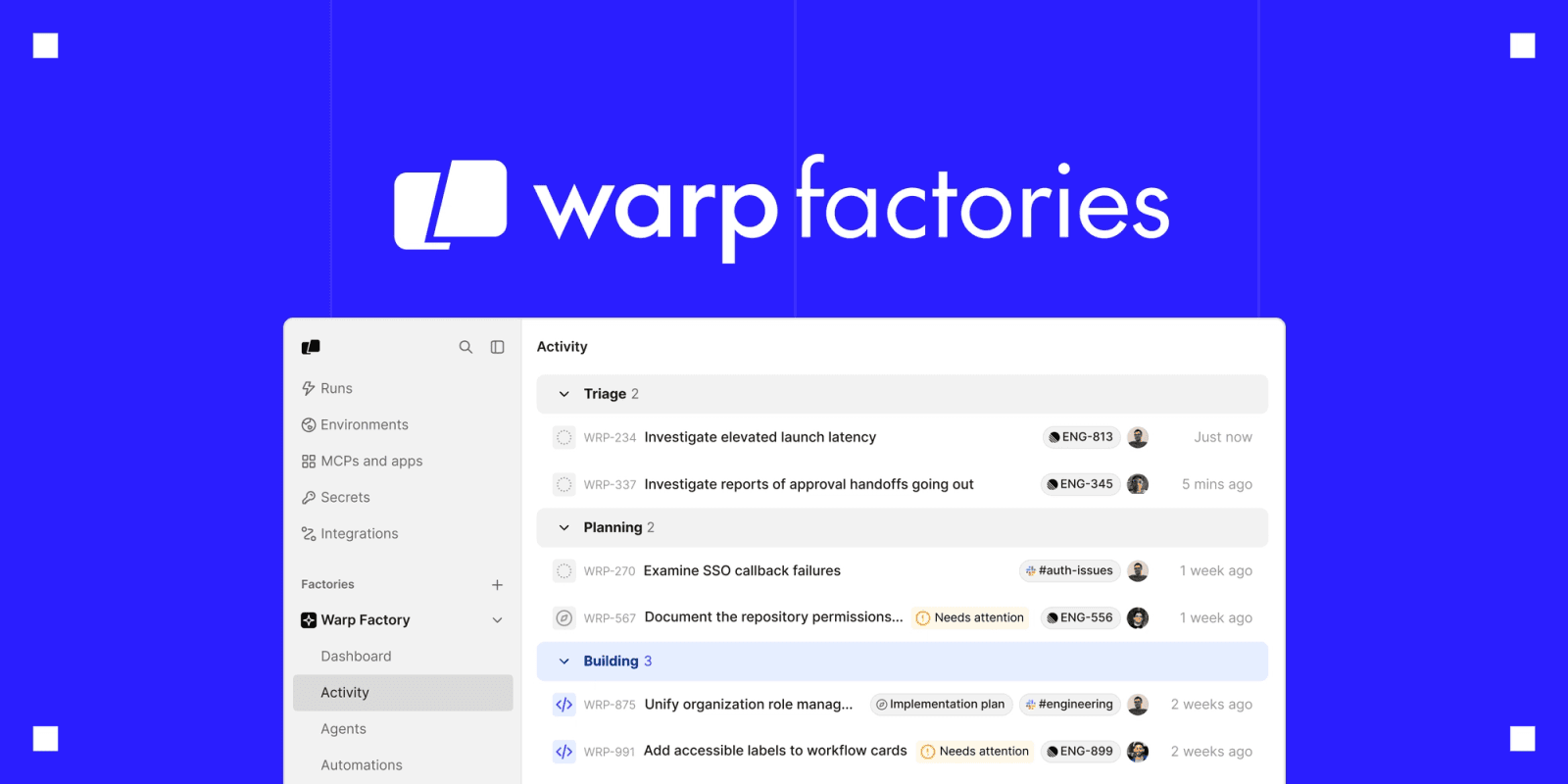
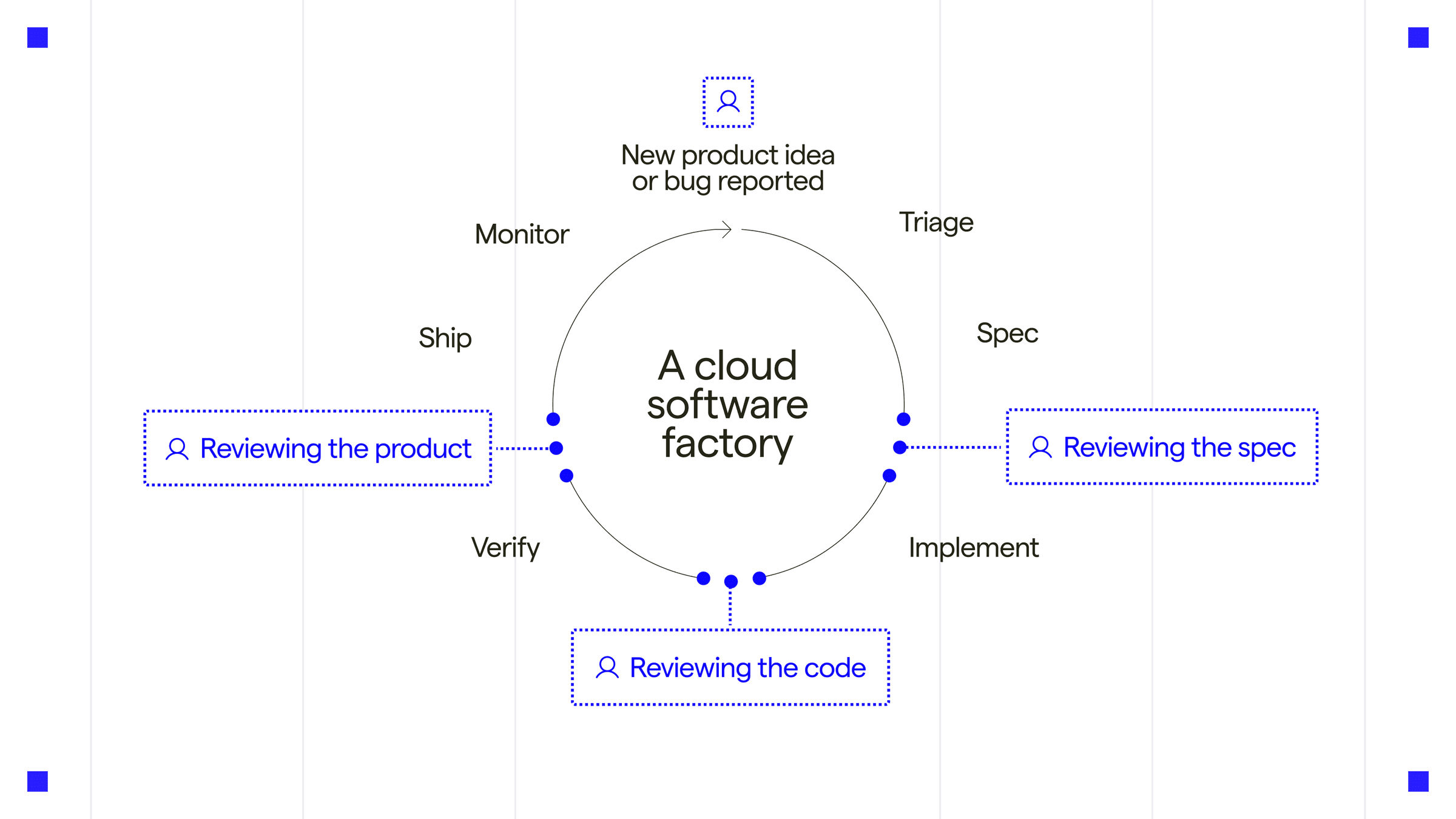
Warp's biggest move this window is the Early Access launch of Warp Factories with a built-in Factory MCP server, alongside a new /usage command in the Agent CLI, new oz agent run-cloud flags for CI orchestration, and a wide batch of shell completion and vim-keybinding extensions.
└──▷ WHAT SHIPPED · 8 FEATURESmost completely described firstwhat's the number?
Each feature carries 0–100 for how completely the vendor documented
it — not how big or important the work is. A major capability
described in eight words scores low, and that is the finding.
depth0–40what it does and how it works or what changed
specificity0–30names real surfaces — APIs, flags, formats, limits, numbers
actionability0–30enough to go use it — a named endpoint, flag, or config key tops this; a UI path is a starting point
Code and config rank first by construction: a documented endpoint,
flag or config key scores at the top of specificity and actionability,
so it sorts above a feature described only in prose. Under
60 the notes go thin — everything below the “thinner
coverage” line is thinner documentation, not smaller work.
Hover any meter for that feature's three sub-scores.
01
`--title` and `--parent-run-id` flags for `oz agent run-cloud`NEW85how completely this was documenteddepth25/40specificity30/30actionability30/3085 / 100
Adds --title and --parent-run-id flags to oz agent run-cloud, letting third-party harnesses set a run's display title and orchestration lineage.
Tag a cloud agent run with a human-readable title and link it to a parent orchestration run for traceability in CI pipelines.
Expanded shell completionsNEW55how completely this was documenteddepth15/40specificity30/30actionability10/3055 / 100
Adds new shell completions for mpv, ruff, deno, yay, paru, kubectl --user value completions, and ip covering address, link, route, neighbour, netns, rule, tunnel, xfrm, monitor, and remaining subcommands, plus git read-tree.
Vim keybindings extended to more surfacesIMPROVED53how completely this was documenteddepth18/40specificity25/30actionability10/3053 / 100
Extends vim keybindings (when vim mode is enabled) to commit messages, suggested-rule content, env var commands, compact AI inputs, queued-prompt editing, workflow dynamic enums, and the rule editor.
Warp Factories Early Access launchNEW52how completely this was documenteddepth22/40specificity20/30actionability10/3052 / 100
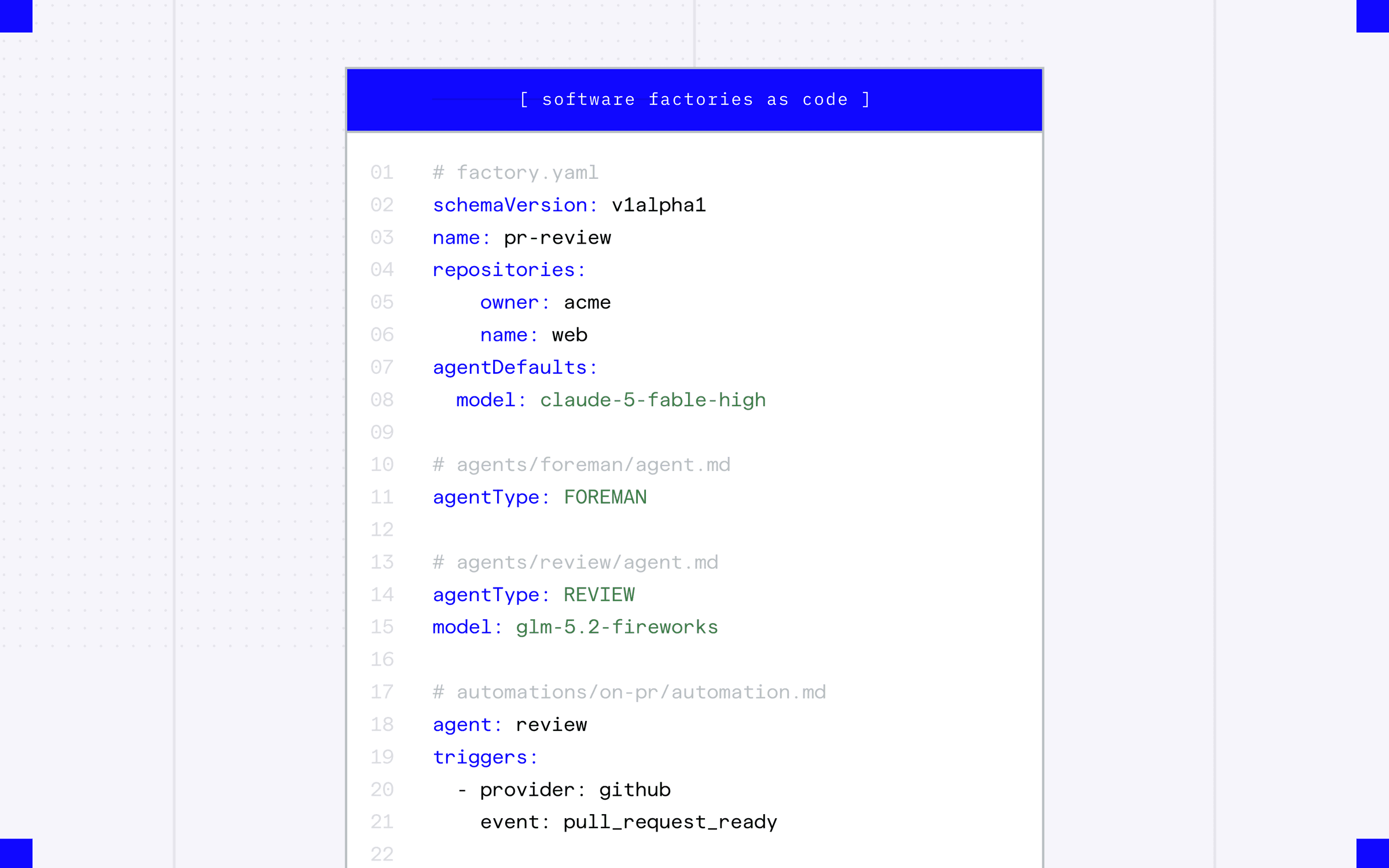
Warp Factories is now live in Early Access, with a built-in Factory MCP server available to all logged-in users. The feature includes an Activity view grouping tasks into Triage, Planning, and Building with linked issues, implementation plans, and channels, plus a "software factories as code" YAML configuration format defining repositories, agent models and roles, and pull-request triggers.
Workspace team management for adminsIMPROVED50how completely this was documenteddepth20/40specificity20/30actionability10/3050 / 100
Workspace admins can now promote, demote, and remove members on their current team, and see 'Workspace admin'/'Workspace owner' badges in the team members list; teamless users in a native workspace now see an Admin Panel link and joinable teams on the Teams settings page instead of a team creation flow.
Daytona is an open-source development environment platform that enables developers to spin up standardized, reproducible coding environments instantly.
Daytona stabilized its sandbox fork and snapshot creation API and sharpened TypeScript SDK error handling to distinguish client-side from server-side failures.
└──▷ WHAT SHIPPED · 2 FEATURESmost completely described firstwhat's the number?
Each feature carries 0–100 for how completely the vendor documented
it — not how big or important the work is. A major capability
described in eight words scores low, and that is the finding.
depth0–40what it does and how it works or what changed
specificity0–30names real surfaces — APIs, flags, formats, limits, numbers
actionability0–30enough to go use it — a named endpoint, flag, or config key tops this; a UI path is a starting point
Code and config rank first by construction: a documented endpoint,
flag or config key scores at the top of specificity and actionability,
so it sorts above a feature described only in prose. Under
60 the notes go thin — everything below the “thinner
coverage” line is thinner documentation, not smaller work.
Hover any meter for that feature's three sub-scores.
thinner coverage below
01
Stable sandbox fork and snapshot creation APIBREAKING47how completely this was documenteddepth20/40specificity12/30actionability15/3047 / 100
Fork and create-snapshot operations move from experimental API aliases to the stable API. The experimental aliases are now deprecated in favor of the stable equivalents, and callers using the experimental aliases must migrate.
— Names the change and migration need but no exact endpoint paths givensnapshot-20260824
02
Client-side validation errors in TypeScript SDKIMPROVED35how completely this was documenteddepth15/40specificity10/30actionability10/3035 / 100
The TypeScript SDK now distinguishes client-side argument validation errors from server-side 400 responses, giving clearer error handling for callers.
— Describes the distinction but no code sample or error type namessnapshot-20260824
└──▷ BREAKING ON UPGRADE
!Experimental API aliases for fork and create-snapshot are deprecated and replaced by the stable API endpoints — callers using the experimental aliases must migrate to the stable equivalents.
Turn any codebase, with its docs, SQL schemas, configs, and PDFs, into a queryable knowledge graph. A /graphify skill for Claude Code, Cursor, Codex, and Gemini CLI: local deterministic AST parsing, every edge explained, no vector store.
Graphify's v0.9.49 release expands C# graph modeling with constructor-call edges, interface-dispatch resolution, and property member nodes, adds cross-repo type linking via merge-graphs, and makes --code-only --force extraction safe to run on existing graphs.
└──▷ WHAT SHIPPED · 5 FEATURESmost completely described firstwhat's the number?
Each feature carries 0–100 for how completely the vendor documented
it — not how big or important the work is. A major capability
described in eight words scores low, and that is the finding.
depth0–40what it does and how it works or what changed
specificity0–30names real surfaces — APIs, flags, formats, limits, numbers
actionability0–30enough to go use it — a named endpoint, flag, or config key tops this; a UI path is a starting point
Code and config rank first by construction: a documented endpoint,
flag or config key scores at the top of specificity and actionability,
so it sorts above a feature described only in prose. Under
60 the notes go thin — everything below the “thinner
coverage” line is thinner documentation, not smaller work.
Hover any meter for that feature's three sub-scores.
01
Cross-repo type linking in merge-graphsNEW85how completely this was documenteddepth30/40specificity30/30actionability25/3085 / 100
graphify merge-graphs now links a type declaration shared across two repos with a same_type_as edge, matched by fully-qualified namespace and name, without linking unrelated types that merely share a short name; this makes shared contract types navigable across repo boundaries.
— Names command, edge type, and exact matching rule.v0.9.49
02
Safer `--code-only --force` re-extractionIMPROVED80how completely this was documenteddepth30/40specificity20/30actionability30/3080 / 100
Running graphify extract --code-only --force over an existing graph now preserves the document/paper/image semantic layer instead of dropping it, while files deleted from disk are still pruned.
Re-extract code changes in an existing graph without losing the document/paper/image semantic layer that was built previously.
$ graphify extract --code-only--force
— Exact command and before/after behaviour given.product docs
03
C# interface-to-implementation dispatch edgesNEW75how completely this was documenteddepth35/40specificity25/30actionability15/3075 / 100
C# interfaces with exactly one implementing class now have their methods linked to that implementation via a dispatches_to edge, so calls through injected dependencies reach the concrete implementation; guarded to single implementer, a single case-sensitively same-named method, and both ends being C#.
— Mechanism and guard conditions named, but no runnable step.v0.9.49
04
C# constructor-call edgesNEW65how completely this was documenteddepth30/40specificity25/30actionability10/3065 / 100
C# object-creation expressions (new Foo()) now emit a calls edge to the constructed type, making constructor usage visible in the graph; qualified constructions resolve against declared namespaces without fabricating built-in or out-of-corpus types.
— Edge type and resolution rule named, no direct action for user.v0.9.49
thinner coverage below
05
C# property member nodesNEW55how completely this was documenteddepth25/40specificity20/30actionability10/3055 / 100
C# properties now emit a member node per property, making properties visible as class members alongside fields and methods; the property's type still emits its references edge and no built-in types are fabricated.
— Describes new node type and its edge but no user action.v0.9.49
Pi's 0.84.3 window centers on a native powershell tool for Windows agent execution, a full set of Windows/WSL keybindings, a /thinking selector with persistent model defaults, atomic staged installer updates, and a batch of new provider/model integrations including ZAI Coding Plan models and xAI's move to the Responses API.
└──▷ WHAT SHIPPED · 8 FEATURESmost completely described firstwhat's the number?
Each feature carries 0–100 for how completely the vendor documented
it — not how big or important the work is. A major capability
described in eight words scores low, and that is the finding.
depth0–40what it does and how it works or what changed
specificity0–30names real surfaces — APIs, flags, formats, limits, numbers
actionability0–30enough to go use it — a named endpoint, flag, or config key tops this; a UI path is a starting point
Code and config rank first by construction: a documented endpoint,
flag or config key scores at the top of specificity and actionability,
so it sorts above a feature described only in prose. Under
60 the notes go thin — everything below the “thinner
coverage” line is thinner documentation, not smaller work.
Hover any meter for that feature's three sub-scores.
01
Native PowerShell tool for WindowsNEW95how completely this was documenteddepth35/40specificity30/30actionability30/3095 / 100
Adds an optional powershell tool that runs commands through pwsh.exe (falling back to Windows PowerShell) with -NoProfile -NonInteractive -ExecutionPolicy Bypass, with administrator-enforced execution policies still taking precedence; configurable through the SDK. Configure via defaultTools to replace or supplement the default bash tool, e.g. "defaultTools": ["read", "powershell", "edit", "write"] to replace it, or "defaultTools": ["read", "bash", "powershell", "edit", "write"] to run both side by side.
Replace the default bash tool with PowerShell so all model-issued commands run through pwsh.exe on a Windows host.
— Full mechanism, exact flags, and two config examples given.v0.84.3
02
Windows/WSL keybinding supportNEW85how completely this was documenteddepth30/40specificity30/30actionability25/3085 / 100
Adds Alt+V to paste an image or clipboard text, Ctrl+F to search the transcript in fullscreen mode, Ctrl+Up/Ctrl+Down to jump between marked messages, Alt+P to cycle to the previous model, Ctrl+Z for undo on native Windows (WSL uses Alt+Z so Ctrl+Z can suspend pi), and Ctrl+Q/Alt+Q to queue and restore follow-up messages, all on Windows/WSL. Also supports binding app.message.followUp to alt+enter in pi config to use Alt+Enter instead of Ctrl+Q.
Bind Alt+Enter to follow-up message queueing instead of the default Ctrl+Q, after configuring Windows Terminal to forward the key.
json
{
  "app.message.followUp": "alt+enter"
}
— Lists every shortcut and the config key with an example.product docs
03
Model provider and thinking-budget additionsNEW75how completely this was documenteddepth30/40specificity30/30actionability15/3075 / 100
Adds configurable OpenAI-compatible thinking-token budget fields for vLLM, Qwen/SGLang, and llama.cpp servers. Adds provider-neutral toolChoice support to simple stream requests. Adds automatic Anthropic server-side refusal fallback for supported first-party models, including returned-model usage pricing. Adds China-specific ZAI Coding Plan models including GLM-4.6V vision support and API-equivalent usage cost estimates. Adds deepseek-v4-pro-0813 support to the Qwen Token Plan Individual catalog. Changes built-in xAI models to use the Responses API with encrypted reasoning replay and makes Grok 4.6 the default xAI model.
— Names every model/provider addition but no config example.v0.84.3
04
Compaction and session summary internalsNEW65how completely this was documenteddepth25/40specificity25/30actionability15/3065 / 100
Adds session_compact_failed extension events that expose compaction failure reason, retry state, source, and error message to handlers. Adds optional routing session IDs to compaction summary helpers so callers can preserve provider routing without enabling prompt cache writes. Adds transcript usage notices for compaction and branch summaries when cache miss notices are enabled.
— Names event and helper parameters but no usage example.v0.84.3
05
`--` end-of-options CLI delimiterNEW65how completely this was documenteddepth20/40specificity20/30actionability25/3065 / 100
Supports -- as an end-of-options delimiter so dash-prefixed prompts are not parsed as flags, e.g. pi -- -analyze this codebase for hardcoded secrets.
Pass a dash-prefixed prompt directly on the CLI without it being misinterpreted as a flag.
$ pi ---analyze this codebase for hardcoded secrets
/thinking selector with persistent defaultsNEW60how completely this was documenteddepth25/40specificity20/30actionability15/3060 / 100
Adds a /thinking selector for choosing thinking levels interactively, with searchable default choices added to model and thinking selectors; Ctrl+S saves the selected model as the global default, persisting it session-wide instead of only session-scoping it.
— Names selector and keybinding but no deeper mechanism.v0.84.3
thinner coverage below
07
Atomic staged installer updatesIMPROVED55how completely this was documenteddepth25/40specificity15/30actionability15/3055 / 100
Changes pi update to stage, verify, and atomically activate the selected release in place for installer-managed installations, replacing the previous in-place swap.
— Describes new update mechanism but no flags or numbers.v0.84.3
08
GoogleThinkingLevel type renamedBREAKING50how completely this was documenteddepth15/40specificity20/30actionability15/3050 / 100
The inherited GoogleThinkingLevel type is renamed to GoogleApiThinkingLevel; any code referencing GoogleThinkingLevel by name will break on upgrade.
— Names exact type rename but gives no migration path.v0.84.3
└──▷ BREAKING ON UPGRADE
!The inherited GoogleThinkingLevel type is renamed to GoogleApiThinkingLevel; any code referencing GoogleThinkingLevel by name will break.
!The GoogleThinkingLevel type is renamed to GoogleApiThinkingLevel; any code referencing GoogleThinkingLevel will break on upgrade.
Lightweight coding agent that runs in your terminal
Codex CLI adds a --thread-source flag to classify automated vs. user-initiated threads, an opt-in image-aware compaction budget, and brings Amazon Bedrock in line with other providers via a new multi-agent protocol and Responses compaction support.
└──▷ WHAT SHIPPED · 3 FEATURESmost completely described firstwhat's the number?
Each feature carries 0–100 for how completely the vendor documented
it — not how big or important the work is. A major capability
described in eight words scores low, and that is the finding.
depth0–40what it does and how it works or what changed
specificity0–30names real surfaces — APIs, flags, formats, limits, numbers
actionability0–30enough to go use it — a named endpoint, flag, or config key tops this; a UI path is a starting point
Code and config rank first by construction: a documented endpoint,
flag or config key scores at the top of specificity and actionability,
so it sorts above a feature described only in prose. Under
60 the notes go thin — everything below the “thinner
coverage” line is thinner documentation, not smaller work.
Hover any meter for that feature's three sub-scores.
01
Thread source classification flagNEW80how completely this was documenteddepth25/40specificity25/30actionability30/3080 / 100
Adds a global --thread-source <SOURCE> flag to codex exec to classify newly created or forked threads (e.g. automated_review, memory_consolidation); it defaults to user when omitted and does not override the source when resuming an existing thread.
Tag threads created by an automated review pipeline so they are distinguishable from interactive user sessions.
Image-aware remote compaction budgetNEW60how completely this was documenteddepth30/40specificity20/30actionability10/3060 / 100
Adds an opt-in compaction_image_budget feature that charges retained images against the remote compaction budget using the existing image size estimate, preventing image-heavy histories from exceeding the intended context budget.
— Mechanism explained but no config example or commandrust-v0.149.1
03
Amazon Bedrock provider improvementsIMPROVED60how completely this was documenteddepth25/40specificity25/30actionability10/3060 / 100
Switches Amazon Bedrock to the multi-agent V1 protocol, which does not require response items unsupported by Bedrock, and enables Responses compaction (compaction_trigger items via /v1/responses) for Bedrock, bringing it in line with OpenAI and Azure Responses providers.
Autonomous coding agent as an SDK, IDE extension, or CLI assistant.
Cline v4.1.14 significantly expands its built-in model catalog with a wave of new frontier and open-weight models available for selection.
└──▷ WHAT SHIPPED · 1 FEATUREmost completely described firstwhat's the number?
Each feature carries 0–100 for how completely the vendor documented
it — not how big or important the work is. A major capability
described in eight words scores low, and that is the finding.
depth0–40what it does and how it works or what changed
specificity0–30names real surfaces — APIs, flags, formats, limits, numbers
actionability0–30enough to go use it — a named endpoint, flag, or config key tops this; a UI path is a starting point
Code and config rank first by construction: a documented endpoint,
flag or config key scores at the top of specificity and actionability,
so it sorts above a feature described only in prose. Under
60 the notes go thin — everything below the “thinner
coverage” line is thinner documentation, not smaller work.
Hover any meter for that feature's three sub-scores.
thinner coverage below
01
Expanded built-in model catalogNEW50how completely this was documenteddepth15/40specificity25/30actionability10/3050 / 100
Adds Claude Fable 5, Grok 4.6 on Vertex, DeepSeek V4 Flash variants (including a vision preview), MiMo v2.5, Qwen3.8 27B, Gemma 4 26B, LongCat 2.0, Nemotron 3.5 Lightning, and Thinking Machines' Inkling models to the built-in model catalog.
— Names every added model but no usage or selection detail.v4.1.14
Agno's biggest addition this window is a new media storage subsystem letting agents offload session media to local disk, S3, or GCS, alongside a Studio dispatch self-loop option, MiniMax video generation tools, and non-blocking telemetry.
└──▷ WHAT SHIPPED · 4 FEATURESmost completely described firstwhat's the number?
Each feature carries 0–100 for how completely the vendor documented
it — not how big or important the work is. A major capability
described in eight words scores low, and that is the finding.
depth0–40what it does and how it works or what changed
specificity0–30names real surfaces — APIs, flags, formats, limits, numbers
actionability0–30enough to go use it — a named endpoint, flag, or config key tops this; a UI path is a starting point
Code and config rank first by construction: a documented endpoint,
flag or config key scores at the top of specificity and actionability,
so it sorts above a feature described only in prose. Under
60 the notes go thin — everything below the “thinner
coverage” line is thinner documentation, not smaller work.
Hover any meter for that feature's three sub-scores.
01
External media storage for session mediaNEW83how completely this was documenteddepth30/40specificity28/30actionability25/3083 / 100
Agents gain a media_storage parameter (type Optional[Union[MediaStorage, AsyncMediaStorage]]) that offloads session media to external storage while keeping only a reference in the database, backed by new S3 Media Storage, GCS Media Storage, and local filesystem backends. A delete_media parameter (bool, default False) can be set so that deleting a session also deletes its offloaded media from media_storage.
— Names exact param types, defaults, and storage backends.product docs
thinner coverage below
02
Self-dispatch option for Studio agentsNEW55how completely this was documenteddepth20/40specificity20/30actionability15/3055 / 100
Adds a self_dispatch opt-in knob to the Studio dispatch guard, allowing agents to be explicitly configured to dispatch to themselves.
— Names the flag but not its config path or effect scope.v3.0.0a5
03
MiniMax video generation toolsNEW40how completely this was documenteddepth15/40specificity15/30actionability10/3040 / 100
Adds MiniMax video generation tools, extending Agno's 100+ integrations toolkit with AI video synthesis capability.
— Names the integration but no usage detail or API.v3.0.0a4
04
Fire-and-forget telemetry callsIMPROVED35how completely this was documenteddepth20/40specificity10/30actionability5/3035 / 100
All telemetry calls are now fire-and-forget, eliminating blocking waits on telemetry I/O during agent runs.
— Explains mechanism but no config surface or metric.v3.0.0a4
Mend AI is a software composition analysis tool that identifies and manages security vulnerabilities and open source compliance issues in code dependencies.
Mend AI's biggest addition this window is a new AI Bill of Materials report exporting in CycloneDX and SPDX formats, alongside account-level global workflows, an Administration UI overhaul, Renovate config and pagination improvements, and Chainguard support in container image detection.
└──▷ WHAT SHIPPED · 5 FEATURESmost completely described firstwhat's the number?
Each feature carries 0–100 for how completely the vendor documented
it — not how big or important the work is. A major capability
described in eight words scores low, and that is the finding.
depth0–40what it does and how it works or what changed
specificity0–30names real surfaces — APIs, flags, formats, limits, numbers
actionability0–30enough to go use it — a named endpoint, flag, or config key tops this; a UI path is a starting point
Code and config rank first by construction: a documented endpoint,
flag or config key scores at the top of specificity and actionability,
so it sorts above a feature described only in prose. Under
60 the notes go thin — everything below the “thinner
coverage” line is thinner documentation, not smaller work.
Hover any meter for that feature's three sub-scores.
01
AI Bill of Materials (AI-BOM) reportNEW90how completely this was documenteddepth35/40specificity30/30actionability25/3090 / 100
Mend AI introduces an AI-BOM report available via the Mend Platform reporting interface and API, generating a metadata-only inventory of detected AI entities — models, system prompts, agent configurations, tools, and agents — scoped to organization, application, or project level. Exports support industry-standard CycloneDX 1.7 and SPDX 3.0.1 formats, with metadata-only content preserving data privacy.
Generate an AI-BOM report for your organization's AI footprint via the Mend Platform reporting UI.
📍In the Mend Platform, go to Reports › AI Bill of Materials (AI-BOM), select the desired scope (organization, application, or project), choose output format (CycloneDX 1.7 or SPDX 3.0.1), and export.
— Names formats, scopes, API and exact UI navigation steps.(24-August-2026)
02
Chainguard support in hardened image detectionNEW70how completely this was documenteddepth30/40specificity25/30actionability15/3070 / 100
Mend Container adds Chainguard as a supported vendor in hardened image detection, incorporating Chainguard-specific vulnerability data, VEX information, and detection of Chainguard image layers and base images. Chainguard VEX status and branding are surfaced directly in the risk factors columns across the UI for Chainguard-based images and findings.
— Explains detection mechanism and UI surfacing but no exact command.product docs
03
Account-level global workflowsNEW65how completely this was documenteddepth30/40specificity20/30actionability15/3065 / 100
Mend AI adds Account-Level (Global) Workflows, letting administrators define workflows centrally and propagate them to selected organizations, with controls over whether org-level admins can enable or disable them locally. Comprehensive API support is included for managing these global workflows.
— Describes mechanism and API but no endpoint names given.product docs
04
Administration sidebar redesign and AI Usage tab moveBREAKING60how completely this was documenteddepth25/40specificity20/30actionability15/3060 / 100
The Administration page sidebar has been redesigned with a categorized, collapsible navigation structure, adding a dedicated 'AI Usage' tab under a new AI category and sub-headers for AI, Code, and Dependencies in Engine Settings. AI Usage settings have moved from the General tab to this new 'AI Usage' tab under the AI category, which is a breaking navigation change for existing users.
— UI path given but no config keys or endpoints named.product docs
thinner coverage below
05
Renovate config option and GitHub paginationIMPROVED50how completely this was documenteddepth15/40specificity20/30actionability15/3050 / 100
Mend Renovate adds the overrideDescription config option (v44.41.0) and adds cursor pagination support for GitHub HTTP requests (v44.41.1).
— Names the config key but gives no usage example or mechanism.product docs
└──▷ BREAKING ON UPGRADE
!AI Usage settings have been moved from the General tab to a dedicated 'AI Usage' tab under the new AI category in the Administration page sidebar.
LangSmith is a platform for debugging, testing, and monitoring LLM applications built with LangChain.
LangSmith's July 2026 changes center on a new public experiment comparison API (with legacy helpers removed from the OpenAPI spec), thread evaluator testing, OpenTelemetry resource attribute tracing, zstd-based bulk export, and per-project/user monthly trace limits, plus a new dataset split management UI and several tracing pipeline reliability fixes.
└──▷ WHAT SHIPPED · 12 FEATURESmost completely described firstwhat's the number?
Each feature carries 0–100 for how completely the vendor documented
it — not how big or important the work is. A major capability
described in eight words scores low, and that is the finding.
depth0–40what it does and how it works or what changed
specificity0–30names real surfaces — APIs, flags, formats, limits, numbers
actionability0–30enough to go use it — a named endpoint, flag, or config key tops this; a UI path is a starting point
Code and config rank first by construction: a documented endpoint,
flag or config key scores at the top of specificity and actionability,
so it sorts above a feature described only in prose. Under
60 the notes go thin — everything below the “thinner
coverage” line is thinner documentation, not smaller work.
Hover any meter for that feature's three sub-scores.
01
Thread evaluator testing via rules validate endpointNEW88how completely this was documenteddepth30/40specificity28/30actionability30/3088 / 100
The /runs/rules/validate endpoint now supports thread evaluators — pass test_thread_id and session_id to test a multi-turn evaluator against a real conversation before saving it.
Test a multi-turn thread evaluator against a real conversation before saving it, to validate logic without running a full experiment.
— Endpoint, fields, and runnable curl example givensnapshot-20260824
02
OpenTelemetry resource attributes as trace metadataNEW87how completely this was documenteddepth32/40specificity27/30actionability28/3087 / 100
Resource attributes set via OTEL_RESOURCE_ATTRIBUTES now appear on traces as metadata namespaced under otel.resource.*, enabling user IDs and other span metadata without changing tracer emit logic.
Attach OpenTelemetry resource attributes — such as a user ID — so they appear on LangSmith traces under otel.resource.* without modifying span emission code.
— Env var, namespace, and mechanism all named with examplesnapshot-20260824
03
Public experiment comparison API replaces legacy helpersBREAKING82how completely this was documenteddepth30/40specificity27/30actionability25/3082 / 100
The POST /v2/datasets/{dataset_id}/experiment-runs endpoint is now the supported public API for paginated experiment comparison. Legacy dataset comparison helpers are removed from the public OpenAPI spec and generated SDKs; the existing HTTP routes continue to work only for LangSmith UI clients.
— Names exact endpoint and migration scope but no code samplesnapshot-20260824
04
Bulk export defaults to zstandard compressionIMPROVED78how completely this was documenteddepth25/40specificity28/30actionability25/3078 / 100
Bulk export compression now defaults to zstd; self-hosted environments retain gzip as the default via the FF_BULK_EXPORT_DEFAULT_COMPRESSION environment variable.
Keep gzip compression for bulk exports on a self-hosted LangSmith deployment instead of adopting the new zstd default.
$ export FF_BULK_EXPORT_DEFAULT_COMPRESSION=gzip
— Names formats and env var with configuration examplesnapshot-20260824
05
Dataset split management in experiment viewsNEW70how completely this was documenteddepth30/40specificity25/30actionability15/3070 / 100
Adds a reorderable 'Splits (latest)' column to the experiment comparison view showing each example's current dataset split assignments as chips. Bulk row actions now allow adding, replacing, or removing dataset splits, or copying selected examples to another dataset, across multiple rows at once. Each split chip in a row's Splits cell is now interactive, with an 'Edit splits' action opening the single-example split picker.
— Names UI elements and actions but only navigable, not scriptablesnapshot-20260824
06
Trace ingestion pipeline robustnessIMPROVED67how completely this was documenteddepth30/40specificity25/30actionability12/3067 / 100
The batched-run ingestion log now emits run_verbs as a list of run_id and verbs objects instead of a map keyed by run UUID, preventing structured-log aggregators from exhausting dynamic field limits. LangSmith now preserves traces in multipart ingestion batches when one run has oversized inputs or outputs, replacing oversized fields with a placeholder instead of rejecting the entire batch. It also returns clearer 409 Conflict messages indicating whether a duplicate was a run create or run update request when duplicate payloads are submitted.
— Names log fields and error codes but no direct trigger for readerssnapshot-20260824
thinner coverage below
07
User-defined monthly trace limits per project and userNEW53how completely this was documenteddepth28/40specificity15/30actionability10/3053 / 100
LangSmith now enforces user-defined monthly trace limits scoped to individual projects and users, rejecting new traces that exceed a configured limit while still allowing patches and feedback for already-accepted traces.
— Describes behavior but no config key to set the limitsnapshot-20260824
08
Native OpenTelemetry span ordering and Vercel AI SDK renderingIMPROVED51how completely this was documenteddepth25/40specificity18/30actionability8/3051 / 100
Native OpenTelemetry child spans are no longer dropped when they arrive before an SDK-attributed parent span; they are buffered and correctly nested regardless of arrival order. Vercel AI SDK traces sent over raw OpenTelemetry now render in the Messages view.
— Explains mechanism but no config or command to act onsnapshot-20260824
09
Trace sharing now operates on the trace rootIMPROVED47how completely this was documenteddepth25/40specificity12/30actionability10/3047 / 100
Sharing, viewing, or unsharing any run in a trace now operates on the trace root, making every run in a shared trace publicly viewable.
— Behavior change described but no named surface or settingsnapshot-20260824
10
Tracing view query and access-control fixesIMPROVED40how completely this was documenteddepth20/40specificity12/30actionability8/3040 / 100
All time filters in tracing views now query the full retention window instead of falling back to a shorter backend default. Thread pages now show an explicit access-control message when trace loading is denied by ABAC, instead of a generic retrieval error.
— Two UI/query fixes described without named settingssnapshot-20260824
11
Incremental thread stats streamingIMPROVED38how completely this was documenteddepth20/40specificity10/30actionability8/3038 / 100
Thread stats requests that opt into streaming now return the main stats first and add feedback stats incrementally when ready.
!Legacy dataset comparison helpers are removed from the public OpenAPI spec and generated SDKs; existing HTTP routes continue to work only for LangSmith UI clients.
Open source AI engineering platform: LLM evals, observability, metrics, prompt management, playground, datasets. Integrates with OpenTelemetry, LangChain, OpenAI SDK, LiteLLM, and more. YC W23
Langfuse v4.17.0 focuses on evaluation workflows, adding a redesigned eval UX with model filtering, annotation queue creation from data tables, and Anthropic support for the in-app Assistant, alongside smaller UX and migration improvements.
└──▷ WHAT SHIPPED · 7 FEATURESmost completely described firstwhat's the number?
Each feature carries 0–100 for how completely the vendor documented
it — not how big or important the work is. A major capability
described in eight words scores low, and that is the finding.
depth0–40what it does and how it works or what changed
specificity0–30names real surfaces — APIs, flags, formats, limits, numbers
actionability0–30enough to go use it — a named endpoint, flag, or config key tops this; a UI path is a starting point
Code and config rank first by construction: a documented endpoint,
flag or config key scores at the top of specificity and actionability,
so it sorts above a feature described only in prose. Under
60 the notes go thin — everything below the “thinner
coverage” line is thinner documentation, not smaller work.
Hover any meter for that feature's three sub-scores.
thinner coverage below
01
Redesigned evaluation UX with model filteringIMPROVED50how completely this was documenteddepth20/40specificity15/30actionability15/3050 / 100
The evaluation UX has been redesigned to show and filter evaluators by model, giving teams clearer visibility into which models are running evals.
— Describes what changed but no UI path or mechanism detailv4.17.0
02
Annotation queue creation from trace and events tablesNEW50how completely this was documenteddepth20/40specificity15/30actionability15/3050 / 100
Annotation queues can now be created directly from the trace table and the events table, reducing the steps needed to route observations into a review workflow.
— Names the two tables but no exact UI stepsv4.17.0
03
Configurable markdown render character limitIMPROVED45how completely this was documenteddepth20/40specificity15/30actionability10/3045 / 100
The markdown render character limit is now configurable at container runtime via a new environment variable, letting operators tune rendering performance without rebuilding the image.
— Mentions env var mechanism but does not name the variablev4.17.0
04
Anthropic Messages support in Langfuse AssistantNEW40how completely this was documenteddepth15/40specificity15/30actionability10/3040 / 100
Anthropic Messages is now a supported model provider for the Langfuse Assistant (OSS), expanding in-app agent model options.
— Names the provider and feature but no config detailv4.17.0
05
Arbitrary metadata display in sessions viewIMPROVED35how completely this was documenteddepth15/40specificity10/30actionability10/3035 / 100
The sessions view now displays arbitrary metadata, making it easier to inspect custom fields attached to sessions.
— Short description with no further mechanismv4.17.0
06
Default migration UI in dual-write modeIMPROVED35how completely this was documenteddepth15/40specificity10/30actionability10/3035 / 100
The migration UI is now shown by default when the instance is in dual-write mode, surfacing v4 migration status without manual navigation.
— Names the mode but limited operational detailv4.17.0
07
Onboarding prompt for AI featuresIMPROVED20how completely this was documenteddepth10/40specificity5/30actionability5/3020 / 100
The onboarding flow now prompts users to enable AI features, streamlining first-run setup for eval and assistant capabilities.
— Brief description with no specific steps or settings namedv4.17.0
Braintrust is an open-source evals framework for testing and monitoring AI applications with custom test cases and metrics.
Braintrust added write tools to its MCP server, three new first-class API resources (agents, org automations, project groups), two new built-in open-source models, and a wide swath of auto-instrumentation across its Python, TypeScript, Go, and Ruby SDKs — several of which carry breaking changes to span formats and default behavior.
└──▷ WHAT SHIPPED · 13 FEATURESmost completely described firstwhat's the number?
Each feature carries 0–100 for how completely the vendor documented
it — not how big or important the work is. A major capability
described in eight words scores low, and that is the finding.
depth0–40what it does and how it works or what changed
specificity0–30names real surfaces — APIs, flags, formats, limits, numbers
actionability0–30enough to go use it — a named endpoint, flag, or config key tops this; a UI path is a starting point
Code and config rank first by construction: a documented endpoint,
flag or config key scores at the top of specificity and actionability,
so it sorts above a feature described only in prose. Under
60 the notes go thin — everything below the “thinner
coverage” line is thinner documentation, not smaller work.
Hover any meter for that feature's three sub-scores.
01
LiveKit Agents audio capture now opt-inBREAKING90how completely this was documenteddepth30/40specificity30/30actionability30/3090 / 100
In Python SDK v0.32.0, audio attachments on agent_speaking spans for LiveKit Agents are now disabled by default; set BRAINTRUST_CAPTURE_AGENT_AUDIO_ATTACHMENTS=true to restore the previous behavior.
Re-enable LiveKit Agents audio attachment capture after upgrading to Python SDK v0.32.0, where it is now off by default.
— Exact env var and command to restore prior behavior.snapshot-20260824
02
New Agent, Org Automation, and Project Group APIsNEW90how completely this was documenteddepth30/40specificity30/30actionability30/3090 / 100
Adds three new API resource types with full CRUD support: Agent (GET /v1/agent, GET /v1/agent/{agent_id}, POST /v1/agent, PUT /v1/agent, PATCH /v1/agent/{agent_id}, DELETE /v1/agent/{agent_id}, OPTIONS /v1/agent, OPTIONS /v1/agent/{agent_id}), Org Automation (GET /v1/org_automation, GET /v1/org_automation/{org_automation_id}, POST /v1/org_automation, PUT /v1/org_automation, PATCH /v1/org_automation/{org_automation_id}, DELETE /v1/org_automation/{org_automation_id}, OPTIONS /v1/org_automation, OPTIONS /v1/org_automation/{org_automation_id}), and Project Group (GET /v1/project_group, GET /v1/project_group/{project_group_id}, POST /v1/project_group, PUT /v1/project_group, PATCH /v1/project_group/{project_group_id}, DELETE /v1/project_group/{project_group_id}, OPTIONS /v1/project_group, OPTIONS /v1/project_group/{project_group_id}).
— Every new endpoint named across three resource types.1.0.0
03
Python SDK auto-instrumentation expansionNEW80how completely this was documenteddepth30/40specificity30/30actionability20/3080 / 100
Python SDK adds auto-instrumentation for Hugging Face Transformers (v0.34.0, covering local pipelines for text generation, summarization, translation, feature extraction, and question answering), Vercel AI SDK for Python (v0.33.0, enabled by default in auto_instrument()), Cursor SDK (v0.33.0, tracing agent runs, model turns, and tool calls), a native Harbor job plugin (v0.33.0, syncing Harbor evaluation results to Braintrust), and Pipecat (v0.32.0, tracing real-time voice AI pipelines including LLM turns, STT, TTS, and tool calls).
Enable Vercel AI SDK auto-instrumentation for Python to trace all AI calls with no per-call changes.
python
from braintrust import auto_instrument
auto_instrument()

# existing Vercel AI SDK calls are now traced automatically
— Grouped SDK integrations with versions and a runnable example.snapshot-20260824
04
TypeScript SDK integration and tracing expansionNEW75how completely this was documenteddepth30/40specificity30/30actionability15/3075 / 100
TypeScript SDK adds Voyage AI auto-instrumentation (embeddings, multimodal embeddings, reranking, contextualized embeddings) in v3.28.0; Ollama and @cloudflare/think instrumentation, Anthropic beta sessions tracing (anthropic.beta.sessions.turn and anthropic.beta.sessions.thread.turn), Flue v2 support, and a vitest-evals span input override via meta.eval.input in v3.27.0; and auto-instrumentation for Cloudflare Agents, Cloudflare AI Chat, and Hugging Face Transformers.js plus system prompt capture for Strands Agents SDK spans in v3.26.0.
— Grouped SDK integrations with versions; no code sample given.snapshot-20260824
05
Write tools in the Braintrust MCP serverNEW70how completely this was documenteddepth30/40specificity25/30actionability15/3070 / 100
Adds write tools to the Braintrust MCP server, enabling coding agents to create and update prompts, scorers, classifiers, monitor views, alerts, scheduled jobs, dataset rows, and Topics pipeline configuration; clients can be configured to require confirmation before running write tools.
— Names concrete write-tool targets but not exact tool commands.snapshot-20260824
06
Summary table layout for experiments listNEW60how completely this was documenteddepth25/40specificity20/30actionability15/3060 / 100
Adds a Summary table layout to the experiments list, comparing every experiment in a project as columns with scores and metrics as rows, including an 'All scores (avg)' row.
— UI path clear; no exact metrics/columns beyond described.snapshot-20260824
07
Azure AI Gateway as a supported providerNEW60how completely this was documenteddepth25/40specificity25/30actionability10/3060 / 100
Adds Azure AI Gateway as a supported AI provider, supporting models that use the OpenAI Chat Completions, OpenAI Responses, or Anthropic Messages API behind an Azure API Management endpoint.
— Names supported APIs; no setup steps or endpoint given.snapshot-20260824
thinner coverage below
08
Braintrust Lambda Extension for tracingNEW55how completely this was documenteddepth25/40specificity20/30actionability10/3055 / 100
Adds the Braintrust Lambda Extension to give Python and TypeScript/JavaScript Lambda functions a local handoff path for traces, reducing time spent by the SDK's flush() method in the request path.
— Names runtimes and benefit, no install/setup steps given.snapshot-20260824
09
Trace group references in dataset rowsNEW55how completely this was documenteddepth25/40specificity20/30actionability10/3055 / 100
Adds trace group references to dataset rows, allowing a multi-turn session or related set of logs to become one example with up to 64 traces per row.
Schema changes across existing v1 API endpointsIMPROVED55how completely this was documenteddepth10/40specificity30/30actionability15/3055 / 100
Request bodies and/or response schemas changed, without further description, for many existing endpoints: DELETE /v1/acl, DELETE /v1/acl/{acl_id}, DELETE /v1/api_key/{api_key_id}, DELETE /v1/function/{function_id}, DELETE /v1/project/{project_id}, DELETE /v1/project_score/{project_score_id}, DELETE /v1/prompt/{prompt_id}, DELETE /v1/role/{role_id}, DELETE /v1/service_token, DELETE /v1/service_token/{service_token_id}, DELETE /v1/view/{view_id}, GET /v1/acl, GET /v1/acl/list_org, GET /v1/acl/{acl_id}, GET /v1/api_key, GET /v1/api_key/{api_key_id}, GET /v1/function, GET /v1/function/{function_id}, GET /v1/project, GET /v1/project/{project_id}, GET /v1/project_score, GET /v1/project_score/{project_score_id}, GET /v1/prompt, GET /v1/prompt/{prompt_id}, GET /v1/role/{role_id}, GET /v1/service_token, GET /v1/service_token/{service_token_id}, GET /v1/view, GET /v1/view/{view_id}, PATCH /v1/function/{function_id}, PATCH /v1/organization/members, PATCH /v1/project/{project_id}, PATCH /v1/project_score/{project_score_id}, PATCH /v1/prompt/{prompt_id}, PATCH /v1/role/{role_id}, PATCH /v1/view/{view_id}, POST /v1/acl, POST /v1/acl/batch_update, POST /v1/eval, POST /v1/function, POST /v1/function/{function_id}/invoke, POST /v1/project, POST /v1/project_score, POST /v1/prompt, POST /v1/role, POST /v1/service_token, POST /v1/view, PUT /v1/function, PUT /v1/project_score, PUT /v1/prompt, PUT /v1/role, PUT /v1/service_token, and PUT /v1/view.
— Every affected endpoint named; no change detail given.1.0.0
11
Group scope for online scoring rulesNEW50how completely this was documenteddepth25/40specificity15/30actionability10/3050 / 100
Adds Group scope to online scoring rules, letting you evaluate a set of related multi-turn traces as a single unit using a session key of your choice without changing your logging.
— Describes mechanism but no config key or API shown.snapshot-20260824
12
Annotated version history for prompts and scorersNEW50how completely this was documenteddepth25/40specificity15/30actionability10/3050 / 100
Adds annotated version history for prompts, parameters, and scorers, pinning a description note to each saved version and showing each version alongside the one it replaced.
— Describes behavior; no UI path or API detail given.snapshot-20260824
13
SDK identity metadata on Ruby spansNEW45how completely this was documenteddepth15/40specificity20/30actionability10/3045 / 100
Adds braintrust.context_json carrying SDK name and version to all spans in Ruby SDK v0.4.1.
— Single named field; thin description of its purpose.snapshot-20260824
└──▷ BREAKING ON UPGRADE
!Python SDK v0.32.0: LiveKit Agents audio attachments on agent_speaking spans are now disabled by default; set BRAINTRUST_CAPTURE_AGENT_AUDIO_ATTACHMENTS=true to restore the previous behavior.
!Go SDK v0.11.1 (Google GenAI): Provider metadata changed from "gemini" to "google"; update trace queries that filter on the previous provider value.
!Go SDK v0.11.1 (Eino): ChatModel span output is now an OpenAI-compatible choices array ([{"index": 0, "finish_reason": "...", "message": {...}}]) instead of a flat message map; embedding input is now {"inputs": [{"content": "..."}]} and output is {"count": N}, removing embedding_length and renaming embeddings_count; provider metadata is now lowercase (e.g. "openai" instead of "OpenAI"); update trace queries that rely on the previous formats.
!Go SDK v0.11.0 (Anthropic): Span metadata no longer includes endpoint; the output field is now a single message object instead of an array; non-streaming spans no longer emit time_to_first_token.
!Go SDK v0.11.0 (Bedrock): Span metadata renames stop_sequences to stop and removes additional_model_request_fields; image, document, and tool block shapes now align with Bedrock's native wire format.
Pinecone is a managed vector database service for storing and querying high-dimensional embeddings at scale.
Pinecone released Terraform Provider v4.0.0, adding a broad set of resources and data sources for managing organization access and importing existing infrastructure.
└──▷ WHAT SHIPPED · 1 FEATUREmost completely described firstwhat's the number?
Each feature carries 0–100 for how completely the vendor documented
it — not how big or important the work is. A major capability
described in eight words scores low, and that is the finding.
depth0–40what it does and how it works or what changed
specificity0–30names real surfaces — APIs, flags, formats, limits, numbers
actionability0–30enough to go use it — a named endpoint, flag, or config key tops this; a UI path is a starting point
Code and config rank first by construction: a documented endpoint,
flag or config key scores at the top of specificity and actionability,
so it sorts above a feature described only in prose. Under
60 the notes go thin — everything below the “thinner
coverage” line is thinner documentation, not smaller work.
Hover any meter for that feature's three sub-scores.
01
Terraform Provider v4.0.0 expands resource and import coverageNEW69how completely this was documenteddepth22/40specificity25/30actionability22/3069 / 100
The Pinecone Terraform Provider now includes resources for managing organization invites and removing organization members, alongside new data sources for reading existing indexes, collections, projects, service accounts, role bindings, invites, and users. terraform import is now supported for every resource in the provider.
— Names all resources/data sources and import support, but no code samples.snapshot-20260824
 THE AI TOOLCHAIN