Cursor
Start from scratch, without a repo commercialBuilt to make you extraordinarily productive, agents turn ideas into code. Accelerate development by handing off tasks to Cursor.
curl --request POST --url 'https://api.cursor.com/v0/private-workers/claims/bc-00000000-0000-0000-0000-000000000002/release'
/goal fix all flaky tests and make CI green
run a swarm of subagents to test my app for bugs, each in its own environment
Summary
Cursor is a commercial desktop application for AI-assisted software development, built around an editor where developers describe tasks in plain language and agents write, run, and test code on their behalf. It targets application developers and teams who want agent-driven coding folded into their existing workflow rather than a standalone chat assistant, and it extends beyond the desktop with an iOS app for launching and monitoring always-on cloud agents, handing sessions between laptop and phone, and reviewing or merging pull requests remotely. Teams can share configuration through a marketplace of plugins, skills, and MCPs, and automations can be triggered from Slack or GitHub events, putting it closer to a development platform than a simple code completion tool. Cursor sits in the ai-coding-agents category, and with 21 releases tracked and the latest just over a month old, it is under active development.
Built to make you extraordinarily productive, agents turn ideas into code. Accelerate development by handing off tasks to Cursor.
What Cursor answers
Do agents need my laptop running to keep working?
cloud agents move off a local session and keep running with your laptop closed, and can be started directly from the phone
What happens when an automation needs my attention while I'm away?
push notifications and lock-screen status alert you when an agent finishes, needs input, or is ready for review, and Remote Control lets you redirect it from your phone
Can non-developers or teammates trigger these agents without opening the editor?
yes, through a Slack emoji reaction or GitHub events like an issue comment or workflow run completing, which route straight into a configured automation
How do long-running or parallel tasks avoid tying up my main session?
a cloud subagent spins up in its own VM and branch to handle things like CI fixes or PR prep while the parent agent keeps running locally or in the cloud
Do I have to rebuild my cloud setup every time an agent starts?
a shared environment definition committed to the repo lets cloud agents provision from the same reusable snapshot instead of installing dependencies from scratch each run
Can I keep exploring an idea without derailing the task the agent is already running?
a side chat carries context from the main conversation but stays separate, so you can question or research without committing the main agent to a pivot
Release history
- docs update
Cursor Cloud Agent API gains worker pools, SSE queue streaming, hibernation support, and a claim-release endpoint.
└──▷ TRY ITDrop a stale routing claim so a replacement worker can immediately pick up the agent — use this after a machine fails unrecoverably.$ curl --request POST --url 'https://api.cursor.com/v0/private-workers/claims/bc-00000000-0000-0000-0000-000000000002/release'
- ›Adds
POST /v0/private-workers/claims/<id>/releaseendpoint to drop the long-term routing claim that binds an agent to a self-hosted worker, enabling immediate re-claim by a replacement worker. - ›Adds
workerReadyTimeoutSecondsfield on durable pool registration — sets how long a claimed request waits for an offline worker to reconnect before the claim expires and the request returns to the queue; supports hibernate-and-revive machine patterns. - ›Adds agent lifecycle status field with three terminal/non-terminal states:
ACTIVE(turn running or imminent),IDLE(turn finished or recoverable error, machine may hibernate/snapshot), andARCHIVED(terminal, workspace state may be deleted). - ›Adds pool-scoped pending-request listing endpoint that also surfaces claimed-but-offline entries with
claimedWorkerIdandwakeTimeoutMsfields, enabling controllers to revive specific machines before reconnect windows lapse. - ›Adds SSE endpoint to stream pending-request lifecycle events (
pending,claimed,claimed_offline) so controllers can react to queue changes without polling.
+5 moreshow less
- ›Adds
POSTendpoint to register a durable pool before any worker connects, allowing controllers to make a pool selectable on demand before provisioning capacity. - ›Adds
--idle-release-timeoutCLI flag (env varCURSOR_WORKER_IDLE_RELEASE_TIMEOUT) on the worker CLI to exit automatically after idle, distinct from the API-level claim release. - ›Adds 'Get Worker Summary' endpoint to retrieve a single pool worker by its ID, and a list-pool-workers endpoint returning workers for the authenticated service account's team, newest first.
- ›Supports any-repo pools that remain selectable with zero connected workers; repo metadata fields (
repoUrland related) are omitted for any-repo workers and pools. - ›Adds one-hour user-scoped token creation for workers to run as active team members.
- ›Adds
- Start from scratch, without a repo
Cursor Cloud Agents now work without a GitHub account — start from a prompt, preview live in-browser, and publish via Vercel.
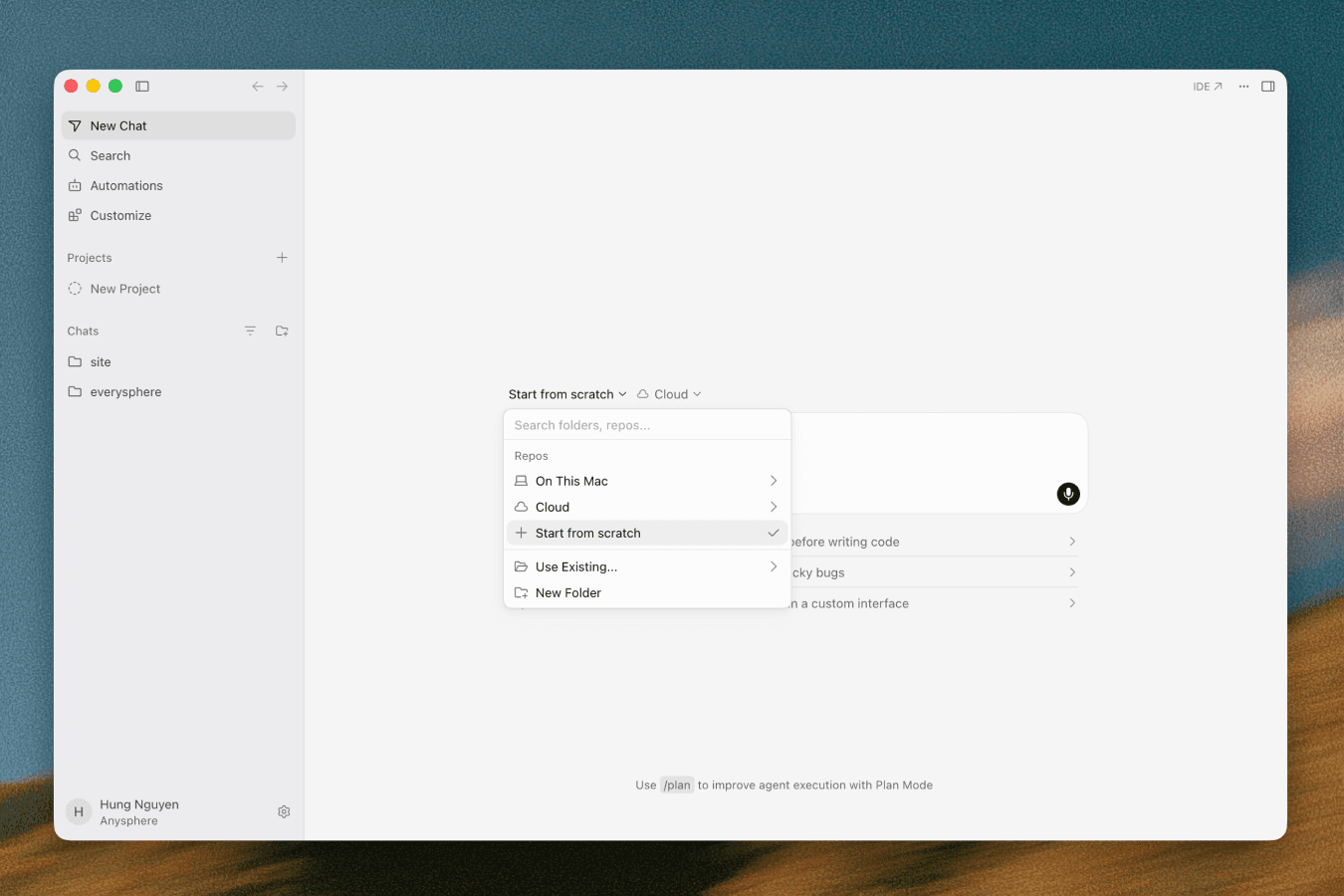 └──▷ HOW TO FIND ITPrototype a new app from a plain prompt — no repo, no SCM account required — then save it as a shareable Origin repo when ready.📍1. Open Cursor and click the repo picker. 2. Select 'Start from scratch'. 3. Prompt the agent to build your project. 4. When satisfied, click 'Create repo', enter a custom name, and set visibility to 'private' or 'internal'. 5. Navigate to the Codebase tab to access the newly created Origin repo.Preview the running app in the browser and ship it to a live URL via Vercel without leaving Cursor.📍1. With a cloud agent session running, open the in-browser preview to see the port-forwarded live environment. 2. Optionally enable design mode in the preview. 3. Connect a Vercel account under account settings. 4. Click 'Publish' to receive a live public URL for the project.
- ›Adds 'Start from scratch' option in the repo picker so Cloud Agents can run without a connected GitHub or other third-party SCM provider.
- ›Adds 'Create repo' button to save an in-progress agent build to a named Cursor Origin repo with configurable visibility (private or internal).
- ›Adds the Codebase tab for navigating and accessing Origin repos after creation.
- ›Port-forwards the cloud agent's live environment directly to the browser, enabling in-browser preview and design mode without extra tooling.
- ›Adds Vercel account integration with a publish action that generates a live public URL for the built project.
- Cloud Agents Start 3x Faster with Builds
Cursor Cloud Agents gain Builds: pre-warmed environments that cut agent startup time 3x and add build history + resilience.
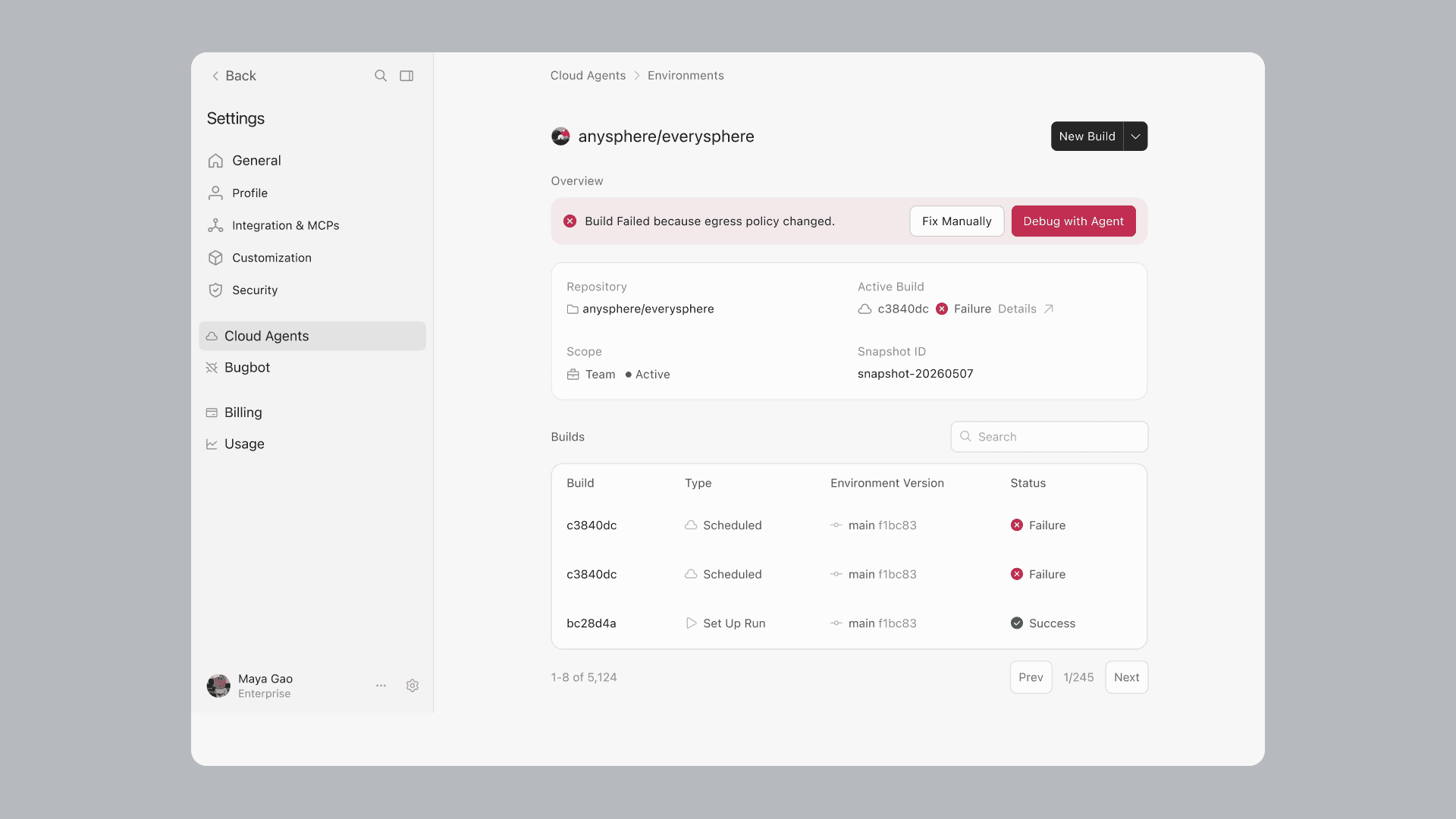 └──▷ HOW TO FIND ITEnable Builds on an existing Cloud Agents environment to get faster agent startup without reconfiguring from scratch.📍In the Cloud Agents dashboard, open your environment › go to the Builds tab › click 'Enable Builds'. To preview changes first, click 'Run setup agent' instead.
- ›Introduces Builds for Cloud Agents: pre-prepared copies of your development environment (repos cloned, dependencies installed, install script run) that agents boot into instead of setting up from scratch each session.
- ›Agents now start 3x faster (time to first token) thanks to environments that internally boot 10x faster via warm Build copies kept ready in the background.
- ›Adds a Builds tab in the Cloud Agents dashboard for inspecting build status, logs, commit SHAs, and which build each agent run used.
- ›Enables Enable Builds and Run setup agent actions on the Builds tab for migrating existing environments to Builds.
- ›Supports manually triggering a Build and debugging failing Builds with an agent directly from the Cloud Agents dashboard.
+3 moreshow less
- ›Adds a configurable staleness threshold to control how often Builds refresh.
- ›When a bad commit or dependency update breaks an environment, agents automatically continue using the last successful Build; the broken Build never becomes active and users are notified.
- ›Agents can inspect and manage Builds using built-in agent tools.
- Cursor Start
Cursor launches Start plan for India at ₹649/month with UPI billing, cloud agents, and iOS remote control.
- ›New Cursor Start plan (₹649/month, INR, tax-inclusive) available to developers in India, selectable at
cursor.com/signupduring onboarding or via the dashboard for existing Free users. - ›Supports UPI and card payment for Indian billing, making local payment methods a first-class option.
- ›Always-on cloud agents that build, test, and ship code continuously in the background.
- ›Cursor for iOS with remote control to launch and steer agents from a mobile device.
- ›Includes plugins, MCP servers, hooks, and skills to extend Cursor across workflows.
- ›New Cursor Start plan (₹649/month, INR, tax-inclusive) available to developers in India, selectable at
- Cursor, now on iPad
Cursor launches on iPad with split-screen review, Apple Pencil markup, inbox, and Bitbucket/Azure DevOps support.
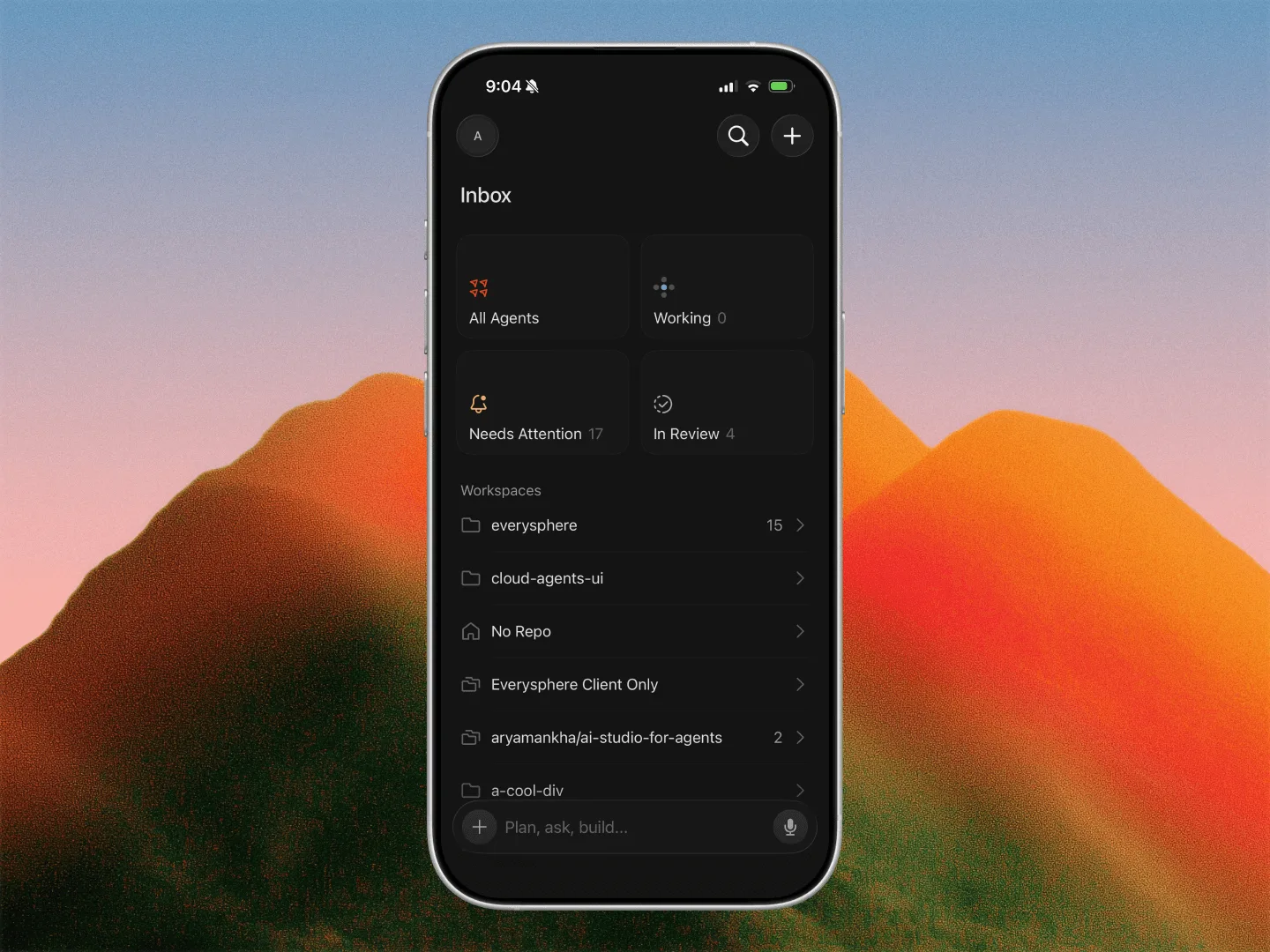
- ›Cursor is now available on iPad for all paid plan subscribers, with a rebuilt layout featuring pinned sidebar chats for monitoring multiple agents simultaneously.
- ›Split-screen mode lets users keep a PR review open alongside a chat session with full file diff rendering.
- ›Apple Pencil support enables drawing directly on attached screenshots; tap-to-place comments let users annotate images at specific points.
- ›Full PR review surface on iPhone and iPad now covers comments, checks, approvals, reviewer management, and agent-driven resolution — through to merge.
- ›New Inbox view surfaces in-progress work, items needing attention, and PRs currently in review.
+3 moreshow less
- ›Adds Bitbucket and Azure DevOps as supported SCM providers on iOS/iPadOS.
- ›Multi-PR sessions now let users open every PR created by a single chat, not just the most recent one.
- ›In-app team switching lets users move between teams they belong to without leaving the app.
- Google Workspace Plugins
Cursor gains Google Workspace plugins giving coding agents direct access to Gmail, Google Drive, and Calendar.
- ›New Google Drive plugin lets agents search files and folders, open and download content, and create and organize files from within Cursor.
- ›New Gmail plugin lets agents search and read mail, draft and send messages, apply labels, and manage threads.
- ›New Google Calendar plugin lets agents read schedules, create and update events, and find free time.
- ›New plugins are browseable and installable from the Cursor Marketplace or the Customize page in Cursor.
- Origin Code Hosting
Cursor launches Origin, a built-in code hosting platform with repos, pull requests, GitHub sync, and CI/CD app integrations.
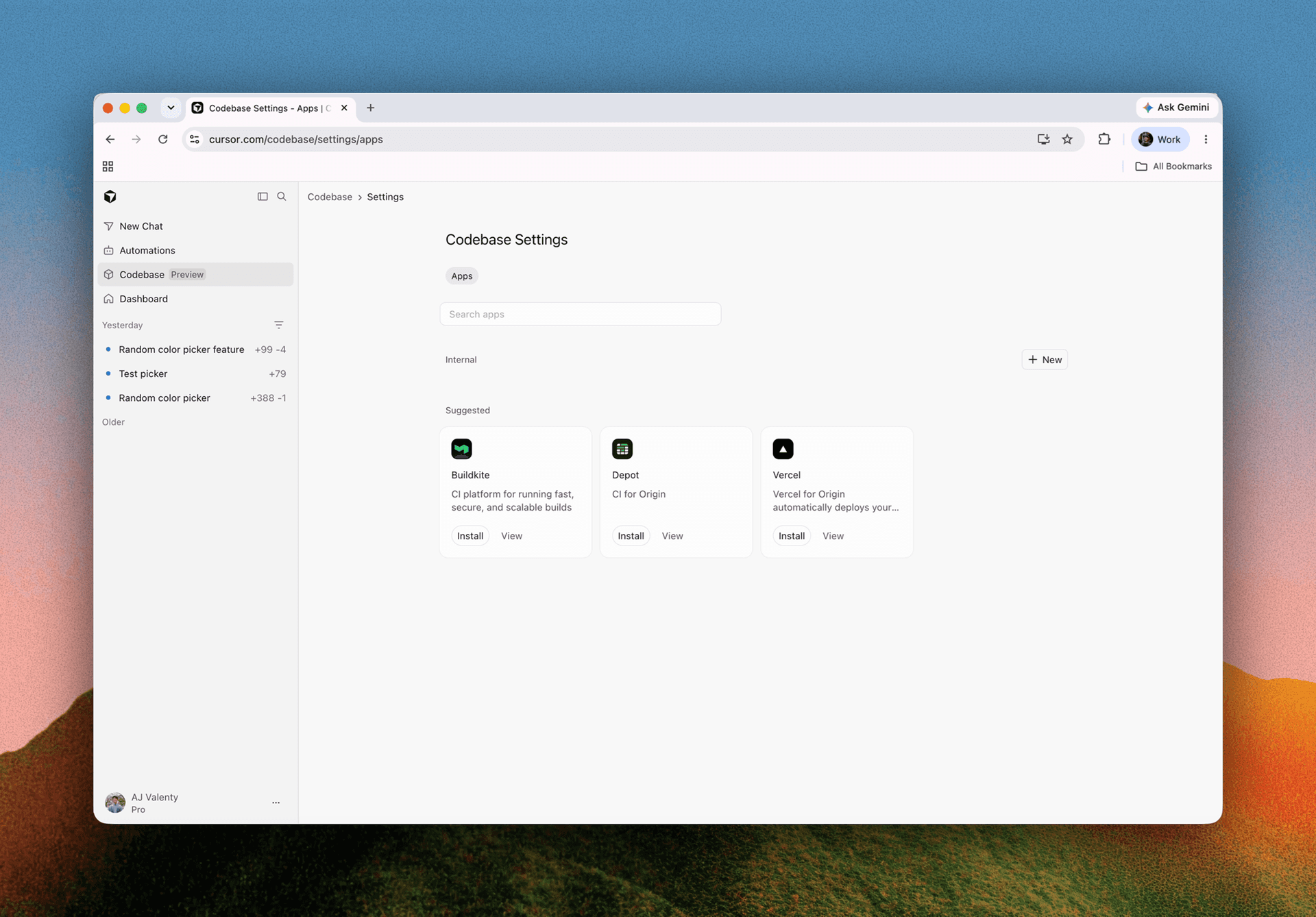
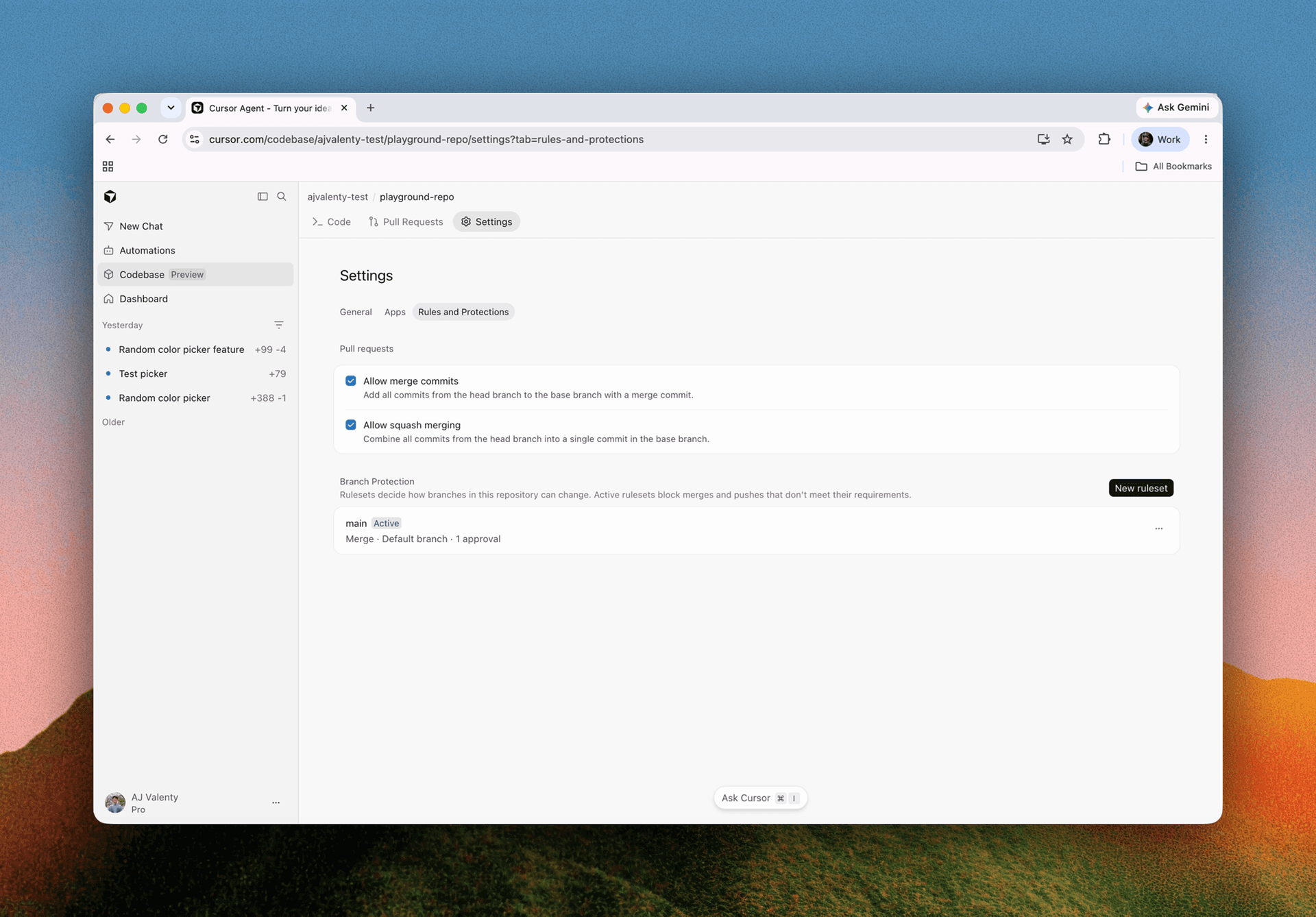
- ›New Codebase tab in Cursor hosts Origin repos; click
+Newto create a repo whose URL follows the patterncursor.com/codebase/<codebase-name>. - ›CLI install flow provided on repo creation with commands to clone a repo or push a local project to Origin.
- ›GitHub sync lets you connect a GitHub org and pull repos into Origin alongside Cursor-hosted ones; synced repos update in real time, with pushes continuing to GitHub as source of truth.
- ›Pull requests on every repo show timeline, commits, checks, diffs, and comments; PRs on synced repos sync bidirectionally with GitHub within seconds.
- ›Agents integrated directly into repos can answer questions about browsed code, make changes, update PRs, or push a branch.
+3 moreshow less
- ›App integrations available from each repo's Apps tab: Vercel (preview deployments per PR), Depot (GitHub Actions CI), and Buildkite (GitHub Actions and native pipelines).
- ›Per-repo Settings page exposes GitHub sync status, access management, and connected apps.
- ›Origin is available in early beta on all paid plans (excluding enterprise orgs whose admins opt out).
- ›New Codebase tab in Cursor hosts Origin repos; click
- Cloud Agents and Cursor Harness Improvements
Cursor cloud agents gain event subscriptions,
/goal, custom modes, isolated subagent VMs, and mid-run steering.└──▷ TRY ITGive a cloud agent a persistent objective so it keeps working until CI is fully green — no repeated prompting needed.$ /goal fix all flaky tests and make CI greenSwarm independent subagents in isolated VMs to simultaneously test different parts of an app for bugs without environment collisions.$ run a swarm of subagents to test my app for bugs, each in its own environmentKeep an agent focused on a specialised workflow by pinning a skill as a Custom Mode directly from the skill picker.📍In the chat, type / to open the skill picker, select a skill, then press Alt+Enter (Windows) or Option+Return (Mac) — or choose 'Use as Mode' — to pin it as a Custom Mode.- ›Adds Subscriptions for cloud agents: agents can monitor PR activity, watch a Slack thread, or run scheduled tasks, waking automatically when an event fires.
- ›Cloud agents automatically subscribe to PRs they create and drive them to completion, fixing CI and addressing bot comments without manual re-triggering.
- ›Adds
/goalcommand — give an agent a long-lived objective it pursues across loops until fully complete; pairs with custom modes or/loopfor recurring check-ins. - ›Adds Custom Modes: pin any skill as an always-on mode via
⌥⏎(Mac) / Alt+Enter (Windows) or the 'Use as Mode' option from the/skill picker. - ›Subagents can now run on their own isolated virtual machines, each receiving a clean copy of the project — enables swarming independent fixes or testing parent-agent changes without collisions.
+1 moreshow less
- ›Adds mid-run steering: send a follow-up message while an agent is working via 'Send now' or double-
⏎; the message waits for the next tool call instead of interrupting mid-action.