Kiro
changelog-20260831-1c861324 commercial/spec run /spec run /spec run kiro-cli chat --resume-picker kiro-cli chat --cloud --repo my-org/my-repo # later, from any machine: kiro-cli chat --resume-id <session-id> kiro-cli --v3 # inside the session: /tangent research-auth-flow # ... explore freely ... /tangent root /tangent ls /voice
Summary
Kiro is a commercial AI coding agent, run as a desktop IDE, that lets developers direct one or more coding agents against their own codebase instead of writing every change by hand. It supports custom agents defined in Markdown with scoped tool permissions, hot-reloading agent and MCP configs without losing conversation history, and hooks generated from plain-language descriptions to automate lint checks or notifications. A companion CLI and web interface extend the same spec-driven workflow to the terminal and browser, where agents can plan across multiple GitHub or GitLab repositories and open pull requests unattended on a schedule. It's aimed at developers and teams who want agents embedded directly in their editor and version control rather than a separate chat window. Pricing runs from a Pro+ tier at $40/month up to Power at $200, with releases shipping roughly weekly since its 2025 launch.
What Kiro answers
Can I stop an unattended agent from touching files or commands I haven't approved?
it prompts for consent on unapproved actions and remembers the decision as a workspace or global rule, so scope is enforced rather than assumed
Will switching agents mid-conversation lose my context?
no, changing between default, custom, and spec agents in the chat bar keeps the conversation history intact
What happens if the automation opens a bad pull request?
each scheduled run works in its own sandboxed clone, and the automation itself can be edited, disabled, or deleted so a bad schedule doesn't keep repeating
Can I redirect an agent that's already partway through a task?
yes, a correction can be injected mid-turn or queued for the next tool boundary, without cancelling the run
Do I have to migrate anything from an older setup?
hooks built before the structured format need converting to the current JSON layout, and manual hooks are gone in favor of steering files
Can a task run itself to completion without me checking in at every step?
a self-verifying loop checks its own work against acceptance criteria for a capped number of iterations before stopping, instead of running unbounded
Release history
- changelog-20260831-1c861324└──▷ TRY ITRun a spec in full-screen mode to monitor real-time task progress and select task scope before execution begins.
$ /spec run- ›Adds
/spec runcommand to open a dedicated full-screen task execution view for V3 spec runs, with real-time progress tracking and task scope selection before execution begins. - ›New 'Preserve scrollback' toggle keeps terminal history available through overflow and resize redraws.
- ›Enables third-party extensions to work alongside Kiro without conflicts.
- ›Adds support for the latest MCP protocol revision with more reliable sign-in.
- ›Adds
- changelog-20260830-1c861324
Kiro 1.0.395/2.20.0 adds full-screen spec task execution, a Preserve scrollback toggle, and third-party extension compatibility.
└──▷ TRY ITRun a spec in full-screen mode to monitor real-time task progress and select scope before execution begins.$ /spec run- ›Keeps agent turns running when the network briefly drops.
- Full-Screen Spec Task Execution and Preserve Scrollback
Kiro adds a full-screen spec task execution view and a Preserve Scrollback toggle for terminal history.
└──▷ TRY ITLaunch a V3 spec in full-screen mode to monitor task progress in real time and narrow scope before execution starts.$ /spec run- ›Adds
/spec runcommand to open a dedicated full-screen task execution view for V3 spec runs, with real-time progress tracking and task scope selection before execution begins. - ›New 'Preserve Scrollback' toggle keeps terminal history available through overflow and resize redraws.
- ›Adds
- Third-Party Extension Compatibility and More Reliable MCP Sign-In
Kiro now supports third-party extensions alongside its own, updates MCP protocol, and improves agent resilience.
- ›Enables third-party extensions to run alongside Kiro without conflicts.
- ›Adds support for the latest MCP protocol revision with more reliable sign-in.
- ›Keeps agent turns running when the network briefly drops, improving resilience during interrupted sessions.
- Spec Review Mouse Support and Automatic Stream Recovery
Kiro adds mouse support to spec review and automatic stream recovery with configurable timeouts.
- ›Adds
api.streamIdleSoftTimeout,api.streamIdleHardTimeout, andapi.timeoutsettings to tune idle watchdog thresholds and the overall streaming timeout. - ›Adds a 60-minute default streaming timeout so long responses are no longer cut off mid-turn.
- ›Adds
- Spec Review Mouse Support, AI Session Titles, and Automatic Stream Recovery
Kiro adds spec review mouse support, AI session titles, and automatic stream recovery with idle watchdog and configurable timeouts.
└──▷ TRY ITResume a past session by name when you have many similar sessions and need the AI-generated titles to tell them apart.$ kiro-cli chat --resume-picker
- ›Adds
api.streamIdleSoftTimeout,api.streamIdleHardTimeout, andapi.timeoutconfig settings to tune the new idle watchdog, automatic retry-with-backoff, and 60-minute streaming timeout for stalled or dropped connections. - ›Adds AI-generated session titles to the V3 session resume picker, surfaced via
kiro-cli chat --resume-pickeror/chat resume, so similar sessions are distinguishable at a glance. - ›Adds mouse support to the spec review screen — scroll to navigate and click to position the cursor — with
mtoggling mouse support on or off. - ›Introduces a stream idle watchdog that warns after 60 seconds of silence and cancels at 300 seconds, with automatic retries for throttling, 5xx errors, and connection drops.
- ›Adds
- Access Kiro Web with Okta or Microsoft Entra ID
Kiro Web now supports SSO login via Okta and Microsoft Entra ID using OIDC, with Cloud Sessions available for Pro and above.
└──▷ HOW TO FIND ITConfigure Okta SSO so your team can sign in to Kiro Web with existing corporate credentials.📍In Okta, open your existing Kiro OIDC application › Sign-in redirect URIs › Add URI › enterhttps://app.kiro.dev/signin/oauth› Save. Then in Kiro Web admin settings, enable Cloud Sessions (Preview).Configure Microsoft Entra ID SSO for Kiro Web, keeping the redirect separate from desktop/mobile app redirects.📍In Microsoft Entra ID, open your existing Kiro OIDC application › Authentication › Single-page application section › Add URI › enterhttps://app.kiro.dev/signin/oauth› Save. Then in Kiro Web admin settings, enable Cloud Sessions (Preview).- ›Adds SSO access to Kiro Web via Okta and Microsoft Entra ID using OpenID Connect (OIDC), requiring admins to add
https://app.kiro.dev/signin/oauthas a sign-in redirect URI to an existing Kiro OIDC application. - ›Introduces Cloud Sessions (Preview), which can be enabled independently from API key generation, available on Kiro Pro and above subscriptions.
- ›Adds SSO access to Kiro Web via Okta and Microsoft Entra ID using OpenID Connect (OIDC), requiring admins to add
- Agent Plugin Support and Session Pinning
Kiro gains Agent Plugin format support, session pinning, and Kiro CLI hand-off in Agent Focus Mode.
- ›Adds support for the open Agent Plugin format, letting users install Powers (plugins that bundle skills and MCP servers) from a local folder or a GitHub URL — shareable across compatible agent tools.
- ›Adds Pin Session action in Agent Focus Mode to keep a session pinned at the top of its section in the session rail.
- ›Adds Open with Kiro CLI action to resume an existing Agent Focus Mode session directly in Kiro CLI.
- ›Adds an update row in the Agent Focus Mode rail footer and a Check for Updates button in the settings pane when a new Kiro version is available.
- ›Spec documents and task rows in the context panel now open directly in the editor.
+1 moreshow less
- ›Adds bulk session migration for Agent Focus Mode sessions.
- Claude Opus 5 Now Available
Claude Opus 5 is now available in Kiro IDE, CLI, and Web with a 1M context window.
- ›Adds Claude Opus 5 to the Kiro IDE, CLI, and Web model selector for Pro, Pro+, Pro Max, and Power customers in us-east-1 and eu-central-1 with cross-region inference.
- ›Claude Opus 5 supports a 1M token context window with a 2.2x credit multiplier.
- ›Claude Opus 5 brings improved multi-agent coordination with fewer conflicts between parallel agents running concurrently.
- ›Claude Opus 5 adds self-verification and iterative refinement on agentic coding tasks, reducing stubs and placeholders in generated output.
- ›Code review with Claude Opus 5 delivers higher real-bug detection rates with lower false positives, including at reduced effort settings.
- Cloud Sessions Preview and Smarter Command Menus
Kiro CLI gains cloud sessions (preview) with
--cloud,--repo, and--resume-idflags, plus substring matching in the slash command menu.└──▷ TRY ITStart a cloud session, attach a repo, then disconnect and resume later from another machine.$ kiro-cli chat --cloud --repo my-org/my-repo # later, from any machine: kiro-cli chat --resume-id <session-id>
- ›Adds
--cloudflag tokiro-cli(andkiro-cli chat --cloud) to run a session in a managed cloud sandbox instead of locally. - ›Adds
--repoflag (and/repopicker) to attach repositories to a cloud session. - ›Adds
--resume-idflag to reconnect to a cloud session from any machine after disconnecting while the agent continues working. - ›Cloud and local sessions now appear together in the session picker UI.
- ›IAM Identity Center administrators enable cloud sessions via the 'Cloud Sessions (Preview)' setting (formerly 'Kiro Web (Preview)').
+1 moreshow less
- ›Slash command menu gains substring matching, making commands reachable without typing a prefix.
└──▷ BREAKING ON UPGRADE- !The IAM Identity Center admin setting 'Kiro Web (Preview)' is renamed to 'Cloud Sessions (Preview)'; organizations that had the prior setting remain enabled, but new organizations must explicitly opt in.
- ›Adds
- Cloud Sessions and Agent Focus Mode Upgrades
Kiro adds Cloud Sessions to Agent Focus Mode preview, with collapsible rail, in-place attention cards, and session navigation.
- ›Adds Cloud Sessions to Agent Focus Mode as a preview, letting sessions run in the cloud alongside local ones with selectable repositories kept visible below chat.
- ›Cloud sessions use the same agent and model selectors as local sessions.
- ›Adds a collapsible icon-only view for the sessions rail, keeping every session one click away while giving more room to the chat panel.
- ›Adds in-place attention cards that surface agent questions and action buttons next to the chat without requiring a context switch or raising the attention panel automatically.
- ›Adds back/forward navigation across sessions and settings from the titlebar via
Cmd/Ctrl+[andCmd/Ctrl+].
+1 moreshow less
- ›Pins the agent's Windows terminal to PowerShell.
- Editor Actions, Guided Hook Creation, and Code OSS Upgrade
Kiro adds an editor context menu submenu, Ask Kiro to Fix quick fixes, guided hook creation, and a Code OSS v1.108.2 upgrade.
- ›Adds a 'Kiro' submenu to the editor context menu for quick access to Kiro actions from within the editor.
- ›Adds an 'Ask Kiro to Fix' quick-fix action on errors and warnings, surfacing AI-assisted remediation inline.
- ›Adds a guided form for creating hooks, replacing the need to author hook configuration manually.
- ›Upgrades the underlying editor to Code OSS v1.108.2.
- ›Kiro now replies in the IDE's configured display language.
+1 moreshow less
- ›Chat history now persists across workspace folder changes.
- Nested AGENTS.md and Long-Session Efficiency
Kiro adds nested AGENTS.md support for directory-scoped agent instructions and improves long-session context retention.
- ›Supports
AGENTS.mdfiles placed at any level of a workspace directory tree, allowing agent instructions scoped to each subdirectory. - ›Preserves more context during long sessions, reducing loss of conversation state over extended interactions.
- ›Lowers idle resource consumption during inactive periods.
- ›Supports
- Permission Improvements and Configured Windows Shells
Kiro agent commands now run in your configured terminal profile on Windows, with improved permission rules.
- ›Agent commands now run in the user's configured Windows terminal profile instead of a default shell.
- ›Improves filesystem and command permission rules for agent operations.
- ›Keeps ignored files out of search results.
- Spec Drafting and Plan Auto-Execution
Kiro adds a guided description step to
/spec newand auto-executes approved plans in Plan mode.- ›Adds a guided description prompt to
/spec new: the agent now asks what the spec should cover before drafting requirements, using your description as ground truth instead of inferring from the spec name alone. - ›Plan mode now auto-executes the approved plan immediately after approval, removing the manual mode-switch step.
- ›Adds a guided description prompt to
- Tangent Side-Conversations and Per-Tool Token Breakdown
Kiro gains
/tangentside-conversations and per-tool token breakdown in/context.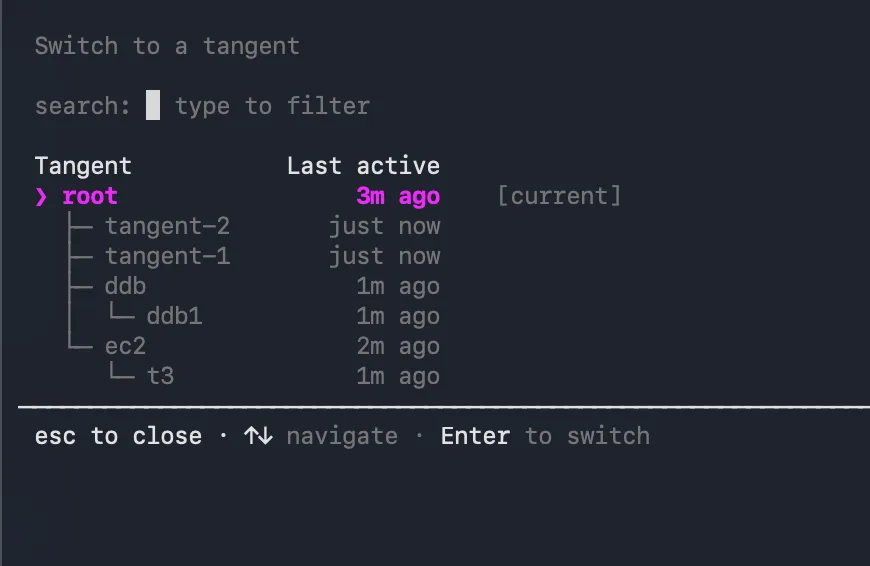 └──▷ TRY ITBranch into a named side-conversation mid-task to look something up, then return to the main thread without losing context.
$ kiro-cli --v3 # inside the session: /tangent research-auth-flow # ... explore freely ... /tangent root
Visualise your full conversation tree to find and jump to any branch you created.$ /tangent ls- ›Adds
/tangent <name>to branch a named side-conversation that inherits the full conversation history, letting you explore freely without polluting the main thread. - ›Adds
/tangent lsto browse the full conversation tree in a visual picker. - ›Adds
/tangent rootto jump straight back to the main conversation from any depth. - ›Extends
/contextwith a per-tool token breakdown so you can see exactly what is consuming your context window. - ›All
/tangentfeatures are available in V3 mode viakiro-cli --v3.
- ›Adds
- Voice Mode, Opt-In Cloud Sessions, and Spec Review
Kiro gains
/voicedictation, spec review with Ctrl+X, nestedAGENTS.mdsteering, and opt-in cloud sessions.└──▷ TRY ITDictate a prompt hands-free when typing is inconvenient — transcription runs locally so no audio is sent to the cloud.$ /voiceReview a spec phase document and request targeted edits without leaving the checkpoint screen.📍Ctrl+X at a spec phase checkpoint to open the review screen, add line comments on sections to change, then answer the checkpoint question to send all staged comments as one revision request.- ›Adds
/voicecommand (also triggered by holding Space) to dictate prompts with on-device Whisper transcription — no audio leaves the machine and no cloud API key is required. - ›Adds Ctrl+X at spec phase checkpoints to open a review screen where you can read phase documents and stage line comments, sending all staged comments as one revision request when the checkpoint is answered.
- ›Supports
AGENTS.mdsteering files anywhere in the workspace tree (not just the workspace root or~/.kiro/steering/), so steering context can live next to the code it describes. - ›Cloud sessions are now opt-in: administrators must explicitly enable 'Cloud Sessions' in the Kiro console, and an unset toggle now defaults to disabled.
└──▷ BREAKING ON UPGRADE- !Cloud sessions default to disabled; organizations that never configured the 'Cloud Sessions' toggle in the Kiro console will find cloud sessions unavailable until an administrator explicitly opts in.
- ›Adds